light Peugeot 307 CC 2003 User Guide
[x] Cancel search | Manufacturer: PEUGEOT, Model Year: 2003, Model line: 307 CC, Model: Peugeot 307 CC 2003Pages: 173, PDF Size: 2.12 MB
Page 29 of 173
22-09-2003
INSTRUMENTS AND CONTROLS31
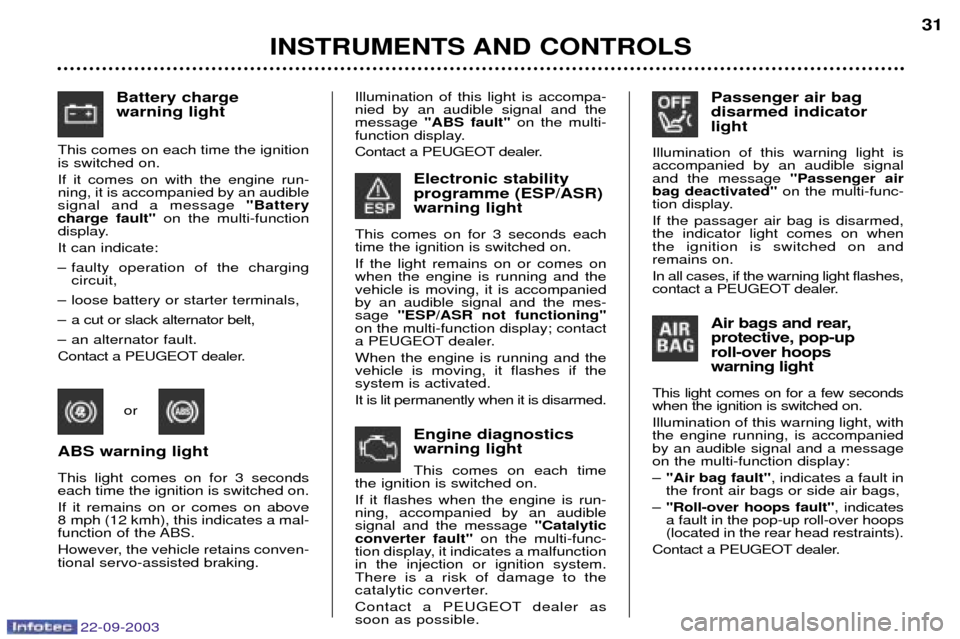
Electronic stability programme (ESP/ASR)warning light
This comes on for 3 seconds each time the ignition is switched on. If the light remains on or comes on when the engine is running and thevehicle is moving, it is accompaniedby an audible signal and the mes-sage "ESP/ASR not functioning"
on the multi-function display; contact
a PEUGEOT dealer. When the engine is running and the vehicle is moving, it flashes if thesystem is activated. It is lit permanently when it is disarmed.
Battery charge warning light
This comes on each time the ignition is switched on. If it comes on with the engine run- ning, it is accompanied by an audiblesignal and a message "Battery
charge fault" on the multi-function
display. It can indicate:
Ð faulty operation of the charging circuit,
Ð loose battery or starter terminals,
Ð a cut or slack alternator belt,
Ð an alternator fault.
Contact a PEUGEOT dealer.
Engine diagnostics warning light This comes on each time
the ignition is switched on. If it flashes when the engine is run- ning, accompanied by an audiblesignal and the message "Catalytic
converter fault" on the multi-func-
tion display, it indicates a malfunctionin the injection or ignition system.There is a risk of damage to the
catalytic converter.
Contact a PEUGEOT dealer as soon as possible. Passenger air bag disarmed indicatorlight
Illumination of this warning light is accompanied by an audible signaland the message "Passenger air
bag deactivated" on the multi-func-
tion display. If the passager air bag is disarmed, the indicator light comes on whenthe ignition is switched on andremains on. In all cases, if the warning light flashes,
contact a PEUGEOT dealer.
Air bags and rear, protective, pop-uproll-over hoopswarning light
This light comes on for a few seconds when the ignition is switched on. Illumination of this warning light, with the engine running, is accompaniedby an audible signal and a messageon the multi-function display: Ð "Air bag fault" , indicates a fault in
the front air bags or side air bags,
Ð "Roll-over hoops fault" , indicates
a fault in the pop-up roll-over hoops (located in the rear head restraints).
Contact a PEUGEOT dealer.
or
ABS warning light This light comes on for 3 seconds each time the ignition is switched on. If it remains on or comes on above
8 mph (12 kmh), this indicates a mal-
function of the ABS.
However, the vehicle retains conven- tional servo-assisted braking. Illumination of this light is accompa-nied by an audible signal and themessage
"ABS fault" on the multi-
function display.
Contact a PEUGEOT dealer.
Page 30 of 173
22-09-2003
INSTRUMENTS AND CONTROLS
32
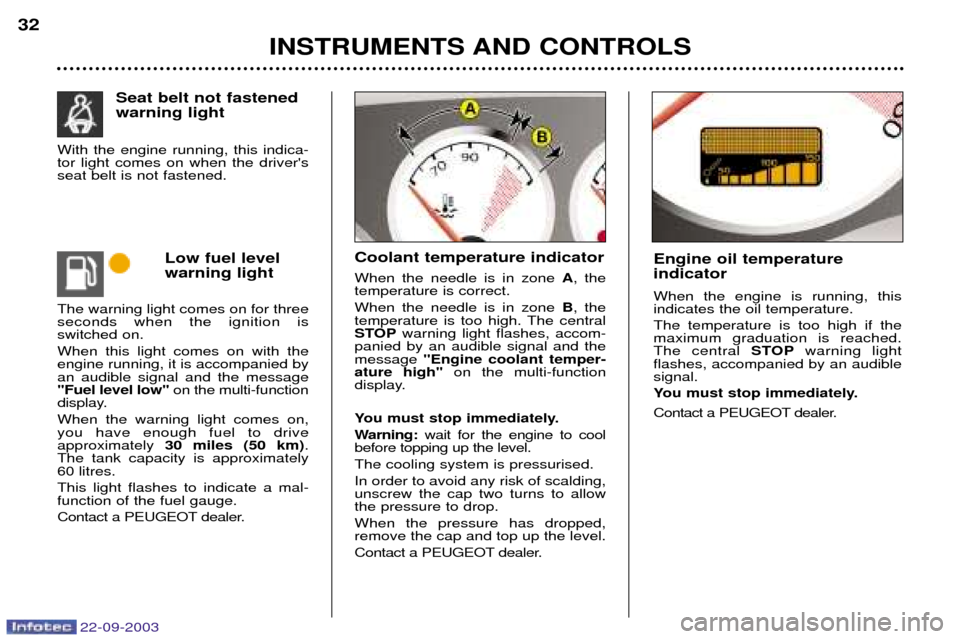
Low fuel level warning light
The warning light comes on for three seconds when the ignition isswitched on. When this light comes on with the engine running, it is accompanied byan audible signal and the message"Fuel level low" on the multi-function
display. When the warning light comes on, you have enough fuel to driveapproximately 30 miles (50 km) .
The tank capacity is approximately
60 litres. This light flashes to indicate a mal- function of the fuel gauge.
Contact a PEUGEOT dealer. Coolant temperature indicator When the needle is in zone
A, the
temperature is correct. When the needle is in zone B, the
temperature is too high. The central
STOP warning light flashes, accom-
panied by an audible signal and themessage "Engine coolant temper-
ature high" on the multi-function
display.
You must stop immediately.
Warning: wait for the engine to cool
before topping up the level.The cooling system is pressurised.In order to avoid any risk of scalding, unscrew the cap two turns to allowthe pressure to drop. When the pressure has dropped, remove the cap and top up the level.
Contact a PEUGEOT dealer. Engine oil temperature indicator When the engine is running, this indicates the oil temperature. The temperature is too high if the maximum graduation is reached.The central
STOPwarning light
flashes, accompanied by an audiblesignal.
You must stop immediately.
Contact a PEUGEOT dealer.
Seat belt not fastened warning light
With the engine running, this indica- tor light comes on when the driver'sseat belt is not fastened.
Page 31 of 173
22-09-2003
INSTRUMENTS AND CONTROLS
32
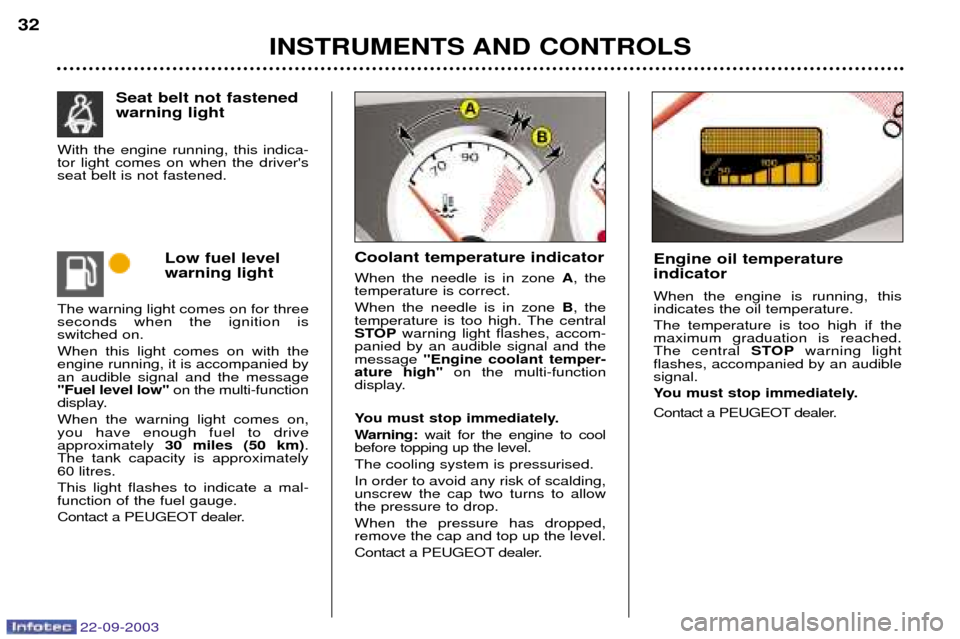
Low fuel level warning light
The warning light comes on for three seconds when the ignition isswitched on. When this light comes on with the engine running, it is accompanied byan audible signal and the message"Fuel level low" on the multi-function
display. When the warning light comes on, you have enough fuel to driveapproximately 30 miles (50 km) .
The tank capacity is approximately
60 litres. This light flashes to indicate a mal- function of the fuel gauge.
Contact a PEUGEOT dealer. Coolant temperature indicator When the needle is in zone
A, the
temperature is correct. When the needle is in zone B, the
temperature is too high. The central
STOP warning light flashes, accom-
panied by an audible signal and themessage "Engine coolant temper-
ature high" on the multi-function
display.
You must stop immediately.
Warning: wait for the engine to cool
before topping up the level.The cooling system is pressurised.In order to avoid any risk of scalding, unscrew the cap two turns to allowthe pressure to drop. When the pressure has dropped, remove the cap and top up the level.
Contact a PEUGEOT dealer. Engine oil temperature indicator When the engine is running, this indicates the oil temperature. The temperature is too high if the maximum graduation is reached.The central
STOPwarning light
flashes, accompanied by an audiblesignal.
You must stop immediately.
Contact a PEUGEOT dealer.
Seat belt not fastened warning light
With the engine running, this indica- tor light comes on when the driver'sseat belt is not fastened.
Page 32 of 173
INSTRUMENTS AND CONTROLS33
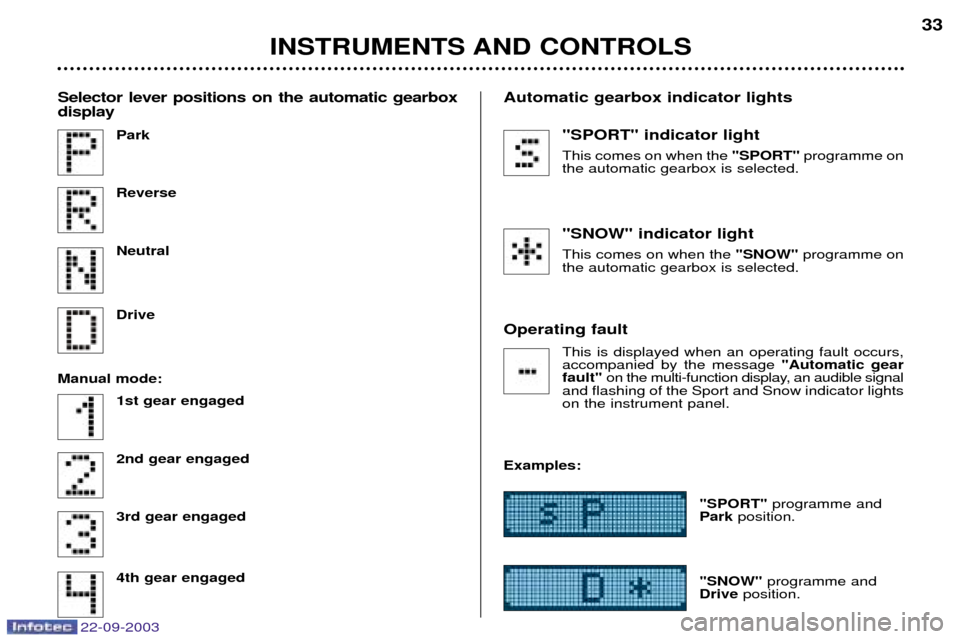
"SPORT" indicator light This comes on when the
"SPORT"programme on
the automatic gearbox is selected. "SNOW" indicator light This comes on when the "SNOW"programme on
the automatic gearbox is selected.
Operating fault This is displayed when an operating fault occurs, accompanied by the message "Automatic gear
fault" on the multi-function display, an audible signal
and flashing of the Sport and Snow indicator lightson the instrument panel.
Examples: "SPORT"programme and
Park position.
"SNOW" programme and
Drive position.
Park ReverseNeutral Drive
Manual mode: 1st gear engaged 2nd gear engaged3rd gear engaged 4th gear engaged
Selector lever positions on the automatic gearbox display
Automatic gearbox indicator lights
22-09-2003
Page 33 of 173
22-09-2003
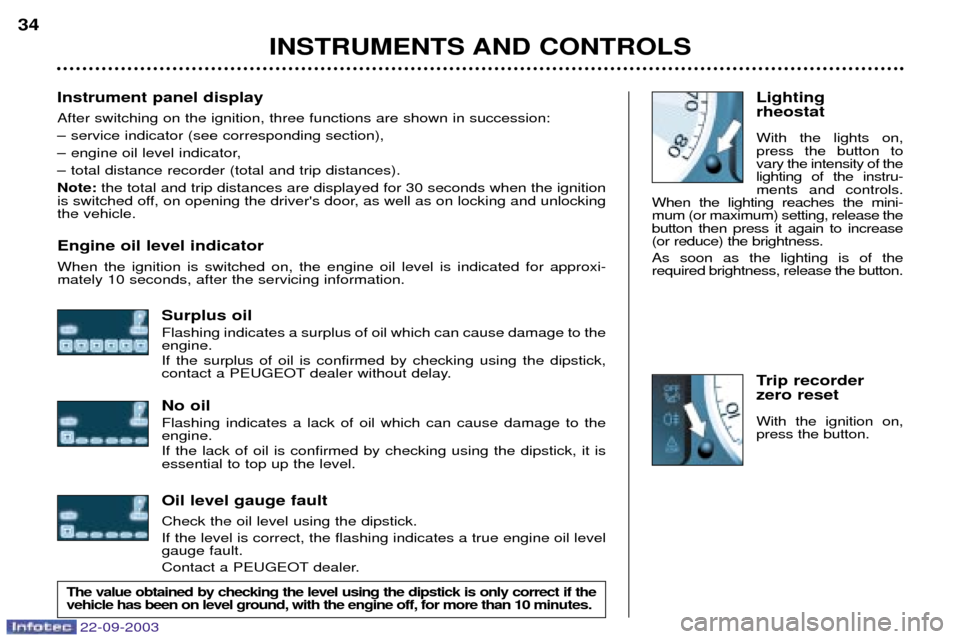
Lighting rheostat With the lights on, press the button tovary the intensity of thelighting of the instru-ments and controls.
When the lighting reaches the mini-mum (or maximum) setting, release thebutton then press it again to increase(or reduce) the brightness. As soon as the lighting is of the required brightness, release the button.
Trip recorder zero reset With the ignition on, press the button.
Instrument panel display After switching on the ignition, three functions are shown in succession:
Ð service indicator (see corresponding section),
Ð engine oil level indicator,
Ð total distance recorder (total and trip distances).Note:
the total and trip distances are displayed for 30 seconds when the ignition
is switched off, on opening the driver's door, as well as on locking and unlocking the vehicle. Engine oil level indicator When the ignition is switched on, the engine oil level is indicated for approxi- mately 10 seconds, after the servicing information.
Surplus oil Flashing indicates a surplus of oil which can cause damage to the engine. If the surplus of oil is confirmed by checking using the dipstick,
contact a PEUGEOT dealer without delay. No oil Flashing indicates a lack of oil which can cause damage to the engine. If the lack of oil is confirmed by checking using the dipstick, it is essential to top up the level. Oil level gauge fault Check the oil level using the dipstick. If the level is correct, the flashing indicates a true engine oil level gauge fault.
Contact a PEUGEOT dealer.
INSTRUMENTS AND CONTROLS
34
The value obtained by checking the level using the dipstick is only correct if the vehicle has been on level ground, with the engine off, for more than 10 min
utes.
Page 55 of 173
22-09-2003
YOUR 307 CC IN DETAIL
56
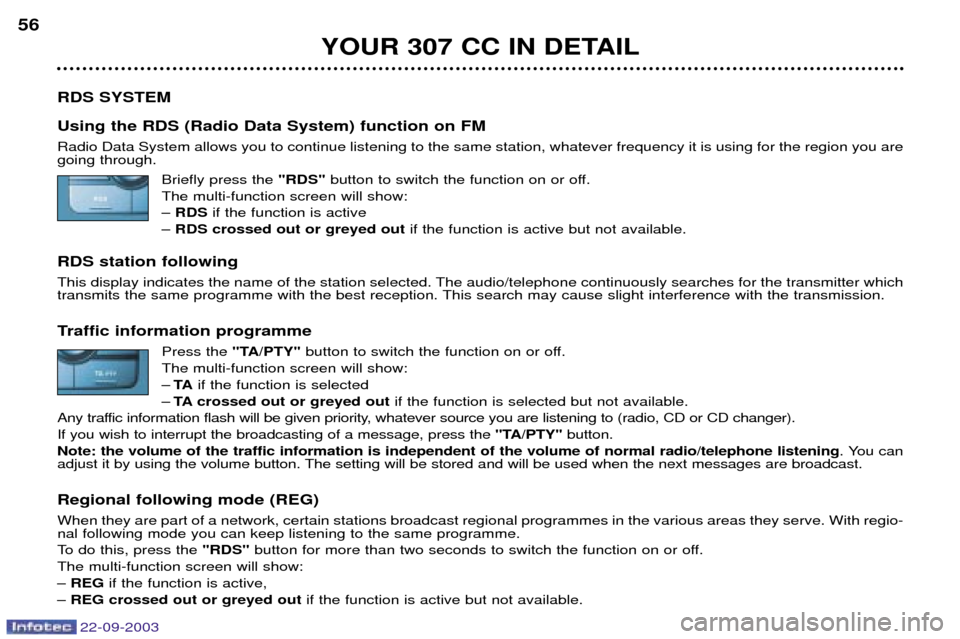
RDS SYSTEM Using the RDS (Radio Data System) function on FM Radio Data System allows you to continue listening to the same station, whatever frequency it is using for the region you are going through. Briefly press the "RDS"button to switch the function on or off.
The multi-function screen will show: Ð RDS if the function is active
Ð RDS crossed out or greyed out if the function is active but not available.
RDS station following
This display indicates the name of the station selected. The audio/telephone continuously searches for the transmitter which
transmits the same programme with the best reception. This search may cause slight interference with the transmission.
Traffic information programme Press the "TA/PTY" button to switch the function on or off.
The multi-function screen will show: Ð TA if the function is selected
Ð TA crossed out or greyed out if the function is selected but not available.
Any traffic information flash will be given priority, whatever source you are listening to (radio, CD or CD changer).If you wish to interrupt the broadcasting of a message, press the "TA/PTY"button.
Note: the volume of the traffic information is independent of the volume of normal radio/telephone listening . You can
adjust it by using the volume button. The setting will be stored and will be used when the next messages are broadcast. Regional following mode (REG) When they are part of a network, certain stations broadcast regional programmes in the various areas they serve. With regio- nal following mode you can keep listening to the same programme.
To do this, press the "RDS"button for more than two seconds to switch the function on or off.
The multi-function screen will show:Ð REG if the function is active,
Ð REG crossed out or greyed out if the function is active but not available.
Page 59 of 173
22-09-2003
YOUR 307 CC IN DETAIL
60
TELEPHONE
This function is a GSM dual-band telephone (900 and 1 800 MHz) incorporated in the RT3 audio system. It is a "hands free" telephone. This function is provided by a microphone located next to the front courtesy light, the spea-
kers and a steering column control which allows access to most of the functions (the audio/telephone control panel buttons allow access to all the functions). Display of the principal "mobile"type functions, as well as consultation of the indexes, is provided by the multi-function
display.This function is active , whatever position the ignition key is in even after thirty minutes, when the message "Economy
mode active" appears on the multi-function display.
Using the menus Press the "MENU"button to display the general menu. Select the telematicsapplication, validate "Telephone functions"
to access the principal telephone functions, then the various menus, in order to reach the one required. This menu allows you to access the following functions:
Ð Network:allows you to select the network search mode and to see the networks avai-
lable.
Ð Duration of calls: allows you to consult the duration recorder of calls made and zero re-
set.
Ð Security: allows you to use or modify the PIN code and to erase the list of calls and
text messages (SMS).
Ð Telephone options: allows you to configure the calls with entering of my number,
automatic answering after X rings, specification of ring options and allows you to
configure the call diversion number.
Within each menu:
Move around and select a function by turning the Gbutton then validate by pressing the button.
Cancel an operation using the "ESC"button.
Page 65 of 173
22-09-2003
YOUR 307 CC IN DETAIL
66
Services*
Press button Eto display the "Services"menu and select one of the following services:
¥ "Customer Contact Centre" which enables you to contact the PEUGEOT Customer Contact Centre directly and
access the services offered (this type of call is suspended if an emergency or breakown call is made).
¥ "PEUGEOT Assistance" which enables you to contact the call centre which controls the PEUGEOT breakdown
service directly and receive rapid assistance (you have 6 seconds within which to cancel the call when it is made). During the breakdown call phase it is not possible to make any other calls with the exception of emergency calls.
¥ "Operator services" which gives access to the list of services specific to the operator (e.g.: customer service, consump-
tion monitoring, news, stock market, weather, travel, games, etc) if they are available.
Emergency call*
In an emergency, press button Vuntil a signal is heard and a call validation / deletion screen is displayed (delay of
6 seconds) or enter 11 2directly.
In the absence of a specific service contract, the parameters of the SOSbutton are set so that a call is made to 11 2- unique
number made available by the worldwide GSM network, reserved for emergency calls. Before making a call of this kind, the audio/telephone must detect a cellular network. No security mode is required and, depending on the network, you do not need to insert your SIM card or enter your PIN. If you have signed the specific contract, refer to its general conditions.
"PEUGEOT Assistance"/Emergency call
During a connection to "PEUGEOT Assistance" or an emergency call, it is not possible to send or receive calls or SMS messages; these will be transferred to your voice mail.
In this case, a green diode flashes on the RT3 audio/telephone panel, when the emergency call or "PEUGEOT Assistance" call procedure begins, then lights continuously when the call is taken by the services concerned.
* If option and service available.
Page 66 of 173

22-09-2003
YOUR 307 CC IN DETAIL67
Voice commands The voice commands make it possible to use pre-recorded words or phrases to control a certain number of functions of the
RT3 audio/telephone. Activation of the voice commands Press the button on the end of the lights stalk to activate this function. Example: to recall the radio station stored on button 3, the key words are: "Radio" "Memory" "3" .
To use these key words, you must say the word "Radio", wait for the audible confirmation signal, then say the word
"Memory" , wait for the audible confirmation signal, then end with the word "3", wait for the audible confirmation signal which
will carry out the action requested. Notes: Ð between two key words, a screen indicates the time remaining and the key word recognised,
Ð in the absence of any voice commands, this function will be switched off after approximately five seconds,Ð if a command is not understood, the system transmits "Pardon"and displays "Word not recognised" on the screen.
Saying the phrase "Help"or "What can I say" displays all of the commands available on the screen.
List of commands available
Ð For the radio, say "RADIO", then: "PREVIOUS"/"FOLLOWING"/"MEMORY" + 1...6/"AUTOSTORE"
Ð For the CD, say "CD PLAYER", then: "PREVIOUS TRACK"/"FOLLOWING TRACK"/"TRACK NUMBER" + 1..20/"SHUFFLE"/"SCAN"/"REPEAT"
Ð For the CD changer, say "CHANGER", then: "PREVIOUS TRACK"/"FOLLOWING TRACK"/"TRACK NUMBER" + 1...20/"PREVIOUS DISC"/"FOLLOWING DISC"/
"DISC NUMBER" + 1...5/"SHUFFLE"/"SCAN"/"REPEAT"
Ð For the telephone, say "TELEPHONE", then: "LAST NUMBER"/"DIRECTORY" + DESCRIPTION/"SERVICES"
Ð For navigation, say "NAVIGATION", then: "STOP"/"RE-START"/"DIRECTORY" + DESCRIPTION
Ð To change the permanent application, say "DISPLAY", then: "AUDIO"/"TELEPHONE"/"NAVIGATION"/"TRIP COMPUTER"
Ð To call someone recorded in the directory directly, say "CALL" + DESCRIPTION
Ð To be guided to the address of someone recorded in the directory, say "GUIDE TO" + DESCRIPTION.
Ð Various:
"CANCEL"/"HELP"/"WHAT CAN I SAY"
Page 69 of 173
22-09-2003
YOUR 307 CC IN DETAIL
70
SATELLITE NAVIGATION SYSTEM Introduction The satellite navigation system guides you, by means of
vocal and
visual instructions (graphics), to
your chosen destination.
The heart of the system lies in the useof a map data base and GPS (Global
Positioning System) . With this sys-
tem you can fix the position of yourvehicle by means of a satellite net-work.
The system uses the following ele-ments:
Ð the CD-Rom drive,
Ð the configuration CD-Rom,
Ð the navigation CD-Rom,
Ð the last voice message recall con- trol,
Ð the control keypad,
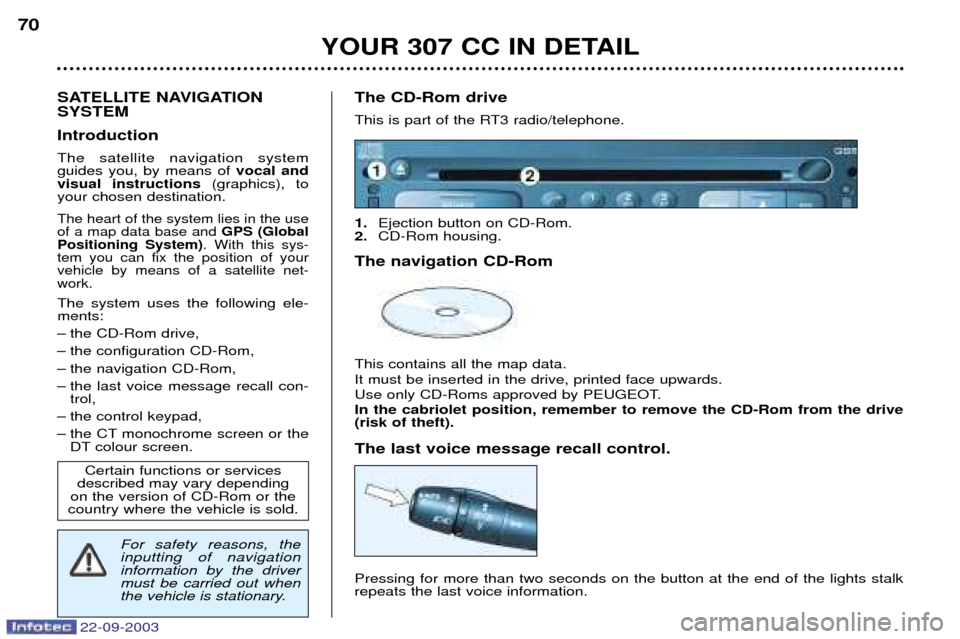
Ð the CT monochrome screen or the DT colour screen. The CD-Rom drive
This is part of the RT3 radio/telephone. 1.
Ejection button on CD-Rom.
2. CD-Rom housing.
The navigation CD-Rom This contains all the map data. It must be inserted in the drive, printed face upwards.
Use only CD-Roms approved by PEUGEOT. In the cabriolet position, remember to remove the CD-Rom from the drive (risk of theft). The last voice message recall control. Pressing for more than two seconds on the button at the end of the lights stalk repeats the last voice information.
Certain functions or services
described may vary depending
on the version of CD-Rom or the
country where the vehicle is sold.
For safety reasons, the inputting of navigationinformation by the drivermust be carried out when
the vehicle is stationary.