steering Peugeot 308 2014 User Guide
[x] Cancel search | Manufacturer: PEUGEOT, Model Year: 2014, Model line: 308, Model: Peugeot 308 2014Pages: 400, PDF Size: 10.05 MB
Page 112 of 400
110
Driving
308_EN_CHAP04_CONDUITE_ED02-2013
If the vehicle is not immobilised, the engine will not stop.
Switching off
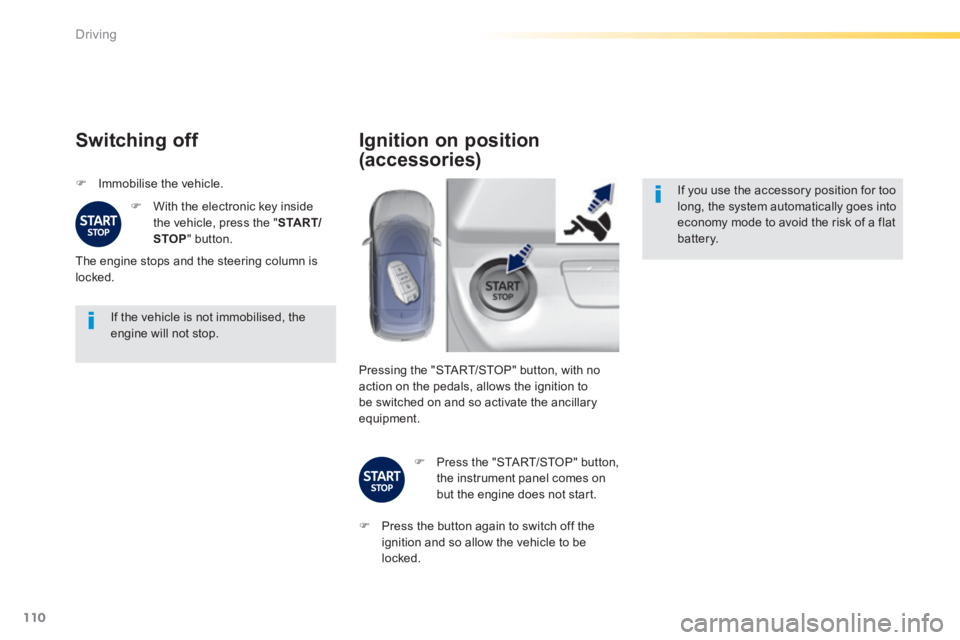
Immobilise the vehicle.
With the electronic key inside the vehicle, press the " S TA R T/STOP " button.
The engine stops and the steering column is locked.
Ignition on position
(accessories)
If you use the accessory position for too long, the system automatically goes into economy mode to avoid the risk of a flat battery.
Pressing the "START/STOP" button, with no action on the pedals, allows the ignition to be switched on and so activate the ancillary equipment.
Press the "START/STOP" button, the instrument panel comes on but the engine does not start.
Press the button again to switch off the ignition and so allow the vehicle to be locked.
Page 113 of 400
111
4
Driving
308_EN_CHAP04_CONDUITE_ED02-2013
Key left in reader
You are warned by a message if the electronic key is is still in the reader on opening the driver's door.
Emergency starting
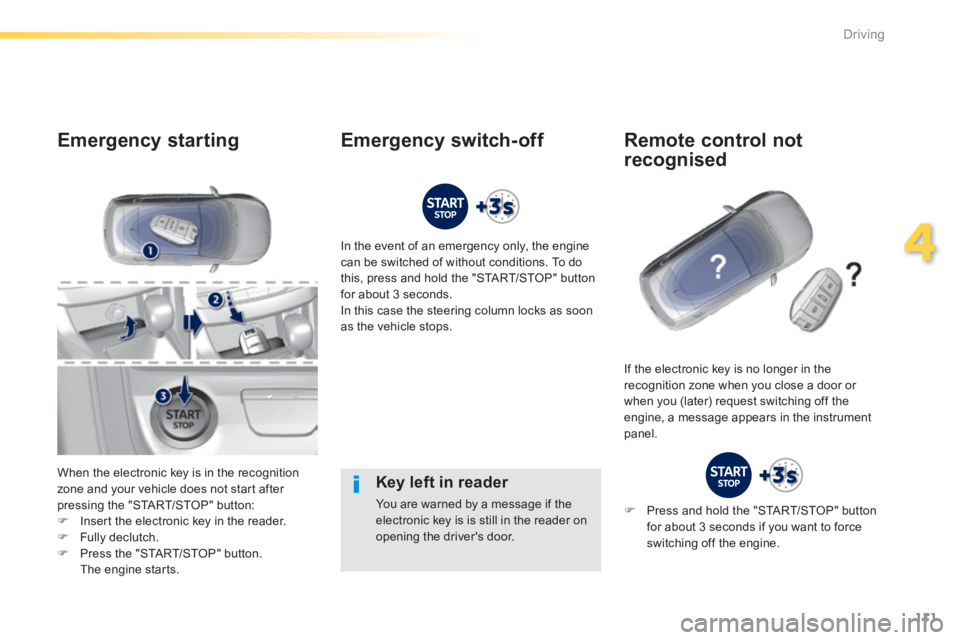
When the electronic key is in the recognition zone and your vehicle does not start after pressing the "START/STOP" button: Insert the electronic key in the reader.
Fully declutch. Press the "START/STOP" button. The engine starts.
In the event of an emergency only, the engine can be switched of without conditions. To do this, press and hold the "START/STOP" button for about 3 seconds. In this case the steering column locks as soon as the vehicle stops.
If the electronic key is no longer in the recognition zone when you close a door or when you (later) request switching off the engine, a message appears in the instrument panel.
Emergency switch-off Remote control not
recognised
Press and hold the "START/STOP" button for about 3 seconds if you want to force switching off the engine.
Page 126 of 400
124
Driving
308_EN_CHAP04_CONDUITE_ED02-2013
Automatic gearbox
Six speed automatic gearbox which offers a choice between the comfort of fully automatic operation, enhanced by sport and snow programmes, or manual gear changing. Four driving modes are offered: - automatic operation for electronic management of the gears by the gearbox, - sport programme for a more dynamic style of driving, - snow programme to improve driving when traction is poor, - manual operation for sequential changing of the gears by the driver.
Gear lever
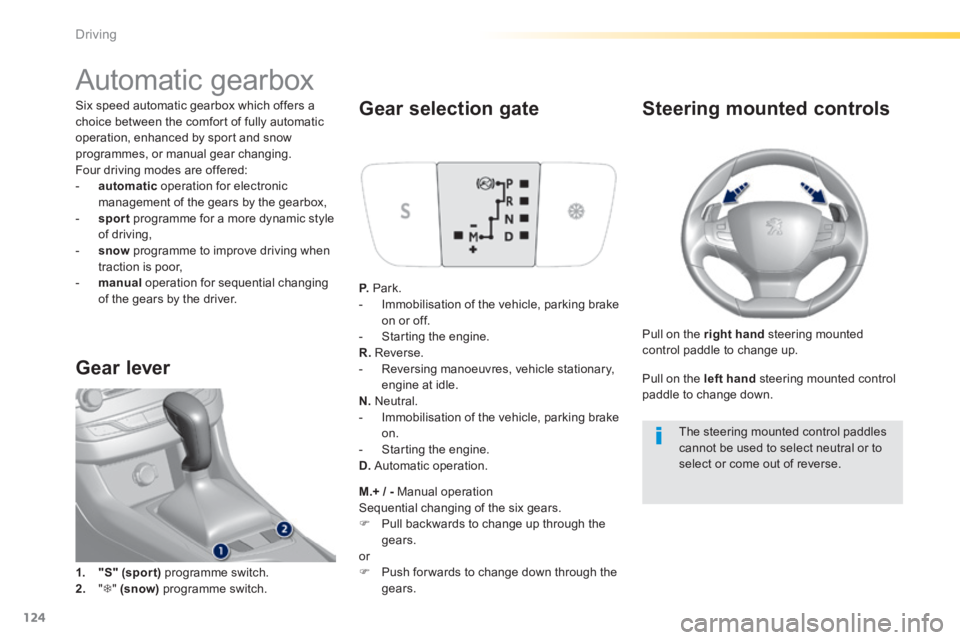
1. "S" (spor t) programme switch.
2. " " (snow) programme switch.
Gear selection gate
P. Park. - Immobilisation of the vehicle, parking brake on or off. - Starting the engine. R. Reverse. - Reversing manoeuvres, vehicle stationary, engine at idle. N. Neutral. - Immobilisation of the vehicle, parking brake on. - Starting the engine. D. Automatic operation.
M.+ / - Manual operation Sequential changing of the six gears. Pull backwards to change up through the gears. or Push for wards to change down through the
gears.
Steering mounted controls
Pull on the right hand steering mounted control paddle to change up.
Pull on the left hand steering mounted control paddle to change down.
The steering mounted control paddles cannot be used to select neutral or to select or come out of reverse.
Page 130 of 400
128
Driving
308_EN_CHAP04_CONDUITE_ED02-2013
Dynamic function
In sport mode (with an automatic gearbox), this function conditions: - the visual ambience, with specific back-lighting for the instrument panel, - the acoustic ambience of the engine, - power assistance for the steering, - acceleration, - the automatic gearbox, - information to the driver in the instrument panel on dynamic settings.
This function is only available when Park Assist is not selected and snow mode in the automatic gearbox is not selected. If Park Assist is switched on, this automatically deactivates the function.
Activation
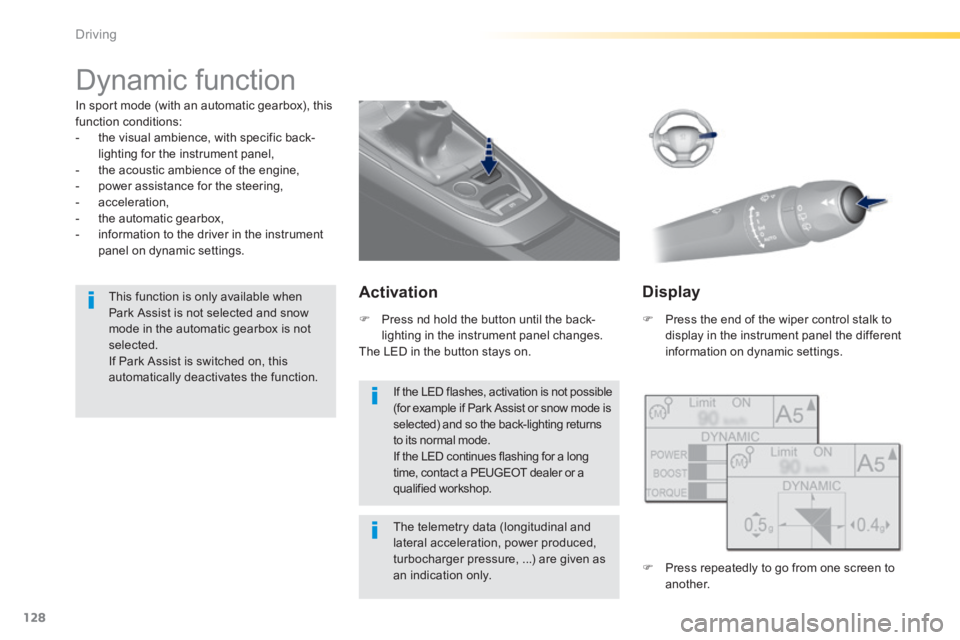
Press the end of the wiper control stalk to display in the instrument panel the different information on dynamic settings.
The telemetry data (longitudinal and lateral acceleration, power produced, turbocharger pressure, ...) are given as an indication only.
Press nd hold the button until the back-lighting in the instrument panel changes. The LED in the button stays on.
Display
Press repeatedly to go from one screen to another.
If the LED flashes, activation is not possible (for example if Park Assist or snow mode is selected) and so the back-lighting returns to its normal mode. If the LED continues flashing for a long time, contact a PEUGEOT dealer or a qualified workshop.
Page 131 of 400
129
4
Driving
308_EN_CHAP04_CONDUITE_ED02-2013
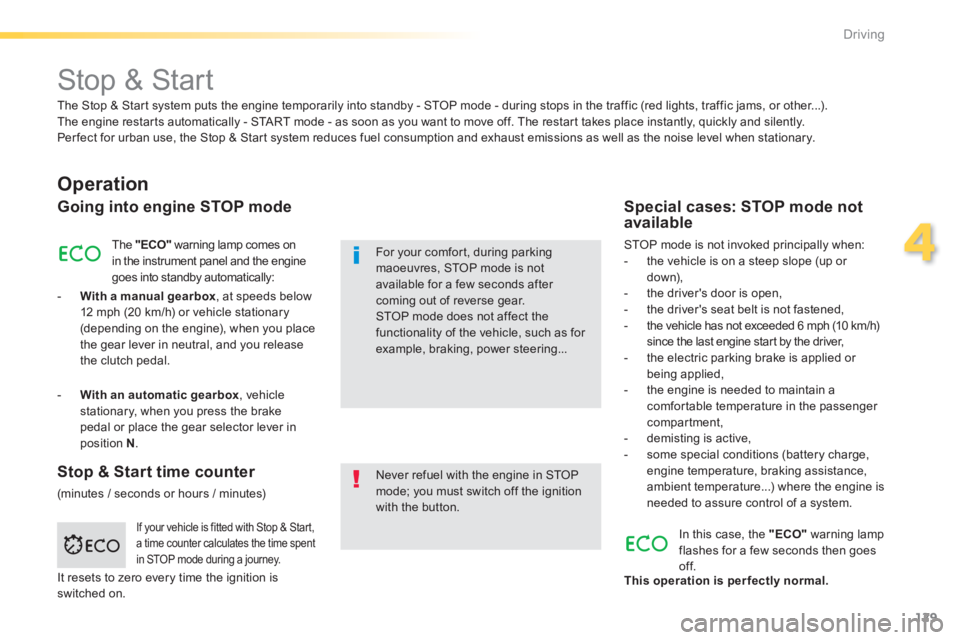
Stop & Start
Operation
Going into engine STOP mode
The "ECO" warning lamp comes on in the instrument panel and the engine goes into standby automatically:
- With a manual gearbox , at speeds below 12 mph (20 km/h) or vehicle stationary (depending on the engine), when you place the gear lever in neutral, and you release the clutch pedal.
Never refuel with the engine in STOP mode; you must switch off the ignition with the button.
For your comfort, during parking maoeuvres, STOP mode is not available for a few seconds after coming out of reverse gear. STOP mode does not affect the functionality of the vehicle, such as for example, braking, power steering...
Special cases: STOP mode not available
STOP mode is not invoked principally when: - the vehicle is on a steep slope (up or d ow n), - the driver's door is open, - the driver's seat belt is not fastened, - the vehicle has not exceeded 6 mph (10 km/h) since the last engine start by the driver, - the electric parking brake is applied or being applied, - the engine is needed to maintain a comfortable temperature in the passenger compartment,
- demisting is active, - some special conditions (battery charge, engine temperature, braking assistance, ambient temperature...) where the engine is needed to assure control of a system.
If your vehicle is fitted with Stop & Start, a time counter calculates the time spent in STOP mode during a journey.
In this case, the "ECO" warning lamp flashes for a few seconds then goes of f. This operation is perfectly normal.
The Stop & Start system puts the engine temporarily into standby - STOP mode - during stops in the traffic (red lights, traffic jams, or other...). The engine restarts automatically - START mode - as soon as you want to move off. The restart takes place instantly, quickly and silently. Per fect for urban use, the Stop & Start system reduces fuel consumption and exhaust emissions as well as the noise level when stationary.
Stop & Start time counter
(minutes / seconds or hours / minutes)
- With an automatic gearbox , vehicle stationary, when you press the brake pedal or place the gear selector lever in position N .
It resets to zero every time the ignition is switched on.
Page 135 of 400
133
4
Driving
308_EN_CHAP04_CONDUITE_ED02-2013
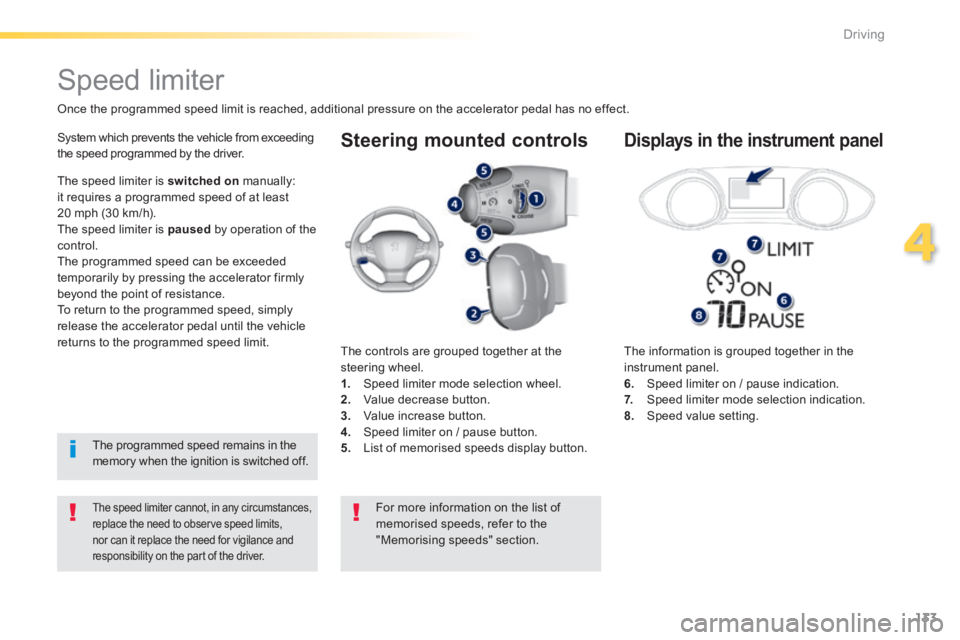
Steering mounted controls
The information is grouped together in the instrument panel. 6. Speed limiter on / pause indication. 7. Speed limiter mode selection indication. 8. Speed value setting.
Speed limiter
Once the programmed speed limit is reached, additional pressure on the accelerator pedal has no effect.
The speed limiter cannot, in any circumstances, replace the need to observe speed limits, nor can it replace the need for vigilance and responsibility on the part of the driver.
System which prevents the vehicle from exceeding the speed programmed by the driver.
The controls are grouped together at the steering wheel. 1. Speed limiter mode selection wheel. 2. Value decrease button. 3. Value increase button. 4. Speed limiter on / pause button. 5. List of memorised speeds display button.
Displays in the instrument panel
The speed limiter is switched on manually: it requires a programmed speed of at least 20 mph (30 km/h). The speed limiter is paused by operation of the control. The programmed speed can be exceeded temporarily by pressing the accelerator firmly beyond the point of resistance. To return to the programmed speed, simply release the accelerator pedal until the vehicle returns to the programmed speed limit.
The programmed speed remains in the memory when the ignition is switched off.
For more information on the list of memorised speeds, refer to the "Memorising speeds" section.
Page 138 of 400
136
Driving
308_EN_CHAP04_CONDUITE_ED02-2013
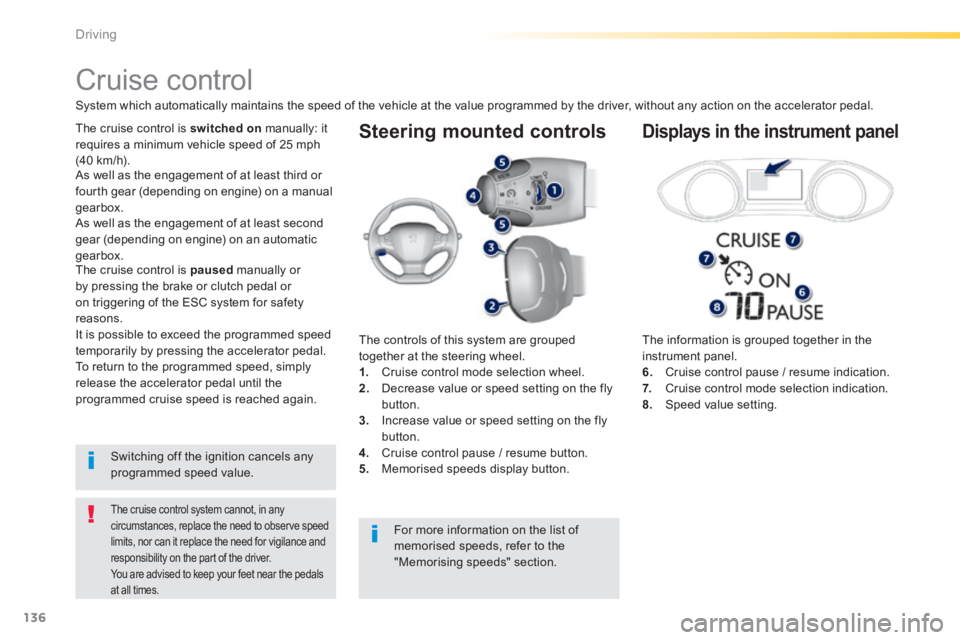
Steering mounted controls
The information is grouped together in the instrument panel. 6. Cruise control pause / resume indication. 7. Cruise control mode selection indication. 8. Speed value setting.
Cruise control
System which automatically maintains the speed of the vehicle at the value programmed by the driver, without any action on the accelerator pedal.
The cruise control system cannot, in any circumstances, replace the need to observe speed limits, nor can it replace the need for vigilance and responsibility on the part of the driver. You are advised to keep your feet near the pedals
at all times.
The cruise control is switched on manually: it requires a minimum vehicle speed of 25 mph (40 km/h).
The controls of this system are grouped together at the steering wheel. 1. Cruise control mode selection wheel. 2. Decrease value or speed setting on the fly button. 3. Increase value or speed setting on the fly
button. 4. Cruise control pause / resume button. 5. Memorised speeds display button.
Displays in the instrument panel
Switching off the ignition cancels any programmed speed value.
The cruise control is paused manually or by pressing the brake or clutch pedal or on triggering of the ESC system for safety reasons. It is possible to exceed the programmed speed temporarily by pressing the accelerator pedal. To return to the programmed speed, simply release the accelerator pedal until the programmed cruise speed is reached again.
As well as the engagement of at least third or fourth gear (depending on engine) on a manual gearbox.
For more information on the list of
memorised speeds, refer to the "Memorising speeds" section.
As well as the engagement of at least second
gear (depending on engine) on an automatic gearbox.
Page 143 of 400
141
4
Driving
308_EN_CHAP04_CONDUITE_ED02-2013
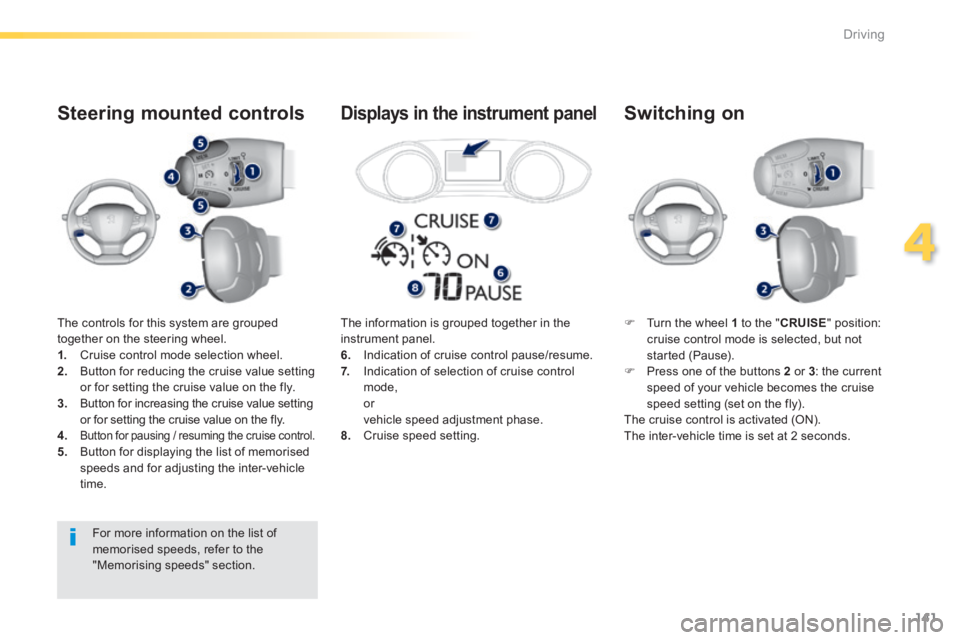
The controls for this system are grouped together on the steering wheel. 1. Cruise control mode selection wheel. 2. Button for reducing the cruise value setting or for setting the cruise value on the fly. 3. Button for increasing the cruise value setting or for setting the cruise value on the fly.
4.Button for pausing / resuming the cruise control. 5. Button for displaying the list of memorised speeds and for adjusting the inter-vehicle time.
Steering mounted controls
Turn the wheel 1 to the " CRUISE " position: cruise control mode is selected, but not started (Pause). Press one of the buttons 2 or 3 : the current speed of your vehicle becomes the cruise speed setting (set on the fly). The cruise control is activated (ON). The inter-vehicle time is set at 2 seconds.
Switching on
The information is grouped together in the instrument panel. 6. Indication of cruise control pause/resume. 7. Indication of selection of cruise control mode, or vehicle speed adjustment phase. 8. Cruise speed setting.
Displays in the instrument panel
For more information on the list of memorised speeds, refer to the "Memorising speeds" section.
Page 164 of 400
162
Driving
308_EN_CHAP04_CONDUITE_ED02-2013
Park Assist
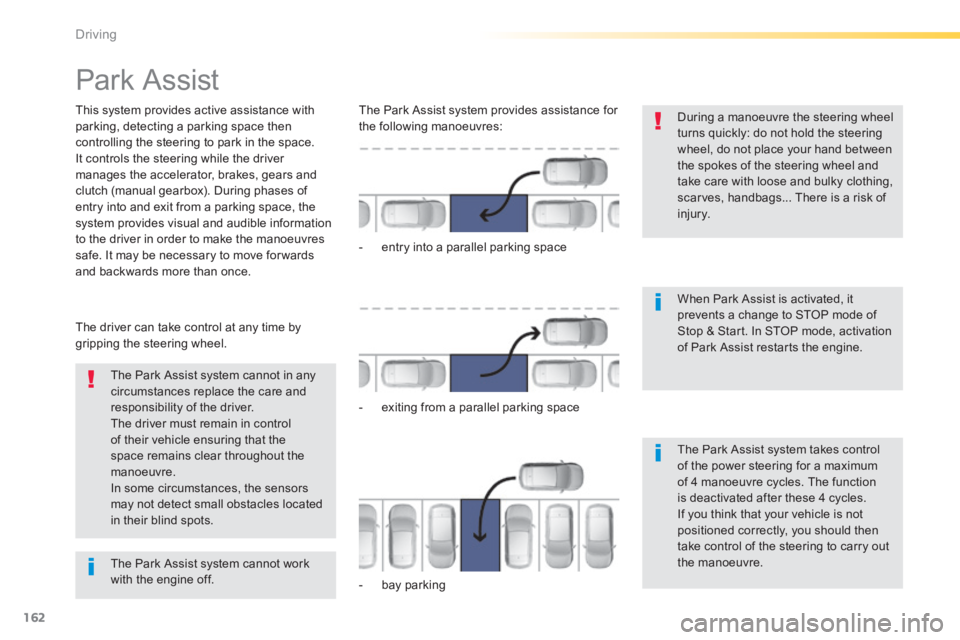
This system provides active assistance with parking, detecting a parking space then controlling the steering to park in the space. It controls the steering while the driver manages the accelerator, brakes, gears and clutch (manual gearbox). During phases of entry into and exit from a parking space, the system provides visual and audible information
to the driver in order to make the manoeuvres safe. It may be necessary to move for wards and backwards more than once.
During a manoeuvre the steering wheel turns quickly: do not hold the steering wheel, do not place your hand between the spokes of the steering wheel and take care with loose and bulky clothing, scarves, handbags... There is a risk of injury.
When Park Assist is activated, it prevents a change to STOP mode of Stop & Start. In STOP mode, activation of Park Assist restarts the engine.
The Park Assist system cannot in any circumstances replace the care and responsibility of the driver. The driver must remain in control of their vehicle ensuring that the space remains clear throughout the manoeuvre. In some circumstances, the sensors may not detect small obstacles located in their blind spots.
The driver can take control at any time by gripping the steering wheel.
The Park Assist system provides assistance for the following manoeuvres:
- entry into a parallel parking space
- exiting from a parallel parking space
- bay parking
The Park Assist system takes control of the power steering for a maximum of 4 manoeuvre cycles. The function is deactivated after these 4 cycles. If you think that your vehicle is not positioned correctly, you should then take control of the steering to carry out the manoeuvre. The Park Assist system cannot work with the engine off.
Page 165 of 400
163
4
Driving
308_EN_CHAP04_CONDUITE_ED02-2013
The sequence of manoeuvres and the driving instructions are displayed in the instrument panel.
You should always check the surroundings of your vehicle before starting a manoeuvre.
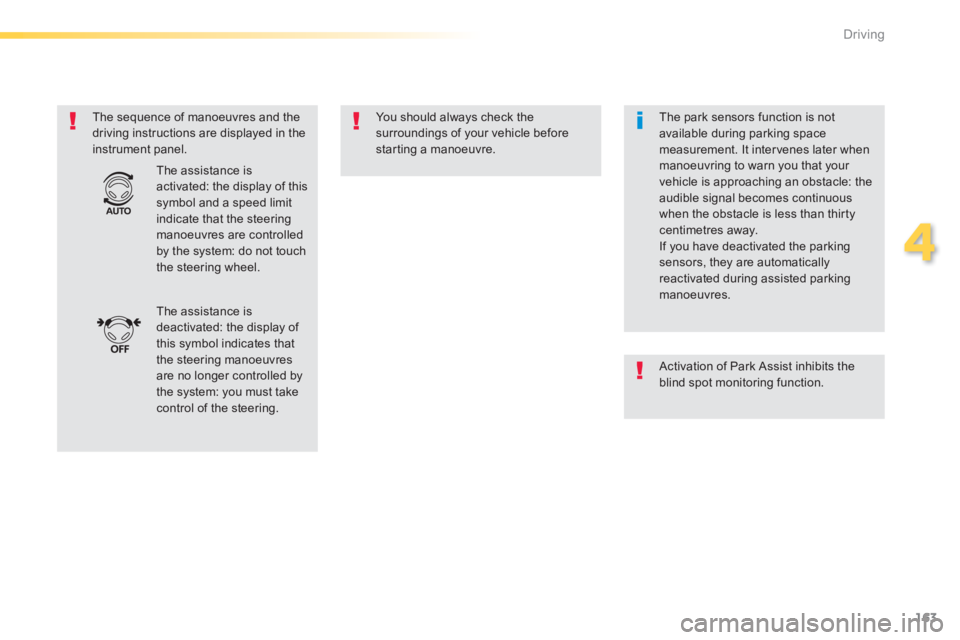
The assistance is deactivated: the display of this symbol indicates that the steering manoeuvres are no longer controlled by the system: you must take control of the steering.
The assistance is activated: the display of this symbol and a speed limit indicate that the steering manoeuvres are controlled by the system: do not touch the steering wheel.
The park sensors function is not available during parking space measurement. It intervenes later when manoeuvring to warn you that your vehicle is approaching an obstacle: the audible signal becomes continuous when the obstacle is less than thirty centimetres away. If you have deactivated the parking sensors, they are automatically reactivated during assisted parking manoeuvres.
Activation of Park Assist inhibits the blind spot monitoring function.