key Peugeot 308 2014 Service Manual
[x] Cancel search | Manufacturer: PEUGEOT, Model Year: 2014, Model line: 308, Model: Peugeot 308 2014Pages: 400, PDF Size: 10.05 MB
Page 255 of 400
253
7
Practical information
308_EN_CHAP07_INFO PR ATIQUES_ED02-2013
Starting using another
battery
First check that the slave battery has a nominal voltage of 12 V and a capacity at least equal to that of the discharged battery. Do not try to start the engine by connecting a battery charger. Do not disconnect the (+) terminal when the engine is running.
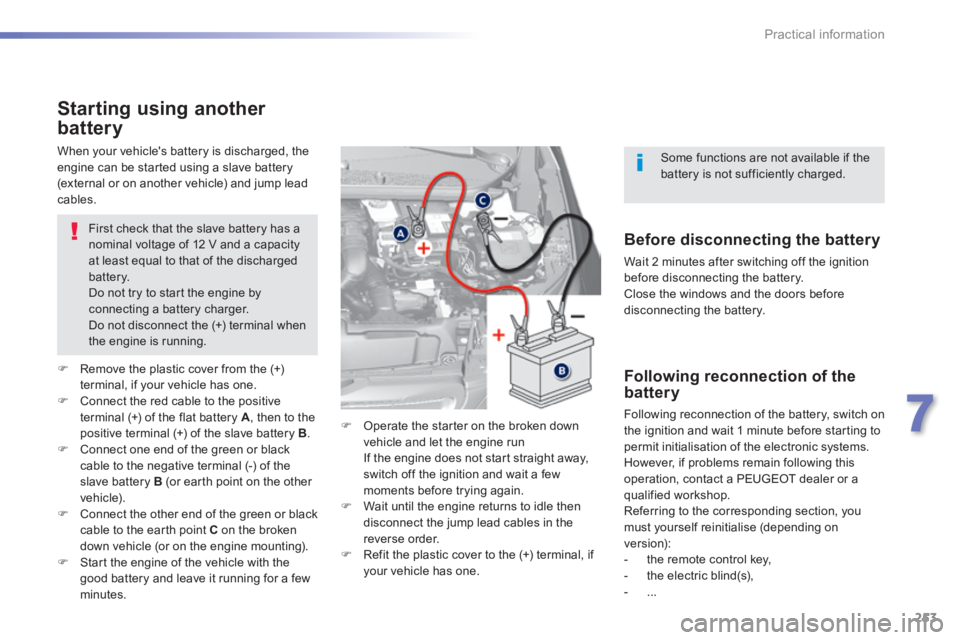
Remove the plastic cover from the (+) terminal, if your vehicle has one. Connect the red cable to the positive terminal (+) of the flat battery A , then to the
positive terminal (+) of the slave battery B . Connect one end of the green or black cable to the negative terminal (-) of the slave battery B (or earth point on the other vehicle). Connect the other end of the green or black cable to the earth point C on the broken down vehicle (or on the engine mounting). Start the engine of the vehicle with the good battery and leave it running for a few minutes.
Operate the starter on the broken down vehicle and let the engine run If the engine does not start straight away, switch off the ignition and wait a few moments before trying again. Wait until the engine returns to idle then disconnect the jump lead cables in the reverse order. Refit the plastic cover to the (+) terminal, if your vehicle has one.
When your vehicle's battery is discharged, the engine can be started using a slave battery (external or on another vehicle) and jump lead cables.
Before disconnecting the battery
Wait 2 minutes after switching off the ignition before disconnecting the battery. Close the windows and the doors before disconnecting the battery.
Following reconnection of the battery
Following reconnection of the battery, switch on
the ignition and wait 1 minute before starting to permit initialisation of the electronic systems. However, if problems remain following this operation, contact a PEUGEOT dealer or a qualified workshop. Referring to the corresponding section, you must yourself reinitialise (depending on version): - the remote control key, - the electric blind(s), - ...
Some functions are not available if the battery is not sufficiently charged.
Page 279 of 400
277
8
Checks
308_EN_CHAP08_VERIFICATIONS_ED02-2013
Recommendations on storage
Never store bottles of AdBlue ® in your ® in your ®
vehicle.
AdBlue ® freezes at about -11°C and ® freezes at about -11°C and ®
deteriorates above 25°C. It is recommended that bottles be stored in a cool area and protected from direct sunlight. Under these conditions, the additive can be kept for at least a year. Additive that has been frozen can be used once it has thawed out.
Procedure
Before topping-up, ensure that the vehicle is parked on a flat and level sur face. In wintry conditions, ensure that the temperature of the vehicle is above -11°C.
Otherwise, by freezing, the AdBlue ® cannot ® cannot ®
be poured into its tank. Park your vehicle in a warmer area for a few hours to allow the top-up to be carried out.
Switch off the ignition and remove the key, or if your vehicle has one, press the START/STOP button to switch of the engine.
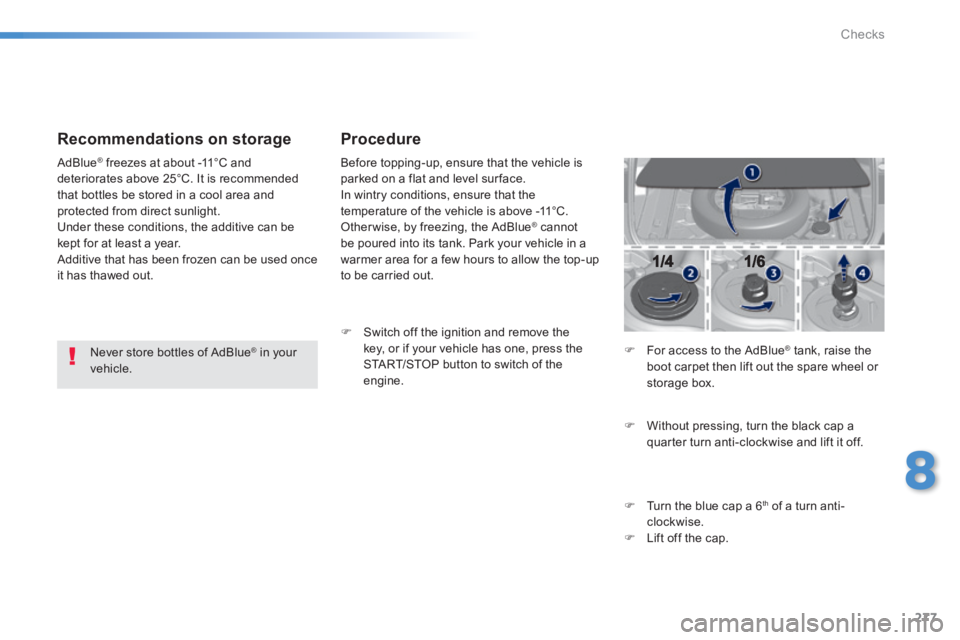
For access to the AdBlue ® tank, raise the ® tank, raise the ®
boot carpet then lift out the spare wheel or storage box.
Without pressing, turn the black cap a quarter turn anti-clockwise and lift it off.
Turn the blue cap a 6 th of a turn anti-clockwise. Lift off the cap.
Page 280 of 400
278
Checks
308_EN_CHAP08_VERIFICATIONS_ED02-2013
Never dispose of AdBlue ® additive ® additive ®
bottles in the household waste. Place them in a special container provided this purpose or take them to your dealer.
Important: if your vehicle's AdBlue ®
tank is completely empty - which is
confirmed by the alert messages and the impossibility of starting the engine - you must add at least 3.8 litres, so two 1.89 litre bottles.
After emptying the bottle, wipe away any spillage around the tank filler using a damp cloth.
If any additive is split or splashed, wash immediately with cold water or wipe with a damp cloth. If the additive has crystallised, clean it off using a sponge and hot water.
Refit the blue cap to the tank and turn it a 6 th of a turn clockwise, to its stop. Refit the black cap and turn it a quarter of a turn clockwise without pressing. Ensure that the indicator on the cap lines up with
the indicator on the support. Lower the boot floor and close the tailgate.
Important: when topping-up after running out of additive , signalled by the message "Top up emissions additive: Starting prevented", you must wait for about 5 minutes before switching on the ignition, without opening the driver's door, unlocking the vehicle, introducing the key into the ignition switch, or placing the key of the "Keyless Entr y and Star ting" system inside the vehicle. Switch on the ignition, then wait for 10 seconds before starting the engine.
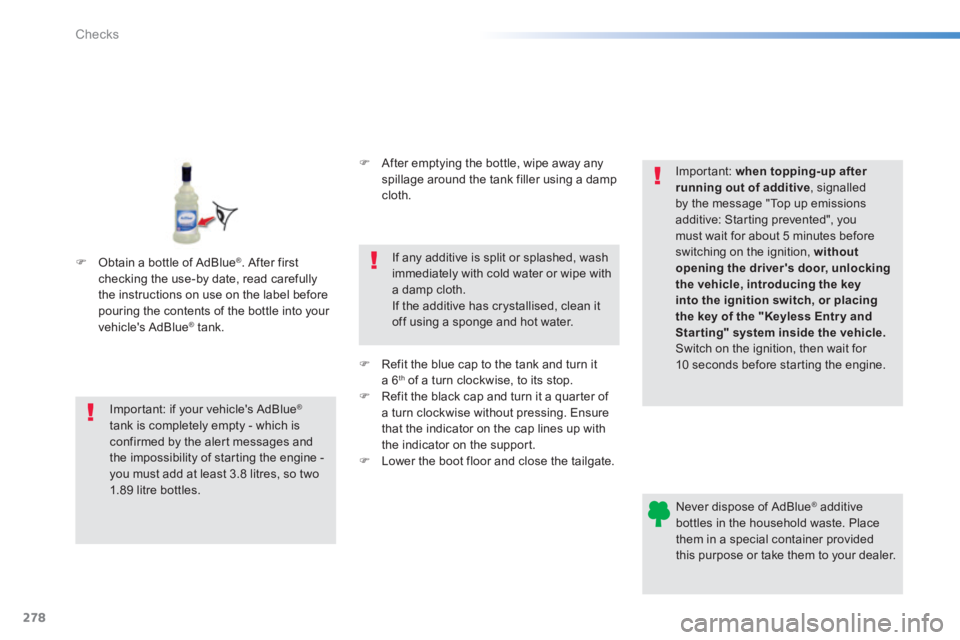
Obtain a bottle of AdBlue ® . After first checking the use-by date, read carefully the instructions on use on the label before pouring the contents of the bottle into your vehicle's AdBlue ® tank. ® tank. ®
Page 296 of 400
01
308_EN_CHAP10C_SMEGPLUS_ED02-2013
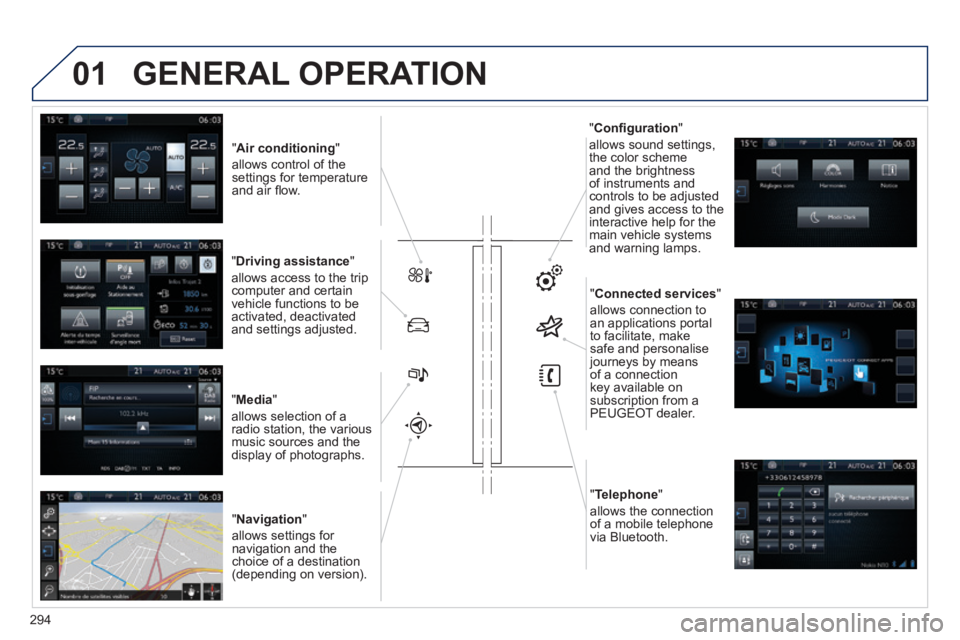
" Air conditioning "
allows control of the settings for temperature and air fl ow.
" Driving assistance "
allows access to the trip computer and certain vehicle functions to be activated, deactivated and settings adjusted.
" Media "
allows selection of a radio station, the various music sources and the display of photographs.
" Navigation "
allows settings for navigation and the choice of a destination (depending on version).
" Confi guration "
allows sound settings, the color scheme and the brightness of instruments and controls to be adjusted and gives access to the interactive help for the main vehicle systems and warning lamps.
" Connected services "
allows connection to an applications portal to facilitate, make safe and personalise journeys by means of a connection key available on subscription from a PEUGEOT dealer.
" Telephone "
allows the connection of a mobile telephone via Bluetooth.
GENERAL OPERATION
294
Page 307 of 400
04
305
308_EN_CHAP10C_SMEGPLUS_ED02-2013
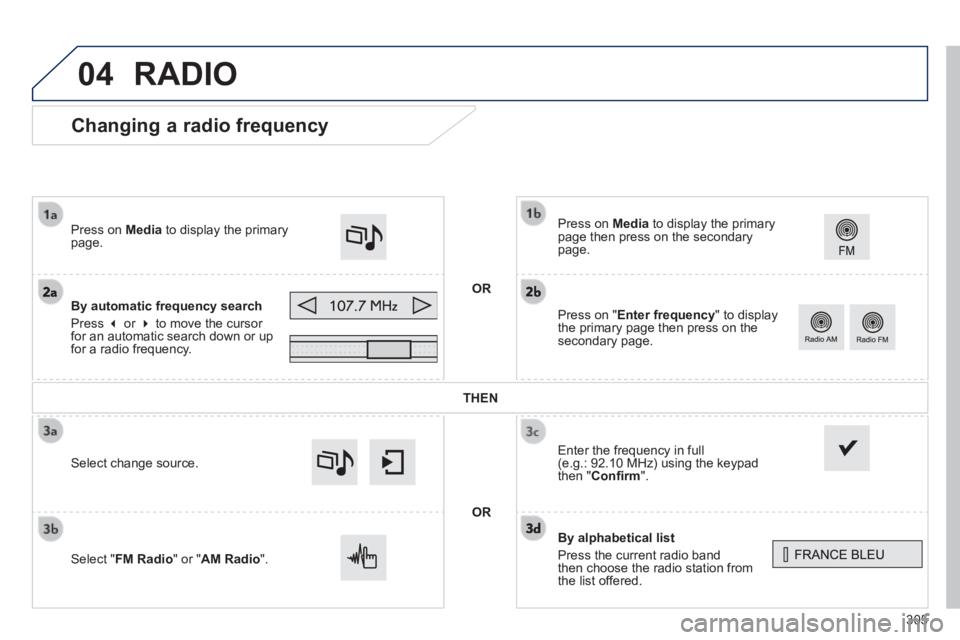
Changing a radio frequency
By alphabetical list
Press the current radio band then choose the radio station from the list offered.
Press on Media to display the primary page then press on the secondary page.
Enter the frequency in full (e.g.: 92.10 MHz) using the keypad then " Confi rm ".
By automatic frequency search
Press or to move the cursor for an automatic search down or up for a radio frequency.
Press on Media to display the primary page.
Press on " Enter frequency " to display the primary page then press on the secondary page.
OR
RADIO
Select change source.
Select " FM Radio " or " AM Radio ".
THEN
OR
Page 349 of 400
07
308_EN_CHAP10C_SMEGPLUS_ED02-2013
PEUGEOT CONNECT APPS
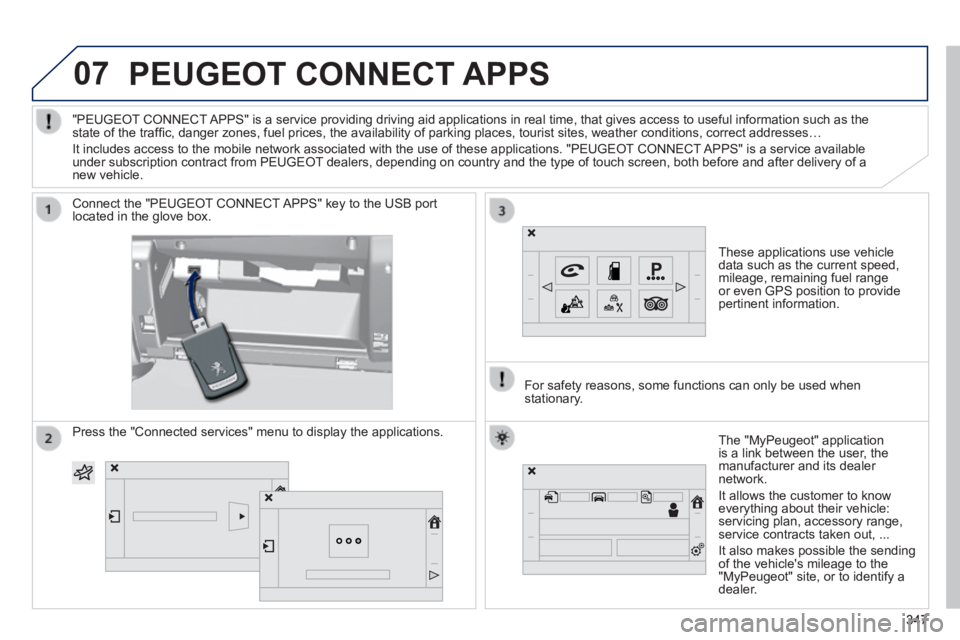
These applications use vehicle data such as the current speed, mileage, remaining fuel range or even GPS position to provide pertinent information.
Connect the "PEUGEOT CONNECT APPS" key to the USB port located in the glove box.
The "MyPeugeot" application is a link between the user, the manufacturer and its dealer network.
It allows the customer to know everything about their vehicle: servicing plan, accessory range, service contracts taken out, ...
It also makes possible the sending of the vehicle's mileage to the "MyPeugeot" site, or to identify a dealer.
"PEUGEOT CONNECT APPS" is a service providing driving aid applications in real time, that\
gives access to useful information such as the state of the traffi c, danger zones, fuel prices, the availability of parking places, tourist sites, weather conditions, correct addresses…
It includes access to the mobile network associated with the use of thes\
e applications. "PEUGEOT CONNECT APPS" is a service available under subscription contract from PEUGEOT dealers, depending on country and the type of touch screen, both before\
and after delivery of a new vehicle.
For safety reasons, some functions can only be used when stationary.
Press the "Connected services" menu to display the applications.
347347347
Page 357 of 400
08
355
308_EN_CHAP10C_SMEGPLUS_ED02-2013
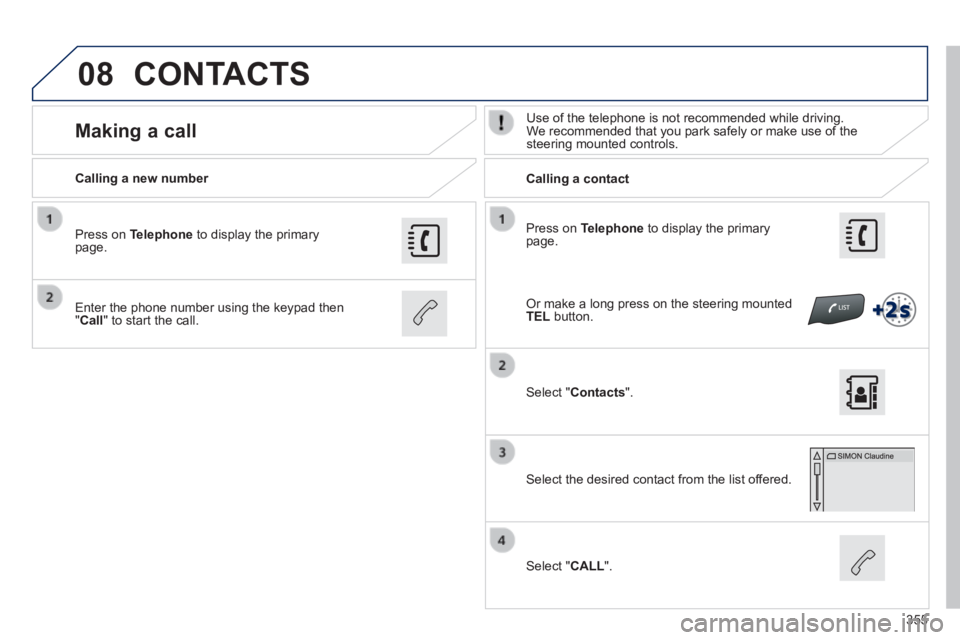
Press on Telephone to display the primary page.
Calling a new number Calling a contact
Making a call Use of the telephone is not recommended while driving. We recommended that you park safely or make use of the steering mounted controls.
Enter the phone number using the keypad then " Call " to start the call.
Press on Telephone to display the primary page.
Select " Contacts ".
Select the desired contact from the list offered.
Select " CALL ".
CONTACTS
Or make a long press on the steering mounted TEL button.
Page 365 of 400
308_EN_CHAP10C_SMEGPLUS_ED02-2013
FREQUENTLY ASKED QUESTIONS
363
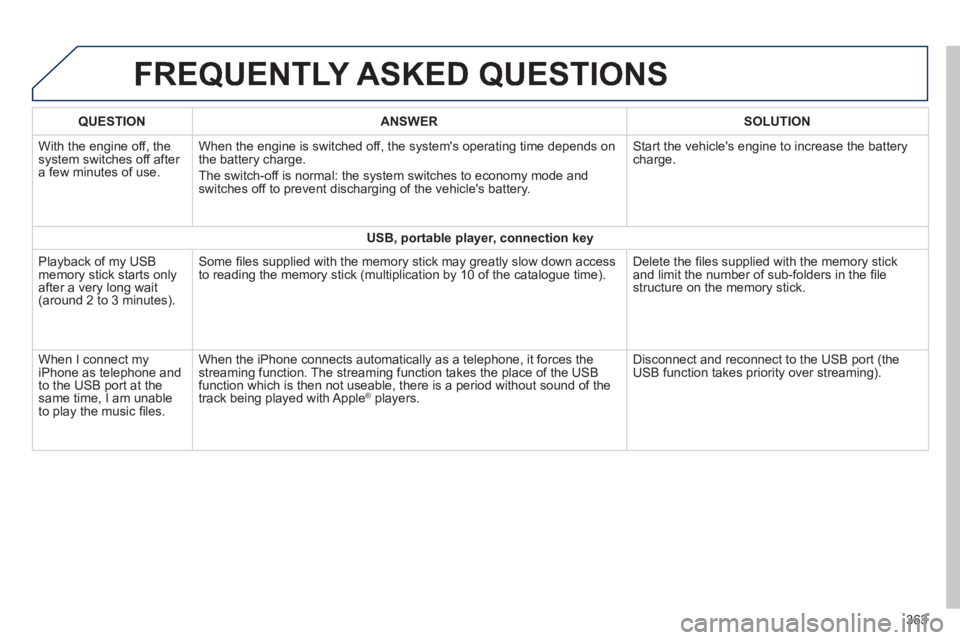
QUESTIONANSWERSOLUTION
With the engine off, the system switches off after a few minutes of use.
When the engine is switched off, the system's operating time depends on the battery charge.
The switch-off is normal: the system switches to economy mode and switches off to prevent discharging of the vehicle's battery.
Start the vehicle's engine to increase the battery charge.
USB, portable player, connection key
Playback of my USB memory stick starts only after a very long wait (around 2 to 3 minutes).
Some fi les supplied with the memory stick may greatly slow down access to reading the memory stick (multiplication by 10 of the catalogue time\
). Delete the fi les supplied with the memory stick and limit the number of sub-folders in the fi le structure on the memory stick.
When I connect my iPhone as telephone and to the USB port at the same time, I am unable to play the music fi les.
When the iPhone connects automatically as a telephone, it forces the streaming function. The streaming function takes the place of the USB function which is then not useable, there is a period without sound of t\
he track being played with Apple ® players. ® players. ®
Disconnect and reconnect to the USB port (the USB function takes priority over streaming).
Page 379 of 400
06
MENU
377
308_EN_CHAP10D_RD45_ED02_2013
BLUETOOTH
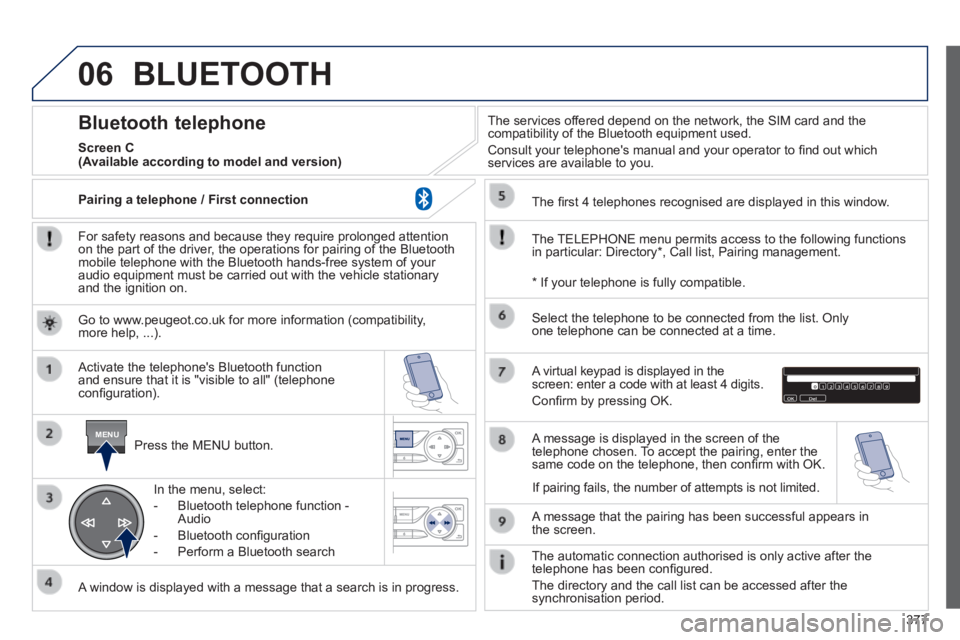
For safety reasons and because they require prolonged attention on the part of the driver, the operations for pairing of the Bluetooth mobile telephone with the Bluetooth hands-free system of your audio equipment must be carried out with the vehicle stationary and the ignition on.
Press the MENU button.
A window is displayed with a message that a search is in progress.
Activate the telephone's Bluetooth function and ensure that it is "visible to all" (telephone confi guration).
In the menu, select:
- Bluetooth telephone function - Audio
- Bluetooth confi guration
- Perform a Bluetooth search
The services offered depend on the network, the SIM card and the compatibility of the Bluetooth equipment used.
Consult your telephone's manual and your operator to fi nd out which services are available to you.
Bluetooth telephone
Screen C
The TELEPHONE menu permits access to the following functions in particular: Directory * , Call list, Pairing management.
The fi rst 4 telephones recognised are displayed in this window.
A virtual keypad is displayed in the screen: enter a code with at least 4 digits.
Confi rm by pressing OK.
A message that the pairing has been successful appears in the screen.
Select the telephone to be connected from the list. Only one telephone can be connected at a time.
A message is displayed in the screen of the telephone chosen. To accept the pairing, enter the same code on the telephone, then confi rm with OK.
The automatic connection authorised is only active after the telephone has been confi gured.
The directory and the call list can be accessed after the synchronisation period.
(Available according to model and version)
* If your telephone is fully compatible.
If pairing fails, the number of attempts is not limited.
Go to www.peugeot.co.uk for more information (compatibility, more help, ...).
Pairing a telephone / First connection
Page 380 of 400
06
378
308_EN_CHAP10D_RD45_ED02_2013
Receiving a call
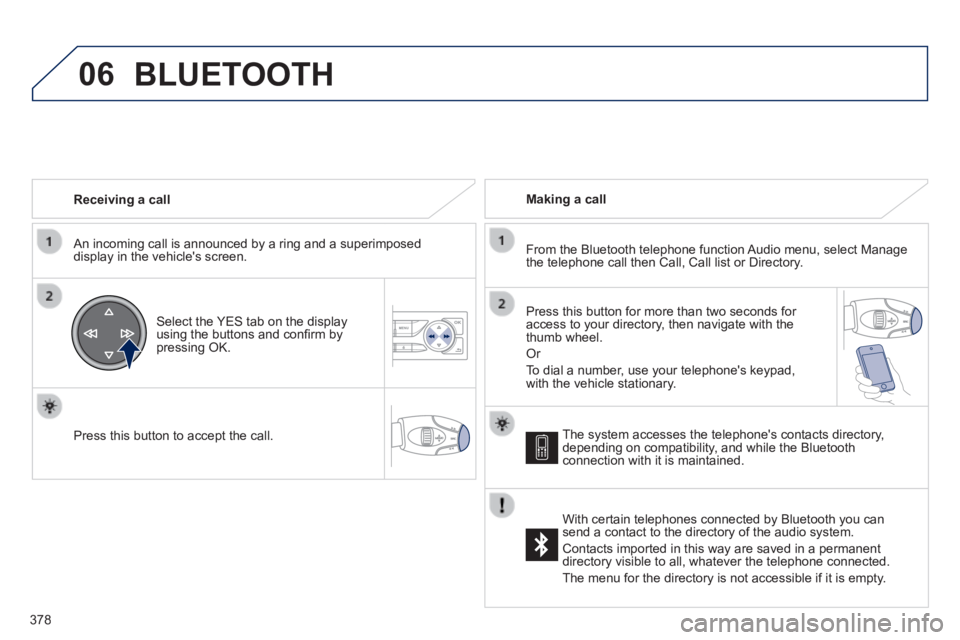
An incoming call is announced by a ring and a superimposed display in the vehicle's screen.
Select the YES tab on the display using the buttons and confi rm by pressing OK.
Press this button to accept the call.
Making a call
From the Bluetooth telephone function Audio menu, select Manage the telephone call then Call, Call list or Directory.
Press this button for more than two seconds for access to your directory, then navigate with the thumb wheel.
Or
To dial a number, use your telephone's keypad, with the vehicle stationary.
BLUETOOTH
The system accesses the telephone's contacts directory, depending on compatibility, and while the Bluetooth connection with it is maintained.
With certain telephones connected by Bluetooth you can send a contact to the directory of the audio system.
Contacts imported in this way are saved in a permanent directory visible to all, whatever the telephone connected.
The menu for the directory is not accessible if it is empty.