engine PEUGEOT 308 2014 Owners Manual
[x] Cancel search | Manufacturer: PEUGEOT, Model Year: 2014, Model line: 308, Model: Peugeot 308 2014Pages: 389, PDF Size: 22.92 MB
Page 245 of 389
12
Technical data243
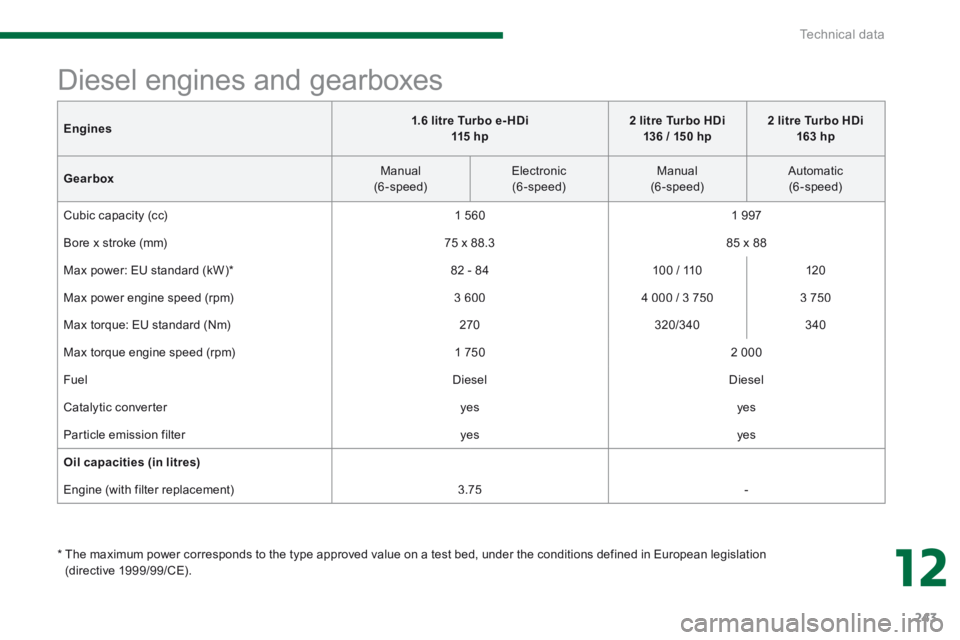
Engines1.6 litre Turbo e- HDi 115 h p2 litre Turbo HDi 136 / 150 hp2 litre Turbo HDi 163 hp
Gearbox Manual (6-speed) Electronic (6-speed) Manual (6-speed) Automatic (6-speed)
Cubic capacity (cc) 1 560 1 9 9 7
Bore x stroke (mm) 75 x 88.3 85 x 88
Max power: EU standard (kW) * 82 - 84 100 / 110 120
Max power engine speed (rpm) 3 600 4 000 / 3 750 3 750
Max torque: EU standard (Nm) 270 320/340 340
Max torque engine speed (rpm) 1 750 2 000
Fuel Diesel Diesel
Catalytic converter yes yes
Particle emission filter yes yes
Oil capacities (in litres)
Engine (with filter replacement) 3.75 -
Diesel engines and gearboxes
* The maximum power corresponds to the type approved value on a test bed, under the conditions defined in European legislation (directive 1999/99/CE).
Page 246 of 389
Technical data
244
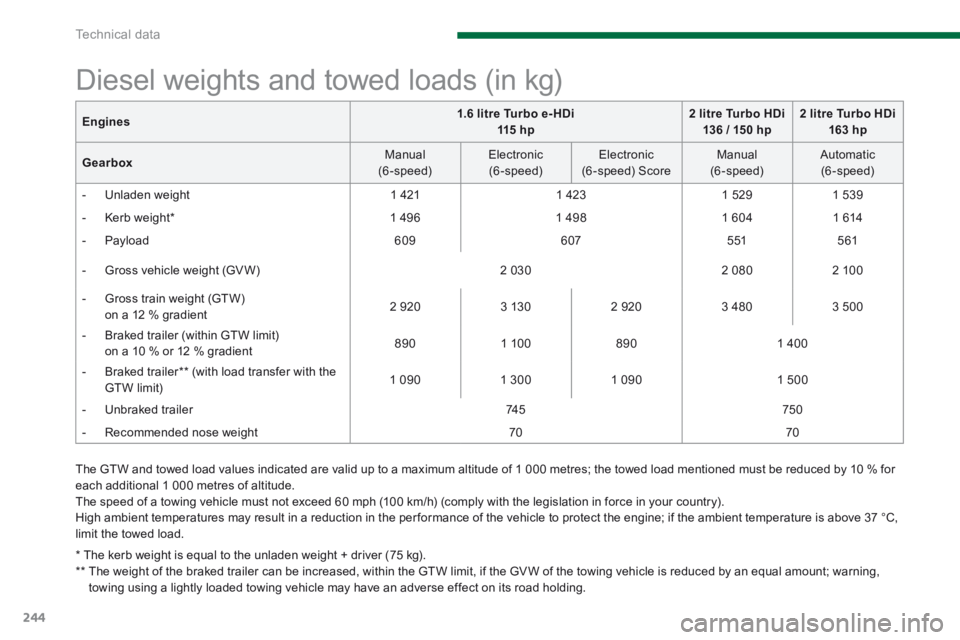
The GTW and towed load values indicated are valid up to a maximum altitude of 1 000 metres; the towed load mentioned must be reduced by 10 % for each additional 1 000 metres of altitude. The speed of a towing vehicle must not exceed 60 mph (100 km/h) (comply with the legislation in force in your country). High ambient temperatures may result in a reduction in the per formance of the vehicle to protect the engine; if the ambient temperature is above 37 °C,
limit the towed load.
Diesel weights and towed loads (in kg)
* The kerb weight is equal to the unladen weight + driver (75 kg). ** The weight of the braked trailer can be increased, within the GTW limit, if the GV W of the towing vehicle is reduced by an equal amount; warning, towing using a lightly loaded towing vehicle may have an adverse effect on its road holding.
Engines1.6 litre Turbo e- HDi 115 h p2 litre Turbo HDi 136 / 150 hp2 litre Turbo HDi 163 hp
Gearbox Manual (6-speed) Electronic (6-speed) Electronic (6 -speed) Score Manual (6-speed) Automatic (6-speed)
- Unladen weight 1 421 1 423 1 5 2 9 1 5 3 9
- Kerb weight * 1 4 9 6 1 4 9 8 1 604 1 614
- Payload 6 0 9 607 5 51 561
- Gross vehicle weight (GV W) 2 030 2 080 2 100
- Gross train weight (GTW) on a 12 % gradient 2 9 2 0 3 130 2 9 2 0 3 480 3 500
- Braked trailer (within GTW limit) on a 10 % or 12 % gradient 8 9 0 1 100 8 9 0 1 400
- Braked trailer ** (with load transfer with the GTW limit) 1 0 9 0 1 300 1 0 9 0 1 500
- Unbraked trailer 74 5 750
- Recommended nose weight 70 70
Page 247 of 389
12
Technical data245
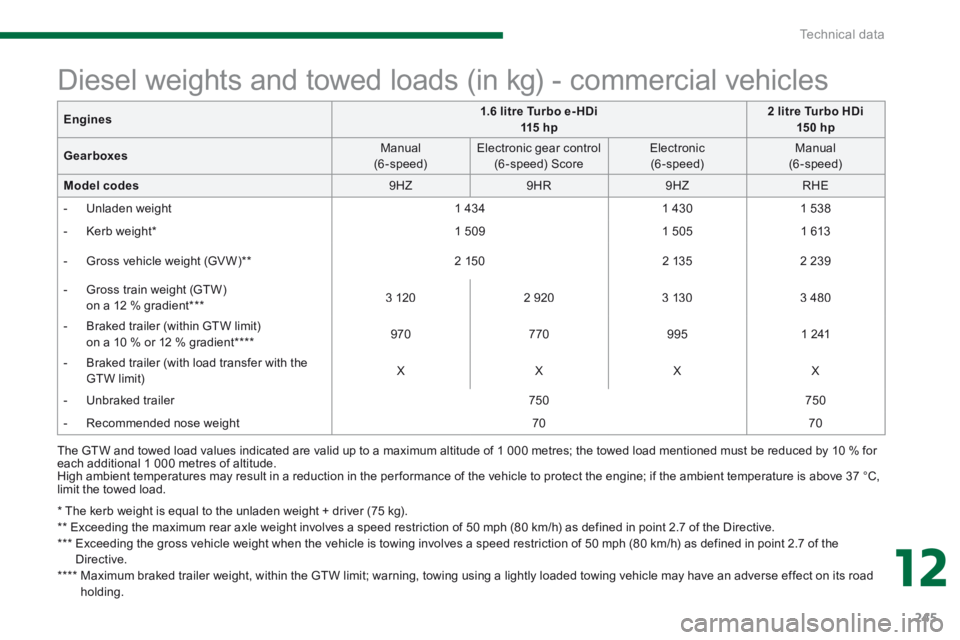
* The kerb weight is equal to the unladen weight + driver (75 kg). ** Exceeding the maximum rear axle weight involves a speed restriction of 50 mph (80 km/h) as defined in point 2.7 of the Directive. *** Exceeding the gross vehicle weight when the vehicle is towing involves a speed restriction of 50 mph (80 km/h) as defined in point 2.7 of the Directive. **** Maximum braked trailer weight, within the GTW limit; warning, towing using a lightly loaded towing vehicle may have an adverse effect on its road
holding.
Diesel weights and towed loads (in kg) - commercial vehicles
The GTW and towed load values indicated are valid up to a maximum altitude of 1 000 metres; the towed load mentioned must be reduced by 10 % for each additional 1 000 metres of altitude. High ambient temperatures may result in a reduction in the per formance of the vehicle to protect the engine; if the ambient temperature is above 37 °C, limit the towed load.
Engines1.6 litre Turbo e- HDi 115 h p2 litre Turbo HDi 15 0 hp
Gearboxes Manual (6-speed) Electronic gear control (6 -speed) Score Electronic (6-speed) Manual (6-speed)
Model codes 9 H Z 9 H R 9 H Z RHE
- Unladen weight 1 434 1 430 1 538
- Kerb weight * 1 5 0 9 1 505 1 613
- Gross vehicle weight (GV W) ** 2 150 2 135 2 2 3 9
- Gross train weight (GTW) on a 12 % gradient *** 3 120 2 9 2 0 3 130 3 480
- Braked trailer (within GTW limit) on a 10 % or 12 % gradient **** 9 7 0 770 9 9 5 1 241
- Braked trailer (with load transfer with the GTW limit) X X X X
- Unbraked trailer 750 750
- Recommended nose weight 70 70
Page 255 of 389
253
The system is protected in such a way that it will only operate in your vehicle.
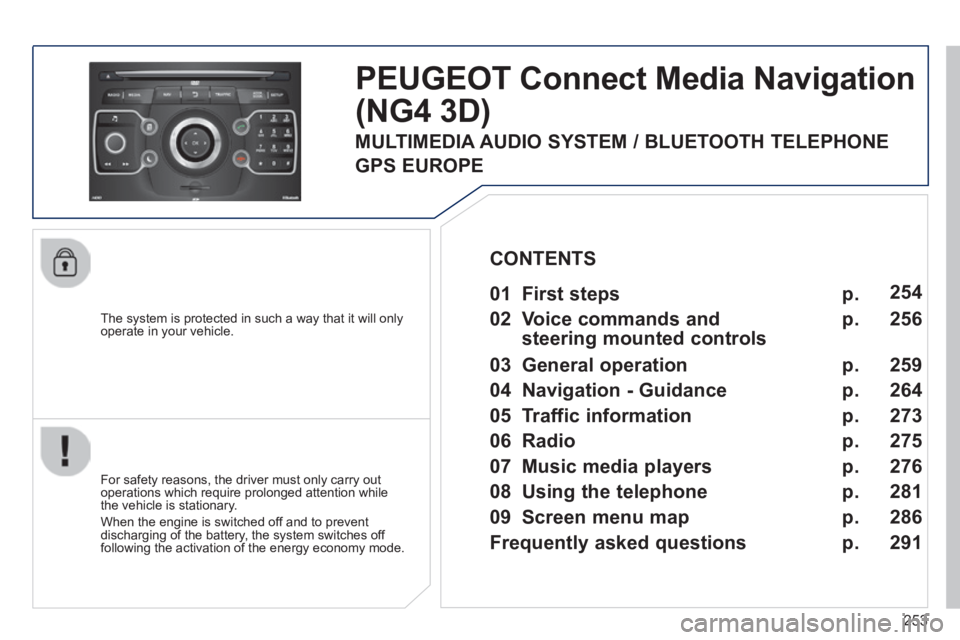
PEUGEOT Connect Media Navigation
(NG4 3D)
For safety reasons, the driver must only carry out operations which require prolonged attention while the vehicle is stationary.
When the engine is switched off and to prevent discharging of the battery, the system switches off following the activation of the energy economy mode.
01 First steps
02 Voice commands and
steering mounted controls
03 General operation
04 Navigation - Guidance
05 Traffic information
06 Radio
07 Music media players
08 Using the telephone
09 Screen menu map
Frequently asked questions
p.
p.
p.
p.
p.
p.
p.
p.
p.
p.
254
256
259
264
273
275
276
286
291
CONTENTS
MULTIMEDIA AUDIO SYSTEM / BLUETOOTH TELEPHONE
GPS EUROPE
281
Page 294 of 389
292
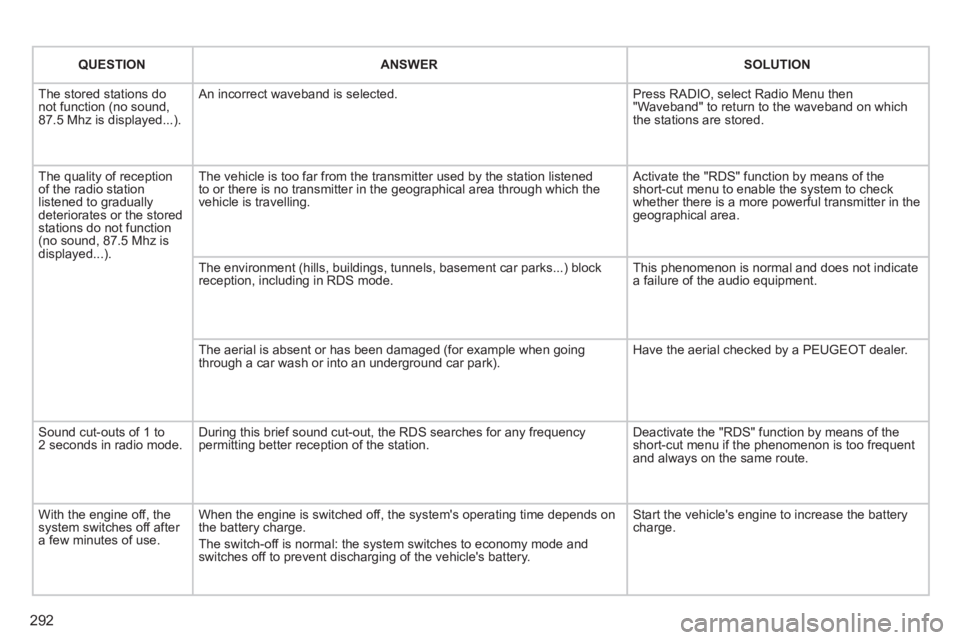
QUESTIONANSWERSOLUTION
The stored stations do not function (no sound, 87.5 Mhz is displayed...).
An incorrect waveband is selected. Press RADIO, select Radio Menu then "Waveband" to return to the waveband on which the stations are stored.
The quality of reception of the radio station listened to gradually deteriorates or the stored stations do not function (no sound, 87.5 Mhz is displayed...).
The vehicle is too far from the transmitter used by the station listened\
to or there is no transmitter in the geographical area through which the\
vehicle is travelling.
Activate the "RDS" function by means of the short-cut menu to enable the system to check whether there is a more powerful transmitter in the geographical area.
The environment (hills, buildings, tunnels, basement car parks...) blo\
ck reception, including in RDS mode. This phenomenon is normal and does not indicate a failure of the audio equipment.
The aerial is absent or has been damaged (for example when going through a car wash or into an underground car park). Have the aerial checked by a PEUGEOT dealer.
Sound cut-outs of 1 to 2 seconds in radio mode. During this brief sound cut-out, the RDS searches for any frequency permitting better reception of the station. Deactivate the "RDS" function by means of the short-cut menu if the phenomenon is too frequent and always on the same route.
With the engine off, the system switches off after a few minutes of use.
When the engine is switched off, the system's operating time depends on the battery charge.
The switch-off is normal: the system switches to economy mode and switches off to prevent discharging of the vehicle's battery.
Start the vehicle's engine to increase the battery charge.
Page 299 of 389
297
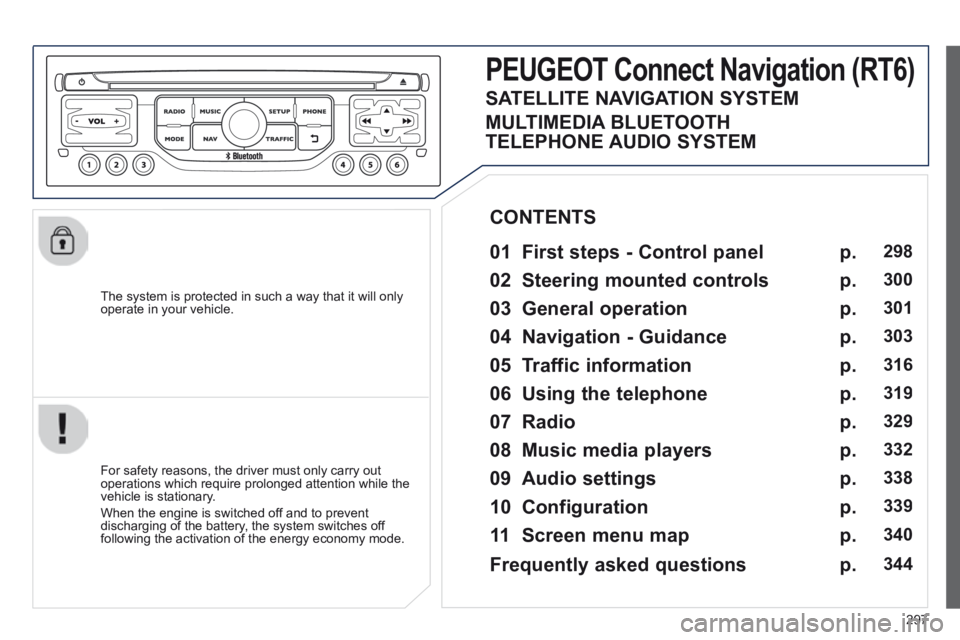
The system is protected in such a way that it will only operate in your vehicle.
PEUGEOT Connect Navigation (RT6)
01 First steps - Control panel
For safety reasons, the driver must only carry out operations which require prolonged attention while the vehicle is stationary.
When the engine is switched off and to prevent discharging of the battery, the system switches off following the activation of the energy economy mode.
CONTENTS
02 Steering mounted controls
03 General operation
04 Navigation - Guidance
05 Traffic information
06 Using the telephone
07 Radio
08 Music media players
09 Audio settings
10 Configuration
11 Screen menu map
p.
p.
p.
p.
p.
p.
p.
p.
p.
p.
p.
298
300
301
303
316
319
329
332
338
339
340
SATELLITE NAVIGATION SYSTEM
MULTIMEDIA BLUETOOTH
TELEPHONE AUDIO SYSTEM
Frequently asked questions p. 344
Page 300 of 389
01
298
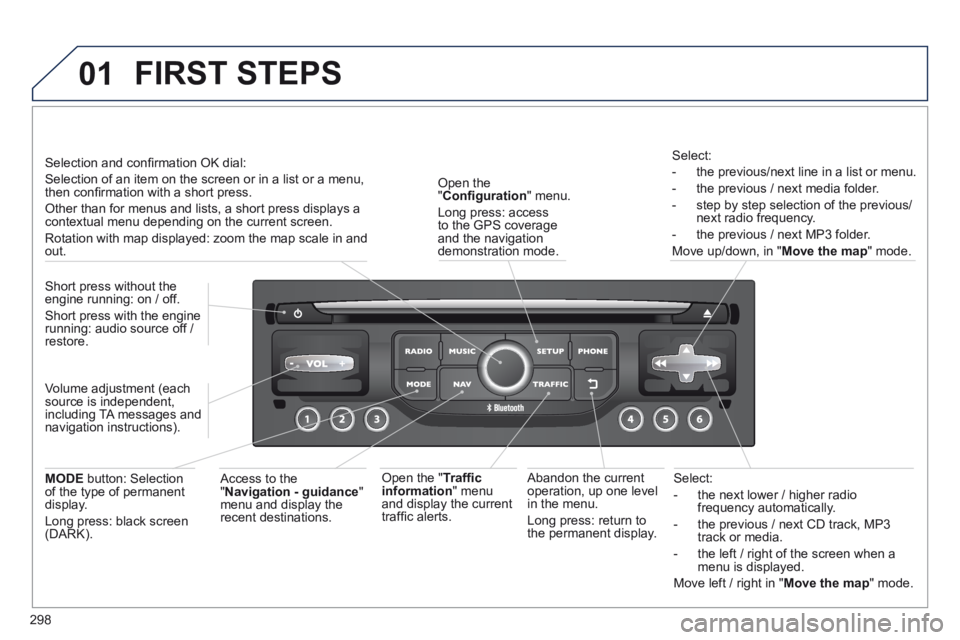
Select:
- the next lower / higher radio frequency automatically.
- the previous / next CD track, MP3 track or media.
- the left / right of the screen when a menu is displayed.
Move left / right in " Move the map " mode.
Abandon the current operation, up one level in the menu.
Long press: return to the permanent display.
Open the " Confi guration " menu.
Long press: access to the GPS coverage and the navigation demonstration mode.
Open the " Traffi c information " menu and display the current traffi c alerts.
Select:
- the previous/next line in a list or menu.
- the previous / next media folder.
- step by step selection of the previous/next radio frequency.
- the previous / next MP3 folder.
Move up/down, in " Move the map " mode.
FIRST STEPS
Access to the " Navigation - guidance " menu and display the recent destinations.
Short press without the engine running: on / off.
Short press with the engine running: audio source off / restore.
MODE button: Selection of the type of permanent display.
Long press: black screen (DARK).
Selection and confi rmation OK dial:
Selection of an item on the screen or in a list or a menu, then confi rmation with a short press.
Other than for menus and lists, a short press displays a contextual menu depending on the current screen.
Rotation with map displayed: zoom the map scale in and out.
Volume adjustment (each source is independent, including TA messages and navigation instructions).
Page 351 of 389
349
FREQUENTLY ASKED QUESTIONS
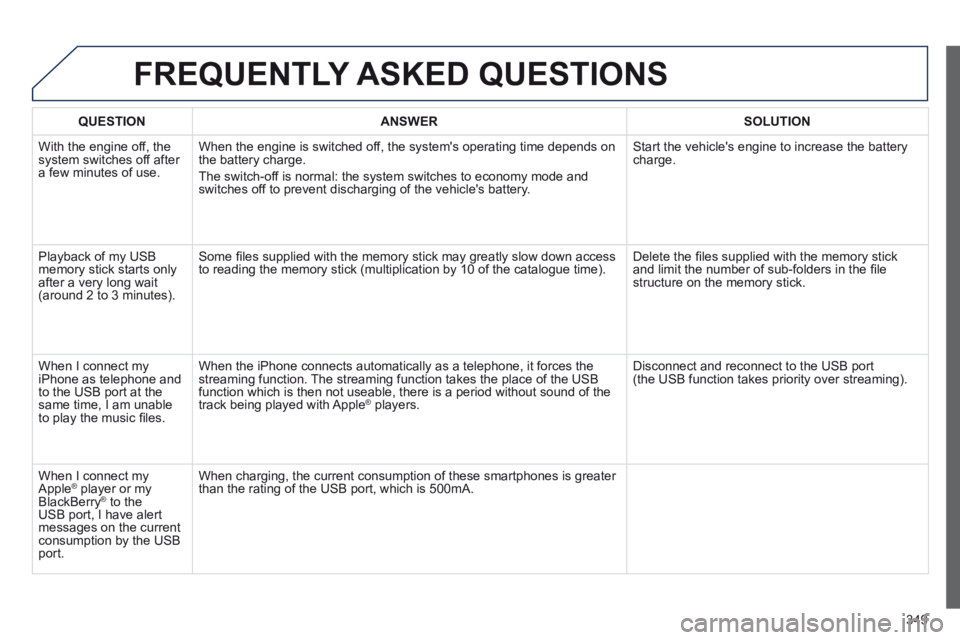
QUESTIONANSWERSOLUTION
With the engine off, the system switches off after a few minutes of use.
When the engine is switched off, the system's operating time depends on the battery charge.
The switch-off is normal: the system switches to economy mode and switches off to prevent discharging of the vehicle's battery.
Start the vehicle's engine to increase the battery charge.
Playback of my USB memory stick starts only after a very long wait (around 2 to 3 minutes).
Some fi les supplied with the memory stick may greatly slow down access to reading the memory stick (multiplication by 10 of the catalogue time\
). Delete the fi les supplied with the memory stick and limit the number of sub-folders in the fi le structure on the memory stick.
When I connect my iPhone as telephone and to the USB port at the same time, I am unable to play the music fi les.
When the iPhone connects automatically as a telephone, it forces the streaming function. The streaming function takes the place of the USB function which is then not useable, there is a period without sound of t\
he track being played with Apple ® players. ® players. ®
Disconnect and reconnect to the USB port (the USB function takes priority over streaming).
When I connect my Apple ® player or my ® player or my ®
BlackBerry ® to the ® to the ®
USB port, I have alert messages on the current consumption by the USB port.
When charging, the current consumption of these smartphones is greater than the rating of the USB port, which is 500mA.
Page 353 of 389
351
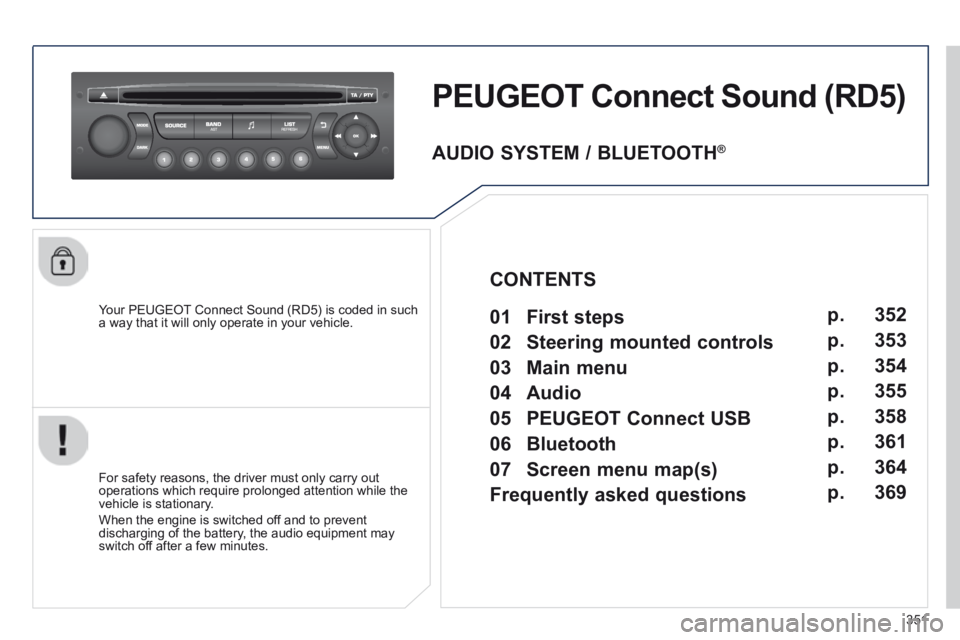
PEUGEOT Connect Sound (RD5)
Your PEUGEOT Connect Sound (RD5) is coded in such a way that it will only operate in your vehicle.
For safety reasons, the driver must only carry out operations which require prolonged attention while the vehicle is stationary.
When the engine is switched off and to prevent discharging of the battery, the audio equipment may switch off after a few minutes.
AUDIO SYSTEM / BLUETOOTH ®
01 First steps
02 Steering mounted controls
03 Main menu
04 Audio
05 PEUGEOT Connect USB
06 Bluetooth
07 Screen menu map(s)
Frequently asked questions p.
p.
p.
p.
p.
p.
p.
p.
352
353
354
355
358
361
364
369
CONTENTS
Page 373 of 389
371
FREQUENTLY ASKED QUESTIONS
QUESTIONANSWERSOLUTION
Sound cut-outs of 1 to 2 seconds in radio mode. During this brief sound cut-out, the RDS searches for any frequency permitting better reception of the station. Deactivate the RDS function if the phenomenon is too frequent and always on the same route.
With the engine off, the audio equipment switches off after a few minutes of use.
When the engine is switched off, the audio equipment operating time depends on the battery charge.
The switch-off is normal: the audio equipment switches to economy mode and switches off to prevent discharging of the vehicle's battery.
Start the vehicle's engine to increase the battery charge.
The message "the audio system is overheated" appears on the display.
In order to protect the installation if the surrounding temperature is t\
oo high, the audio equipment switches to an automatic thermal protection mode leading to a reduction of the volume or stopping of the playing of \
the CD.
Switch the audio system off for a few minutes to allow the system to cool.