ECO mode PEUGEOT 308 2014 User Guide
[x] Cancel search | Manufacturer: PEUGEOT, Model Year: 2014, Model line: 308, Model: Peugeot 308 2014Pages: 389, PDF Size: 22.92 MB
Page 48 of 389
Multifunction screens
46
Date and time Languages
Once the "Languages" menu has been selected, you can change the language used by the display.
Units
Once the "Units" menu has been selected, you can change the units of the following parameters: - temperature (°C or °F), - fuel consumption (l/100 km, mpg or km/l).
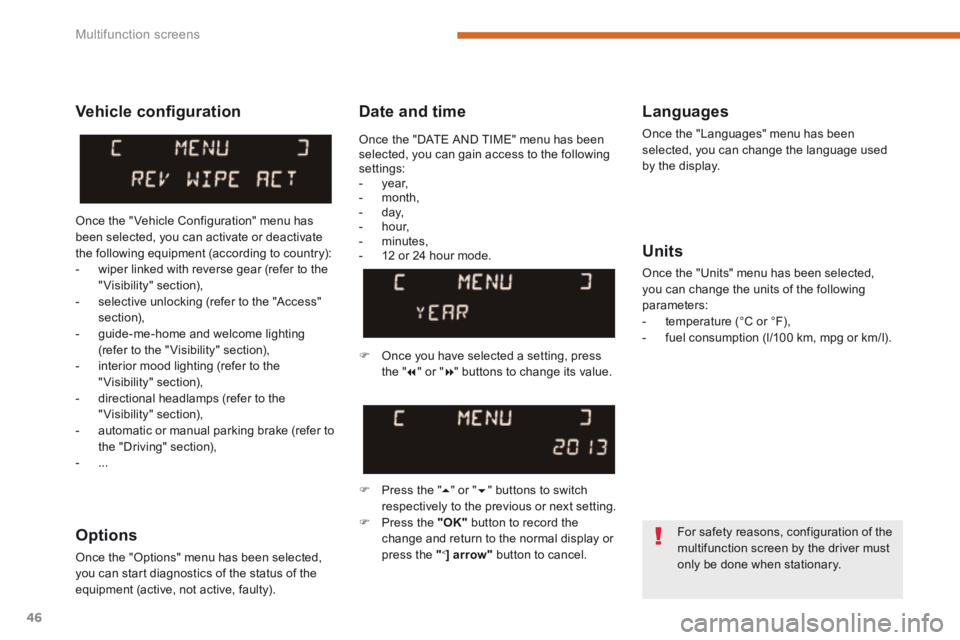
Once you have selected a setting, press t h e " " or " " buttons to change its value.
Press the " " or " " buttons to switch respectively to the previous or next setting. Press the "OK" button to record the
change and return to the normal display or press the " < ] arrow" button to cancel.
Vehicle confi guration
Once the " Vehicle Configuration" menu has been selected, you can activate or deactivate the following equipment (according to country): - wiper linked with reverse gear (refer to the "Visibility" section), - selective unlocking (refer to the "Access" section), - guide-me-home and welcome lighting (refer to the " Visibility" section), - interior mood lighting (refer to the "Visibility" section), - directional headlamps (refer to the "Visibility" section),
- automatic or manual parking brake (refer to the "Driving" section), - ...
Options
Once the "Options" menu has been selected, you can start diagnostics of the status of the equipment (active, not active, faulty).
For safety reasons, configuration of the multifunction screen by the driver must only be done when stationary.
Once the "DATE AND TIME" menu has been selected, you can gain access to the following settings: - year, - month, - day, - hour, - minutes, - 12 or 24 hour mode.
Page 51 of 389
2
Multifunction screens49
Display confi guration
Once this menu has been selected, you have access to the following settings: - brightness-video setting, - date and time setting,
- selection of the units.
Adjusting the date and time Press the " " or " " button to select the "Display configuration" menu, then the "OK" button. Press the " " or " " button, to select the "Adjust date and time" line, then on the "OK" button. Press the " " or " " button to select the setting to modify. Conform by pressing the "OK" button then adjust the setting and confirm again to save the modification.
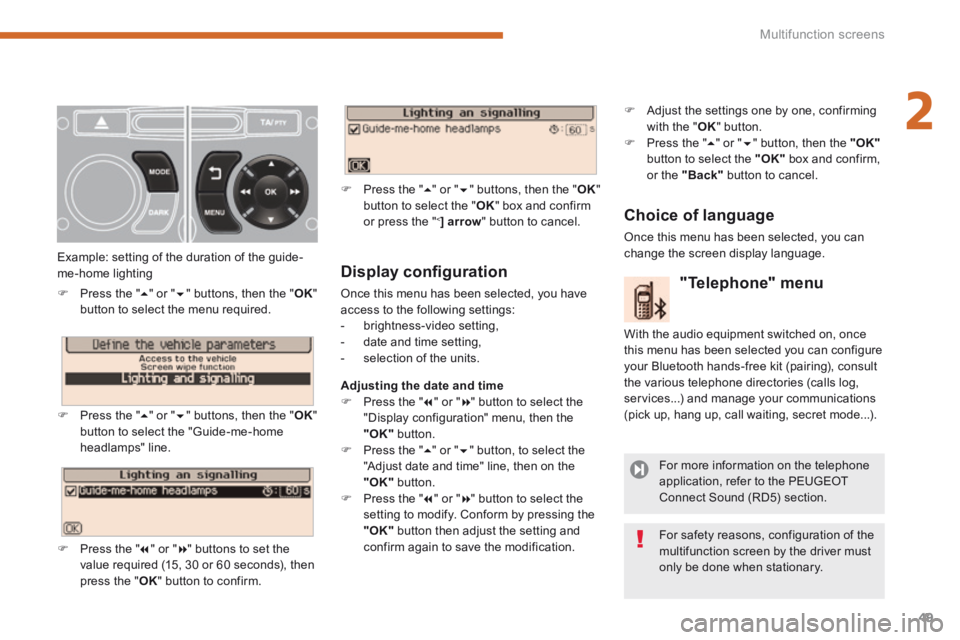
Example: setting of the duration of the guide-me-home lighting
Press the " " or " " buttons, then the " OK " button to select the menu required.
Press the " " or " " buttons, then the " OK " button to select the "Guide-me-home headlamps" line.
Press the " " or " " buttons to set the value required (15, 30 or 60 seconds), then press the " OK " button to confirm.
Press the " " or " " buttons, then the " OK " button to select the " OK " box and confirm or press the " < ] arrow " button to cancel.
"Telephone" menu
With the audio equipment switched on, once this menu has been selected you can configure your Bluetooth hands-free kit (pairing), consult the various telephone directories (calls log, services...) and manage your communications (pick up, hang up, call waiting, secret mode...).
For more information on the telephone application, refer to the PEUGEOT Connect Sound (RD5) section.
For safety reasons, configuration of the multifunction screen by the driver must only be done when stationary.
Choice of language
Once this menu has been selected, you can change the screen display language.
Adjust the settings one by one, confirming with the " OK " button. Press the " " or " " button, then the "OK"button to select the "OK" box and confirm, or the "Back" button to cancel.
Page 53 of 389
2
Multifunction screens51
"SETUP" menu (PEUGEOT Connect Navigation (RT6))
Press the "SETUP" button for access to the "SETUP" menu. This allows you to select from the following functions: - "Languages", - "Date and time", - "Display", - " Vehicle parameters", - "Units", - "System".
"SETUP" menu (PEUGEOT Connect
Media Navigation (NG4 3D))
Press the "SETUP" menu for access to the "SETUP" menu . It allows you to adjust settings for the following functions: - "Languages and voice functions" - "Date and time", - "Display screen",
- "Units", - "System parameters".
Languages (PEUGEOT Connect Navigation (RT6))
This menu allows you to select the language used by the display.
Languages and voice functions (PEUGEOT Connect Media Navigation (NG4 3D))
This menu allows you to: - select the language used by the display, - select the settings for voice recognition (on/off, instructions on use, personal voice training...), - adjust the volume of the voice synthesiser.
Date and time
Press "SETUP". Select "Display configuration" and confirm. Select "Adjust date and time" and confirm. Select "Synchronise minutes with GPS" for the adjustment of minutes to be done automatically by satellite reception. Select the setting to modify. Conform by pressing "OK", then adjust the setting and confirm again. Adjust the settings one by one. Select "OK" in the screen then confirm to save the settings.
Display
This menu allows you to set the brightness of the screen, the screen colour scheme and the colour of the map (day/night or auto mode).
System parameters
This menu allows you to restore the factory configuration, display the software version and activate scrolling text.
For safety reasons, configuration of the multifunction screen by the driver must only be done when stationary.
* According to country.
Units
This menu allows you to select the units: temperature (°C or °F) and fuel consumption (km/l, l/100 or mpg).
Vehicle parameters (PEUGEOT Connect Navigation (RT6))
This menu allows you to activate or deactivate certain driving and comfort equipment * : - wiper linked with reverse gear (refer to the "Visibility" section), - selective unlocking (refer to the "Access" section), - guide-me-home and welcome lighting (refer to the " Visibility" section), - interior mood lighting (refer to the "Visibility" section), - directional headlamps (refer to the "Visibility" section), - automatic or manual parking brake (refer to the "Driving" section), - ...
Page 58 of 389
Multifunction screens
56
Trip computer, a few definitions
When the range falls below 20 miles (30 km), dashes are displayed. After filling with at least
5 litres of fuel, the range is recalculated and is displayed when it exceeds 60 miles (100 km).
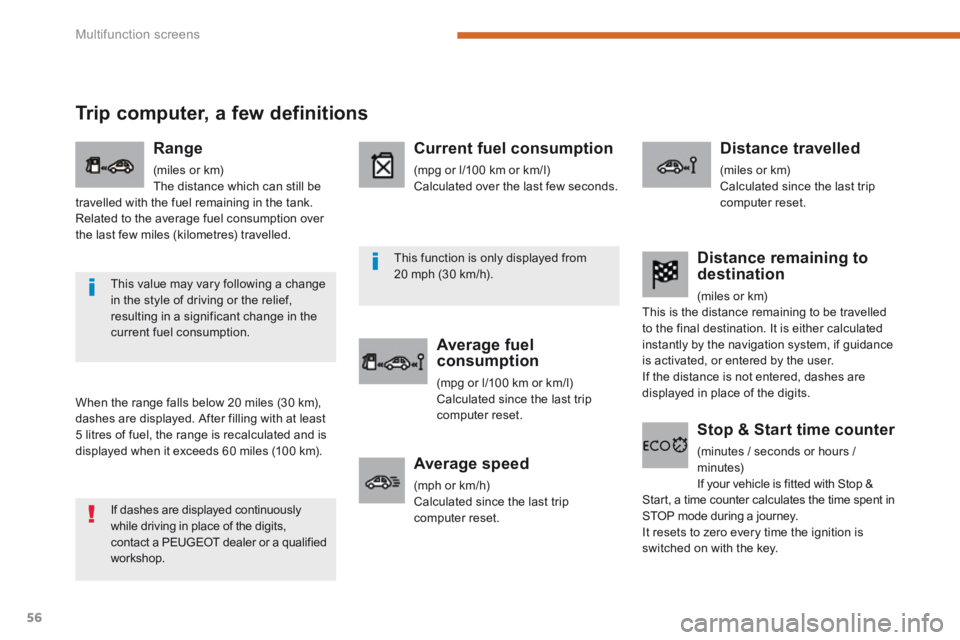
Range
(miles or km) The distance which can still be travelled with the fuel remaining in the tank. Related to the average fuel consumption over the last few miles (kilometres) travelled.
Current fuel consumption
(mpg or l/100 km or km/l) Calculated over the last few seconds.
Average fuel consumption
(mpg or l/100 km or km/l) Calculated since the last trip computer reset.
Distance travelled
(miles or km) Calculated since the last trip computer reset.
Average speed
(mph or km/h) Calculated since the last trip computer reset.
Distance remaining to destination
(miles or km) This is the distance remaining to be travelled to the final destination. It is either calculated instantly by the navigation system, if guidance is activated, or entered by the user. If the distance is not entered, dashes are displayed in place of the digits.
Stop & Start time counter
(minutes / seconds or hours / minutes) If your vehicle is fitted with Stop & Start, a time counter calculates the time spent in STOP mode during a journey. It resets to zero every time the ignition is switched on with the key.
If dashes are displayed continuously while driving in place of the digits, contact a PEUGEOT dealer or a qualified workshop.
This value may vary following a change in the style of driving or the relief, resulting in a significant change in the current fuel consumption.
This function is only displayed from 20 mph (30 km/h).
Page 64 of 389
Comfort
62
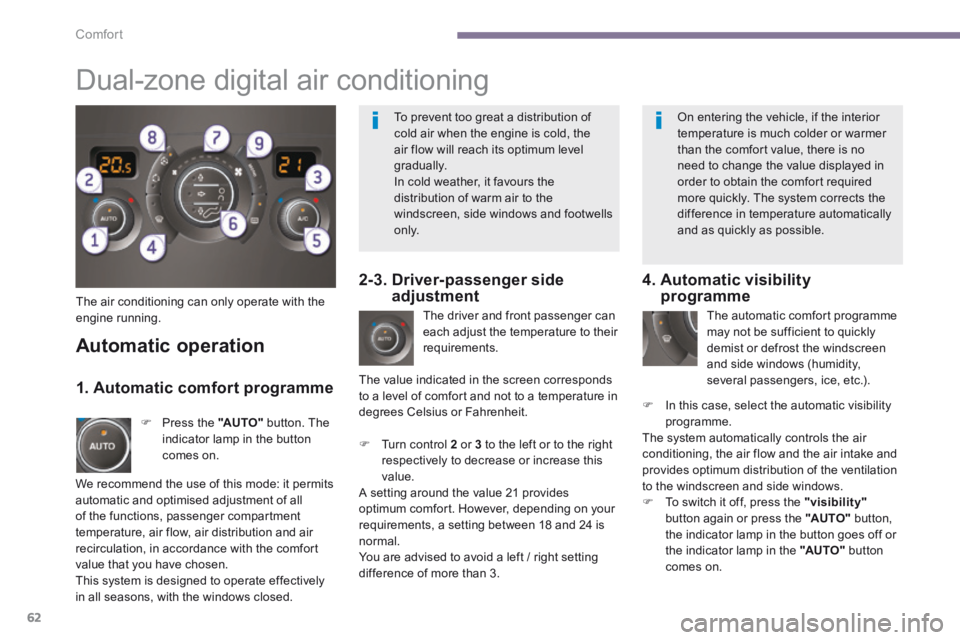
The air conditioning can only operate with the engine running. The driver and front passenger can each adjust the temperature to their requirements.
Turn control 2 or 3 to the left or to the right respectively to decrease or increase this value. A setting around the value 21 provides optimum comfort. However, depending on your requirements, a setting between 18 and 24 is normal. You are advised to avoid a left / right setting difference of more than 3.
4. Automatic visibility programme
The automatic comfort programme may not be sufficient to quickly demist or defrost the windscreen and side windows (humidity, several passengers, ice, etc.).
In this case, select the automatic visibility programme. The system automatically controls the air conditioning, the air flow and the air intake and provides optimum distribution of the ventilation to the windscreen and side windows. To switch it off, press the "visibility"button again or press the "AUTO" button, the indicator lamp in the button goes off or the indicator lamp in the "AUTO" button comes on.
Automatic operation
Press the "AUTO" button. The indicator lamp in the button comes on.
2-3. Driver-passenger side adjustment
Dual-zone digital air conditioning
We recommend the use of this mode: it permits automatic and optimised adjustment of all of the functions, passenger compartment temperature, air flow, air distribution and air recirculation, in accordance with the comfort value that you have chosen. This system is designed to operate effectively in all seasons, with the windows closed.
The value indicated in the screen corresponds to a level of comfort and not to a temperature in degrees Celsius or Fahrenheit.
1. Automatic comfort programme
To prevent too great a distribution of cold air when the engine is cold, the air flow will reach its optimum level gradually. In cold weather, it favours the distribution of warm air to the windscreen, side windows and footwells o n l y.
On entering the vehicle, if the interior temperature is much colder or warmer than the comfort value, there is no need to change the value displayed in order to obtain the comfort required more quickly. The system corrects the difference in temperature automatically and as quickly as possible.
Page 65 of 389
3
Comfort63
Manual operation
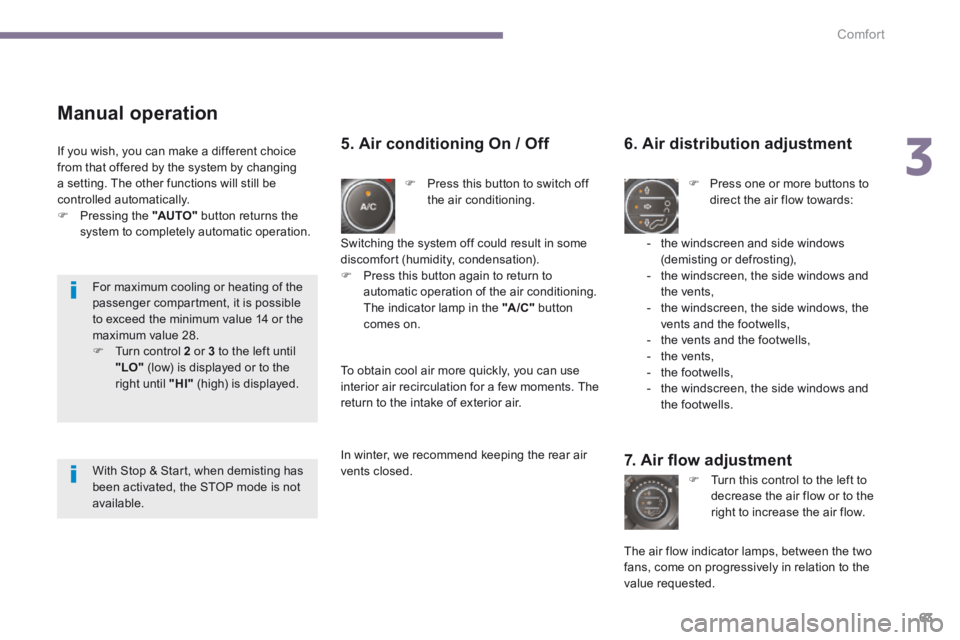
Press this button to switch off the air conditioning.
6. Air distribution adjustment
Press one or more buttons to direct the air flow towards:
7. Air fl ow adjustment
Turn this control to the left to decrease the air flow or to the right to increase the air flow.
5. Air conditioning On / Off
- the windscreen and side windows (demisting or defrosting), - the windscreen, the side windows and the vents, - the windscreen, the side windows, the vents and the footwells, - the vents and the footwells, - the vents, - the footwells, - the windscreen, the side windows and the footwells.
The air flow indicator lamps, between the two fans, come on progressively in relation to the value requested.
Switching the system off could result in some discomfort (humidity, condensation). Press this button again to return to automatic operation of the air conditioning. The indicator lamp in the "A /C " button comes on.
If you wish, you can make a different choice from that offered by the system by changing a setting. The other functions will still be controlled automatically. Pressing the "AUTO" button returns the
system to completely automatic operation.
To obtain cool air more quickly, you can use interior air recirculation for a few moments. The return to the intake of exterior air.
In winter, we recommend keeping the rear air vents closed.
For maximum cooling or heating of the passenger compartment, it is possible to exceed the minimum value 14 or the maximum value 28. Turn control 2 or 3 to the left until "LO" (low) is displayed or to the right until "HI" (high) is displayed.
With Stop & Start, when demisting has been activated, the STOP mode is not available.
Page 69 of 389
3
Comfort67
The electrical functions of the driver's seat are active approximately one minute after opening the front door. They are deactivated approximately one minute after the ignition is switched off and in economy mode. To reactivate them, switch on the ignition.
Before moving the seat backwards, ensure that there is nothing that might prevent the full travel of the seat, so as to avoid the risk of of jamming the seat caused by the presence of objects
on the floor behind the seat or rear passengers. If the seat jams, stop the movement immediately.
Head restraint height and
angle adjustment
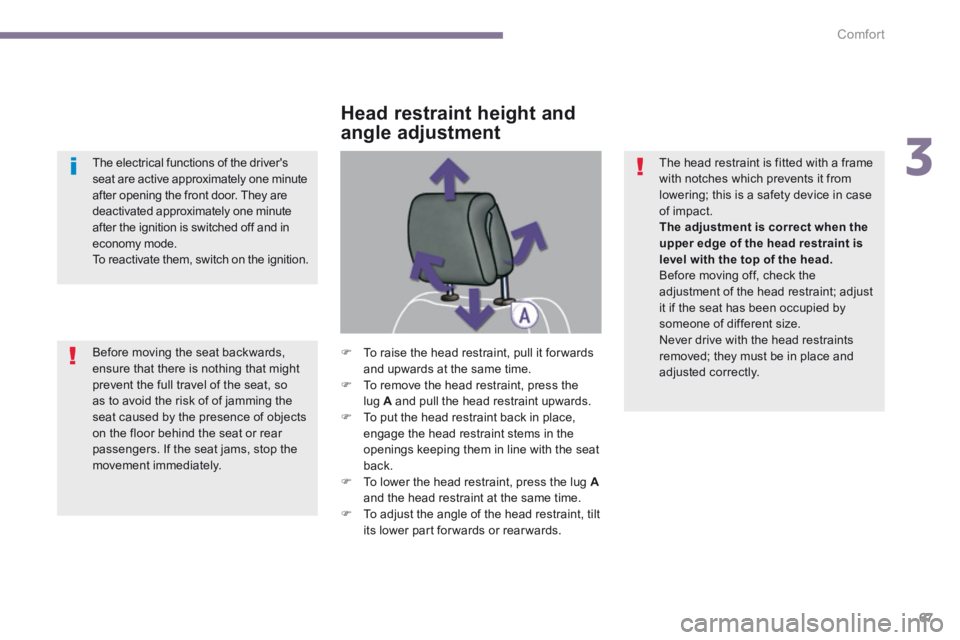
To raise the head restraint, pull it for wards and upwards at the same time. To remove the head restraint, press the lug A and pull the head restraint upwards. To put the head restraint back in place, engage the head restraint stems in the openings keeping them in line with the seat
back. To lower the head restraint, press the lug Aand the head restraint at the same time. To adjust the angle of the head restraint, tilt its lower part forwards or rearwards.
The head restraint is fitted with a frame with notches which prevents it from lowering; this is a safety device in case of impact. The adjustment is correct when the upper edge of the head restraint is level with the top of the head. Before moving off, check the adjustment of the head restraint; adjust it if the seat has been occupied by someone of different size. Never drive with the head restraints removed; they must be in place and adjusted correctly.
Page 80 of 389
Access
78
Electronic engine immobiliser
The key contains an electronic chip which has a special code. When the ignition is switched on, this code must be recognised in order for starting to be possible. This electronic engine immobiliser locks the engine management system a few minutes after the ignition is switched off and prevents starting of the engine by anyone who does not have the key.
Anti-theft protection
In the event of a fault, you are informed by illumination of this warning lamp, an audible signal and a message in the screen. In this case, your vehicle will not start; contact a PEUGEOT dealer as soon as possible. Keep safely the label attached to the keys given to you on acquisition of the vehicle.
Starting the vehicle
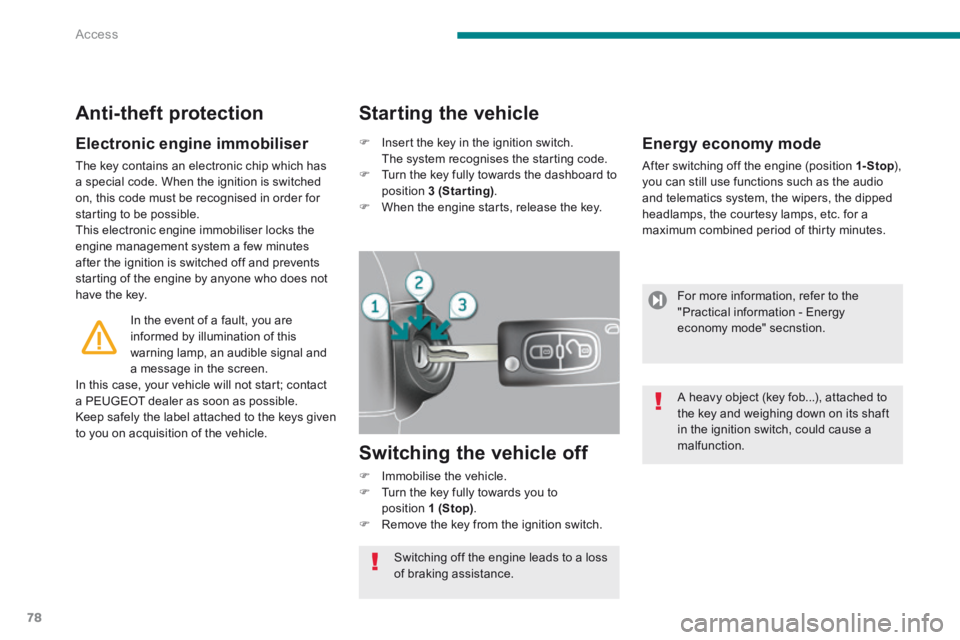
Insert the key in the ignition switch. The system recognises the starting code. Turn the key fully towards the dashboard to position 3 (Starting) . When the engine starts, release the key.
Switching the vehicle off
Immobilise the vehicle. Turn the key fully towards you to position 1 (Stop) . Remove the key from the ignition switch.
Switching off the engine leads to a loss of braking assistance.
Energy economy mode
After switching off the engine (position 1- Stop ), 1- Stop ), 1- Stopyou can still use functions such as the audio and telematics system, the wipers, the dipped headlamps, the courtesy lamps, etc. for a maximum combined period of thirty minutes.
For more information, refer to the "Practical information - Energy economy mode" secnstion.
A heavy object (key fob...), attached to the key and weighing down on its shaft in the ignition switch, could cause a malfunction.
Page 85 of 389
4
Access83
Electric windows
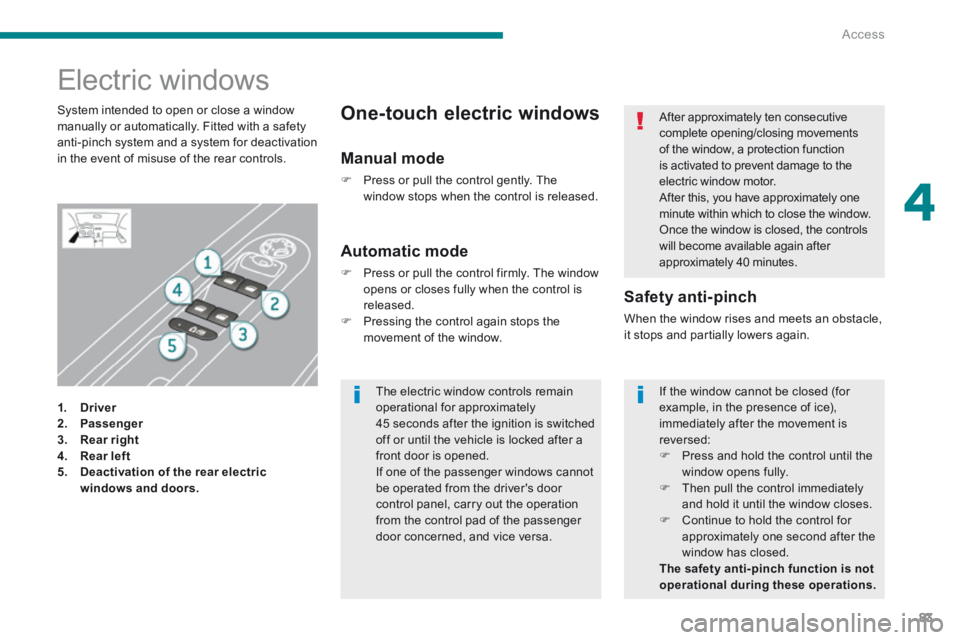
1. Driver2. Passenger
3. Rear right4. Rear left5. Deactivation of the rear electric windows and doors.
Safety anti-pinch
When the window rises and meets an obstacle, it stops and partially lowers again.
Automatic mode
Press or pull the control firmly. The window opens or closes fully when the control is released. Pressing the control again stops the movement of the window.
One-touch electric windows System intended to open or close a window manually or automatically. Fitted with a safety anti-pinch system and a system for deactivation in the event of misuse of the rear controls. Manual mode
Press or pull the control gently. The window stops when the control is released.
After approximately ten consecutive complete opening/closing movements of the window, a protection function is activated to prevent damage to the electric window motor. After this, you have approximately one minute within which to close the window. Once the window is closed, the controls will become available again after approximately 40 minutes.
The electric window controls remain operational for approximately 45 seconds after the ignition is switched off or until the vehicle is locked after a front door is opened. If one of the passenger windows cannot be operated from the driver's door control panel, carry out the operation from the control pad of the passenger door concerned, and vice versa.
If the window cannot be closed (for example, in the presence of ice), immediately after the movement is reversed: Press and hold the control until the window opens fully. Then pull the control immediately and hold it until the window closes. Continue to hold the control for approximately one second after the window has closed. The safety anti-pinch function is not operational during these operations.
Page 99 of 389
5
Visibility97
Switching off the lighting when switching off the ignition
When the ignition is switched off, all of the lamps switch off immediately, except for the dipped beam headlamps if automatic guide-me-home lighting is activated.
In good or rainy weather, by both day and night, the front foglamps and the rear foglamps are prohibited. In these situations, the power of their beams may dazzle other drivers. They should
only be used in fog or falling snow. In these weather conditions, you should switch on the foglamps and dipped beam headlamps manually, as the sunshine sensor may detect sufficient light. Do not forget to switch off the front and rear foglamps when they are no longer necessary.
Switching on the lighting when switching on the ignition
To reactivate the lighting control stalk, turn the ring A to position "0" - lighting off, then to the position of your choice. If the lighting is switched on manually after switching off the ignition, there is an audible signal when a front door is opened to warn the driver that they have forgotten to switch off the vehicle's lighting, with the ignition off. They switch off automatically after a period which depends on the state of charge of the battery (entry to energy economy mode).