bluetooth PEUGEOT 308 2014 User Guide
[x] Cancel search | Manufacturer: PEUGEOT, Model Year: 2014, Model line: 308, Model: Peugeot 308 2014Pages: 389, PDF Size: 22.92 MB
Page 283 of 389
281
08
2ABC3DEF5JKL4GHI6MNO8TUV7PQR S9WXYZ0*#
1RADIO MEDIA NA
V TRAFFIC
SETUPADDR
BOOK
2ABC3DEF5JKL4GHI6MNO8TUV7PQR S9WXYZ0*#
1RADIO MEDIA NA
V TRAFFIC
SETUPADDR
BOOK
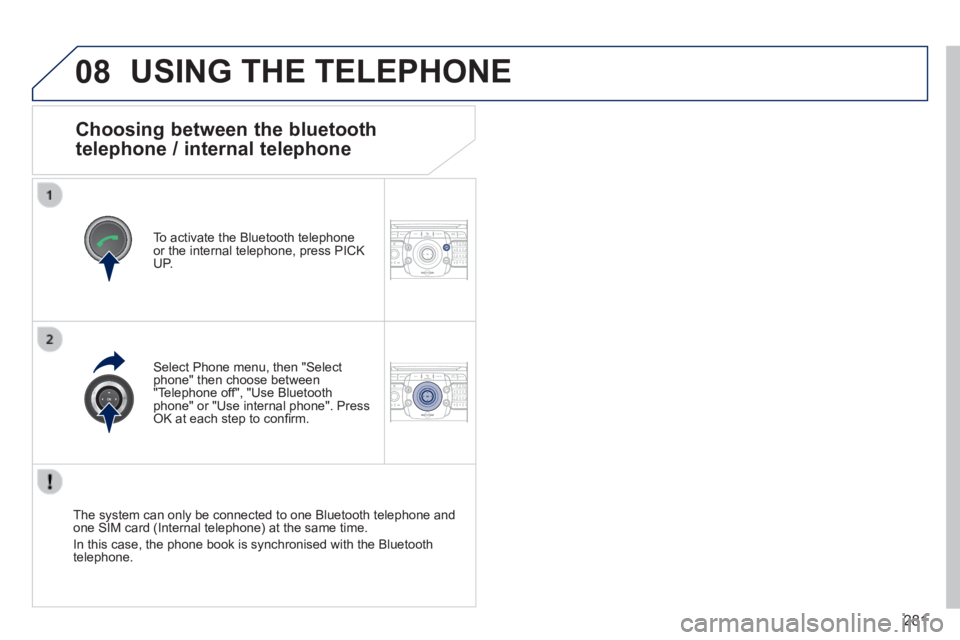
Choosing between the bluetooth
telephone / internal telephone
To activate the Bluetooth telephone or the internal telephone, press PICK UP.
USING THE TELEPHONE
Select Phone menu, then "Select phone" then choose between "Telephone off", "Use Bluetooth phone" or "Use internal phone". Press OK at each step to confi rm.
The system can only be connected to one Bluetooth telephone and one SIM card (Internal telephone) at the same time.
In this case, the phone book is synchronised with the Bluetooth telephone.
Page 284 of 389
282
08
2ABC3DEF5JKL4GHI6MNO8TUV7PQR S9WXYZ0*#
1RADIO MEDIA NA
V TRAFFIC
SETUPADDR
BOOK
2ABC3DEF5JKL4GHI6MNO8TUV7PQR S9WXYZ0*#
1RADIO MEDIA NA
V TRAFFIC
SETUPADDR
BOOK
2ABC3DEF5JKL4GHI6MNO8TUV7PQR S9WXYZ0*#
1RADIO MEDIA NA
V TRAFFIC
SETUPADDR
BOOK
2ABC3DEF5JKL4GHI6MNO8TUV7PQR S9WXYZ0*#
1RADIO MEDIA NA
V TRAFFIC
SETUPADDR
BOOK
2ABC3DEF5JKL4GHI6MNO8TUV7PQR S9WXYZ0*#
1RADIO MEDIA NA
V TRAFFIC
SETUPADDR
BOOK2ABC3DEF5JKL4GHI6MNO8TUV7PQR S9WXYZ0*#
1RADIO MEDIA NA
V TRAFFIC
SETUPADDR
BOOK
* The services available via the telephone depend on the network, the SIM \
card and the compatibility of the Bluetooth equipment used. Refer to you\
r telephone's manual and your operator to check which services you have access to.
USING THE TELEPHONE
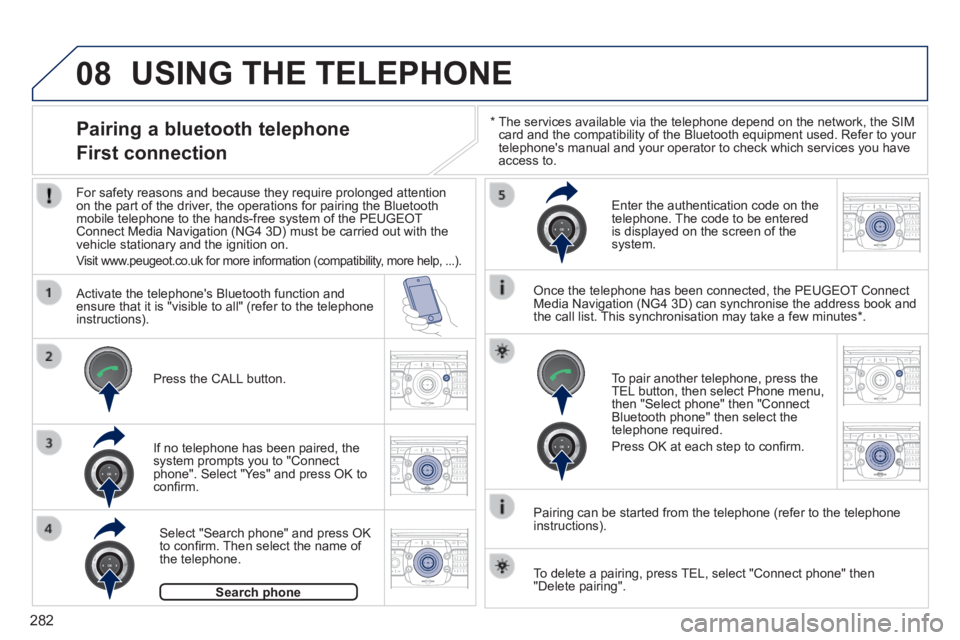
Pairing a bluetooth telephone
First connection
For safety reasons and because they require prolonged attention on the part of the driver, the operations for pairing the Bluetooth mobile telephone to the hands-free system of the PEUGEOT Connect Media Navigation (NG4 3D) must be carried out with the vehicle stationary and the ignition on.
Visit www.peugeot.co.uk for more information (compatibility, more help, ...).
Activate the telephone's Bluetooth function and ensure that it is "visible to all" (refer to the telephone instructions).
If no telephone has been paired, the system prompts you to "Connect phone". Select "Yes" and press OK to confi rm.
Enter the authentication code on the telephone. The code to be entered is displayed on the screen of the system.
To pair another telephone, press the TEL button, then select Phone menu, then "Select phone" then "Connect Bluetooth phone" then select the telephone required.
Press OK at each step to confi rm.
Once the telephone has been connected, the PEUGEOT Connect Media Navigation (NG4 3D) can synchronise the address book and the call list. This synchronisation may take a few minutes * .
Pairing can be started from the telephone (refer to the telephone instructions).
Press the CALL button.
Select "Search phone" and press OK to confi rm. Then select the name of the telephone.
Search phoneSearch phone
To delete a pairing, press TEL, select "Connect phone" then "Delete pairing".
Page 285 of 389

283
08
2ABC3DEF5JKL4GHI6MNO8TUV7PQR S9WXYZ0*#
1RADIO MEDIA NA
V TRAFFIC
SETUPADDR
BOOK
* The services available via the telephone depend on the network, the SIM \
card and the compatibility of the Bluetooth equipment used. Refer to your tel\
ephone's manual and your operator to check which services you have access to. A list of mobile telephones which offer the best range of services is available from dealers.
USING THE TELEPHONE
Connecting a bluetooth telephone
For safety reasons and because they require prolonged attention on the part of the driver, the operations for pairing the Bluetooth mobile telephone to the hands-free system of the PEUGEOT Connect Media Navigation (NG4 3D) must be carried out with the vehicle stationary and the ignition on.
Activate the telephone's Bluetooth function and ensure that it is visible to all.
Once the telephone has been connected, the PEUGEOT Connect Media Navigation (NG4 3D) can synchronise the address book and the call list. This synchronisation may take a few minutes * .
Press the PICK UP button.
The list of telephones connected previously (4 maximum) appears in the multifunction screen. Select the telephone required then select "Connect phone" for a new connection. Select "Delete pairing" to cancel the connection to the telephone.
Page 286 of 389
284
08
2ABC3DEF5JKL4GHI6MNO8TUV7PQRS9WXYZ0*#
1
2ABC3DEF5JKL4GHI6MNO8TUV7PQR S9WXYZ0*#
1RADIO MEDIA NA
V TRAFFIC
SETUPADDR
BOOK
2ABC3DEF5JKL4GHI6MNO8TUV7PQR S9WXYZ0*#
1NAV TRAFFICADDR
BOOKSETUP2ABC3DEF5JKL4GHI6MNO8TUV7PQRS9WXYZ0*#
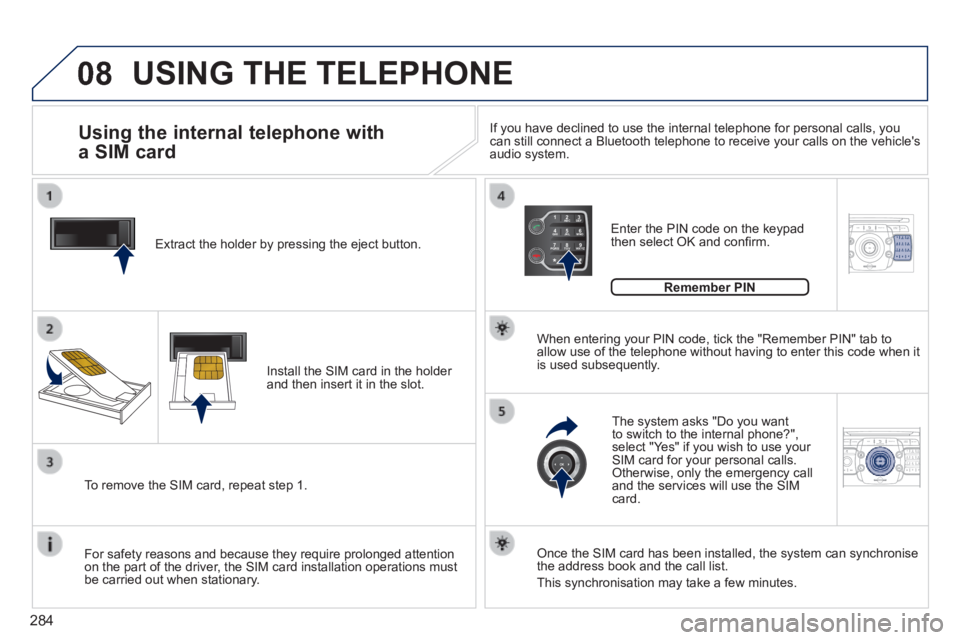
1 Extract the holder by pressing the eject button.
Install the SIM card in the holder and then insert it in the slot.
To remove the SIM card, repeat step 1.
For safety reasons and because they require prolonged attention on the part of the driver, the SIM card installation operations must be carried out when stationary.
Enter the PIN code on the keypad then select OK and confi rm.
The system asks "Do you want to switch to the internal phone?", select "Yes" if you wish to use your SIM card for your personal calls. Otherwise, only the emergency call and the services will use the SIM card.
Remember PIN
When entering your PIN code, tick the "Remember PIN" tab to allow use of the telephone without having to enter this code when it is used subsequently.
Using the internal telephone with
a SIM card
USING THE TELEPHONE
Once the SIM card has been installed, the system can synchronise the address book and the call list.
This synchronisation may take a few minutes.
If you have declined to use the internal telephone for personal calls, y\
ou can still connect a Bluetooth telephone to receive your calls on the veh\
icle's audio system.
Page 290 of 389
288
ADDR
BOOK
Recalculate3
Fast route 4
Short route 4
Optimized route 4
POI nearby
POI search 2
3
POI near destination3
POI in city3
POI in country3
POI near route3
Route type
Route options 2
3
POI near destination 4
Short route 4
Optimized route 4
Subscr. service 4
Route dynamics
Settings 2
3
Traffi c independent 4
Semi-dynamic 4
Dynamic 4
Avoidance criteria3
Avoid motorways 4
Avoid toll roads 4
Avoid tunnels 4
Avoid ferries 4
Recalculate3
"Address book" Menu
Create new entry
1
2
Show memory status 2
Export address book 2
Delete all voice entries 2
Delete all entries 2
Delete folder "My Addresses" 2
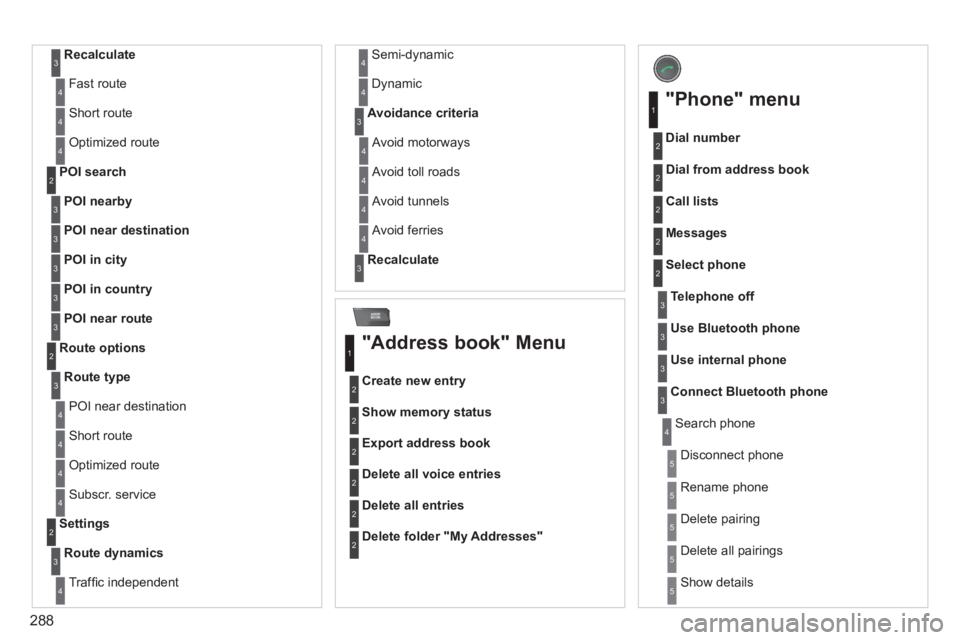
"Phone" menu
Dial number
1
2
Dial from address book 2
Call lists 2
Messages 2
Select phone 2
Search phone 4
Telephone off3
Use Bluetooth phone3
Use internal phone3
Connect Bluetooth phone3
Disconnect phone 5
Rename phone 5
Delete pairing 5
Delete all pairings 5
Show details 5
Page 296 of 389
294
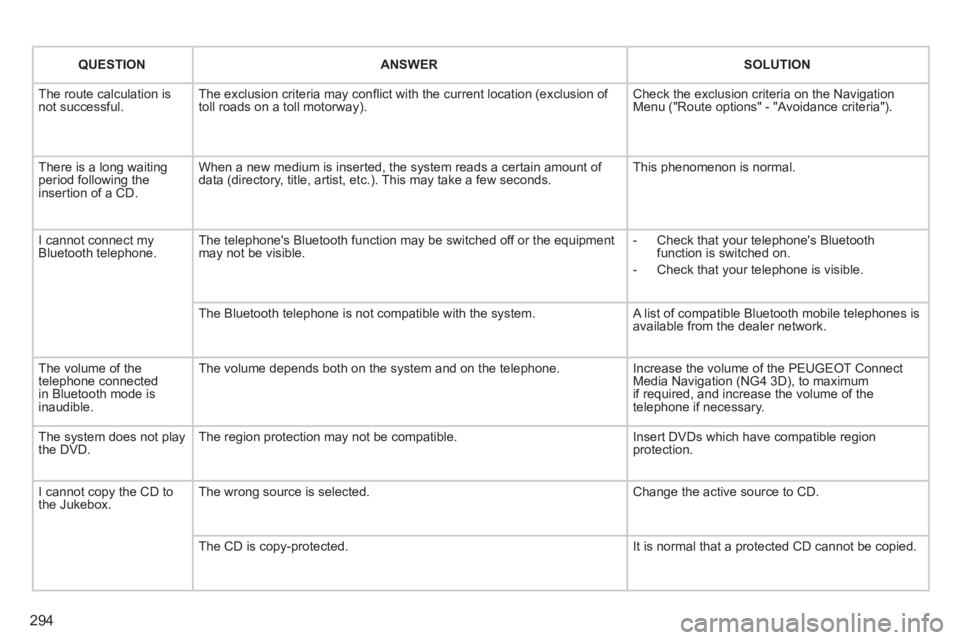
QUESTIONANSWERSOLUTION
The route calculation is not successful. The exclusion criteria may confl ict with the current location (exclusion of toll roads on a toll motorway). Check the exclusion criteria on the Navigation Menu ("Route options" - "Avoidance criteria").
There is a long waiting period following the insertion of a CD.
When a new medium is inserted, the system reads a certain amount of data (directory, title, artist, etc.). This may take a few seconds. This phenomenon is normal.
I cannot connect my Bluetooth telephone. The telephone's Bluetooth function may be switched off or the equipment may not be visible. - Check that your telephone's Bluetooth function is switched on.
- Check that your telephone is visible.
The Bluetooth telephone is not compatible with the system. A list of compatible Bluetooth mobile telephones is available from the dealer network.
The volume of the telephone connected in Bluetooth mode is inaudible.
The volume depends both on the system and on the telephone. Increase the volume of the PEUGEOT Connect Media Navigation (NG4 3D), to maximum if required, and increase the volume of the telephone if necessary.
The system does not play the DVD. The region protection may not be compatible. Insert DVDs which have compatible region protection.
I cannot copy the CD to the Jukebox. The wrong source is selected. Change the active source to CD.
The CD is copy-protected. It is normal that a protected CD cannot be copied.
Page 297 of 389
295
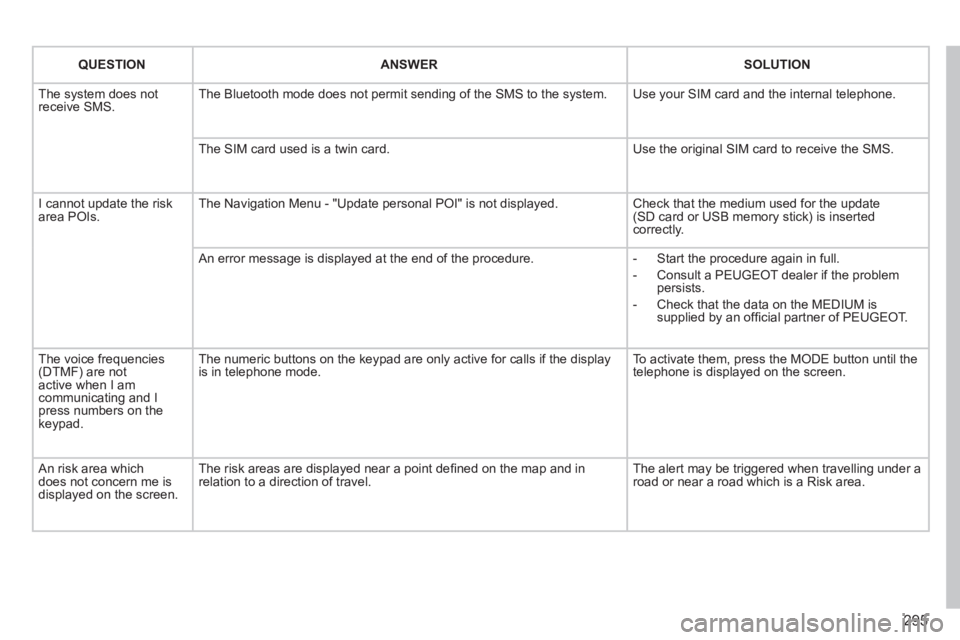
QUESTIONANSWERSOLUTION
The system does not receive SMS. The Bluetooth mode does not permit sending of the SMS to the system. Use your SIM card and the internal telephone.
The SIM card used is a twin card. Use the original SIM card to receive the SMS.
I cannot update the risk area POIs. The Navigation Menu - "Update personal POI" is not displayed. Check that the medium used for the update (SD card or USB memory stick) is inserted correctly.
An error message is displayed at the end of the procedure. - Start the procedure again in full.
- Consult a PEUGEOT dealer if the problem persists.
- Check that the data on the MEDIUM is supplied by an offi cial partner of PEUGEOT.
The voice frequencies (DTMF) are not active when I am communicating and I press numbers on the keypad.
The numeric buttons on the keypad are only active for calls if the displ\
ay is in telephone mode. To activate them, press the MODE button until the telephone is displayed on the screen.
An risk area which does not concern me is displayed on the screen.
The risk areas are displayed near a point defi ned on the map and in relation to a direction of travel. The alert may be triggered when travelling under a road or near a road which is a Risk area.
Page 299 of 389
297
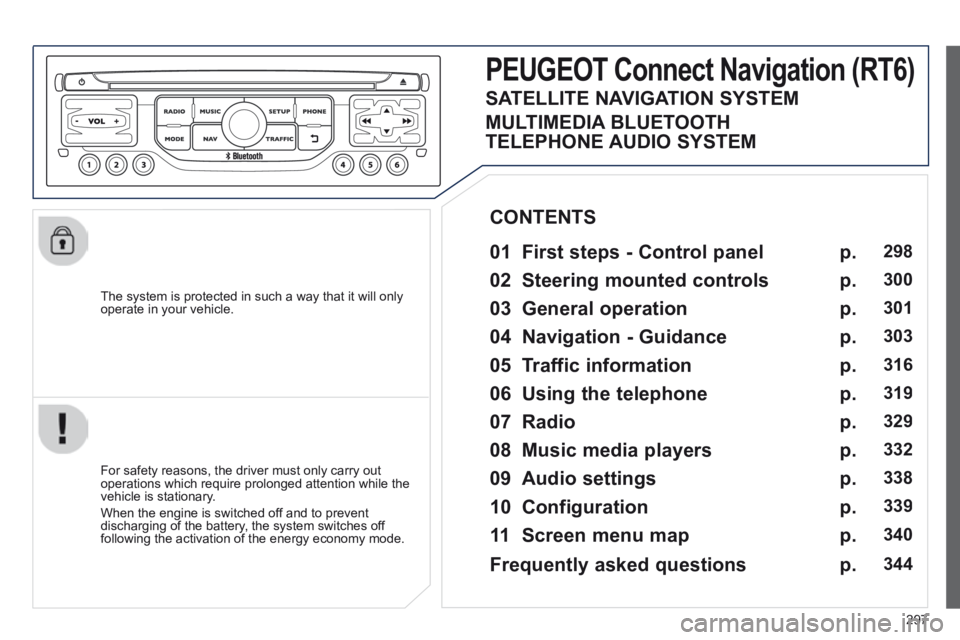
The system is protected in such a way that it will only operate in your vehicle.
PEUGEOT Connect Navigation (RT6)
01 First steps - Control panel
For safety reasons, the driver must only carry out operations which require prolonged attention while the vehicle is stationary.
When the engine is switched off and to prevent discharging of the battery, the system switches off following the activation of the energy economy mode.
CONTENTS
02 Steering mounted controls
03 General operation
04 Navigation - Guidance
05 Traffic information
06 Using the telephone
07 Radio
08 Music media players
09 Audio settings
10 Configuration
11 Screen menu map
p.
p.
p.
p.
p.
p.
p.
p.
p.
p.
p.
298
300
301
303
316
319
329
332
338
339
340
SATELLITE NAVIGATION SYSTEM
MULTIMEDIA BLUETOOTH
TELEPHONE AUDIO SYSTEM
Frequently asked questions p. 344
Page 321 of 389
06
319
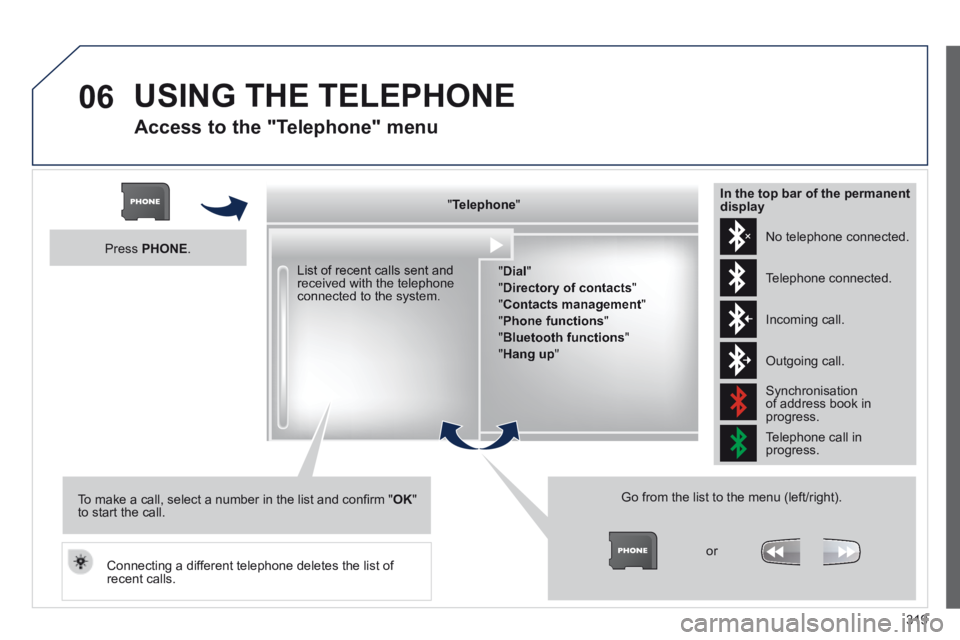
Access to the "Telephone" menu
" " " " " " " " " " " " " " " " " " TelephoneTelephoneTelephoneTelephoneTelephoneTelephoneTelephoneTelephoneTelephoneTelephoneTelephoneTelephoneTelephoneTelephoneTelephoneTelephoneTelephoneTelephoneTelephoneTelephoneTelephoneTelephoneTelephone " " " " " " " " " " " " " " " " " "
" Dial "
" Directory of contacts "
" Contacts management "
" Phone functions "
" Bluetooth functions "
" Hang up "
Go from the list to the menu (left/right).
or
List of recent calls sent and received with the telephone connected to the system.
Press PHONE .
To make a call, select a number in the list and confi rm " OK " to start the call.
Connecting a different telephone deletes the list of recent calls.
No telephone connected.
Telephone connected.
Incoming call.
Outgoing call.
Synchronisation of address book in progress.
Telephone call in progress.
In the top bar of the permanent display
USING THE TELEPHONE
Page 322 of 389
06
320
USING THE TELEPHONE
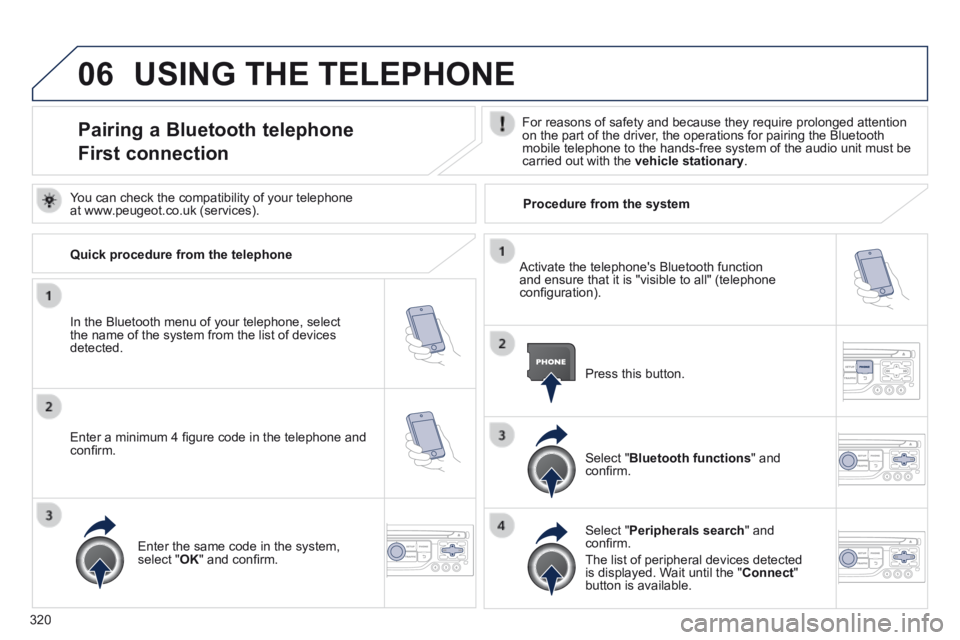
Pairing a Bluetooth telephone
First connection
For reasons of safety and because they require prolonged attention on the part of the driver, the operations for pairing the Bluetooth mobile telephone to the hands-free system of the audio unit must be carried out with the vehicle stationary .
In the Bluetooth menu of your telephone, select the name of the system from the list of devices detected.
Press this button.
Select " Bluetooth functions " and confi rm.
Select " Peripherals search " and confi rm.
The list of peripheral devices detected is displayed. Wait until the " Connect " button is available.
You can check the compatibility of your telephone at www.peugeot.co.uk (services).
Activate the telephone's Bluetooth function and ensure that it is "visible to all" (telephone confi guration).
Quick procedure from the telephone
Enter a minimum 4 fi gure code in the telephone and confi rm.
Enter the same code in the system, select " OK " and confi rm.
Procedure from the system