stop start PEUGEOT 308 2014 Owner's Manual
[x] Cancel search | Manufacturer: PEUGEOT, Model Year: 2014, Model line: 308, Model: Peugeot 308 2014Pages: 389, PDF Size: 22.92 MB
Page 231 of 389
11
Practical information229
12 V battery
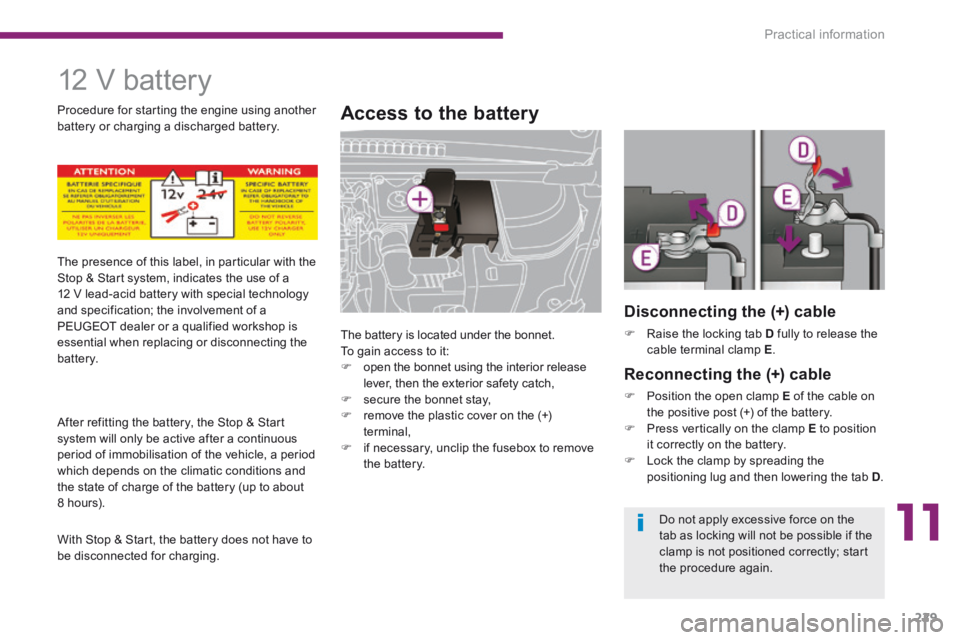
Access to the battery
The battery is located under the bonnet. To gain access to it: open the bonnet using the interior release lever, then the exterior safety catch, secure the bonnet stay, remove the plastic cover on the (+) terminal, if necessary, unclip the fusebox to remove the battery.
The presence of this label, in particular with the Stop & Start system, indicates the use of a 12 V lead-acid battery with special technology and specification; the involvement of a PEUGEOT dealer or a qualified workshop is essential when replacing or disconnecting the battery.
After refitting the battery, the Stop & Start
system will only be active after a continuous period of immobilisation of the vehicle, a period which depends on the climatic conditions and the state of charge of the battery (up to about 8 hours).
With Stop & Start, the battery does not have to be disconnected for charging.
Procedure for starting the engine using another battery or charging a discharged battery.
Disconnecting the (+) cable
Raise the locking tab D fully to release the cable terminal clamp E .
Reconnecting the (+) cable
Position the open clamp E of the cable on the positive post (+) of the battery. Press vertically on the clamp E to position it correctly on the battery. Lock the clamp by spreading the positioning lug and then lowering the tab D .
Do not apply excessive force on the
tab as locking will not be possible if the clamp is not positioned correctly; start the procedure again.
Page 234 of 389
Practical information
232
Exiting economy mode
These functions are reactivated automatically next time the vehicle is driven. To restore the use of these functions immediately, start the engine and let it run for at least 5 minutes.
Load reduction mode Energy economy mode
Switching to economy mode
Once this time has elapsed, a message appears in the screen indicating that the vehicle has switched to economy mode and the active functions are put on standby.
Let the engine run for the duration specified to ensure that the battery charge is sufficient. Do not repeatedly and continuously restart the engine in order to charge the battery. A flat battery prevents the engine from starting (refer to the "Battery" paragraph).
If the telephone is being used at this time: - it will be maintained for 5 minutes with the hands-free kit of your PEUGEOT Connect Sound or PEUGEOT Connect Navigation, - it will still be possible to finish the call with the PEUGEOT Connect Media.
System which manages the duration of use of certain functions to conserve a sufficient level of charge in the battery. After the engine has stopped, you can still use functions such as the audio and telematics system, windscreen wipers, dipped beam headlamps, courtesy lamps, etc. for a maximum combined duration of thirty minutes. This period may be greatly reduced if the battery is not fully charged.
System which manages the use of certain functions according to the level of charge remaining in the battery. When the vehicle is being driven, the load reduction function temporarily deactivates certain functions, such as the air conditioning, the heated rear screen... The deactivated functions are reactivated automatically as soon as conditions permit.
Page 240 of 389
Practical information
238
Very cold climate screen
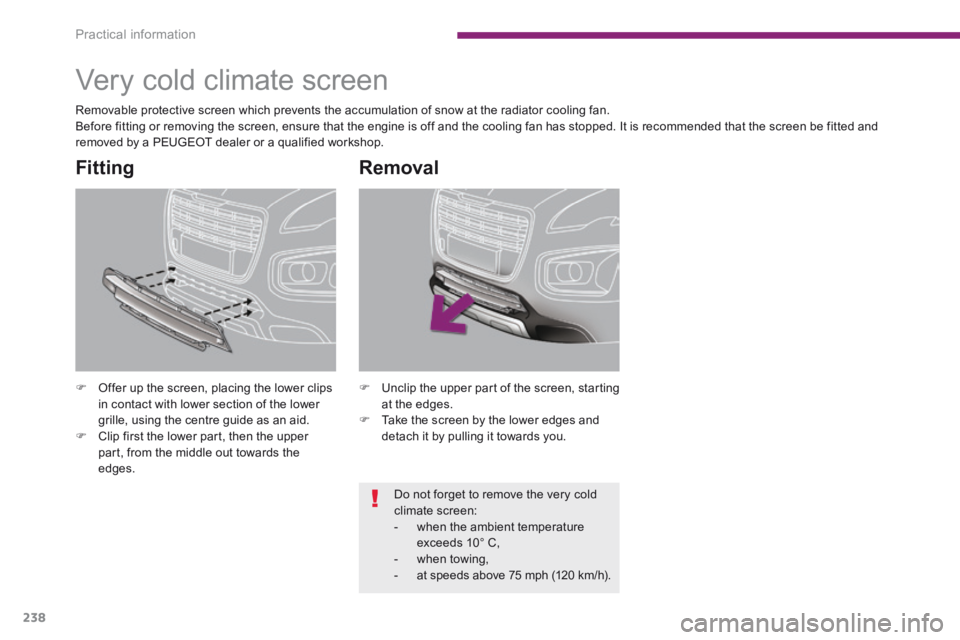
Offer up the screen, placing the lower clips in contact with lower section of the lower grille, using the centre guide as an aid. Clip first the lower part, then the upper part, from the middle out towards the edges.
Fitting
Unclip the upper part of the screen, starting at the edges. Take the screen by the lower edges and
detach it by pulling it towards you.
Removal
Removable protective screen which prevents the accumulation of snow at the radiator cooling fan. Before fitting or removing the screen, ensure that the engine is off and the cooling fan has stopped. It is recommended that the screen be fitted and removed by a PEUGEOT dealer or a qualified workshop.
Do not forget to remove the very cold climate screen: - when the ambient temperature exceeds 10° C, - when towing, - at speeds above 75 mph (120 km/h).
Page 258 of 389
256
02
SETUP2ABC3DEF5JKL4GHI6MNO8TUV7PQR S9WXYZ0*#
1NAV TRAFFICADDR
BOOKSETUP
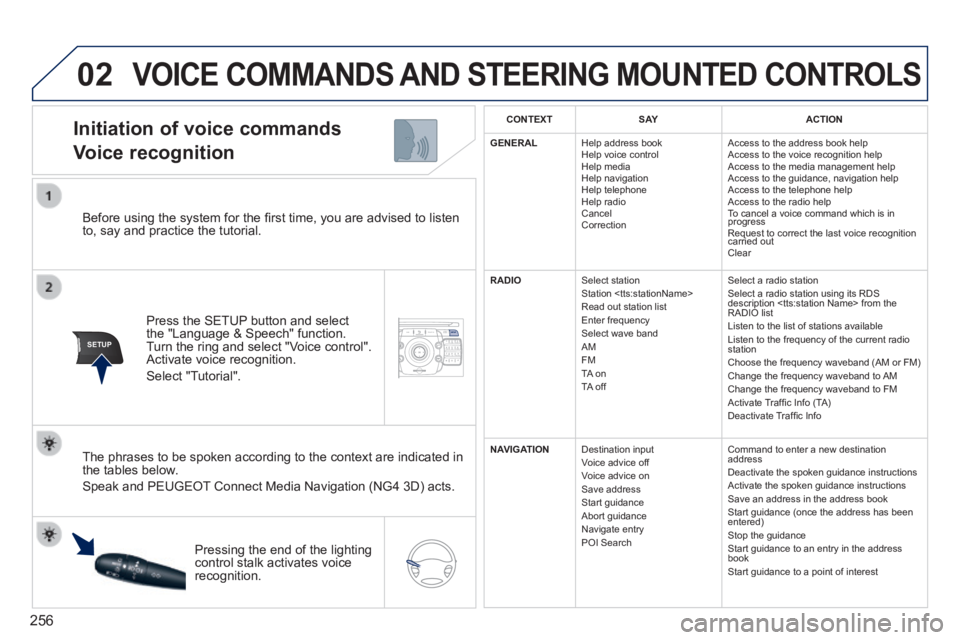
Before using the system for the fi rst time, you are advised to listen to, say and practice the tutorial.
Press the SETUP button and select the "Language & Speech" function. Turn the ring and select "Voice control". Activate voice recognition.
Select "Tutorial".
Initiation of voice commands
Voice recognition
The phrases to be spoken according to the context are indicated in the tables below.
Speak and PEUGEOT Connect Media Navigation (NG4 3D) acts.
Pressing the end of the lighting control stalk activates voice recognition.
CONTEXTS AYACTION
GENERAL Help address book Help voice control Help media Help navigation Help telephone Help radio Cancel Correction
Access to the address book help Access to the voice recognition help Access to the media management help Access to the guidance, navigation help Access to the telephone help Access to the radio help To cancel a voice command which is in progress Request to correct the last voice recognition carried out Request to correct the last voice recognition carried out Request to correct the last voice recognition
Clear
RADIO Select station Station
Select a radio station Select a radio station using its RDS description
NAVIGATION Destination input Voice advice off Voice advice on Save address Start guidance Abort guidance Navigate entry POI Search
Command to enter a new destination address Deactivate the spoken guidance instructions Activate the spoken guidance instructions Save an address in the address book Start guidance (once the address has been entered) Stop the guidance Start guidance to an entry in the address book Start guidance to a point of interest
VOICE COMMANDS AND STEERING MOUNTED CONTROLS
Page 270 of 389
268
04
NAV2AB C3DEF5JKL4GHI6MNO8TUV7PQR S9WXYZ0*#
1RADIO MEDIA NA
V TRAFFIC
SETUPADDR
BOOK
2ABC3DEF5JKL4GHI6MNO8TUV7PQR S9WXYZ0*#
1RADIO MEDIA NA
V TRAFFIC
SETUPADDR
BOOK
2ABC3DEF5JKL4GHI6MNO8TUV7PQR S9WXYZ0*#
1RADIO MEDIA NA
V TRAFFIC
SETUPADDR
BOOK
2ABC3DEF5JKL4GHI6MNO8TUV7PQR S9WXYZ0*#
1RADIO MEDIA NA
V TRAFFIC
SETUPADDR
BOOK
2ABC3DEF5JKL4GHI6MNO8TUV7PQR S9WXYZ0*#
1RADIO MEDIA NA
V TRAFFIC
SETUPADDR
BOOK
2ABC3DEF5JKL4GHI6MNO8TUV7PQR S9WXYZ0*#
1RADIO MEDIA NA
V TRAFFIC
SETUPADDR
BOOK
2ABC3DEF5JKL4GHI6MNO8TUV7PQR S9WXYZ0*#
1RADIO MEDIA NA
V TRAFFIC
SETUPADDR
BOOK
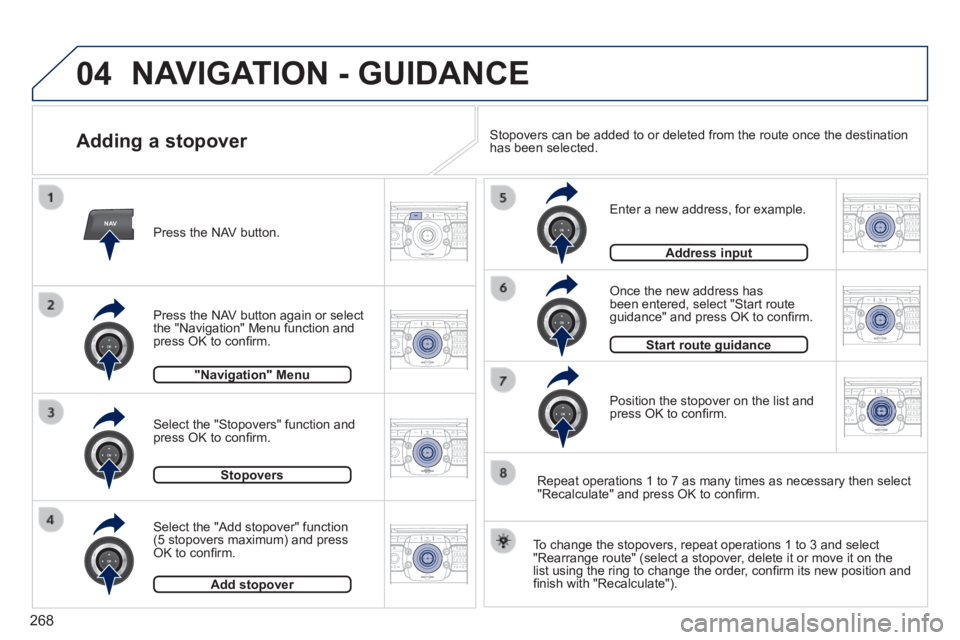
Adding a stopover
Enter a new address, for example.
Once the new address has been entered, select "Start route guidance" and press OK to confi rm.
Position the stopover on the list and press OK to confi rm.
Press the NAV button.
Press the NAV button again or select the "Navigation" Menu function and press OK to confi rm.
Select the "Add stopover" function (5 stopovers maximum) and press OK to confi rm.
Select the "Stopovers" function and press OK to confi rm.
"Navigation" Menu"Navigation" Menu
StopoversStopovers
Add stopoverAdd stopover
Address inputAddress input
To change the stopovers, repeat operations 1 to 3 and select "Rearrange route" (select a stopover, delete it or move it on the list using the ring to change the order, confi rm its new position and fi nish with "Recalculate").
Stopovers can be added to or deleted from the route once the destination\
has been selected.
Repeat operations 1 to 7 as many times as necessary then select "Recalculate" and press OK to confi rm.
Start route guidanceStart route guidance
NAVIGATION - GUIDANCE
Page 289 of 389
287
NAV
RADI O
AUX standard3
Reset video settings3
Off / Audio / Audio and Video (AV)
Ext. Device (Aux) management 2
3
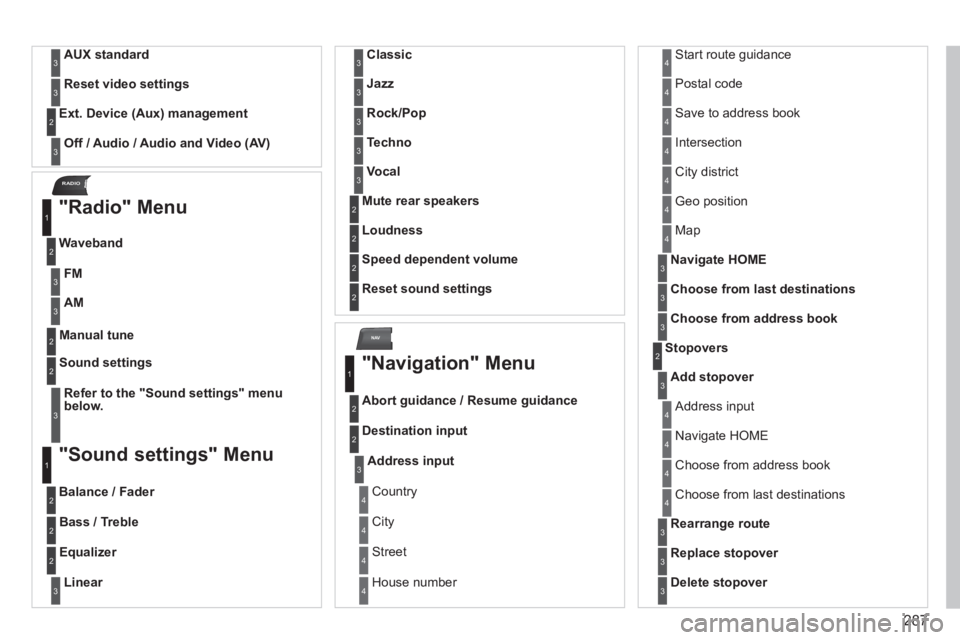
"Radio" Menu
Waveband
1
2
Manual tune 2
Refer to the "Sound settings" menu below.
Sound settings 2
3
"Sound settings" Menu
Balance / Fader
1
2
Bass / Treble 2
Equalizer 2
Linear3
Classic3
Jazz3
Rock/Pop3
Techno3
Vocal3
Mute rear speakers 2
Loudness 2
Speed dependent volume 2
Reset sound settings 2
"Navigation" Menu
Abort guidance / Resume guidance
1
2
Destination input 2
Address input3
Country 4
City 4
Street 4
House number 4
Start route guidance 4
Postal code 4
Save to address book 4
Intersection 4
City district 4
Geo position 4
Map 4
Navigate HOME3
Choose from last destinations3
Choose from address book3
Stopovers 2
Add stopover3
Address input 4
Navigate HOME 4
Choose from address book 4
Choose from last destinations 4
Rearrange route3
Replace stopover3
Delete stopover3
FM3
AM3
Page 295 of 389
293
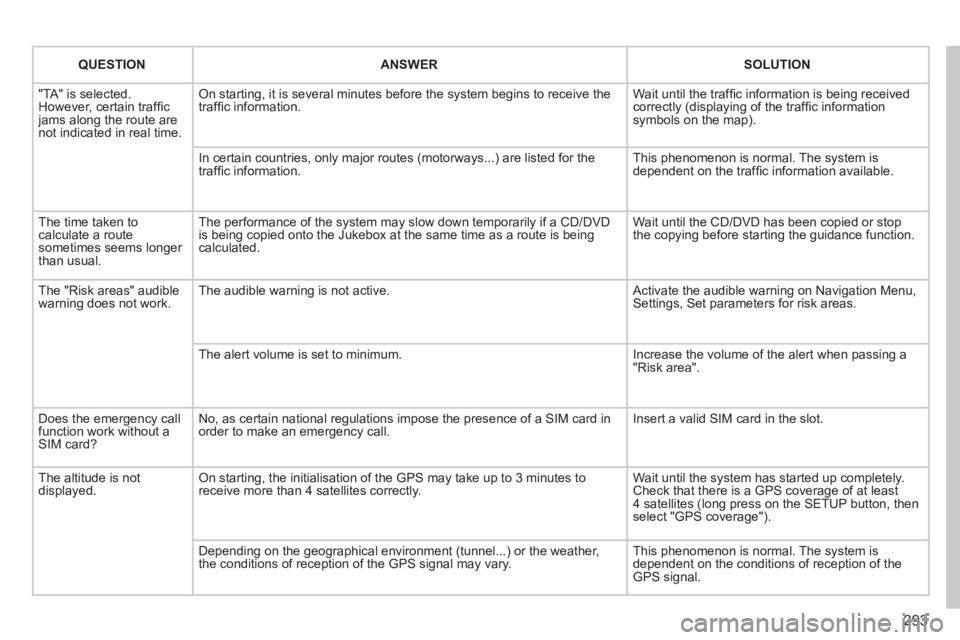
QUESTIONANSWERSOLUTION
"TA" is selected. However, certain traffi c jams along the route are not indicated in real time.
On starting, it is several minutes before the system begins to receive t\
he traffi c information. Wait until the traffi c information is being received correctly (displaying of the traffi c information symbols on the map).
In certain countries, only major routes (motorways...) are listed for \
the traffi c information. This phenomenon is normal. The system is dependent on the traffi c information available.
The time taken to calculate a route sometimes seems longer than usual.
The performance of the system may slow down temporarily if a CD/DVD is being copied onto the Jukebox at the same time as a route is being calculated.
Wait until the CD/DVD has been copied or stop the copying before starting the guidance function.
The "Risk areas" audible warning does not work. The audible warning is not active. Activate the audible warning on Navigation Menu, Settings, Set parameters for risk areas.
The alert volume is set to minimum. Increase the volume of the alert when passing a "Risk area".
Does the emergency call function work without a SIM card?
No, as certain national regulations impose the presence of a SIM card in\
order to make an emergency call. Insert a valid SIM card in the slot.
The altitude is not displayed. On starting, the initialisation of the GPS may take up to 3 minutes to receive more than 4 satellites correctly. Wait until the system has started up completely. Check that there is a GPS coverage of at least 4 satellites (long press on the SETUP button, then select "GPS coverage").
Depending on the geographical environment (tunnel...) or the weather, the conditions of reception of the GPS signal may vary. This phenomenon is normal. The system is dependent on the conditions of reception of the GPS signal.
Page 373 of 389
371
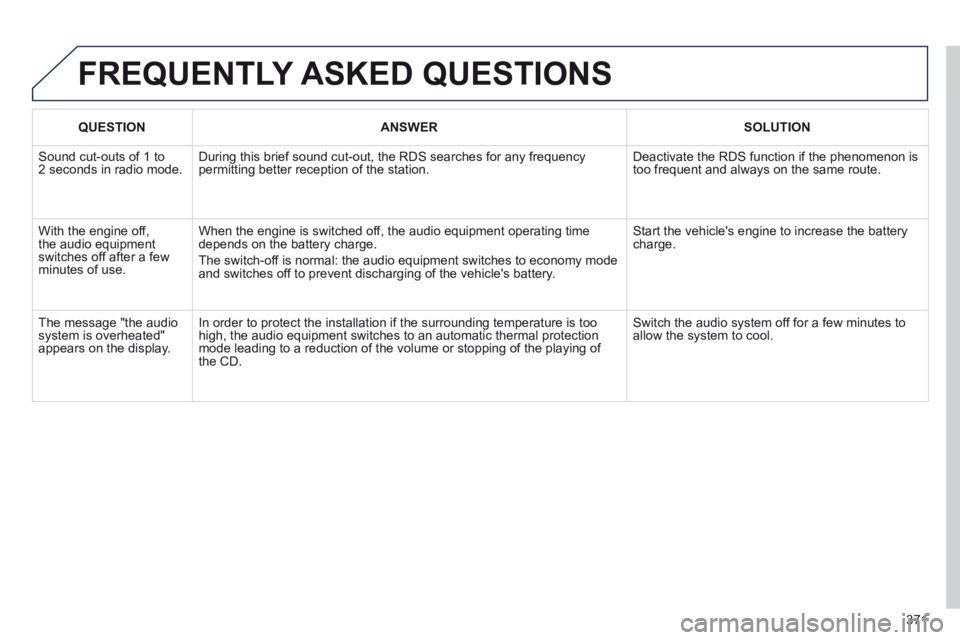
FREQUENTLY ASKED QUESTIONS
QUESTIONANSWERSOLUTION
Sound cut-outs of 1 to 2 seconds in radio mode. During this brief sound cut-out, the RDS searches for any frequency permitting better reception of the station. Deactivate the RDS function if the phenomenon is too frequent and always on the same route.
With the engine off, the audio equipment switches off after a few minutes of use.
When the engine is switched off, the audio equipment operating time depends on the battery charge.
The switch-off is normal: the audio equipment switches to economy mode and switches off to prevent discharging of the vehicle's battery.
Start the vehicle's engine to increase the battery charge.
The message "the audio system is overheated" appears on the display.
In order to protect the installation if the surrounding temperature is t\
oo high, the audio equipment switches to an automatic thermal protection mode leading to a reduction of the volume or stopping of the playing of \
the CD.
Switch the audio system off for a few minutes to allow the system to cool.
Page 377 of 389
.
Alphabetical index375
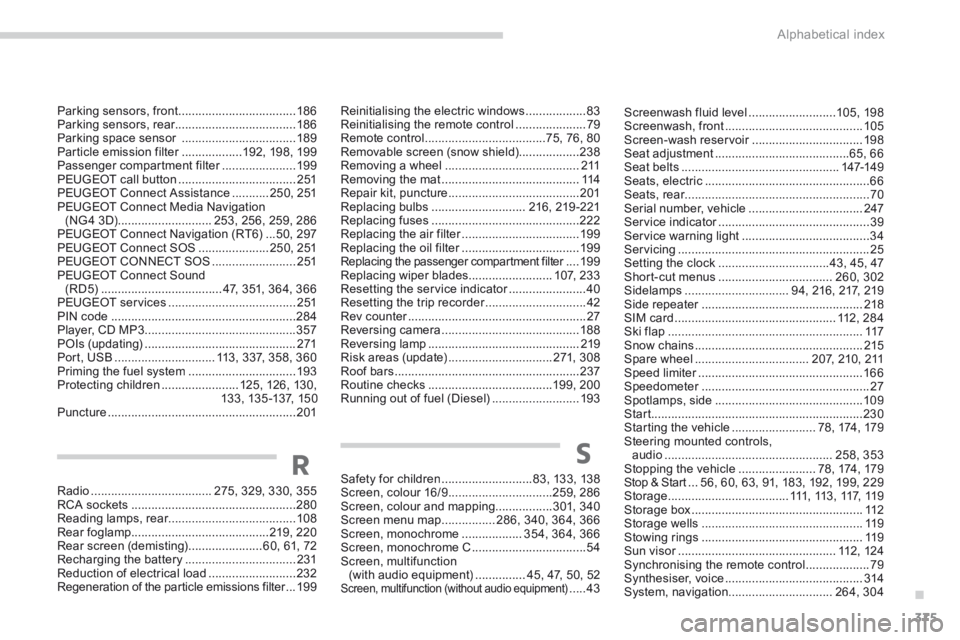
Screenwash fluid level ..........................105, 198Screenwash, front .........................................105Screen-wash reservoir .................................Screen-wash reservoir .................................Screen-wash reservoir198Seat adjustment ........................................65, 66Seat belts ...............................................147-149Seats, electric .................................................66Seats, rear .......................................................Seats, rear .......................................................Seats, rear70Serial number, vehicle ..................................247Service indicator .............................................Service indicator .............................................Service indicator39Service warning light ......................................34Servicing .........................................................25Setting the clock .................................43, 45, 47Short-cut menus ..................................260, 302Sidelamps ...............................94, 216, 217, 219Side repeater ................................................Side repeater ................................................Side repeater218SIM card ................................................112, 284Ski flap ..........................................................117Snow chains ..................................................215Spare wheel ..................................207, 210, 211Speed limiter .................................................Speed limiter .................................................Speed limiter166Speedometer ..................................................Speedometer ..................................................Speedometer27Spotlamps, side ............................................109Start ...............................................................230Starting the vehicle .........................78, 174, 179Steering mounted controls, audio ..................................................258, 353Stopping the vehicle .......................78, 174, 179Stop & Start ...Stop & Start ...Stop & Start56, 60, 63, 91, 183, 192, 199, 229Storage ....................................111, 113, 117, 119Storage box ...................................................112Storage wells ................................................11 9Stowing rings ................................................11 9Sun visor ...............................................Sun visor ...............................................Sun visor112, 124Synchronising the remote control ...................79Synthesiser, voice .........................................314System, navigation...............................264, 304
Radio ....................................275, 329, 330, 355RCA sockets .................................................280Reading lamps, rear ......................................Reading lamps, rear ......................................Reading lamps, rear108Rear foglamp.........................................219, 220Rear screen (demisting) ......................60, 61, 72Recharging the battery .................................231Reduction of electrical load ..........................232Regeneration of the particle emissions filter ...Regeneration of the particle emissions filter ...Regeneration of the particle emissions filter19 9
Safety for children ...........................8 3, 13 3, 13 8Screen, colour 16/9 ...............................259, 286Screen, colour and mapping.................3 01, 3 4 0Screen menu map ................286, 340, 364, 366Screen, monochrome ..................354, 364, 366Screen, monochrome C ..................................54Screen, multifunction (with audio equipment) ...............45, 47, 50, 52Screen, multifunction (without audio equipment) .....43
RS
Parking sensors, front ...................................18 6Parking sensors, rear....................................18 6Parking space sensor ..................................189Particle emission filter ..................Particle emission filter ..................Particle emission filter192, 198, 199Passenger compartment filter ......................Passenger compartment filter ......................Passenger compartment filter19 9PEUGEOT call button ...................................2 51PEUGEOT Connect Assistance ...........250, 251PEUGEOT Connect Media Navigation (NG 4 3D) ............................253, 256, 259, 286PEUGEOT Connect Navigation (RT6) ...50, 297PEUGEOT Connect SOS .....................250, 251PEUGEOT CONNECT SOS .........................2 51PEUGEOT Connect Sound (RD5) ....................................47, 351, 364, 366PEUGEOT services ......................................2 51PIN code .......................................................284Player, CD MP3 .............................................357POIs (updating) .............................................271Port, USB ..............................113, 337, 358, 360Priming the fuel system ................................193Protecting children .......................125, 126, 13 0,13 3, 13 5 -137, 15 0Puncture ........................................................201
Reinitialising the electric windows ..................83Reinitialising the remote control .....................79Remote control ....................................75, 76, 80Removable screen (snow shield)..................238Removing a wheel ........................................2 11Removing the mat .........................................114Repair kit, puncture .......................................201Replacing bulbs ............................216, 219 -221Replacing fuses ............................................222Replacing the air filter ...................................Replacing the air filter ...................................Replacing the air filter19 9Replacing the oil filter ...................................Replacing the oil filter ...................................Replacing the oil filter19 9Replacing the passenger compartment filter ....Replacing the passenger compartment filter ....Replacing the passenger compartment filter19 9Replacing wiper blades.........................1 0 7, 2 3 3Resetting the service indicator .......................Resetting the service indicator .......................Resetting the service indicator40Resetting the trip recorder ..............................Resetting the trip recorder ..............................Resetting the trip recorder42Rev counter .....................................................Rev counter .....................................................Rev counter27Reversing camera .........................................188Reversing lamp .............................................219Risk areas (update) ...............................271, 308Roof bars .......................................................237Routine checks .....................................199, 200Running out of fuel (Diesel) ..........................193
Page 381 of 389
.
Visual search379
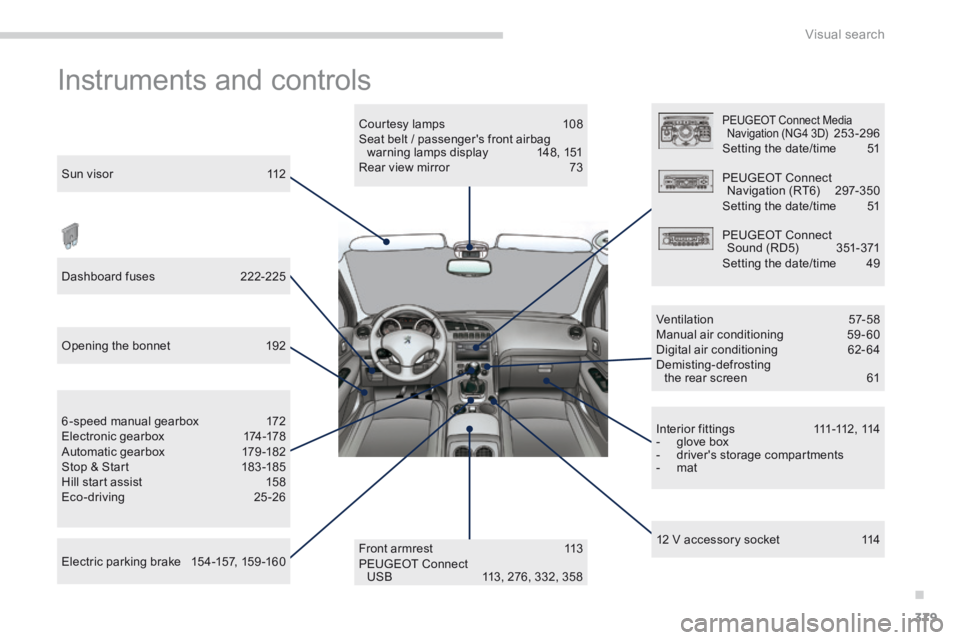
Instruments and controls
Sun visor 112
Dashboard fuses 222-225
Opening the bonnet 192
Electric parking brake 154-157, 159 -160
6-speed manual gearbox 172 Electronic gearbox 174-178 Automatic gearbox 179 -182 Stop & Start 183 -185 Hill start assist 158 Eco-driving 25 -26
Front armrest 113 PEUGEOT Connect USB 113, 276, 332, 358
Courtesy lamps 108 Seat belt / passenger's front airbag warning lamps display 148, 151 Rear view mirror 73
PEUGEOT Connect Media Navigation (NG4 3D) 253 -296 Setting the date/time 51
PEUGEOT Connect Navigation (RT6) 297-350 Setting the date/time 51
PEUGEOT Connect Sound (RD5) 351-371 Setting the date/time 49
Ventilation 57-58 Manual air conditioning 59 - 60 Digital air conditioning 62-64 Demisting-defrosting the rear screen 61
I n t e r i o r f i t t i n g s 111 -112 , 114 - glove box - driver's storage compartments - mat
12 V accessory socket 114