phone PEUGEOT 308 2014 Owner's Guide
[x] Cancel search | Manufacturer: PEUGEOT, Model Year: 2014, Model line: 308, Model: Peugeot 308 2014Pages: 389, PDF Size: 22.92 MB
Page 303 of 389
03
301
For the details of the menus, refer to the "Screen menu map" section. For cleaning the screen, the use of a soft, non-abrasive cloth (spectacles cloth) is recommended, with no additional product.
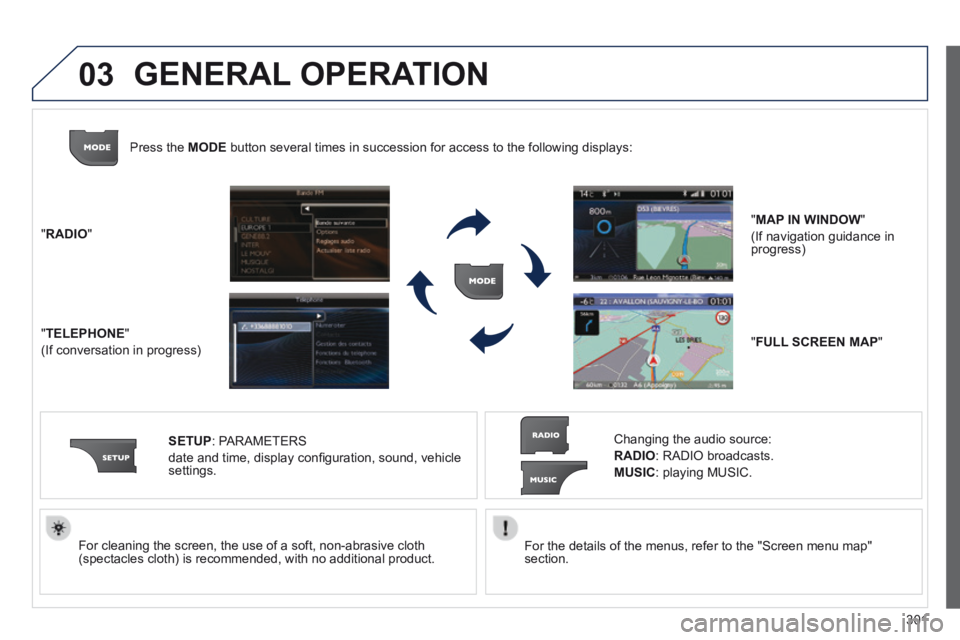
" RADIO "
" TELEPHONE "
(If conversation in progress)
SETUP : PARAMETERS
date and time, display confi guration, sound, vehicle settings.
Changing the audio source:
RADIO : RADIO broadcasts.
MUSIC : playing MUSIC.
Press the MODE button several times in succession for access to the following displays\
:
" FULL SCREEN MAP "
" MAP IN WINDOW "
(If navigation guidance in progress)
GENERAL OPERATION
Page 304 of 389
03
302
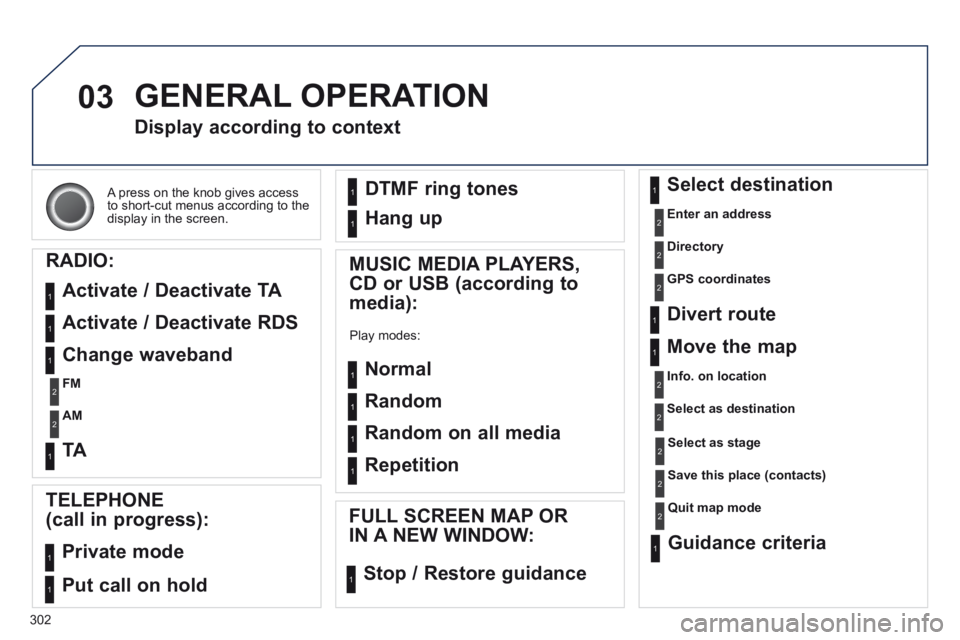
A press on the knob gives access to short-cut menus according to the display in the screen.
Display according to context
RADIO:
Activate / Deactivate TA
Activate / Deactivate RDS
MUSIC MEDIA PLAYERS,
CD or USB (according to
media):
Play modes:
Normal
Random
Random on all media
Repetition
TELEPHONE
(call in progress):
Private mode
FULL SCREEN MAP OR
IN A NEW WINDOW:
Stop / Restore guidance
Select destination
Enter an address
Directory
GPS coordinates
Divert route
Move the map
Info. on location
Select as destination
Select as stage
Save this place (contacts)
Quit map mode
Guidance criteria
Put call on hold
DTMF ring tones
Hang up
1
1
1
1
1
1
1
1
2
2
2
2
2
1
2
2
2
1
1
1
1
1
1
Change waveband
FM
AM
2
2
1
TA 1
GENERAL OPERATION
Page 321 of 389
06
319
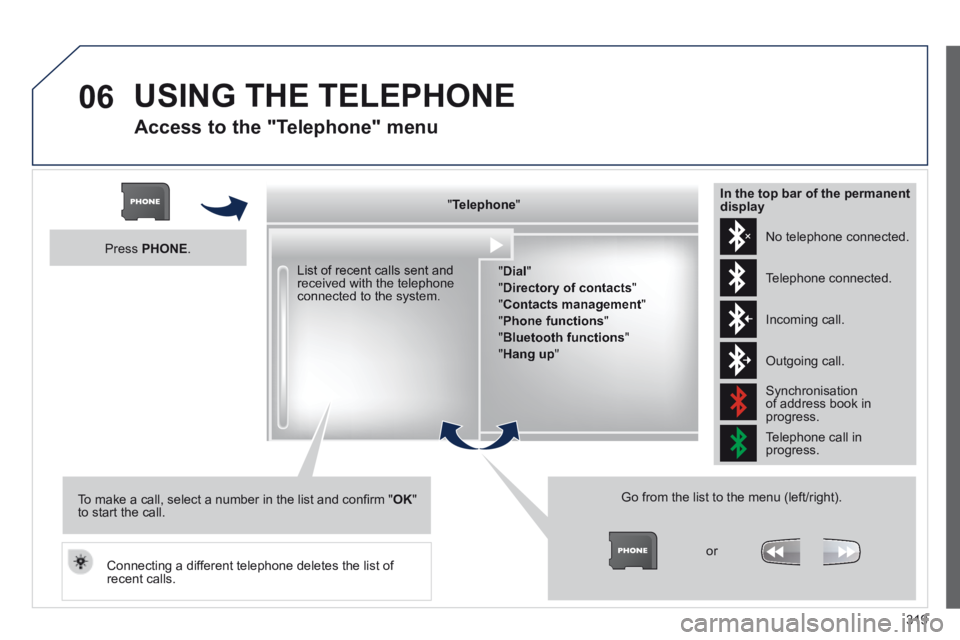
Access to the "Telephone" menu
" " " " " " " " " " " " " " " " " " TelephoneTelephoneTelephoneTelephoneTelephoneTelephoneTelephoneTelephoneTelephoneTelephoneTelephoneTelephoneTelephoneTelephoneTelephoneTelephoneTelephoneTelephoneTelephoneTelephoneTelephoneTelephoneTelephone " " " " " " " " " " " " " " " " " "
" Dial "
" Directory of contacts "
" Contacts management "
" Phone functions "
" Bluetooth functions "
" Hang up "
Go from the list to the menu (left/right).
or
List of recent calls sent and received with the telephone connected to the system.
Press PHONE .
To make a call, select a number in the list and confi rm " OK " to start the call.
Connecting a different telephone deletes the list of recent calls.
No telephone connected.
Telephone connected.
Incoming call.
Outgoing call.
Synchronisation of address book in progress.
Telephone call in progress.
In the top bar of the permanent display
USING THE TELEPHONE
Page 322 of 389
06
320
USING THE TELEPHONE
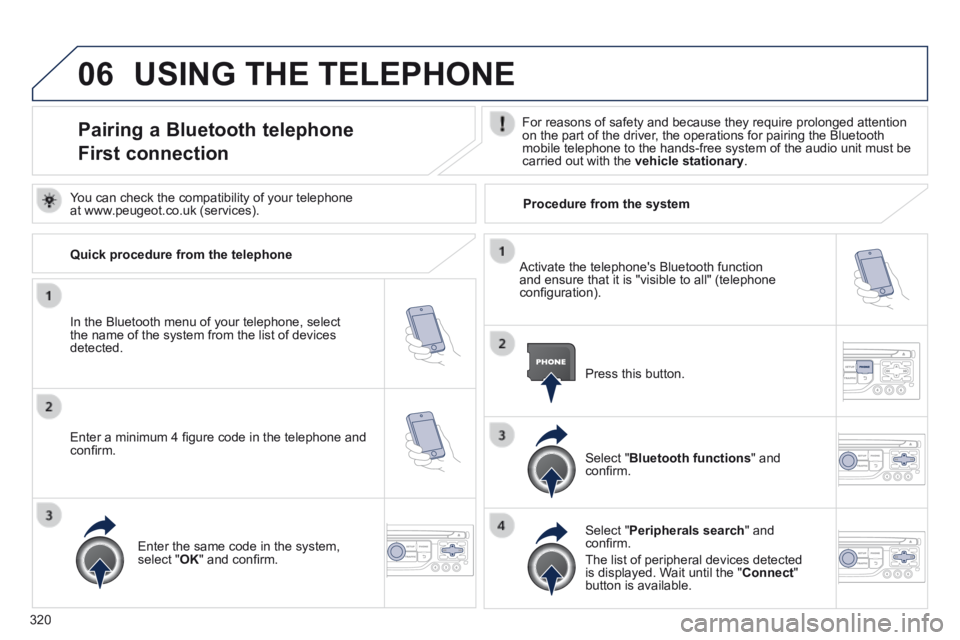
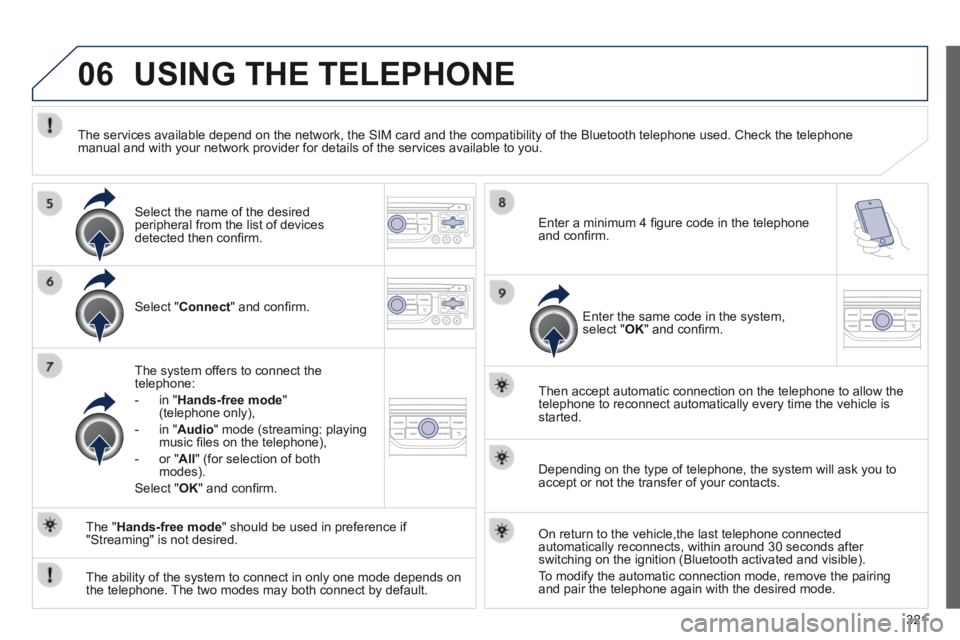
Pairing a Bluetooth telephone
First connection
For reasons of safety and because they require prolonged attention on the part of the driver, the operations for pairing the Bluetooth mobile telephone to the hands-free system of the audio unit must be carried out with the vehicle stationary .
In the Bluetooth menu of your telephone, select the name of the system from the list of devices detected.
Press this button.
Select " Bluetooth functions " and confi rm.
Select " Peripherals search " and confi rm.
The list of peripheral devices detected is displayed. Wait until the " Connect " button is available.
You can check the compatibility of your telephone at www.peugeot.co.uk (services).
Activate the telephone's Bluetooth function and ensure that it is "visible to all" (telephone confi guration).
Quick procedure from the telephone
Enter a minimum 4 fi gure code in the telephone and confi rm.
Enter the same code in the system, select " OK " and confi rm.
Procedure from the system
Page 323 of 389
06
321
USING THE TELEPHONE
Select " Connect " and confi rm.
The system offers to connect the telephone:
- in " Hands-free mode " (telephone only),
- in " Audio " mode (streaming: playing music fi les on the telephone),
- or " All " (for selection of both modes).
Select " OK " and confi rm.
Then accept automatic connection on the telephone to allow the telephone to reconnect automatically every time the vehicle is started.
The ability of the system to connect in only one mode depends on the telephone. The two modes may both connect by default.
The " Hands-free mode " should be used in preference if "Streaming" is not desired.
The services available depend on the network, the SIM card and the compa\
tibility of the Bluetooth telephone used. Check the telephone manual and with your network provider for details of the services availa\
ble to you.
Depending on the type of telephone, the system will ask you to accept or not the transfer of your contacts.
On return to the vehicle,the last telephone connected automatically reconnects, within around 30 seconds after switching on the ignition (Bluetooth activated and visible).
To modify the automatic connection mode, remove the pairing and pair the telephone again with the desired mode.
Enter a minimum 4 fi gure code in the telephone and confi rm.
Enter the same code in the system, select " OK " and confi rm.
Select the name of the desired peripheral from the list of devices detected then confi rm .
Page 324 of 389
06
322
USING THE TELEPHONE
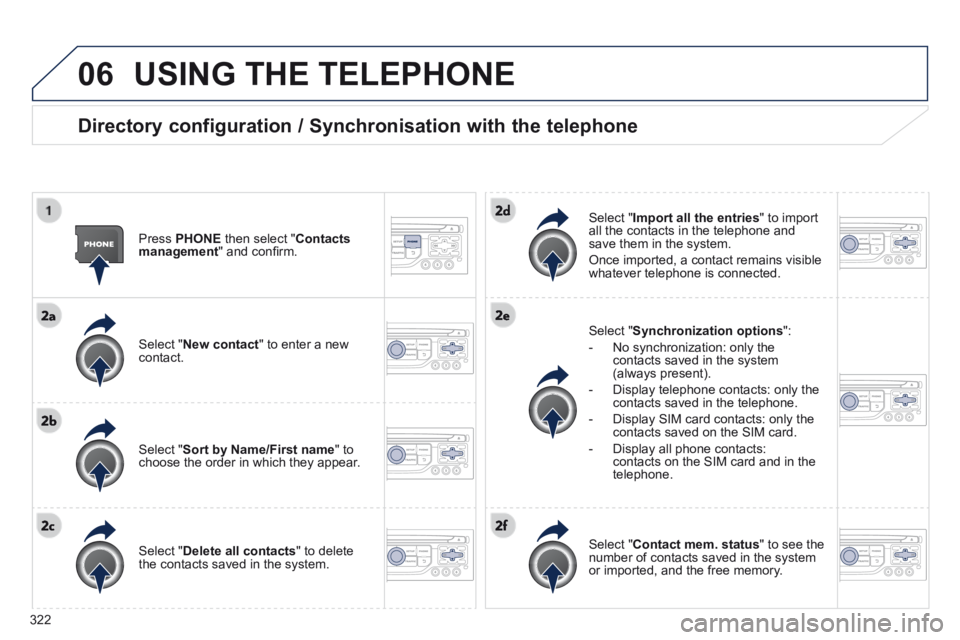
Directory configuration / Synchronisation with the telephone
Press PHONE then select " Contacts management " and confi rm.
Select " New contact " to enter a new contact.
Select " Sort by Name/First name " to choose the order in which they appear.
Select " Delete all contacts " to delete the contacts saved in the system.
Select " Synchronization options ":
- No synchronization: only the contacts saved in the system (always present).
- Display telephone contacts: only the contacts saved in the telephone.
- Display SIM card contacts: only the contacts saved on the SIM card.
- Display all phone contacts: contacts on the SIM card and in the telephone.
Select " Import all the entries " to import all the contacts in the telephone and save them in the system.
Once imported, a contact remains visible whatever telephone is connected.
Select " Contact mem. status " to see the number of contacts saved in the system or imported, and the free memory.
Page 325 of 389
06
323
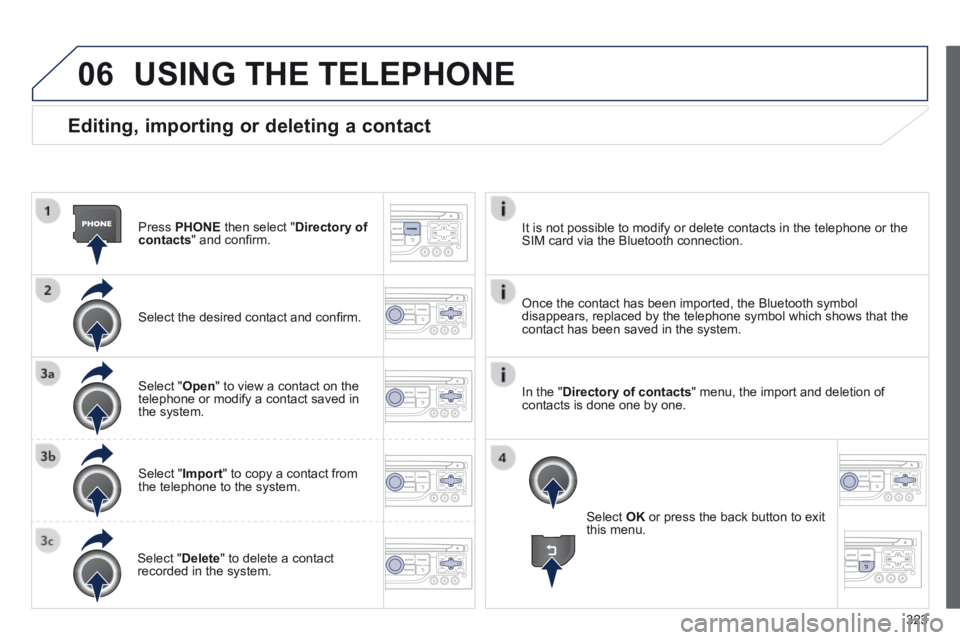
Editing, importing or deleting a contact
Press PHONE then select " Directory of contacts " and confi rm.
Select the desired contact and confi rm.
Select " Open " to view a contact on the telephone or modify a contact saved in the system.
Select " Import " to copy a contact from the telephone to the system.
Select " Delete " to delete a contact recorded in the system.
USING THE TELEPHONE
Select OK or press the back button to exit this menu.
Once the contact has been imported, the Bluetooth symbol disappears, replaced by the telephone symbol which shows that the contact has been saved in the system.
It is not possible to modify or delete contacts in the telephone or the \
SIM card via the Bluetooth connection.
In the " Directory of contacts " menu, the import and deletion of contacts is done one by one.
Page 326 of 389
06
324
USING THE TELEPHONE
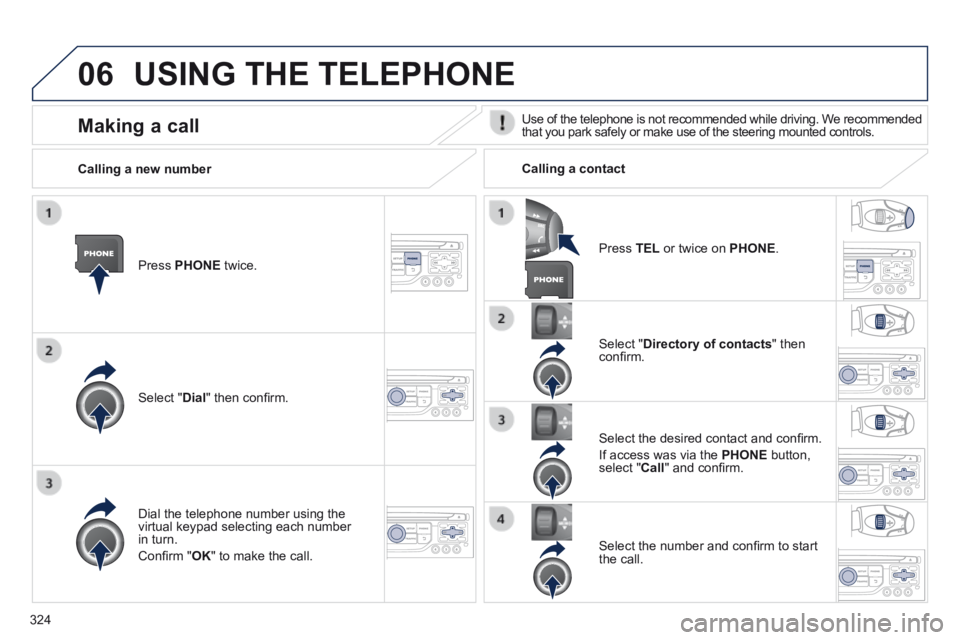
Press PHONE twice.
Select " Dial " then confi rm.
Select " Directory of contacts " then confi rm.
Dial the telephone number using the virtual keypad selecting each number in turn.
Confi rm " OK " to make the call.
Press TEL or twice on PHONE .
Calling a new number Calling a contact
Select the desired contact and confi rm.
If access was via the PHONE button, select " Call " and confi rm.
Select the number and confi rm to start the call.
Making a call Use of the telephone is not recommended while driving. We recommended that you park safely or make use of the steering mounted controls.
Page 327 of 389
06
325
USING THE TELEPHONE
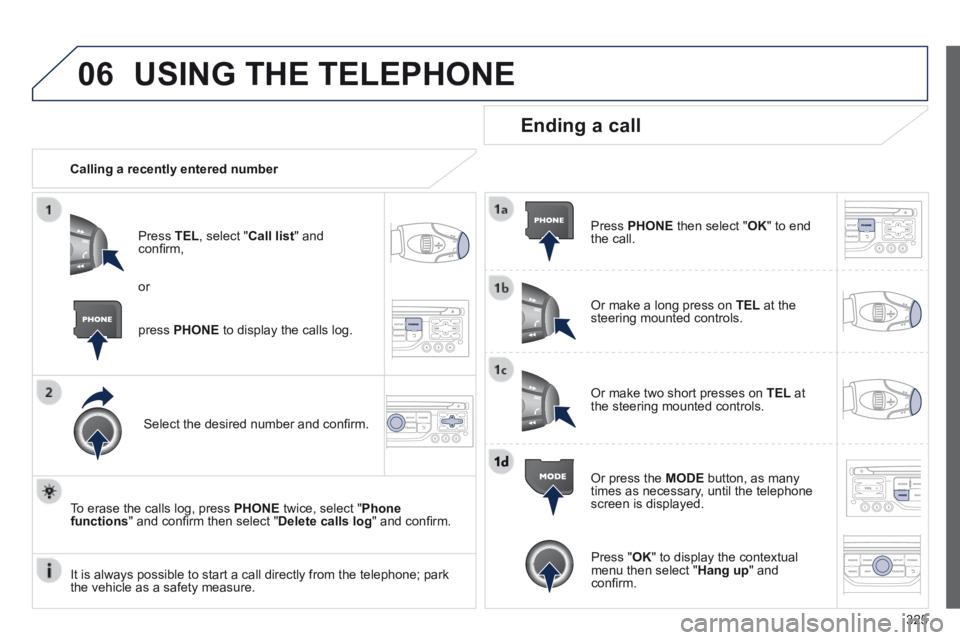
Calling a recently entered number
Press TEL , select " Call list " and confi rm,
Select the desired number and confi rm.
To erase the calls log, press PHONE twice, select " Phone functions " and confi rm then select " Delete calls log " and confi rm.
Ending a call
Press PHONE then select " OK " to end the call.
Or make a long press on TEL at the steering mounted controls.
Or make two short presses on TEL at the steering mounted controls.
Or press the MODE button, as many times as necessary, until the telephone screen is displayed.
press PHONE to display the calls log.
or
Press " OK " to display the contextual menu then select " Hang up " and confi rm. It is always possible to start a call directly from the telephone; park \
the vehicle as a safety measure.
Page 328 of 389
06
326
USING THE TELEPHONE
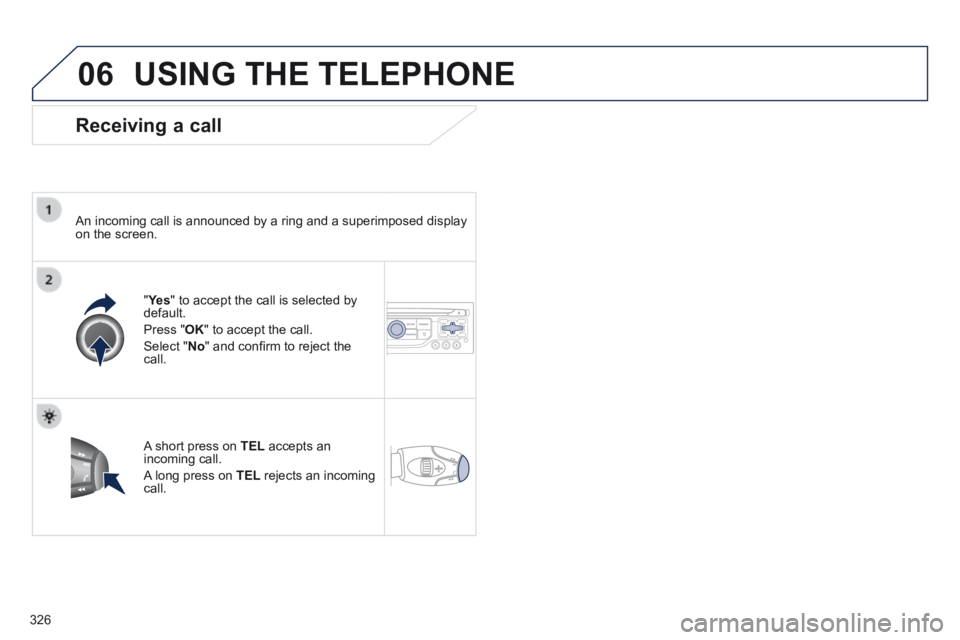
Receiving a call
An incoming call is announced by a ring and a superimposed display on the screen.
" Ye s " Ye s " " to accept the call is selected by default.
Press " OK " to accept the call.
Select " No " and confi rm to reject the call.
A short press on TEL accepts an incoming call.
A long press on TEL rejects an incoming call.