light PEUGEOT 308 2014 Workshop Manual
[x] Cancel search | Manufacturer: PEUGEOT, Model Year: 2014, Model line: 308, Model: Peugeot 308 2014Pages: 389, PDF Size: 22.92 MB
Page 226 of 389
Practical information
224
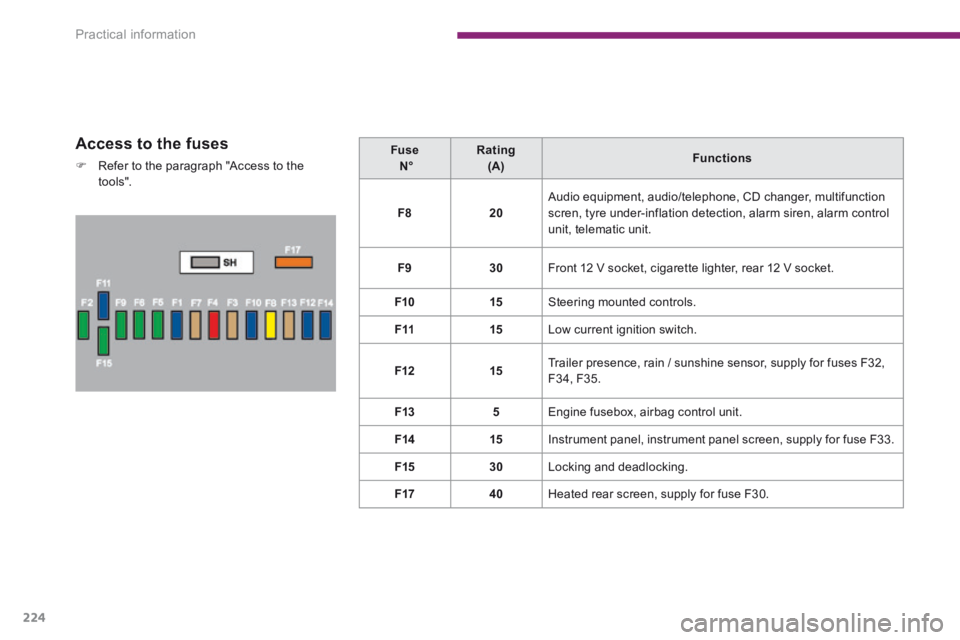
Access to the fuses
Refer to the paragraph "Access to the to o ls".
Fuse N° Rating (A) Functions
F820 Audio equipment, audio/telephone, CD changer, multifunction scren, tyre under-inflation detection, alarm siren, alarm control
unit, telematic unit.
F930 Front 12 V socket, cigarette lighter, rear 12 V socket.
F1015 Steering mounted controls.
F1115 Low current ignition switch.
F1215 Trailer presence, rain / sunshine sensor, supply for fuses F32, F34, F35.
F135 Engine fusebox, airbag control unit.
F1415 Instrument panel, instrument panel screen, supply for fuse F33.
F1530 Locking and deadlocking.
F1740 Heated rear screen, supply for fuse F30.
Page 237 of 389
11
Practical information235
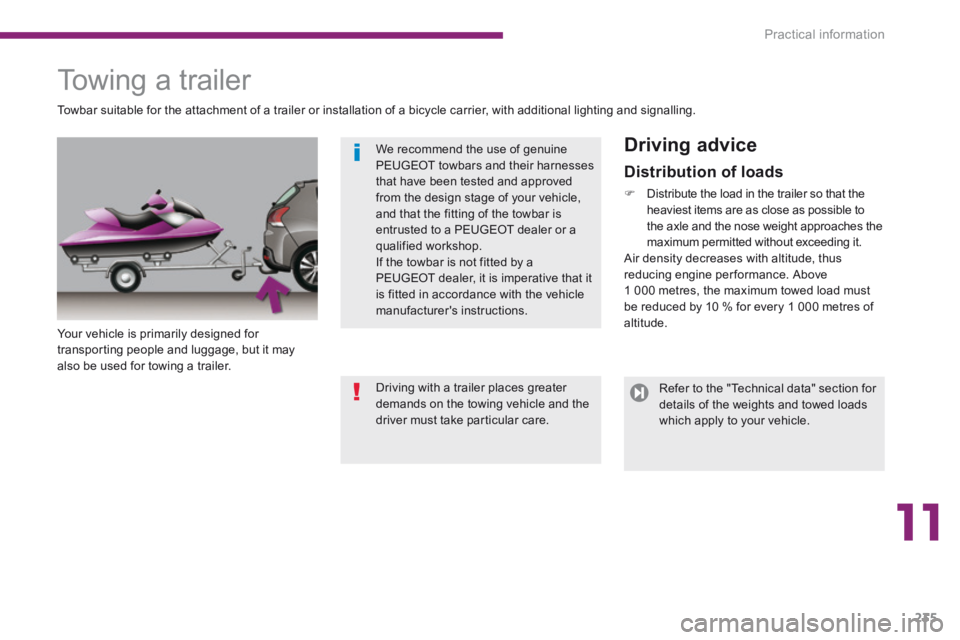
Towing a trailer
Your vehicle is primarily designed for transporting people and luggage, but it may also be used for towing a trailer.
Driving advice
Towbar suitable for the attachment of a trailer or installation of a bicycle carrier, with additional lighting and signalling.
Distribution of loads
Distribute the load in the trailer so that the heaviest items are as close as possible to the axle and the nose weight approaches the maximum permitted without exceeding it. Air density decreases with altitude, thus reducing engine performance. Above 1 000 metres, the maximum towed load must be reduced by 10 % for every 1 000 metres of altitude.
We recommend the use of genuine PEUGEOT towbars and their harnesses that have been tested and approved from the design stage of your vehicle, and that the fitting of the towbar is
entrusted to a PEUGEOT dealer or a qualified workshop. If the towbar is not fitted by a PEUGEOT dealer, it is imperative that it is fitted in accordance with the vehicle manufacturer's instructions.
Refer to the "Technical data" section for details of the weights and towed loads which apply to your vehicle.
Driving with a trailer places greater demands on the towing vehicle and the driver must take particular care.
Page 238 of 389
Practical information
236
Side wind
Take into account the increased sensitivity to side wind.
Cooling
Towing a trailer on a slope increases the temperature of the coolant. As the fan is electrically controlled, its cooling capacity is not dependent on the engine speed. To lower the engine speed, reduce your speed. The maximum towed load on a long incline depends on the gradient and the ambient temperature. In all cases, keep a check on the coolant temperature.
Braking
Towing a trailer increases the braking distance. To avoid overheating of the brakes on a long
mountain type of descent, the use of engine braking is recommended.
Ty r e s
Check the tyre pressures of the towing vehicle and of the trailer, observing the recommended pressures.
Lighting
Check the electrical lighting and signalling on the trailer.
If the warning lamp and the STOP warning lamp come on, stop the vehicle and switch off the engine as soon as possible.
The rear parking sensors will be deactivated automatically if a genuine PEUGEOT towbar is used.
Page 244 of 389
Technical data
242
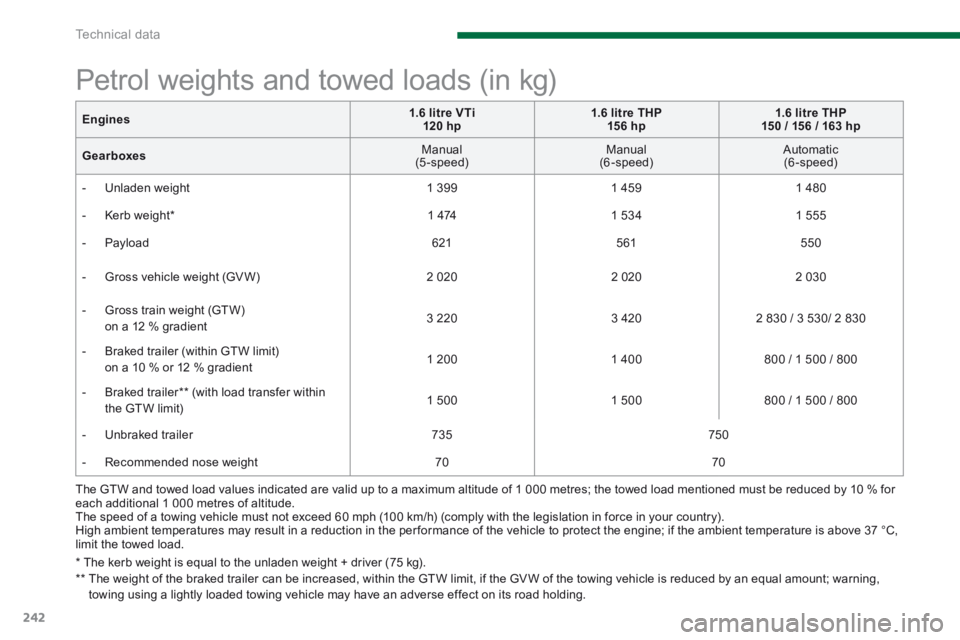
The GTW and towed load values indicated are valid up to a maximum altitude of 1 000 metres; the towed load mentioned must be reduced by 10 % for each additional 1 000 metres of altitude. The speed of a towing vehicle must not exceed 60 mph (100 km/h) (comply with the legislation in force in your country). High ambient temperatures may result in a reduction in the per formance of the vehicle to protect the engine; if the ambient temperature is above 37 °C, limit the towed load.
Petrol weights and towed loads (in kg)
* The kerb weight is equal to the unladen weight + driver (75 kg). ** The weight of the braked trailer can be increased, within the GTW limit, if the GV W of the towing vehicle is reduced by an equal amount; warning, towing using a lightly loaded towing vehicle may have an adverse effect on its road holding.
Engines1.6 litre VTi 120 hp1.6 litre THP 15 6 hp1.6 litre THP 150 / 156 / 163 hp
Gearboxes Manual (5-speed) Manual (6-speed) Automatic (6-speed)
- Unladen weight 1 3 9 9 1 4 5 9 1 480
- Kerb weight * 1 474 1 534 1 555
- Payload 621 561 550
- Gross vehicle weight (GV W) 2 020 2 020 2 030
- Gross train weight (GTW) on a 12 % gradient 3 220 3 420 2 830 / 3 530/ 2 830
- Braked trailer (within GTW limit) on a 10 % or 12 % gradient 1 200 1 400 800 / 1 500 / 800
- Braked trailer ** (with load transfer within the GTW limit) 1 500 1 500 800 / 1 500 / 800
- Unbraked trailer 735 750
- Recommended nose weight 70 70
Page 246 of 389
Technical data
244
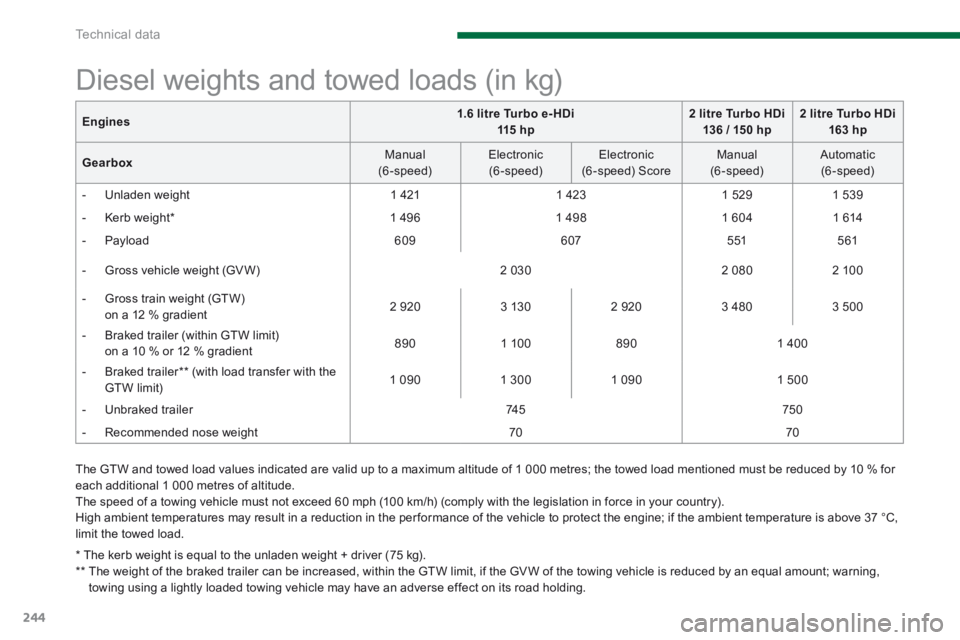
The GTW and towed load values indicated are valid up to a maximum altitude of 1 000 metres; the towed load mentioned must be reduced by 10 % for each additional 1 000 metres of altitude. The speed of a towing vehicle must not exceed 60 mph (100 km/h) (comply with the legislation in force in your country). High ambient temperatures may result in a reduction in the per formance of the vehicle to protect the engine; if the ambient temperature is above 37 °C,
limit the towed load.
Diesel weights and towed loads (in kg)
* The kerb weight is equal to the unladen weight + driver (75 kg). ** The weight of the braked trailer can be increased, within the GTW limit, if the GV W of the towing vehicle is reduced by an equal amount; warning, towing using a lightly loaded towing vehicle may have an adverse effect on its road holding.
Engines1.6 litre Turbo e- HDi 115 h p2 litre Turbo HDi 136 / 150 hp2 litre Turbo HDi 163 hp
Gearbox Manual (6-speed) Electronic (6-speed) Electronic (6 -speed) Score Manual (6-speed) Automatic (6-speed)
- Unladen weight 1 421 1 423 1 5 2 9 1 5 3 9
- Kerb weight * 1 4 9 6 1 4 9 8 1 604 1 614
- Payload 6 0 9 607 5 51 561
- Gross vehicle weight (GV W) 2 030 2 080 2 100
- Gross train weight (GTW) on a 12 % gradient 2 9 2 0 3 130 2 9 2 0 3 480 3 500
- Braked trailer (within GTW limit) on a 10 % or 12 % gradient 8 9 0 1 100 8 9 0 1 400
- Braked trailer ** (with load transfer with the GTW limit) 1 0 9 0 1 300 1 0 9 0 1 500
- Unbraked trailer 74 5 750
- Recommended nose weight 70 70
Page 247 of 389
12
Technical data245
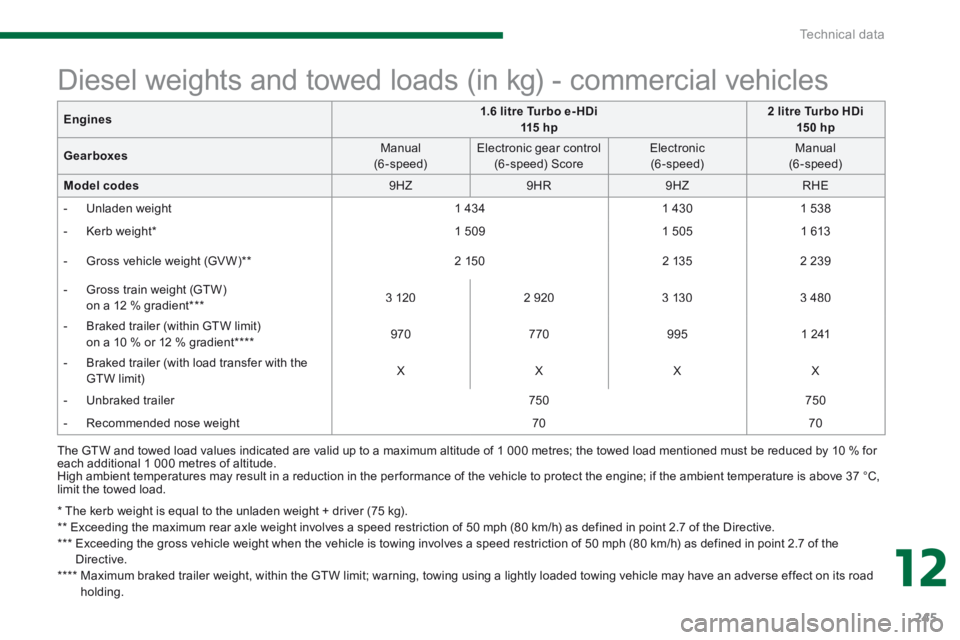
* The kerb weight is equal to the unladen weight + driver (75 kg). ** Exceeding the maximum rear axle weight involves a speed restriction of 50 mph (80 km/h) as defined in point 2.7 of the Directive. *** Exceeding the gross vehicle weight when the vehicle is towing involves a speed restriction of 50 mph (80 km/h) as defined in point 2.7 of the Directive. **** Maximum braked trailer weight, within the GTW limit; warning, towing using a lightly loaded towing vehicle may have an adverse effect on its road
holding.
Diesel weights and towed loads (in kg) - commercial vehicles
The GTW and towed load values indicated are valid up to a maximum altitude of 1 000 metres; the towed load mentioned must be reduced by 10 % for each additional 1 000 metres of altitude. High ambient temperatures may result in a reduction in the per formance of the vehicle to protect the engine; if the ambient temperature is above 37 °C, limit the towed load.
Engines1.6 litre Turbo e- HDi 115 h p2 litre Turbo HDi 15 0 hp
Gearboxes Manual (6-speed) Electronic gear control (6 -speed) Score Electronic (6-speed) Manual (6-speed)
Model codes 9 H Z 9 H R 9 H Z RHE
- Unladen weight 1 434 1 430 1 538
- Kerb weight * 1 5 0 9 1 505 1 613
- Gross vehicle weight (GV W) ** 2 150 2 135 2 2 3 9
- Gross train weight (GTW) on a 12 % gradient *** 3 120 2 9 2 0 3 130 3 480
- Braked trailer (within GTW limit) on a 10 % or 12 % gradient **** 9 7 0 770 9 9 5 1 241
- Braked trailer (with load transfer with the GTW limit) X X X X
- Unbraked trailer 750 750
- Recommended nose weight 70 70
Page 257 of 389
255
01 FIRST STEPS
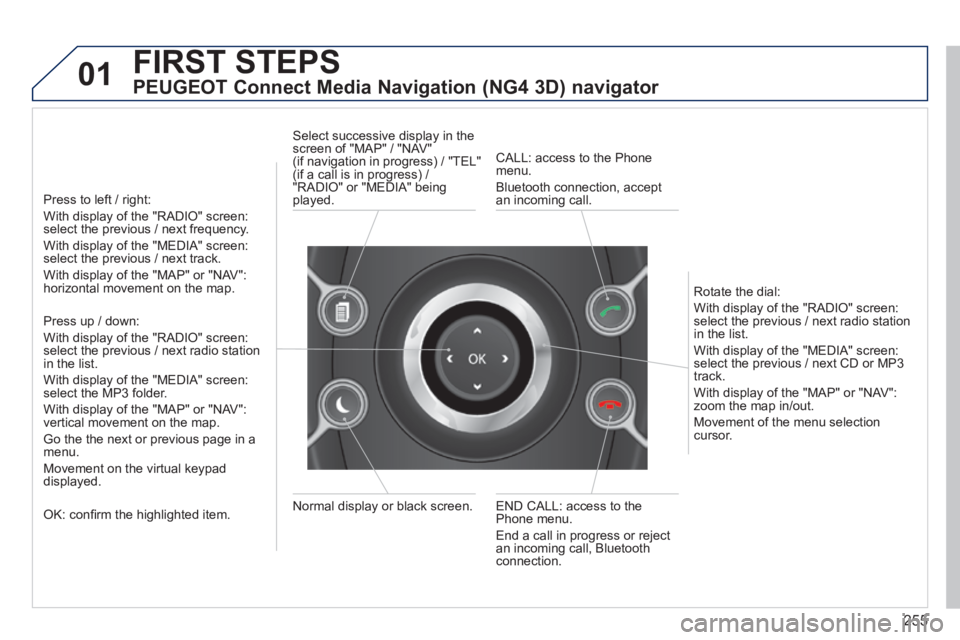
PEUGEOT Connect Media Navigation (NG4 3D) navigator
Press to left / right:
With display of the "RADIO" screen: select the previous / next frequency.
With display of the "MEDIA" screen: select the previous / next track.
With display of the "MAP" or "NAV": horizontal movement on the map.
Press up / down:
With display of the "RADIO" screen: select the previous / next radio station in the list.
With display of the "MEDIA" screen: select the MP3 folder.
With display of the "MAP" or "NAV": vertical movement on the map.
Go the the next or previous page in a menu.
Movement on the virtual keypad displayed.
OK: confi rm the highlighted item. END CALL: access to the Phone menu.
End a call in progress or reject an incoming call, Bluetooth connection.
Normal display or black screen.
Select successive display in the screen of "MAP" / "NAV" (if navigation in progress) / "TEL" (if a call is in progress) / "RADIO" or "MEDIA" being played.
CALL: access to the Phone menu.
Bluetooth connection, accept an incoming call.
Rotate the dial:
With display of the "RADIO" screen: select the previous / next radio station in the list.
With display of the "MEDIA" screen: select the previous / next CD or MP3 track.
With display of the "MAP" or "NAV": zoom the map in/out.
Movement of the menu selection cursor.
Page 258 of 389
256
02
SETUP2ABC3DEF5JKL4GHI6MNO8TUV7PQR S9WXYZ0*#
1NAV TRAFFICADDR
BOOKSETUP
Before using the system for the fi rst time, you are advised to listen to, say and practice the tutorial.
Press the SETUP button and select the "Language & Speech" function. Turn the ring and select "Voice control". Activate voice recognition.
Select "Tutorial".
Initiation of voice commands
Voice recognition
The phrases to be spoken according to the context are indicated in the tables below.
Speak and PEUGEOT Connect Media Navigation (NG4 3D) acts.
Pressing the end of the lighting control stalk activates voice recognition.
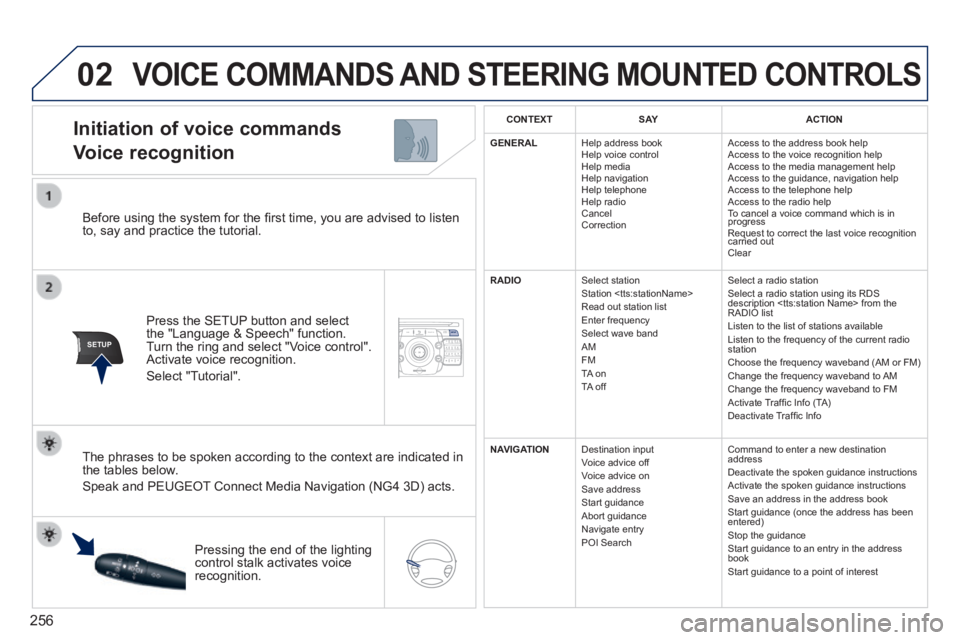
CONTEXTS AYACTION
GENERAL Help address book Help voice control Help media Help navigation Help telephone Help radio Cancel Correction
Access to the address book help Access to the voice recognition help Access to the media management help Access to the guidance, navigation help Access to the telephone help Access to the radio help To cancel a voice command which is in progress Request to correct the last voice recognition carried out Request to correct the last voice recognition carried out Request to correct the last voice recognition
Clear
RADIO Select station Station
Select a radio station Select a radio station using its RDS description
NAVIGATION Destination input Voice advice off Voice advice on Save address Start guidance Abort guidance Navigate entry POI Search
Command to enter a new destination address Deactivate the spoken guidance instructions Activate the spoken guidance instructions Save an address in the address book Start guidance (once the address has been entered) Stop the guidance Start guidance to an entry in the address book Start guidance to a point of interest
VOICE COMMANDS AND STEERING MOUNTED CONTROLS
Page 260 of 389

258
02 VOICE COMMANDS AND STEERING MOUNTED CONTROLS
Steering mounted controls
Wiper stalk: display "RADIO" and "MEDIA".
Lighting stalk: activate voice commands with a short press; indication o\
f the current navigation instruction with a long press.
Change audio source.
Start a call from the contacts list
Call/hang up the telephone.
Confi rm a selection.
Press for more than 2 seconds: telephone menu.
Radio: automatic search for a lower frequency.
CD / SD CARD / JUKEBOX: select the previous track.
CD / SD CARD / JUKEBOX: continuous press: fast backwards.
Radio: select the previous/next pre-set station.
CD audio: select the previous/next track
If "MEDIA" is displayed in the screen:
MP3 CD / SD CARD / JUKEBOX: select the previous/next folder.
Select the previous/next item in the contacts list.
Radio: automatic search for a higher frequency.
CD / SD CARD / JUKEBOX: select the next track.
CD / SD CARD / JUKEBOX: continuous press: fast forwards.
Volume increase.
Volume decrease.
Mute: press the volume increase and decrease buttons simultaneously.
The sound is restored by pressing one of the two volume buttons.
Page 266 of 389
264
04
NAV2AB C3DEF5JKL4GHI6MNO8TUV7PQR S9WXYZ0*#
1RADIO MEDIA NA
V TRAFFIC
SETUPADDR
BOOK
2ABC3DEF5JKL4GHI6MNO8TUV7PQR S9WXYZ0*#
1RADIO MEDIA NA
V TRAFFIC
SETUPADDR
BOOK
2ABC3DEF5JKL4GHI6MNO8TUV7PQR S9WXYZ0*#
1RADIO MEDIA NA
V TRAFFIC
SETUPADDR
BOOK
2ABC3DEF5JKL4GHI6MNO8TUV7PQR S9WXYZ0*#
1RADIO MEDIA NA
V TRAFFIC
SETUPADDR
BOOK
2ABC3DEF5JKL4GHI6MNO8TUV7PQR S9WXYZ0*#
1RADIO MEDIA NA
V TRAFFIC
SETUPADDR
BOOK
2ABC3DEF5JKL4GHI6MNO8TUV7PQR S9WXYZ0*#
1RADIO MEDIA NA
V TRAFFIC
SETUPADDR
BOOK
NAVIGATION - GUIDANCE
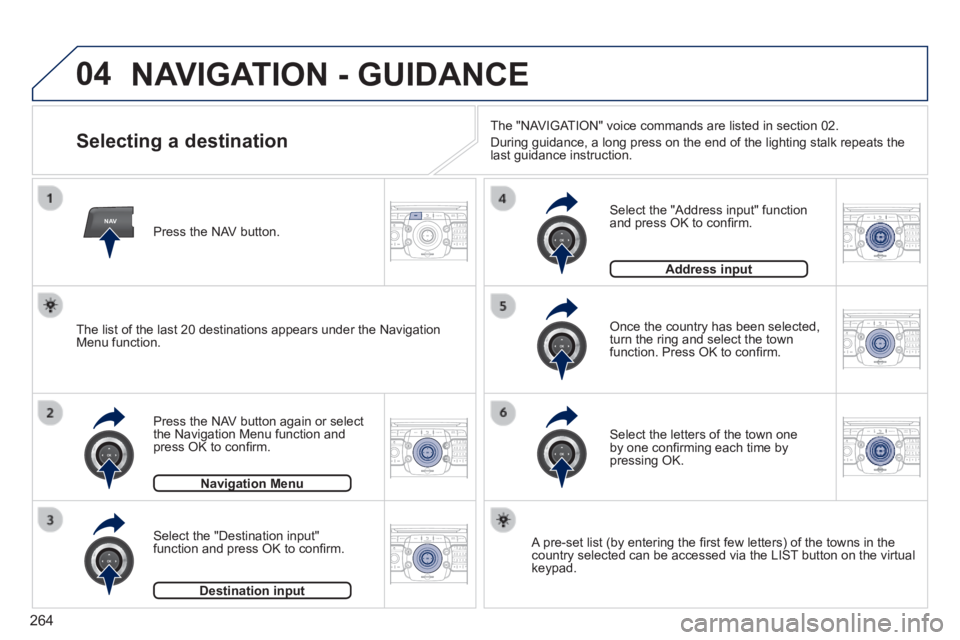
Selecting a destination
Press the NAV button again or select the Navigation Menu function and press OK to confi rm.
Select the "Destination input" function and press OK to confi rm.
Press the NAV button.
Select the letters of the town one by one confi rming each time by pressing OK.
Once the country has been selected, turn the ring and select the town function. Press OK to confi rm.
Navigation MenuNavigation Menu
Destination inputDestination input
A pre-set list (by entering the fi rst few letters) of the towns in the country selected can be accessed via the LIST button on the virtual keypad.
Select the "Address input" function and press OK to confi rm.
Address inputAddress input
The list of the last 20 destinations appears under the Navigation Menu function.
The "NAVIGATION" voice commands are listed in section 02.
During guidance, a long press on the end of the lighting stalk repeats t\
he last guidance instruction.