screen Peugeot 308 2015 Owner's Guide
[x] Cancel search | Manufacturer: PEUGEOT, Model Year: 2015, Model line: 308, Model: Peugeot 308 2015Pages: 416, PDF Size: 11.81 MB
Page 48 of 416
46
308_en_Chap01_controle-de-marche_ed01-2015
Touch screen
Setting the date and time
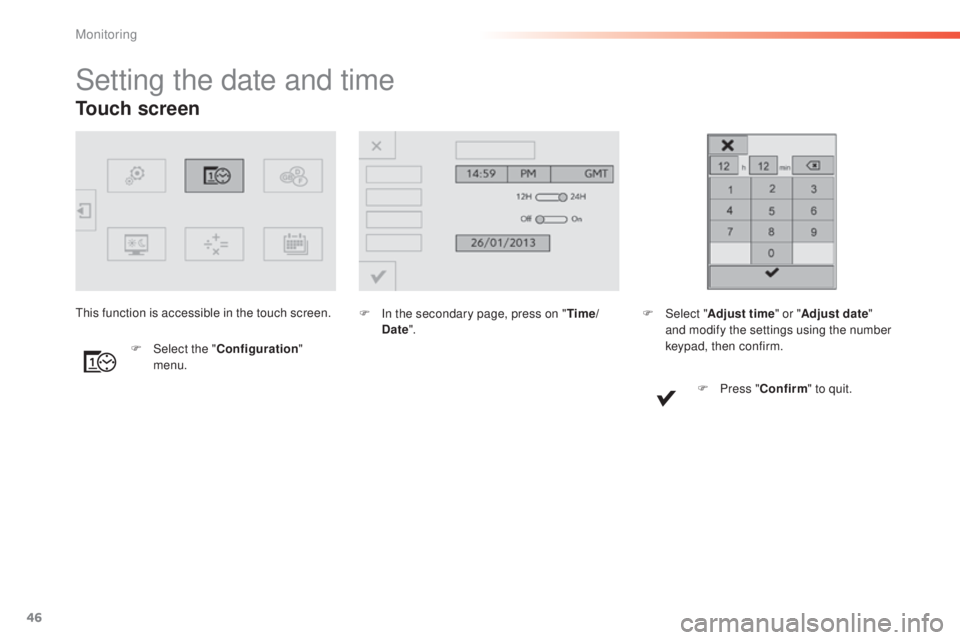
F In the secondary page, press on "Time/
Date ".
F
Sel
ect the " Configuration "
menu.th
is function is accessible in the touch screen.
F Sel ect "Adjust time " or "Adjust date"
and modify the settings using the number
keypad, then confirm.
F
P
ress "Confirm " to quit.
Monitoring
Page 49 of 416
47
308_en_Chap01_controle-de-marche_ed01-2015
For more information on the
Multimedia menu, refer to the "Audio
equipment and telematics" section.
Screen C
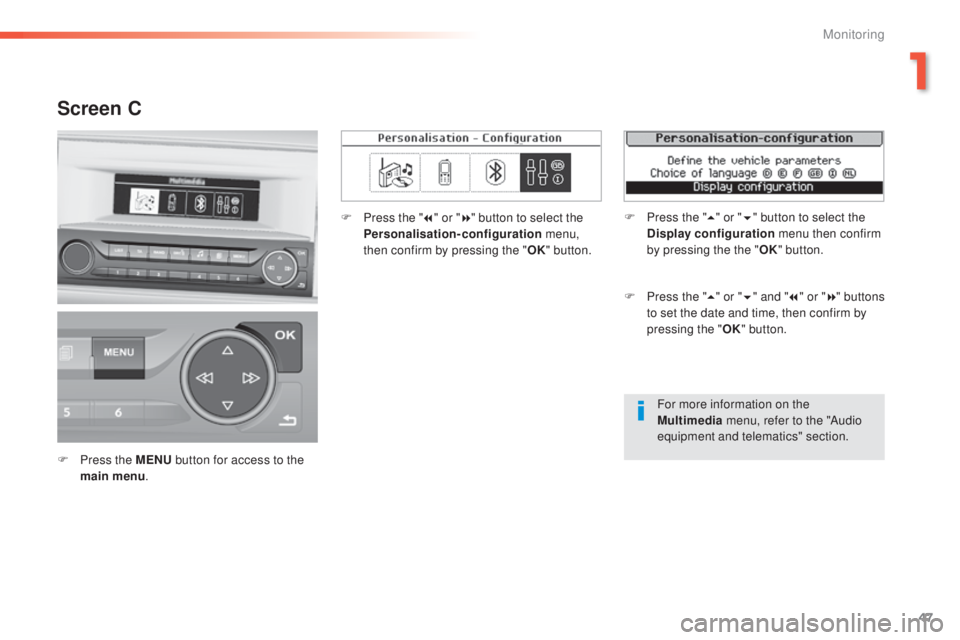
F Press the MENU button for access to the
main menu . F
P
ress the "
7" or " 8" button to select the
Personalisation-configuration menu,
then confirm by pressing the " OK" button.
F
P
ress the "
5" or " 6" and " 7" or " 8" buttons
to set the date and time, then confirm by
pressing the " OK" button.
F
P
ress the "
5" or " 6" button to select the
Display configuration menu then confirm
by pressing the the " OK" button.
1
Monitoring
Page 50 of 416
48
308_en_Chap01_controle-de-marche_ed01-2015
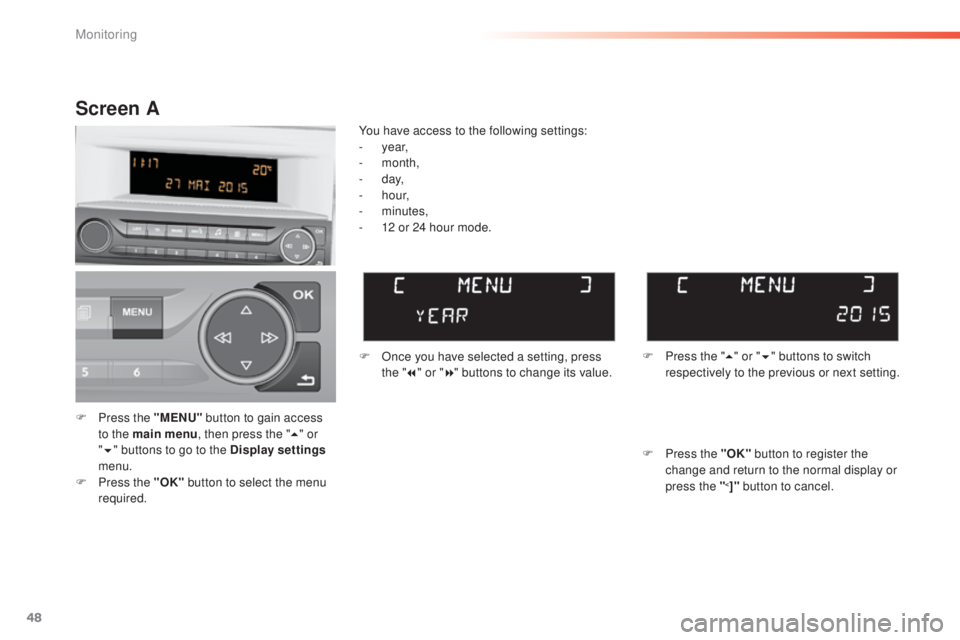
F Press the "MENU" button to gain access
to the main menu , then press the "5" or
" 6 " buttons to go to the Display settings
menu.
F
P
ress the "OK" button to select the menu
required. F
O
nce you have selected a setting, press
the " 7" or " 8" buttons to change its value.
You have access to the following settings:
-
year,
-
month,
-
d ay,
-
h o u r,
-
minutes,
-
1
2 or 24 hour mode.
Screen A
F Press the " 5" or " 6" buttons to switch
respectively to the previous or next setting.
F
P
ress the "OK" button to register the
change and return to the normal display or
press the "
<]" button to cancel.
Monitoring
Page 51 of 416
49
308_en_Chap01_controle-de-marche_ed01-2015
Screen A (without audio system)
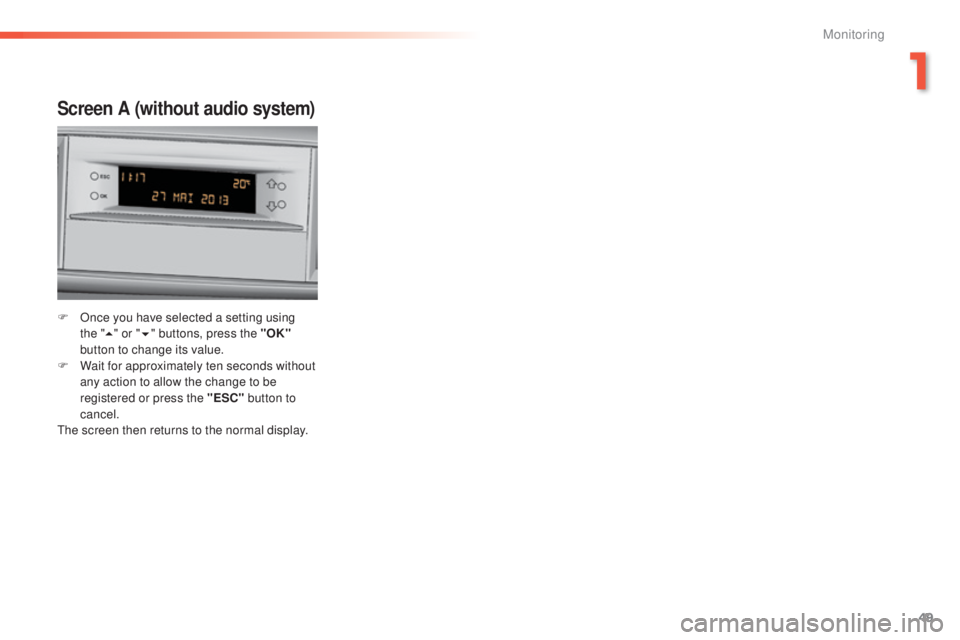
F Once you have selected a setting using the "5 " or " 6" buttons, press the "OK"
button to change its value.
F
W
ait for approximately ten seconds without
any action to allow the change to be
registered or press the "ESC" button to
cancel.
th
e screen then returns to the normal display.
1
Monitoring
Page 56 of 416
54
308_en_Chap02_ouvertures_ed01-2015
Electronic engine immobiliser
the key contains an electronic chip which has
a special code. When the ignition is switched
on, this code must be recognised in order for
starting to be possible.
th
is electronic engine immobiliser locks the
engine management system a few minutes
after the ignition is switched off and prevents
starting of the engine by anyone who does not
have the key.
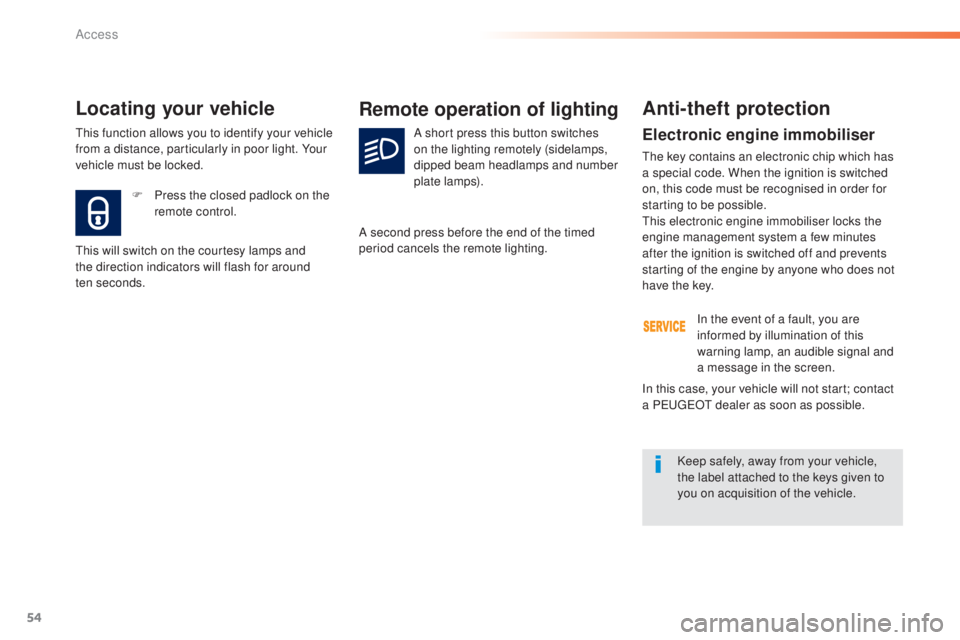
F
P
ress the closed padlock on the
remote control.
Locating your vehicle
this will switch on the courtesy lamps and
the direction indicators will flash for around
ten
seconds.
Remote operation of lighting
A short press this button switches
on the lighting remotely (sidelamps,
dipped beam headlamps and number
plate lamps).
A second press before the end of the timed
period cancels the remote lighting.
Anti-theft protection
In the event of a fault, you are
informed by illumination of this
warning lamp, an audible signal and
a message in the screen.
Keep safely, away from your vehicle,
the label attached to the keys given to
you on acquisition of the vehicle.
In this case, your vehicle will not start; contact
a P
e
uge
Ot
dealer as soon as possible.
th
is function allows you to identify your vehicle
from a distance, particularly in poor light. Your
vehicle must be locked.
Access
Page 58 of 416
56
308_en_Chap02_ouvertures_ed01-2015
Changing the battery
Do not throw the remote control
batteries away, they contain metals
which are harmful to the environment.
ta
ke them to an approved collection
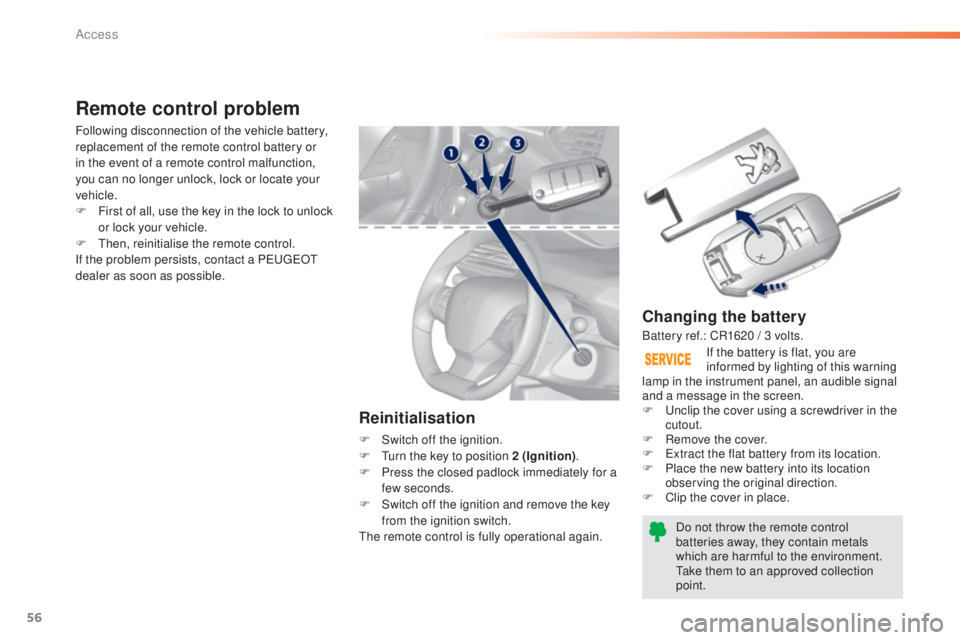
point. If the battery is flat, you are
informed by lighting of this warning
lamp in the instrument panel, an audible signal
and a message in the screen.
F
u
n
clip the cover using a screwdriver in the
cutout.
F
R
emove the cover.
F
e
x
tract the flat battery from its location.
F
P
lace the new battery into its location
observing the original direction.
F
C
lip the cover in place.
Remote control problem
Reinitialisation
F Switch off the ignition.
F
tu rn the key to position 2 (Ignition) .
F
P
ress the closed padlock immediately for a
few seconds.
F
S
witch off the ignition and remove the key
from the ignition switch.
th
e remote control is fully operational again.
Following disconnection of the vehicle battery,
replacement of the remote control battery or
in the event of a remote control malfunction,
you can no longer unlock, lock or locate your
vehicle.
F
F
irst of all, use the key in the lock to unlock
or lock your vehicle.
F
t
hen
, reinitialise the remote control.
If the problem persists, contact a P
e
uge
Ot
dealer as soon as possible.
Battery ref.: CR1620 / 3 volts.
Access
Page 68 of 416
66
308_en_Chap02_ouvertures_ed01-2015
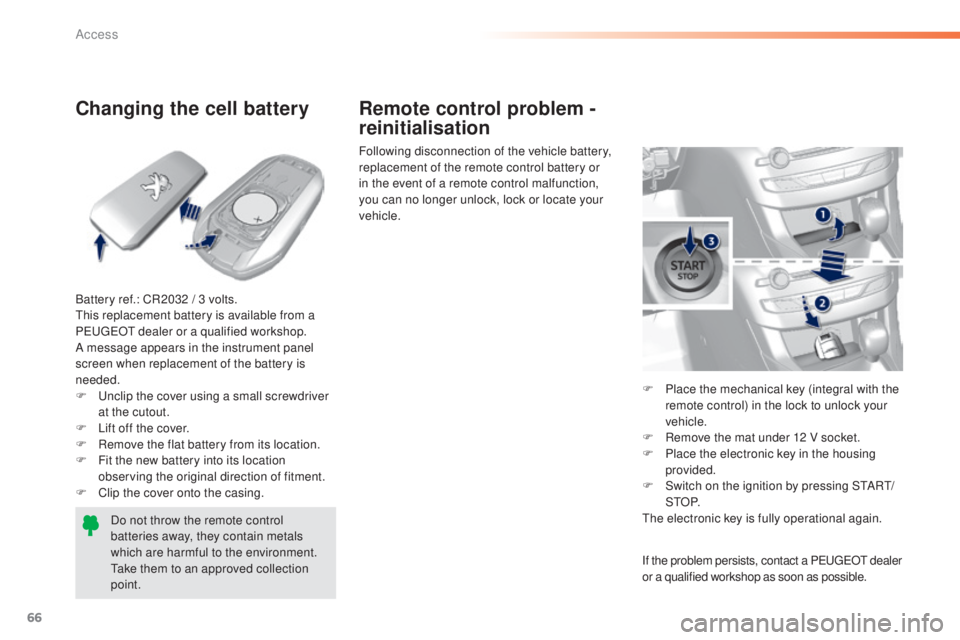
Changing the cell battery
Battery ref.: CR2032 / 3 volts.this replacement battery is available from a
P
e
uge
Ot
dealer or a qualified workshop.
A message appears in the instrument panel
screen when replacement of the battery is
needed.
F
u
n
clip the cover using a small screwdriver
at the cutout.
F
L
ift off the cover.
F
R
emove the flat battery from its location.
F
F
it the new battery into its location
observing the original direction of fitment.
F
C
lip the cover onto the casing.Do not throw the remote control
batteries away, they contain metals
which are harmful to the environment.
ta
ke them to an approved collection
point. Following disconnection of the vehicle battery,
replacement of the remote control battery or
in the event of a remote control malfunction,
you can no longer unlock, lock or locate your
vehicle.
F
P
lace the mechanical key (integral with the
remote control) in the lock to unlock your
vehicle.
F
R
emove the mat under 12 V socket.
F
P
lace the electronic key in the housing
provided.
F
S
witch on the ignition by pressing S
tA
R
t/
StO
P.
th
e electronic key is fully operational again.
Remote control problem -
reinitialisation
If the problem persists, contact a PeugeOt dealer
or a qualified workshop as soon as possible.
Access
Page 70 of 416
68
308_en_Chap02_ouvertures_ed01-2015
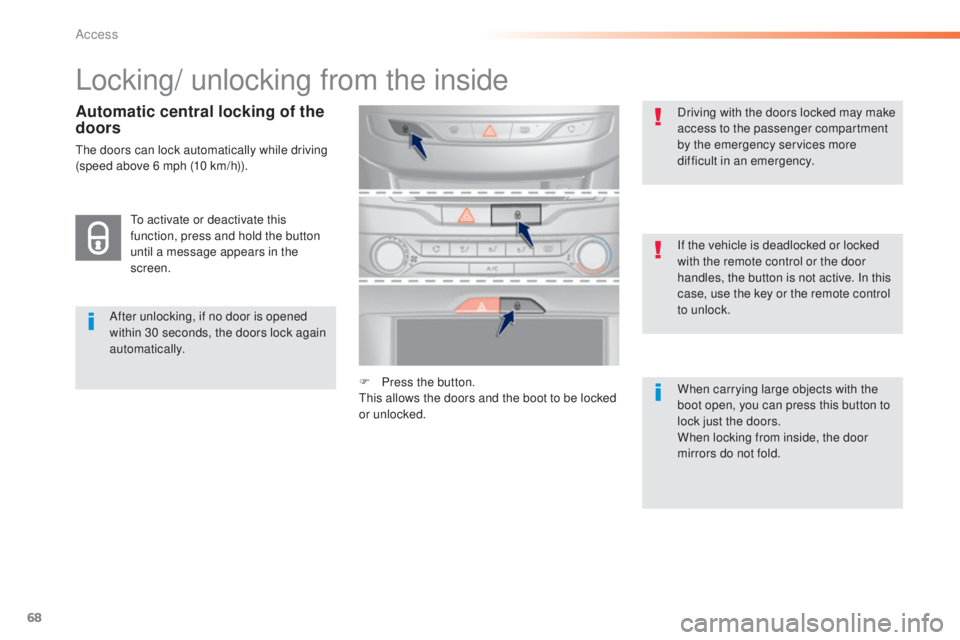
Locking/ unlocking from the inside
After unlocking, if no door is opened
within 30 seconds, the doors lock again
automatically.If the vehicle is deadlocked or locked
with the remote control or the door
handles, the button is not active. In this
case, use the key or the remote control
to unlock. Driving with the doors locked may make
access to the passenger compartment
by the emergency services more
difficult in an emergency.
F
P
ress the button.
th
is allows the doors and the boot to be locked
or unlocked. When carrying large objects with the
boot open, you can press this button to
lock just the doors.
When locking from inside, the door
mirrors do not fold.
to a
ctivate or deactivate this
function, press and hold the button
until a message appears in the
screen.
Automatic central locking of the
doors
the doors can lock automatically while driving
(speed above 6 mph (10 km/h)).
Access
Page 101 of 416
99
308_en_Chap03_confort_ed01-2015
Heating and Ventilation
Air intake
the air circulating in the passenger compartment
is filtered and originates either from the outside via
the grille located at the base of the windscreen or
from the inside in air recirculation mode.
Controls
the incoming air follows various routes
depending on the controls selected by
the driver, the front passenger and rear
passengers, according to the level of
equipment.
th
e temperature control enables you to obtain
the level of comfort required by mixing the air of
the various circuits.
th
e air distribution control enables you to
select the air vents used in the passenger
compartment by the combined use of the
associated buttons.
th
e air flow control enables you to increase or
reduce the speed of the ventilation fan.
Depending on your vehicle, the controls are
accessible in the " Air conditioning" menu of
the touch screen or are grouped together on
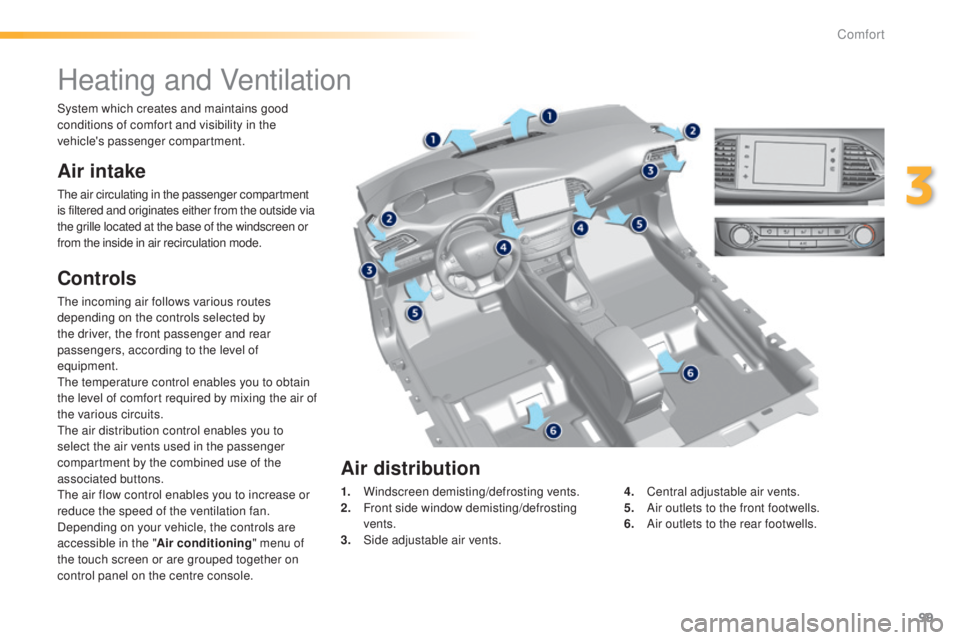
control panel on the centre console. 1.
W
indscreen demisting/defrosting vents.
2.
F
ront side window demisting/defrosting
vents.
3.
S
ide adjustable air vents.4.
C
entral adjustable air vents.
5.
A
ir outlets to the front footwells.
6.
A
ir outlets to the rear footwells.
Air distribution
System which creates and maintains good
conditions of comfort and visibility in the
vehicle's passenger compartment.
3
Comfort
Page 102 of 416
100
308_en_Chap03_confort_ed01-2015
In order for these systems to be fully effective, follow the operation and maintenance
guidelines below:
F t
o o
btain an even air distribution, take care not to obstruct the exterior air intake grilles
located at the base of the windscreen, the nozzles, the vents and the air outlets, as well
as the air extractor located in the boot.
F
D
o not cover the sunshine sensor, located on the dashboard; this is used for regulation
of the air conditioning system.
F
O
perate the air conditioning system for at least 5 to 10 minutes, once or twice a month
to keep it in per fect working order.
F
e
n
sure that the passenger compartment filter is in good condition and have the filter
elements replaced regularly.
W
e recommend the use of a combined passenger compartment filter. t
h
anks to its
special active additive, it contributes to the purification of the air breathed by the
occupants and the cleanliness of the passenger compartment (reduction of allergic
symptoms, bad odours and greasy deposits).
F
t
o e
nsure correct operation of the air conditioning system, you are also advised to have
it checked regularly as recommended in the warranty and maintenance record.
F
I
f the system does not produce cold air, switch it off and contact a P
e
uge
Ot
dealer or
a qualified workshop.
Recommendations for ventilation and air conditioning
If after an extended stop in sunshine,
the interior temperature is very high, first
ventilate the passenger compartment for
a few moments.
Put the air flow control at a setting high
enough to quickly change the air in the
passenger compartment.
th
e air conditioning system does not
contain chlorine and does not present
any danger to the ozone layer.
th
e condensation created by the air
conditioning results in a discharge
of water under the vehicle which is
perfectly normal.
When towing the maximum load on a steep gradient in high temperatures, switching off the
air conditioning increases the available engine power and so improves the towing ability.
Stop & Start
the heating and air conditioning
systems only work when the engine
is running. t
o m
aintain a comfortable
temperature in the passenger
compartment, you can temporarily
deactivate the Stop & Start system (see
the corresponding section).
Comfort