screen Peugeot 308 2015 Workshop Manual
[x] Cancel search | Manufacturer: PEUGEOT, Model Year: 2015, Model line: 308, Model: Peugeot 308 2015Pages: 416, PDF Size: 11.81 MB
Page 171 of 416
169
308_en_Chap04_conduite_ed01-2015
Reversing camera
Opening the tailgate causes the display
to disappear.
the
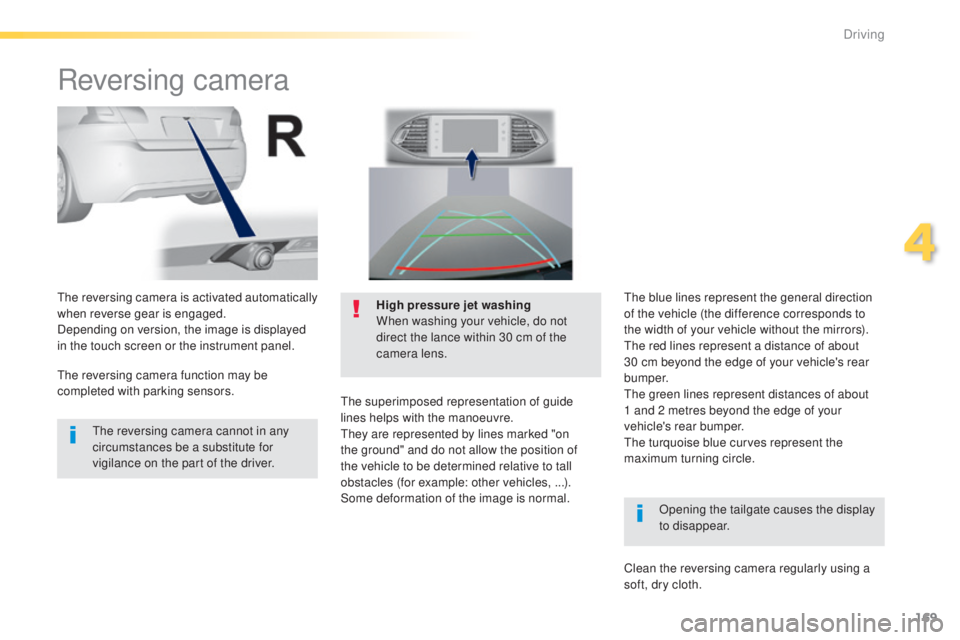
reversing camera is activated automatically
when reverse gear is engaged.
Depending on version, the image is displayed
in the touch screen or the instrument panel. High pressure jet washing
When washing your vehicle, do not
direct the lance within 30 cm of the
camera lens.
the
superimposed representation of guide
lines helps with the manoeuvre.
th
ey are represented by lines marked "on
the ground" and do not allow the position of
the vehicle to be determined relative to tall
obstacles (for example: other vehicles, ...).
Some deformation of the image is normal.
th
e reversing camera cannot in any
circumstances be a substitute for
vigilance on the part of the driver.
th
e reversing camera function may be
completed with parking sensors.
th
e blue lines represent the general direction
of the vehicle (the difference corresponds to
the width of your vehicle without the mirrors).
th
e red lines represent a distance of about
30 cm beyond the edge of your vehicle's rear
b u m p e r.
th
e green lines represent distances of about
1
and 2 metres beyond the edge of your
vehicle's rear bumper.
the
turquoise blue curves represent the
maximum turning circle.
Clean the reversing camera regularly using a
soft, dry cloth.
4
Driving
Page 174 of 416
172
308_en_Chap04_conduite_ed01-2015
Operation
Assistance with parallel parking
manoeuvres
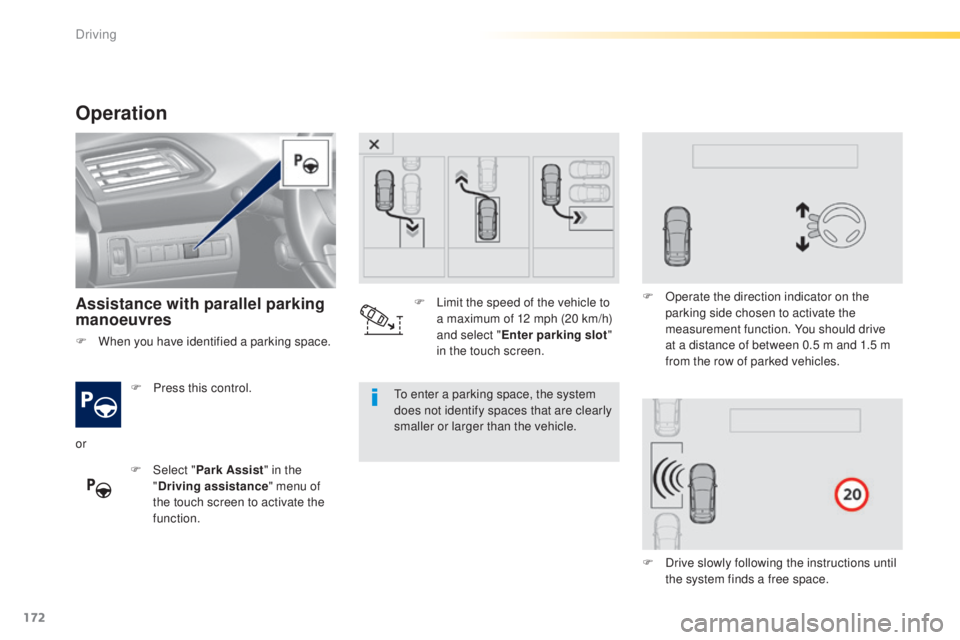
F Press this control.
F
Sel
ect "Park Assist " in the
" Driving assistance " menu of
the touch screen to activate the
function.to e nter a parking space, the system
does not identify spaces that are clearly
smaller or larger than the vehicle.
or F
L
imit the speed of the vehicle to
a maximum of 12 mph (20 km/h)
and select " Enter parking slot "
in the touch screen. F
O
perate the direction indicator on the
parking side chosen to activate the
measurement function. You should drive
at a distance of between 0.5 m and 1.5 m
from the row of parked vehicles.
F
D
rive slowly following the instructions until
the system finds a free space.
F
W
hen you have identified a parking space.
Driving
Page 176 of 416
174
308_en_Chap04_conduite_ed01-2015
Assistance in exiting from
a parallel parking space
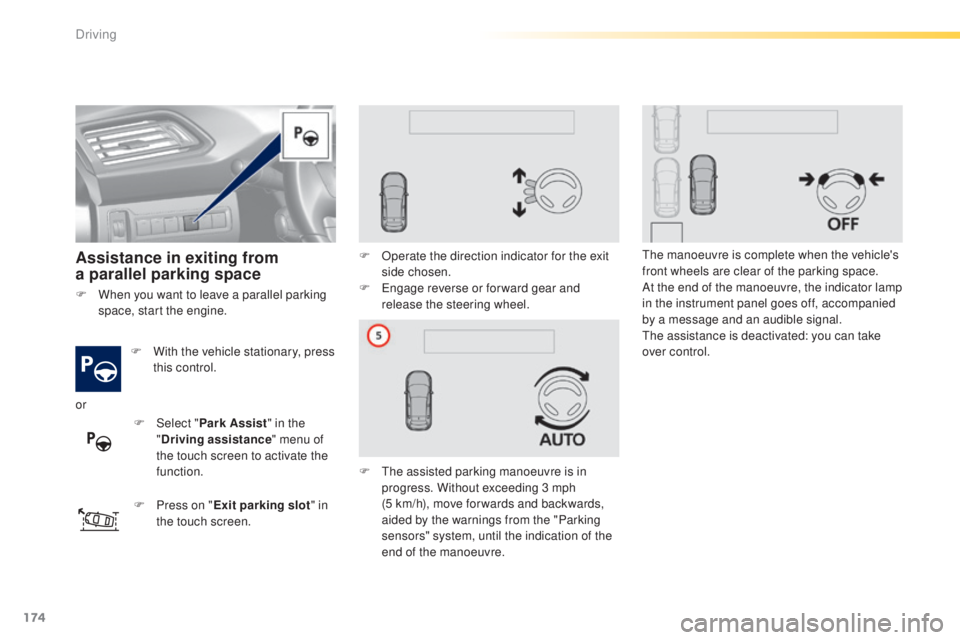
F With the vehicle stationary, press
this control.
F
P
ress on " Exit parking slot " in
the touch screen. F
O
perate the direction indicator for the exit
side chosen.
F e
n
gage reverse or for ward gear and
release the steering wheel.
F t
h
e assisted parking manoeuvre is in
progress. Without exceeding 3 mph
(5
km/h), move for wards and backwards,
aided by the warnings from the "Parking
sensors" system, until the indication of the
end of the manoeuvre.
th
e manoeuvre is complete when the vehicle's
front wheels are clear of the parking space.
At the end of the manoeuvre, the indicator lamp
in the instrument panel goes off, accompanied
by a message and an audible signal.th e assistance is deactivated: you can take
over control.
F
W
hen you want to leave a parallel parking
space, start the engine.
or F
Sel
ect "Park Assist " in the
" Driving assistance " menu of
the touch screen to activate the
function.
Driving
Page 177 of 416
175
308_en_Chap04_conduite_ed01-2015
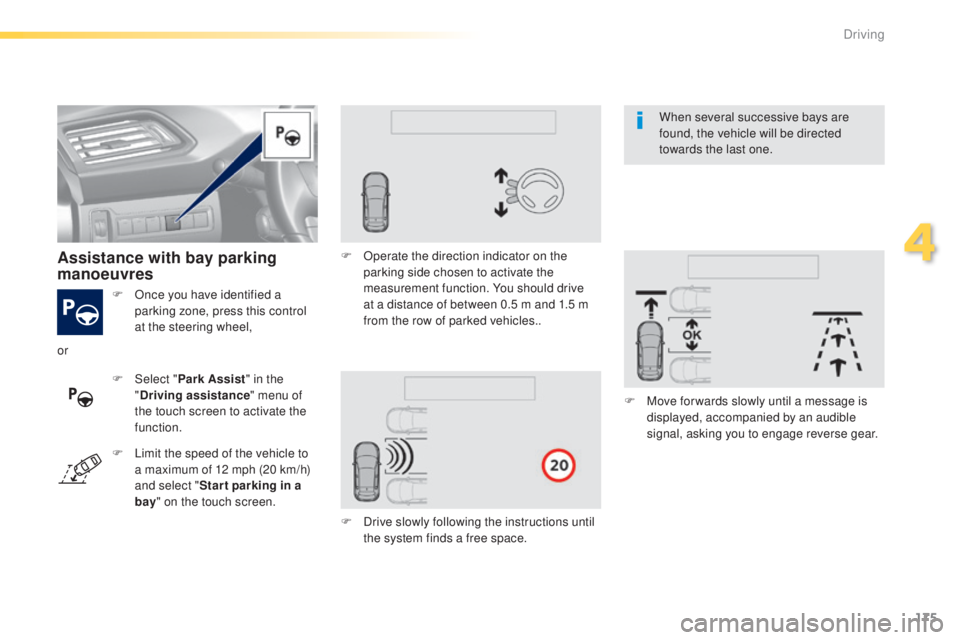
F Once you have identified a parking zone, press this control
at the steering wheel,
Assistance with bay parking
manoeuvres
F Select " Park Assist " in the
" Driving assistance " menu of
the touch screen to activate the
function. F
O
perate the direction indicator on the
parking side chosen to activate the
measurement function. You should drive
at a distance of between 0.5 m and 1.5 m
from the row of parked vehicles..
F
D
rive slowly following the instructions until
the system finds a free space. F
M
ove for wards slowly until a message is
displayed, accompanied by an audible
signal, asking you to engage reverse gear.
or
F
L
imit the speed of the vehicle to
a maximum of 12 mph (20 km/h)
and select " Star t parking in a
bay " on the touch screen. When several successive bays are
found, the vehicle will be directed
towards the last one.
4
Driving
Page 180 of 416
178
308_en_Chap05_visibilite_ed01-2015
Mirrors
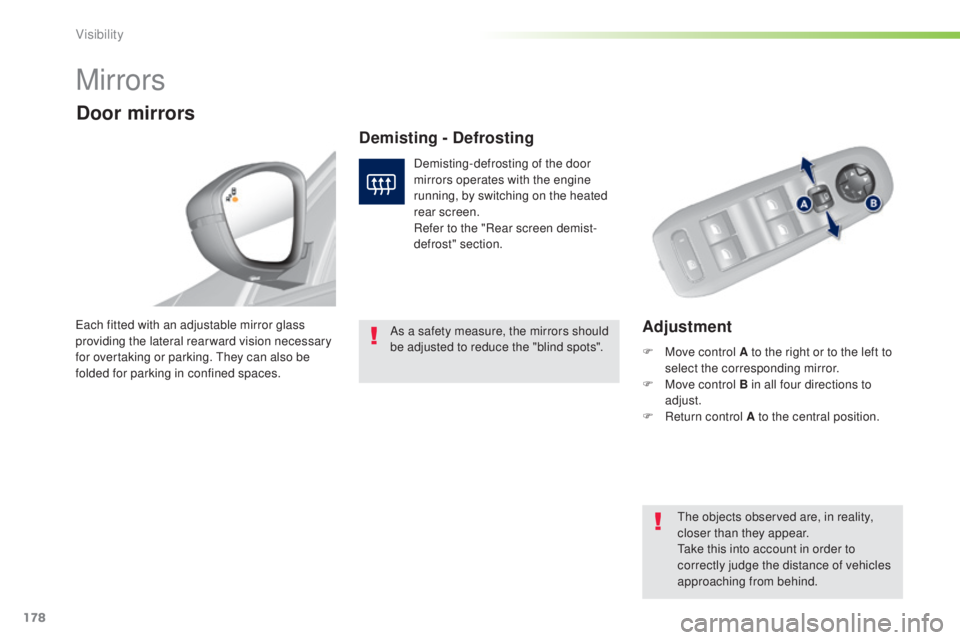
Adjustmenteach fitted with an adjustable mirror glass
providing the lateral rear ward vision necessary
for overtaking or parking. t
h
ey can also be
folded for parking in confined spaces.
Demisting - Defrosting
Door mirrors
Demisting-defrosting of the door
mirrors operates with the engine
running, by switching on the heated
rear screen.
Refer to the "Rear screen demist-
defrost" section.
th
e objects observed are, in reality,
closer than they appear.
ta
ke this into account in order to
correctly judge the distance of vehicles
approaching from behind.
F
M
ove control A to the right or to the left to
select the corresponding mirror.
F
M
ove control B in all four directions to
adjust.
F
R
eturn control A to the central position.
As a safety measure, the mirrors should
be adjusted to reduce the "blind spots".
Visibility
Page 188 of 416
186
308_en_Chap05_visibilite_ed01-2015
Automatic illumination of
headlamps
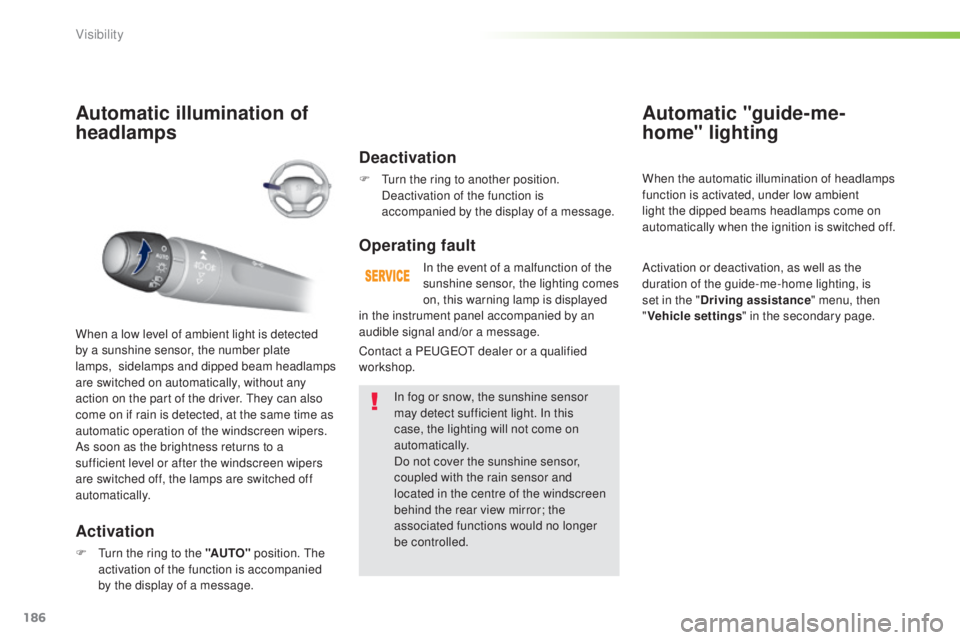
Activation
F turn the ring to the "AUTO" position. th e
activation of the function is accompanied
by the display of a message.
When a low level of ambient light is detected
by a sunshine sensor, the number plate
lamps,
s
idelamps and dipped beam headlamps
are switched on automatically, without any
action on the part of the driver. t
h
ey can also
come on if rain is detected, at the same time as
automatic operation of the windscreen wipers.
As soon as the brightness returns to a
sufficient level or after the windscreen wipers
are switched off, the lamps are switched off
automatically.
Deactivation
F turn the ring to another position. Deactivation of the function is
accompanied by the display of a message.
Operating fault
In the event of a malfunction of the
sunshine sensor, the lighting comes
on, this warning lamp is displayed
In fog or snow, the sunshine sensor
may detect sufficient light. In this
case, the lighting will not come on
automatically.
Do not cover the sunshine sensor,
coupled with the rain sensor and
located in the centre of the windscreen
behind the rear view mirror; the
associated functions would no longer
be controlled.
Automatic "guide-me-
home" lighting
When the automatic illumination of headlamps
function is activated, under low ambient
light the dipped beams headlamps come on
automatically when the ignition is switched off.
Activation or deactivation, as well as the
duration of the guide-me-home lighting, is
set in the " Driving assistance " menu, then
" Vehicle settings " in the secondary page.
Contact a P
e
uge
Ot
dealer or a qualified
workshop. in the instrument panel accompanied by an
audible signal and/or a message.
Visibility
Page 190 of 416
188
308_en_Chap05_visibilite_ed01-2015
Halogen headlamps"Full LeD "
headlamps
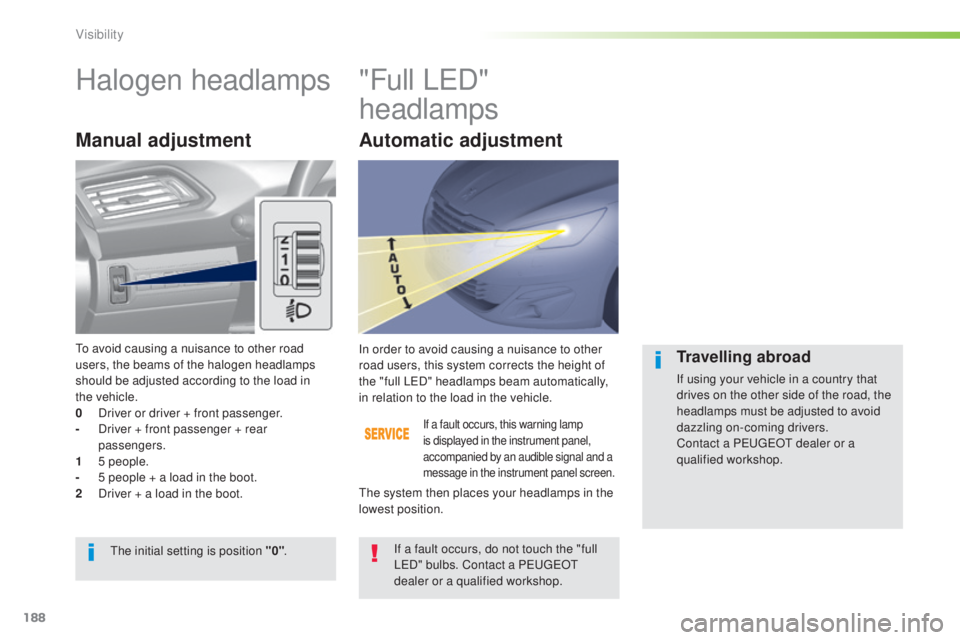
Manual adjustment
If a fault occurs, this warning lamp
is displayed in the instrument panel,
accompanied by an audible signal and a
message in the instrument panel screen.
In order to avoid causing a nuisance to other
road users, this system corrects the height of
the "full L
e
D
" headlamps beam automatically,
in relation to the load in the vehicle.
If a fault occurs, do not touch the "full
L
eD
" bulbs. Contact a P
e
uge
Ot
dealer or a qualified workshop.
th
e initial setting is position "0" .
th
e system then places your headlamps in the
lowest position.Travelling abroad
If using your vehicle in a country that
drives on the other side of the road, the
headlamps must be adjusted to avoid
dazzling on-coming drivers.
Contact a P
e
uge
Ot
dealer or a
qualified workshop.
to a
void causing a nuisance to other road
users, the beams of the halogen headlamps
should be adjusted according to the load in
the
vehicle.
0
D
river or driver + front passenger.
-
D
river + front passenger + rear
passengers.
1
5
people.
-
5 p
eople + a load in the boot.
2
D
river + a load in the boot.
Automatic adjustment
Visibility
Page 191 of 416
189
308_en_Chap05_visibilite_ed01-2015
Wipers
Programming
Various automatic wiper control modes are also
available according to the following options:
-
a
utomatic rain sensitive windscreen wipers,
-
r
ear wiping on engaging reverse gear.
Manual controls
the wipers are controlled directly by the driver.
th
e vehicle's front and rear wipers are
designed to improve the driver's visibility
progressively according to the climatic
conditions.
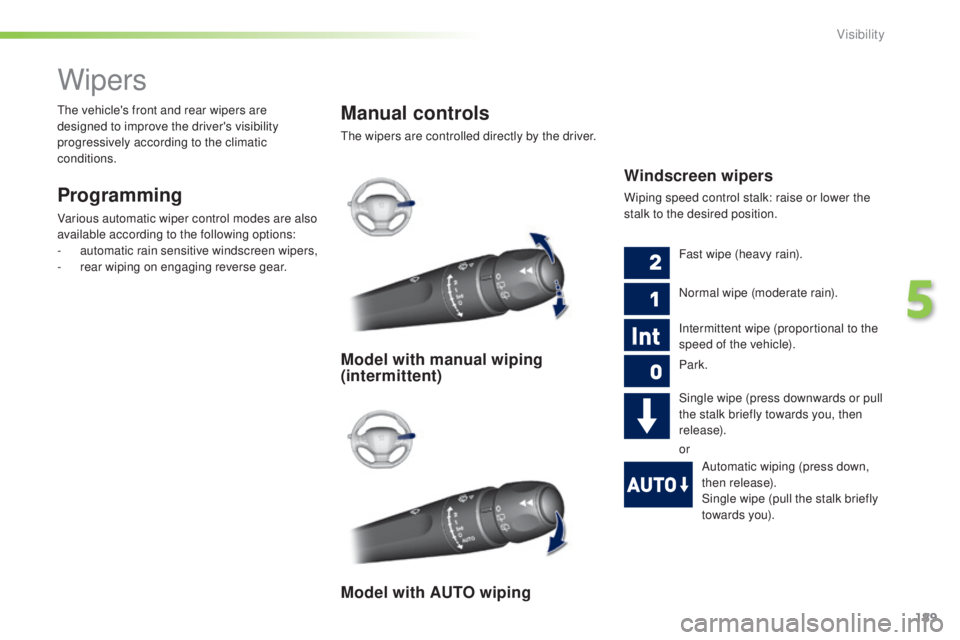
Windscreen wipers
Wiping speed control stalk: raise or lower the
stalk to the desired position.
Model with manual wiping
(intermittent)
Model with AUTO wiping
Fast wipe (heavy rain).
Normal wipe (moderate rain).
Intermittent wipe (proportional to the
speed of the vehicle).
Park.
Single wipe (press downwards or pull
the stalk briefly towards you, then
release).
or
Automatic wiping (press down,
then release).
Single wipe (pull the stalk briefly
towards you).
5
Visibility
Page 192 of 416
190
308_en_Chap05_visibilite_ed01-2015
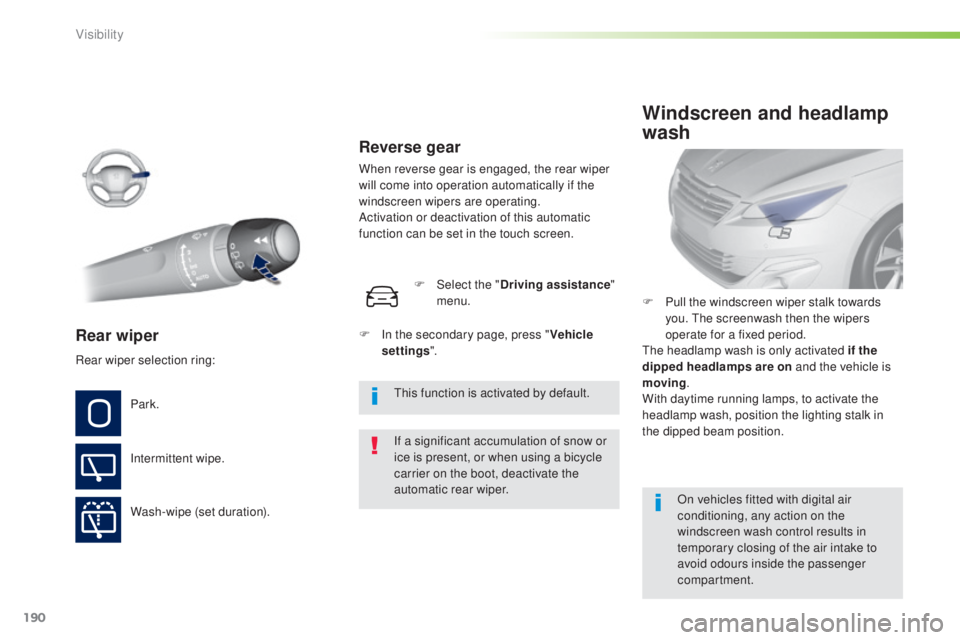
Rear wiper
If a significant accumulation of snow or
ice is present, or when using a bicycle
carrier on the boot, deactivate the
automatic rear wiper.
Park.
Intermittent wipe.
Wash-wipe (set duration). F
P
ull the windscreen wiper stalk towards
you. t
he
screenwash then the wipers
operate for a fixed period.
th
e headlamp wash is only activated if the
dipped headlamps are on and the vehicle is
moving .
With daytime running lamps, to activate the
headlamp wash, position the lighting stalk in
the dipped beam position.
Windscreen and headlamp
wash
On vehicles fitted with digital air
conditioning, any action on the
windscreen wash control results in
temporary closing of the air intake to
avoid odours inside the passenger
compartment.
Rear wiper selection ring:
th
is function is activated by default.
F
I
n the secondary page, press "
Vehicle
settings ".
F
Sel
ect the "
Driving assistance "
menu.
Reverse gear
When reverse gear is engaged, the rear wiper
will come into operation automatically if the
windscreen wipers are operating.
Activation or deactivation of this automatic
function can be set in the touch screen.
Visibility
Page 193 of 416
191
308_en_Chap05_visibilite_ed01-2015
Screenwash/headlamp wash
level low
In the case of vehicles fitted with headlamp
washers, when the fluid reservoir low level
is reached this warning lamp comes on in
the instrument panel, accompanied by an
audible signal and a message.
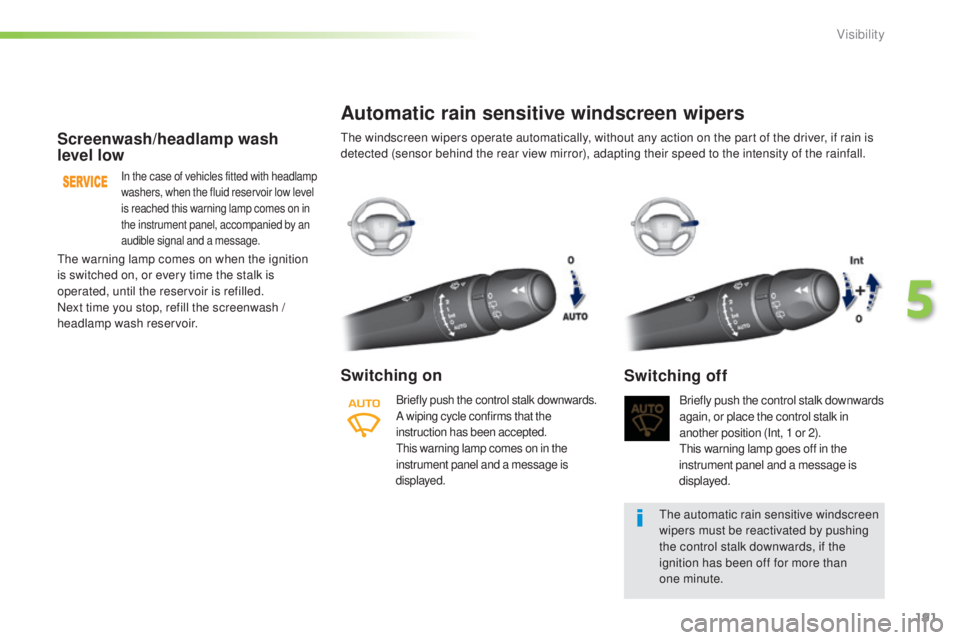
Automatic rain sensitive windscreen wipers
Switching on
Briefly push the control stalk downwards.
A wiping cycle confirms that the
instruction has been accepted.
th
is warning lamp comes on in the
instrument panel and a message is
displayed.Briefly push the control stalk downwards
again, or place the control stalk in
another position (Int, 1 or 2).
th
is warning lamp goes off in the
instrument panel and a message is
displayed.
Switching off
the automatic rain sensitive windscreen
wipers must be reactivated by pushing
the control stalk downwards, if the
ignition has been off for more than
one
minute.
th
e warning lamp comes on when the ignition
is switched on, or every time the stalk is
operated, until the reservoir is refilled.
Next time you stop, refill the screenwash /
headlamp wash reservoir.
th
e windscreen wipers operate automatically, without any action on the part of the driver, if rain is
detected (sensor behind the rear view mirror), adapting their speed to the intensity of the rainfall.
5
Visibility