screen Peugeot 308 2015 Manual PDF
[x] Cancel search | Manufacturer: PEUGEOT, Model Year: 2015, Model line: 308, Model: Peugeot 308 2015Pages: 416, PDF Size: 11.81 MB
Page 279 of 416
277
308_en_Chap08_verifications_ed01-2015
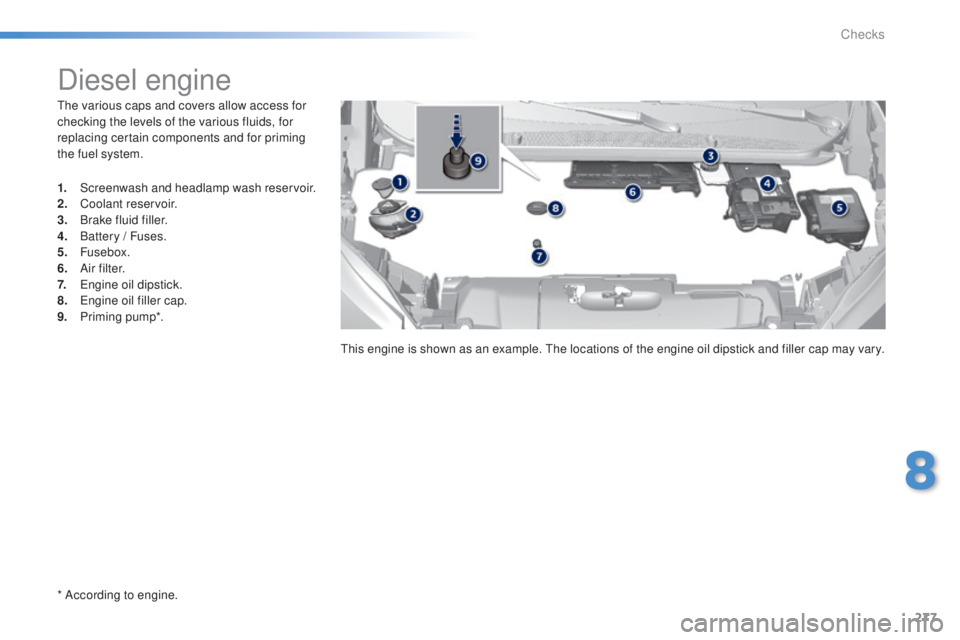
the various caps and covers allow access for
checking the levels of the various fluids, for
replacing certain components and for priming
the fuel system.
* According to engine.
Diesel engine
1. Screenwash and headlamp wash reservoir.
2. Coolant reservoir.
3.
B
rake fluid filler.
4.
B
attery / Fuses.
5.
Fusebox.
6.
A
i r f i l t e r.
7.
e
n
gine oil dipstick.
8.
e
n
gine oil filler cap.
9.
P
riming pump*.
th
is engine is shown as an example. t
h
e locations of the engine oil dipstick and filler cap may vary.
8
Checks
Page 282 of 416
280
308_en_Chap08_verifications_ed01-2015
Range indicators
When switching on the ignition, an indicator
gives an estimate of the distance that can
be travelled with your vehicle before engine
starting is automatically prevented, once the
vehicle starts using the reserve of AdBlue
® or
after a fault is detected with the SCR system.
In the event of simultaneous system fault and
low AdBlue
® level, the shortest range is the one
displayed.
In the event of the risk of non-starting related to a lack of AdBlue®
the engine start prevention system
required by regulations is activated
automatically once the AdBlue
® tank is
e m pt y.
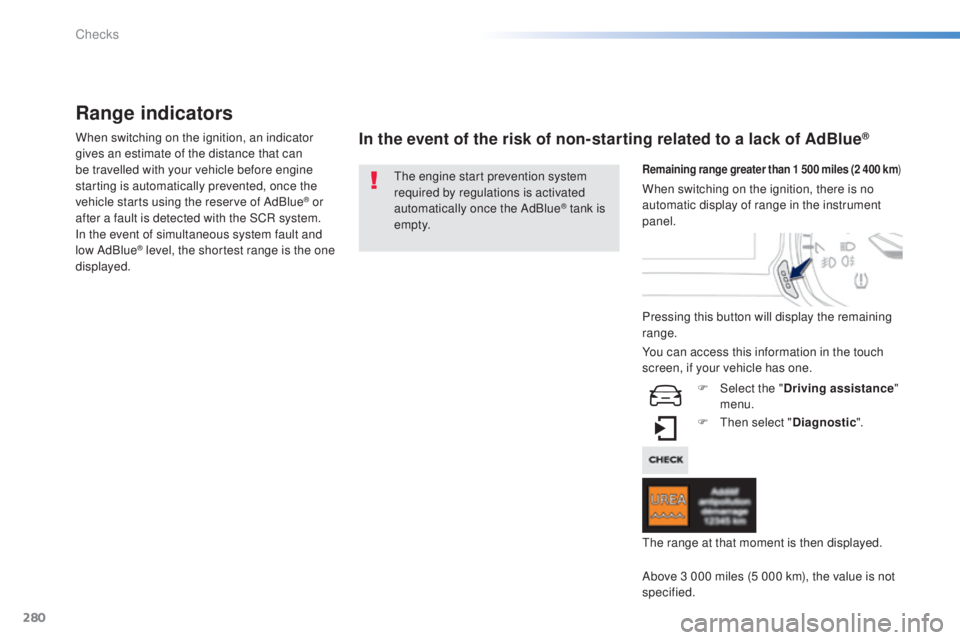
Remaining range greater than 1 500 miles (2 400 km )
Pressing this button will display the remaining
range.
F
t
hen
select "Diagnostic ".
Above 3 000 miles (5 000 km), the value is not
specified. When switching on the ignition, there is no
automatic display of range in the instrument
panel.
th
e range at that moment is then displayed.
You can access this information in the touch
screen, if your vehicle has one.
F
Sel
ect the "Driving assistance "
menu.
Checks
Page 292 of 416
290
308_en_Chap08_verifications_ed01-2015
Fluid specification
For optimum cleaning and to avoid freezing,
this fluid must not be topped up with or
replaced with plain water.
Screenwash and headlamp
wash fluid
In the case of vehicles fitted with
headlamp washers, the low fluid level
is indicated by an audible signal and
a message in the instrument panel
screen.
to
p up the reservoir when you next
stop the vehicle. Avoid prolonged contact of used oil or
fluids with the skin.
Most of these fluids are harmful to
health or indeed very corrosive.
Do not discard used oil or fluids into
sewers or onto the ground.
ta
ke used oil to a P
e
uge
Ot
dealer or
a qualified workshop (France) or to an
authorised waste disposal site.
Used products
To p p i n g u p
this additive must be topped up by a
Pe ugeOt dealer or a qualified workshop
without delay.
Diesel additive level (Diesel
engine with particle filter)
A low additive level is indicated by
illumination of the service warning
lamp, accompanied by an audible
warning and a message in the
instrument panel screen.
In wintry conditions, the use of an ethyl alcohol
or methanol base fluid is recommended.
Checks
Page 293 of 416
291
308_en_Chap08_verifications_ed01-2015
Checks
12 V battery
the battery does not require any maintenance.
However, check that the terminals are clean
and correctly tightened, particularly in summer
and winter.Refer to the manufacturer's
service schedule for details of the
replacement intervals for these
components.
Air filter and passenger compartment filter
Replace the oil filter each time the
engine oil is changed.
Refer to the manufacturer's
service schedule for details of
the replacement interval for this
component.
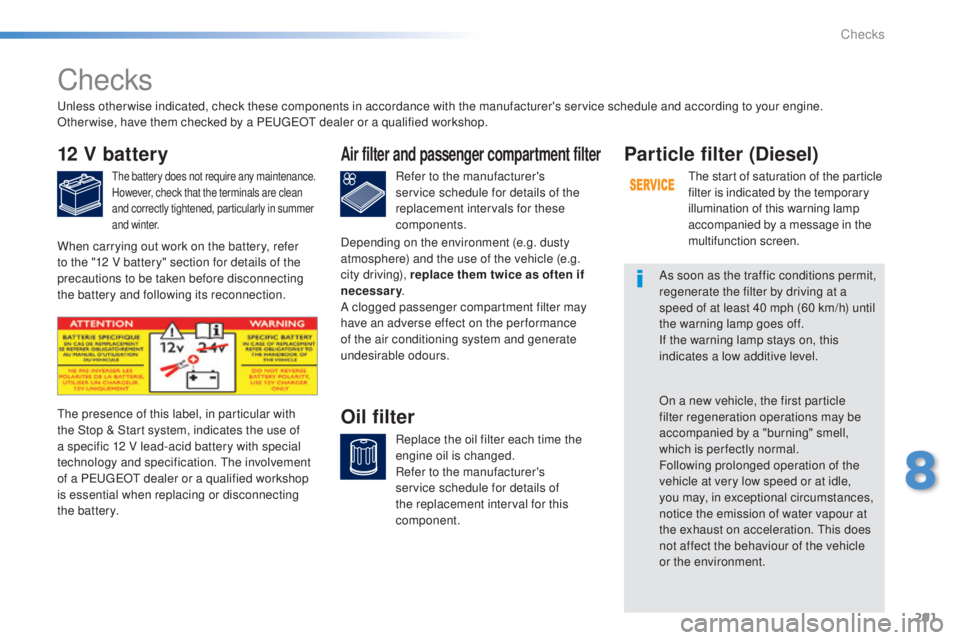
Oil filterthe presence of this label, in particular with
the Stop & Start system, indicates the use of
a specific 12 V lead-acid battery with special
technology and specification. t
h
e involvement
of a P
e
uge
Ot
dealer or a qualified workshop
is essential when replacing or disconnecting
the battery.
Particle filter (Diesel)
the start of saturation of the particle
filter is indicated by the temporary
illumination of this warning lamp
accompanied by a message in the
multifunction screen.
As soon as the traffic conditions permit,
regenerate the filter by driving at a
speed of at least 40 mph (60 km/h) until
the warning lamp goes off.
If the warning lamp stays on, this
indicates a low additive level.
On a new vehicle, the first particle
filter regeneration operations may be
accompanied by a "burning" smell,
which is per fectly normal.
Following prolonged operation of the
vehicle at very low speed or at idle,
you may, in exceptional circumstances,
notice the emission of water vapour at
the exhaust on acceleration.
t
h
is does
not affect the behaviour of the vehicle
or the environment.
un
less otherwise indicated, check these components in accordance with the manufacturer's service schedule and according to your engine.
Other wise, have them checked by a P
e
uge
Ot
dealer or a qualified workshop.
When carrying out work on the battery, refer
to the "12 V battery" section for details of the
precautions to be taken before disconnecting
the battery and following its reconnection. Depending on the environment (e.g. dusty
atmosphere) and the use of the vehicle (e.g.
city driving), replace them twice as often if
necessary
.
A clogged passenger compartment filter may
have an adverse effect on the per formance
of the air conditioning system and generate
undesirable odours.
8
Checks
Page 298 of 416
296
308_en_Chap09_caracteristiques-techniques_ed01-2015
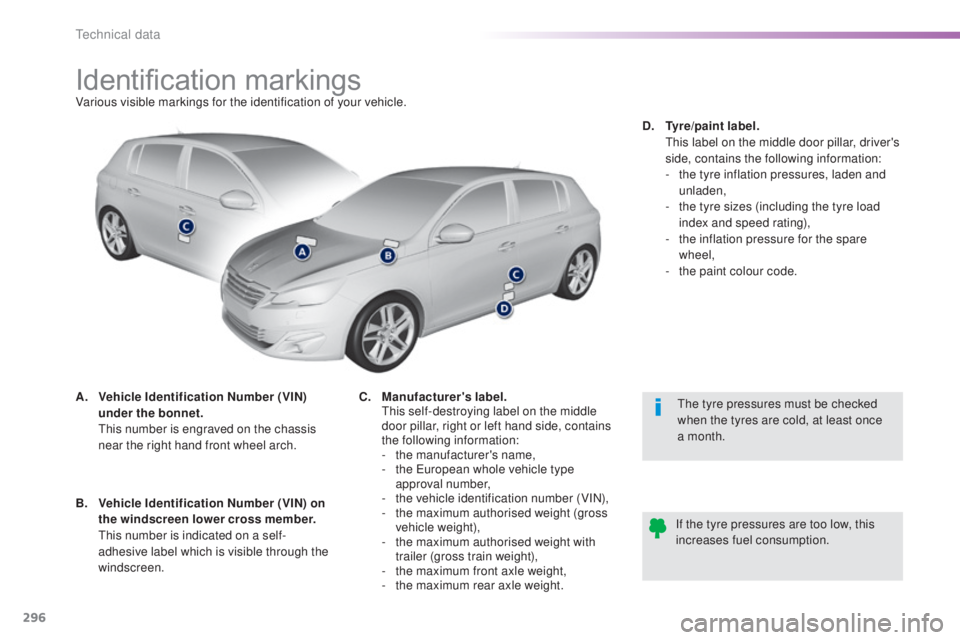
Identification markingsVarious visible markings for the identification of your vehicle.
A.
V
ehicle Identification Number (VIN)
under the bonnet.
t
h
is number is engraved on the chassis
near the right hand front wheel arch.
th
e tyre pressures must be checked
when the tyres are cold, at least once
a month.
If the tyre pressures are too low, this
increases fuel consumption.
B.
V
ehicle Identification Number (VIN) on
the windscreen lower cross member.
t
h
is number is indicated on a self-
adhesive label which is visible through the
windscreen. C.
M
anufacturer's label.
t
h
is self-destroying label on the middle
door pillar, right or left hand side, contains
the following information:
-
t
he manufacturer's name,
-
t
he e
u
ropean whole vehicle type
approval number,
-
t
he vehicle identification number (VIN),
-
t
he maximum authorised weight (gross
vehicle weight),
-
t
he maximum authorised weight with
trailer (gross train weight),
-
t
he maximum front axle weight,
-
t
he maximum rear axle weight.D.
T
yre/paint label.
t
h
is label on the middle door pillar, driver's
side, contains the following information:
-
t
he tyre inflation pressures, laden and
unladen,
-
t
he tyre sizes (including the tyre load
index and speed rating),
-
t
he inflation pressure for the spare
wheel,
-
t
he paint colour code.
technical data
Page 303 of 416
301
308_en_Chap10c_SMegplus_ed01-2015
the system is protected in such a way that it will only
operate in your vehicle.
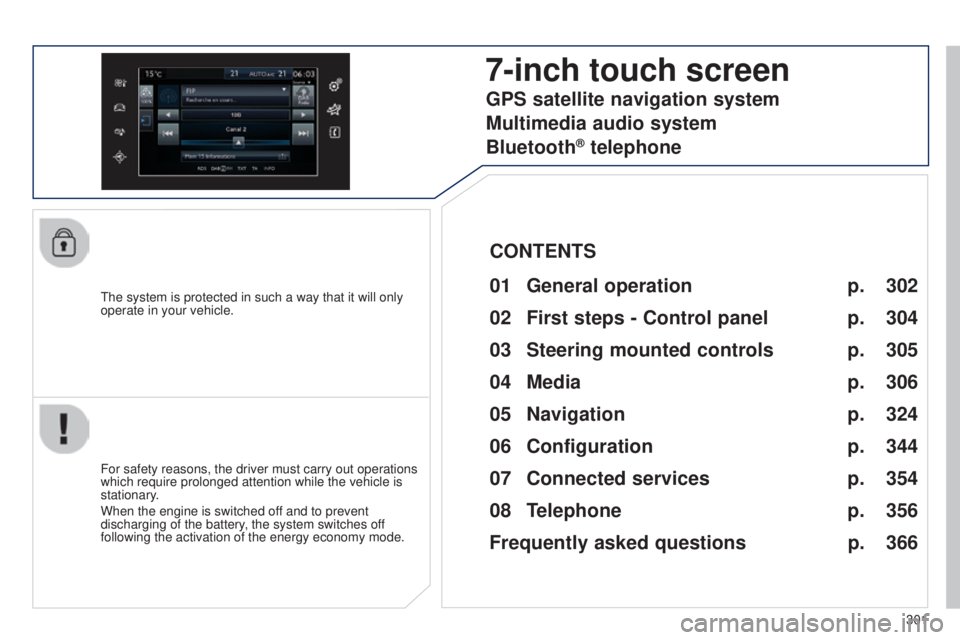
7-inch touch screen
01 General operation
For safety reasons, the driver must carry out operations
which require prolonged attention while the vehicle is
stationary.
When the engine is switched off and to prevent
discharging of the battery, the system switches off
following the activation of the energy economy mode.
CONTENTS
02
First steps - Control
panel
04
Media
05
Navigation
06
Configuration
07
Connected service
s
08
Telephone p.
p.
p.
p.
p.
p.
p.
Frequently asked questions p.
GPS satellite navigation system
Multimedia audio system
Bluetooth
® telephone
302
304
324 306
344
354
356
366
03
Steering mounted
controls p. 305
Page 305 of 416

01
use the buttons on either side of the touch screen for access to the menu\
s, then press the
virtual buttons in the touch screen.
e
ach menu is displayed in one or two pages (primary page and secondary p\
age).
GENERAL OPERATION
In very hot conditions, the system may go into stand-by (screen and sou\
nd completely off) for a minimum period of 5 minutes. Secondary page
Primary page
303
Page 306 of 416
02
304
FIRST STEPS
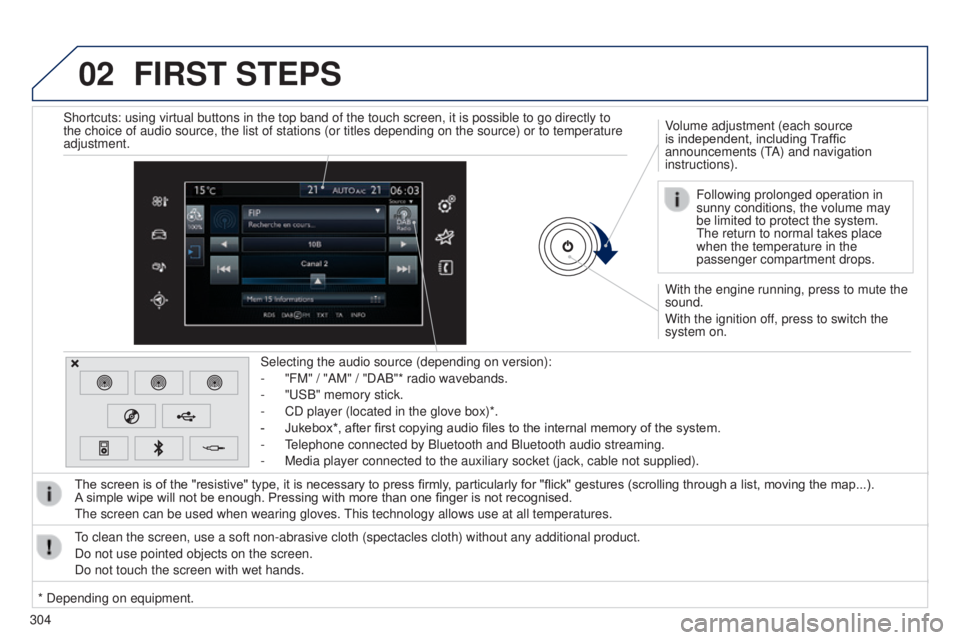
With the engine running, press to mute the
sound.
With the ignition off, press to switch the
system on. Volume adjustment (each source
is independent, including Traffic
announcements (t
A) and navigation
instructions).
Selecting the audio source (depending on version):
-
"FM" / "AM" / "DAB"* radio wavebands.
-
"
u
SB" memory stick.
-
CD player (located in the glove box)*.
-
Jukebox*, after first copying audio files to the internal memory of the system.
-
t
elephone connected by Bluetooth and Bluetooth audio streaming.
-
Media player connected to the auxiliary socket (jack, cable not supplie\
d).
The screen is of the "resistive" type, it is necessary to press firmly , particularly for "flick" gestures (scrolling through a list, moving the map...).
A
simple wipe will not be enough. Pressing with more than one finger is not recognised.
t
he screen can be used when wearing gloves.
t
his technology allows use at all temperatures.
to clean the screen, use a soft non-abrasive cloth (spectacles cloth) w\
ithout any additional product.
Do not use pointed objects on the screen.
Do not touch the screen with wet hands. Following prolonged operation in
sunny conditions, the volume may
be limited to protect the system.
t
he return to normal takes place
when the temperature in the
passenger compartment drops.
Shortcuts: using virtual buttons in the top band of the touch screen, it\
is possible to go directly to
the choice of audio source, the list of stations (or titles depending o\
n the source) or to temperature
adjustment.
* Depending on equipment.
Page 311 of 416
309
308_en_Chap10c_SMegplus_ed01-2015
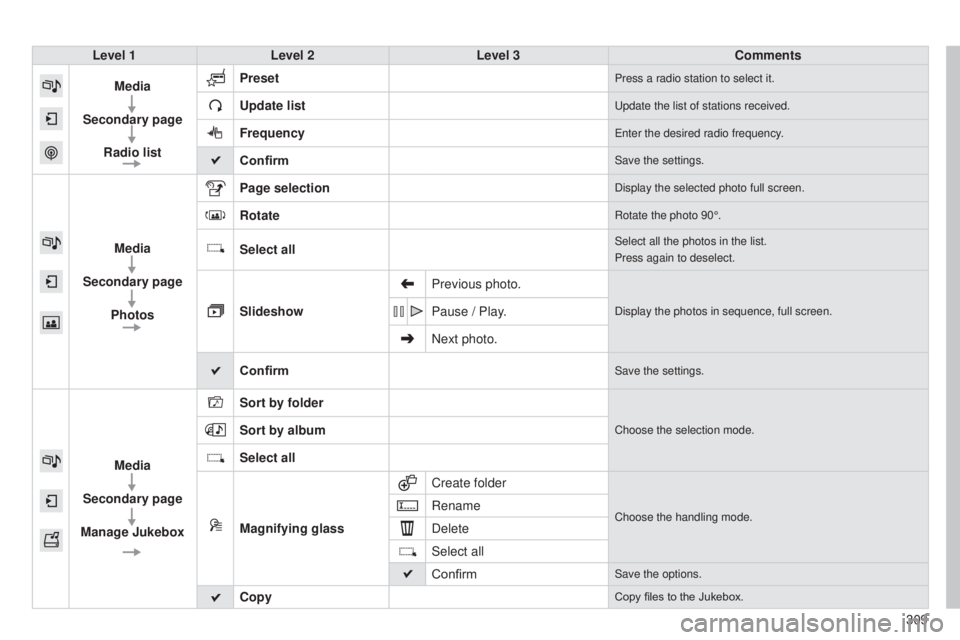
Level 1Level 2 Level 3 Comments
Media
Secondary page Radio list Preset
Press a radio station to select it.
Update listupdate the list of stations received.
Frequencyenter the desired radio frequency.
ConfirmSave the settings.
Media
Secondary page Photos Page selection
Display the selected photo full screen.
RotateRotate the photo 90°.
Select allSelect all the photos in the list.
Press again to deselect.
Slideshow
Previous photo.Display the photos in sequence, full screen.Pause / Play.
Next photo.
Confirm
Save the settings.
Media
Secondary page
Manage Jukebox Sort by folder
Choose the selection mode.Sort by album
Select all
Magnifying glass
Create folder
Choose the handling mode.Rename
Delete
Select all
Confirm
Save the options.
CopyCopy files to the Jukebox.
Page 327 of 416
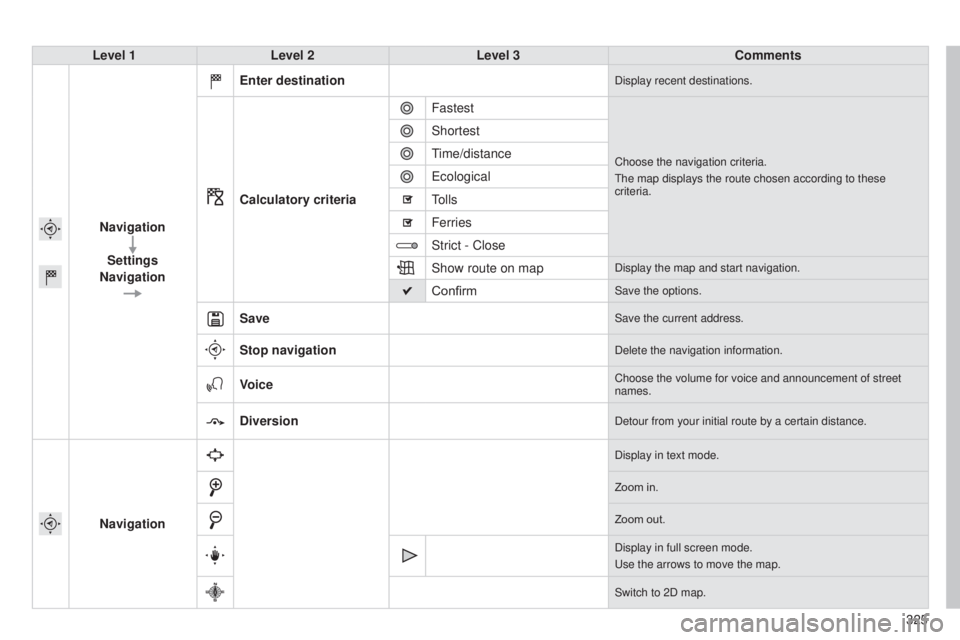
325
308_en_Chap10c_SMegplus_ed01-2015
Level 1Level 2 Level 3 Comments
Navigation Settings
Navigation Enter destination
Display recent destinations.
Calculatory criteria
Fastest
Choose the navigation criteria.
t
he map displays the route chosen according to these
criteria.
Shortest
time/distance
e
cological
tolls
Ferries
Strict - Close
Show route on map
Display the map and start navigation.
ConfirmSave the options.
SaveSave the current address.
Stop navigationDelete the navigation information.
VoiceChoose the volume for voice and announcement of street
names.
DiversionDetour from your initial route by a certain distance.
Navigation
Display in text mode.
Zoom in.
Zoom out.
Display in full screen mode.
u
se the arrows to move the map.
Switch to 2D map.