driving assistance menu Peugeot 308 2015 Owner's Manual
[x] Cancel search | Manufacturer: PEUGEOT, Model Year: 2015, Model line: 308, Model: Peugeot 308 2015Pages: 416, PDF Size: 11.81 MB
Page 39 of 416
37
308_en_Chap01_controle-de-marche_ed01-2015
tr i p c o m p u t e r
System that gives you information on the current journey (range, fuel consumption…).
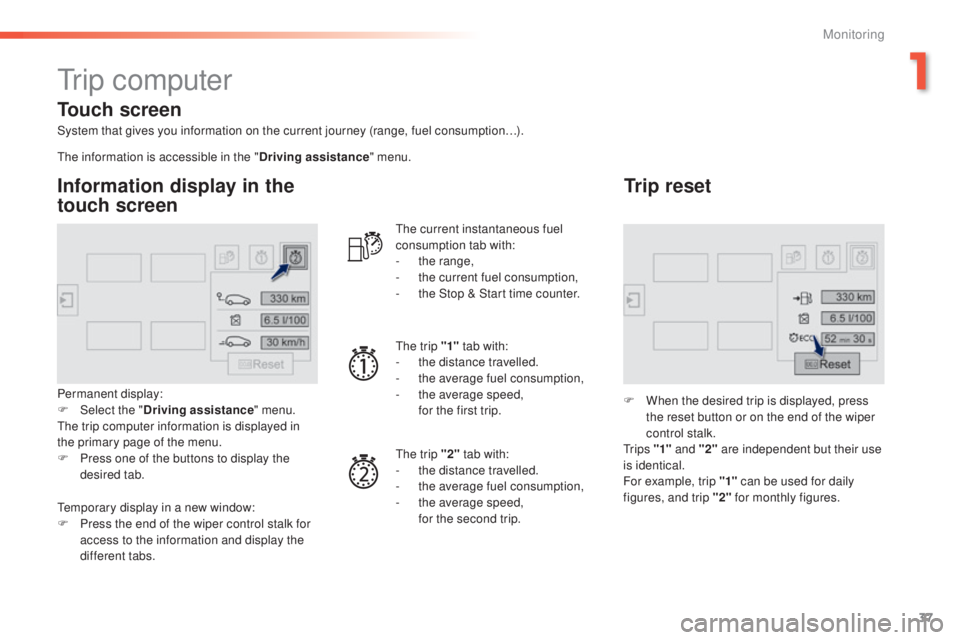
Information display in the
touch screen
Permanent display:
F Sel ect the " Driving assistance " menu.
th
e trip computer information is displayed in
the primary page of the menu.
F
P
ress one of the buttons to display the
desired tab.
th
e current instantaneous fuel
consumption tab with:
-
t
he range,
-
t
he current fuel consumption,
-
t
he Stop & Start time counter.
th
e trip "1"
tab with:
-
t
he distance travelled.
- t he average fuel consumption,
- t he average speed,
f
or the first trip.
th
e trip "2" tab with:
-
t
he distance travelled.
-
t
he average fuel consumption,
-
t
he average speed,
f
or the second trip.
Trip reset
F When the desired trip is displayed, press the reset button or on the end of the wiper
control stalk.
t
r i p s "1" and "2" are independent but their use
is identical.
For example, trip "1" can be used for daily
figures, and trip "2" for monthly figures.
th
e information is accessible in the "
Driving assistance" menu.
te
mporary display in a new window:
F
P
ress the end of the wiper control stalk for
access to the information and display the
different tabs.
Touch screen
1
Monitoring
Page 42 of 416
40
308_en_Chap01_controle-de-marche_ed01-2015
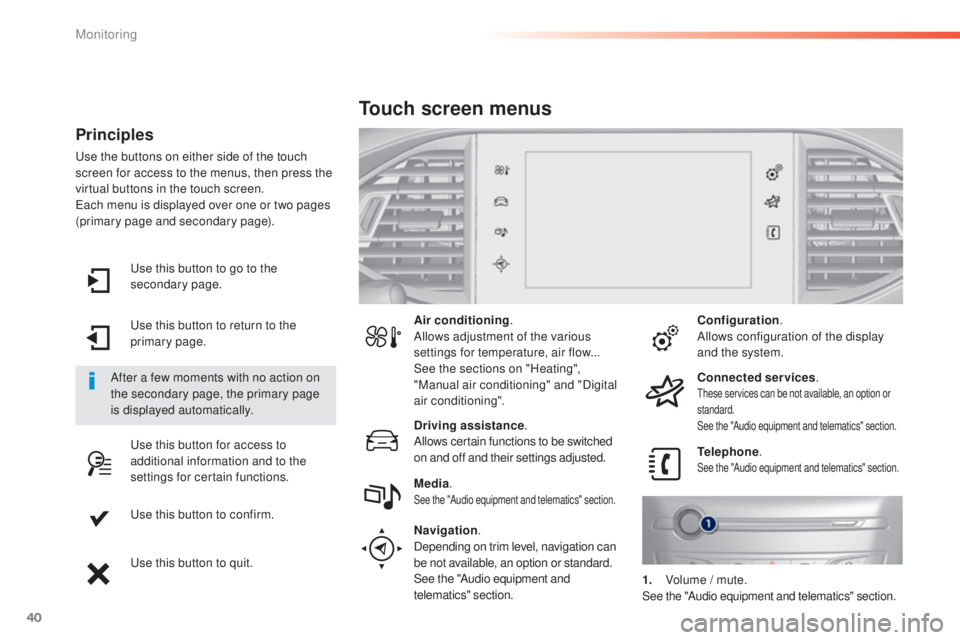
use this button to go to the
secondary page.
us
e this button to return to the
primary page.
us
e this button for access to
additional information and to the
settings for certain functions.
us
e this button to confirm.
us
e this button to quit.
Principles
use the buttons on either side of the touch
screen for access to the menus, then press the
virtual buttons in the touch screen.
ea
ch menu is displayed over one or two pages
(primary page and secondary page).
After a few moments with no action on
the secondary page, the primary page
is displayed automatically. Air conditioning
.
Allows adjustment of the various
settings for temperature, air flow...
See the sections on "Heating",
"Manual air conditioning" and "Digital
air conditioning".
Touch screen menus
Driving assistance .
Allows certain functions to be switched
on and off and their settings adjusted. Telephone
.
See the "Audio equipment and telematics" section.Media.See the "Audio equipment and telematics" section.
Navigation .
Depending on trim level, navigation can
be not available, an option or standard.
See the "Audio equipment and
telematics" section. Configuration
.
Allows configuration of the display
and the system.
Connected services .
these services can be not available, an option or
standard.
See the "Audio equipment and telematics" section.
1. Volume / mute.See the "Audio equipment and telematics" section.
Monitoring
Page 43 of 416
41
308_en_Chap01_controle-de-marche_ed01-2015
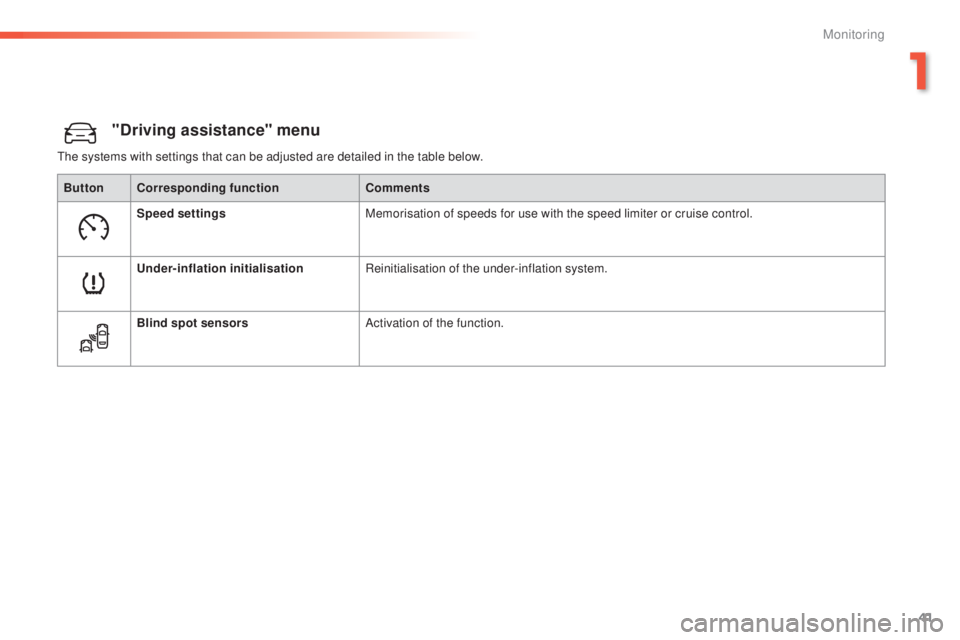
"Driving assistance" menu
the systems with settings that can be adjusted are detailed in the table below.Button Corresponding function Comments
Speed settings Memorisation of speeds for use with the speed limiter or cruise control.
Under-inflation initialisation Reinitialisation of the under-inflation system.
Blind spot sensors Activation of the function.
1
Monitoring
Page 53 of 416
51
308_en_Chap02_ouvertures_ed01-2015
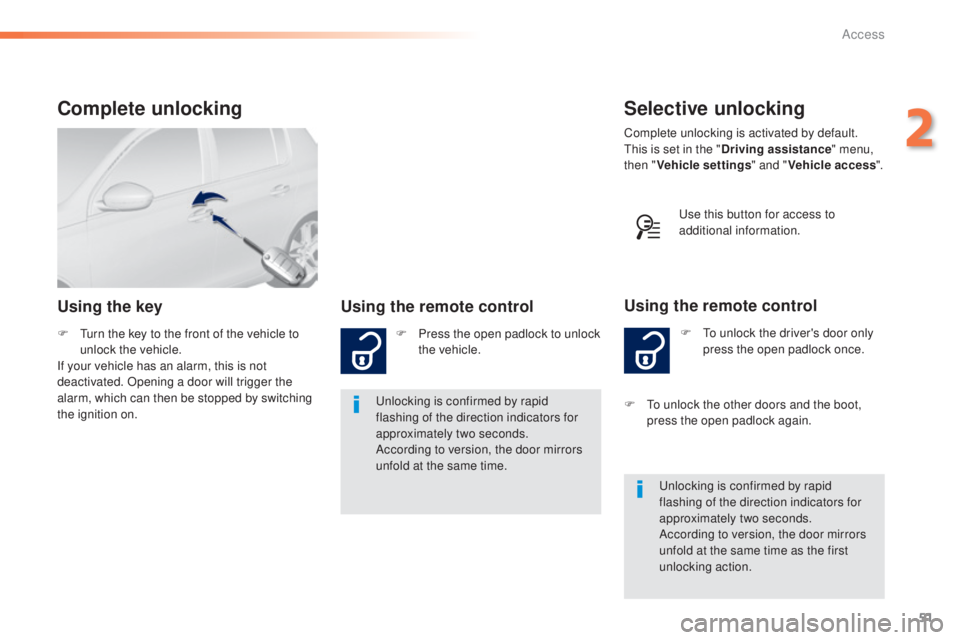
Selective unlocking
F to unlock the driver's door only press the open padlock once.
Using the remote control
Complete unlocking is activated by default.this is set in the " Driving assistance " menu,
then " Vehicle settings " and "Vehicle access ".
un
locking is confirmed by rapid
flashing of the direction indicators for
approximately two seconds.
According to version, the door mirrors
unfold at the same time as the first
unlocking action.
F
t
o u
nlock the other doors and the boot,
press the open padlock again.
Complete unlocking
Using the key Using the remote control
F Press the open padlock to unlock
the vehicle.
un
locking is confirmed by rapid
flashing of the direction indicators for
approximately two seconds.
According to version, the door mirrors
unfold at the same time.
F
tu
rn the key to the front of the vehicle to
unlock the vehicle.
If your vehicle has an alarm, this is not
deactivated. Opening a door will trigger the
alarm, which can then be stopped by switching
the ignition on.
us
e this button for access to
additional information.
2
Access
Page 59 of 416
57
308_en_Chap02_ouvertures_ed01-2015
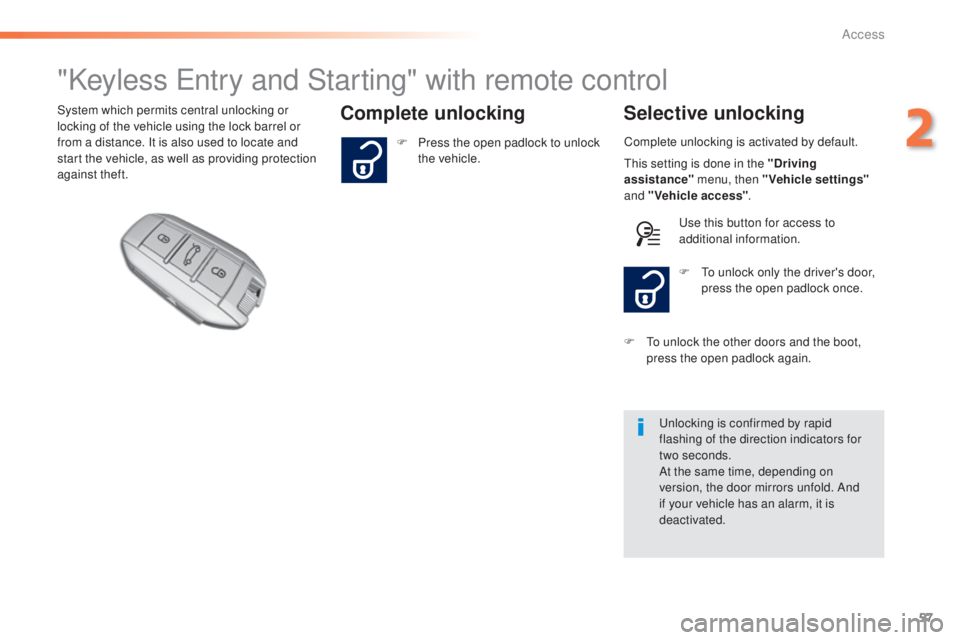
"Keyless entry and Starting" with remote control
Complete unlocking Selective unlockingSystem which permits central unlocking or
locking of the vehicle using the lock barrel or
from a distance. It is also used to locate and
start the vehicle, as well as providing protection
against theft. Complete unlocking is activated by default.
un
locking is confirmed by rapid
flashing of the direction indicators for
two
seconds.
At the same time, depending on
version, the door mirrors unfold. And
if your vehicle has an alarm, it is
deactivated. F
t
o u
nlock only the driver's door,
press the open padlock once.
F
P
ress the open padlock to unlock
the vehicle.
F
t
o u
nlock the other doors and the boot,
press the open padlock again.
th
is setting is done in the "Driving
assistance" menu, then "Vehicle settings"
and "Vehicle access" .
us
e this button for access to
additional information.
2
Access
Page 61 of 416
59
308_en_Chap02_ouvertures_ed01-2015
Complete unlocking
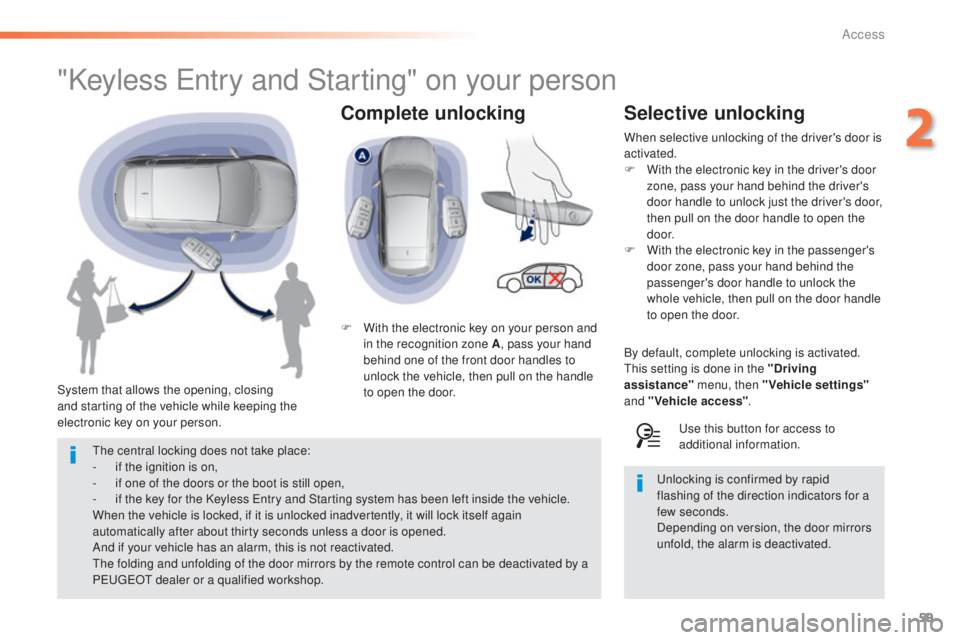
"Keyless entry and Starting" on your person
System that allows the opening, closing
and starting of the vehicle while keeping the
electronic key on your person. F
W
ith the electronic key on your person and
in the recognition zone A , pass your hand
behind one of the front door handles to
unlock the vehicle, then pull on the handle
to open the door.
th
e central locking does not take place:
-
i
f the ignition is on,
-
i
f one of the doors or the boot is still open,
-
i
f the key for the Keyless e
n
try and Starting system has been left inside the vehicle.
When the vehicle is locked, if it is unlocked inadvertently, it will lock itself again
automatically after about thirty seconds unless a door is opened.
And if your vehicle has an alarm, this is not reactivated.
th
e folding and unfolding of the door mirrors by the remote control can be deactivated by a
P
e
uge
Ot
dealer or a qualified workshop.
Selective unlocking
When selective unlocking of the driver's door is
activated.
F
W
ith the electronic key in the driver's door
zone, pass your hand behind the driver's
door handle to unlock just the driver's door,
then pull on the door handle to open the
d o o r.
F
W
ith the electronic key in the passenger's
door zone, pass your hand behind the
passenger's door handle to unlock the
whole vehicle, then pull on the door handle
to open the door.
By default, complete unlocking is activated.
th
is setting is done in the "Driving
assistance" menu, then "Vehicle settings"
and "Vehicle access" .
us
e this button for access to
additional information.
un
locking is confirmed by rapid
flashing of the direction indicators for a
few
seconds.
Depending on version, the door mirrors
unfold, the alarm is deactivated.
2
Access
Page 64 of 416
62
308_en_Chap02_ouvertures_ed01-2015
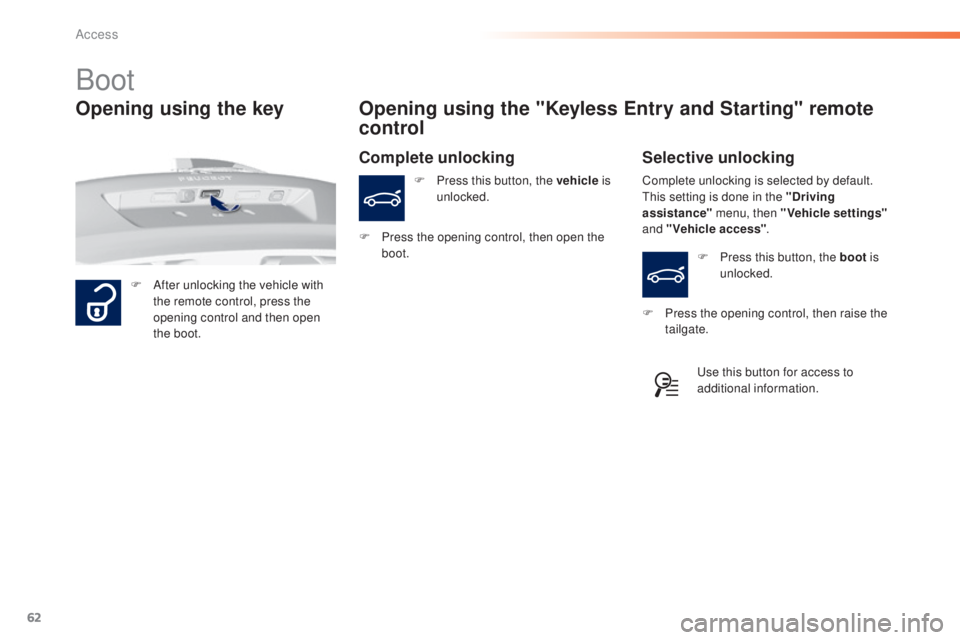
Boot
F After unlocking the vehicle with the remote control, press the
opening control and then open
the boot.
Opening using the "Keyless Entry and Starting" remote
control
F Press this button, the vehicle is
unlocked.
Opening using the key
Complete unlocking is selected by default.th is setting is done in the "Driving
assistance" menu, then "Vehicle settings"
and "Vehicle access" .
Complete unlocking Selective unlocking
F Press this button, the boot is
unlocked.
us
e this button for access to
additional information.
F
P
ress the opening control, then open the
boot.
F
P
ress the opening control, then raise the
tailgate.
Access
Page 65 of 416
63
308_en_Chap02_ouvertures_ed01-2015
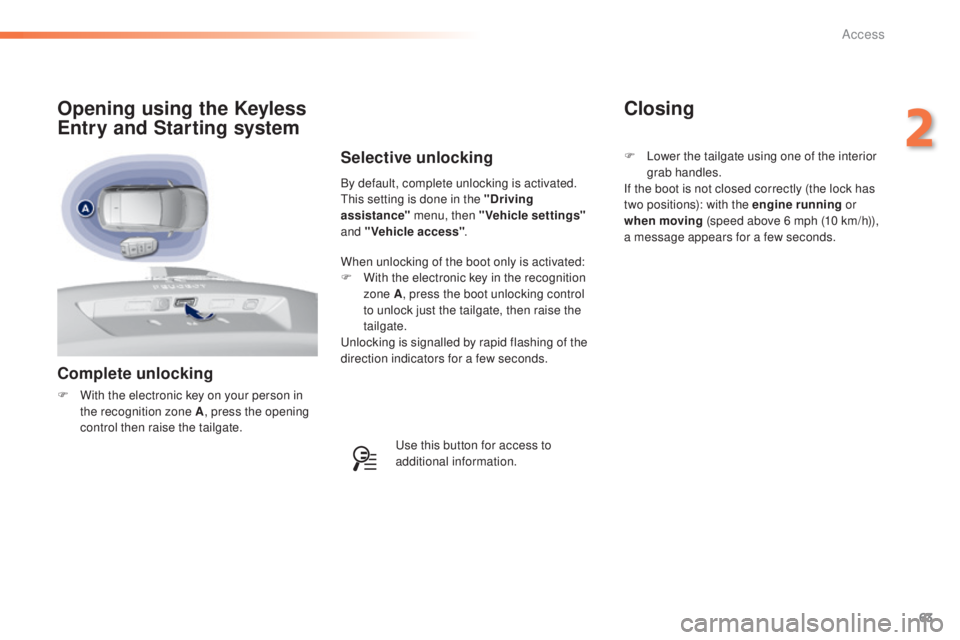
Complete unlocking
F With the electronic key on your person in the recognition zone A , press the opening
control then raise the tailgate.
Opening using the Keyless
Entry and Starting system
By default, complete unlocking is activated.th is setting is done in the "Driving
assistance" menu, then "Vehicle settings"
and "Vehicle access" .
Selective unlocking
When unlocking of the boot only is activated:
F
W ith the electronic key in the recognition
zone A , press the boot unlocking control
to unlock just the tailgate, then raise the
tailgate.
un
locking is signalled by rapid flashing of the
direction indicators for a few seconds.
us
e this button for access to
additional information.
Closing
F Lower the tailgate using one of the interior grab handles.
If the boot is not closed correctly (the lock has
two positions): with the engine running or
when moving (speed above 6 mph (10 km/h)),
a message appears for a few seconds.
2
Access
Page 141 of 416
139
308_en_Chap04_conduite_ed01-2015
Memorising speeds
Memorising
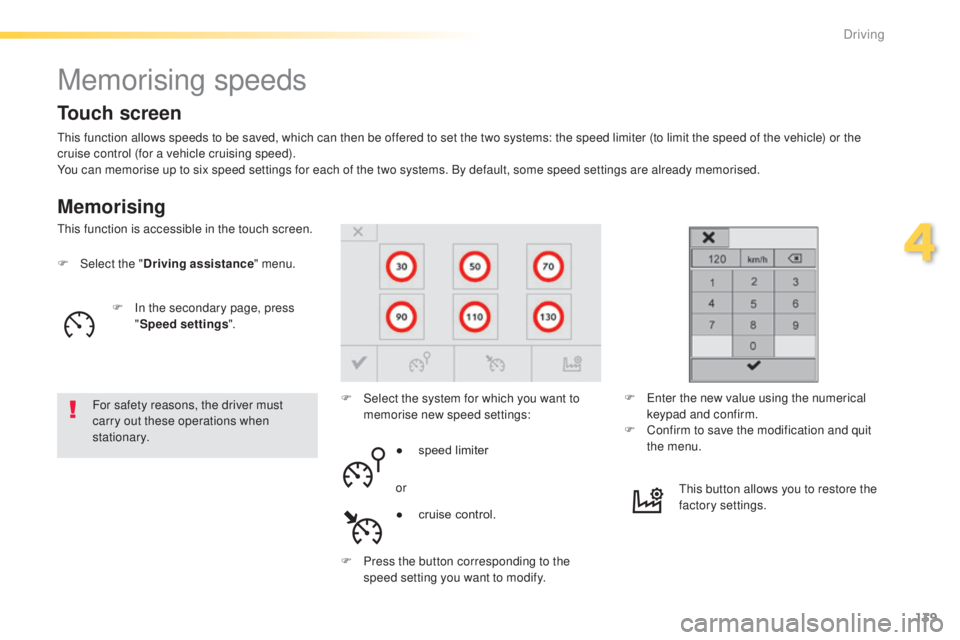
this function allows speeds to be saved, which can then be offered to set the two systems: the speed limiter (to limit the speed of the vehicle) or the
cruise control (for a vehicle cruising speed).
You can memorise up to six speed settings for each of the two systems. By default, some speed settings are already memorised.
F
Sel
ect the " Driving assistance " menu.
For safety reasons, the driver must
carry out these operations when
stationary. F
S
elect the system for which you want to
memorise new speed settings:
th
is function is accessible in the touch screen.
F
e
n
ter the new value using the numerical
keypad and confirm.
F
C
onfirm to save the modification and quit
the menu.
●
s
peed limiter
or
F
P
ress the button corresponding to the
speed setting you want to modify.
th
is button allows you to restore the
factory settings.
Touch screen
F In the secondary page, press "Speed settings ".
●
c
ruise control.
4
Driving
Page 148 of 416
146
308_en_Chap04_conduite_ed01-2015
Active cruise control
this systems allows the vehicle's speed to be
maintained at a value set by the driver.
In addition it allows (when circumstances
permit) an inter-vehicle time that you have
selected to be maintained between your vehicle
and the one in front.Principles of operation
using a radar with a range of about 100 metres,
located at the front of the vehicle, this system
detects a vehicle running in front of your
vehicle.
It automatically adapts the speed of your
vehicle to that of the vehicle in front.
If the vehicle in front is running more slowly,
the system progressively reduces the speed of
your vehicle using just engine braking (as if the
driver had pressed the "-" b ut to n).
If your vehicle is too close to, or approaching
too quickly the vehicle in front, the cruise
control is automatically deactivated.
t
h
e
driver is then alerted by an audible signal,
accompanied by a message.
If the vehicle in front accelerates or changes
lane, the active cruise control progressively
accelerates your vehicle to return to the
programmed speed.
If the driver operates a direction indicator to
overtake a slower vehicle, the active cruise
control allows your vehicle to temporarily
approach the vehicle in front to assist the
overtaking manoeuvre, though never exceeding
the programmed speed.
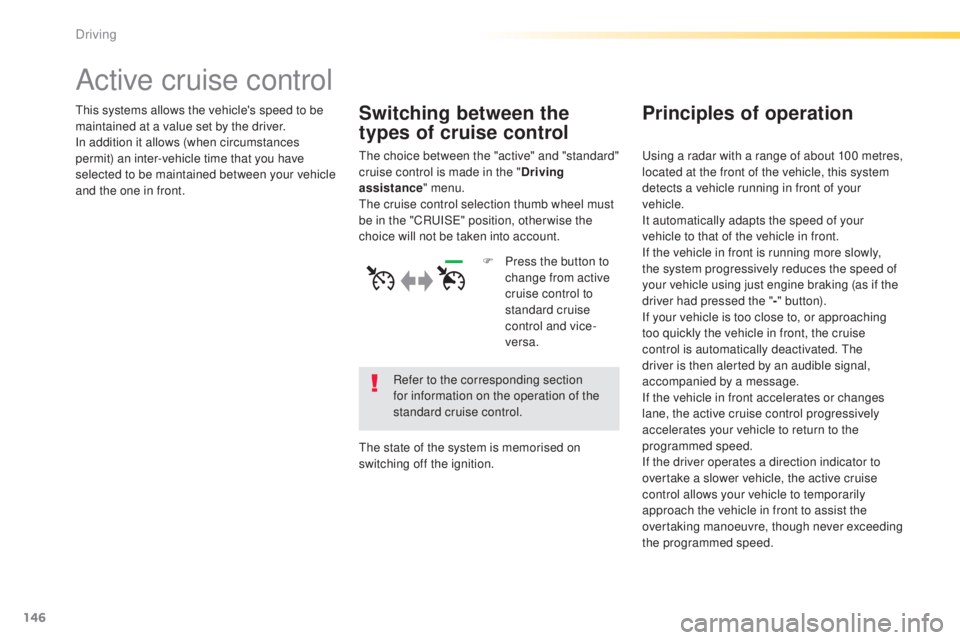
Switching between the
types of cruise control
the choice between the "active" and "standard"
cruise control is made in the " Driving
assistance " menu.
th
e cruise control selection thumb wheel must
be in the "CR
uI
S
e" p
osition, other wise the
choice will not be taken into account.
Refer to the corresponding section
for information on the operation of the
standard cruise control.
th
e state of the system is memorised on
switching off the ignition. F
P
ress the button to
change from active
cruise control to
standard cruise
control and vice-
versa.
Driving