buttons Peugeot 308 2016 User Guide
[x] Cancel search | Manufacturer: PEUGEOT, Model Year: 2016, Model line: 308, Model: Peugeot 308 2016Pages: 398, PDF Size: 9.38 MB
Page 76 of 398
74
308_en_Chap03_ergonomie-et-confort_ed02-2015
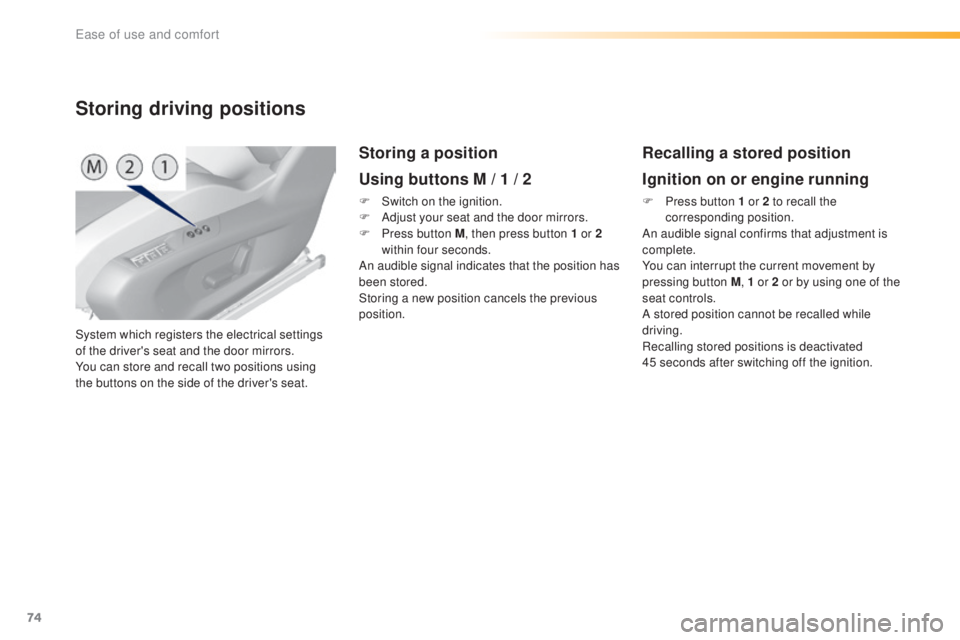
System which registers the electrical settings
of the driver's seat and the door mirrors.
You can store and recall two positions using
the buttons on the side of the driver's seat.
Storing driving positions
Storing a position
Using buttons M / 1 / 2
F Switch on the ignition.
F Ad just your seat and the door mirrors.
F
Pr
ess button M , then press button 1 or 2
within four seconds.
An audible signal indicates that the position has
been stored.
Storing a new position cancels the previous
position.
Recalling a stored position
Ignition on or engine running
F Press button 1 or 2 to recall the
c orresponding position.
An audible signal confirms that adjustment is
complete.
You can interrupt the current movement by
pressing button M , 1 or 2 or by using one of the
seat controls.
A stored position cannot be recalled while
driving.
Recalling stored positions is deactivated
45
s
econds after switching off the ignition.
ease of use and comfort
Page 92 of 398
90
308_en_Chap03_ergonomie-et-confort_ed02-2015
Heating and Ventilation
Air intake
the air circulating in the passenger compartment
i s filtered and originates either from the outside via
the grille located at the base of the windscreen or
from the inside in air recirculation mode.
Controls
the incoming air follows various routes
d epending on the controls selected by
the driver, the front passenger and rear
passengers, according to the level of
equipment.
the t
emperature control enables you to obtain
the level of comfort required by mixing the air of
the various circuits.
the a
ir distribution control enables you to
select the air vents used in the passenger
compartment by the combined use of the
associated buttons.
the a
ir flow control enables you to increase or
reduce the speed of the ventilation fan.
Depending on your vehicle, the controls are
accessible in the " Air conditioning" menu of
the touch screen or are grouped together on
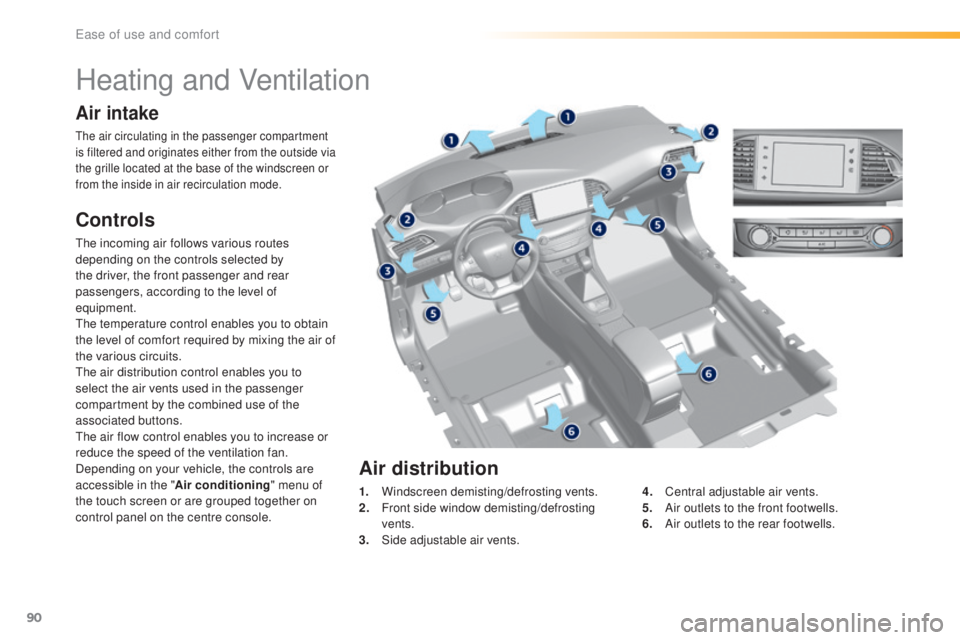
control panel on the centre console. 1.
Wi
ndscreen demisting/defrosting vents.
2.
Fr
ont side window demisting/defrosting
vents.
3.
Si
de adjustable air vents.4.
Ce
ntral adjustable air vents.
5.
Ai
r outlets to the front footwells.
6.
Ai
r outlets to the rear footwells.
Air distribution
ease of use and comfort
Page 95 of 398
93
308_en_Chap03_ergonomie-et-confort_ed02-2015
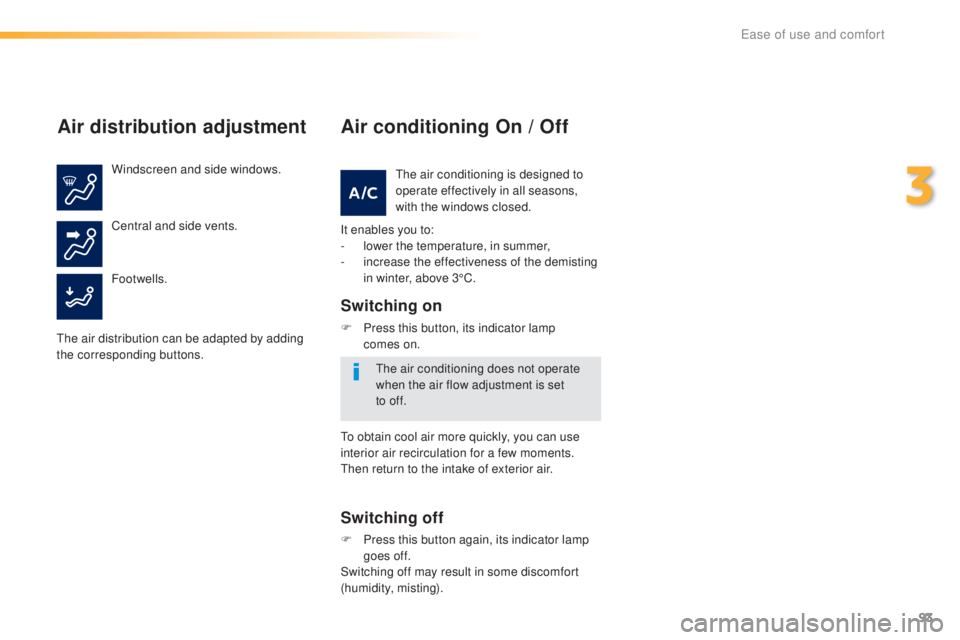
Air distribution adjustment
Windscreen and side windows.
Footwells. Central and side vents.
the a
ir distribution can be adapted by adding
the corresponding buttons.
Air conditioning On / Off
It enables you to:
- lo wer the temperature, in summer,
-
in
crease the effectiveness of the demisting
in winter, above 3°C.
Switching on
F Press this button, its indicator lamp
c omes on.
Switching off
F Press this button again, its indicator lamp
go es off.
Switching off may result in some discomfort
(humidity, misting).
the a
ir conditioning is designed to
operate effectively in all seasons,
with the windows closed.
the a
ir conditioning does not operate
when the air flow adjustment is set
to
of
f.
to ob
tain cool air more quickly, you can use
interior air recirculation for a few moments.
the
n return to the intake of exterior air.
3
ease of use and comfort
Page 96 of 398
94
308_en_Chap03_ergonomie-et-confort_ed02-2015
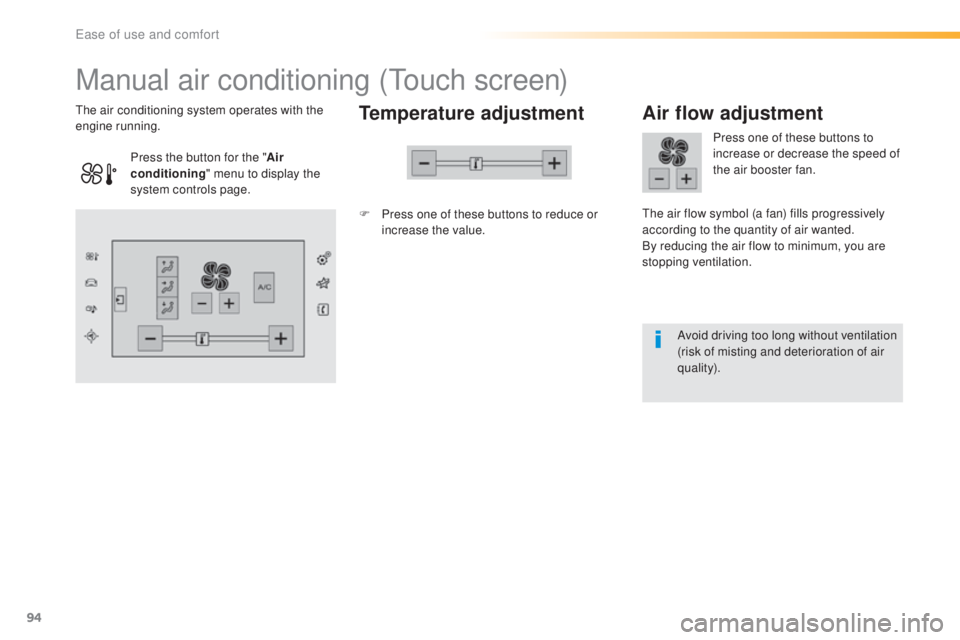
Manual air conditioning (touch screen)
Temperature adjustment
F Press one of these buttons to reduce or
inc
rease the value.
the a
ir conditioning system operates with the
engine running.
Air flow adjustment
Press one of these buttons to
increase or decrease the speed of
the air booster fan.
the a
ir flow symbol (a fan) fills progressively
according to the quantity of air wanted.
By reducing the air flow to minimum, you are
stopping ventilation.
Avoid driving too long without ventilation
(risk of misting and deterioration of air
quality).
Press the button for the "
Air
conditioning " menu to display the
system controls page.
ease of use and comfort
Page 97 of 398
95
308_en_Chap03_ergonomie-et-confort_ed02-2015
the air conditioning is designed to
ope rate effectively in all seasons,
with the windows closed.
Air conditioning On / Off
Switching on
Switching off
the air conditioning does not operate
w hen the air flow adjustment is set
to
of
f.
F
Press this button, its indicator lamp
comes on.
It enables you to:
- lo
wer the temperature, in summer,
-
in
crease the effectiveness of the demisting
in winter, above 3°C.
F
Pr
ess this button again, its
indicator lamp goes off.
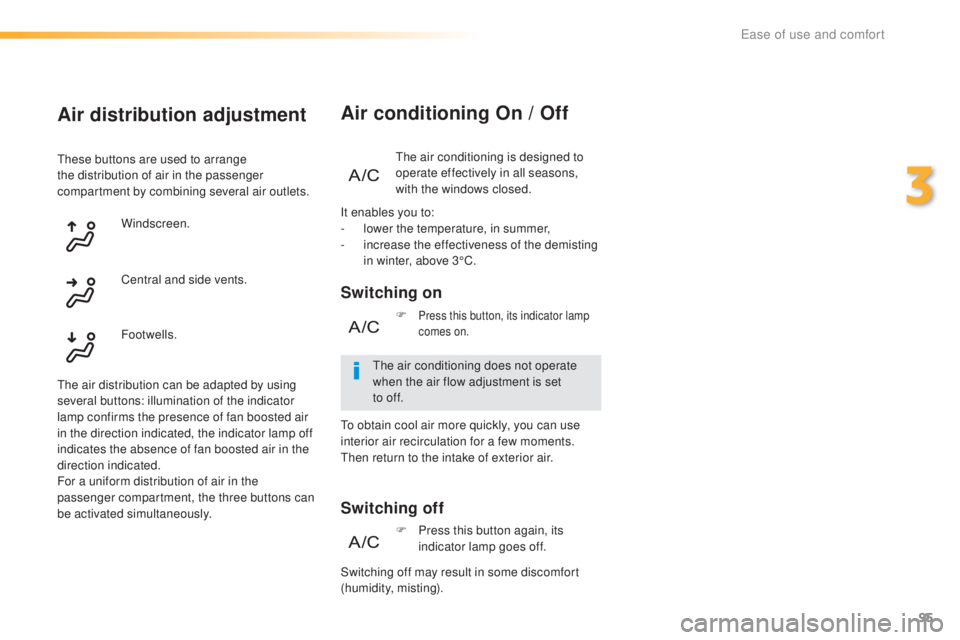
Air distribution adjustment
these buttons are used to arrange
t he distribution of air in the passenger
compartment by combining several air outlets.
Windscreen.
the a
ir distribution can be adapted by using
several buttons: illumination of the indicator
lamp confirms the presence of fan boosted air
in the direction indicated, the indicator lamp off
indicates the absence of fan boosted air in the
direction indicated.
For a uniform distribution of air in the
passenger compartment, the three buttons can
be activated simultaneously. Footwells. Central and side vents.
Switching off may result in some discomfort
(humidity, misting).
to ob
tain cool air more quickly, you can use
interior air recirculation for a few moments.
the
n return to the intake of exterior air.
3
ease of use and comfort
Page 98 of 398
96
308_en_Chap03_ergonomie-et-confort_ed02-2015
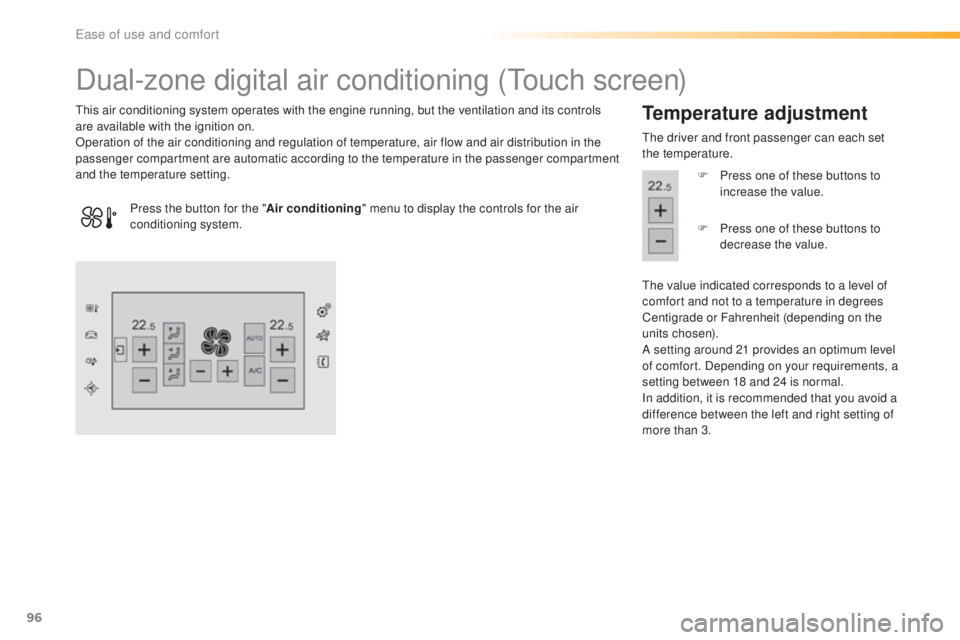
Dual-zone digital air conditioning (touch screen)
this air conditioning system operates with the engine running, but the ventilation and its controls
a re available with the ignition on.
Operation of the air conditioning and regulation of temperature, air flow and air distribution in the
passenger compartment are automatic according to the temperature in the passenger compartment
and the temperature setting.Temperature adjustment
the driver and front passenger can each set
t he temperature.
F
Pr
ess one of these buttons to
increase the value.
the v
alue indicated corresponds to a level of
comfort and not to a temperature in degrees
Centigrade or Fahrenheit (depending on the
units chosen).
A setting around 21 provides an optimum level
of comfort. Depending on your requirements, a
setting between 18 and 24 is normal.
In addition, it is recommended that you avoid a
difference between the left and right setting of
more than 3.
Press the button for the "
Air conditioning" menu to display the controls for the air
conditioning system. F
Pr
ess one of these buttons to
decrease the value.
ease of use and comfort
Page 100 of 398
98
308_en_Chap03_ergonomie-et-confort_ed02-2015
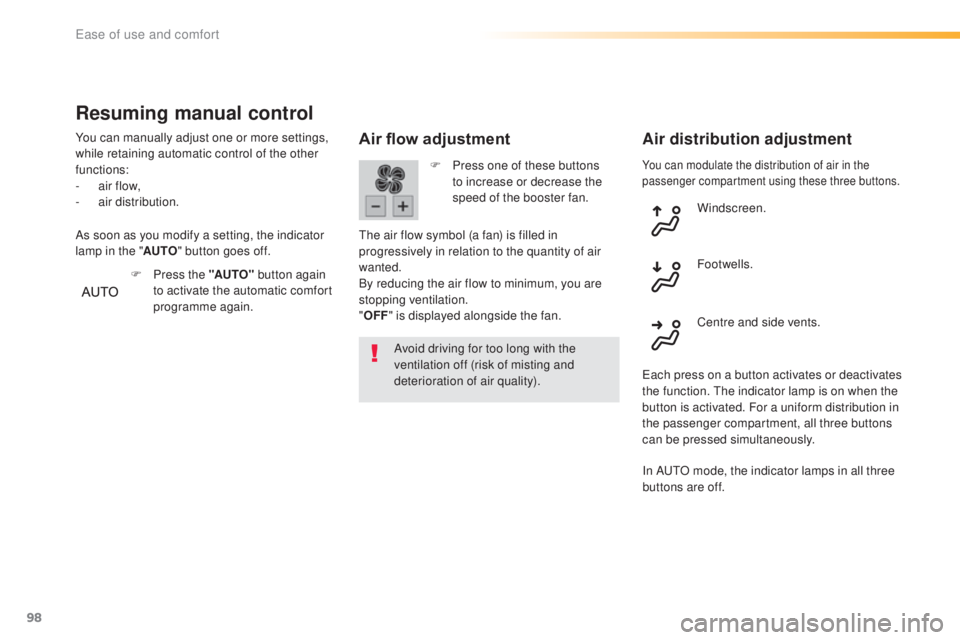
You can modulate the distribution of air in the
passenger compartment using these three buttons.
Air flow adjustment
Avoid driving for too long with the
ventilation off (risk of misting and
deterioration of air quality).
Air distribution adjustment
F Press one of these buttons
to increase or decrease the
speed of the booster fan.
the a
ir flow symbol (a fan) is filled in
progressively in relation to the quantity of air
wanted.
By reducing the air flow to minimum, you are
stopping ventilation.
" OFF " is displayed alongside the fan. Windscreen.
Centre and side vents. Footwells.
eac
h press on a button activates or deactivates
the function.
the i
ndicator lamp is on when the
button is activated. For a uniform distribution in
the passenger compartment, all three buttons
can be pressed simultaneously.
Resuming manual control
You can manually adjust one or more settings,
while retaining automatic control of the other
functions:
-
ai
r flow,
-
air
distribution.
F
Pr
ess the "AUTO" button again
to activate the automatic comfort
programme again.
As soon as you modify a setting, the indicator
lamp in the "
AUTO" button goes off.
In A
utO mo
de, the indicator lamps in all three
buttons are off.
ease of use and comfort
Page 101 of 398
99
308_en_Chap03_ergonomie-et-confort_ed02-2015
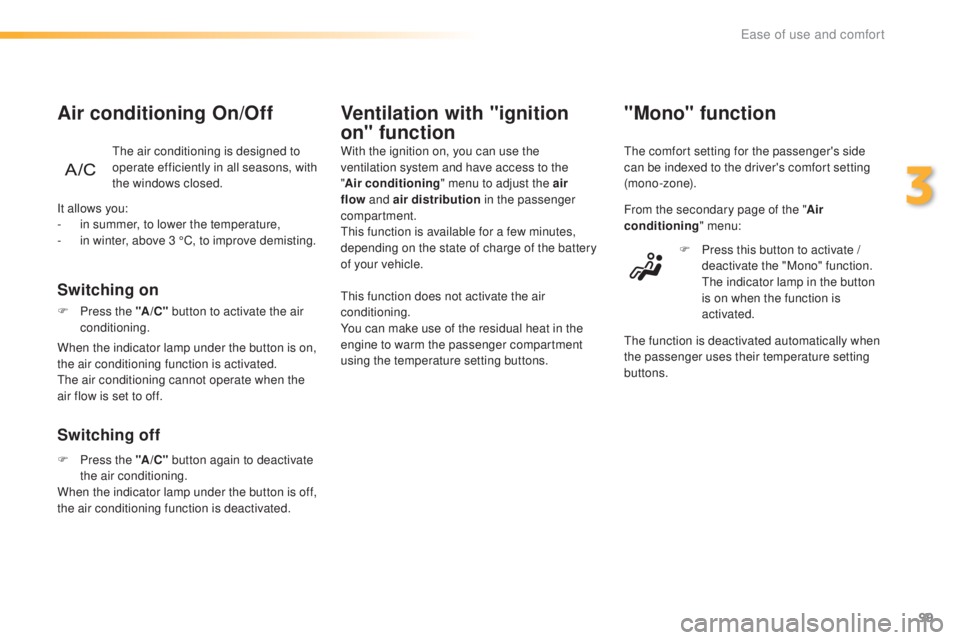
"Mono" function
the comfort setting for the passenger's side
c an be indexed to the driver's comfort setting
(mono-zone).
From the secondary page of the " Air
conditioning " menu:
F
Pr
ess this button to activate /
deactivate the "Mono" function.
the i
ndicator lamp in the button
is on when the function is
activated.
the f
unction is deactivated automatically when
the passenger uses their temperature setting
buttons.
It allows you:
-
in s
ummer, to lower the temperature,
-
in w
inter, above 3 °C, to improve demisting.
Switching off Switching on
Air conditioning On/Off
the air conditioning is designed to
o perate efficiently in all seasons, with
the windows closed.
Ventilation with "ignition
on" function
With the ignition on, you can use the
ventilation system and have access to the
" Air conditioning " menu to adjust the air
flow and air distribution in the passenger
compartment.
thi
s function is available for a few minutes,
depending on the state of charge of the battery
of your vehicle.
thi
s function does not activate the air
conditioning.
You can make use of the residual heat in the
engine to warm the passenger compartment
using the temperature setting buttons.
F
Pr
ess the " A/C" button to activate the air
conditioning.
When the indicator lamp under the button is on,
the air conditioning function is activated.
the a
ir conditioning cannot operate when the
air flow is set to off.
F
Pr
ess the "A /C " button again to deactivate
the air conditioning.
When the indicator lamp under the button is off,
the air conditioning function is deactivated.
3
ease of use and comfort
Page 177 of 398
175
308_en_Chap06_conduite_ed02-2015
Switching on / Pause
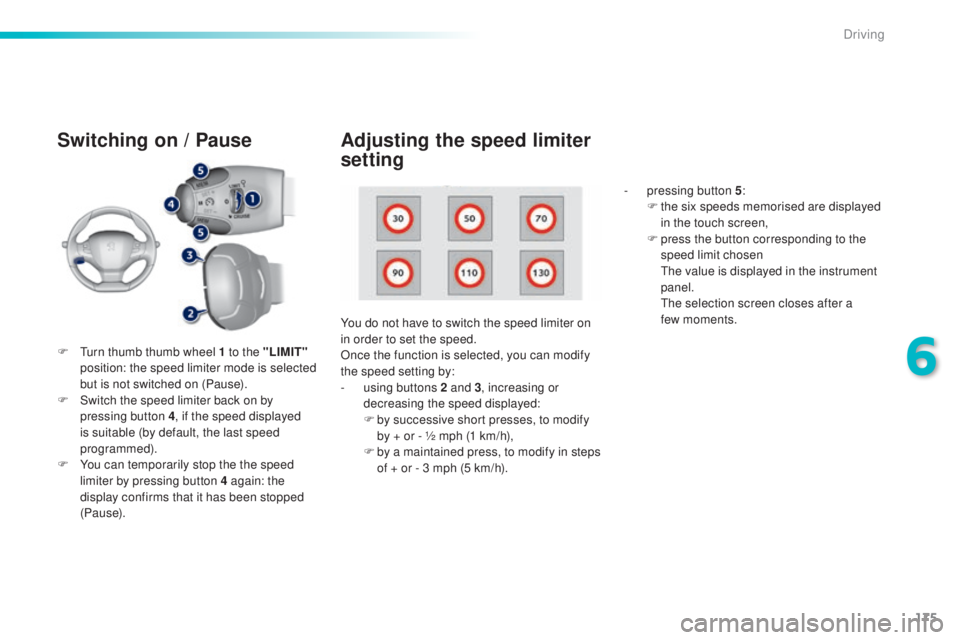
F turn thumb thumb wheel 1 to the "LIMIT"
p osition: the speed limiter mode is selected
but is not switched on (Pause).
F
Sw
itch the speed limiter back on by
pressing button 4 , if the speed displayed
is suitable (by default, the last speed
programmed).
F
Yo
u can temporarily stop the the speed
limiter by pressing button 4 again: the
display confirms that it has been stopped
(Pause). You do not have to switch the speed limiter on
in order to set the speed.
Once the function is selected, you can modify
the speed setting by:
-
us
ing buttons 2 and 3, increasing or
decreasing the speed displayed:
F
by s
uccessive short presses, to modify
by + or - ½ mph (1 km/h),
F
by a m
aintained press, to modify in steps
of + or - 3 mph (5 km/h). -
pr
essing button 5
:
F
th
e six speeds memorised are displayed
in the touch screen,
F
pr
ess the button corresponding to the
speed limit chosen
the v
alue is displayed in the instrument
panel.
the s
election screen closes after a
few moments.
Adjusting the speed limiter
setting
6
Driving
Page 180 of 398
178
308_en_Chap06_conduite_ed02-2015
Switching on
If the cruise control is switched on, you can then
modify the initial speed in one of the following ways:
- using buttons 2 o r 3:F by successive short presses, to modify the
s peed by + or - 1 mph (km/h),
F by a long press, to modify the speed in steps
o f + or - 5 mph (km/h),
Pause
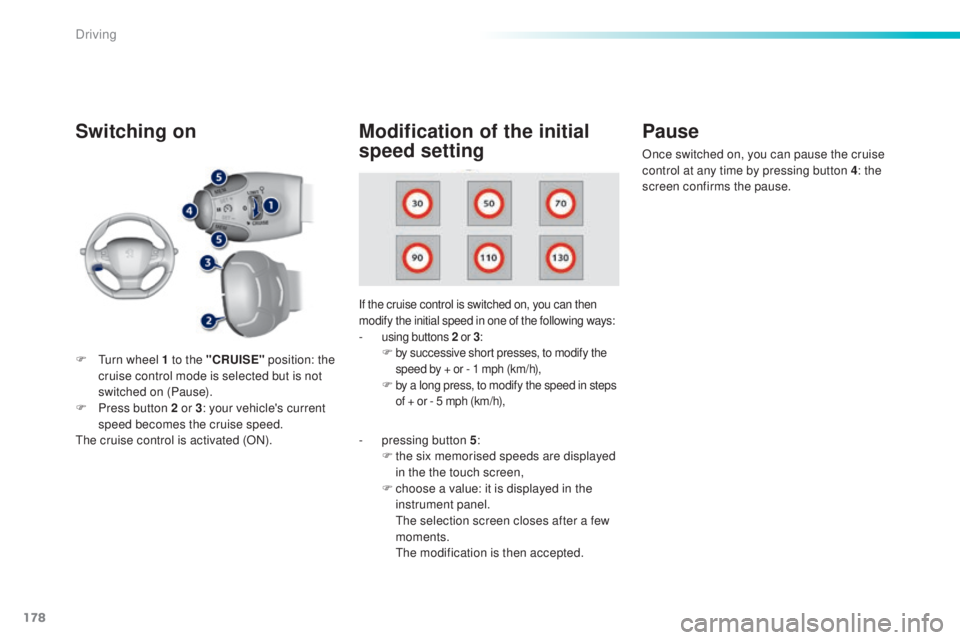
F turn wheel 1 to the "CRUISE" p osition: the
cruise control mode is selected but is not
switched on (Pause).
F
Pr
ess button 2 or 3 : your vehicle's current
speed becomes the cruise speed.
the c
ruise control is activated (ON).
Modification of the initial
speed setting
- pressing button 5 :
F th e six memorised speeds are displayed
in the the touch screen,
F
ch
oose a value: it is displayed in the
instrument panel.
the s
election screen closes after a few
moments.
the m
odification is then accepted. Once switched on, you can pause the cruise
control at any time by pressing button 4: the
screen confirms the pause.
Driving