Stop Peugeot 308 2016 Workshop Manual
[x] Cancel search | Manufacturer: PEUGEOT, Model Year: 2016, Model line: 308, Model: Peugeot 308 2016Pages: 398, PDF Size: 9.38 MB
Page 195 of 398
193
308_en_Chap06_conduite_ed02-2015
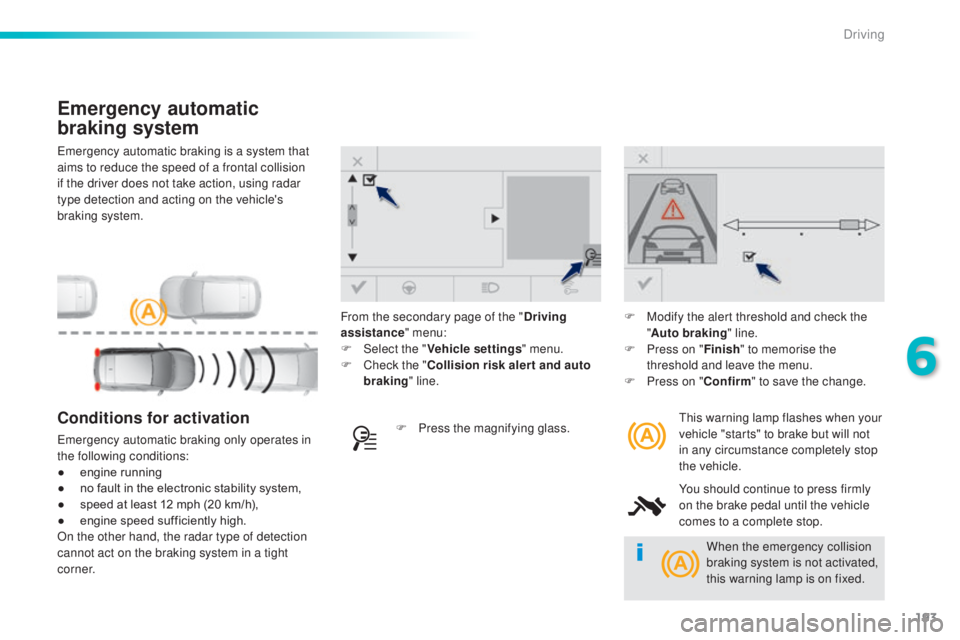
emergency automatic braking is a system that
a ims to reduce the speed of a frontal collision
if the driver does not take action, using radar
type detection and acting on the vehicle's
braking system.
Emergency automatic
braking system
this warning lamp flashes when your
v ehicle "starts" to brake but will not
in any circumstance completely stop
the vehicle.
You should continue to press firmly
on the brake pedal until the vehicle
comes to a complete stop.Conditions for activation
emergency automatic braking only operates in
th e following conditions:
●
en
gine running
●
no f
ault in the electronic stability system,
●
sp
eed at least 12 mph (20 km/h),
●
en
gine speed sufficiently high.
On the other hand, the radar type of detection
cannot act on the braking system in a tight
c o r n e r. F Pr
ess the magnifying glass.F
Mo
dify the alert threshold and check the
" Auto braking " line.
F
Pr
ess on "
Finish" to memorise the
threshold and leave the menu.
F
Pr
ess on "
Confirm " to save the change.
From the secondary page of the "
Driving
assistance " menu:
F
Selec
t the "
Vehicle settings " menu.
F
Ch
eck the "
Collision risk alert and auto
braking " line.
When the emergency collision
braking system is not activated,
this warning lamp is on fixed.
6
Driving
Page 200 of 398
198
308_en_Chap06_conduite_ed02-2015
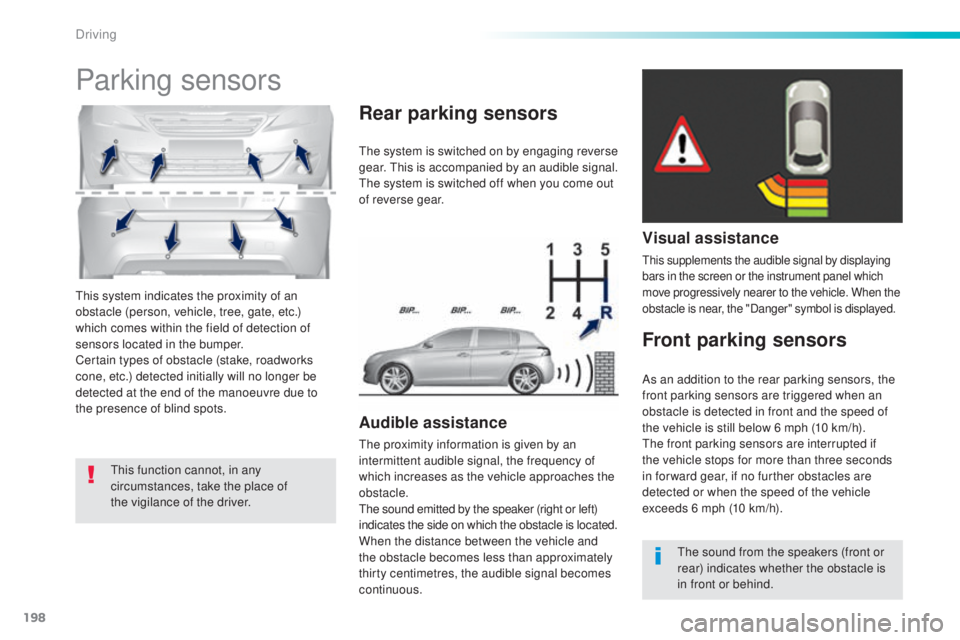
this system indicates the proximity of an
o bstacle (person, vehicle, tree, gate, etc.)
which comes within the field of detection of
sensors located in the bumper.
Certain types of obstacle (stake, roadworks
cone, etc.) detected initially will no longer be
detected at the end of the manoeuvre due to
the presence of blind spots.
Parking sensors
this function cannot, in any
c ircumstances, take the place of
the vigilance of the driver.
the s
ystem is switched on by engaging reverse
gear.
thi
s is accompanied by an audible signal.
the s
ystem is switched off when you come out
of reverse gear.
Audible assistance
the proximity information is given by an
i ntermittent audible signal, the frequency of
which increases as the vehicle approaches the
obstacle.
the s
ound emitted by the speaker (right or left)
indicates the side on which the obstacle is located.
When the distance between the vehicle and
the obstacle becomes less than approximately
thirty centimetres, the audible signal becomes
continuous.
Rear parking sensors
Visual assistance
this supplements the audible signal by displaying
b ars in the screen or the instrument panel which
move progressively nearer to the vehicle. When the
obstacle is near, the "Danger" symbol is displayed.
Front parking sensors
the sound from the speakers (front or
r ear) indicates whether the obstacle is
in front or behind.
As an addition to the rear parking sensors, the
front parking sensors are triggered when an
obstacle is detected in front and the speed of
the vehicle is still below 6 mph (10 km/h).
the f
ront parking sensors are interrupted if
the vehicle stops for more than three seconds
in for ward gear, if no further obstacles are
detected or when the speed of the vehicle
exceeds 6 mph (10 km/h).
Driving
Page 203 of 398
201
308_en_Chap06_conduite_ed02-2015
Park Assist
this system provides active assistance with
par king, detecting a parking space then
controlling the steering to park in the space.
It controls the steering while the driver
manages the accelerator, brakes, gears and
clutch (manual gearbox). During phases of
entry into and exit from a parking space, the
system provides visual and audible information
to the driver in order to make the manoeuvres
safe. It may be necessary to move for wards
and backwards more than once. During a manoeuvre the steering wheel
turns quickly: do not hold the steering
wheel, do not place your hand between
the spokes of the steering wheel and
take care with loose and bulky clothing,
scarves, handbags...
the
re is a risk of
injury.
When Park Assist is activated, it
prevents a change to S
tOP m
ode of
Stop & Start. In S
tOP m
ode, activation
of Park Assist restarts the engine.
the P
ark Assist system cannot in any
circumstances replace the need for
vigilance on the part of the driver.
the d
river must remain in control
of their vehicle ensuring that the
space remains clear throughout the
manoeuvre.
In some circumstances, the sensors
may not detect small obstacles located
in their blind spots.
the d
river can take control at any time by
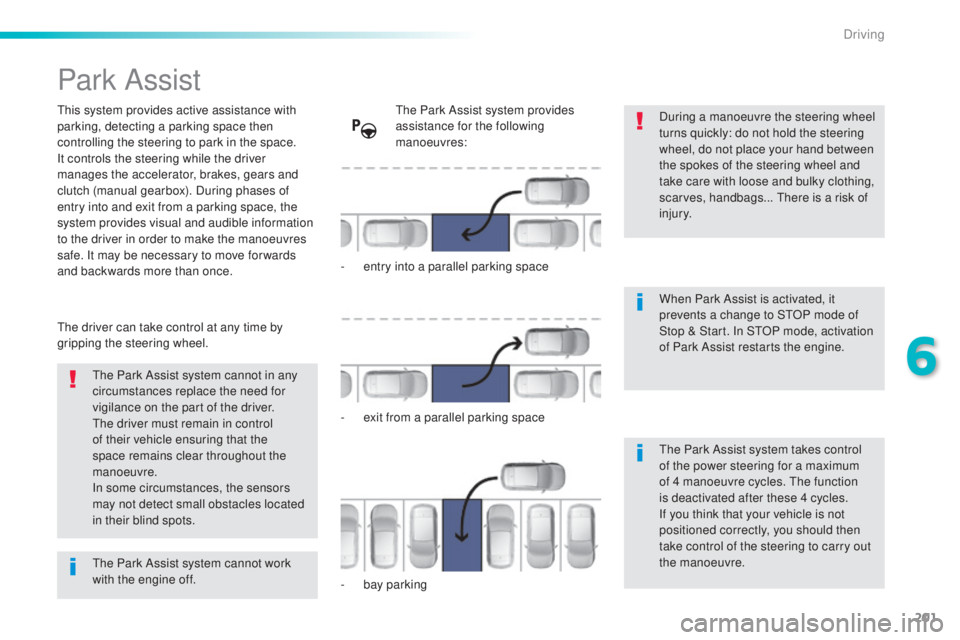
gripping the steering wheel.the P ark Assist system provides
assistance for the following
manoeuvres:
-
en
try into a parallel parking space
-
ex
it from a parallel parking space
-
ba
y parking
the P
ark Assist system takes control
of the power steering for a maximum
of 4 manoeuvre cycles.
the f
unction
is deactivated after these 4 cycles.
If you think that your vehicle is not
positioned correctly, you should then
take control of the steering to carry out
the manoeuvre.
the P
ark Assist system cannot work
with the engine off.
6
Driving
Page 210 of 398
208
308_en_Chap06_conduite_ed02-2015
the system is deactivated by pressing the
c ontrol.
the s
ystem is deactivated automatically:
-
on s
witching off the ignition,
-
if t
he engine stalls,
-
if n
o manoeuvre is started within 5 minutes
of selection of the type of manoeuvre,
-
af
ter a prolonged stop of the vehicle during
a manoeuvre,
-
if t
he road wheel anti-slip regulation (ASR)
is triggered,
-
if t
he speed of the vehicle exceeds the
stated limit,
-
wh
en the driver interrupts movement of the
steering wheel,
-
af
ter 4 manoeuvre cycles,
-
on
opening the driver's door,
-
if o
ne of the front wheels encounters an
obstacle.
the o
peration indicator lamp goes off in the
instrument panel and a message is displayed
accompanied by an audible signal.
the d
river should then take back control of the
vehicle's steering.
Deactivation
If the system is deactivated during a
manoeuvre, the drive should reactivate it to
repeat the measurement.
the s
ystem is switched off automatically:
-
wh
en towing a trailer,
-
if t
he driver's door is opened,
-
if t
he speed of the vehicle is above 42 mph
(70 km/h).
to sw
itch the system of for a prolonged period,
contact a P
eu
ge
Ot d
ealer or a qualified
workshop.
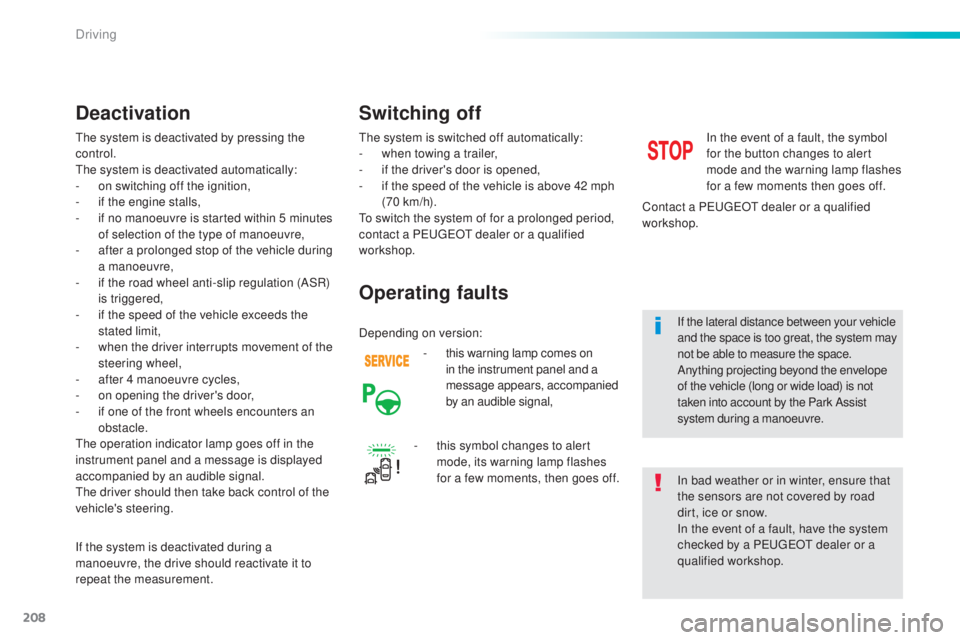
-
th
is warning lamp comes on
in the instrument panel and a
message appears, accompanied
by an audible signal,
Operating faults
In the event of a fault, the symbol
for the button changes to alert
mode and the warning lamp flashes
for a few moments then goes off.
Contact a P
eu
ge
Ot d
ealer or a qualified
workshop.
Switching off
In bad weather or in winter, ensure that
the sensors are not covered by road
dirt, ice or snow.
In the event of a fault, have the system
checked by a P
eu
ge
Ot d
ealer or a
qualified workshop.
-
th
is symbol changes to alert
mode, its warning lamp flashes
for a few moments, then goes off. If the lateral distance between your vehicle
and the space is too great, the system may
not be able to measure the space.
Anything projecting beyond the envelope
of the vehicle (long or wide load) is not
taken into account by the Park Assist
system during a manoeuvre.
Depending on version:
Driving
Page 211 of 398
209
308_en_Chap06_conduite_ed02-2015
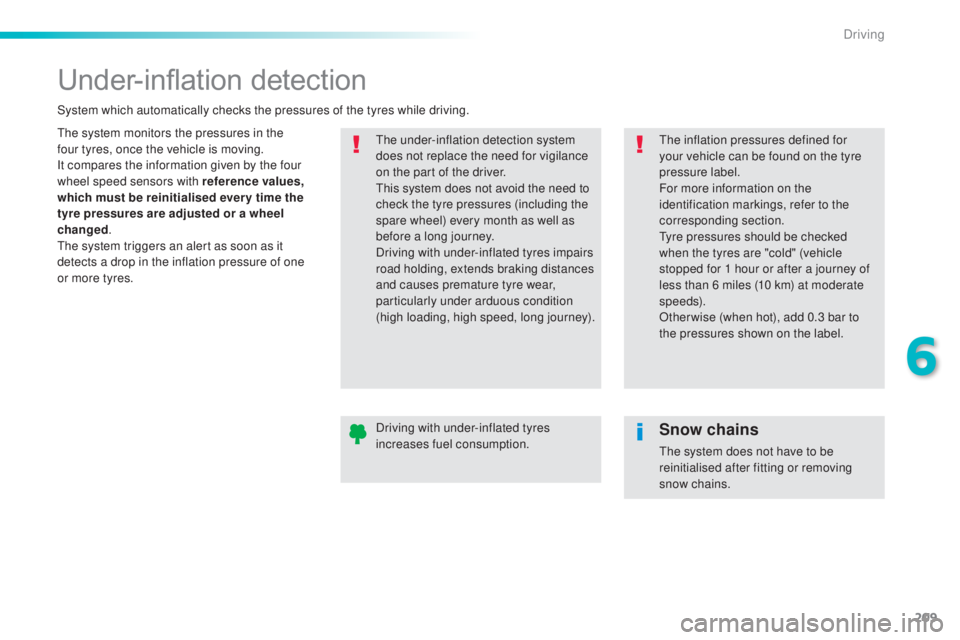
Under-inflation detection
the system monitors the pressures in the
f our t yres, once the vehicle is moving.
It compares the information given by the four
wheel speed sensors with reference values,
which must be reinitialised ever y time the
tyre pressures are adjusted or a wheel
changed .
the s
ystem triggers an alert as soon as it
detects a drop in the inflation pressure of one
or more tyres.the u nder-inflation detection system
does not replace the need for vigilance
on the part of the driver.
thi
s system does not avoid the need to
check the tyre pressures (including the
spare wheel) every month as well as
before a long journey.
Driving with under-inflated tyres impairs
road holding, extends braking distances
and causes premature tyre wear,
particularly under arduous condition
(high loading, high speed, long journey).
System which automatically checks the pressures of the tyres while driving.the i
nflation pressures defined for
your vehicle can be found on the tyre
pressure label.
For more information on the
identification markings, refer to the
corresponding section.
tyr
e pressures should be checked
when the tyres are "cold" (vehicle
stopped for 1 hour or after a journey of
less than 6 miles (10 km) at moderate
speeds).
Other wise (when hot), add 0.3 bar to
the pressures shown on the label.
Driving with under-inflated tyres
increases fuel consumption.
Snow chains
the system does not have to be
r einitialised after fitting or removing
snow chains.
6
Driving
Page 215 of 398
213
308_en_Chap07_info-pratiques_ed02-2015
Fuel tank
Additions of fuel must be of at least 10 litres to
be registered by the fuel gauge.
Opening the filler cap may result in an inrush of
air.
thi
s vacuum is entirely normal and results
from the sealing of the fuel system.
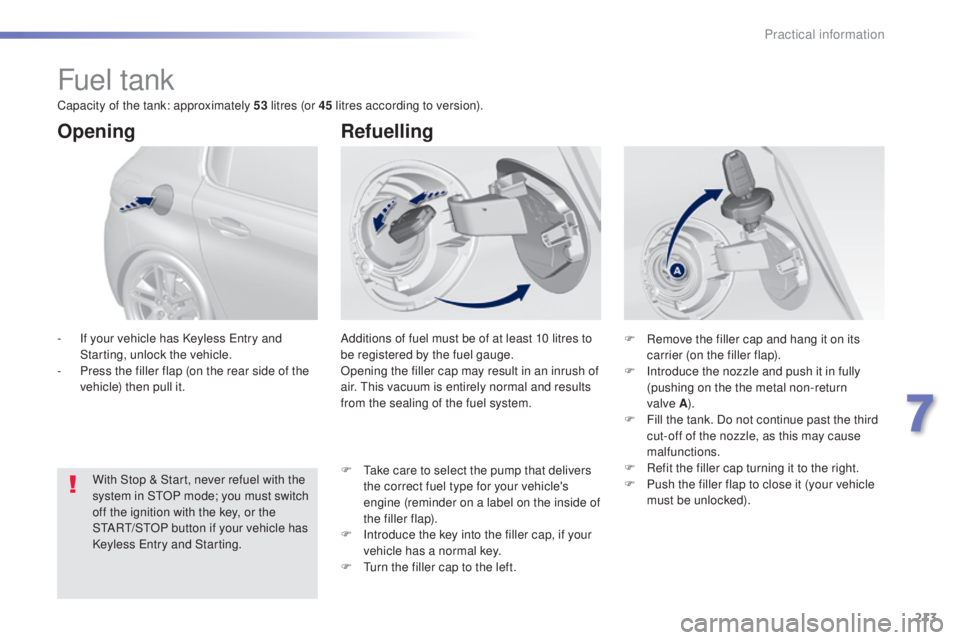
Opening
With Stop & Start, never refuel with the
system in StOP m ode; you must switch
off the ignition with the key, or the
S
tARt/StOP b
utton if your vehicle has
Keyless
ent
ry and Starting.
-
If y
our vehicle has Keyless
ent
ry and
Starting, unlock the vehicle.
-
Pr
ess the filler flap (on the rear side of the
vehicle) then pull it.
Refuelling
F Remove the filler cap and hang it on its
c arrier (on the filler flap).
F
In
troduce the nozzle and push it in fully
(pushing on the the metal non-return
valve
A ).
F Fi
ll the tank. Do not continue past the third
cut-off of the nozzle, as this may cause
malfunctions.
F
Re
fit the filler cap turning it to the right.
F
Pu
sh the filler flap to close it (your vehicle
must be unlocked).
F
t
ak
e care to select the pump that delivers
the correct fuel type for your vehicle's
engine (reminder on a label on the inside of
the filler flap).
F
In
troduce the key into the filler cap, if your
vehicle has a normal key.
F
t
ur
n the filler cap to the left.
Capacity of the tank: approximately 53
litres (or 45 litres according to version).
7
Practical information
Page 218 of 398
216
308_en_Chap07_info-pratiques_ed02-2015
Snow chains
In wintry conditions, snow chains improve traction as well as the behaviour of the vehicle
when braking.
the s
now chains must be fitted only
to the front wheels.
the
y must never
be fitted to "space-saver" type spare
wheels.
tak
e account of the legislation in force
in your country on the use of snow
chains and the maximum running speed
authorised.
Avoid driving with snow chains on roads
that have been cleared of snow, to
avoid damaging your vehicle's tyres and
the road sur face. If your vehicle is fitted
with alloy wheels, check that no part of
the chain or its fixings is in contact with
the wheel rim.
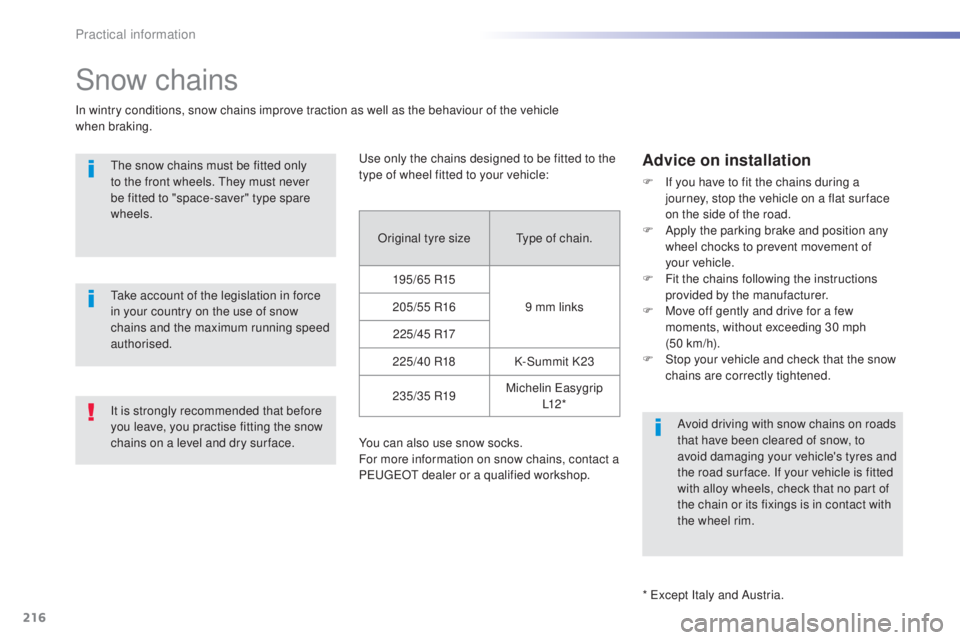
use o
nly the chains designed to be fitted to the
type of wheel fitted to your vehicle:
You can also use snow socks.
For more information on snow chains, contact a
P
eu
ge
Ot d
ealer or a qualified workshop.
Advice on installation
F If you have to fit the chains during a
journey, stop the vehicle on a flat sur face
on the side of the road.
F
Ap
ply the parking brake and position any
wheel chocks to prevent movement of
your
v
ehicle.
F
Fit
the chains following the instructions
provided by the manufacturer.
F
Mov
e off gently and drive for a few
moments, without exceeding 30 mph
(50
k
m/h).
F
St
op your vehicle and check that the snow
chains are correctly tightened.
Original tyre size
typ
e of chain.
195/65 R15 9 mm links
205/55 R16
2 2 5 /4 5 R17
225/40 R18 K-Summit K23
235/35 R19 Michelin
eas
ygrip
L1 2 *
It is strongly recommended that before
you leave, you practise fitting the snow
chains on a level and dry sur face.
*
exc
ept Italy and Austria.
Practical information
Page 219 of 398
217
308_en_Chap07_info-pratiques_ed02-2015
Very cold climate screen
Before fitting or removing the screen,
ensure that the engine is off and the cooling
fan has stopped. It is recommended that
the screen be fitted and removed by a
P
eu
ge
Ot d
ealer or a qualified workshop.
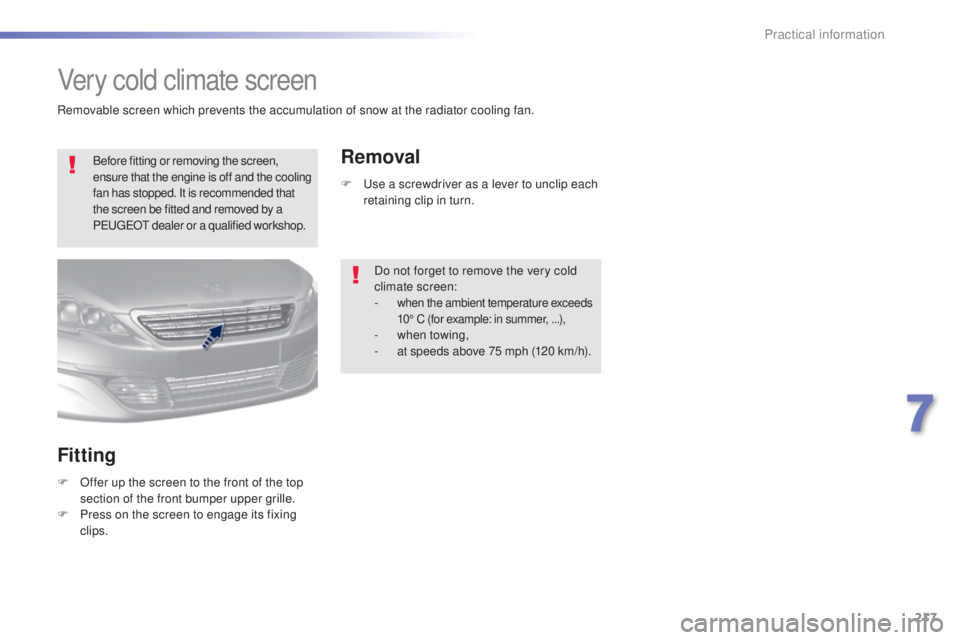
Fitting
F Offer up the screen to the front of the top
section of the front bumper upper grille.
F
Pr
ess on the screen to engage its fixing
clips.
Removal
F use a screwdriver as a lever to unclip each
r etaining clip in turn.
Do not forget to remove the very cold
climate screen:
-
when the ambient temperature exceeds
10° C (for example: in summer, . ..),
- when towing,
- at s peeds above 75 mph (120 km/h).
Removable screen which prevents the accumulation of snow at the radiator cooling fan.
7
Practical information
Page 221 of 398
219
308_en_Chap07_info-pratiques_ed02-2015
System which manages the duration of use of certain functions to conserve a sufficient level of
charge in the battery.
After the engine has stopped, you can still use functions such as the audio and telematics
system,
w
indscreen wipers, dipped beam headlamps,
c
ourtesy lamps, etc. for a maximum
combined duration of about forty minutes.
energy economy mode
Switching to economy
mode
A message then appears in the instrument
panel screen indicating that the vehicle has
switched to economy mode and the active
functions are put on standby.
If a telephone call is being made at this time, it
will be maintained for around 10 minutes with
the Bluetooth hands-free system of your audio
system.
Exiting economy mode
these functions are reactivated automatically
n ext time the vehicle is driven.
In order to restore the use of these functions
immediately, start the engine and let it run:
-
fo
r less than ten minutes, to use the
equipment for approximately five minutes,
-
fo
r more than ten minutes, to use the
equipment for up to approximately
thirty
m
inutes.
Let the engine run for the duration specified to
ensure that the battery charge is sufficient.
Do not repeatedly and continuously restart the
engine in order to charge the battery.
A flat battery prevents the engine from starting.
For more information on the battery, refer to the
corresponding section.
Load reduction mode
System which manages the use of certain
functions according to the level of charge
remaining in the battery.
When the vehicle is being driven, the load
reduction function temporarily deactivates
certain functions, such as the air conditioning,
the heated rear screen...
the d
eactivated functions are reactivated
automatically as soon as conditions permit.
7
Practical information
Page 228 of 398
226
308_en_Chap07_info-pratiques_ed02-2015
Bonnet
Before doing anything under the
bonnet, switch off the Stop & Start
system to avoid any risk of injury
resulting from an automatic change to
S
tA
R
t m o
d e .
Opening Closing
F take the stay out of its support slot.
F Cl ip the stay back into its housing.
F
Lo
wer the bonnet and release it at the end
of its travel.
F
Pu
ll on the bonnet to check that it has
latched correctly.
F
u
nc
lip the stay from its housing and place
it in the support slot to hold the bonnet
open.
Do not open the bonnet under very
windy conditions.
When the engine is hot, handle the
exterior safety catch and the stay with
care (risk of burns).
to a
void damaging electrical units,
it is strictly forbidden to use a high
pressure jet wash under the bonnet.
F
Pu
ll the safety catch towards you, then
raise the bonnet.
F
Op
en the door.
F
Pu
ll the release lever, located at the bottom
of the door aperture, towards you.
Practical information