ESP PEUGEOT 308 2016 User Guide
[x] Cancel search | Manufacturer: PEUGEOT, Model Year: 2016, Model line: 308, Model: Peugeot 308 2016Pages: 344, PDF Size: 12.23 MB
Page 34 of 344
32
3008_en_Chap01_controle-marche_ed01-2015
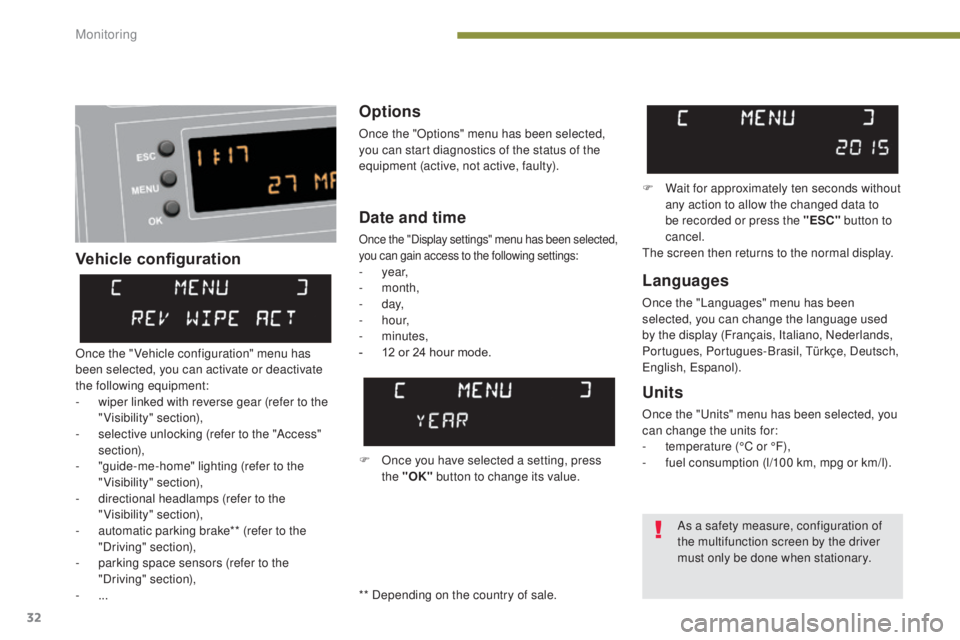
Vehicle configurationOptions
Once the "Options" menu has been selected,
you can start diagnostics of the status of the
equipment (active, not active, faulty).
Languages
Once the "Languages" menu has been
selected, you can change the language used
by the display (Français, Italiano, Nederlands,
Portugues, Portugues-Brasil, Türkçe, Deutsch,
English, Espanol).
Date and time
Once the "Display settings" menu has been selected,
you can gain access to the following settings:
- year,
- month,
-
d ay,
-
h o u r,
-
minutes,
-
1
2 or 24 hour mode.
Units
Once the "Units" menu has been selected, you
can change the units for:
-
t
emperature (°C or °F),
-
f
uel consumption (l/100 km, mpg or km/l).
F Once you have selected a setting, press the "OK" button to change its value. F
W
ait for approximately ten seconds without
any action to allow the changed data to
be recorded or press the "ESC" button to
cancel.
The screen then returns to the normal display.
Once the " Vehicle configuration" menu has
been selected, you can activate or deactivate
the following equipment:
-
w
iper linked with reverse gear (refer to the
"Visibility" section),
-
s
elective unlocking (refer to the "Access"
section),
-
"
guide-me-home" lighting (refer to the
"Visibility" section),
-
d
irectional headlamps (refer to the
"Visibility" section),
-
a
utomatic parking brake** (refer to the
"Driving" section),
-
p
arking space sensors (refer to the
"Driving" section),
-
... As a safety measure, configuration of
the multifunction screen by the driver
must only be done when stationary.
** Depending on the country of sale.
Monitoring
Page 35 of 344
33
3008_en_Chap01_controle-marche_ed01-2015
Monochrome screen A (with audio equipment)
Controls
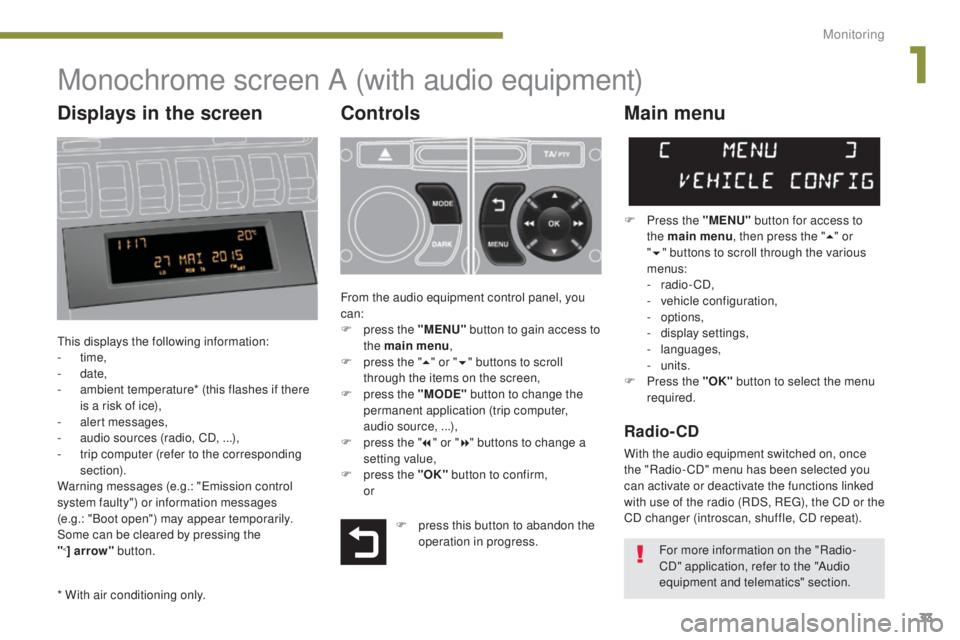
This displays the following information:
- time,
-
date,
-
a
mbient temperature* (this flashes if there
is a risk of ice),
-
a
lert messages,
-
a
udio sources (radio, CD, ...),
-
t
rip computer (refer to the corresponding
section).
Warning messages (e.g.: "Emission control
system faulty") or information messages
(e.g.: "Boot open") may appear temporarily.
Some can be cleared by pressing the
"
<] arrow" button.
Main menu
F Press the "MENU" button for access to
the main menu , then press the " 5" or
" 6 " buttons to scroll through the various
menus:
-
radio - CD,
-
v
ehicle configuration,
-
options,
-
d
isplay settings,
-
languages,
-
units.
F
P
ress the "OK" button to select the menu
required.
From the audio equipment control panel, you
can:
F
p
ress the "MENU" button to gain access to
the main menu ,
F
p
ress the " 5" or " 6" buttons to scroll
through the items on the screen,
F
p
ress the "MODE" button to change the
permanent application (trip computer,
audio source, ...),
F
p
ress the " 7" or " 8" buttons to change a
setting value,
F
p
ress the "OK" button to confirm,
or
Radio- CD
With the audio equipment switched on, once
the "Radio- CD" menu has been selected you
can activate or deactivate the functions linked
with use of the radio (RDS, REG), the CD or the
CD changer (introscan, shuffle, CD repeat).
* With air conditioning only. F
p
ress this button to abandon the
operation in progress. For more information on the "Radio-
CD" application, refer to the "Audio
equipment and telematics" section.
Displays in the screen
1
Monitoring
Page 36 of 344
34
3008_en_Chap01_controle-marche_ed01-2015
Date and timeLanguages
Once the "Languages" menu has been
selected, you can change the language used
by the display.
Units
Once the "Units" menu has been selected,
you can change the units of the following
parameters:
-
t
emperature (°C or °F),
-
f
uel consumption (l/100 km, mpg or km/l).
F
O
nce you have selected a setting, press
the " 7" or " 8" buttons to change its value.
F
P
ress the " 5" or " 6" buttons to switch
respectively to the previous or next setting.
F
P
ress the "OK" button to record the
change and return to the normal display or
press the "
<] arrow" button to cancel.
Vehicle configuration
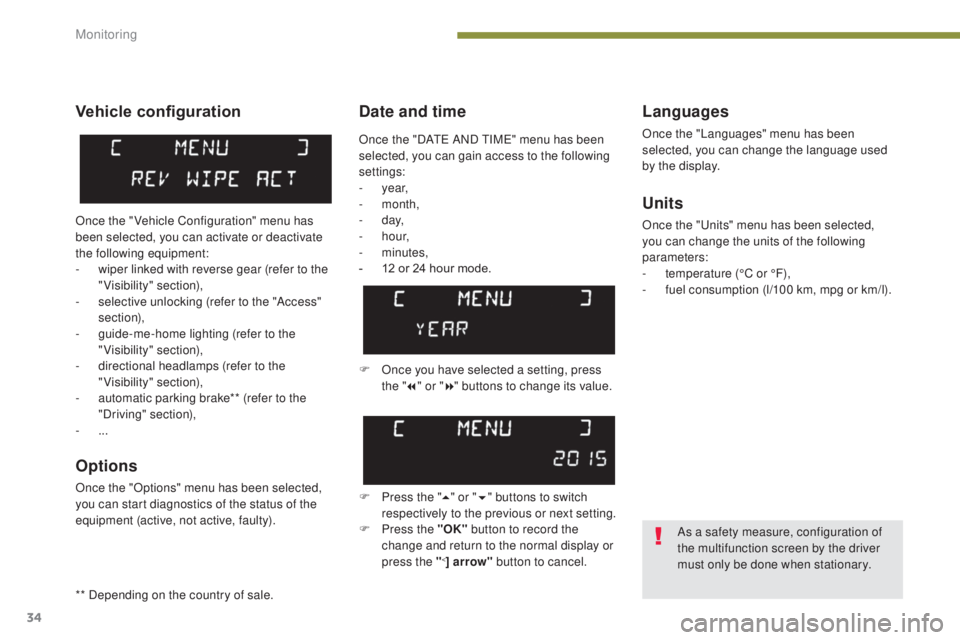
Once the " Vehicle Configuration" menu has
been selected, you can activate or deactivate
the following equipment:
-
w
iper linked with reverse gear (refer to the
"Visibility" section),
-
s
elective unlocking (refer to the "Access"
section),
-
g
uide-me-home lighting (refer to the
"Visibility" section),
-
d
irectional headlamps (refer to the
"Visibility" section),
-
a
utomatic parking brake** (refer to the
"Driving" section),
-
...
Options
Once the "Options" menu has been selected,
you can start diagnostics of the status of the
equipment (active, not active, faulty).
As a safety measure, configuration of
the multifunction screen by the driver
must only be done when stationary.
Once the "DATE AND TIME" menu has been
selected, you can gain access to the following
settings:
-
year,
-
month,
-
d ay,
-
h o u r,
-
minutes,
-
1
2 or 24 hour mode.
** Depending on the country of sale.
Monitoring
Page 37 of 344
35
3008_en_Chap01_controle-marche_ed01-2015
Monochrome screen C (with PEUGEOT Connect Sound (RD5))
Main menu
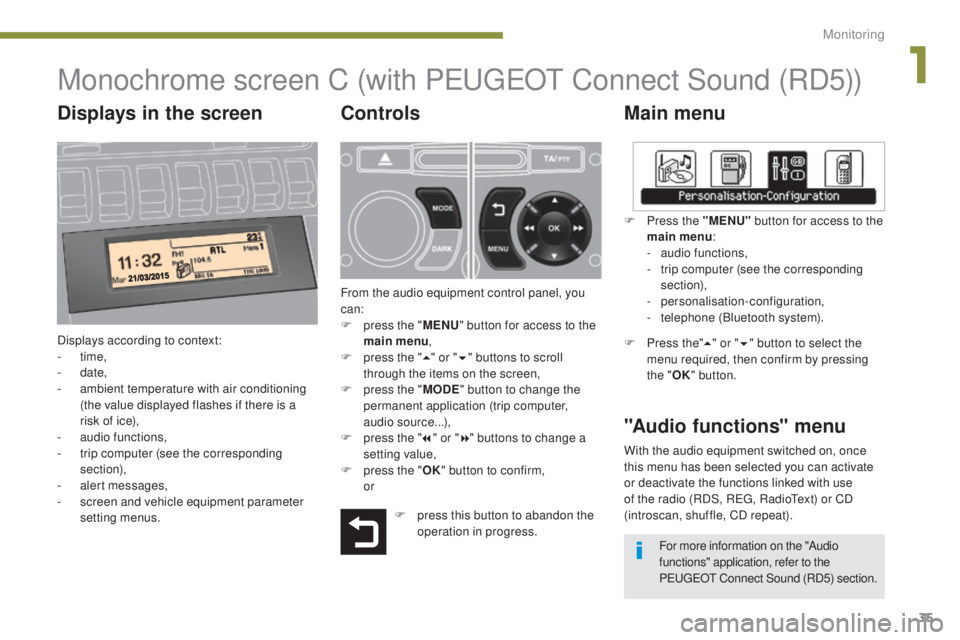
Displays according to context:
- time,
-
date,
-
a
mbient temperature with air conditioning
(the value displayed flashes if there is a
risk of ice),
-
a
udio functions,
-
t
rip computer (see the corresponding
section),
-
a
lert messages,
-
s
creen and vehicle equipment parameter
setting menus.
"Audio functions" menu
Controls
From the audio equipment control panel, you
can:
F
p
ress the " MENU" button for access to the
main menu ,
F
p
ress the " 5" or " 6" buttons to scroll
through the items on the screen,
F
p
ress the " MODE" button to change the
permanent application (trip computer,
audio source...),
F
p
ress the " 7" or " 8" buttons to change a
setting value,
F
p
ress the " OK" button to confirm,
or F
P
ress the "MENU"
button for access to the
main menu :
-
a
udio functions,
-
t
rip computer (see the corresponding
section),
- personalisation-configuration,
-
t
elephone (Bluetooth system).
F Press the"5" or " 6" button to select the
menu required, then confirm by pressing
the " OK" button.
With the audio equipment switched on, once
this menu has been selected you can activate
or deactivate the functions linked with use
of the radio (RDS, REG, RadioText) or CD
(introscan, shuffle, CD repeat).
F
p
ress this button to abandon the
operation in progress. For more information on the "Audio
functions" application, refer to the
PEUGEOT Connect Sound (RD5) section.
Displays in the screen
1
Monitoring
Page 40 of 344
38
3008_en_Chap01_controle-marche_ed01-2015
16/9 retractable colour screen (PEUGEOT Connect Navigation (RT6))
* For more information on these applications, refer to the "Audio equipment and telematics"
section.
Displays in the screen
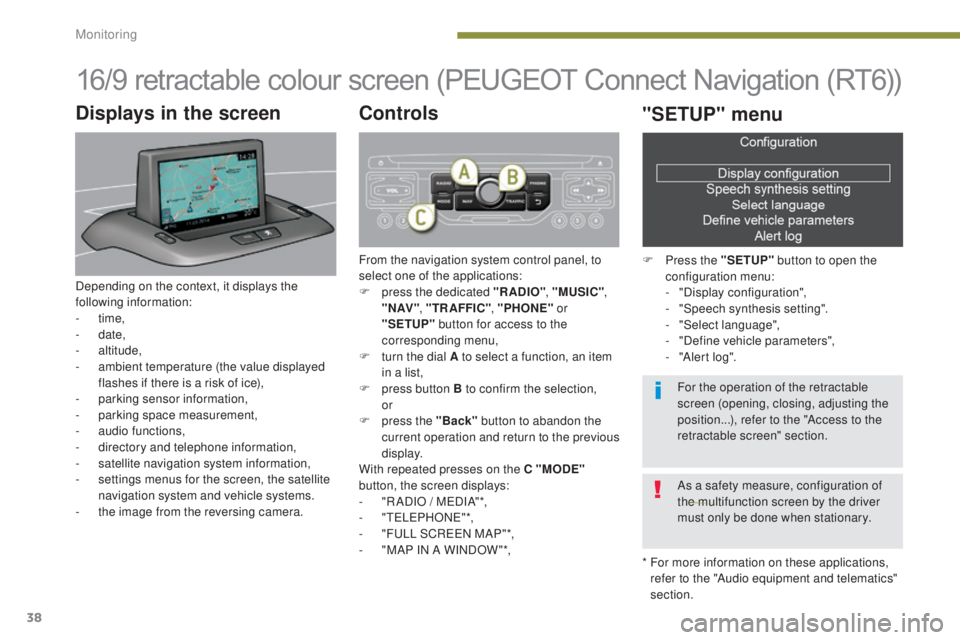
Depending on the context, it displays the
following information:
-
time,
-
date,
-
altitude,
-
a
mbient temperature (the value displayed
flashes if there is a risk of ice),
-
par
king sensor information,
-
par
king space measurement,
-
a
udio functions,
-
d
irectory and telephone information,
-
sa
tellite navigation system information,
-
s
ettings menus for the screen, the satellite
navigation system and vehicle systems.
-
t
he image from the reversing camera.
Controls
From the navigation system control panel, to
select one of the applications:
F
p
ress the dedicated "RADIO" , "MUSIC",
" N AV " , "TR AFFIC" , "PHONE" or
"SETUP" button for access to the
corresponding menu,
F
t
urn the dial A to select a function, an item
in a list,
F
p
ress button B to confirm the selection,
or
F
p
ress the "Back" button to abandon the
current operation and return to the previous
display.
With repeated presses on the C "MODE"
button, the screen displays:
-
"
R ADIO / MEDIA"*,
-
"TELEPHONE"*,
-
"
FULL SCREEN MAP"*,
-
"
MAP IN A WINDOW "*,
"SETUP" menu
F Press the "SETUP" button to open the
configuration menu:
-
"
Display configuration",
-
"
Speech synthesis setting".
-
"
Select language",
-
"
Define vehicle parameters",
-
"
Alert log".
For the operation of the retractable
screen (opening, closing, adjusting the
position...), refer to the "Access to the
retractable screen" section.
As a safety measure, configuration of
the multifunction screen by the driver
must only be done when stationary.
Monitoring
Page 58 of 344
56
3008_en_Chap02_ouvertures_ed01-2015
Automatic locking
Above 6 mph (10 km/h), the doors and boot
lock automatically.
If one of the doors is open, the automatic
central locking does not take place.
If the boot is open, the automatic central
locking of the doors is active.
Deactivation
F Press this button again for more than two seconds.
Unlocking
F Above 6 mph (10 km/h), press this button to unlock the doors and boot temporarily.
In the event of an impact, the doors
unlock automatically.
Back-up control
System allowing the doors to be locked and
unlocked manually in the event of a malfunction
of the central locking system or battery failure.
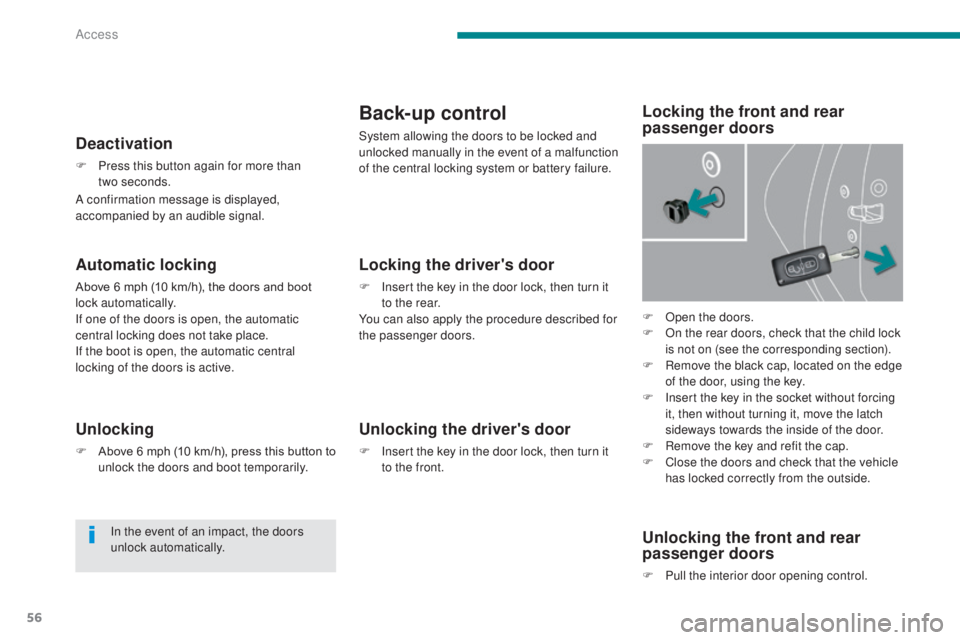
F
O
pen the doors.
F
O
n the rear doors, check that the child lock
is not on (see the corresponding section).
F
R
emove the black cap, located on the edge
of the door, using the key.
F
I
nsert the key in the socket without forcing
it, then without turning it, move the latch
sideways towards the inside of the door.
F
R
emove the key and refit the cap.
F
C
lose the doors and check that the vehicle
has locked correctly from the outside.
Locking the driver's door
F Insert the key in the door lock, then turn it to the rear.
You can also apply the procedure described for
the passenger doors.
Unlocking the driver's door
F Insert the key in the door lock, then turn it to the front.
Locking the front and rear
passenger doors
Unlocking the front and rear
passenger doors
F Pull the interior door opening control.
A confirmation message is displayed,
accompanied by an audible signal.
Access
Page 66 of 344
64
3008_en_Chap03_confort_ed01-2015
The air conditioning can only operate with the
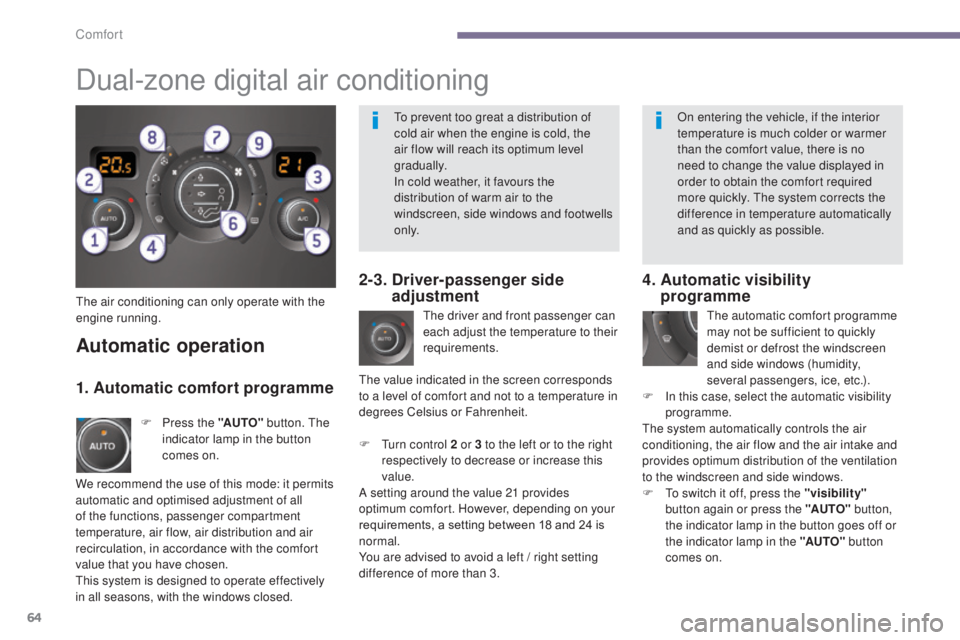
engine running.The driver and front passenger can
each adjust the temperature to their
requirements.
F
T
urn control 2 or 3 to the left or to the right
respectively to decrease or increase this
value.
A setting around the value 21 provides
optimum comfort. However, depending on your
requirements, a setting between 18 and 24 is
normal.
You are advised to avoid a left
/ right setting
difference of more than 3.
4. Automatic visibility programme
The automatic comfort programme
may not be sufficient to quickly
demist or defrost the windscreen
and side windows (humidity,
several passengers, ice, etc.).
F
I
n this case, select the automatic visibility
programme.
The system automatically controls the air
conditioning, the air flow and the air intake and
provides optimum distribution of the ventilation
to the windscreen and side windows.
F
T
o switch it off, press the "visibility"
button again or press the "AUTO" button,
the indicator lamp in the button goes off or
the indicator lamp in the "AUTO" button
comes on.
Automatic operation
F Press the "AUTO" button. The
indicator lamp in the button
comes on.
2-3. Driver-passenger side adjustment
Dual-zone digital air conditioning
We recommend the use of this mode: it permits
automatic and optimised adjustment of all
of the functions, passenger compartment
temperature, air flow, air distribution and air
recirculation, in accordance with the comfort
value that you have chosen.
This system is designed to operate effectively
in all seasons, with the windows closed. The value indicated in the screen corresponds
to a level of comfort and not to a temperature in
degrees Celsius or Fahrenheit.
1. Automatic comfort programme
To prevent too great a distribution of
cold air when the engine is cold, the
air flow will reach its optimum level
gradually.
In cold weather, it favours the
distribution of warm air to the
windscreen, side windows and footwells
o n l y.
On entering the vehicle, if the interior
temperature is much colder or warmer
than the comfort value, there is no
need to change the value displayed in
order to obtain the comfort required
more quickly. The system corrects the
difference in temperature automatically
and as quickly as possible.
Comfort
Page 68 of 344
66
3008_en_Chap03_confort_ed01-2015
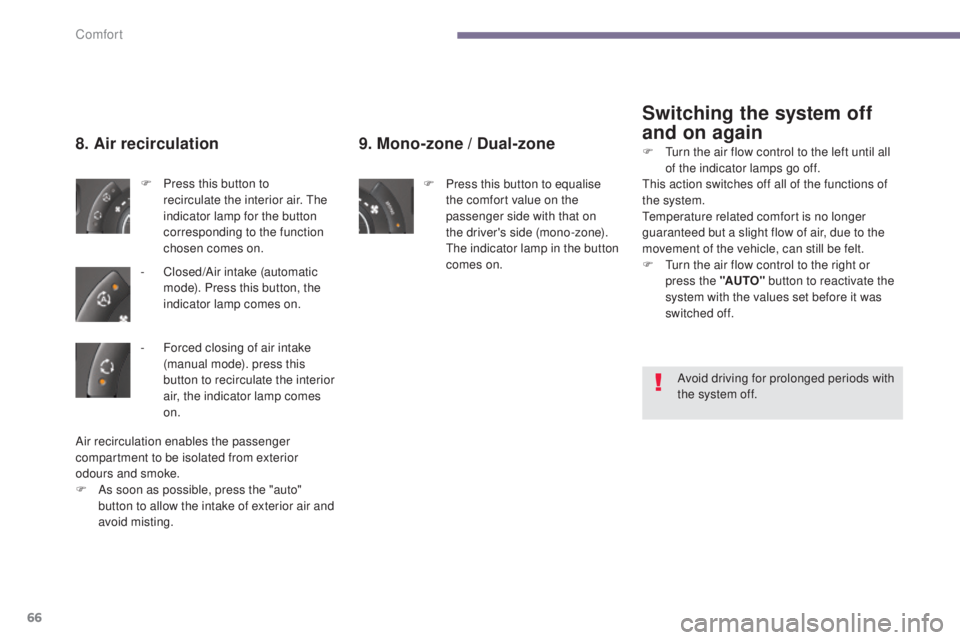
9. Mono-zone / Dual-zone
F Press this button to equalise
the comfort value on the
passenger side with that on
the driver's side (mono-zone).
The indicator lamp in the button
comes on.
8. Air recirculation
F Press this button to recirculate the interior air. The
indicator lamp for the button
corresponding to the function
chosen comes on.
-
C
losed/Air intake (automatic
mode). Press this button, the
indicator lamp comes on.
Switching the system off
and on again
Air recirculation enables the passenger
compartment to be isolated from exterior
odours and smoke.
F
A
s soon as possible, press the "auto"
button to allow the intake of exterior air and
avoid misting. Avoid driving for prolonged periods with
the system off.
F
T
urn the air flow control to the left until all
of the indicator lamps go off.
This action switches off all of the functions of
the system.
Temperature related comfort is no longer
guaranteed but a slight flow of air, due to the
movement of the vehicle, can still be felt.
F
T
urn the air flow control to the right or
press the "AUTO" button to reactivate the
system with the values set before it was
switched off.
-
F
orced closing of air intake
(manual mode). press this
button to recirculate the interior
air, the indicator lamp comes
on.
Comfort
Page 75 of 344
73
3008_en_Chap03_confort_ed01-2015
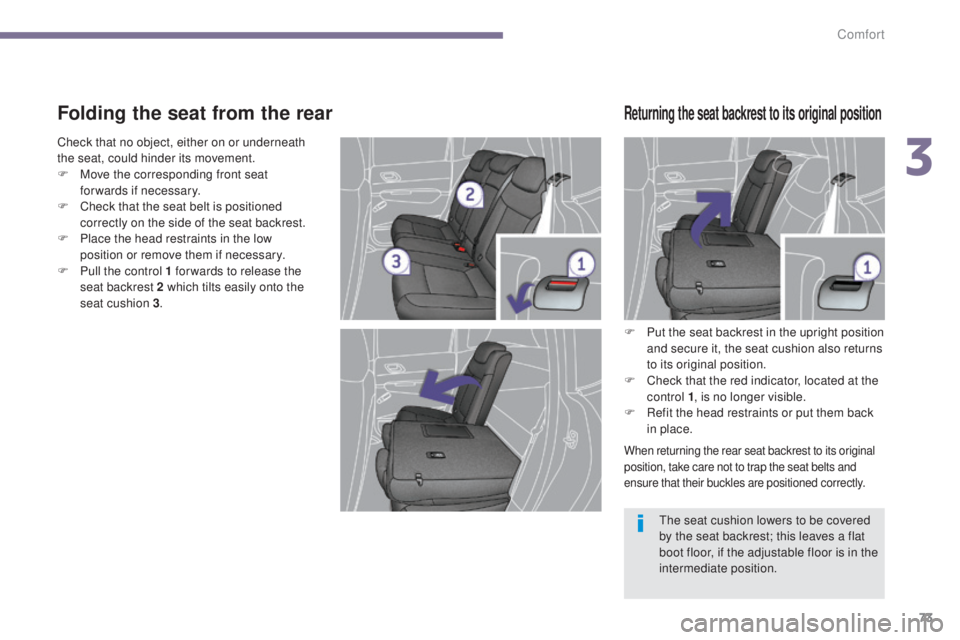
Folding the seat from the rear
F Put the seat backrest in the upright position and secure it, the seat cushion also returns
to its original position.
F
C
heck that the red indicator, located at the
control 1 , is no longer visible.
F
R
efit the head restraints or put them back
in place.
When returning the rear seat backrest to its original
position, take care not to trap the seat belts and
ensure that their buckles are positioned correctly.
The seat cushion lowers to be covered
by the seat backrest; this leaves a flat
boot floor, if the adjustable floor is in the
intermediate position.
Returning the seat backrest to its original position
Check that no object, either on or underneath
the seat, could hinder its movement.
F
M
ove the corresponding front seat
forwards if necessary.
F
C
heck that the seat belt is positioned
correctly on the side of the seat backrest.
F
P
lace the head restraints in the low
position or remove them if necessary.
F
P
ull the control 1 for wards to release the
seat backrest 2 which tilts easily onto the
seat cushion 3 .
3
Comfort
Page 76 of 344
74
3008_en_Chap03_confort_ed01-2015
Mirrors
Each fitted with an adjustable mirror glass
permitting the lateral rearward vision necessary
for overtaking or parking. They can also be
folded for parking in confined spaces.
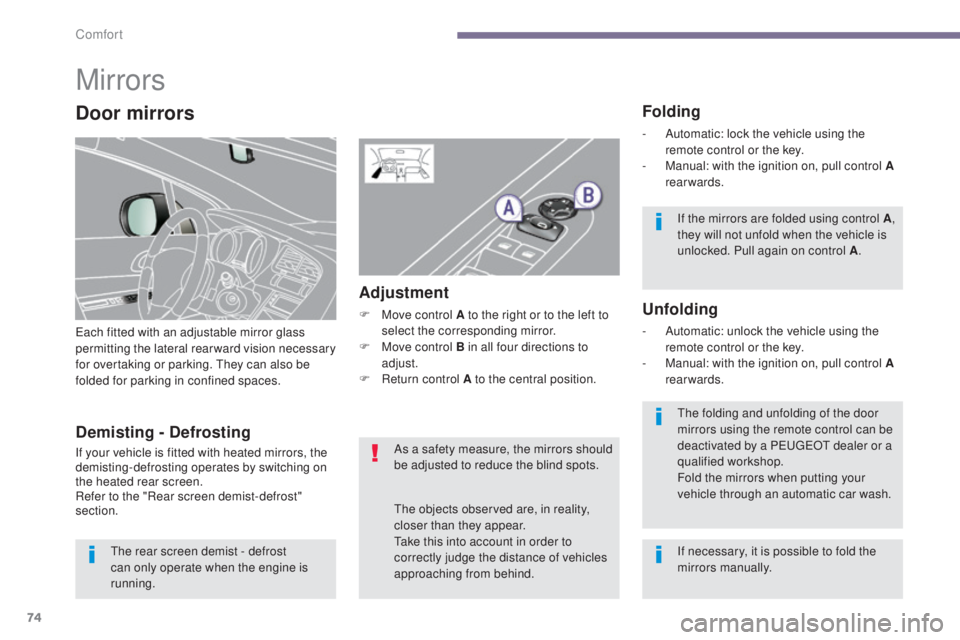
Folding
- Automatic: lock the vehicle using the remote control or the key.
-
M
anual: with the ignition on, pull control A
rearwards.
Unfolding
- Automatic: unlock the vehicle using the remote control or the key.
-
M
anual: with the ignition on, pull control A
rearwards.
Adjustment
F Move control A to the right or to the left to select the corresponding mirror.
F
M
ove control B in all four directions to
adjust.
F
R
eturn control A to the central position.
Demisting - Defrosting
If your vehicle is fitted with heated mirrors, the
demisting-defrosting operates by switching on
the heated rear screen.
Refer to the "Rear screen demist-defrost"
section. If the mirrors are folded using control A
,
they will not unfold when the vehicle is
unlocked. Pull again on control A .
The folding and unfolding of the door
mirrors using the remote control can be
deactivated by a PEUGEOT dealer or a
qualified workshop.
Fold the mirrors when putting your
vehicle through an automatic car wash.
The rear screen demist - defrost
can only operate when the engine is
running. As a safety measure, the mirrors should
be adjusted to reduce the blind spots.
The objects observed are, in reality,
closer than they appear.
Take this into account in order to
correctly judge the distance of vehicles
approaching from behind.
Door mirrors
If necessary, it is possible to fold the
mirrors manually.
Comfort