ad blue PEUGEOT 308 2016 User Guide
[x] Cancel search | Manufacturer: PEUGEOT, Model Year: 2016, Model line: 308, Model: Peugeot 308 2016Pages: 344, PDF Size: 12.23 MB
Page 37 of 344
35
3008_en_Chap01_controle-marche_ed01-2015
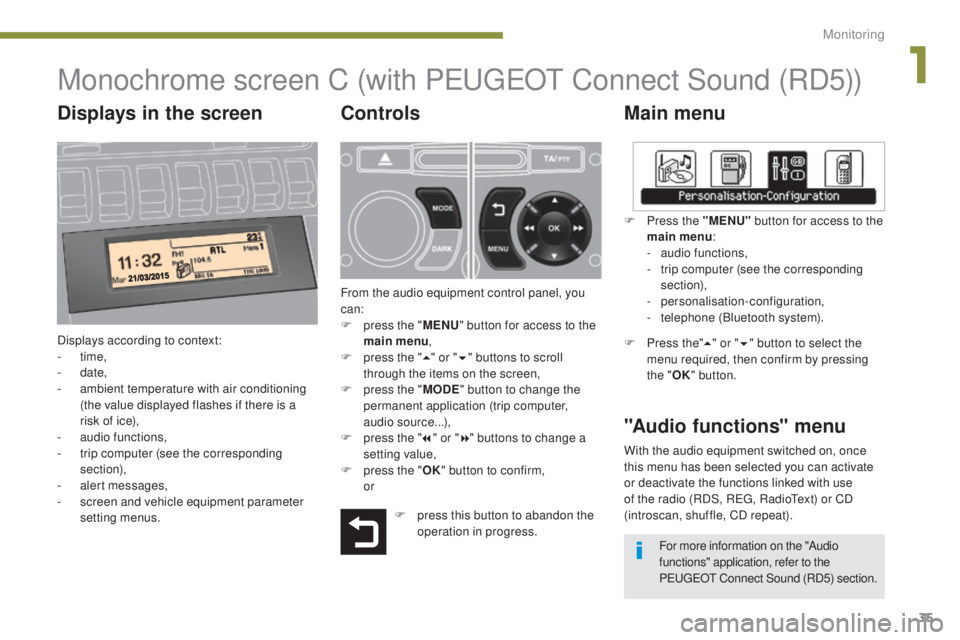
Monochrome screen C (with PEUGEOT Connect Sound (RD5))
Main menu
Displays according to context:
- time,
-
date,
-
a
mbient temperature with air conditioning
(the value displayed flashes if there is a
risk of ice),
-
a
udio functions,
-
t
rip computer (see the corresponding
section),
-
a
lert messages,
-
s
creen and vehicle equipment parameter
setting menus.
"Audio functions" menu
Controls
From the audio equipment control panel, you
can:
F
p
ress the " MENU" button for access to the
main menu ,
F
p
ress the " 5" or " 6" buttons to scroll
through the items on the screen,
F
p
ress the " MODE" button to change the
permanent application (trip computer,
audio source...),
F
p
ress the " 7" or " 8" buttons to change a
setting value,
F
p
ress the " OK" button to confirm,
or F
P
ress the "MENU"
button for access to the
main menu :
-
a
udio functions,
-
t
rip computer (see the corresponding
section),
- personalisation-configuration,
-
t
elephone (Bluetooth system).
F Press the"5" or " 6" button to select the
menu required, then confirm by pressing
the " OK" button.
With the audio equipment switched on, once
this menu has been selected you can activate
or deactivate the functions linked with use
of the radio (RDS, REG, RadioText) or CD
(introscan, shuffle, CD repeat).
F
p
ress this button to abandon the
operation in progress. For more information on the "Audio
functions" application, refer to the
PEUGEOT Connect Sound (RD5) section.
Displays in the screen
1
Monitoring
Page 39 of 344
37
3008_en_Chap01_controle-marche_ed01-2015
Display configuration
Once this menu has been selected, you have
access to the following settings:
-
b
rightness-video setting,
-
d
ate and time setting,
-
s
election of the units.
Adjusting the date and time
F
P
ress the " 7" or " 8" button to select the
"Display configuration" menu, then the
"OK" button.
F
P
ress the " 5" or " 6" button, to select the
"Adjust date and time" line, then on the
"OK" button.
F
P
ress the " 7" or " 8" button to select the
setting to modify. Confirm by pressing the
"OK"
button then adjust the setting and
confirm again to save the modification.
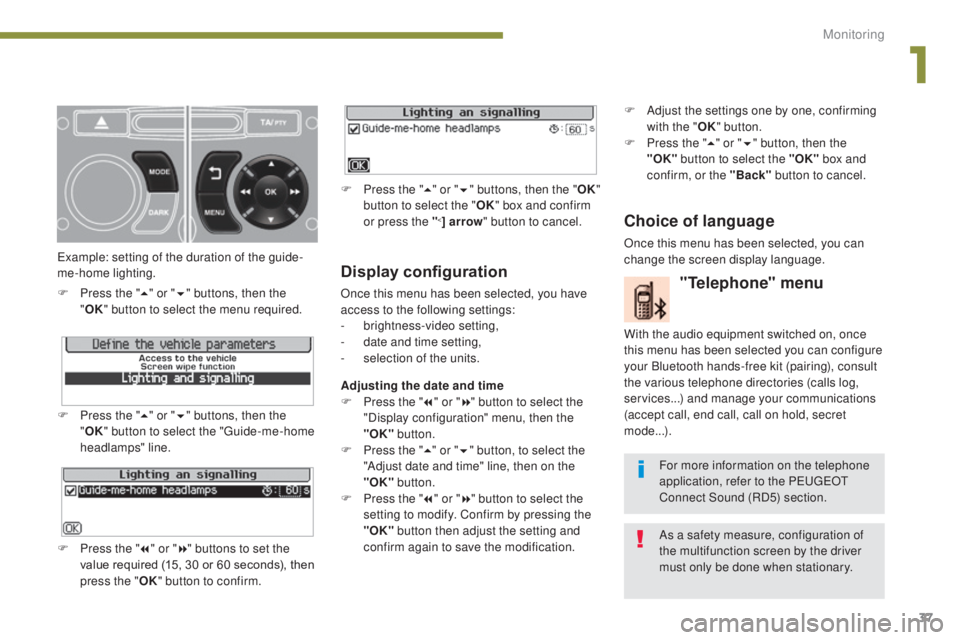
Example: setting of the duration of the guide-
me-home lighting.
F
P
ress the "
5" or " 6" buttons, then the
" OK "
button to select the menu required.
F
P
ress the " 5" or " 6" buttons, then the
" OK " button to select the "Guide-me-home
headlamps" line.
F
P
ress the " 7" or " 8" buttons to set the
value required (15, 30 or 60 seconds), then
press the " OK" button to confirm. F
P
ress the "
5" or " 6" buttons, then the " OK"
button to select the " OK" box and confirm
or press the "
<] arrow " button to cancel.
"Telephone" menu
With the audio equipment switched on, once
this menu has been selected you can configure
your Bluetooth hands-free kit (pairing), consult
the various telephone directories (calls log,
services...) and manage your communications
(accept call, end call, call on hold, secret
mode...).
For more information on the telephone
application, refer to the PEUGEOT
Connect Sound (RD5) section.
As a safety measure, configuration of
the multifunction screen by the driver
must only be done when stationary.
Choice of language
Once this menu has been selected, you can
change the screen display language. F
A
djust the settings one by one, confirming
with the " OK" button.
F
P
ress the "
5" or " 6" button, then the
"OK"
button to select the "OK"
box and
confirm, or the "Back" button to cancel.
1
Monitoring
Page 63 of 344
61
3008_en_Chap03_confort_ed01-2015
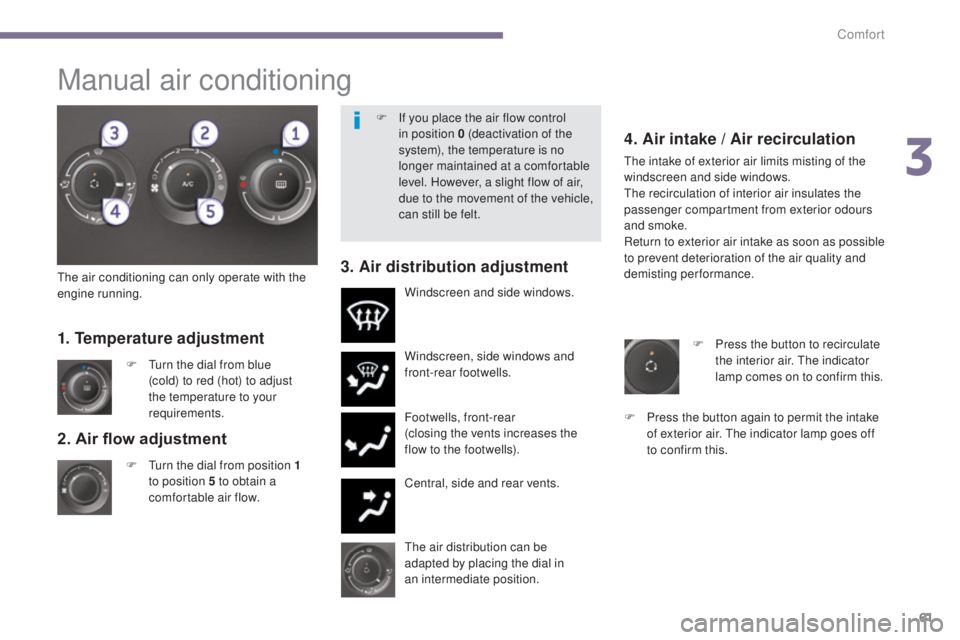
2. Air flow adjustment
F Turn the dial from position 1
to position 5 to obtain a
comfortable air flow. Windscreen, side windows and
front-rear footwells.
Footwells, front-rear
(closing the vents increases the
flow to the footwells).
Central, side and rear vents.
F
T
urn the dial from blue
(cold) to red (hot) to adjust
the temperature to your
requirements. Windscreen and side windows.
1. Temperature adjustment
The air distribution can be
adapted by placing the dial in
an
intermediate position.
The air conditioning can only operate with the
engine running.
4. Air intake / Air recirculation
The intake of exterior air limits misting of the
windscreen and side windows.
The recirculation of interior air insulates the
passenger compartment from exterior odours
and smoke.
Return to exterior air intake as soon as possible
to prevent deterioration of the air quality and
demisting performance.
3. Air distribution adjustment
F Press the button to recirculate
the interior air. The indicator
lamp comes on to confirm this.
F
P
ress the button again to permit the intake
of exterior air. The indicator lamp goes off
to confirm this.
Manual air conditioning
F If you place the air flow control in position 0 (deactivation of the
system), the temperature is no
longer maintained at a comfortable
level. However, a slight flow of air,
due to the movement of the vehicle,
can still be felt.
3
Comfort
Page 100 of 344
98
3008_en_Chap05_amenagements_ed01-2015
Rear multimedia
This multimedia system allows rear passengers
to connect one or two external portable
systems (audio or video player, games
consoles, DVD player...). The sound is played
through two Bluetooth
® wireless headphone
sets, while the video content is displayed in
two
7-inch screens built into the backs of the
front seat head restraints.
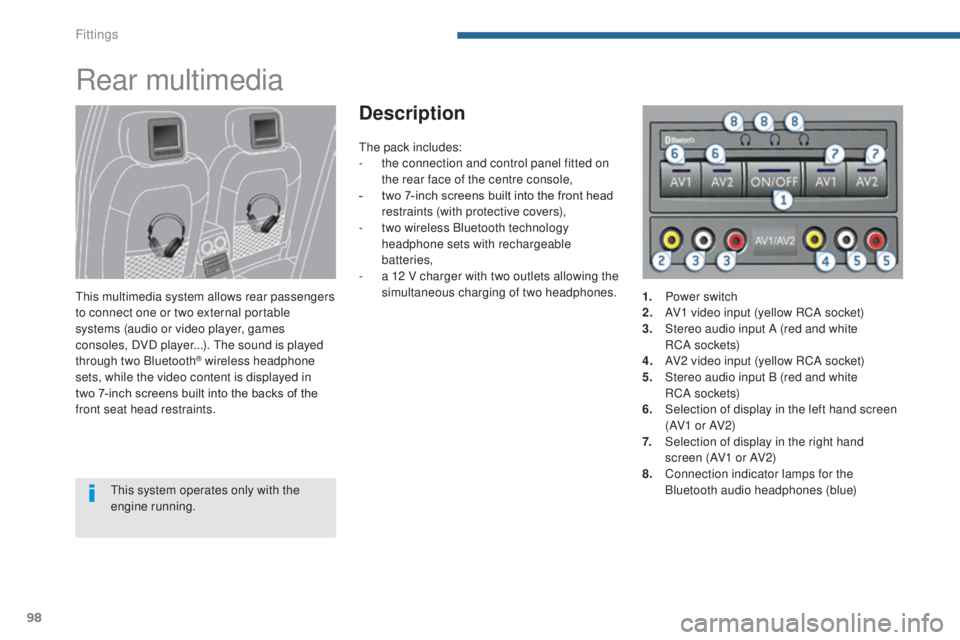
Description
This system operates only with the
engine running. The pack includes:
-
t
he connection and control panel fitted on
the rear face of the centre console,
-
t
wo 7-inch screens built into the front head
restraints (with protective covers),
-
t
wo wireless Bluetooth technology
headphone sets with rechargeable
batteries,
-
a 1
2 V charger with two outlets allowing the
simultaneous charging of two
headphones.
1.
P
ower switch
2.
A
V1 video input (yellow RCA socket)
3.
S
tereo audio input A (red and white
RC A s o c ket s)
4.
A
V2 video input (yellow RCA socket)
5.
S
tereo audio input B (red and white
RC A s o c ket s)
6.
S
election of display in the left hand screen
(AV1 o r AV2)
7.
S
election of display in the right hand
screen (AV1 or AV2)
8.
C
onnection indicator lamps for the
Bluetooth audio headphones (blue)
Fittings
Page 101 of 344
99
3008_en_Chap05_amenagements_ed01-2015
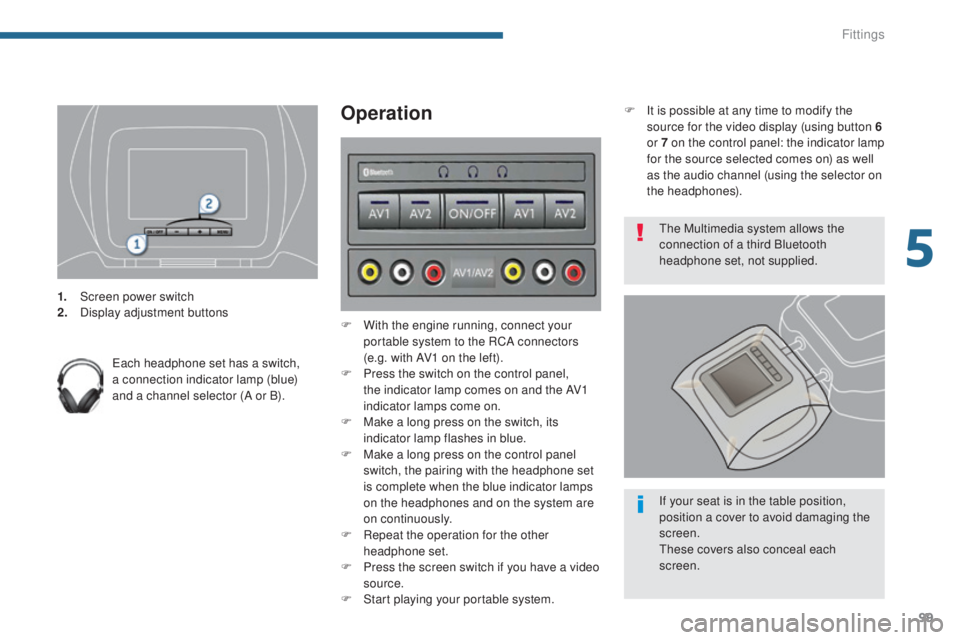
1. Screen power switch
2. Display adjustment buttons
Each headphone set has a switch,
a connection indicator lamp (blue)
and a channel selector (A or B).
Operation
F With the engine running, connect your portable system to the RCA connectors
(e.g. with AV1 on the left).
F
P
ress the switch on the control panel,
the indicator lamp comes on and the AV1
indicator lamps come on.
F
M
ake a long press on the switch, its
indicator lamp flashes in blue.
F
M
ake a long press on the control panel
switch, the pairing with the headphone set
is complete when the blue indicator lamps
on the headphones and on the system are
on continuously.
F
R
epeat the operation for the other
headphone set.
F
P
ress the screen switch if you have a video
source.
F
S
tart playing your portable system. The Multimedia system allows the
connection of a third Bluetooth
headphone set, not supplied.
If your seat is in the table position,
position a cover to avoid damaging the
screen.
These covers also conceal each
screen.
F
I
t is possible at any time to modify the
source for the video display (using button 6
or 7 on the control panel: the indicator lamp
for the source selected comes on) as well
as the audio channel (using the selector on
the headphones).
5
Fittings
Page 170 of 344
168
3008_en_Chap08_conduite_ed01-2015
Gear shift indicator*
* Depending on engine.
The system adapts its gear change
recommendation according to the
driving conditions (slope, load, ...) and
the demands of the driver (power,
acceleration, braking, ...).
The system never suggests:
-
e
ngaging first gear,
-
enga
ging reverse gear.
System which reduces fuel consumption by
recommending the most appropriate gear.
Operation
Depending on the driving situation and your
vehicle's equipment, the system may advise
you to skip one (or more) gear(s). You can
follow this instruction without engaging the
intermediate gears.
The gear engagement recommendations must
not be considered compulsory. In fact, the
configuration of the road, the amount of traffic
and safety remain determining factors when
choosing the best gear. Therefore, the driver
remains responsible for deciding whether or not
to follow the advice given by the system.
This function cannot be deactivated.
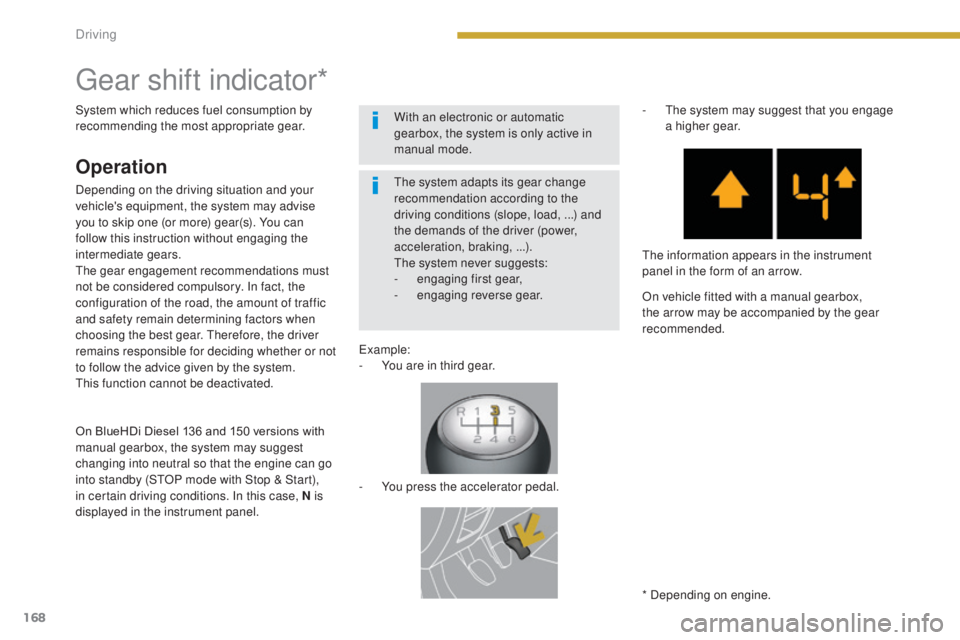
Example:
-
Y
ou are in third gear.
-
Y
ou press the accelerator pedal.-
T
he system may suggest that you engage
a higher gear.
The information appears in the instrument
panel in the form of an arrow.
On vehicle fitted with a manual gearbox,
the arrow may be accompanied by the gear
recommended.
With an electronic or automatic
gearbox, the system is only active in
manual mode.
On BlueHDi Diesel 136 and 150 versions with
manual gearbox, the system may suggest
changing into neutral so that the engine can go
into standby (STOP mode with Stop & Start),
in certain driving conditions. In this case, N is
displayed in the instrument panel.
Driving
Page 171 of 344
169
3008_en_Chap08_conduite_ed01-2015
The Stop & Start system puts the engine
t emporarily into standby - STOP mode - during
stops in the traffic (red lights, traffic jams, or
other...). The engine restarts automatically -
START mode - as soon as you want to move
off. The restart takes place instantly, quickly
and silently.
Per fect for urban use, the Stop & Start system
reduces fuel consumption and exhaust
emissions as well as the noise level when
stationary.
Operation
Going into engine STOP mode
The "ECO" indicator lamp comes
on in the instrument panel and the
engine goes into standby:
-
w
ith a manual gearbox , at speeds below
12 mph (20 km/h), or vehicle stationary
with PureTech 130 and BlueHDi 115 and
120 versions, when you put the gear lever
into neutral and release the clutch pedal,
-
w
ith an electronic gearbox , at speeds
below 5 mph (8 km/h), when you press the
brake pedal or you put the gear selector in
position N ,
Special cases: STOP mode not
available
STOP mode is not invoked when:
- t
he driver's door is open,
-
t
he driver's seat belt is not fastened,
-
t
he vehicle has not exceeded 6 mph
(10
km/h) since the last engine start using
t h e key,
-
t
he vehicle is stopped on a steep slope
(up
or down),
-
t
he electric parking brake is applied or
being applied,
-
t
he engine is needed to maintain a
comfortable temperature in the passenger
compartment,
-
d
emisting is active,
-
s
ome special conditions (battery charge,
engine temperature, braking assistance,
ambient temperature...) where the engine is
needed to assure control of a system.
In this case, the "ECO" indicator
lamp flashes for a few seconds then
goes off.
This operation is perfectly normal.
Never refuel with the engine in STOP
mode; you must switch off the ignition
with the key. For your comfort, during parking
maoeuvres, STOP mode is not
available for a few seconds after
coming out of reverse gear.
STOP mode does not affect the
functionality of the vehicle, such as for
example, braking, power steering...
Stop & Start
- with an automatic gearbox, vehicle
stationary, when you press the brake pedal
or you put the gear selector in position N .
If your vehicle is fitted with the system,
a time counter calculates the sum of the
periods in STOP mode during a journey.
It rests itself to zero every time the
ignition is switched on with the key.
8
Driving
Page 172 of 344
170
3008_en_Chap08_conduite_ed01-2015
Going into engine START mode
The "ECO" indicator lamp goes off
and the engine starts automatically:
-
w
ith a manual gearbox , when you fully
depress the clutch pedal,
-
w
ith an electronic gearbox:
●
g
ear selector in position A or M , when
you release the brake pedal,
●
o
r gear selector in position N and brake
pedal released, when you put the gear
selector in position A or M ,
●
o
r when you engage reverse gear.
-
w
ith an automatic gearbox:
●
g
ear selector in position D or M , when
you release the brake pedal,
●
o
r gear selector in position N and brake
pedal released, when you put the gear
selector in position D or M ,
●
o
r when you engage reverse gear. In this case the "ECO" indicator lamp
flashes for a few seconds, then goes
of f.
Special cases: START invoked
automatically
START mode is invoked automatically when:
- t he driver's door is open,
-
t
he driver's seat belt is not fastened,
-
t
he speed of the vehicle exceeds 18 mph
(25 km/h) with a manual gearbox, 2
mph
(3
km/h) with the PureTech 130 and
BlueHDi 115 and 120 versions, 7 mph
(11
km/h) with an electronic gearbox or
2
mph (3 km/h) with an automatic gearbox,
-
t
he electric parking brake is being applied,
-
s
ome special conditions (battery charge,
engine temperature, braking assistance,
ambient temperature...) where the engine is
needed for control of a system.
This operation is perfectly normal.
Deactivation
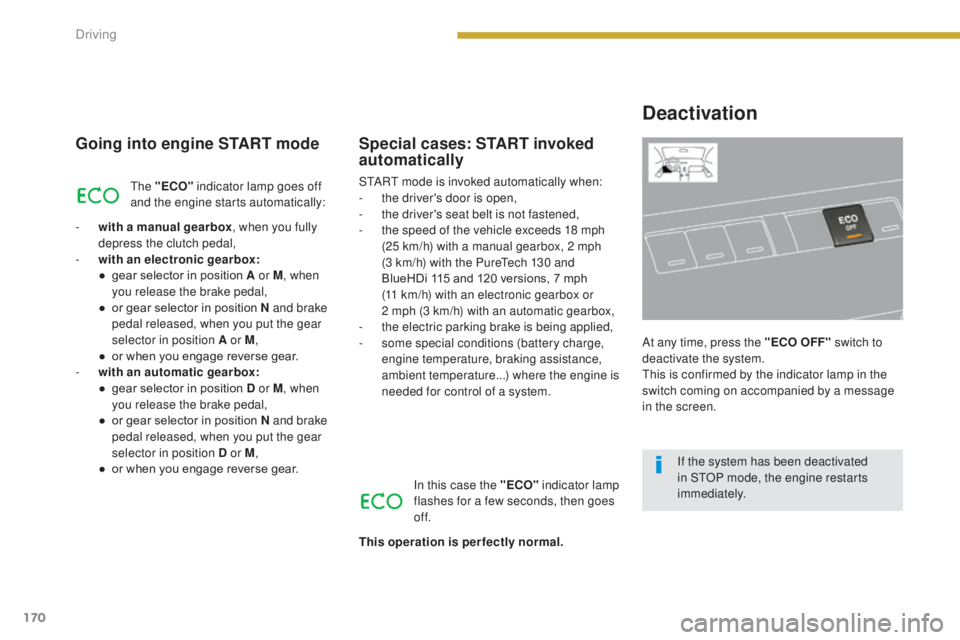
At any time, press the "ECO OFF" switch to
d eactivate the system.
This is confirmed by the indicator lamp in the
switch coming on accompanied by a message
in the screen.
If the system has been deactivated
in STOP mode, the engine restarts
immediately.
Driving
Page 178 of 344
176
3008_en_Chap08_conduite_ed01-2015
Reversing camera
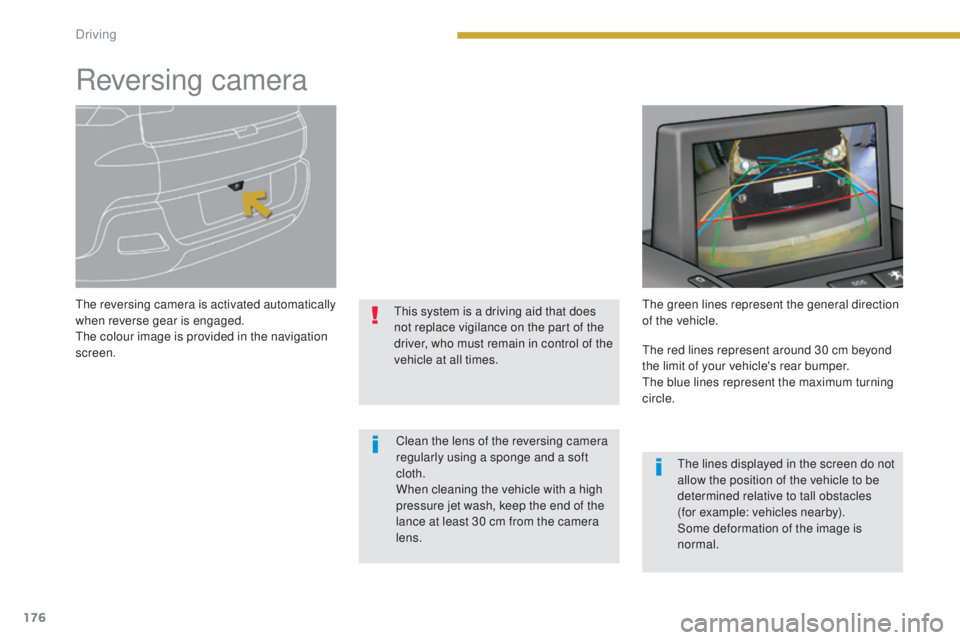
The reversing camera is activated automatically
when reverse gear is engaged.
The colour image is provided in the navigation
screen.This system is a driving aid that does
not replace vigilance on the part of the
driver, who must remain in control of the
vehicle at all times.The green lines represent the general direction
of the vehicle.
Clean the lens of the reversing camera
regularly using a sponge and a soft
cloth.
When cleaning the vehicle with a high
pressure jet wash, keep the end of the
lance at least 30 cm from the camera
lens. The red lines represent around 30 cm beyond
the limit of your vehicle's rear bumper.
The blue lines represent the maximum turning
circle.
The lines displayed in the screen do not
allow the position of the vehicle to be
determined relative to tall obstacles
(for example: vehicles nearby).
Some deformation of the image is
normal.
Driving
Page 186 of 344
184
3008_en_Chap09_verifications_ed01-2015
Running out of fuel (Diesel)
Other engines
F Add at least five litres of Diesel fuel to the tank.
F
O
pen the bonnet.
F
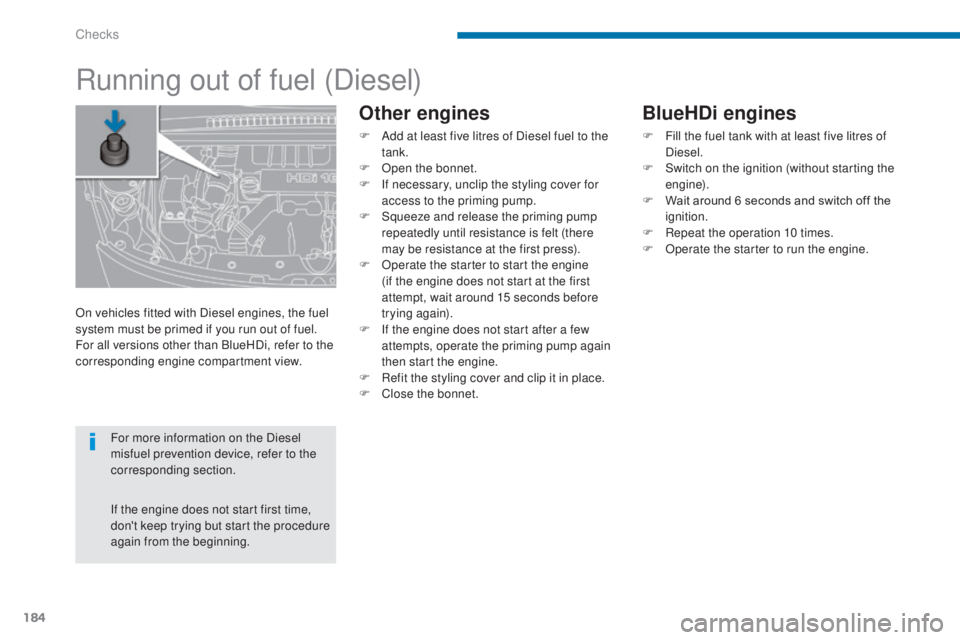
I
f necessary, unclip the styling cover for
access to the priming pump.
F
S
queeze and release the priming pump
repeatedly until resistance is felt (there
may be resistance at the first press).
F
O
perate the starter to start the engine
(if the engine does not start at the first
attempt, wait around 15 seconds before
trying again).
F
I
f the engine does not start after a few
attempts, operate the priming pump again
then start the engine.
F
R
efit the styling cover and clip it in place.
F
C
lose the bonnet.
On vehicles fitted with Diesel engines, the fuel
system must be primed if you run out of fuel.
For all versions other than BlueHDi, refer to the
corresponding engine compartment view.
For more information on the Diesel
misfuel prevention device, refer to the
corresponding section.
If the engine does not start first time,
don't keep trying but start the procedure
again from the beginning.
BlueHDi engines
F Fill the fuel tank with at least five litres of Diesel.
F
S
witch on the ignition (without starting the
engine).
F
W
ait around 6 seconds and switch off the
ignition.
F
R
epeat the operation 10 times.
F
O
perate the starter to run the engine.
Checks