ignition PEUGEOT 308 2016 Workshop Manual
[x] Cancel search | Manufacturer: PEUGEOT, Model Year: 2016, Model line: 308, Model: Peugeot 308 2016Pages: 344, PDF Size: 12.23 MB
Page 143 of 344
141
3008_en_Chap08_conduite_ed01-2015
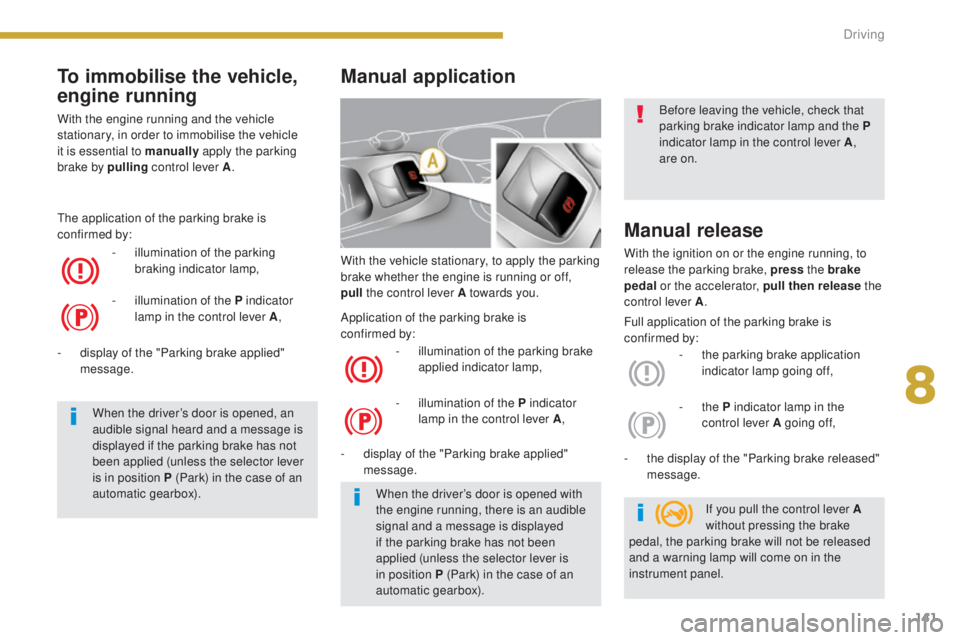
With the vehicle stationary, to apply the parking
brake whether the engine is running or off,
pull
the control lever A towards you.
-
i
llumination of the parking brake
applied indicator lamp,
-
d
isplay of the "Parking brake applied"
message.
Manual release
With the ignition on or the engine running, to
release the parking brake, press the brake
pedal or the accelerator, pull then release the
control lever A .
-
t
he parking brake application
indicator lamp going off,
-
t
he display of the "Parking brake released"
message.
Manual application
- illumination of the P indicator lamp in the control lever A ,-
the P indicator lamp in the
control lever A going of f,
When the driver’s door is opened with
the engine running, there is an audible
signal and a message is displayed
if the parking brake has not been
applied (unless the selector lever is
in position
P (Park) in the case of an
automatic gearbox). If you pull the control lever A
without pressing the brake
pedal, the parking brake will not be released
and a warning lamp will come on in the
instrument panel. Before leaving the vehicle, check that
parking brake indicator lamp and the
P
indicator lamp in the control lever A ,
are on.
Full application of the parking brake is
confirmed by:
Application of the parking brake is
confirmed
by:
To immobilise the vehicle,
engine running
With the engine running and the vehicle
stationary, in order to immobilise the vehicle
it is essential to manually
apply the parking
brake by pulling
control lever A.
-
i
llumination of the parking
braking indicator lamp,
The application of the parking brake is
confirmed by:
-
i
llumination of the P indicator
lamp in the control lever A ,
When the driver’s door is opened, an
audible signal heard and a message is
displayed if the parking brake has not
been applied (unless the selector lever
is in position P (Park) in the case of an
automatic gearbox).
-
d
isplay of the "Parking brake applied"
message.
8
Driving
Page 144 of 344
142
3008_en_Chap08_conduite_ed01-2015
Automatic application,
engine off
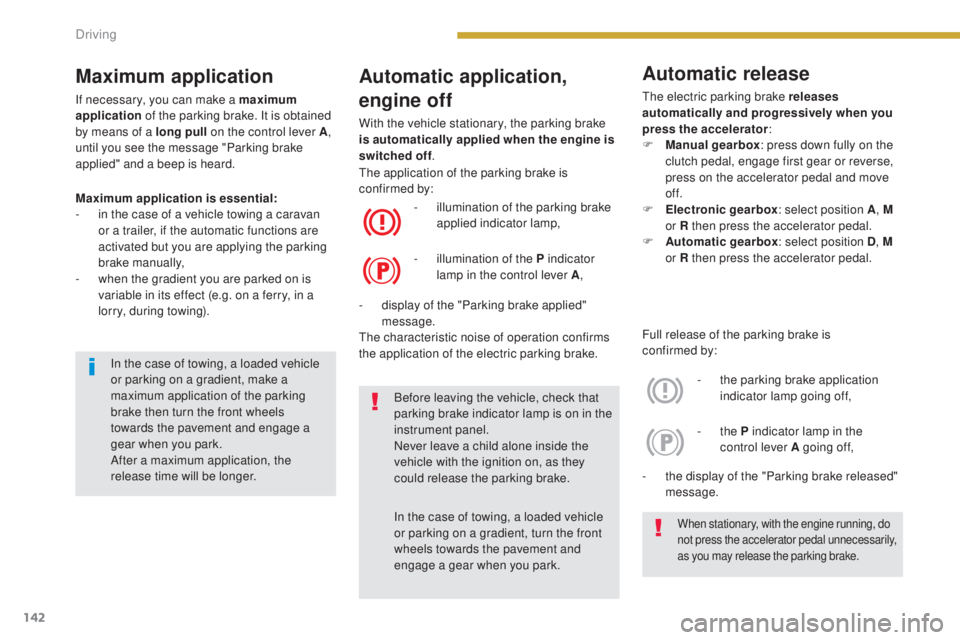
With the vehicle stationary, the parking brake
is automatically applied when the engine is
switched off.
Maximum application is essential:
-
i
n the case of a vehicle towing a caravan
or a trailer, if the automatic functions are
activated but you are applying the parking
brake manually,
-
w
hen the gradient you are parked on is
variable in its effect (e.g. on a ferry, in a
lorry, during towing). -
i
llumination of the parking brake
applied indicator lamp,
-
d
isplay of the "Parking brake applied"
message.
The characteristic noise of operation confirms
the application of the electric parking brake. The application of the parking brake is
confirmed by:
-
i
llumination of the P indicator
lamp in the control lever A ,
Before leaving the vehicle, check that
parking brake indicator lamp is on in the
instrument panel.
Never leave a child alone inside the
vehicle with the ignition on, as they
could release the parking brake.
In the case of towing, a loaded vehicle
or parking on a gradient, turn the front
wheels towards the pavement and
engage a gear when you park.
When stationary, with the engine running, do
not press the accelerator pedal unnecessarily,
as you may release the parking brake.
In the case of towing, a loaded vehicle
or parking on a gradient, make a
maximum application of the parking
brake then turn the front wheels
towards the pavement and engage a
gear when you park.
After a maximum application, the
release time will be longer.
Maximum application
If necessary, you can make a maximum
application of the parking brake. It is obtained
by means of a long pull on the control lever
A,
until you see the message "Parking brake
applied" and a beep is heard.
Full release of the parking brake is
confirmed
by:
-
t
he parking brake application
indicator lamp going off,
-
t
he display of the "Parking brake released"
message. -
the P indicator lamp in the
control lever A going of f,
Automatic release
The electric parking brake releases
automatically and progressively when you
press the accelerator :
F
M
anual gearbox : press down fully on the
clutch pedal, engage first gear or reverse,
press on the accelerator pedal and move
of f.
F
E
lectronic gearbox : select position A, M
or R then press the accelerator pedal.
F
A
utomatic gearbox : select position D, M
or R then press the accelerator pedal.
Driving
Page 145 of 344
143
3008_en_Chap08_conduite_ed01-2015
Emergency braking
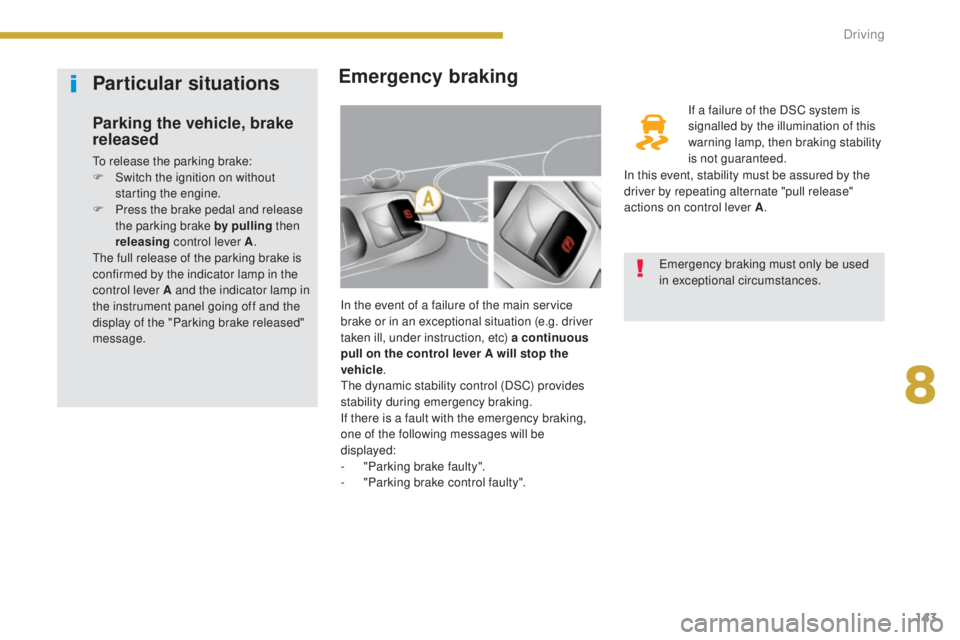
In the event of a failure of the main service
brake or in an exceptional situation (e.g. driver
taken ill, under instruction, etc) a continuous
pull on the control lever A will stop the
vehicle .
The dynamic stability control (DSC) provides
stability during emergency braking.
If there is a fault with the emergency braking,
one of the following messages will be
displayed:
-
"
Parking brake faulty".
-
"
Parking brake control faulty". If a failure of the DSC system is
signalled by the illumination of this
warning lamp, then braking stability
is not guaranteed.
Emergency braking must only be used
in exceptional circumstances.
Particular situations
Parking the vehicle, brake
released
To release the parking brake:
F S witch the ignition on without
starting the engine.
F
P
ress the brake pedal and release
the parking brake by pulling then
releasing control lever A .
The full release of the parking brake is
confirmed by the indicator lamp in the
control lever A and the indicator lamp in
the instrument panel going off and the
display of the "Parking brake released"
message. In this event, stability must be assured by the
driver by repeating alternate "pull release"
actions on control lever A
.
8
Driving
Page 147 of 344
145
3008_en_Chap08_conduite_ed01-2015
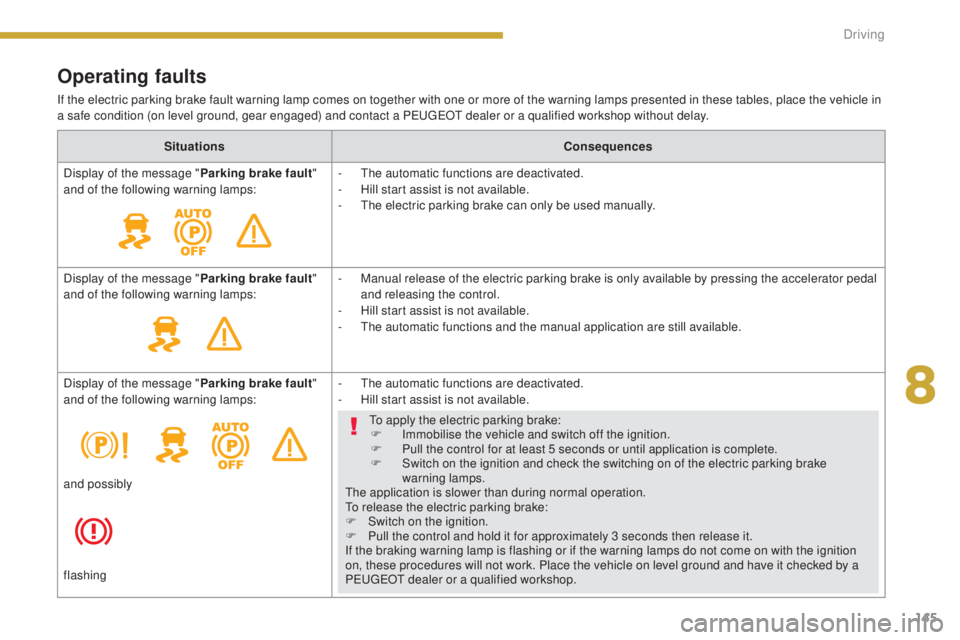
Operating faults
If the electric parking brake fault warning lamp comes on together with one or more of the warning lamps presented in these tables, place the vehicle in
a safe condition (on level ground, gear engaged) and contact a PEUGEOT dealer or a qualified workshop without delay.Situations Consequences
Display of the message " Parking brake fault"
and of the following warning lamps: -
T
he automatic functions are deactivated.
-
H
ill start assist is not available.
-
T
he electric parking brake can only be used manually.
Display of the message " Parking brake fault"
and of the following warning lamps: -
M
anual release of the electric parking brake is only available by pressing the accelerator pedal
and releasing the control.
-
H
ill start assist is not available.
-
T
he automatic functions and the manual application are still available.
Display of the message " Parking brake fault"
and of the following warning lamps: -
T
he automatic functions are deactivated.
-
H
ill start assist is not available.
To apply the electric parking brake: F
I
mmobilise the vehicle and switch off the ignition.
F
P
ull the control for at least 5 seconds or until application is complete.
F
S
witch on the ignition and check the switching on of the electric parking brake
warning lamps.
The application is slower than during normal operation.
To release the electric parking brake:
F
S
witch on the ignition.
F
P
ull the control and hold it for approximately 3 seconds then release it.
If the braking warning lamp is flashing or if the warning lamps do not come on with the ignition
on, these procedures will not work. Place the vehicle on level ground and have it checked by a
PEUGEOT dealer or a qualified workshop.
and possibly
flashing
8
Driving
Page 149 of 344
147
3008_en_Chap08_conduite_ed01-2015
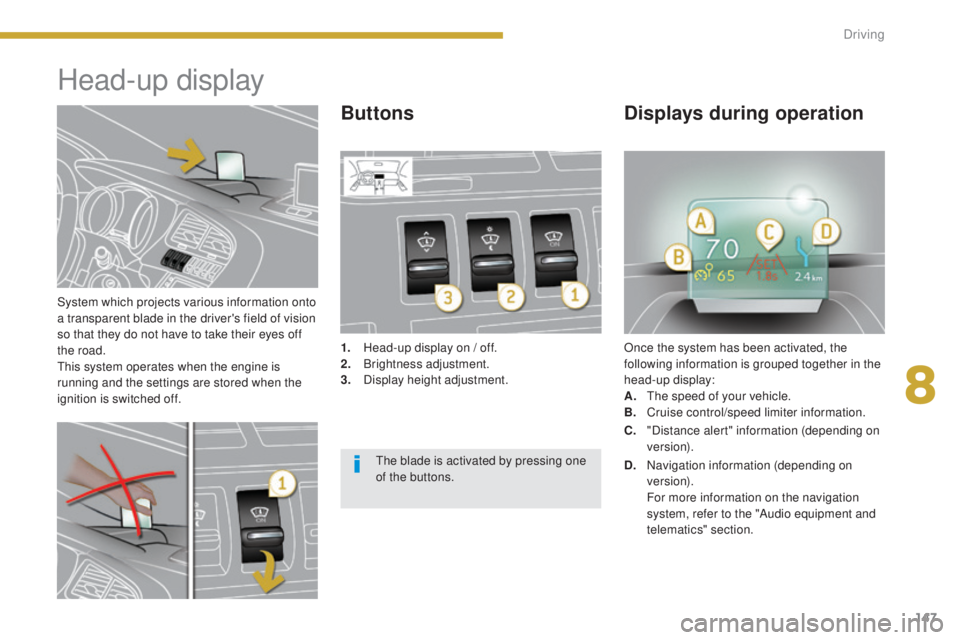
System which projects various information onto
a transparent blade in the driver's field of vision
so that they do not have to take their eyes off
the road.
This system operates when the engine is
running and the settings are stored when the
ignition is switched off.
Head-up display
1. Head-up display on / off.
2. Br ightness adjustment.
3.
D
isplay height adjustment. Once the system has been activated, the
following information is grouped together in the
head-up display:
A.
T
he speed of your vehicle.
B.
C
ruise control/speed limiter information.
ButtonsDisplays during operation
C. "Distance alert" information (depending on
ve r s i o n).
The blade is activated by pressing one
of the buttons. D.
N
avigation information (depending on
ve r s i o n).
F
or more information on the navigation
system, refer to the "Audio equipment and
telematics" section.
8
Driving
Page 151 of 344
149
3008_en_Chap08_conduite_ed01-2015
Distance alert*
For the safety time to be observed, refer
to the current legislation or highway code
recommendations in your country.
The system operates when the speed of your
vehicle is higher than 45 mph (70 km/h) and
below 90 mph (150 km/h).
It has a programmable visual alert which
remains in the memory when the ignition is
switched off.
This system is a driving aid and cannot, in any
circumstances, take the place of vigilance on
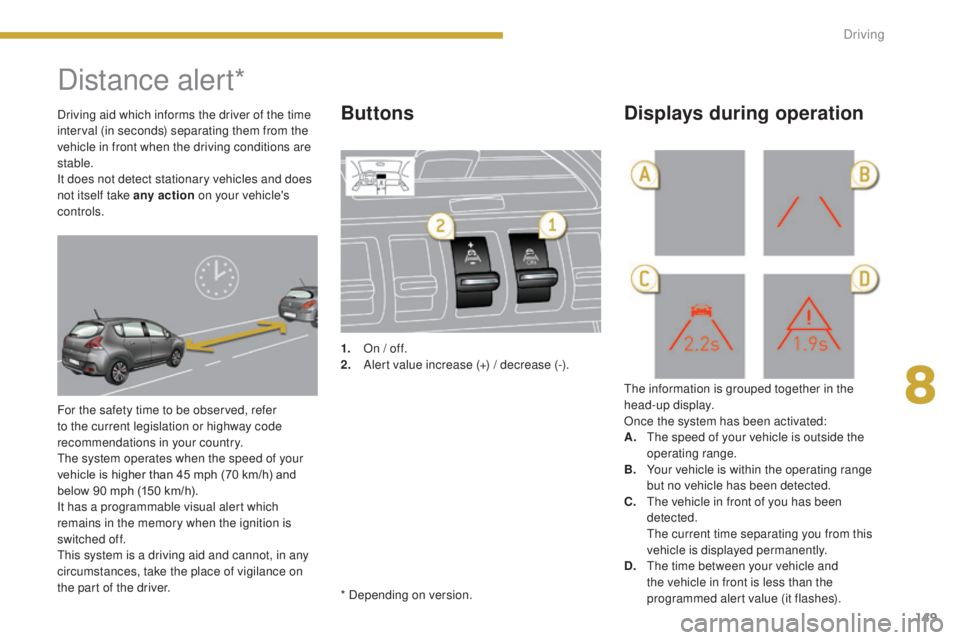
the part of the driver.1.
O
n / off.
2.
A
lert value increase (+) / decrease (-).
The information is grouped together in the
head-up display.
Once the system has been activated:
A.
T
he speed of your vehicle is outside the
operating range.
B.
Y
our vehicle is within the operating range
but no vehicle has been detected.
C.
T
he vehicle in front of you has been
detected.
T
he current time separating you from this
vehicle is displayed permanently.
D.
T
he time between your vehicle and
the vehicle in front is less than the
programmed alert value (it flashes).
Buttons Displays during operationDriving aid which informs the driver of the time
interval (in seconds) separating them from the
vehicle in front when the driving conditions are
stable.
It does not detect stationary vehicles and does
not itself take any action on your vehicle's
controls.
* Depending on version.
8
Driving
Page 154 of 344
152
3008_en_Chap08_conduite_ed01-2015
Speed limiter
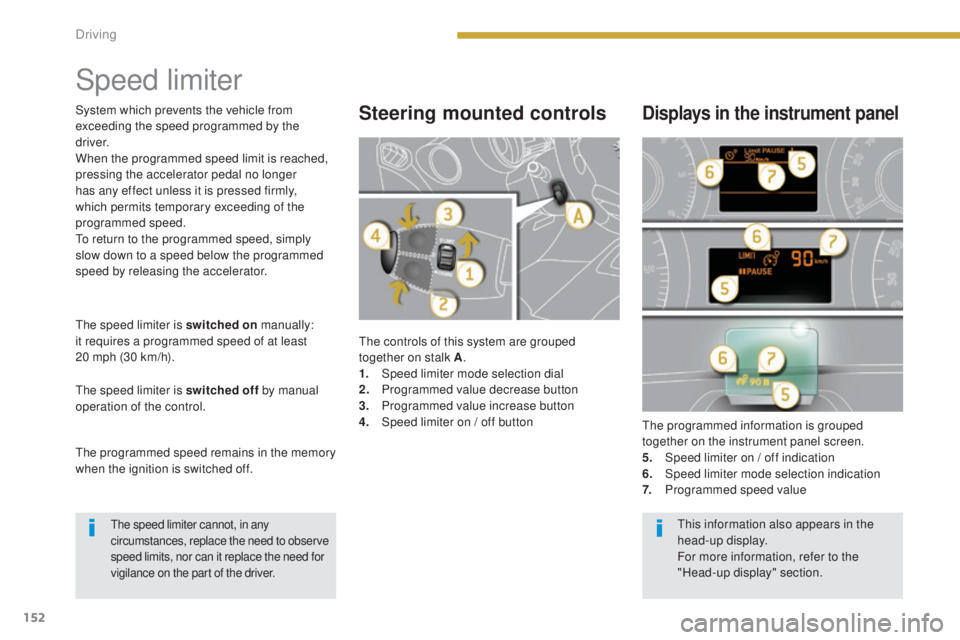
The controls of this system are grouped
together on stalk A.
1.
Spe
ed limiter mode selection dial
2.
P
rogrammed value decrease button
3.
P
rogrammed value increase button
4.
S
peed limiter on / off button The programmed information is grouped
together on the instrument panel screen.
5.
S
peed limiter on / off indication
6.
Spe
ed limiter mode selection indication
7.
P
rogrammed speed value
Steering mounted controlsDisplays in the instrument panel
The speed limiter is switched on manually:
it requires a programmed speed of at least
20 mph (30 km/h).
The speed limiter is switched off by manual
operation of the control.
The programmed speed remains in the memory
when the ignition is switched off. System which prevents the vehicle from
exceeding the speed programmed by the
driver.
When the programmed speed limit is reached,
pressing the accelerator pedal no longer
has any effect unless it is pressed firmly,
which permits temporary exceeding of the
programmed speed.
To return to the programmed speed, simply
slow down to a speed below the programmed
speed by releasing the accelerator.
The speed limiter cannot, in any
circumstances, replace the need to observe
speed limits, nor can it replace the need for
vigilance on the part of the driver.This information also appears in the
head-up display.
For more information, refer to the
"Head-up display" section.
Driving
Page 157 of 344
155
3008_en_Chap08_conduite_ed01-2015
Cruise control
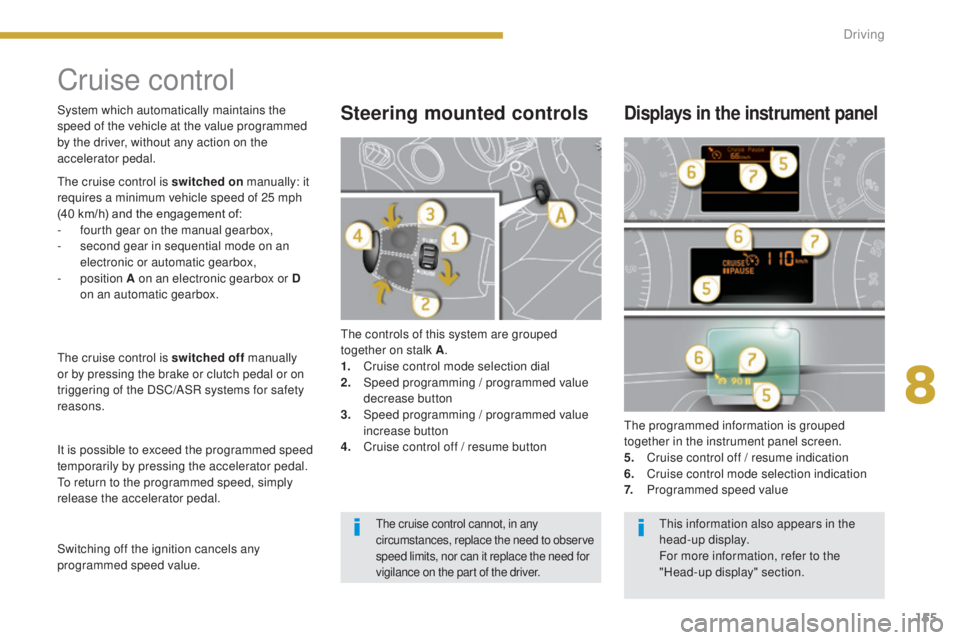
The controls of this system are grouped
together on stalk A.
1.
C
ruise control mode selection dial
2.
S
peed programming
/ programmed value
decrease button
3.
S
peed programming
/ programmed value
increase button
4.
C
ruise control off / resume button The programmed information is grouped
together in the instrument panel screen.
5.
C
ruise control off / resume indication
6.
C
ruise control mode selection indication
7.
P
rogrammed speed value
Steering mounted controlsDisplays in the instrument panel
The cruise control is switched on manually: it
requires a minimum vehicle speed of 25 mph
(40 km/h) and the engagement of:
-
f
ourth gear on the manual gearbox,
-
s
econd gear in sequential mode on an
electronic or automatic gearbox,
-
position A on an electronic gearbox or D
on an automatic gearbox.
The cruise control is switched off manually
or by pressing the brake or clutch pedal or on
triggering of the DSC/ASR systems for safety
reasons.
It is possible to exceed the programmed speed
temporarily by pressing the accelerator pedal.
To return to the programmed speed, simply
release the accelerator pedal. System which automatically maintains the
speed of the vehicle at the value programmed
by the driver, without any action on the
accelerator pedal.
Switching off the ignition cancels any
programmed speed value.
The cruise control cannot, in any
circumstances, replace the need to observe
speed limits, nor can it replace the need for
vigilance on the part of the driver.This information also appears in the
head-up display.
For more information, refer to the
"Head-up display" section.
8
Driving
Page 164 of 344
162
3008_en_Chap08_conduite_ed01-2015
The gearbox is then operating in auto-active
mode, without any action on the part of the
driver. It continuously selects the most suitable
gear in relation to the following parameters:
-
s
tyle of driving,
-
p
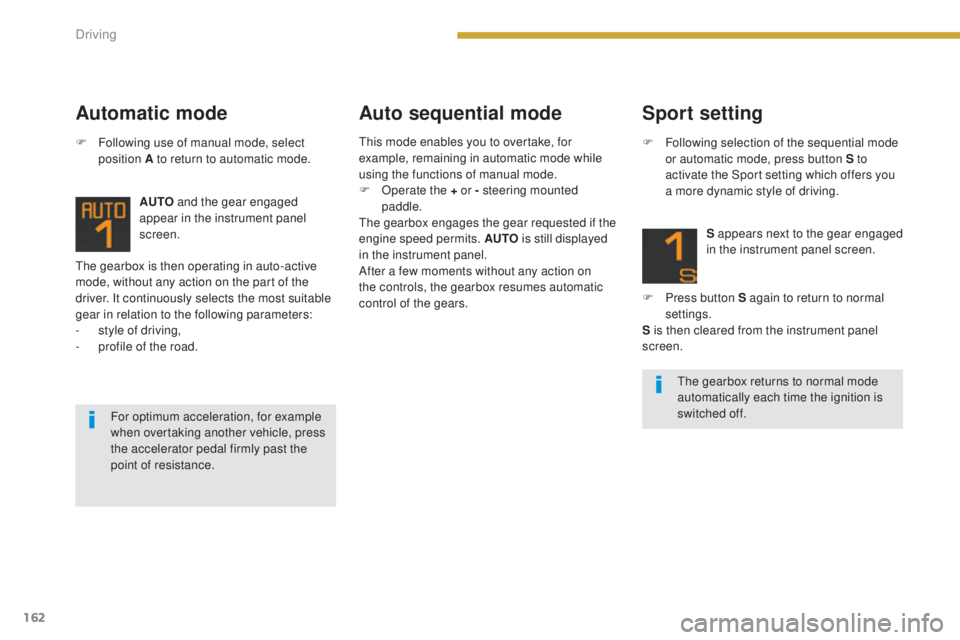
rofile of the road. AUTO
and the gear engaged
appear in the instrument panel
screen.
Automatic mode Auto sequential mode
F Following use of manual mode, select
position A to return to automatic mode.
For optimum acceleration, for example
when overtaking another vehicle, press
the accelerator pedal firmly past the
point of resistance.
Sport setting
F Following selection of the sequential mode or automatic mode, press button S to
activate the Sport setting which offers you
a more dynamic style of driving.
S appears next to the gear engaged
in the instrument panel screen.
F
P
ress button S again to return to normal
settings.
S is then cleared from the instrument panel
screen.
The gearbox returns to normal mode
automatically each time the ignition is
switched off.
This mode enables you to overtake, for
example, remaining in automatic mode while
using the functions of manual mode.
F
O
perate the + or - steering mounted
paddle.
The gearbox engages the gear requested if the
engine speed permits. AUTO is still displayed
in the instrument panel.
After a few moments without any action on
the controls, the gearbox resumes automatic
control of the gears.
Driving
Page 165 of 344
163
3008_en_Chap08_conduite_ed01-2015
Stopping the vehicleOperating fault
With the ignition on, if this warning
lamp comes on and AUTO flashes,
accompanied by an audible signal
and a message in the screen, this
indicates a fault with the gearbox.
Have it checked by a PEUGEOT dealer or a
qualified workshop.
Before switching off the engine, you can
choose to:
-
m
ove to position N to engage neutral,
-
l
eave the gear engaged; in this case, it will
not be possible to move the vehicle.
In both cases, it is essential that you apply the
parking brake to immobilise the vehicle, unless
it is programmed in automatic mode.
When immobilising the vehicle, with the
engine running, it is essential to place
the gear lever in neutral N .
Before carrying out any work in the
engine compartment, check that the
gear lever is in neutral N and that the
parking brake is applied. It is essential to press the brake pedal
when starting the engine.
When parking, is it essential to apply
the parking brake to immobilise the
vehicle, whatever the circumstances.
When driving on flooded roads or when
crossing a ford, drive at walking speed.
8
Driving