ESP PEUGEOT 308 2017 Owner's Manual
[x] Cancel search | Manufacturer: PEUGEOT, Model Year: 2017, Model line: 308, Model: Peugeot 308 2017Pages: 566, PDF Size: 16.05 MB
Page 58 of 566
56
3008-2_en_Chap02_ouvertures_ed01-2016
Deadlocking
F Make a first press on this button.
F W ithin five seconds, press this
button again to deadlock the
vehicle.
Deadlocking renders the interior door
controls inoperative.
It also deactivates the interior central
locking button on the dashboard.
Therefore, never leave anyone inside
the vehicle when it is deadlocked.
Locating your vehicle
F Press this button.
This will switch on the courtesy lamps and door
mirror spot lamps and the direction indicators
will flash for around ten seconds. This function allows you to identify your vehicle
from a distance, particularly in poor light. Your
vehicle must be locked.
For versions without alarm, deadlocking is
confirmed by illumination of the direction
indicators for few seconds on the second press
of the locking button. Closing the windows and sunroof
Pressing and holding the locking
button closes the windows and,
depending on version, the sunroof to
the desired position.
When closing the windows and sunroof
you must ensure that nothing prevents
their correct closing.
If, on versions with alarm, you want to
leave the windows and/or sunroof partly
open, you must first deactivate the
volumetric alarm protection.
For more information on the Alarm ,
refer to the corresponding section.
This operation also starts closing of the blind.
Access
Page 60 of 566
58
3008-2_en_Chap02_ouvertures_ed01-2016
Keyless Entry and Starting
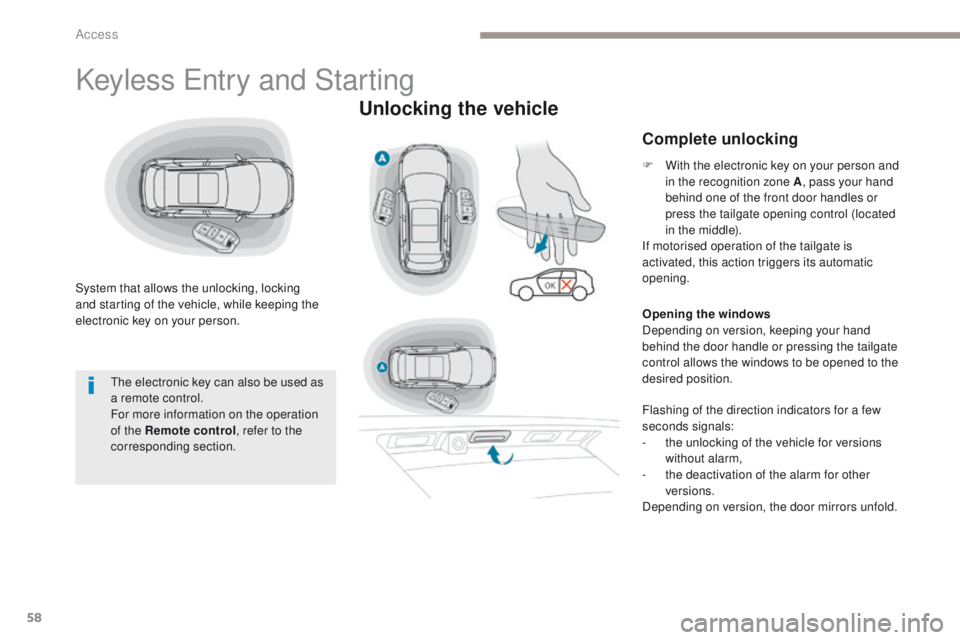
System that allows the unlocking, locking
and starting of the vehicle, while keeping the
electronic key on your person.
Unlocking the vehicle
Complete unlocking
The electronic key can also be used as
a remote control.
For more information on the operation
of the Remote control, refer to the
corresponding section. F
W
ith the electronic key on your person and
in the recognition zone A , pass your hand
behind one of the front door handles or
press the tailgate opening control (located
in the middle).
If motorised operation of the tailgate is
activated, this action triggers its automatic
opening.
Opening the windows
Depending on version, keeping your hand
behind the door handle or pressing the tailgate
control allows the windows to be opened to the
desired position.
Flashing of the direction indicators for a few
seconds signals:
-
t
he unlocking of the vehicle for versions
without alarm,
-
t
he deactivation of the alarm for other
versions.
Depending on version, the door mirrors unfold.
Access
Page 62 of 566
60
3008-2_en_Chap02_ouvertures_ed01-2016
If one of the doors or the boot is still
open or if the electronic key for the
Keyless Entry and Starting system has
been left inside the vehicle, the central
locking does not take place.
However, the alarm (if fitted) will be fully
activated after about 45 seconds.As a safety measure (children on
board), never leave the vehicle without
taking the electronic key for the Keyless
Entry and Starting system with you,
even for a short period.
Be aware of the risk of theft when the
electronic key for the Keyless Entry and
Starting system is in one of the defined
zones with the vehicle unlocked.
The automatic folding and unfolding
of the door mirrors can be deactivated
by a PEUGEOT dealer or a qualified
workshop. In order to preserve the battery in the
electronic key and the vehicle's battery,
the "hands-free" functions are put into
long-term standby after 21 days without
use. To restore these functions, press
one of the remote control buttons or
start the engine with the electronic key
in the reader.
For more information on starting with
Keyless Entr y and Star ting
, refer to
the corresponding section.
If the vehicle is unlocked by mistake
and with no action on the doors or boot,
the vehicle will lock again automatically
after about 30 seconds.
If fitted to your vehicle, the alarm will
also be reactivated automatically.
Access
Page 66 of 566
64
3008-2_en_Chap02_ouvertures_ed01-2016
Back-up procedures
These procedures should be used in the
following cases:
-
r
emote control cell battery flat,
-
r
emote control fault,
-
v
ehicle in an area subject to strong
electromagnetic interference.
In the first case, you can also replace the
remote control cell battery.
Refer to the corresponding section.
In the second case, you can also reinitialise the
remote control.
Refer to the corresponding section.Unlocking
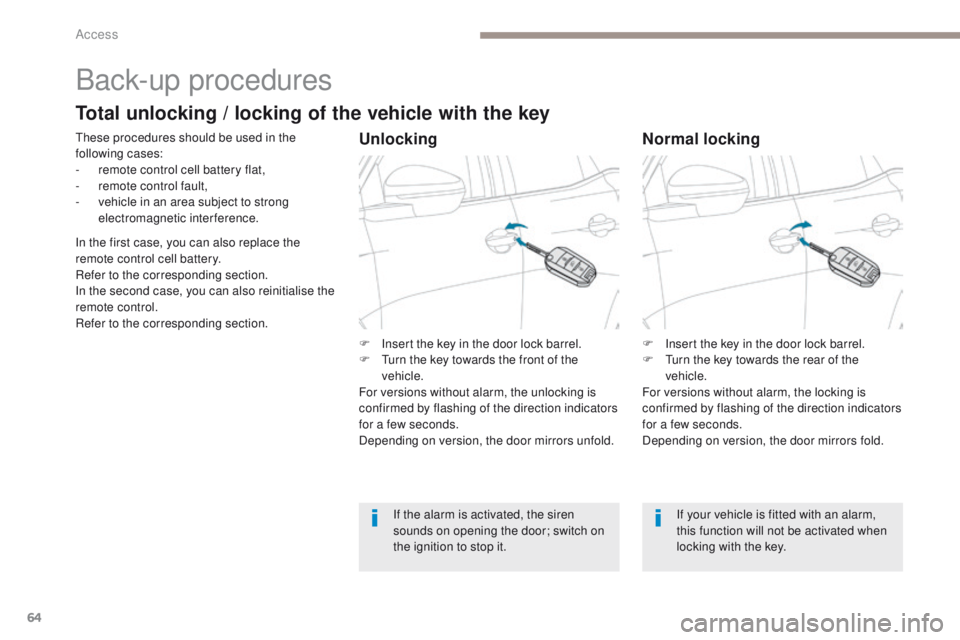
F Insert the key in the door lock barrel.
F T urn the key towards the front of the
vehicle.
For versions without alarm, the unlocking is
confirmed by flashing of the direction indicators
for a few seconds.
Depending on version, the door mirrors unfold.
If the alarm is activated, the siren
sounds on opening the door; switch on
the ignition to stop it.
Normal locking
F Insert the key in the door lock barrel.
F T urn the key towards the rear of the
vehicle.
For versions without alarm, the locking is
confirmed by flashing of the direction indicators
for a few seconds.
Depending on version, the door mirrors fold.
If your vehicle is fitted with an alarm,
this function will not be activated when
locking with the key.
Total unlocking / locking of the vehicle with the key
Access
Page 67 of 566
65
3008-2_en_Chap02_ouvertures_ed01-2016
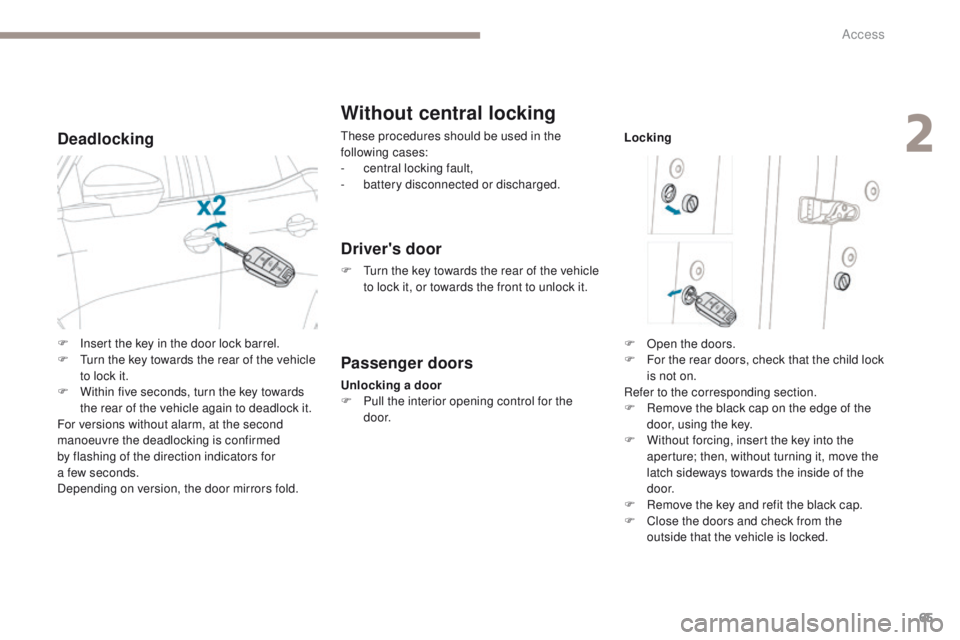
Deadlocking
Without central locking
These procedures should be used in the
following cases:
-
c
entral locking fault,
-
b
attery disconnected or discharged.
Driver's door
F Turn the key towards the rear of the vehicle to lock it, or towards the front to unlock it.
Passenger doors
Unlocking a door
F P ull the interior opening control for the
d o o r. Locking
F
O
pen the doors.
F
F
or the rear doors, check that the child lock
is not on.
Refer to the corresponding section.
F
R
emove the black cap on the edge of the
door, using the key.
F
W
ithout forcing, insert the key into the
aperture; then, without turning it, move the
latch sideways towards the inside of the
d o o r.
F
R
emove the key and refit the black cap.
F
C
lose the doors and check from the
outside that the vehicle is locked.
F
I
nsert the key in the door lock barrel.
F
T
urn the key towards the rear of the vehicle
to lock it.
F
W
ithin five seconds, turn the key towards
the rear of the vehicle again to deadlock it.
For versions without alarm, at the second
manoeuvre the deadlocking is confirmed
by
flashing of the direction indicators for
a few seconds.
Depending on version, the door mirrors fold.
2
Access
Page 68 of 566
66
3008-2_en_Chap02_ouvertures_ed01-2016
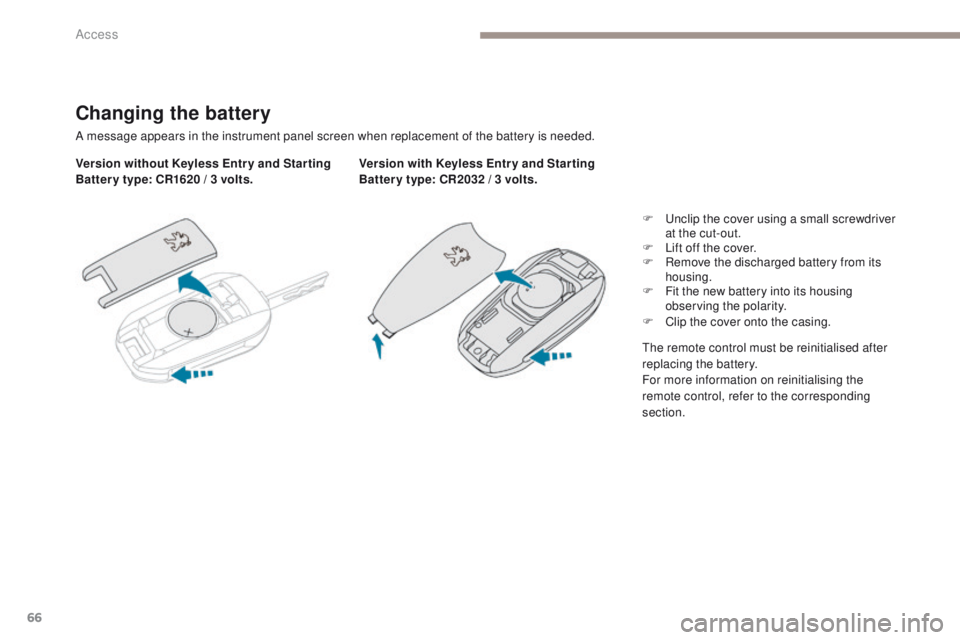
Changing the battery
A message appears in the instrument panel screen when replacement of the battery is needed.
Version without Keyless Entr y and Star ting
Batter y type: CR1620 / 3 volts.Version with Keyless Entr y and Star ting
Batter y type: CR2032 / 3 volts.
F
U
nclip the cover using a small screwdriver
at the cut-out.
F
L
ift off the cover.
F
R
emove the discharged battery from its
housing.
F
F
it the new battery into its housing
observing the polarity.
F
C
lip the cover onto the casing.
The remote control must be reinitialised after
replacing the battery.
For more information on reinitialising the
remote control, refer to the corresponding
section.
Access
Page 70 of 566
68
3008-2_en_Chap02_ouvertures_ed01-2016
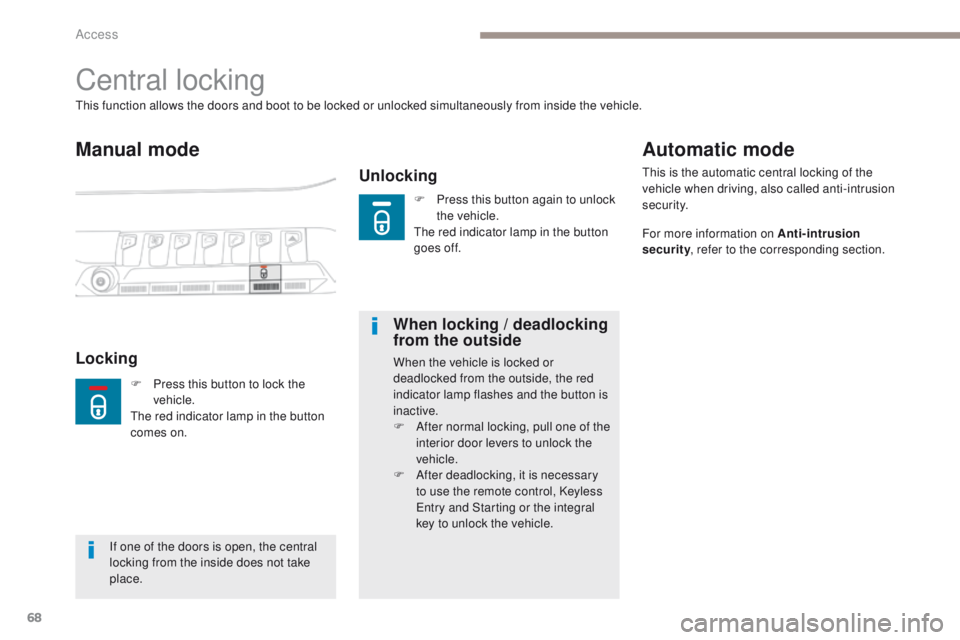
Central locking
Manual mode
Unlocking
This function allows the doors and boot to be locked or unlocked simultaneously from inside the vehicle.
LockingWhen locking / deadlocking
from the outsideWhen the vehicle is locked or
deadlocked from the outside, the red
indicator lamp flashes and the button is
inactive.
F
A
fter normal locking, pull one of the
interior door levers to unlock the
vehicle.
F
A
fter deadlocking, it is necessary
to use the remote control, Keyless
Entry and Starting or the integral
key to unlock the vehicle.
Automatic mode
This is the automatic central locking of the
vehicle when driving, also called anti-intrusion
s e c u r i t y.
For more information on Anti-intrusion
security , refer to the corresponding section.
If one of the doors is open, the central
locking from the inside does not take
place. F
P
ress this button to lock the
vehicle.
The red indicator lamp in the button
comes on. F
P
ress this button again to unlock
the vehicle.
The red indicator lamp in the button
goes off.
Access
Page 71 of 566
69
3008-2_en_Chap02_ouvertures_ed01-2016
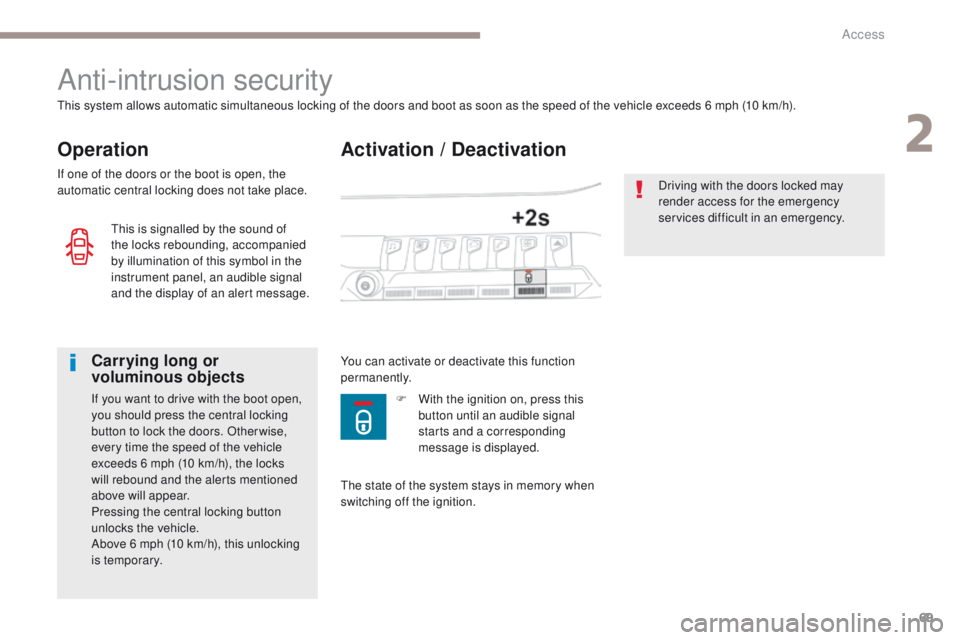
Activation / Deactivation
Anti-intrusion security
Operation
This system allows automatic simultaneous locking of the doors and boot as soon as the speed of the vehicle exceeds 6 mph (10 km/h).
If one of the doors or the boot is open, the
automatic central locking does not take place.
Carrying long or
voluminous objects
If you want to drive with the boot open,
you should press the central locking
button to lock the doors. Other wise,
every time the speed of the vehicle
exceeds 6 mph (10 km/h), the locks
will rebound and the alerts mentioned
above will appear.
Pressing the central locking button
unlocks the vehicle.
Above 6 mph (10 km/h), this unlocking
is temporary.You can activate or deactivate this function
permanently.
Driving with the doors locked may
render access for the emergency
services difficult in an emergency.
This is signalled by the sound of
the locks rebounding, accompanied
by illumination of this symbol in the
instrument panel, an audible signal
and the display of an alert message.
The state of the system stays in memory when
switching off the ignition.F
W ith the ignition on, press this
button until an audible signal
starts and a corresponding
message is displayed.
2
Access
Page 85 of 566
83
3008-2_en_Chap02_ouvertures_ed01-2016
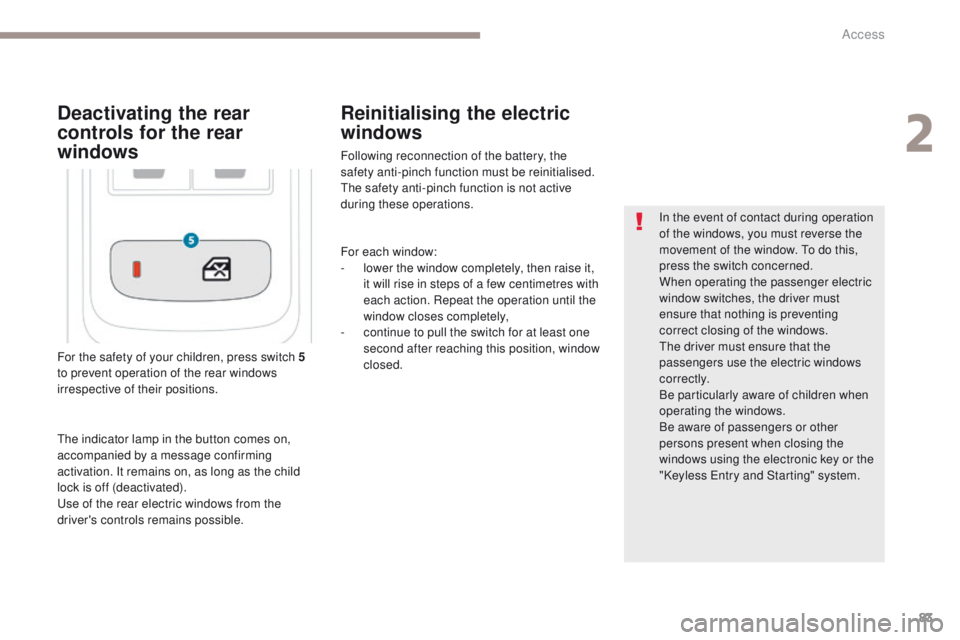
For the safety of your children, press switch 5
t o prevent operation of the rear windows
irrespective of their positions. In the event of contact during operation
of the windows, you must reverse the
movement of the window. To do this,
press the switch concerned.
When operating the passenger electric
window switches, the driver must
ensure that nothing is preventing
correct closing of the windows.
The driver must ensure that the
passengers use the electric windows
c o r r e c t l y.
Be particularly aware of children when
operating the windows.
Be aware of passengers or other
persons present when closing the
windows using the electronic key or the
"Keyless Entry and Starting" system.
Deactivating the rear
controls for the rear
windows
The indicator lamp in the button comes on,
accompanied by a message confirming
activation. It remains on, as long as the child
lock is off (deactivated).
Use of the rear electric windows from the
driver's controls remains possible.
Reinitialising the electric
windows
Following reconnection of the battery, the
safety anti-pinch function must be reinitialised.
The safety anti-pinch function is not active
during these operations.
For each window:
-
l
ower the window completely, then raise it,
it will rise in steps of a few centimetres with
each action. Repeat the operation until the
window closes completely,
-
c
ontinue to pull the switch for at least one
second after reaching this position, window
closed.
2
Access
Page 92 of 566
90
3008-2_en_Chap03_ergonomie-et-confort_ed01-2016
Front seats
Before moving the seat backwards, ensure that there is nothing that might prevent the full
travel of the seat.
There is a risk of trapping or pinching passengers if present in the rear seats or jamming the
seat if large objects are placed on the floor behind the seat.
Manual seats
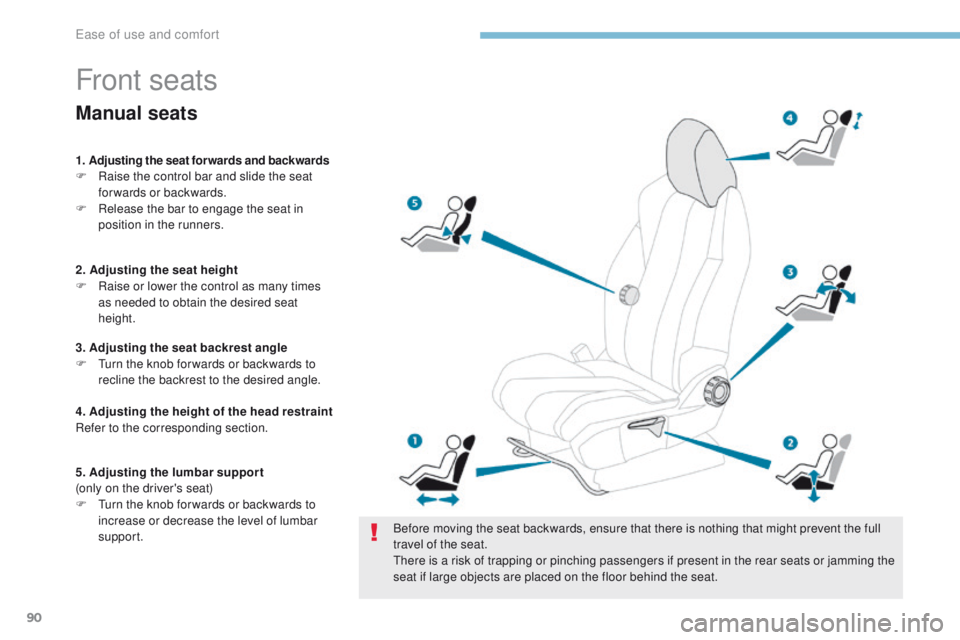
1. Adjusting the seat for wards and backwards
F Ra ise the control bar and slide the seat
forwards or backwards.
F
R
elease the bar to engage the seat in
position in the runners.
2. Adjusting the seat height
F
R
aise or lower the control as many times
as needed to obtain the desired seat
height.
3. Adjusting the seat backrest angle
F
T
urn the knob for wards or backwards to
recline the backrest to the desired angle.
4. Adjusting the height of the head restraint
Refer to the corresponding section.
5. Adjusting the lumbar support
(only on the driver's seat)
F
T
urn the knob for wards or backwards to
increase or decrease the level of lumbar
support.
Ease of use and comfort