engine PEUGEOT 308 2018 Owners Manual
[x] Cancel search | Manufacturer: PEUGEOT, Model Year: 2018, Model line: 308, Model: Peugeot 308 2018Pages: 360, PDF Size: 12.38 MB
Page 266 of 360
264
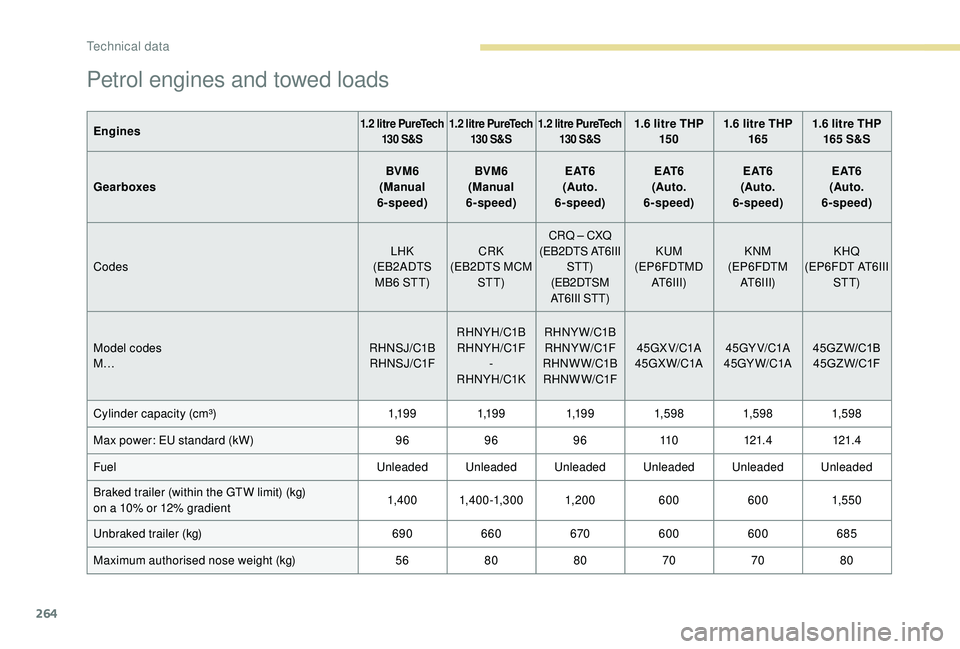
Petrol engines and towed loads
Engines1.2 litre PureTech 130 S&S 1.2 litre PureTech
130 S&S 1.2 litre PureTech
130 S&S1.6 litre THP 15 0 1.6 litre THP
165 1.6 litre THP
165 S&S
Gearboxes BVM6
(Manual
6-speed) BVM6
(Manual
6-speed) E AT 6
(Auto.
6-speed) E AT 6
(Auto.
6-speed) E AT 6
(Auto.
6-speed) E AT 6
(Auto.
6-speed)
Codes LHK
(EB2ADTS MB6 STT) CRK
(EB2DTS MCM STT) CRQ
– CXQ
(EB2DTS AT6III STT)
(EB2DTSM
AT6III STT) KUM
(EP6FDTMD AT6III) KNM
(EP6FDTM AT6III) KHQ
(EP6FDT AT6III STT)
Model codes
M… RHNSJ/C1B
RH NS J/C1F RHNYH/C1B
RHNYH/C1F -
RHNYH/C1K RHNYW/C1B
RHNYW/C1F
RHNW W/C1B RH NW W/C1F 45GX V/C1A
45GX W/C1A 45GY V/C1A
45GY W/C1A 45GZ W/C1B
45G Z W/C1F
Cylinder capacity (cm³) 1,1 9 91,1 9 91,1 9 91,59 8 1,59 81,59 8
Max power: EU standard (kW) 96969611 0121.4 121.4
Fuel Unleaded Unleaded Unleaded Unleaded Unleaded Unleaded
Braked trailer (within the GTW limit) (kg)
on a 10% or 12% gradient 1,4 0 0 1,4 0 0 -1,3 0 0 1, 20 0
6006001,550
Unbraked trailer (kg) 690660 670600 600 685
Maximum authorised nose weight (kg) 5680 80 707080
Technical data
Page 267 of 360
265
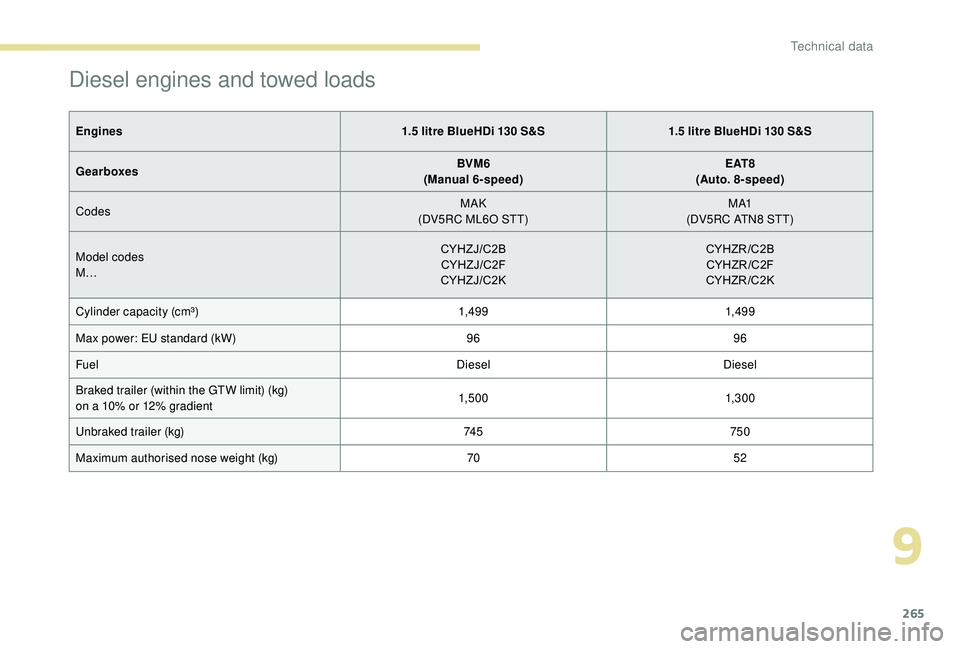
Diesel engines and towed loads
Engines1.5 litre BlueHDi 130 S&S1.5 litre BlueHDi 130 S&S
Gearboxes BVM6
(Manual 6-speed) E AT 8
(Auto. 8-speed)
Codes MAK
(DV5RC ML6O STT) M A1
(DV5RC ATN8 STT)
Model codes
M… CYHZJ/C2B
CYHZJ/C2F
CYHZJ/C2K CYHZR/C2B
CYHZR /C2F
CYHZR/C2K
Cylinder capacity (cm³) 1,49 91,49 9
Max power: EU standard (kW) 9696
Fuel DieselDiesel
Braked trailer (within the GTW limit) (kg)
on a 10% or 12% gradient 1,5 0 0
1,3 0 0
Unbraked trailer (kg) 74 5750
Maximum authorised nose weight (kg) 7052
9
Technical data
Page 268 of 360
266
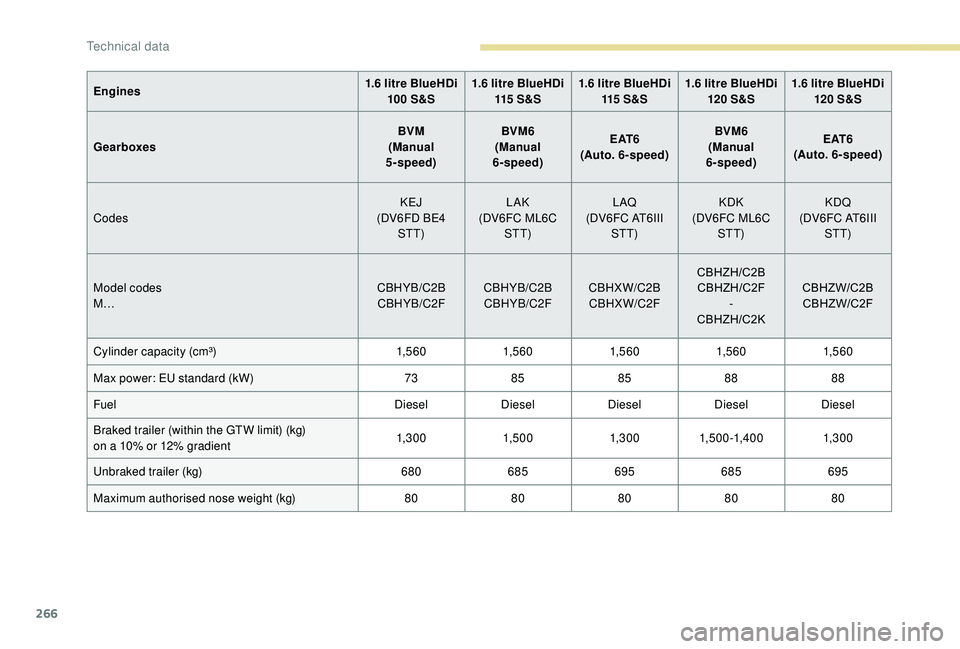
Engines1.6 litre BlueHDi
100 S&S 1.6 litre BlueHDi
115 S & S 1.6 litre BlueHDi
115 S & S 1.6 litre BlueHDi
120 S&S 1.6 litre BlueHDi
120 S&S
Gearboxes BVM
(Manual
5-speed) BVM6
(Manual
6-speed) E AT 6
(Auto. 6-speed) BVM6
(Manual
6-speed) E AT 6
(Auto. 6-speed)
Codes KEJ
(DV6FD BE4 STT) LAK
(DV6FC ML6C STT) L AQ
(DV6FC AT6III STT) KDK
(DV6FC ML6C STT) KDQ
(DV6FC AT6III STT)
Model codes
M… CBHYB/C2B
CBHYB/C2F CBHYB/C2B
CBHYB/C2F CBHXW/C2B
CBHXW/C2F CBHZH/C2B
CBHZH/C2F -
CBHZH/C2K CBHZW/C2B
CBHZW/C2F
Cylinder capacity (cm³) 1,5 6 01,5 6 01,5 6 01,5 6 01,5 6 0
Max power: EU standard (kW) 7385 8588 88
Fuel DieselDieselDieselDieselDiesel
Braked trailer (within the GTW limit) (kg)
on a 10% or 12% gradient 1,3 0 0
1,5 0 01,3 0 01,5 0 0 -1,4 0 0 1,3 0 0
Unbraked trailer (kg) 680685695685695
Maximum authorised nose weight (kg) 8080808080
Technical data
Page 269 of 360
267
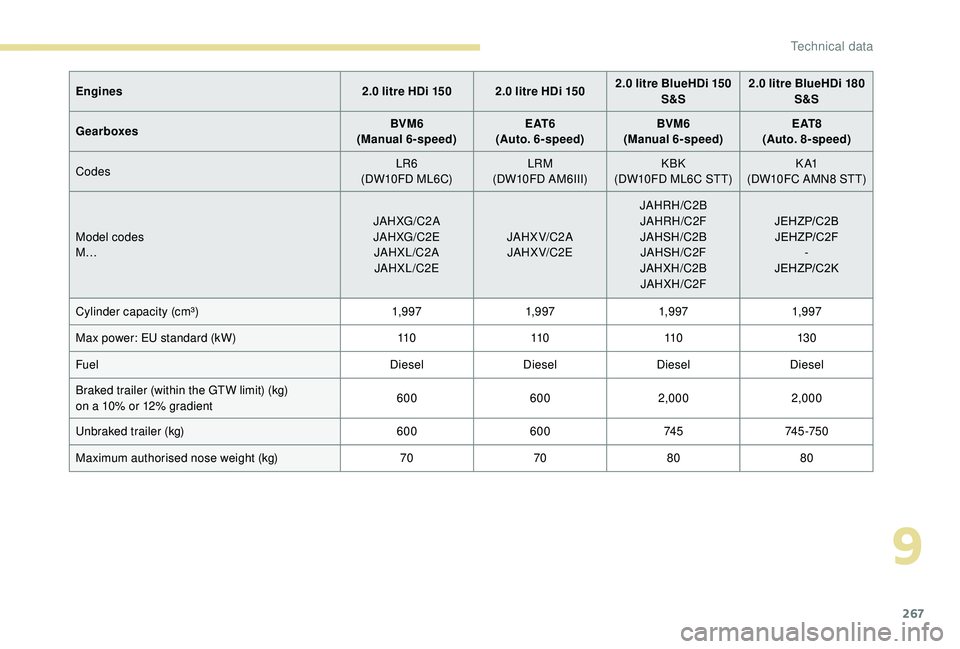
Engines2.0 litre HDi 150 2.0 litre HDi 1502.0 litre BlueHDi 150
S&S 2.0 litre BlueHDi 180
S&S
Gearboxes BVM6
(Manual 6-speed) E AT 6
(Auto. 6-speed) BVM6
(Manual 6-speed) E AT 8
(Auto. 8-speed)
Codes LR6
(DW10FD ML6C) LRM
(DW10FD AM6III) KBK
(DW10FD ML6C STT) K A1
(DW10FC AMN8 STT)
Model codes
M… JAHXG/C2 A
JAHXG/C2E JAHXL/C2AJAHXL/C2E JAHX V/C2 A
JAHX V/C2E JAHRH/C2B
JAHRH/C2F
JAHSH/C2BJAHSH/C2F
JAHXH/C2B JAHXH/C2F JEHZP/C2B
JEHZP/C2F -
JEHZP/C2K
Cylinder capacity (cm³) 1,9 971,9 971,9 971,9 97
Max power: EU standard (kW) 11 011 011 013 0
Fuel DieselDieselDieselDiesel
Braked trailer (within the GTW limit) (kg)
on a 10% or 12% gradient 600
6002,000 2,000
Unbraked trailer (kg) 600600 74 574 5 -75 0
Maximum authorised nose weight (kg) 707080 80
9
Technical data
Page 274 of 360
2
12:13
18,5 21,5
23 °CFirst steps
With the engine running, a press
mutes the sound.
With the ignition off, a press turns
the system on.
Adjustment of the volume.
Use the buttons either side of or below the
touch screen for access to the menus, then
press the virtual buttons in the touch screen.
Depending on the model, use the "Source" or
"Menu" buttons on the left of the touch screen
for access to the menus, then press the virtual
buttons in the touch screen.
You can display the menus at any time by
pressing the screen briefly with three fingers.
All of the touch areas of the screen are white.
Press the cross to go back a level.
Press "OK" to confirm. The touch screen is of the "capacitive"
type.
To clean the screen, use a soft, non-
abrasive cloth (e.g. spectacles cloth) with
no additional product.
Do not use sharp objects on the screen.
Do not touch the screen with wet hands.
*
D
epending on equipment.
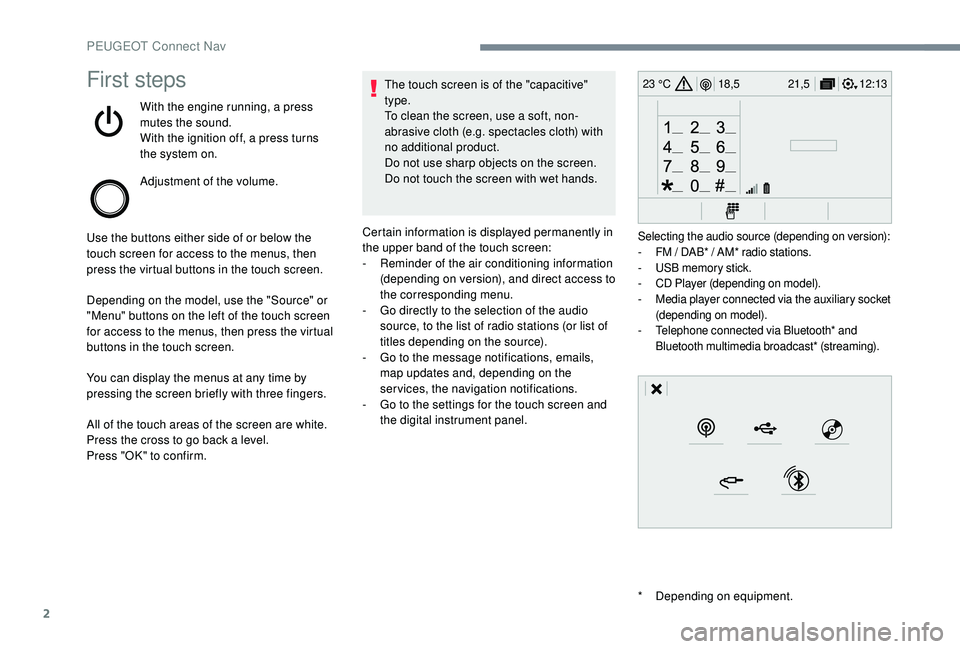
Certain information is displayed permanently in
the upper band of the touch screen:
-
R
eminder of the air conditioning information
(depending on version), and direct access to
the corresponding menu.
-
G
o directly to the selection of the audio
source, to the list of radio stations (or list of
titles depending on the source).
-
G
o to the message notifications, emails,
map updates and, depending on the
services, the navigation notifications.
-
G
o to the settings for the touch screen and
the digital instrument panel.
Selecting the audio source (depending on version):
- F M / DAB* / AM* radio stations.
-
U
SB memory stick.
-
C
D Player (depending on model).
-
M
edia player connected via the auxiliary socket
(depending on model).
-
T
elephone connected via Bluetooth* and
Bluetooth multimedia broadcast* (streaming).
PEUGEOT Connect Nav
Page 310 of 360
38
Settings
QUESTIONRESPONSESOLUTION
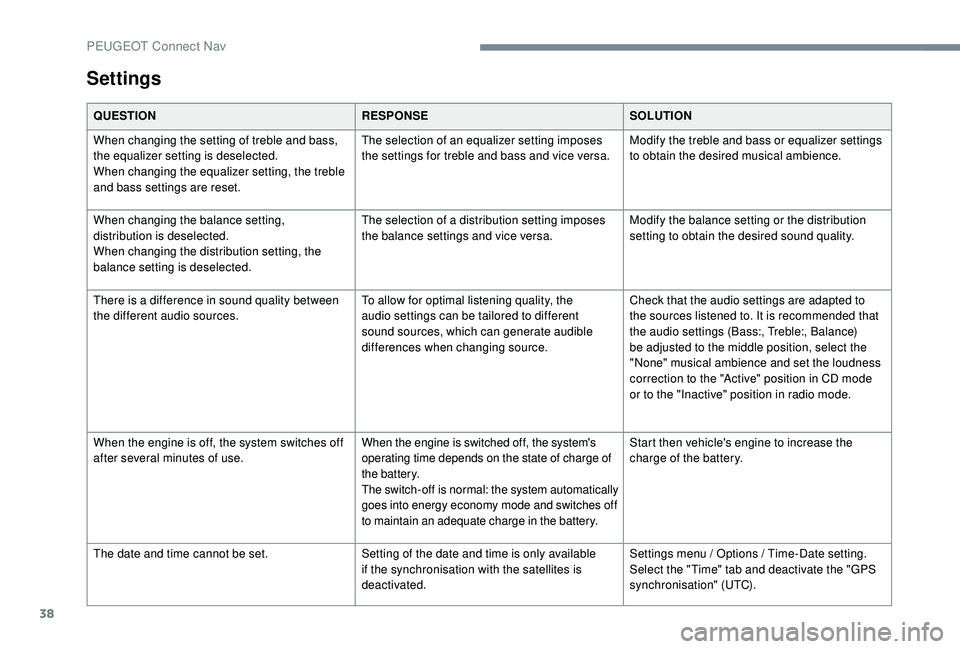
When changing the setting of treble and bass,
the equalizer setting is deselected.
When changing the equalizer setting, the treble
and bass settings are reset. The selection of an equalizer setting imposes
the settings for treble and bass and vice versa.
Modify the treble and bass or equalizer settings
to obtain the desired musical ambience.
When changing the balance setting,
distribution is deselected.
When changing the distribution setting, the
balance setting is deselected. The selection of a distribution setting imposes
the balance settings and vice versa.
Modify the balance setting or the distribution
setting to obtain the desired sound quality.
There is a difference in sound quality between
the different audio sources. To allow for optimal listening quality, the
audio settings can be tailored to different
sound sources, which can generate audible
differences when changing source.Check that the audio settings are adapted to
the sources listened to. It is recommended that
the audio settings (Bass:, Treble:, Balance)
be adjusted to the middle position, select the
"None" musical ambience and set the loudness
correction to the "Active" position in CD mode
or to the "Inactive" position in radio mode.
When the engine is off, the system switches off
after several minutes of use.
When the engine is switched off, the system's
operating time depends on the state of charge of
the battery.
The switch-off is normal: the system automatically
goes into energy economy mode and switches off
to maintain an adequate charge in the battery.Start then vehicle's engine to increase the
charge of the battery.
The date and time cannot be set. Setting of the date and time is only available
if the synchronisation with the satellites is
deactivated.Settings menu / Options / Time-Date setting.
Select the "Time" tab and deactivate the "GPS
synchronisation" (UTC).
PEUGEOT Connect Nav
Page 312 of 360
2
First steps
With the engine running, a press
mutes the sound.
With the ignition off, a press turns
the system on.
Adjustment of the volume.
Use the buttons on either side of or below the
touch screen for access to the menus, then
press the virtual buttons in the touch screen.
Depending on the model, use the "Source" or
"Menu" buttons on the left of the touch screen
for access to the menus, then press the virtual
buttons in the touch screen.
You can display the menus at any time by
pressing the screen briefly with three fingers.
All of the touch areas of the screen are white.
Press in the grey zone to go back a level or
confirm.
Press the back arrow to go back a level or
confirm. The touch screen is of the "capacitive"
type.
To clean the screen, use a soft, non-
abrasive cloth (e.g. spectacles cloth) with
no additional product.
Do not use sharp objects on the screen.
Do not touch the screen with wet hands.
*
D
epending on equipment.
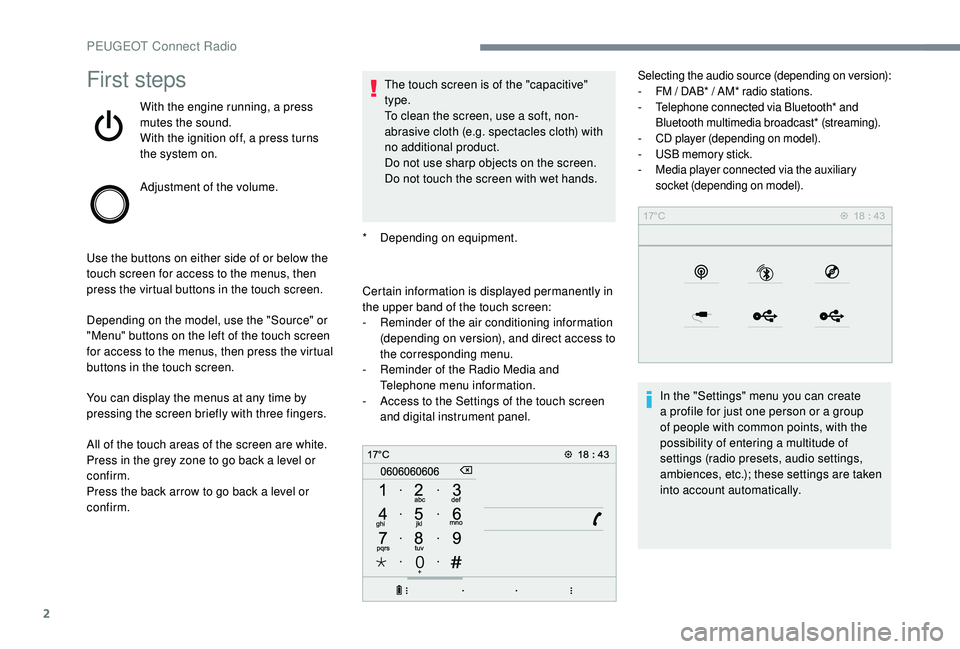
Certain information is displayed permanently in
the upper band of the touch screen:
-
R
eminder of the air conditioning information
(depending on version), and direct access to
the corresponding menu.
-
R
eminder of the Radio Media and
Telephone menu information.
-
A
ccess to the Settings of the touch screen
and digital instrument panel.
Selecting the audio source (depending on version):
- F M / DAB* / AM* radio stations.
-
T
elephone connected via Bluetooth* and
Bluetooth multimedia broadcast* (streaming).
-
C
D player (depending on model).
-
U
SB memory stick.
-
M
edia player connected via the auxiliary
socket (depending on model).
In the "Settings" menu you can create
a profile for just one person or a group
of people with common points, with the
possibility of entering a multitude of
settings (radio presets, audio settings,
ambiences, etc.); these settings are taken
into account automatically.
PEUGEOT Connect Radio
Page 332 of 360
22
Settings
QUESTIONRESPONSESOLUTION
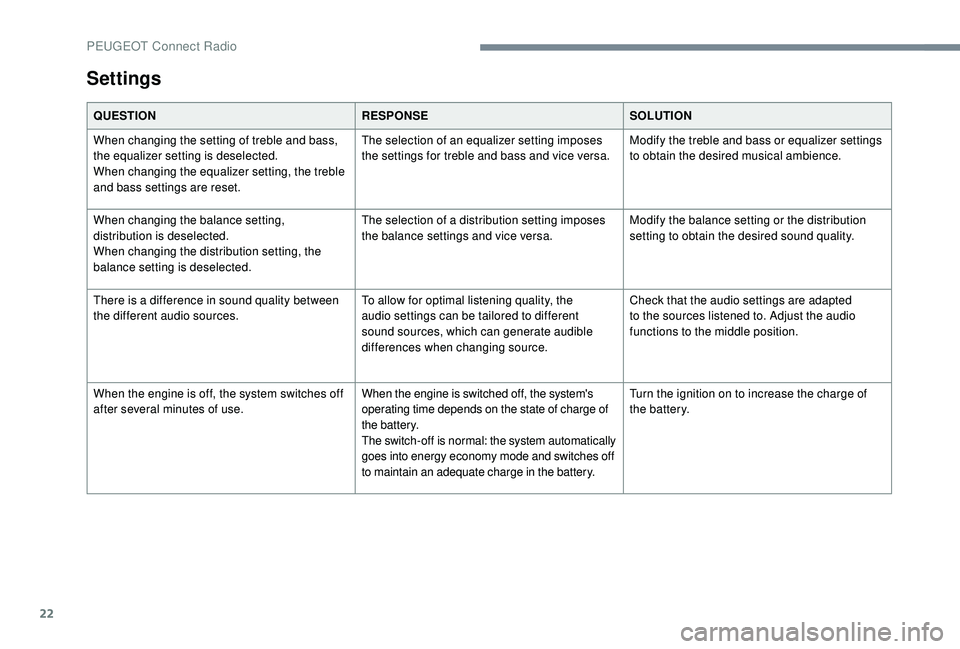
When changing the setting of treble and bass,
the equalizer setting is deselected.
When changing the equalizer setting, the treble
and bass settings are reset. The selection of an equalizer setting imposes
the settings for treble and bass and vice versa.
Modify the treble and bass or equalizer settings
to obtain the desired musical ambience.
When changing the balance setting,
distribution is deselected.
When changing the distribution setting, the
balance setting is deselected. The selection of a distribution setting imposes
the balance settings and vice versa.
Modify the balance setting or the distribution
setting to obtain the desired sound quality.
There is a difference in sound quality between
the different audio sources. To allow for optimal listening quality, the
audio settings can be tailored to different
sound sources, which can generate audible
differences when changing source.Check that the audio settings are adapted
to the sources listened to. Adjust the audio
functions to the middle position.
When the engine is off, the system switches off
after several minutes of use. When the engine is switched off, the system's
operating time depends on the state of charge of
the battery.
The switch-off is normal: the system automatically
goes into energy economy mode and switches off
to maintain an adequate charge in the battery.Turn the ignition on to increase the charge of
the battery.
PEUGEOT Connect Radio
Page 333 of 360
1
Bluetooth® audio system
Contents
First steps
2
S
teering mounted controls
2
M
enus
4
R
adio
4
D
AB radio (Digital Audio Broadcasting)
6
M
edia
7
T
elephone
1
0
Frequently asked questions
1
4 The different functions and settings
described vary according to the version
and configuration of your vehicle.
As a safety measure and because it
requires sustained attention by the
driver, the pairing of a Bluetooth mobile
telephone with the Bluetooth hands-free
system of your audio system must be
done with the vehicle stationary
and the
ignition on.
Your audio system is coded in such a way
that it will only operate in your vehicle.
All work on the system must be
carried out exclusively by a dealer or
qualified workshop, to avoid any risk of
electrocution, fire or mechanical faults.
To avoid discharging the battery, the
audio system may switch off after a few
minutes if the engine is not running.
.
Bluetooth® audio system
Page 347 of 360
15
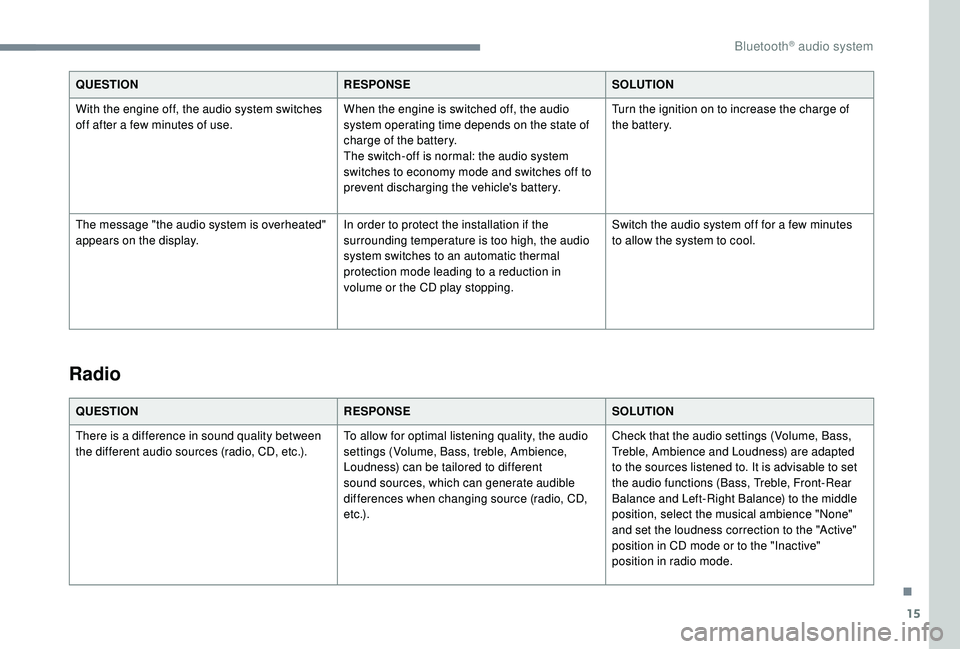
QUESTIONRESPONSESOLUTION
With the engine off, the audio system switches
off after a few minutes of use. When the engine is switched off, the audio
system operating time depends on the state of
charge of the battery.
The switch-off is normal: the audio system
switches to economy mode and switches off to
prevent discharging the vehicle's battery.Turn the ignition on to increase the charge of
the battery.
The message "the audio system is overheated"
appears on the display. In order to protect the installation if the
surrounding temperature is too high, the audio
system switches to an automatic thermal
protection mode leading to a reduction in
volume or the CD play stopping.Switch the audio system off for a few minutes
to allow the system to cool.
Radio
QUESTION
RESPONSESOLUTION
There is a difference in sound quality between
the different audio sources (radio, CD, etc.). To allow for optimal listening quality, the audio
settings (Volume, Bass, treble, Ambience,
Loudness) can be tailored to different
sound sources, which can generate audible
differences when changing source (radio, CD,
e t c .) .Check that the audio settings (Volume, Bass,
Treble, Ambience and Loudness) are adapted
to the sources listened to. It is advisable to set
the audio functions (Bass, Treble, Front-Rear
Balance and Left-Right Balance) to the middle
position, select the musical ambience "None"
and set the loudness correction to the "Active"
position in CD mode or to the "Inactive"
position in radio mode.
.
Bluetooth® audio system