steering PEUGEOT 308 2018 Service Manual
[x] Cancel search | Manufacturer: PEUGEOT, Model Year: 2018, Model line: 308, Model: Peugeot 308 2018Pages: 360, PDF Size: 12.38 MB
Page 213 of 360
211
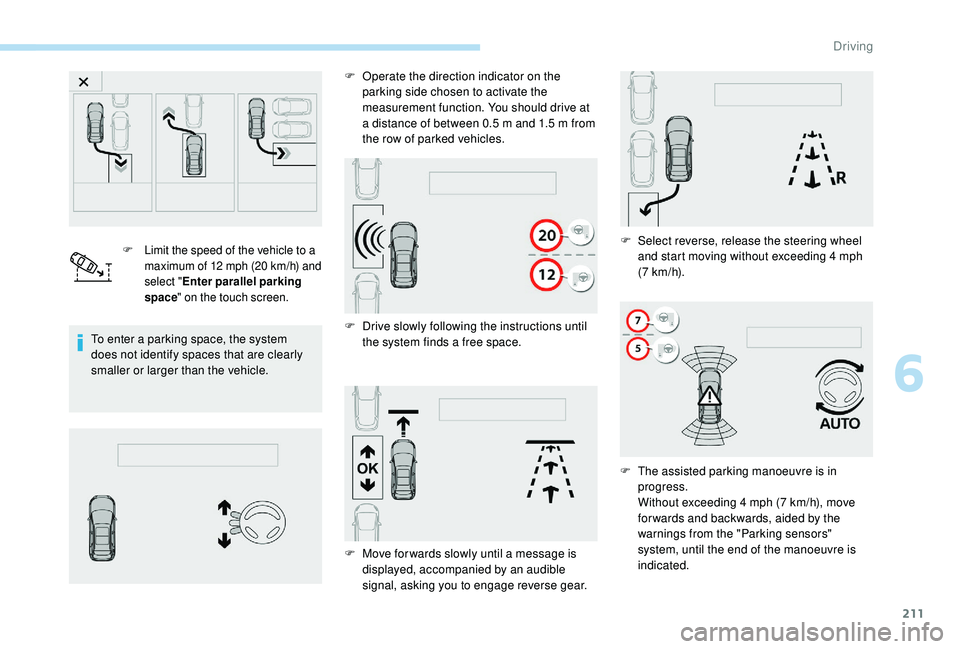
F Limit the speed of the vehicle to a maximum of 12 mph (20 km/h) and
select " Enter parallel parking
space " on the touch screen.
To enter a parking space, the system
does not identify spaces that are clearly
smaller or larger than the vehicle. F
O
perate the direction indicator on the
parking side chosen to activate the
measurement function. You should drive at
a distance of between 0.5 m and 1.5 m from
the row of parked vehicles.
F D rive slowly following the instructions until
the system finds a free space. F
S
elect reverse, release the steering wheel
and start moving without exceeding 4 mph
(7
km/h).
F
M
ove for wards slowly until a message is
displayed, accompanied by an audible
signal, asking you to engage reverse gear. F
T
he assisted parking manoeuvre is in
progress.
Without exceeding 4
mph (7 km/h), move
for wards and backwards, aided by the
warnings from the "Parking sensors"
system, until the end of the manoeuvre is
indicated.
6
Driving
Page 214 of 360
212
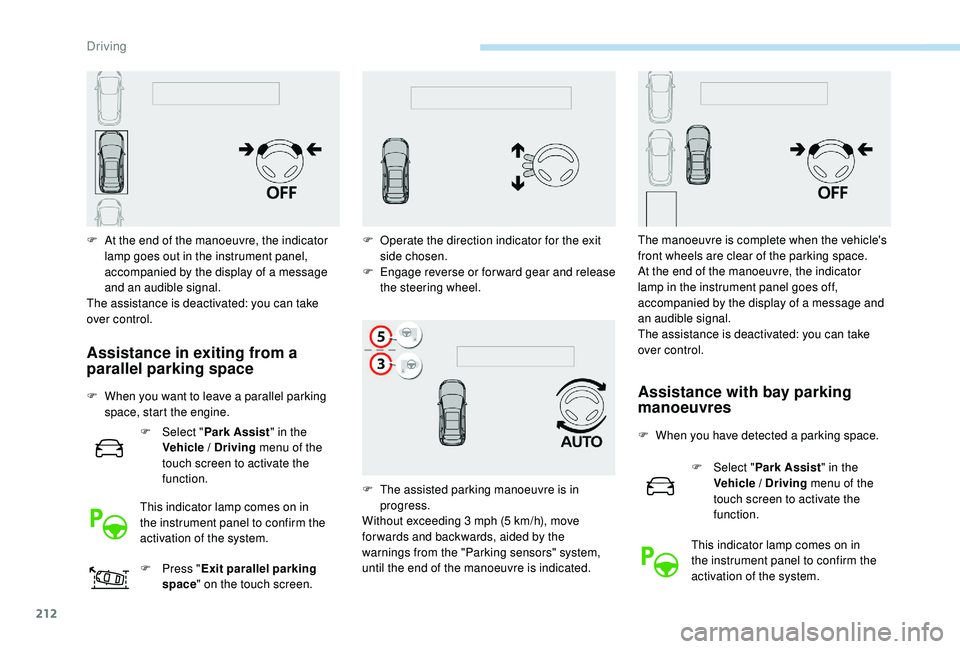
F At the end of the manoeuvre, the indicator lamp goes out in the instrument panel,
accompanied by the display of a message
and an audible signal.
The assistance is deactivated: you can take
over control.
Assistance in exiting from a
parallel parking space
F When you want to leave a parallel parking space, start the engine.
F
Sel
ect "Park Assist " in the
Vehicle / Driving menu of the
touch screen to activate the
function.
This indicator lamp comes on in
the instrument panel to confirm the
activation of the system.
F
P
ress "Exit parallel parking
space " on the touch screen.Assistance with bay parking
manoeuvres
F When you have detected a parking space.
F
Sel
ect "Park Assist " in the
Vehicle / Driving menu of the
touch screen to activate the
function.
This indicator lamp comes on in
the instrument panel to confirm the
activation of the system.
F
O
perate the direction indicator for the exit
side chosen.
F
E
ngage reverse or forward gear and release
the steering wheel.
F
T
he assisted parking manoeuvre is in
progress.
Without exceeding 3
mph (5
km/h), move
for wards and backwards, aided by the
warnings from the "Parking sensors" system,
until the end of the manoeuvre is indicated. The manoeuvre is complete when the vehicle's
front wheels are clear of the parking space.
At the end of the manoeuvre, the indicator
lamp in the instrument panel goes off,
accompanied by the display of a message and
an audible signal.
The assistance is deactivated: you can take
over control.
Driving
Page 215 of 360
213
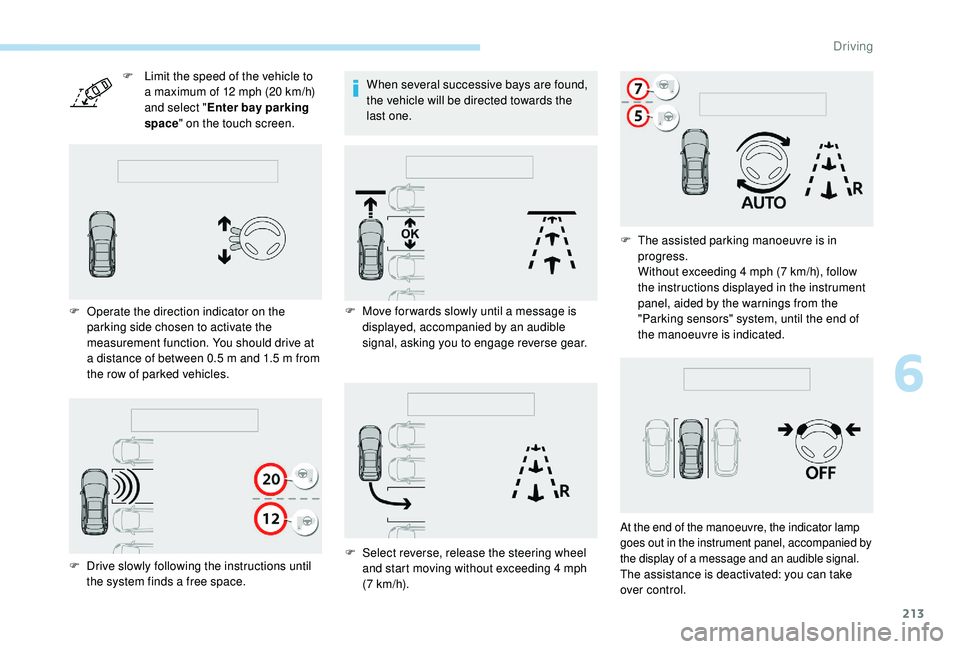
F Limit the speed of the vehicle to a maximum of 12 mph (20 km/h)
and select " Enter bay parking
space " on the touch screen.
F
O
perate the direction indicator on the
parking side chosen to activate the
measurement function. You should drive at
a distance of between 0.5
m and 1.5 m from
the row of parked vehicles. When several successive bays are found,
the vehicle will be directed towards the
last one.
F
D
rive slowly following the instructions until
the system finds a free space. F
M
ove for wards slowly until a message is
displayed, accompanied by an audible
signal, asking you to engage reverse gear.
F
S
elect reverse, release the steering wheel
and start moving without exceeding 4
mph
(7
km/h).F
T
he assisted parking manoeuvre is in
progress.
Without exceeding 4
mph (7 km/h), follow
the instructions displayed in the instrument
panel, aided by the warnings from the
"Parking sensors" system, until the end of
the manoeuvre is indicated.
At the end of the manoeuvre, the indicator lamp
goes out in the instrument panel, accompanied by
the display of a message and an audible signal.
The assistance is deactivated: you can take
over control.
6
Driving
Page 216 of 360
214
During a bay parking manoeuvre, the
Park Assist system is automatically
deactivated once the rear of the vehicle is
within 20 inches (50 cm) of an obstacle.
Deactivation
The system is deactivated by pressing the
control.
The system is deactivated automatically:
-
o
n switching off the ignition,
-
i
f the engine stalls,
-
i
f no manoeuvre is per formed within
5
minutes of selecting the type of manoeuvre
-
a
fter a prolonged stop of the vehicle during a
manoeuvre,
-
i
f the wheel anti-slip regulation (ASR) is
triggered,
-
i
f the speed of the vehicle exceeds the stated
limit,
-
w
hen the driver interrupts movement of the
steering wheel,
-
a
fter 4 manoeuvre cycles,
-
o
n opening the driver's door,
-
i
f one of the front wheels encounters an
obstacle.
The indicator lamp in the instrument panel goes
off and a message is displayed accompanied by
an audible signal.
The driver should then take back control of the
vehicle's steering. If the system is deactivated during a
manoeuvre, the driver should reactivate it
to repeat the measurement.
Deactivation
The system is switched off automatically:
-
w hen towing a trailer, connected electrically,
-
i
f the driver's door is opened,
-
i
f the speed of the vehicle is above 43 mph
(70
km/h).
To switch the system off for a prolonged period,
contact a PEUGEOT dealer or a qualified
workshop.
Operating faults
In the event of a fault, this warning
lamp flashes for a few seconds,
accompanied by an audible signal.
In the event of a fault with the
power steering, this warning lamp
is displayed in the instrument panel,
accompanied by a message.
If the lateral distance between your vehicle
and the space is too great, the system may
not be able to measure the space.
Any object projecting beyond the
dimensions of the vehicle (e.g. a ladder on
the roof or a towball) will not be taken into
account by the Park Assist system during
a manoeuvre.
In bad weather or in winter, ensure that
the sensors are not covered by dirt, ice
or
snow.
In the event of a fault, have the system
checked by a PEUGEOT dealer or a
qualified workshop.
High pressure jet washing
When washing your vehicle, keep the lance at
least 12
inches (30 cm) away from the sensors.
If the fault occurs during the use of the system,
the warning lamp goes off.
Contact a PEUGEOT dealer or a qualified
workshop.
Driving
Page 235 of 360
233
For more information on the Electric
parking brake, refer to the corresponding
section.
Wheels and tyres
The pressure must be checked on
all tyres, including the spare wheel,
when the tyres are "cold", at least
once a month and before a long
j o u r n ey. Using different size wheels and tyres from
those specified can affect the lifetime of tyres,
wheel rotation, ground clearance and the
speedometer reading and have an adverse
effect on road holding.
Fitting different tyres on the front and rear axles
can cause the ESC to mistime.
Only use products recommended by
PEUGEOT or products of equivalent
quality and specification.
In order to optimise the operation of
components as important as those in the
braking system, PEUGEOT selects and
offers very specific products.
After washing the vehicle, dampness, or
in wintry conditions, ice can form on the
brake discs and pads: braking efficiency
may be reduced. Make light brake
applications to dry and defrost the brakes.
The pressures given on the tyre pressure label
are valid for "cold" tyres. If you have driven for
more than 10
minutes or more than 6 miles
(10
kilometres) at more than 31 mph (50 km/h),
0.3
bar (30 kPa) should be added to the values
given on the label.
Under-inflation increases fuel consumption.
Non-compliant tyre pressure causes premature
wear on tyres and has an adverse effect on the
vehicle's road holding
– Risk of an accident!
Driving with worn or damaged tyres reduces
braking efficiency and control of the vehicle's
steering. Regular inspections of the condition
of tyres (tread and sides) and rims are
recommended as well as making sure that
valves are fitted.
7
Practical information
Page 259 of 360
257
12 V battery
Procedure for starting the engine using another
battery or charging a discharged battery.
Version 1 (Full)
Fuse N° Rating (A) Functions
F14 15
AScreenwash pump.
F15 5
APower steering.
F20 25
AScreenwash pump.
F22 15
AHorn.
F23 15
ARight-hand main beam headlamp.
F24 15
ALeft-hand main beam headlamp.
Fuse N° Rating (A) Functions
F8 30
ADiesel emissions control system (AdBlue)
F12 15
AAutomatic gearbox.
F14 5
AAutomatic gearbox.
Version 2 (Eco)
Fuse N° Rating (A) Functions
F16 25
AFront foglamps.
F18 10
ARight-hand main beam headlamp.
F19 10
ALeft-hand main beam headlamp.
Box 1
Box 2
General points
Lead-acid starter batteries
Batteries contain harmful substances
such as sulphuric acid and lead.
They must be disposed of in
accordance with regulations and must
not, in any circumstances, be discarded
with household waste.
Take used remote control batteries and
vehicle batteries to a special collection
point.
Protect your eyes and face before
handling the battery.
All operations on the battery must be
carried out in a well ventilated area and
away from naked flames and sources
of sparks, so as to avoid the risk of
explosion or fire.
Wash your hands afterwards.
8
In the event of a breakdown
Page 263 of 360
261
The Stop & Start system may not be
operational during the trip following the
first engine start.
In this case, the system will only be
available again after a continuous
period of immobilisation of the vehicle,
a period which depends on the exterior
temperature and the state of charge of
the battery (up to about 8 hours).
-
t
he sunroof and its electric blind,
-
t
he electric windows,
-
t
he date and time,
-
t
he preset radio stations.
Towing the vehicle
Procedure for having your vehicle towed or
for towing another vehicle using a removable
towing eye.
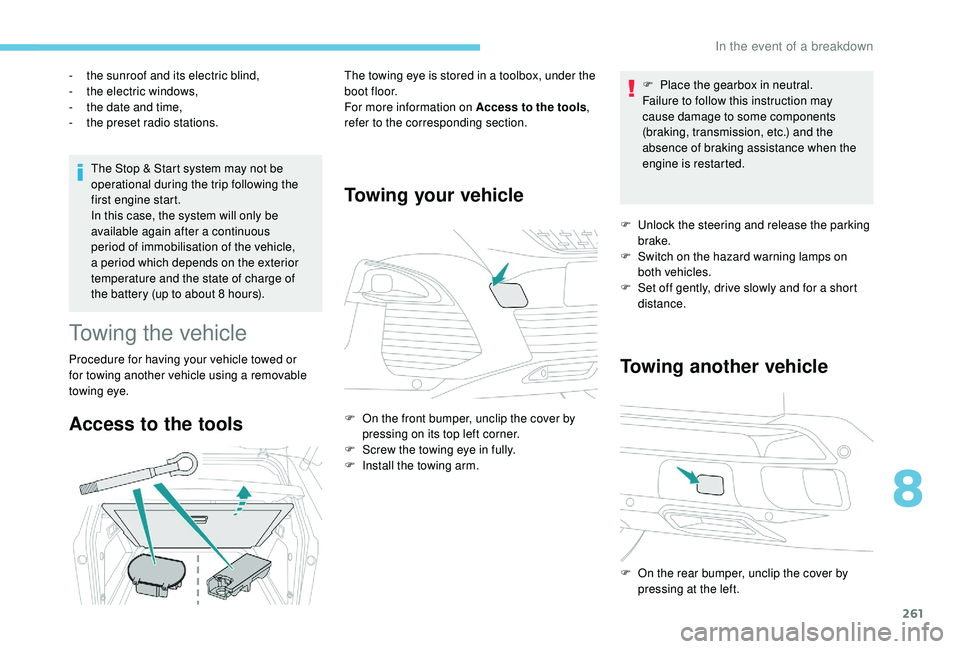
Access to the tools
The towing eye is stored in a toolbox, under the
boot floor.
For more information on Access to the tools
,
refer to the corresponding section.
Towing your vehicle
F On the front bumper, unclip the cover by pressing on its top left corner.
F
S
crew the towing eye in fully.
F
I
nstall the towing arm. F
P
lace the gearbox in neutral.
Failure to follow this instruction may
cause damage to some components
(braking, transmission, etc.) and the
absence of braking assistance when the
engine is restarted.
F
U
nlock the steering and release the parking
brake.
F
S
witch on the hazard warning lamps on
both vehicles.
F
S
et off gently, drive slowly and for a short
distance.
Towing another vehicle
F On the rear bumper, unclip the cover by pressing at the left.
8
In the event of a breakdown
Page 264 of 360
262
F Screw the towing eye in fully.
F I nstall the towing arm.
F
S
witch on the hazard warning lamps on
both vehicles.
F
M
ove off gently, drive slowly and for a short
distance. General recommendations
Obser ve the legislation in force in your
c o u nt r y.
Ensure that the weight of the towing
vehicle is higher than that of the towed
vehicle.
The driver must remain at the wheel of
the towed vehicle and must have a valid
driving licence.
When towing a vehicle with all four
wheels on the ground, always use an
approved towing arm; rope and straps are
prohibited.
The towing vehicle must move off gently.
When the vehicle is towed with its
engine off, there is no longer braking and
steering assistance.
In the following cases, you must always
call on a professional recovery ser vice:
-
v
ehicle broken down on a motor way
or fast road,
-
f
our-wheel drive vehicle,
-
w
hen it is not possible to put the
gearbox into neutral, unlock the
steering, or release the parking brake,
-
w
hen it is not possible to tow a vehicle
with an automatic gearbox, engine
running,
-
t
owing with only two wheels on the
ground,
-
w
here there is no approved towbar,
etc. available.
In the event of a breakdown
Page 275 of 360
3
21,518,5
12:1323 °C
In the "Settings" menu you can create
a profile for just one person or a group
of people with common points, with the
possibility of entering a multitude of
settings (radio presets, audio settings,
navigation history, contact favourites,
etc.); these settings are taken into
account automatically.
In very hot conditions, the volume may
be limited to protect the system. It may go
into standby (screen and sound off) for at
least 5
minutes.
The return to normal takes place after
the temperature in the passenger
compartment drops.
Steering mounted controls
Depending on model
Voice commands :
This control is located on the
steering wheel or at the end of the
lighting control stalk (depending on
model).
Short press, system voice
commands.
Long press, smartphone voice
commands via the system. or
Increase volume.
or Mute / Restore the sound.
Or
Mute by pressing the volume
increase and decrease buttons
simultaneously.
Restore the sound by pressing one
of the two volume buttons.
or Decrease volume.
or Media
(short press): change the
multimedia source.
Telephone (short press): start
telephone call.
Call in progress (short press):
access telephone menu.
Telephone (long press): reject an
incoming call, end call; when no call
is in progress, access telephone
menu. or
Radio
(rotate): automatic search for
the previous / next station.
Media (rotate): previous / next track,
move in a list.
Short press : confirm a selection; if
nothing selected, access to presets.
Radio : display the list of stations.
Media : display the list of tracks.
Radio (press and hold): update the
list of stations received.
Menus
Depending on model / Depending on version
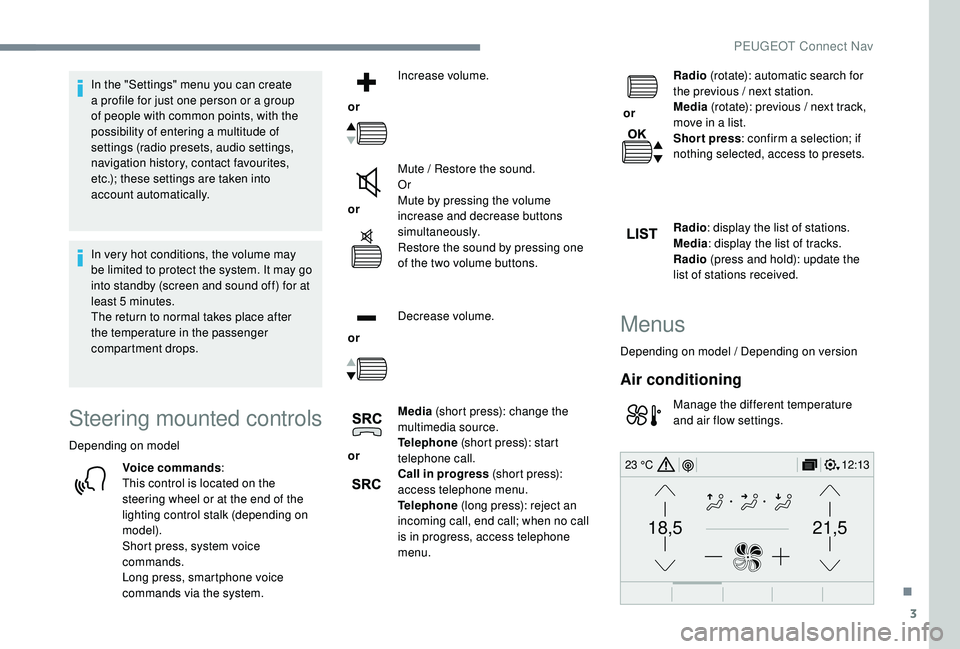
Air conditioning
Manage the different temperature
and air flow settings.
.
PEUGEOT Connect Nav
Page 277 of 360
5
12:13
18,5 21,5
23 °C
12:13
18,5 21,5
23 °C
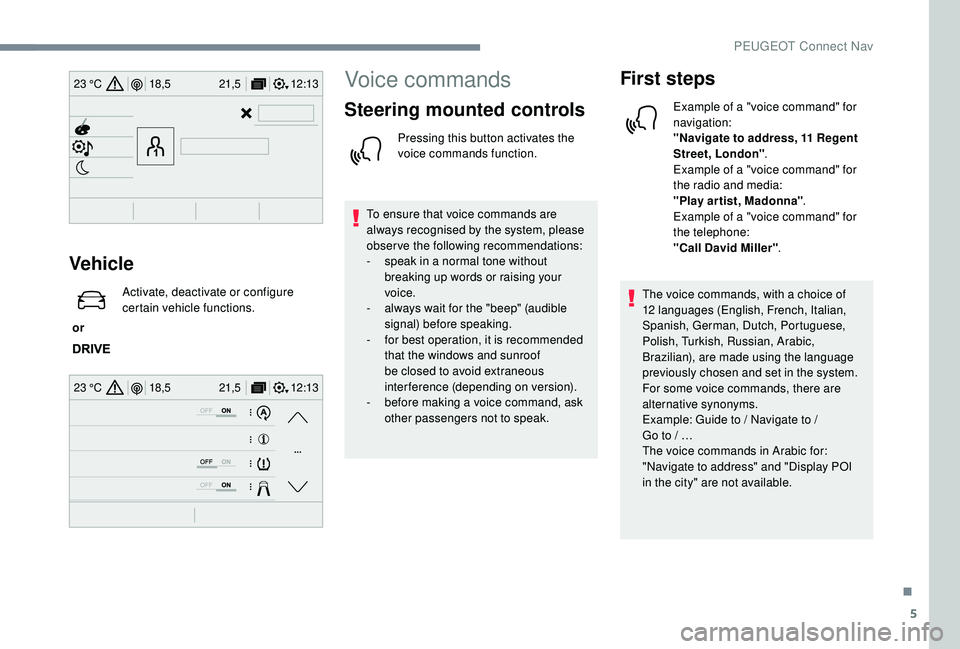
Vehicle
or Activate, deactivate or configure
certain vehicle functions.
Voice commands
Steering mounted controls
Pressing this button activates the
voice commands function.
To ensure that voice commands are
always recognised by the system, please
observe the following recommendations:
-
s
peak in a normal tone without
breaking up words or raising your
voice.
-
a
lways wait for the "beep" (audible
signal) before speaking.
-
f
or best operation, it is recommended
that the windows and sunroof
be closed to avoid extraneous
interference (depending on version).
-
b
efore making a voice command, ask
other passengers not to speak.
First steps
Example of a "voice command" for
navigation:
"Navigate to address, 11 Regent
Street, London" .
Example of a "voice command" for
the radio and media:
"Play ar tist, Madonna" .
Example of a "voice command" for
the telephone:
"Call David Miller" .
The voice commands, with a choice of
12
languages (English, French, Italian,
Spanish, German, Dutch, Portuguese,
Polish, Turkish, Russian, Arabic,
Brazilian), are made using the language
previously chosen and set in the system.
For some voice commands, there are
alternative synonyms.
Example: Guide to / Navigate to /
Go
to
/ …
The voice commands in Arabic for:
"Navigate to address" and "Display POI
in the city" are not available.
.
PEUGEOT Connect Nav