remote start PEUGEOT 308 2022 Owner's Manual
[x] Cancel search | Manufacturer: PEUGEOT, Model Year: 2022, Model line: 308, Model: PEUGEOT 308 2022Pages: 260, PDF Size: 7.92 MB
Page 196 of 260
194
In the event of a breakdown
accessory batteries - risk of irreversible
damage!
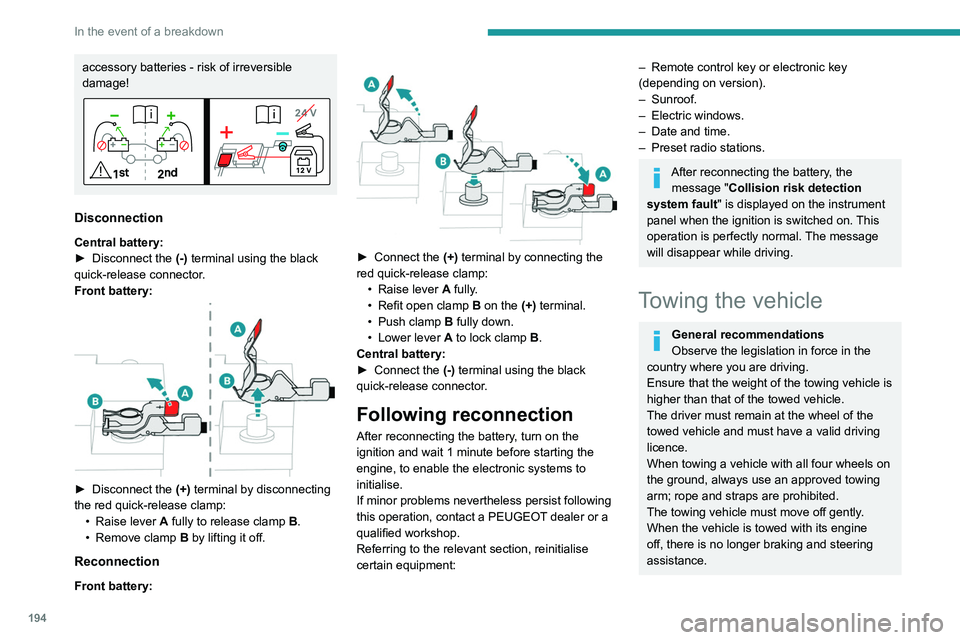
Disconnection
Central battery:
► Disconnect the (-)
terminal using the black
quick-release connector.
Front battery:
► Disconnect the (+) terminal by disconnecting
the red quick-release clamp: •
Raise lever
A
fully to release clamp
B
.
•
Remove clamp
B
by lifting it off.
Reconnection
Front battery:
► Connect the (+) terminal by connecting the
red quick-release clamp: •
Raise lever
A
fully.
•
Refit open clamp
B
on the (+) terminal.
•
Push clamp
B fully down.
•
Lower lever
A
to lock clamp B.
Central battery:
►
Connect the
(-) terminal using the black
quick-release connector.
Following reconnection
After reconnecting the battery, turn on the
ignition and wait 1 minute before starting the
engine, to enable the electronic systems to
initialise.
If minor problems nevertheless persist following
this operation, contact a PEUGEOT dealer or a
qualified workshop.
Referring to the relevant section, reinitialise
certain equipment:
– Remote control key or electronic key
(depending on version).
–
Sunroof.
–
Electric windows.
–
Date and time.
–
Preset radio stations.
After reconnecting the battery, the message "Collision risk detection
system fault" is displayed on the instrument
panel when the ignition is switched on. This
operation is perfectly normal. The message
will disappear while driving.
Towing the vehicle
General recommendations
Observe the legislation in force in the
country where you are driving.
Ensure that the weight of the towing vehicle is
higher than that of the towed vehicle.
The driver must remain at the wheel of the
towed vehicle and must have a valid driving
licence.
When towing a vehicle with all four wheels on
the ground, always use an approved towing
arm; rope and straps are prohibited.
The towing vehicle must move off gently.
When the vehicle is towed with its engine
off, there is no longer braking and steering
assistance.
Page 209 of 260
207
PEUGEOT i-Connect Advanced - PEUGEOT i-Connect
10and the Manufacturer's device management
server each time the ignition is switched on,
when a mobile telephone network is available.
Depending on the vehicle's equipment,
the connection configuration must be set
to "Connected vehicle" to enable to the
connection to the radio network.
Irrespective of a valid subscription to a
connected service, the remote management
of devices relating to or connected with
the security of devices, and the updating
of software and firmware, will be carried
out when necessary in order to comply
with a legal requirement applicable to the
Manufacturer (e.g. the applicable law in terms
of product liability, the regulations governing
e-call) or when necessary to protect the
respective vital interests of the vehicle's users
and passengers.
The establishment of a secure connection via
radio network and the corresponding remote
updates are not affected by the privacy
settings and are intended to be carried out
after being initialised by the user in response
to a related notification.
The system can notify the receipt of an update
when it is connected to an exterior Wi-Fi network
or a mobile telephone network.
Large updates are downloaded only via the Wi-Fi
network.
The availability of an update is notified on the
screen at the end of the journey with an option of immediate installation or postponement of
installation.
The installation time is variable and can take
several minutes with a maximum of about 30
minutes. A notification will give an estimate of the
duration and a description of the update.
Update information is available through the
"Settings" application.
Press the "Settings" application.
In the list, select the "Updates" tab.
This button allows you to change the authorisation for automatic downloading
of updates via an exterior Wi-Fi network.
For safety reasons and because it
requires sustained attention on the part
of the driver, the installation must be carried
out with the ignition on but without starting the
engine.
The installation cannot be carried out in the
following cases:
–
engine running.
–
emergency call in progress.
–
insufficient battery level.
–
when charging for electric vehicles.
If an update has failed or has expired, contact a
dealer or a qualified workshop.
The Manufacturer does not charge for the use of this service.
However, the use of Wi-Fi and/or mobile
telephone networks by your smartphone may
incur extra charges if you exceed the data
allowance included in your contract.
Any associated costs will be billed to you by
your mobile telephone operator.
Personalisation
Press and hold the screen from one of the
system's home pages.
Or
Press the "Settings" application.
In the list, select the "Customisation" tab.
Press the "Displays" field.
A page divided into 2 parts is displayed.
Press the HOME button at any time to leave this
page.
Personalising the screen
Press the pencil in the "Customise
Touchscreen" part.
A representation of the organisation of the
different home page ( HOME) Widgets
is
displayed.
A Widget is a reduced window of an application or service.
Adding a Widget
To add a Widget, press "Widget" on the left of the screen.
Or
Page 228 of 260
226
Alphabetical index
K
Key 14, 16, 19
Key, electronic
30–31
Keyless Entry and Starting
29–30, 100–101
Key not recognised
101–102
Key with remote control
14, 98–99
Kit, hands-free
163
Kit, puncture repair
180–181
Kit, temporary puncture repair
180–183
L
Labels 6
Labels, identification
153
Lamp, boot
42
Lamps, parking
25
Lamps, rear
139
Lams with Full LED technology
26, 28
Lane assist
122–123, 127–129
Lane departure warning active
90
Leather (care)
129
LEDs - Light-emitting diodes
25, 139
Level, AdBlue®
122
Level, brake fluid
122
Level, Diesel additive
171–172
Level, engine coolant
18, 122
Level, engine oil
18, 121
Levels and checks
169–171
Level, screenwash fluid
31, 122
Light-emitting diodes - LEDs
25, 139
Lighting dimmer 21
Lighting, exterior
24, 27
Lighting, guide-me home
16, 26
Lighting, interior
61–62
Lighting, mood
38
Lighting, welcome
69–70
Loading
11 6
Load reduction mode
119
Locating your vehicle
15
Locking
28–30
Locking from the inside
18
Locking the doors
18
Log, alerts
20
Long-distance blind spot monitoring
93
Long objects, transporting
38
Low fuel level
102
Lumbar
21
M
Mains socket (domestic network) 154–155
Maintenance (advice)
104, 127
Maintenance, routine
65, 122, 124
Manoeuvring aids (recommendations)
64
Map reading lamps
37
Markings, identification
153
Massage function
23
Massage, multi-point
23
Mat
37, 65
Menu short cuts
23
Mirror, rear view
25
Mirrors, door 48–49, 32, 93
Mirror, vanity
34
Misfuel prevention
103
Mobile application
24, 33, 110, 112
Motor, electric
108–109, 103, 152
Motorised tailgate
22, 24
Mountings, ISOFIX
42, 44, 46
N
Net, high load retaining 40
Net, luggage retaining
39
O
Obstacle detection 94
Oil change
121
Oil consumption
121
OIl, engine
121
On-board tools
42, 179–181
Opening the bonnet
168–169
Opening the boot
17, 21
Opening the doors
17, 21
Opening the windows
14
P
Pads, brake 123
Paint
128, 153
Page 229 of 260
227
Alphabetical index
Paint colour code 153
Parking brake, electric
102–104, 124
Parking sensors, audible and visual
94
Parking sensors, front
95
Parking sensors, rear
94
Passenger compartment temperature pre-
conditioning (Rechargeable hybrid)
24, 33
Pedestrian horn (Rechargeable hybrid)
30
Personalisation
10, 24
Plates, identification
153
Port, USB
58–59, 38
Post Collision Safety Brake
33
Power
20
Power indicator (Rechargeable hybrid)
8, 20
Pressures, tyres
124, 133, 154
Pre-tensioning seat belts
36
Priming the fuel system
130
Profiles
156
Protecting children
87–93
Proximity Keyless Entry & Start
16
Puncture
181–182, 135
R
Radar (warnings) 64
Radio
214–215
Range, AdBlue®
18, 122
Reading lamps
37
READY lamp
119
Rear screen, demisting
32
Rear traffic alert
99
Rechargeable hybrid engine 8, 23, 119,
146, 152
Rechargeable hybrid system
6, 8, 23,
52, 60, 103
Recharging the battery
140, 142, 144
Recharging the traction battery
107
Recharging the traction battery
(Rechargeable hybrid)
103, 159–160
Recirculation, air
55–56
Recovery
194–196
Recovery of the vehicle
195–196
Reduction of electrical load
119
Regeneration of the particle filter
123
Regenerative braking (deceleration
by engine braking)
57
Reinitialisation of the under-inflation
detection system
63
Reinitialising the remote control
20
Reminder, key in ignition
51
Reminder, lighting on
24
Remote control
27–32
Remote functions
11 2
Remotely operable functions
(Rechargeable hybrid)
24, 33
Removing a wheel
185–186
Removing the mat
37
Replacing bulbs
187–188
Replacing fuses
140
Replacing the air filter
123
Replacing the oil filter
123
Replacing the passenger compartment
filter
123Reservoir, screenwash 122
Reset trip
21
Reversing camera
65, 145–146
Reversing lamps
139
Roof bars
11 6
Roof, opening
28
Running out of fuel (Diesel)
130
S
Safety, children 87–93
Saturation of the particle filter (Diesel)
123
Screens, very cold conditions
11 7
Screenwash
31
Screenwash, front
31
Screenwash, rear
31
SCR (Selective Catalytic Reduction)
19, 124
Seat angle
21
Seat belts
84–85, 42
Seat belts, rear
35
Seat, rear bench
26
Seats, electric
45–46
Seats, front
44–46
Seats, heated
46–47
Seats, rear
50–52, 40
Selector, gear
105–107
Semi-automatic lane changing
82
Sensors (warnings)
65
Serial number, vehicle
153
Service indicator
17
Servicing
17, 122, 124
Page 230 of 260
228
Alphabetical index
Settings, equipment 10, 23
Shield, snow
11 7
Sidelamps
25, 139
Silent vehicle warning sound
(Rechargeable hybrid)
30
Ski flap
38
Smartphone
24, 35
Snow chains
63, 118
Snow screen
11 7
Socket, 12 V accessory
34, 41
Speakers
36
Speed adjustment during cornering
82
Speed limiter
117–120
Speed limit recognition
66, 68
Speedometer
9, 65
Sport mode
108–109
Spotlamps, side
27
Stability control (ESC)
32, 34
Starting a Diesel engine
102
Starting the engine
50, 52
Starting the vehicle
99–100, 57
Starting using another battery
52, 141
State of charge, battery
23
Station, radio
214–215
Stay, bonnet
120
Steering wheel
65
Steering wheel, adjustment
24
Stickers, customising ~ Stickers,
expressive
128
Stopping the vehicle
99–101, 106–107
Stop & Start
22, 29, 32, 110–111,
102, 119, 123, 143
Storage
34, 36, 62–63Storage box 42
Storage wells
39, 42
Storing driving positions
22
Stowing rings
39
Sunshine sensor
28
Sun visor
34
Suspension
124
Switching off the engine
50
Synchronising the remote control
20
T
Tables of engines 152
Tailgate
21
Tank, fuel
151–152
Technical data
152
Telephone
212–213, 216–217
Temperature, coolant
18
Time (setting)
169
Tool box
42
Tools
179–181
Topping-up AdBlue®
125
Top Tether (fixing)
42, 44, 46
Total distance recorder
21
Touch screen
23–25, 33
Touch-sensitive reading lamps
37
Towball, quickly detachable
162–165
Towbar
34, 112
Towbar with quickly detachable
towball
162–165
Towed loads
148, 152
Towing another vehicle
145, 147
Traction battery charge 107
Traction battery (Rechargeable
hybrid)
20, 152–153, 110
Traction control (ASR)
33
Trailer
34, 112
Trailer stability assist (TSA)
34
Trajectory control systems
32
Triangle, warning
130
Trip computer
22–23
Trip distance recorder
21
Tyres
124, 154
Tyre under-inflation detection
62, 133
U
Under-inflation (detection) 62
Unlocking
14, 17
Unlocking from the inside
18
Unlocking the boot
15, 17
Unlocking the doors
18
Unlocking the tailgate
15, 17
Updating the time
169
V
Vehicle data recording and privacy 171
Ventilation
28
Visibility
32
Visiopark 1
96
Visiopark 1 - Visiopark 2
97