fuel PEUGEOT 308 2022 Owners Manual
[x] Cancel search | Manufacturer: PEUGEOT, Model Year: 2022, Model line: 308, Model: PEUGEOT 308 2022Pages: 260, PDF Size: 7.92 MB
Page 5 of 260
3
Contents
Road signs recognition 11 5
Speed limiter 11 9
Cruise control - Specific recommendations 120
Cruise control 121
Drive Assist Plus 122
Drive Assist 2.0 123
Adaptive cruise control 123
Lane positioning assist 127
Speed adjustment during cornering 131
Semi-automatic lane changing 131
Active Safety Brake with Collision Risk Alert
and Intelligent emergency braking assistance
135
Distraction detection 138
Active lane departure warning system 139
Long-distance blind spot monitoring 142
Parking sensors 143
Visiopark 1 145
Visiopark 2 146
Rear traffic alert 148
7Practical informationCompatibility of fuels 151
Refuelling 151
Misfuel prevention (Diesel) 152
Rechargeable hybrid system 152
Charging the traction battery
(Rechargeable hybrid engine)
159
Towing device 161
Towing device with quickly detachable towball 162
Roof bars 165
Very cold climate screens 166
Snow chains 167
Energy economy mode 167
Bonnet 168
Engine compartment 169
Checking levels 169
Checks 171
AdBlue® (BlueHDi) 173
Free-wheeling 175
Advice on care and maintenance 176
8In the event of a breakdownWarning triangle 179
Running out of fuel (Diesel) 179
Tool kit 179
Temporary puncture repair kit 181
Spare wheel 184
Changing a bulb 187
Fuses 189
12
V battery/Accessory batteries 189
Towing the vehicle 194
9Technical dataEngine technical data and towed loads 197
Petrol engines 198
Diesel engines 200
Rechargeable hybrid engines 201
Dimensions 202
Identification markings 202
10 PEUGEOT i-Connect Advanced -PEUGEOT i-Connect
First steps 204
Customisation 207
Steering mounted controls 208
Applications 209
Voice commands 209
Navigation 210
Connectivity 2 11
Mirror Screen 213
Media 214
Phone 216
Settings 217
Help 218
11Event data recorders
■
Alphabetical index
bit.ly/helpPSA
Access to additional videos
Page 7 of 260
5
Overview
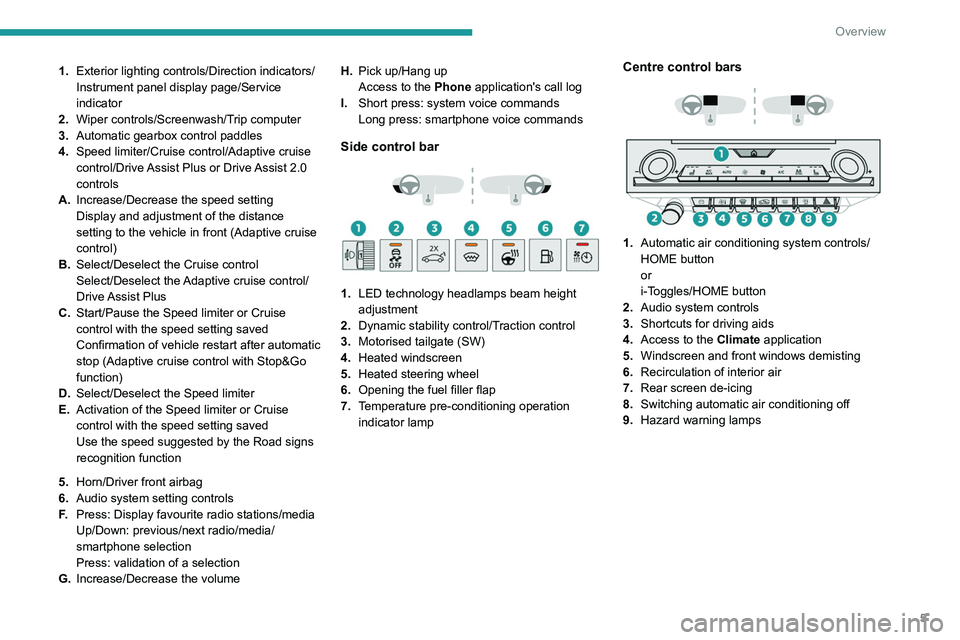
1.Exterior lighting controls/Direction indicators/
Instrument panel display page/Service
indicator
2. Wiper controls/Screenwash/Trip computer
3. Automatic gearbox control paddles
4. Speed limiter/Cruise control/Adaptive cruise
control/Drive Assist Plus or Drive Assist 2.0
controls
A. Increase/Decrease the speed setting
Display and adjustment of the distance
setting to the vehicle in front (Adaptive cruise
control)
B. Select/Deselect the Cruise control
Select/Deselect the Adaptive cruise control/
Drive Assist Plus
C. Start/Pause the Speed limiter or Cruise
control with the speed setting saved
Confirmation of vehicle restart after automatic
stop (Adaptive cruise control with Stop&Go
function)
D. Select/Deselect the Speed limiter
E. Activation of the Speed limiter or Cruise
control with the speed setting saved
Use the speed suggested by the Road signs
recognition function
5. Horn/Driver front airbag
6. Audio system setting controls
F. Press: Display favourite radio stations/media
Up/Down: previous/next radio/media/
smartphone selection
Press: validation of a selection
G. Increase/Decrease the volume H.
Pick up/Hang up
Access to the Phone application's call log
I. Short press: system voice commands
Long press: smartphone voice commands
Side control bar
1. LED technology headlamps beam height
adjustment
2. Dynamic stability control/Traction control
3. Motorised tailgate (SW)
4. Heated windscreen
5. Heated steering wheel
6. Opening the fuel filler flap
7. Temperature pre-conditioning operation
indicator lamp
Centre control bars
1. Automatic air conditioning system controls/
HOME button
or
i-Toggles/HOME button
2. Audio system controls
3. Shortcuts for driving aids
4. Access to the Climate application
5. Windscreen and front windows demisting
6. Recirculation of interior air
7. Rear screen de-icing
8. Switching automatic air conditioning off
9. Hazard warning lamps
Page 8 of 260
6
Overview
Rechargeable hybrid
system
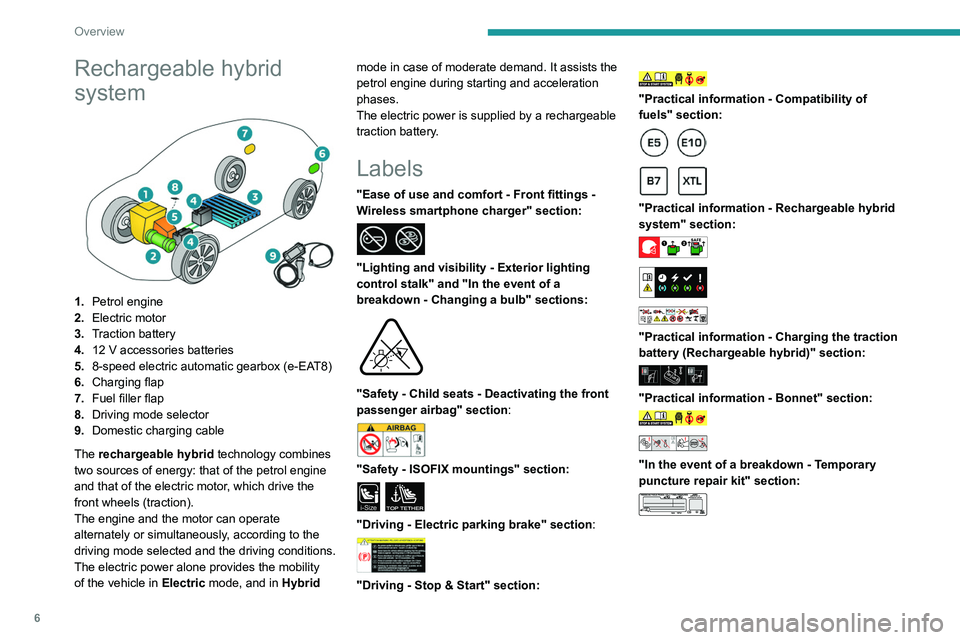
1.Petrol engine
2. Electric motor
3. Traction battery
4. 12 V accessories batteries
5. 8-speed electric automatic gearbox (e-EAT8)
6. Charging flap
7. Fuel filler flap
8. Driving mode selector
9. Domestic charging cable
The rechargeable hybrid technology combines
two sources of energy: that of the petrol engine
and that of the electric motor, which drive the
front wheels (traction).
The engine and the motor can operate
alternately or simultaneously, according to the
driving mode selected and the driving conditions.
The electric power alone provides the mobility
of the vehicle in Electric mode, and in Hybrid mode in case of moderate demand. It assists the
petrol engine during starting and acceleration
phases.
The electric power is supplied by a rechargeable
traction battery.
Labels
"Ease of use and comfort - Front
fittings -
Wireless smartphone charger" section:
"Lighting and visibility - Exterior lighting
control stalk" and "In the event of a
breakdown - Changing a bulb" sections:
"Safety - Child seats - Deactivating the front
passenger airbag" section:
"Safety - ISOFIX mountings" section:
i-SizeTOP TETHER
"Driving - Electric parking brake" section:
"Driving - Stop & Start" section:
"Practical information - Compatibility of
fuels" section:
"Practical information - Rechargeable hybrid
system" section:
"Practical information - Charging the traction
battery (Rechargeable hybrid)" section:
"Practical information - Bonnet" section:
"In the event of a breakdown - Temporary
puncture repair kit" section:
Page 10 of 260
8
Eco-driving
Eco-driving
Eco-driving refers to a range of everyday
practices that allow the motorist to optimise
the vehicle's energy consumption (fuel and/or
electricity) and CO
2 emissions.
Optimise your use of the gearbox
With a manual gearbox, move off gently and
change up promptly. While accelerating, change
up early.
With an automatic gearbox, favour automatic
mode. Do not depress the accelerator pedal
heavily or suddenly.
The gear shift indicator prompts you to engage
the most suitable gear. Whenever this indication
is displayed on the instrument panel, follow it
straight away.
With an automatic gearbox, this indicator
appears only in manual mode.
Drive smoothly
Maintain a safe distance between vehicles, use
engine braking rather than the brake pedal and
press the accelerator gradually. These practices
help to save on energy consumption, reduce
CO
2 emissions and decrease general traffic
noise.
With an EAT8 gearbox, with the gear selector
in mode
D, and except in Sport mode, favour
"free-wheeling" by fully lifting your foot from the
accelerator pedal in order to save fuel.
When the traffic is flowing smoothly, select the
cruise control.
Control the use of electrical equipment
Before moving off, if the passenger compartment
is too warm, ventilate it by opening the windows
and air vents before using the air conditioning.
At speeds above 31
mph (50 km/h), close the
windows and leave the air vents open.
Consider using equipment that can help keep
the temperature in the passenger compartment
down.
Unless automatically regulated, switch off the air
conditioning as soon as the desired temperature
has been reached.
Switch off the demisting and defrosting functions,
if they are not managed automatically.
Switch off the heated seat and heated steering
wheel as soon as possible.
Adapt your use of the headlamps and/or
foglamps to the level of visibility, in accordance
with current legislation in the country in which
you are driving.
Avoid running the engine before moving off,
particularly in winter (other than in severe wintry
conditions: temperature below -23°C). The
vehicle will warm up much faster while driving.
As a passenger, avoid connecting your
multimedia devices (e.g.
film, music, video
game) to help reduce the consumption of energy.
Disconnect all portable devices before leaving
the vehicle.
Limit the causes of excess consumption
Spread loads throughout the vehicle. Place the
heaviest items in the boot as close as possible to
the rear seats.
Limit the loads carried in the vehicle and
minimise wind resistance (e.g.
roof bars, roof
rack, bicycle carrier, trailer). Preferably, use a
roof box.
Remove roof bars and roof racks after use.
At the end of winter, remove snow tyres and refit
summer tyres.
Comply with the servicing instructions
Check tyre pressures regularly, with the tyres
cold, referring to the label in the door aperture on
the driver's side.
Carry out this check in particular:
–
before a long journey
.
–
at each change of season.
–
after a long period out of use.
Do not forget the spare wheel and, where
applicable, the tyres on your trailer or caravan.
Have your vehicle serviced regularly (e.g.
engine
oil, oil filter, air filter, passenger compartment
filter, etc.). Observe the schedule of operations in
the manufacturer's service schedule.
With a BlueHDi Diesel engine, if the SCR system
has a fault, your vehicle will emit pollution. Visit
a PEUGEOT dealer or a qualified workshop
as soon as possible to restore your vehicle's
nitrogen oxide emissions to legal levels.
When filling the fuel tank, do not continue after
the third cut-out of the nozzle, to avoid overflow.
Page 11 of 260
9
Eco-driving
You will only see the fuel consumption of your
new vehicle settle down to a consistent average
after the first 1,900 miles (3,000 kilometres).
Optimising the driving range
(rechargeable hybrid vehicles)
Connect the vehicle as soon as possible.
Favour the ECO zone of the power indicator by
driving smoothly and at a steady speed.
Anticipate slowing down as much as possible
and, if possible, favour decelerations with
regenerative braking mode activated (power
indicator in the CHARGE zone).
With the vehicle connected, carry out
temperature pre-conditioning before setting off.
To optimise consumption during a journey:
►
Programme a destination in the vehicle’
s
GPS navigation system.
►
Select the
Hybrid driving mode.
►
Make sure that the battery charge level is
close to maximum.
►
Do not use the e-Save function while driving.
►
Use the heating/air conditioning system
wisely
.
Page 12 of 260
10
Instruments
Driver information
Instrument panel
The instrument panel displays all the information
the driver needs about the status of the vehicle's
various systems.
This information appears in the form of warning
and indicator lamps and messages.
Depending on the vehicle's equipment, the
instrument panel may be either:
–
Analogue dials with an LCD or matrix display
.
–
A
fully digital display.
Matrix instrument panel
Dials
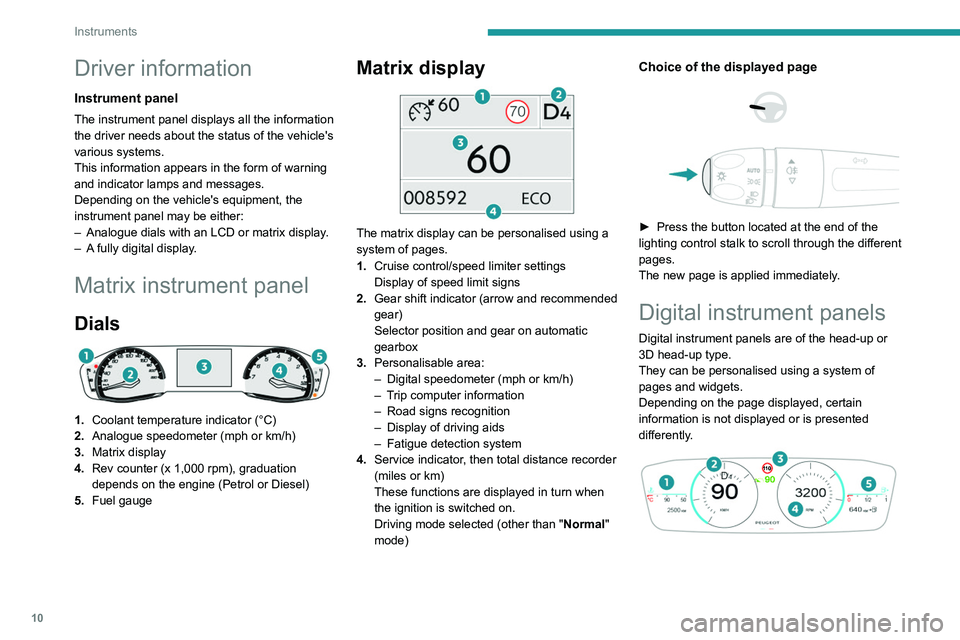
1.Coolant temperature indicator (°C)
2. Analogue speedometer (mph or km/h)
3. Matrix display
4. Rev counter (x 1,000 rpm), graduation
depends on the engine (Petrol or Diesel)
5. Fuel gauge
Matrix display
The matrix display can be personalised using a
system of pages.
1.Cruise control/speed limiter settings
Display of speed limit signs
2. Gear shift indicator (arrow and recommended
gear)
Selector position and gear on automatic
gearbox
3. Personalisable area:
–
Digital speedometer (mph or km/h)
–
T
rip computer information
–
Road signs recognition
–
Display of driving aids
–
Fatigue detection system
4. Service indicator
, then total distance recorder
(miles or km)
These functions are displayed in turn when
the ignition is switched on.
Driving mode selected (other than " Normal"
mode)
Choice of the displayed page
► Press the button located at the end of the
lighting control stalk to scroll through the different
pages.
The new page is applied immediately
.
Digital instrument panels
Digital instrument panels are of the head-up or
3D head-up type.
They can be personalised using a system of
pages and widgets.
Depending on the page displayed, certain
information is not displayed or is presented
differently.
Page 13 of 260
11
Instruments
1
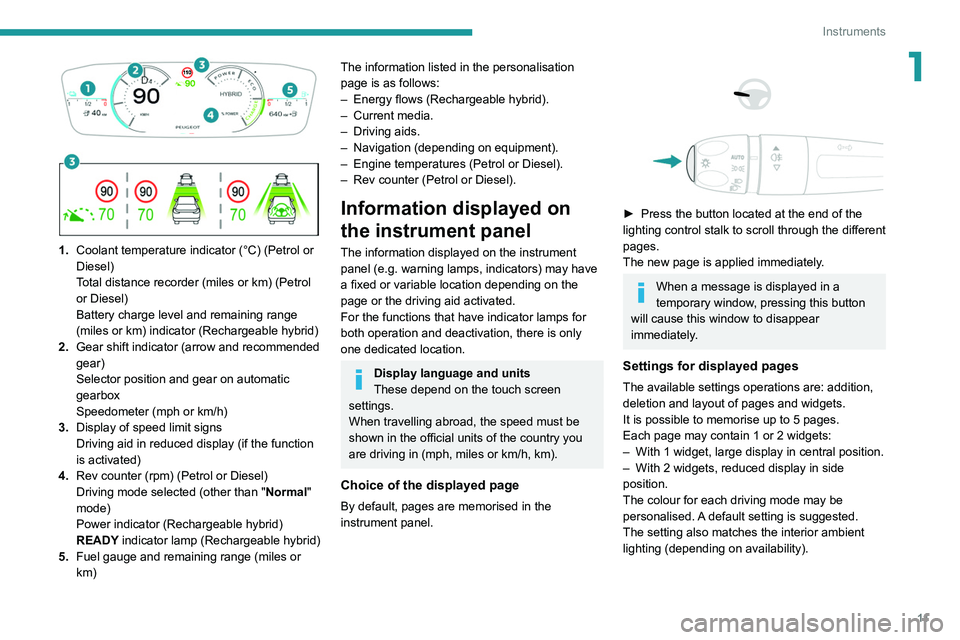
1. Coolant temperature indicator (°C) (Petrol or
Diesel)
Total distance recorder (miles or km) (Petrol
or Diesel)
Battery charge level and remaining range
(miles or km) indicator (Rechargeable hybrid)
2. Gear shift indicator (arrow and recommended
gear)
Selector position and gear on automatic
gearbox
Speedometer (mph or km/h)
3. Display of speed limit signs
Driving aid in reduced display (if the function
is activated)
4. Rev counter (rpm) (Petrol or Diesel)
Driving mode selected (other than " Normal"
mode)
Power indicator (Rechargeable hybrid)
READY indicator lamp (Rechargeable hybrid)
5. Fuel gauge and remaining range (miles or
km)
The information listed in the personalisation
page is as follows:
–
Energy flows (Rechargeable hybrid).
–
Current media.
–
Driving aids.
–
Navigation (depending on equipment).
–
Engine temperatures (Petrol or Diesel).
–
Rev counter (Petrol or Diesel).
Information displayed on
the instrument panel
The information displayed on the instrument
panel (e.g. warning lamps, indicators) may have
a fixed or variable location depending on the
page or the driving aid activated.
For the functions that have indicator lamps for
both operation and deactivation, there is only
one dedicated location.
Display language and units
These depend on the touch screen
settings.
When travelling abroad, the speed must be
shown in the official units of the country you
are driving in (mph, miles or km/h, km).
Choice of the displayed page
By default, pages are memorised in the
instrument panel.
► Press the button located at the end of the
lighting control stalk to scroll through the different
pages.
The new page is applied immediately
.
When a message is displayed in a
temporary window, pressing this button
will cause this window to disappear
immediately.
Settings for displayed pages
The available settings operations are: addition,
deletion and layout of pages and widgets.
It is possible to memorise up to 5 pages.
Each page may contain 1 or 2 widgets:
–
With 1 widget, large display in central position.
–
With 2 widgets, reduced display in side
position.
The colour for each driving mode may be
personalised.
A default setting is suggested.
The setting also matches the interior ambient
lighting (depending on availability).
Page 17 of 260
15
Instruments
1Hill start assistFixed, accompanied by the
message "Anti roll-back system
fault".
The system has a fault.
Carry out (3).
Post Collision Safety BrakeFixed, associated with the
Service warning lamp,
accompanied by the display of a message and
an audible signal.
The system has a fault.
Carry out (3) quickly.
Under-inflationFixed.
The pressure in one or more tyres is too
low.
Check the pressure of the tyres as soon as
possible.
Reinitialise the detection system after adjusting
the pressure.
Under-inflation warning lamp
flashing then fixed and Service
warning lamp fixed.
The tyre pressure monitoring system is faulty.
Under-inflation detection is no longer monitored.
Check the tyre pressures as soon as possible
and carry out (3).
Parking sensorsFixed, accompanied by an onscreen
message and an audible signal.
The system is deactivated.
Fixed, associated with the Service
warning lamp, accompanied by the
display of a message and an audible signal.
The system has a fault.
Carry out (3).
Engine pre-heating (Diesel)Temporarily on (up to approximately 30 seconds in
severe weather conditions).
When switching on the ignition, if the weather
conditions and the engine temperature make it
necessary.
Wait until the warning lamp goes off before
starting.
When the warning lamp goes off, starting will
occur immediately if you press and hold:
–
the clutch pedal with a manual gearbox.
–
the brake pedal with an automatic gearbox.
If the engine does not start, make the engine
starting request again, while keeping your foot
on the pedal.
Airbags
Fixed, associated with the Service
warning lamp and accompanied by
the display of a message.
One of the airbags or seat belt pyrotechnic
pretensioners is faulty.
Carry out (3).
Front passenger airbag (ON)Fixed.
The front passenger airbag is activated.
The control is set to the “ON” position. In this case, do NOT install a "rearward
facing" child seat on the front passenger seat
- risk of serious injury!
Front passenger airbag (OFF)Fixed.
The front passenger airbag is deactivated.
The control is set to the “OFF ” position.
A "rearward facing" child seat can be installed,
unless there is a fault with the airbags (Airbags
warning lamp on).
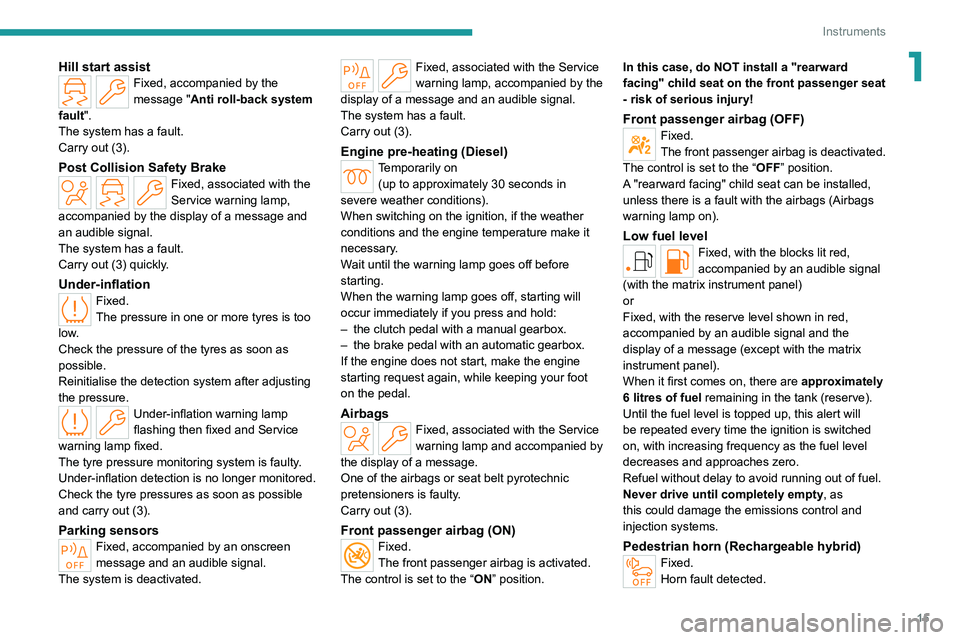
Low fuel levelFixed, with the blocks lit red,
accompanied by an audible signal
(with the matrix instrument panel)
or
Fixed, with the reserve level shown in red,
accompanied by an audible signal and the
display of a message (except with the matrix
instrument panel).
When it first comes on, there are approximately
6 litres of fuel remaining in the tank (reserve).
Until the fuel level is topped up, this alert will
be repeated every time the ignition is switched
on, with increasing frequency as the fuel level
decreases and approaches zero.
Refuel without delay to avoid running out of fuel.
Never drive until completely empty, as
this could damage the emissions control and
injection systems.
Pedestrian horn (Rechargeable hybrid)Fixed.
Horn fault detected.
Page 24 of 260
22
Instruments
► Then select Safety > Diagnostics.
The following information is displayed on the
instrument panel:
–
T
yre pressures.
–
Engine oil level (depending on engine).
–
Next service due.
–
Driving range associated with the
AdBlue® and
the SCR system (BlueHDi
Diesel).
–
Current alerts.
This information is also displayed automatically every time the ignition is
switched on.
Total distance recorder
The total distance recorder measures the total
distance travelled by the vehicle since its initial
registration.
With the ignition on, the total distance is
displayed at all times. It remains displayed for
30
seconds after switching off the ignition. It is
displayed when the driver's door is opened, and
when the vehicle is locked or unlocked.
When travelling abroad, you may have to
change the distance units (miles or km):
the displayed speed must be in the local
country’s official unit (mph or km/h).
The unit is changed via the screen's
configuration application, with the vehicle
stationary.
Rechargeable hybrid vehicles
The total distance recorder is only
accessible from the trip computer.
For more information on the Trip computer,
refer to the corresponding section.
Lighting dimmer
Used to manually adjust the brightness of the
instruments and controls to suit the exterior light
level.
It is configured in the Settings >
Brightness touch screen application.
►
In the "
Cockpit" category, press or move the
slider to the desired setting.
Trip computer
Displays information related to the current trip
(range, fuel consumption, average speed, etc.).
Data displayed on the
instrument panel
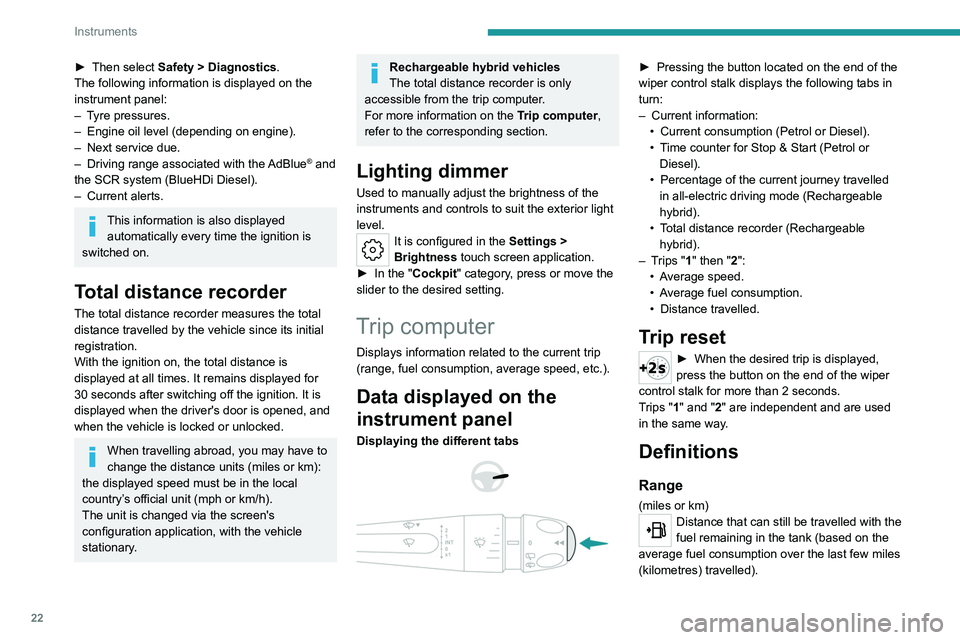
Displaying the different tabs
► Pressing the button located on the end of the
wiper control stalk displays the following tabs in
turn:
–
Current information:
•
Current consumption (Petrol or Diesel).
•
T
ime counter for Stop & Start (Petrol or
Diesel).
•
Percentage of the current journey travelled
in all-electric driving mode (Rechargeable
hybrid).
•
T
otal distance recorder (Rechargeable
hybrid).
–
T
rips "1" then "2":
•
A
verage speed.
•
A
verage fuel consumption.
•
Distance travelled.
Trip reset
► When the desired trip is displayed,
press the button on the end of the wiper
control stalk for more than 2
seconds.
Trips "1" and "2" are independent and are used
in the same way.
Definitions
Range
(miles or km)Distance that can still be travelled with the
fuel remaining in the tank (based on the
average fuel consumption over the last few miles
(kilometres) travelled).
Page 25 of 260
23
Instruments
1This value may vary following a change in driving
style or terrain, leading to a significant change in
current fuel consumption.
When the range falls below 19 miles (30 km),
dashes are displayed.
After filling with at least 5 litres of fuel, the range
is recalculated and is displayed if it exceeds 62
miles (100
km).
Dashes appearing permanently in place of
numbers while driving indicates a malfunction.
Consult a PEUGEOT dealer or a qualified
workshop.
Current consumption
(mpg or l/100 km or km/l)Calculated during the last few seconds.
This function is only displayed at speeds above
19 mph (30
km/h).
Average consumption
(mpg or l/100 km or km/l)Calculated since the last trip computer
reset.
Average speed
(mph or km/h)Calculated since the last trip computer
reset.
Distance travelled
(miles or km)
Calculated since the last trip computer
reset.
Stop & Start time counter
(minutes/seconds or hours/minutes)
If your vehicle is fitted with the Stop & Start
function, a time counter calculates the time spent
in STOP mode during a journey.
The time counter is reset each time the ignition is
switched on.
10-inch touch screen
This system gives access to the following elements:
–
T
ime and exterior temperature.
–
Heating/air conditioning system controls and
reminders of settings.
–
Settings for driving aid functions, comfort and
safety functions, audio equipment and digital
instrument panel.
–
Settings of functions specific to rechargeable
hybrid vehicles.
–
Display of visual manoeuvring aid functions.
–
Interactive handbook.
–
V
ideo tutorials (e.g. screen management,
driving aids, voice recognition).
–
Audio equipment and telephone controls with
display of
associated information.
–
Connected services and display of associated
information.
– Navigation system controls and display
of associated information (depending on
equipment).
–
V
oice recognition (depending on equipment).
For safety reasons, always stop the
vehicle before performing operations
that require sustained attention.
Some functions are not accessible while
driving.
Recommendations
These recommendations are valid for the touch
screen and for the i-Toggles (depending on
equipment).
The touch screen and the i-Toggles screen are
capacitive touch screens.
Do not use pointed objects on the touch screen.
Do not touch the touch screen with wet hands.
►
Use a soft, clean cloth to clean the touch
screen.
Main controls
Access to one of the home pages Return to the first home page
Direct access to the Climate application
Direct access to the Shortcuts for
driving aids
►
Swipe down from the upper edge of the touch
screen to access a list of quick settings (e.g.
Brightness
, Diagnostics).