adjustment Peugeot 308 CC 2011 Owner's Guide
[x] Cancel search | Manufacturer: PEUGEOT, Model Year: 2011, Model line: 308 CC, Model: Peugeot 308 CC 2011Pages: 292, PDF Size: 40.04 MB
Page 92 of 292
5
!
i
90
VISIBILITY
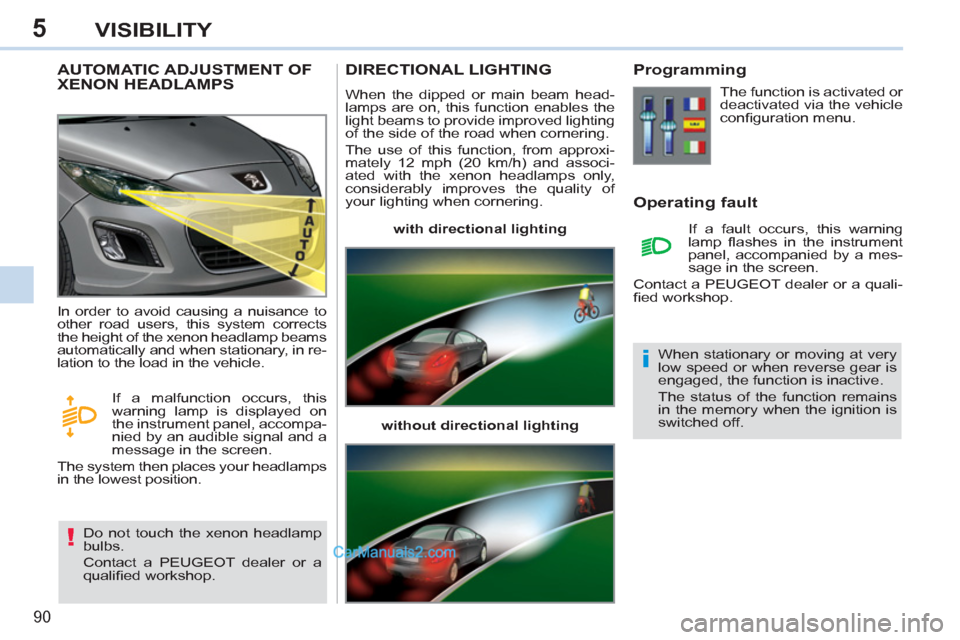
AUTOMATIC ADJUSTMENT OF
XENON HEADLAMPS
Do not touch the xenon headlamp
bulbs.
Contact a PEUGEOT dealer or a
qualifi ed workshop. In order to avoid causing a nuisance to
other road users, this system corrects
the height of the xenon headlamp beams
automatically and when stationary, in re-
lation to the load in the vehicle.
If a malfunction occurs, this
warning lamp is displayed on
the instrument panel, accompa-
nied by an audible signal and a
message in the screen.
The system then places your headlamps
in the lowest position.
DIRECTIONAL LIGHTING
When the dipped or main beam head-
lamps are on, this function enables the
light beams to provide improved lighting
of the side of the road when cornering.
The use of this function, from approxi-
mately 12 mph (20 km/h) and associ-
ated with the xenon headlamps only,
considerably improves the quality of
your lighting when cornering.
with directional lighting
without directional lighting
Programming
Operating fault
The function is activated or
deactivated via the vehicle
confi guration menu.
If a fault occurs, this warning
lamp fl ashes in the instrument
panel, accompanied by a mes-
sage in the screen.
Contact a PEUGEOT dealer or a quali-
fi ed workshop.
When stationary or moving at very
low speed or when reverse gear is
engaged, the function is inactive.
The status of the function remains
in the memory when the ignition is
switched off.
Page 99 of 292
6
97
FITTINGS
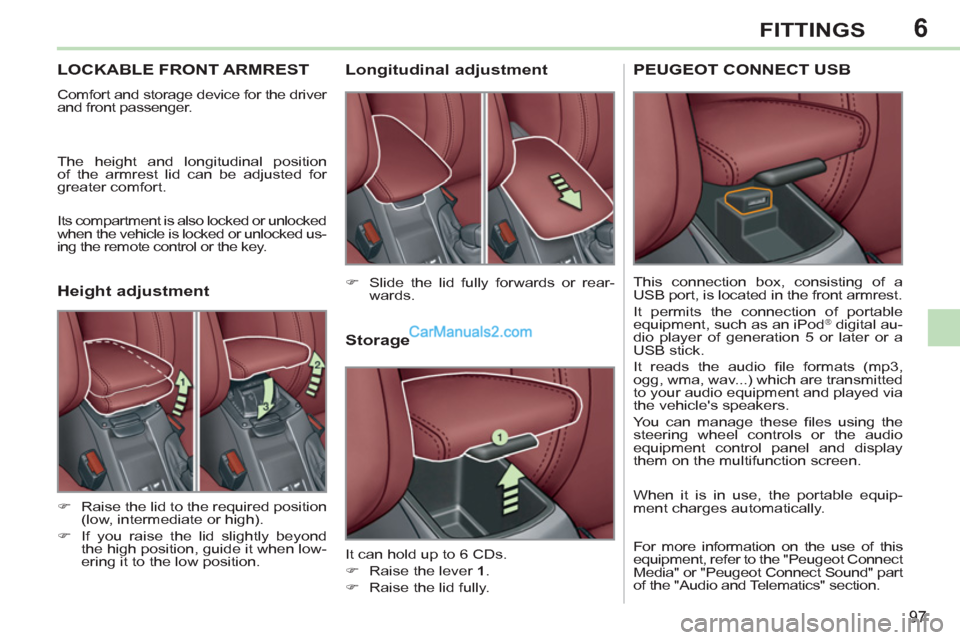
LOCKABLE FRONT ARMREST
Comfort and storage device for the driver
and front passenger.
The height and longitudinal position
of the armrest lid can be adjusted for
greater comfort.
Its compartment is also locked or unlocked
when the vehicle is locked or unlocked us-
ing the remote control or the key.
Storage
It can hold up to 6 CDs.
)
Raise the lever 1
.
)
Raise the lid fully.
)
Slide the lid fully forwards or rear-
wards.
)
Raise the lid to the required position
(low, intermediate or high).
)
If you raise the lid slightly beyond
the high position, guide it when low-
ering it to the low position.
Longitudinal adjustment
Height adjustment
PEUGEOT CONNECT USB
This connection box, consisting of a
USB port, is located in the front armrest.
It permits the connection of portable
equipment, such as an iPod
® digital au-
dio player of generation 5 or later or a
USB stick.
It reads the audio fi le formats (mp3,
ogg, wma, wav...) which are transmitted
to your audio equipment and played via
the vehicle's speakers.
You can manage these fi les using the
steering wheel controls or the audio
equipment control panel and display
them on the multifunction screen.
When it is in use, the portable equip-
ment charges automatically.
For more information on the use of this
equipment, refer to the "Peugeot Connect
Media" or "Peugeot Connect Sound" part
of the "Audio and Telematics" section.
Page 111 of 292
7
i
109
SAFETY
The driver must ensure that passen-
gers use the seat belts correctly and
that they are all restrained securely
before setting off.
Wherever you are seated in the ve-
hicle, always fasten your seat belt,
even for short journeys.
Do not interchange the seat belt
buckles as they will not fulfi l their role
fully.
The seat belts are fi tted with an inertia
reel permitting automatic adjustment
of the length of the strap to your size.
The seat belt is stowed automatically
when not in use.
Before and after use, ensure that the
seat belt is reeled in correctly.
The lower part of the strap must be
positioned as low as possible on the
pelvis.
The upper part must be positioned in
the hollow of the shoulder.
The inertia reels are fi tted with an au-
tomatic locking device which comes
into operation in the event of a collision,
emergency braking or if the vehicle rolls
over. You can release the device by
pulling fi rmly on the strap and releasing
it so that it reels in slightly. In order to be effective, a seat belt
must:
- be tightened as close to the body
as possible,
- be pulled in front of you with a
smooth movement, checking that
it does not twist,
- be used to restrain only one person,
- not bear any trace of cuts or fraying,
- not be converted or modifi ed to
avoid affecting its performance.
In accordance with current safety
regulations, for all repairs on your
vehicle, go to a qualifi ed workshop
with the skills and equipment needed,
which a PEUGEOT dealer is able to
provide.
Have your seat belts checked regu-
larly by a PEUGEOT dealer or a
qualifi ed workshop, particularly if the
straps show signs of damage.
Clean the seat belt straps with soapy
water or a textile cleaning product,
sold by PEUGEOT dealers.
After folding or moving a seat or rear
bench seat, ensure that the seat belt
is positioned and reeled in correctly.
Recommendations for children
Use a suitable child seat if the pas-
senger is less than 12 years old or
shorter than one and a half metres.
Never use the same seat belt to se-
cure more than one person.
Never allow a child to travel on your
lap.
In the event of an impact
Depending on the nature and se-
riousness of the impact
, the pre-
tensioning device may be deployed
before and independently of the
airbags. Deployment of the preten-
sioners is accompanied by a slight
discharge of harmless smoke and
a noise, due to the activation of the
pyrotechnic cartridge incorporated in
the system.
In all cases, the airbag warning lamp
comes on.
Following an impact, have the seat
belts system checked, and if neces-
sary replaced, by a PEUGEOT dealer
or a qualifi ed workshop.
Page 188 of 292
186
01
2ABC3DEF
5JKL4GHI6MNO
8TUV7PQRS9WXYZ
0*#
1
RADIO MEDIANAV ESC TRAFFIC
SETUPADDR
BOOK
1
10
2
3
4
612
9
7
8
115
TU PQRS
0*
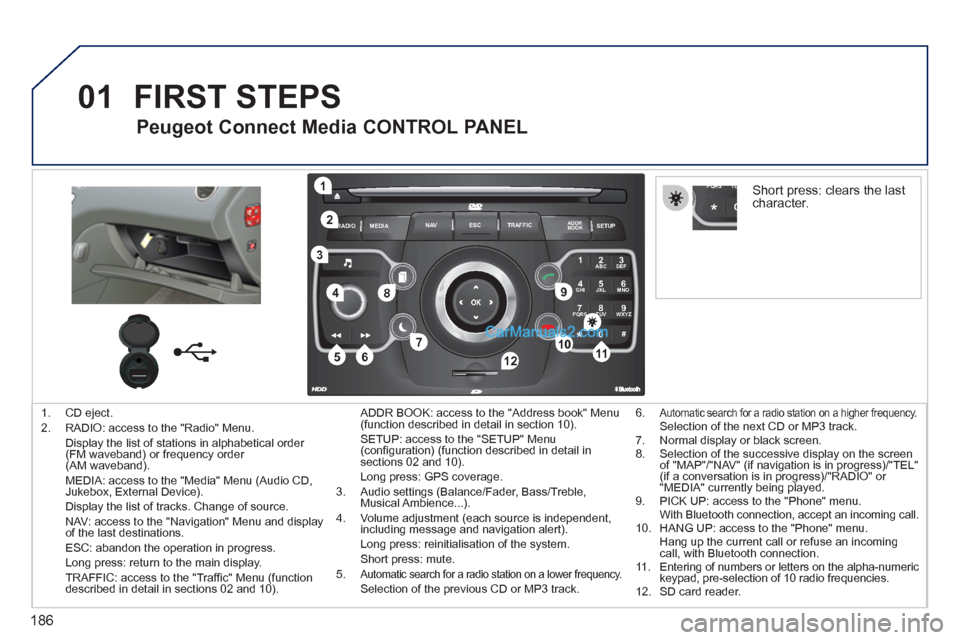
1. CD eject.
2. RADIO: access to the "Radio" Menu.
Display the list of stations in alphabetical order
(FM waveband) or frequency order
(AM waveband).
MEDIA: access to the "Media" Menu (Audio CD,
Jukebox, External Device).
Display the list of tracks. Change of source.
NAV: access to the "Navigation" Menu and display
of the last destinations.
ESC: abandon the operation in progress.
Long press: return to the main display.
TRAFFIC: access to the "Traffi c" Menu (function
described in detail in sections 02 and 10). ADDR BOOK: access to the "Address book" Menu
(function described in detail in section 10).
SETUP: access to the "SETUP" Menu
(confi guration) (function described in detail in
sections 02 and 10).
Long press: GPS coverage.
3. Audio settings (Balance/Fader, Bass/Treble,
Musical Ambience...).
4. Volume adjustment (each source is independent,
including message and navigation alert).
Long press: reinitialisation of the system.
Short press: mute.
5.
Automatic search for a radio station on a lower frequency. Selection of the previous CD or MP3 track.
FIRST STEPS
Peugeot Connect Media CONTROL PANEL
6. Automatic search for a radio station on a higher frequency. Selection of the next CD or MP3 track.
7. Normal display or black screen.
8. Selection of the successive display on the screen
of "MAP"/"NAV" (if navigation is in progress)/"TEL"
(if a conversation is in progress)/"RADIO" or
"MEDIA" currently being played.
9. PICK UP: access to the "Phone" menu.
With Bluetooth connection, accept an incoming call.
10. HANG UP: access to the "Phone" menu.
Hang up the current call or refuse an incoming
call, with Bluetooth connection.
11. Entering of numbers or letters on the alpha-numeric
keypad, pre-selection of 10 radio frequencies.
12. SD card reader.
Short press: clears the last
character.
Page 220 of 292
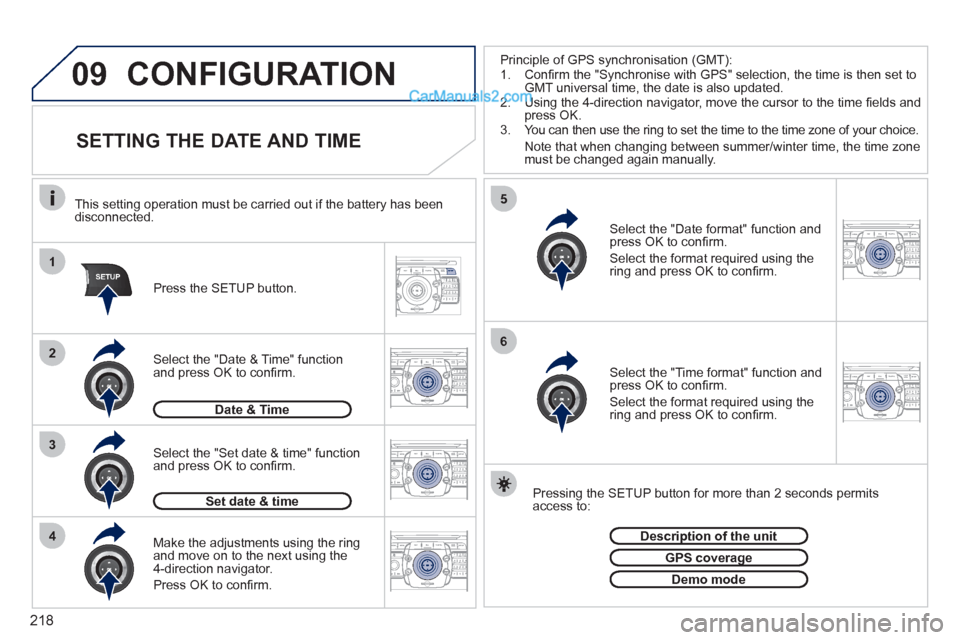
218
09
1
4
5
2ABC3DEF5JKL4GHI6MNO8TUV7PQRS9WXYZ0*#
1RADIO MEDIANAV ESC TRAFFIC
SETUPADDR
BOOK
3
2ABC3DEF5JKL4GHI6MNO8TUV7PQRS9WXYZ0*#
1RADIO MEDIANAV ESC TRAFFIC
SETUPADDR
BOOK
2ABC3DEF5JKL4GHI6MNO8TUV7PQRS9WXYZ0*#
1NAV ESC TRAFFICADDR
BOOKSETUPSETUP
2ABC3DEF5JKL4GHI6MNO8TUV7PQRS9WXYZ0*#
1RADIO MEDIANAV ESC TRAFFIC
SETUPADDR
BOOK26
2ABC3DEF5JKL4GHI6MNO8TUV7PQRS9WXYZ0*#
1RADIO MEDIANAV ESC TRAFFIC
SETUPADDR
BOOK
2ABC3DEF5JKL4GHI6MNO8TUV7PQRS9WXYZ0*#
1RADIO MEDIANAV ESC TRAFFIC
SETUPADDR
BOOK
CONFIGURATION
SETTING THE DATE AND TIME
Make the adjustments using the ring
and move on to the next using the
4-direction navigator.
Press OK to confi rm.
Select the "Date format" function and
press OK to confi rm.
Select the format required using the
ring and press OK to confi rm.
Select the "Set date & time" function
and press OK to confi rm.
Pressing the SETUP button for more than 2 seconds permits
access to:
This setting operation must be carried out if the battery has been
disconnected.
Press the SETUP button.
Select the "Time format" function and
press OK to confi rm.
Select the format required using the
ring and press OK to confi rm.
Set date & time
Select the "Date & Time" function
and press OK to confi rm.
Description of the unit
GPS coverage
Demo mode
Date & Time
Principle of GPS synchronisation (GMT):
1. Confi rm the "Synchronise with GPS" selection, the time is then set to
GMT universal time, the date is also updated.
2. Using the 4-direction navigator, move the cursor to the time fi elds and
press OK.
3. You can then use the ring to set the time to the time zone of your choice.
Note that when changing between summer/winter time, the time zone
must be changed again manually.
Page 232 of 292
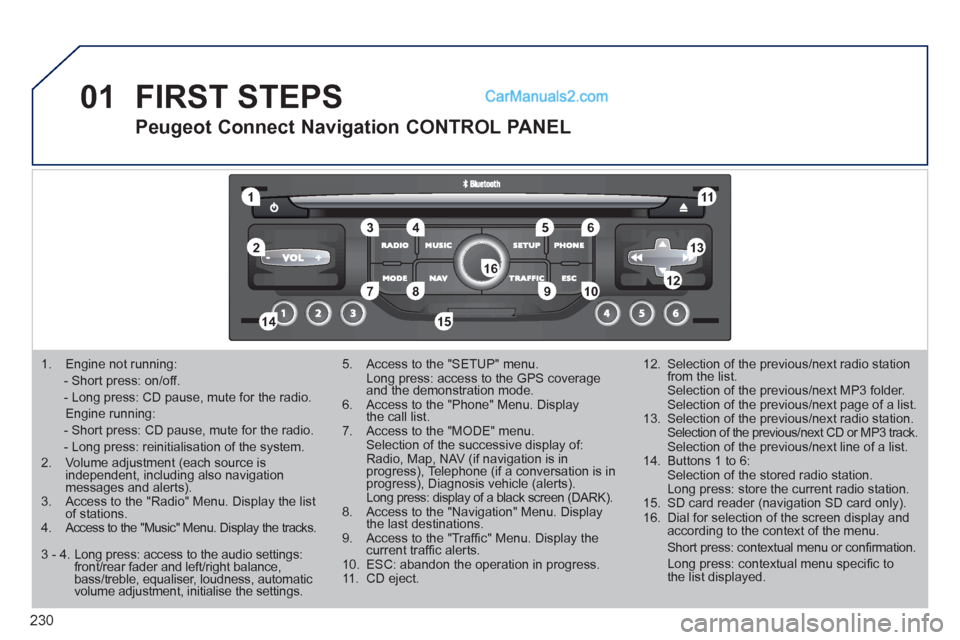
230
01
1
5
10 234 6
1311
9
14 157812 16
1. Engine not running:
- Short press: on/off.
- Long press: CD pause, mute for the radio.
Engine running:
- Short press: CD pause, mute for the radio.
- Long press: reinitialisation of the system.
2. Volume adjustment (each source is
independent, including also navigation
messages and alerts).
3. Access to the "Radio" Menu. Display the list
of stations.
4. Access to the "Music" Menu. Display the tracks.
5. Access to the "SETUP" menu.
Long press: access to the GPS coverage
and the demonstration mode.
6. Access to the "Phone" Menu. Display
the call list.
7. Access to the "MODE" menu.
Selection of the successive display of:
Radio, Map, NAV (if navigation is in
progress), Telephone (if a conversation is in
progress), Diagnosis vehicle (alerts).
Long press: display of a black screen (DARK).
8. Access to the "Navigation" Menu. Display
the last destinations.
9. Access to the "Traffi c" Menu. Display the
current traffi c alerts.
10. ESC: abandon the operation in progress.
11. CD eject.
12. Selection of the previous/next radio station
from the list.
Selection of the previous/next MP3 folder.
Selection of the previous/next page of a list.
13. Selection of the previous/next radio station.
Selection of the previous/next CD or MP3 track.
Selection of the previous/next line of a list.
14. Buttons 1 to 6:
Selection of the stored radio station.
Long press: store the current radio station.
15. SD card reader (navigation SD card only).
16. Dial for selection of the screen display and
according to the context of the menu.
Short press: contextual menu or confi rmation.
Long press: contextual menu specifi c to
the list displayed.
FIRST STEPS
Peugeot Connect Navigation CONTROL PANEL
3 - 4. Long press: access to the audio settings:
front/rear fader and left/right balance,
bass/treble, equaliser, loudness, automatic
volume adjustment, initialise the settings.
Page 244 of 292
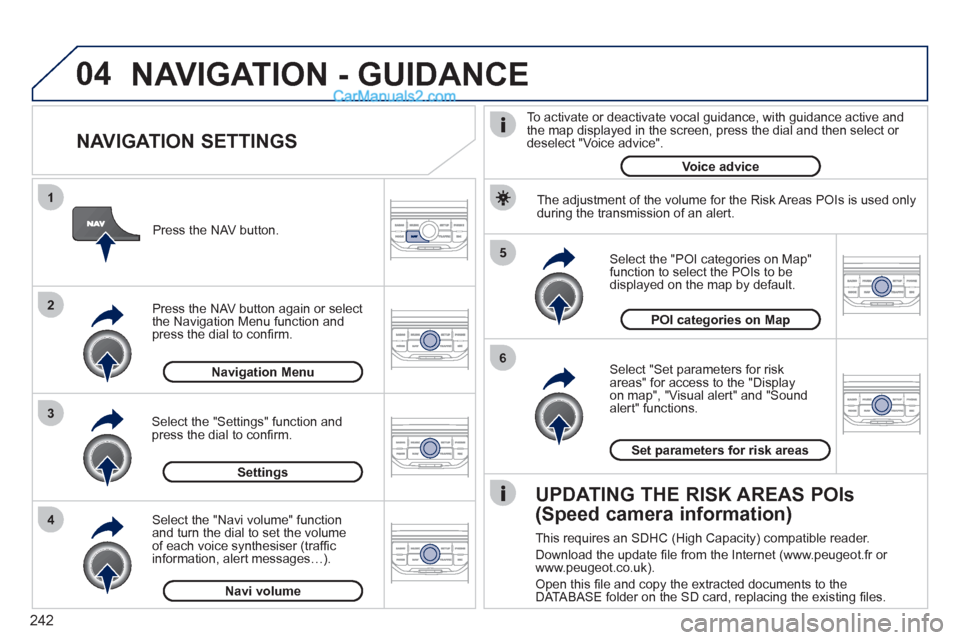
242
04
5
6
3 2 1
4
NAVIGATION SETTINGS
Select "Set parameters for risk
areas" for access to the "Display
on map", "Visual alert" and "Sound
alert" functions.
Select the "POI categories on Map"
function to select the POIs to be
displayed on the map by default.
Press the NAV button.
Press the NAV button again or select
the Navigation Menu function and
press the dial to confi rm.
Select the "Settings" function and
press the dial to confi rm.
POI categories on Map
Settings
Set parameters for risk areas
Navigation Menu
NAVIGATION - GUIDANCE
Select the "Navi volume" function
and turn the dial to set the volume
of each voice synthesiser (traffi c
information, alert messages…).
Navi volume
The adjustment of the volume for the Risk Areas POIs is used only
during the transmission of an alert.
UPDATING THE RISK AREAS POIs
(Speed camera information)
This requires an SDHC (High Capacity) compatible reader.
Download the update fi le from the Internet (www.peugeot.fr or
www.peugeot.co.uk).
Open this fi le and copy the extracted documents to the
DATABASE folder on the SD card, replacing the existing fi les.
To activate or deactivate vocal guidance, with guidance active and
the map displayed in the screen, press the dial and then select or
deselect "Voice advice".
Voice advice
Page 264 of 292
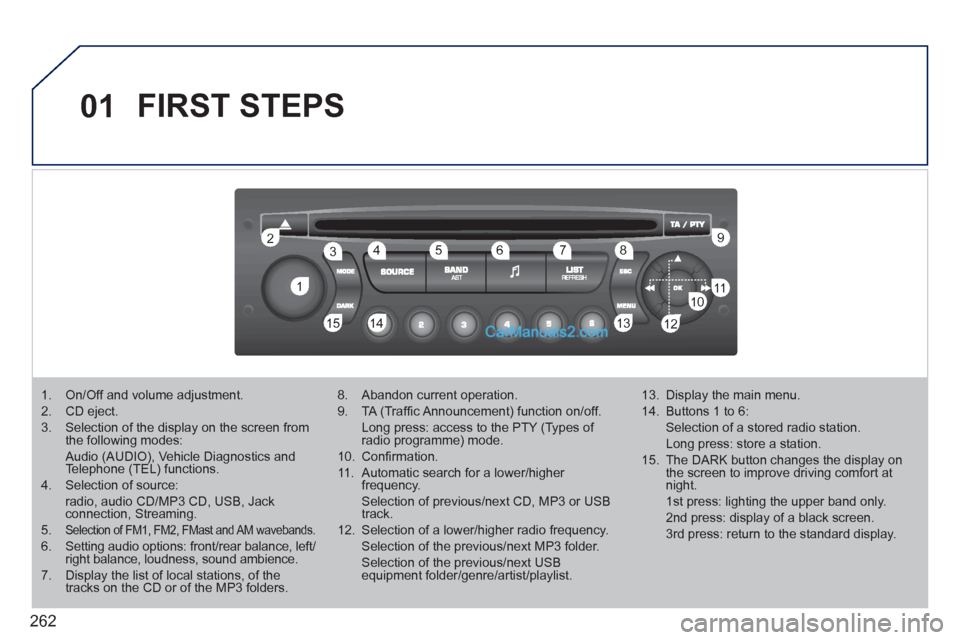
262
01
1 2
1011
13 14 153456 789
12
FIRST STEPS
1. On/Off and volume adjustment.
2. CD eject.
3. Selection of the display on the screen from
the following modes:
Audio (AUDIO), Vehicle Diagnostics and
Telephone (TEL) functions.
4. Selection of source:
radio, audio CD/MP3 CD, USB, Jack
connection, Streaming.
5.
Selection of FM1, FM2, FMast and AM wavebands.
6. Setting audio options: front/rear balance, left/
right balance, loudness, sound ambience.
7. Display the list of local stations, of the
tracks on the CD or of the MP3 folders.
8. Abandon current operation.
9. TA (Traffi c Announcement) function on/off.
Long press: access to the PTY (Types of
radio programme) mode.
10. Confi rmation.
11. Automatic search for a lower/higher
frequency.
Selection of previous/next CD, MP3 or USB
track.
12. Selection of a lower/higher radio frequency.
Selection of the previous/next MP3 folder.
Selection of the previous/next USB
equipment folder/genre/artist/playlist.
13. Display the main menu.
14. Buttons 1 to 6:
Selection of a stored radio station.
Long press: store a station.
15. The DARK button changes the display on
the screen to improve driving comfort at
night.
1st press: lighting the upper band only.
2nd press: display of a black screen.
3rd press: return to the standard display.
Page 277 of 292
275
08
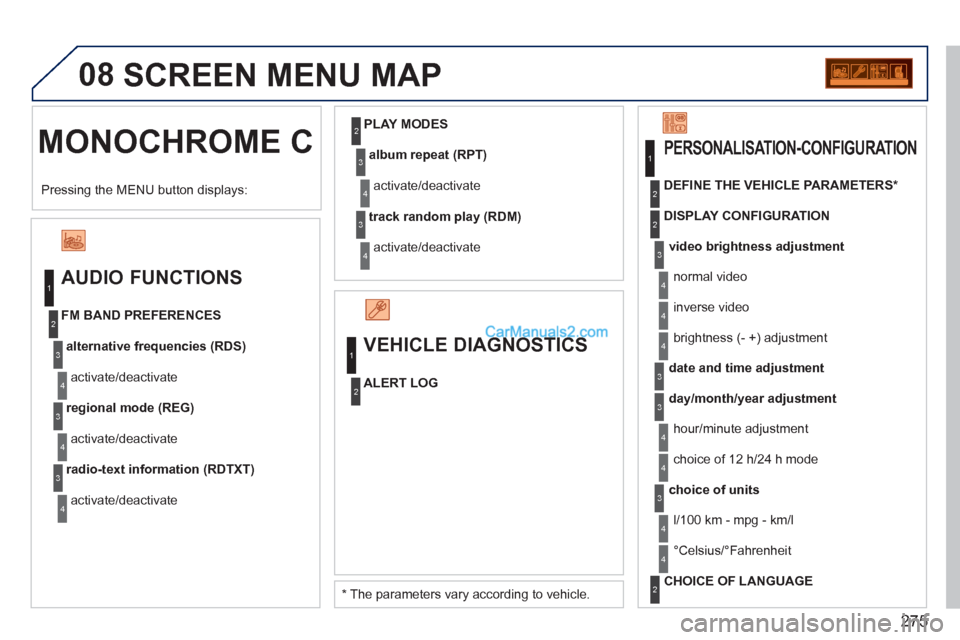
MONOCHROME C SCREEN MENU MAP
AUDIO FUNCTIONS
alternative frequencies (RDS)
activate/deactivate
FM BAND PREFERENCES
regional mode (REG)
activate/deactivate
radio-text information (RDTXT)
activate/deactivate
1
2
3
4
3
4
3
4
PLAY MODES
album repeat (RPT)
activate/deactivate
track random play (RDM)
activate/deactivate
2
3
4
3
4
VEHICLE DIAGNOSTICS
ALERT LOG
1
2
1
2
4
3
2
4
4
3
3
4
4
2
3
4
4
Pressing the MENU button displays:
* The parameters vary according to vehicle.
video brightness adjustment
DISPLAY CONFIGURATION
DEFINE THE VEHICLE PARAMETERS *
PERSONALISATION-CONFIGURATION
normal video
inverse video
brightness (- +) adjustment
date and time adjustment
day/month/year adjustment
hour/minute adjustment
choice of 12 h/24 h mode
choice of units
l/100 km - mpg - km/l
°Celsius/°Fahrenheit
CHOICE OF LANGUAGE
Page 281 of 292
279
VISUAL SEARCH
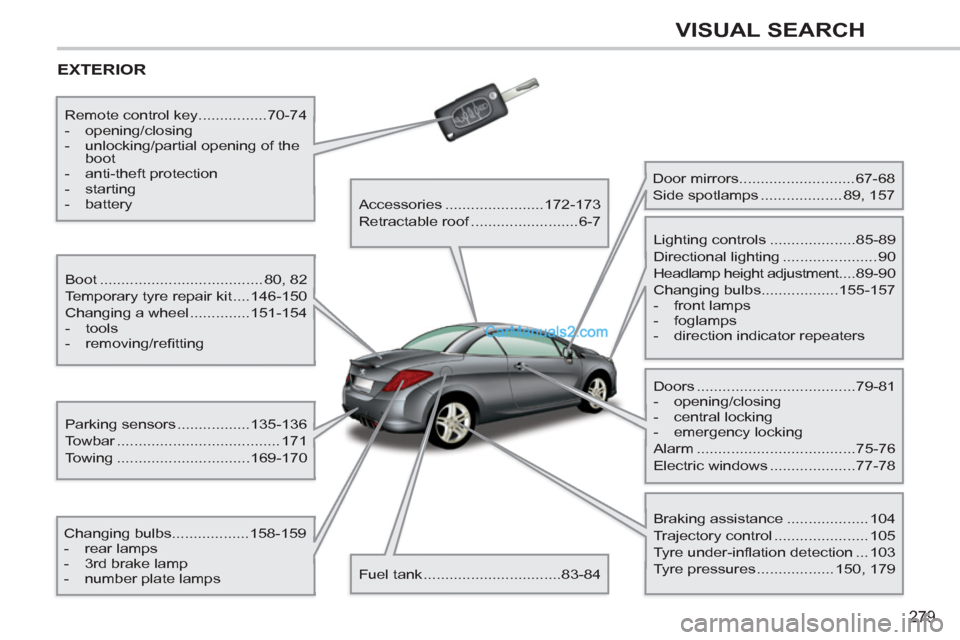
EXTERIOR
Boot ...................................... 80, 82
Temporary tyre repair kit ....146-150
Changing a wheel ..............151-154
- tools
- removing/refi tting
Changing bulbs..................158-159
- rear lamps
- 3rd brake lamp
- number plate lamps
Parking sensors .................135-136
Towbar ...................................... 171
Towing ...............................169-170
Remote control key................70-74
- opening/closing
- unlocking/partial opening of the
boot
- anti-theft protection
- starting
- battery
Accessories .......................172-173
Retractable roof .........................6-7
Fuel tank ................................83-84
Door mirrors ...........................67-68
Side spotlamps ................... 89, 157
Doors .....................................79-81
- opening/closing
- central locking
- emergency locking
Alarm .....................................75-76
Electric windows ....................77-78
Lighting controls ....................85-89
Directional lighting ...................... 90
Headlamp height adjustment....89-90
Changing bulbs..................155-157
- front lamps
- foglamps
- direction indicator repeaters
Braking assistance ................... 104
Trajectory control ...................... 105
Tyre under-inflation detection ... 103
Tyre pressures .................. 150, 179