navigation system Peugeot 308 CC 2011 Owner's Guide
[x] Cancel search | Manufacturer: PEUGEOT, Model Year: 2011, Model line: 308 CC, Model: Peugeot 308 CC 2011Pages: 292, PDF Size: 40.04 MB
Page 234 of 292
232
03 GENERAL OPERATION
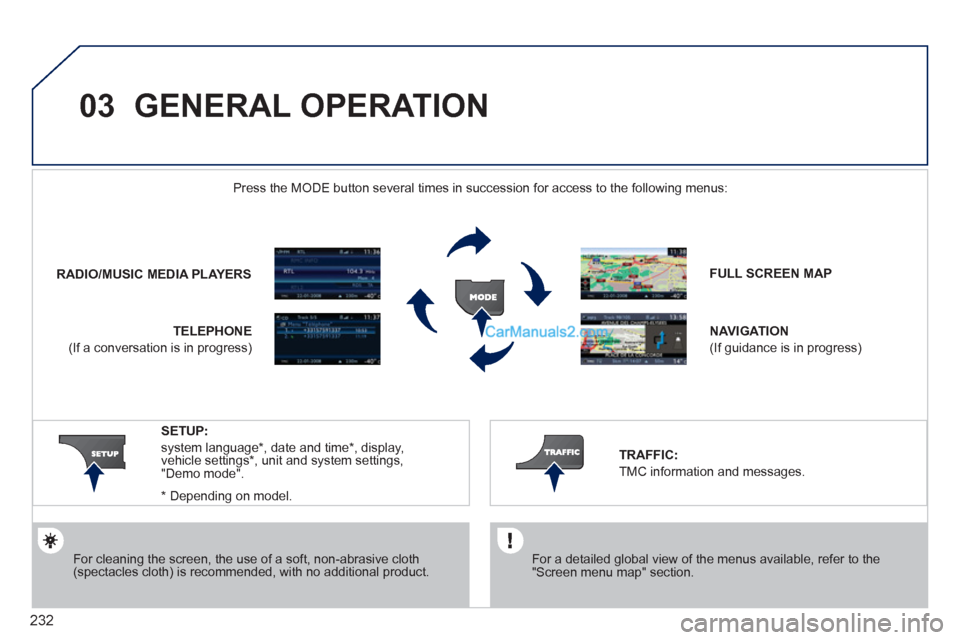
For cleaning the screen, the use of a soft, non-abrasive cloth
(spectacles cloth) is recommended, with no additional product.
FULL SCREEN MAP
NAVIGATION
(If guidance is in progress)
SETUP:
system language*
, date and time*
, display,
vehicle settings*
, unit and system settings,
"Demo mode".
*
Depending on model.
RADIO
/
MUSIC MEDIA PLAYERS
Press the MODE button several times in succession for access to the following menus:
TELEPHONE
(If a conversation is in progress)
TRAFFIC:
TMC information and messages.
For a detailed global view of the menus available, refer to the
"Screen menu map" section.
Page 240 of 292
238
04
4
3
2
1
7
6
5
NAVIGATION - GUIDANCE
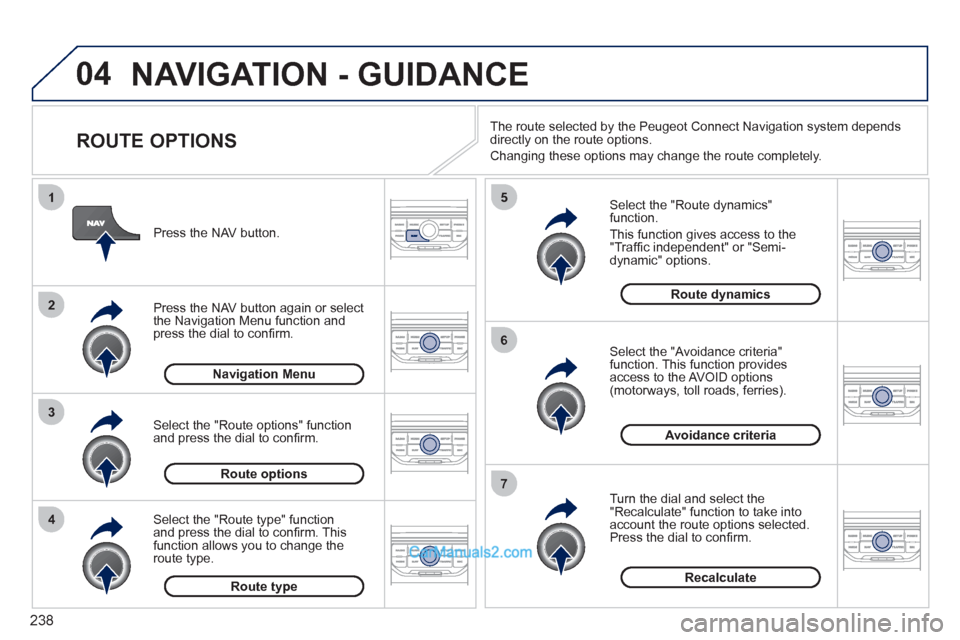
ROUTE OPTIONS
Select the "Route dynamics"
function.
This function gives access to the
"Traffi c independent" or "Semi-
dynamic" options.
Select the "Avoidance criteria"
function. This function provides
access to the AVOID options
(motorways, toll roads, ferries).
Turn the dial and select the
"Recalculate" function to take into
account the route options selected.
Press the dial to confi rm.
Press the NAV button.
Press the NAV button again or select
the Navigation Menu function and
press the dial to confi rm.
Select the "Route type" function
and press the dial to confi rm. This
function allows you to change the
route type.
Select the "Route options" function
and press the dial to confi rm.
Recalculate
Avoidance criteria
Route dynamics
Route type
Route options
Navigation Menu
The route selected by the Peugeot Connect Navigation system depends
directly on the route options.
Changing these options may change the route completely.
Page 245 of 292
243
05
2 1
3
4
5
TRAFFIC INFORMATION
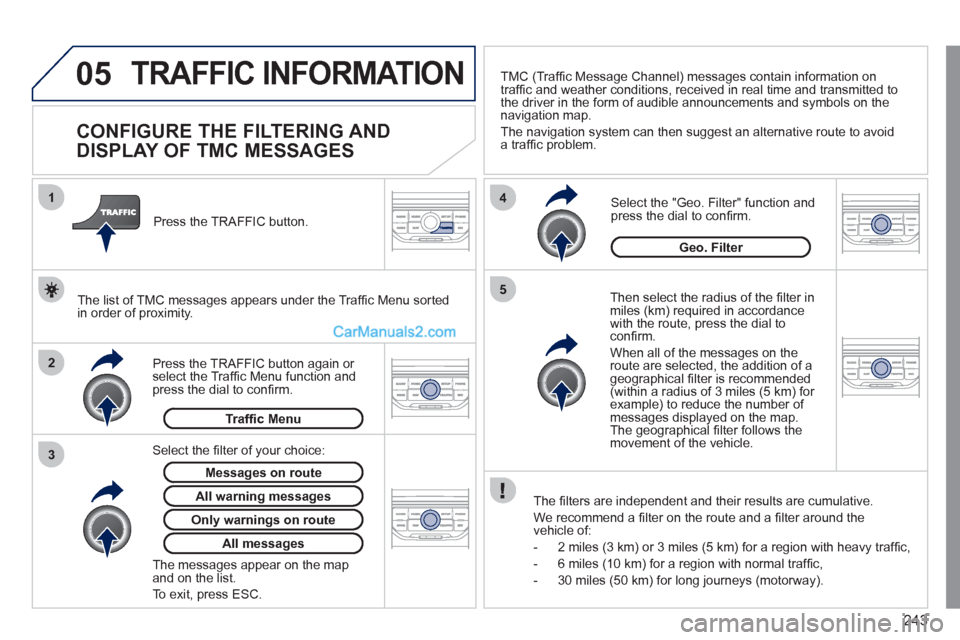
CONFIGURE THE FILTERING AND
DISPLAY OF TMC MESSAGES
Then select the radius of the fi lter in
miles (km) required in accordance
with the route, press the dial to
confi rm.
When all of the messages on the
route are selected, the addition of a
geographical fi lter is recommended
(within a radius of 3 miles (5 km) for
example) to reduce the number of
messages displayed on the map.
The geographical fi lter follows the
movement of the vehicle.
The fi lters are independent and their results are cumulative.
We recommend a fi lter on the route and a fi lter around the
vehicle of:
- 2 miles (3 km) or 3 miles (5 km) for a region with heavy traffi c,
- 6 miles (10 km) for a region with normal traffi c,
- 30 miles (50 km) for long journeys (motorway).
Press the TRAFFIC button again or
select the Traffi c Menu function and
press the dial to confi rm.
Press the TRAFFIC button.
TMC (Traffi c Message Channel) messages contain information on
traffi c and weather conditions, received in real time and transmitted to
the driver in the form of audible announcements and symbols on the
navigation map.
The navigation system can then suggest an alternative route to avoid
a traffi c problem.
Select the "Geo. Filter" function and
press the dial to confi rm.
Messages on route
The list of TMC messages appears under the Traffi c Menu sorted
in order of proximity.
All warning messages
Traffi c Menu
Select the fi lter of your choice:
Only warnings on route
All messages
The messages appear on the map
and on the list.
To exit, press ESC.
Geo. Filter
Page 251 of 292
249
08
1
2
3
5 4
*
The services available depend on the network, the SIM card and the
compatibility of the Bluetooth telephone used. Check the telephone
manual and with your network provider for details of the services
available to you.
BLUETOOTH TELEPHONE
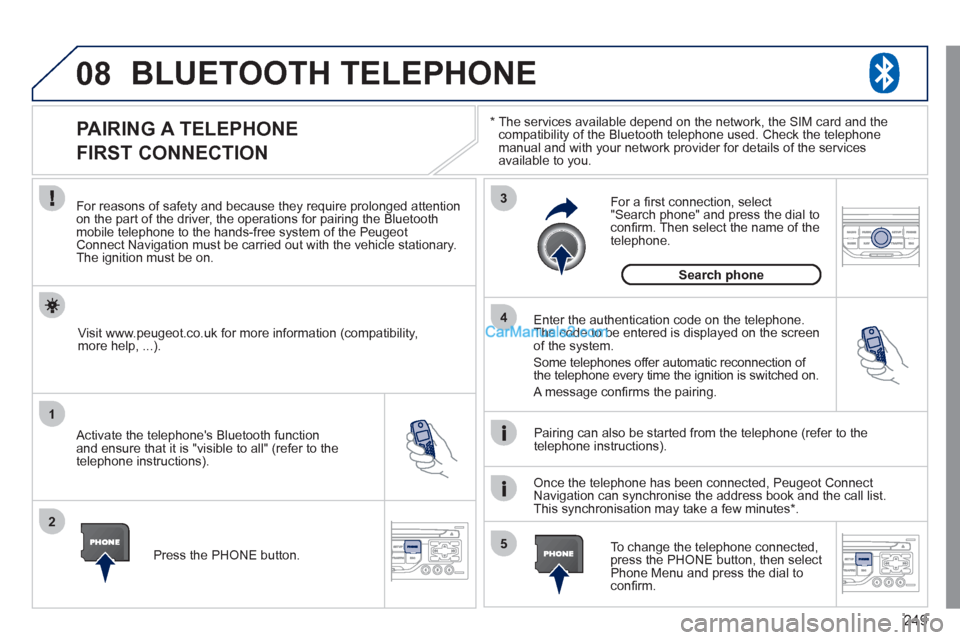
PAIRING A TELEPHONE
FIRST CONNECTION
For reasons of safety and because they require prolonged attention
on the part of the driver, the operations for pairing the Bluetooth
mobile telephone to the hands-free system of the Peugeot
Connect Navigation must be carried out with the vehicle stationary.
The ignition must be on.
Activate the telephone's Bluetooth function
and ensure that it is "visible to all" (refer to the
telephone instructions).
Enter the authentication code on the telephone.
The code to be entered is displayed on the screen
of the system.
Some telephones offer automatic reconnection of
the telephone every time the ignition is switched on.
A message confi rms the pairing.
To change the telephone connected,
press the PHONE button, then select
Phone Menu and press the dial to
confi rm.
Once the telephone has been connected, Peugeot Connect
Navigation can synchronise the address book and the call list.
This synchronisation may take a few minutes * .
Pairing can also be started from the telephone (refer to the
telephone instructions).
Visit www.peugeot.co.uk for more information (compatibility,
more help, ...).
Press the PHONE button.
For a fi rst connection, select
"Search phone" and press the dial to
confi rm. Then select the name of the
telephone.
Search phone
Page 252 of 292
250
08
1
2
4
3
*
The services available depend on the network, the SIM card and the
compatibility of the Bluetooth telephone used. Check the telephone
manual and with your network provider for details of the services
available to you.
BLUETOOTH TELEPHONE
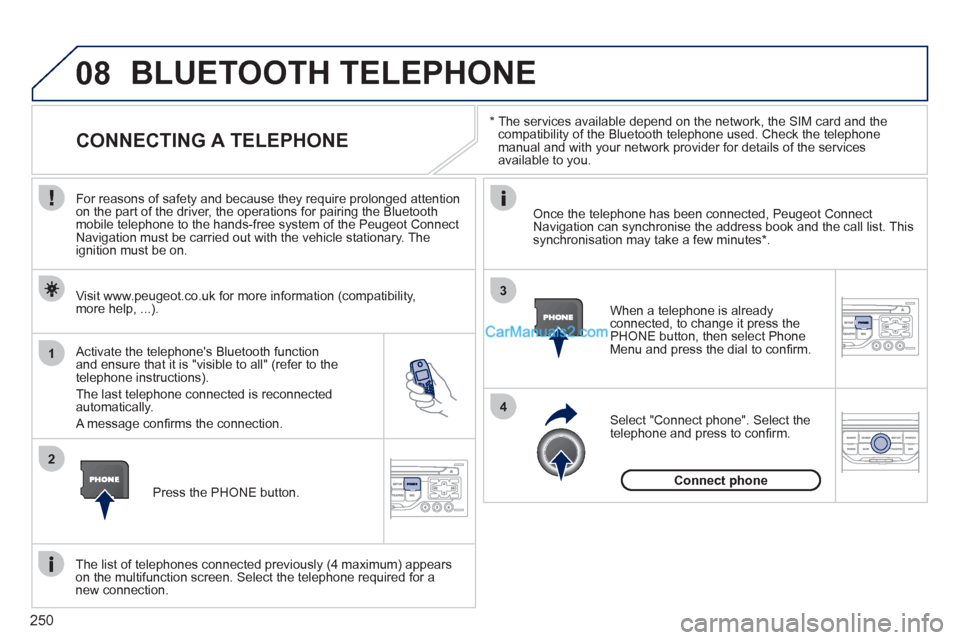
CONNECTING A TELEPHONE
For reasons of safety and because they require prolonged attention
on the part of the driver, the operations for pairing the Bluetooth
mobile telephone to the hands-free system of the Peugeot Connect
Navigation must be carried out with the vehicle stationary. The
ignition must be on.
Activate the telephone's Bluetooth function
and ensure that it is "visible to all" (refer to the
telephone instructions).
The last telephone connected is reconnected
automatically.
A message confi rms the connection.
When a telephone is already
connected, to change it press the
PHONE button, then select Phone
Menu and press the dial to confi rm.
Once the telephone has been connected, Peugeot Connect
Navigation can synchronise the address book and the call list. This
synchronisation may take a few minutes * .
The list of telephones connected previously (4 maximum) appears
on the multifunction screen. Select the telephone required for a
new connection.
Visit www.peugeot.co.uk for more information (compatibility,
more help, ...).
Press the PHONE button.
Select "Connect phone". Select the
telephone and press to confi rm.
Connect phone
Page 261 of 292
259
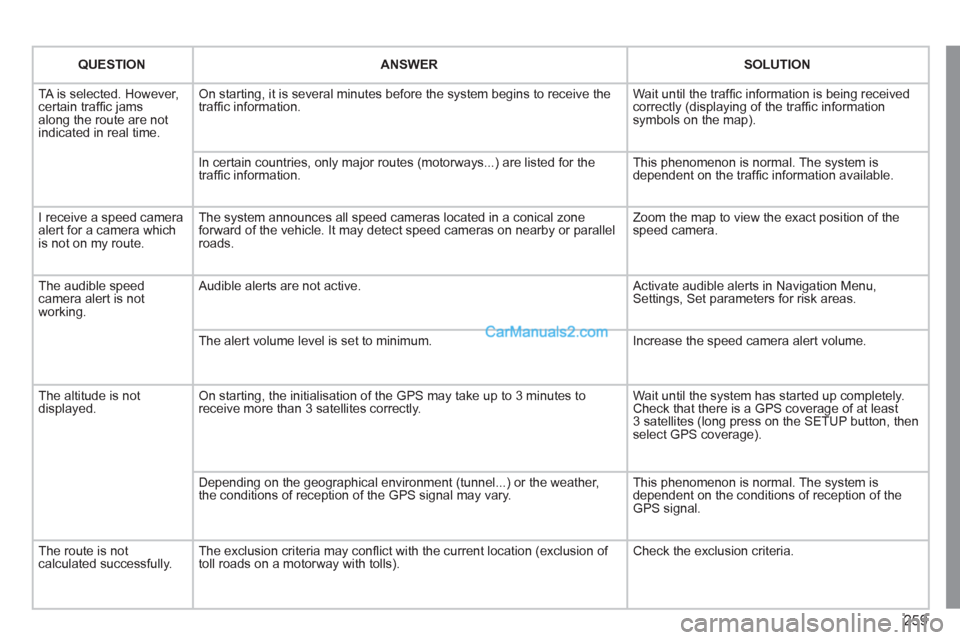
QUESTION
ANSWER
SOLUTION
TA is selected. However,
certain traffi c jams
along the route are not
indicated in real time. On starting, it is several minutes before the system begins to receive the
traffi c information. Wait until the traffi c information is being received
correctly (displaying of the traffi c information
symbols on the map).
In certain countries, only major routes (motorways...) are listed for the
traffi c information. This phenomenon is normal. The system is
dependent on the traffi c information available.
I receive a speed camera
alert for a camera which
is not on my route. The system announces all speed cameras located in a conical zone
forward of the vehicle. It may detect speed cameras on nearby or parallel
roads. Zoom the map to view the exact position of the
speed camera.
The audible speed
camera alert is not
working. Audible alerts are not active. Activate audible alerts in Navigation Menu,
Settings, Set parameters for risk areas.
The alert volume level is set to minimum. Increase the speed camera alert volume.
The altitude is not
displayed. On starting, the initialisation of the GPS may take up to 3 minutes to
receive more than 3 satellites correctly. Wait until the system has started up completely.
Check that there is a GPS coverage of at least
3 satellites (long press on the SETUP button, then
select GPS coverage).
Depending on the geographical environment (tunnel...) or the weather,
the conditions of reception of the GPS signal may vary. This phenomenon is normal. The system is
dependent on the conditions of reception of the
GPS signal.
The route is not
calculated successfully. The exclusion criteria may confl ict with the current location (exclusion of
toll roads on a motorway with tolls). Check the exclusion criteria.
Page 262 of 292
260
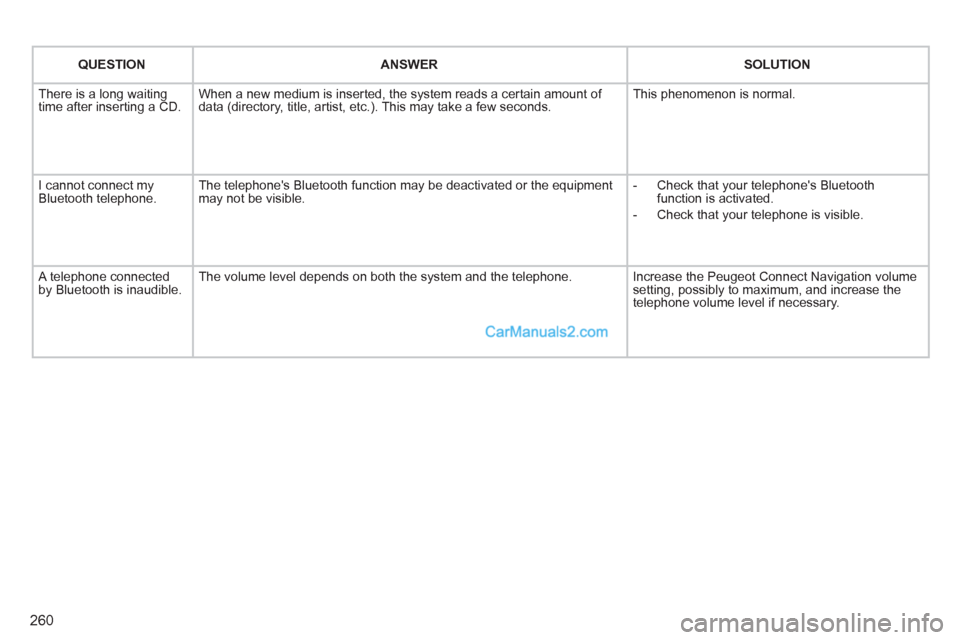
QUESTION
ANSWER
SOLUTION
There is a long waiting
time after inserting a CD. When a new medium is inserted, the system reads a certain amount of
data (directory, title, artist, etc.). This may take a few seconds. This phenomenon is normal.
I cannot connect my
Bluetooth telephone. The telephone's Bluetooth function may be deactivated or the equipment
may not be visible.
- Check that your telephone's Bluetooth
function is activated.
- Check that your telephone is visible.
A telephone connected
by Bluetooth is inaudible. The volume level depends on both the system and the telephone. Increase the Peugeot Connect Navigation volume
setting, possibly to maximum, and increase the
telephone volume level if necessary.
Page 270 of 292
268
05
1
1
2
3
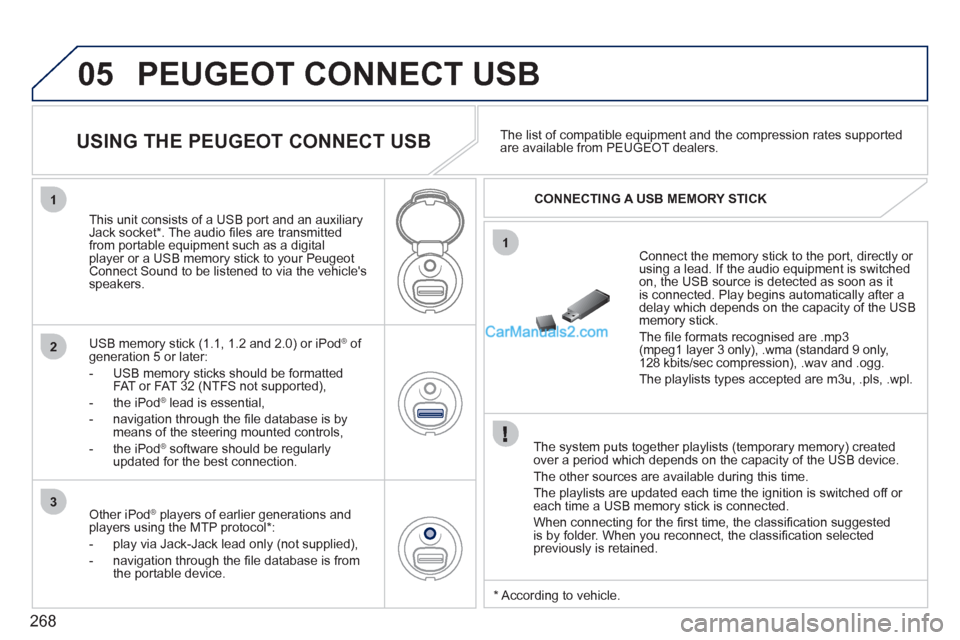
PEUGEOT CONNECT USB
The system puts together playlists (temporary memory) created
over a period which depends on the capacity of the USB device.
The other sources are available during this time.
The playlists are updated each time the ignition is switched off or
each time a USB memory stick is connected.
When connecting for the fi rst time, the classifi cation suggested
is by folder. When you reconnect, the classifi cation selected
previously is retained.
Connect the memory stick to the port, directly or
using a lead. If the audio equipment is switched
on, the USB source is detected as soon as it
is connected. Play begins automatically after a
delay which depends on the capacity of the USB
memory stick.
The fi le formats recognised are .mp3
(mpeg1 layer 3 only), .wma (standard 9 only,
128 kbits/sec compression), .wav and .ogg.
The playlists types accepted are m3u, .pls, .wpl.
This unit consists of a USB port and an auxiliary
Jack socket * . The audio fi les are transmitted
from portable equipment such as a digital
player or a USB memory stick to your Peugeot
Connect Sound to be listened to via the vehicle's
speakers.
USB memory stick (1.1, 1.2 and 2.0) or iPod
®
of
generation 5 or later:
- USB memory sticks should be formatted
FAT or FAT 32 (NTFS not supported),
- the iPod
®
lead is essential,
- navigation through the fi le database is by
means of the steering mounted controls,
- the iPod
®
software should be regularly
updated for the best connection.
The list of compatible equipment and the compression rates supported
are available from PEUGEOT dealers.
USING THE PEUGEOT CONNECT USB
CONNECTING A USB MEMORY STICK
Other iPod
®
players of earlier generations and
players using the MTP protocol * :
- play via Jack-Jack lead only (not supplied),
- navigation through the fi le database is from
the portable device.
* According to vehicle.
Page 283 of 292
281
VISUAL SEARCH
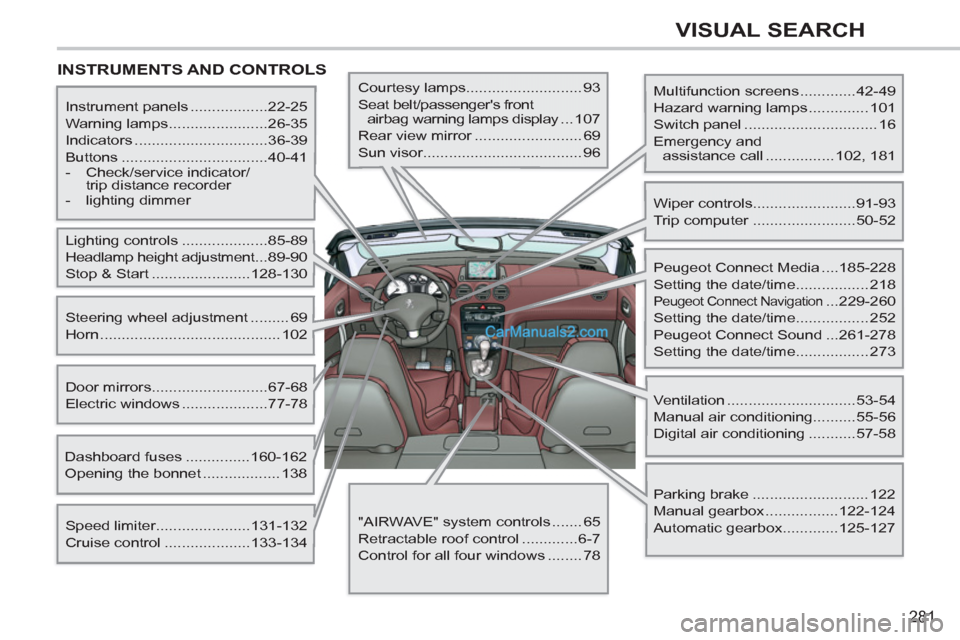
INSTRUMENTS AND CONTROLS
Multifunction screens .............42-49
Hazard warning lamps .............. 101
Switch panel ............................... 16
Emergency and
assistance call ................ 102, 181
Instrument panels ..................22-25
Warning lamps .......................26-35
Indicators ...............................36-39
Buttons ..................................40-41
- Check/service indicator/
trip distance recorder
- lighting dimmer
Lighting controls ....................85-89
Headlamp height adjustment ...89-90
Stop & Start .......................128-130
Speed limiter......................131-132
Cruise control ....................133-134
Door mirrors ...........................67-68
Electric windows ....................77-78
Dashboard fuses ...............160-162
Opening the bonnet .................. 138
Steering wheel adjustment ......... 69
Horn .......................................... 102
Courtesy lamps........................... 93
Seat belt/passenger's front
airbag warning lamps display ...107
Rear view mirror ......................... 69
Sun visor..................................... 96
Wiper controls........................91-93
Trip computer ........................50-52
Peugeot Connect Media ....185-228
Setting the date/time................. 218
Peugeot Connect Navigation ...229-260
Setting the date/time................. 252
Peugeot Connect Sound ...261-278
Setting the date/time................. 273
Ventilation ..............................53-54
Manual air conditioning..........55-56
Digital air conditioning ...........57-58
Parking brake ........................... 122
Manual gearbox .................122-124
Automatic gearbox.............125-127
"AIRWAVE" system controls ....... 65
Retractable roof control .............6-7
Control for all four windows ........ 78
Page 287 of 292
285
ALPHABETICAL INDEX
Oil filter ........................................... 144
Oil level ..................................... 37, 142
Opening the bonnet ........................ 138
Opening the boot ........................ 70, 82
Opening the doors ................ 70, 79, 81
Opening the retractable roof .............. 6
Opening the retractable screen ........ 49
Opening the windows ....................... 77
Operation indicator lamps ........... 26-35 Main beam ........................ 85, 155, 156
Manual gearbox ......122, 123, 128, 145
Manufacturer's
identification plates ..................... 179
Map reading lamps ........................... 93
Markings, identification ................... 179
Mat.................................................... 98
Menu, main ..................................... 264
Mini fuel level.................................... 83
Misfuel prevention ............................ 84 Labels, identification ....................... 179
Lamps, warning
and indicator ............................ 26-35
Lateral airbags ........................ 112, 113 Inflating accessories
(using the kit) ............................. 150
Inflating tyres .................................... 21
Inputs for
audio system .............. 212, 248, 270
Instrument panel lighting .................. 41
Instrument panels ........................ 22-24
Instrument panel screen .............. 22-25
Interior fittings ................................... 95
Interior mood lighting ........................ 94
ISOFIX child seats.................. 120, 121
ISOFIX mountings .......................... 119
Keeping children
safe ..................... 109, 111, 114-121
Key in ignition warning ..................... 72
Key with remote control ............... 70-74Navigation............................... 196, 235
Neck heater ...................................... 65
Neck heater control .......................... 65
Number plate lamps ....................... 158
J
K
L
N
M
OJack ................................................ 151
Jukebox (copy) ............................... 210
Jukebox (playing) ........................... 211LED lamps ........................................ 87
Level, brake fluid ............................ 142
Level, headlamp wash.............. 92, 143
Level, power steering fluid ............. 142
Levels and checks ................... 140-143
Lighting, guide-me home ............ 87, 88
Lighting, interior .......................... 93, 94
Lighting bulbs (replacement) ... 155-159
Lighting dimmer ................................ 41
Lighting stalk .................................... 85
Loading ............................................. 20
Load reduction mode...................... 168
Locating your vehicle........................ 72
Locking from the inside .................... 80
Locking the boot ............................... 82
Luggage retaining net..................... 100
Luggage retaining strap.................... 99Monochrome screen ............... 264, 274
Mountings for ISOFIX seats ........... 119
MP3 CD .......................... 208, 247, 267
Multifunction screen (with audio
equipment) .................42, 45, 47, 49
Music media players....... 208, 246, 266
Paint colour code............................ 179
Parking brake ......................... 122, 145
Particle emission filter ............ 143, 144
P