service Peugeot 308 CC 2011 Owner's Guide
[x] Cancel search | Manufacturer: PEUGEOT, Model Year: 2011, Model line: 308 CC, Model: Peugeot 308 CC 2011Pages: 292, PDF Size: 40.04 MB
Page 223 of 292
221
ADDR
BOOK
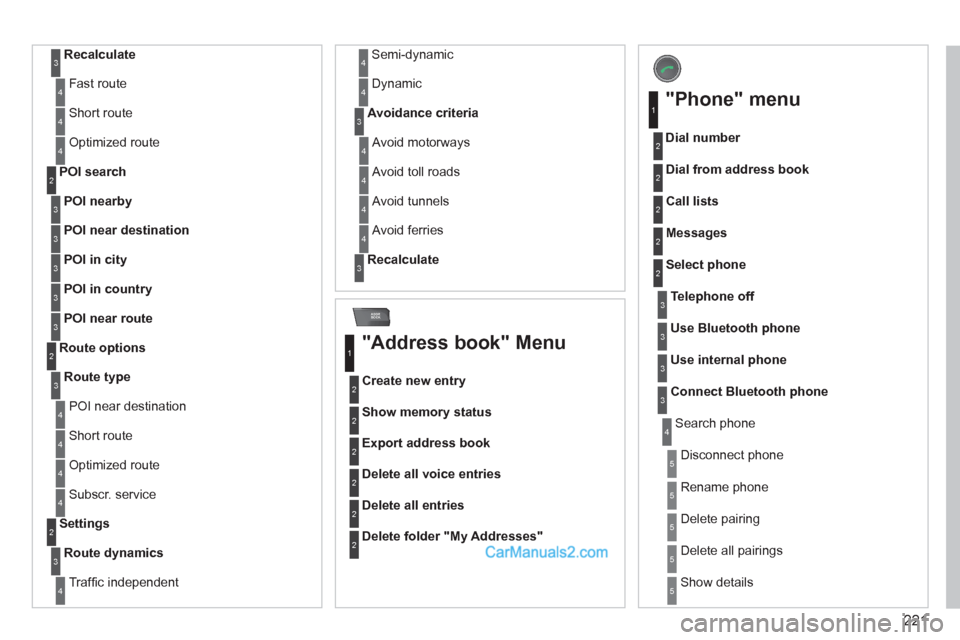
Recalculate
3
Fast route 4
Short route 4
Optimized route 4
POI nearby
POI search
2
3
POI near destination
3
POI in city
3
POI in country
3
POI near route
3
Route type
Route options
2
3
POI near destination 4
Short route 4
Optimized route 4
Subscr. service 4
Route dynamics
Settings
2
3
Traffi c independent 4
Semi-dynamic 4
Dynamic 4
Avoidance criteria
3
Avoid motorways 4
Avoid toll roads 4
Avoid tunnels 4
Avoid ferries 4
Recalculate
3
"Address book" Menu
Create new entry
1
2
Show memory status 2
Export address book 2
Delete all voice entries 2
Delete all entries 2
Delete folder "My Addresses"
2
"Phone" menu
Dial number
1
2
Dial from address book 2
Call lists 2
Messages 2
Select phone 2
Search phone 4
Telephone off
3
Use Bluetooth phone
3
Use internal phone
3
Connect Bluetooth phone
3
Disconnect phone 5
Rename phone 5
Delete pairing 5
Delete all pairings 5
Show details 5
Page 242 of 292
240
04
8
6
7
4
3
5
2
1
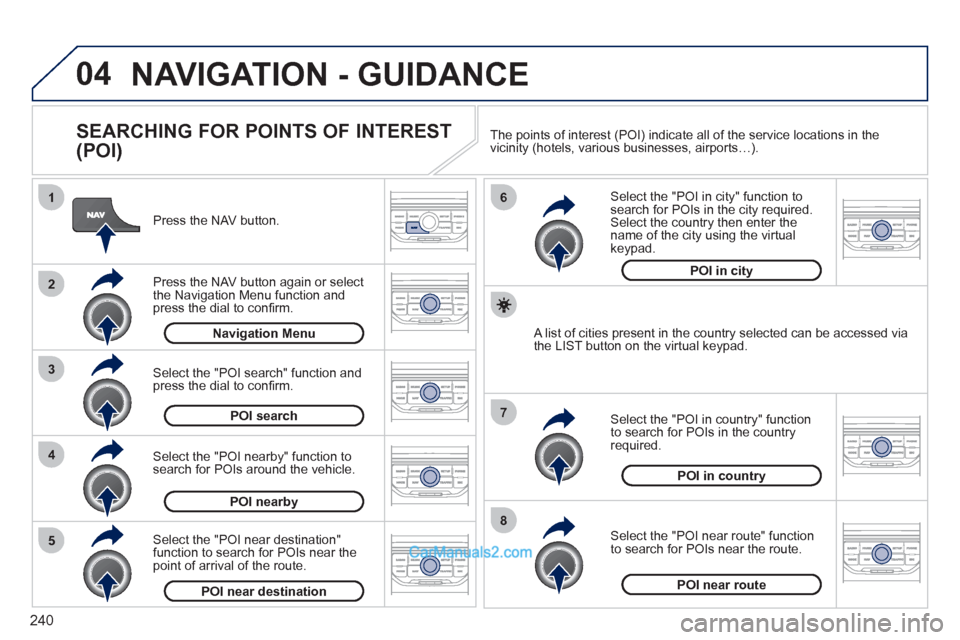
NAVIGATION - GUIDANCE
SEARCHING FOR POINTS OF INTEREST
(POI)
Press the NAV button.
Press the NAV button again or select
the Navigation Menu function and
press the dial to confi rm.
Select the "POI nearby" function to
search for POIs around the vehicle.
Select the "POI search" function and
press the dial to confi rm.
Navigation Menu
POI search
POI nearby
Select the "POI in city" function to
search for POIs in the city required.
Select the country then enter the
name of the city using the virtual
keypad.
Select the "POI near route" function
to search for POIs near the route.
Select the "POI in country" function
to search for POIs in the country
required.
Select the "POI near destination"
function to search for POIs near the
point of arrival of the route.
POI near destination
POI near route
POI in country
POI in city
A list of cities present in the country selected can be accessed via
the LIST button on the virtual keypad. The points of interest (POI) indicate all of the service locations in the
vicinity (hotels, various businesses, airports…).
Page 243 of 292
241
04 NAVIGATION - GUIDANCE
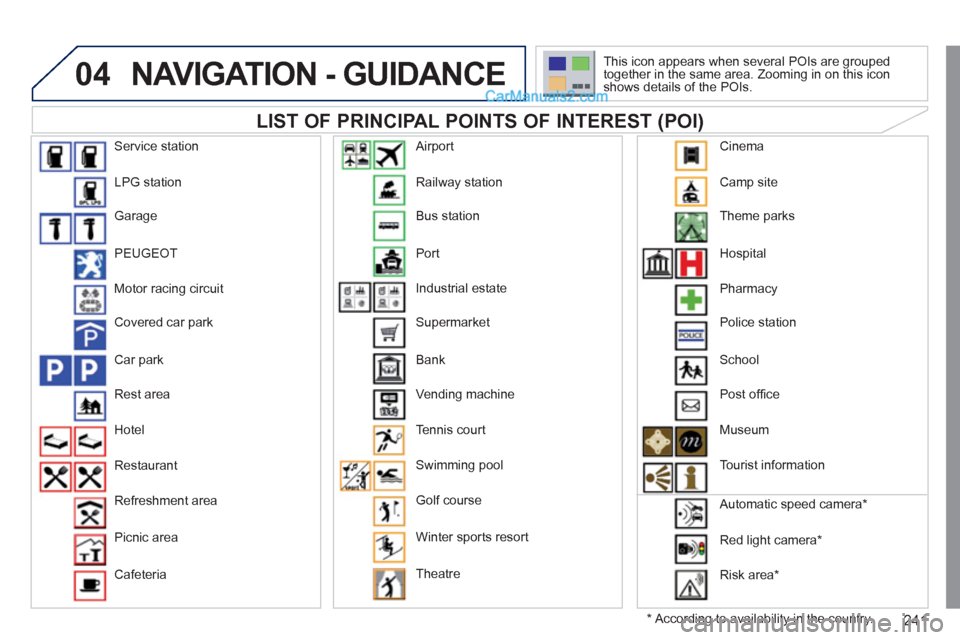
LIST OF PRINCIPAL POINTS OF INTEREST (POI)
*
According to availability in the country. This icon appears when several POIs are grouped
together in the same area. Zooming in on this icon
shows details of the POIs.
Service station
LPG station
Garage
PEUGEOT
Motor racing circuit
Covered car park
Car park
Rest area
Hotel
Restaurant
Refreshment area
Picnic area
Cafeteria Railway station
Bus station
Port
Industrial estate
Supermarket
Bank
Vending machine
Tennis court
Swimming pool
Golf course
Winter sports resort
Theatre
Airport
Camp site
Theme parks
Hospital
Pharmacy
Police station
School
Post offi ce
Museum
Tourist information
Automatic speed camera *
Red light camera *
Risk area *
Cinema
Page 251 of 292
249
08
1
2
3
5 4
*
The services available depend on the network, the SIM card and the
compatibility of the Bluetooth telephone used. Check the telephone
manual and with your network provider for details of the services
available to you.
BLUETOOTH TELEPHONE
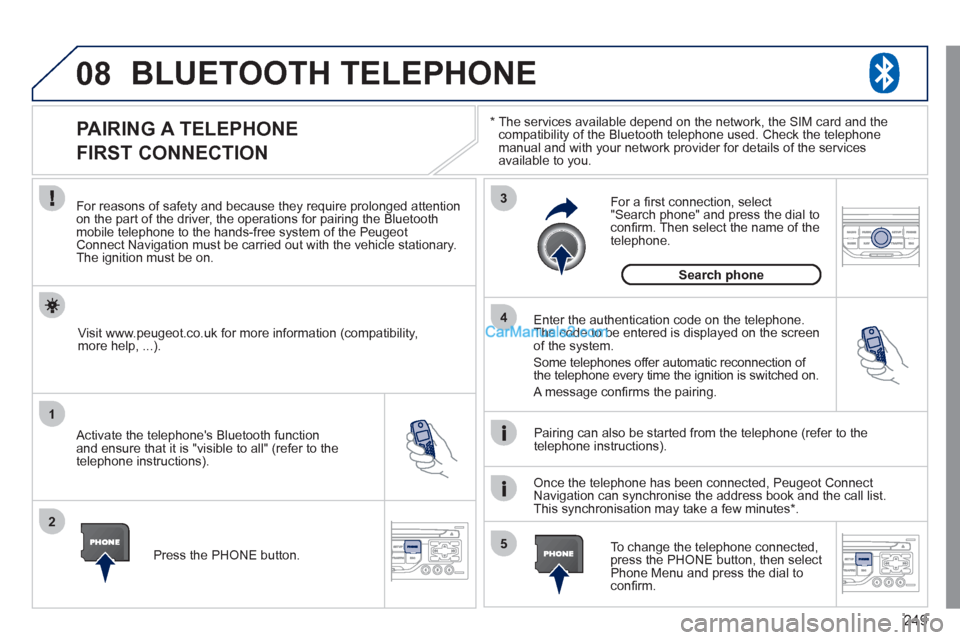
PAIRING A TELEPHONE
FIRST CONNECTION
For reasons of safety and because they require prolonged attention
on the part of the driver, the operations for pairing the Bluetooth
mobile telephone to the hands-free system of the Peugeot
Connect Navigation must be carried out with the vehicle stationary.
The ignition must be on.
Activate the telephone's Bluetooth function
and ensure that it is "visible to all" (refer to the
telephone instructions).
Enter the authentication code on the telephone.
The code to be entered is displayed on the screen
of the system.
Some telephones offer automatic reconnection of
the telephone every time the ignition is switched on.
A message confi rms the pairing.
To change the telephone connected,
press the PHONE button, then select
Phone Menu and press the dial to
confi rm.
Once the telephone has been connected, Peugeot Connect
Navigation can synchronise the address book and the call list.
This synchronisation may take a few minutes * .
Pairing can also be started from the telephone (refer to the
telephone instructions).
Visit www.peugeot.co.uk for more information (compatibility,
more help, ...).
Press the PHONE button.
For a fi rst connection, select
"Search phone" and press the dial to
confi rm. Then select the name of the
telephone.
Search phone
Page 252 of 292
250
08
1
2
4
3
*
The services available depend on the network, the SIM card and the
compatibility of the Bluetooth telephone used. Check the telephone
manual and with your network provider for details of the services
available to you.
BLUETOOTH TELEPHONE
CONNECTING A TELEPHONE
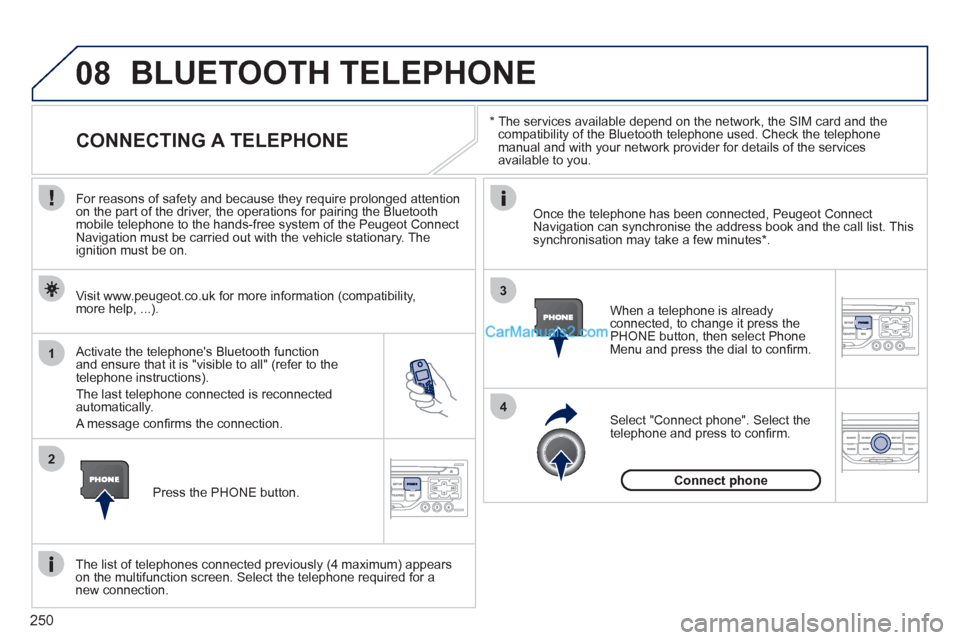
For reasons of safety and because they require prolonged attention
on the part of the driver, the operations for pairing the Bluetooth
mobile telephone to the hands-free system of the Peugeot Connect
Navigation must be carried out with the vehicle stationary. The
ignition must be on.
Activate the telephone's Bluetooth function
and ensure that it is "visible to all" (refer to the
telephone instructions).
The last telephone connected is reconnected
automatically.
A message confi rms the connection.
When a telephone is already
connected, to change it press the
PHONE button, then select Phone
Menu and press the dial to confi rm.
Once the telephone has been connected, Peugeot Connect
Navigation can synchronise the address book and the call list. This
synchronisation may take a few minutes * .
The list of telephones connected previously (4 maximum) appears
on the multifunction screen. Select the telephone required for a
new connection.
Visit www.peugeot.co.uk for more information (compatibility,
more help, ...).
Press the PHONE button.
Select "Connect phone". Select the
telephone and press to confi rm.
Connect phone
Page 273 of 292
271
06
1
2
3
4
5
6
7
8
9
10
BLUETOOTH
For safety reasons and because they require prolonged attention
on the part of the driver, the operations for pairing of the Bluetooth
mobile telephone with the Bluetooth hands-free system of your
audio equipment must be carried out with the vehicle stationary
and the ignition on.
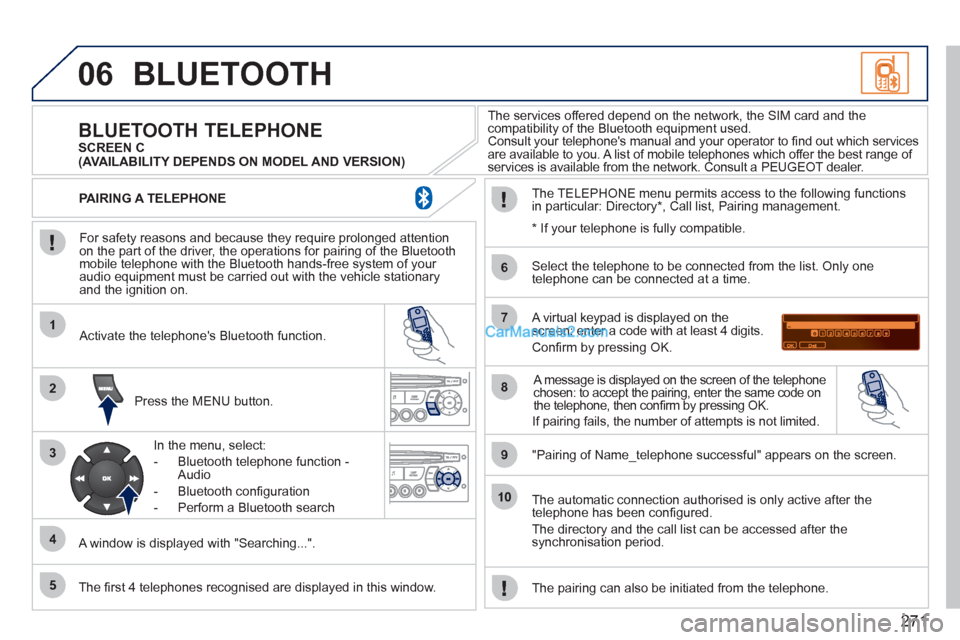
Press the MENU button.
A window is displayed with "Searching...".
Activate the telephone's Bluetooth function.
In the menu, select:
- Bluetooth telephone function -
Audio
- Bluetooth confi guration
- Perform a Bluetooth search
The services offered depend on the network, the SIM card and the
compatibility of the Bluetooth equipment used.
Consult your telephone's manual and your operator to fi nd out which services
are available to you. A list of mobile telephones which offer the best range of
services is available from the network. Consult a PEUGEOT dealer.
BLUETOOTH TELEPHONE
SCREEN C
The TELEPHONE menu permits access to the following functions
in particular: Directory * , Call list, Pairing management.
The fi rst 4 telephones recognised are displayed in this window.
A virtual keypad is displayed on the
screen: enter a code with at least 4 digits.
Confi rm by pressing OK.
"Pairing of Name_telephone successful" appears on the screen.
Select the telephone to be connected from the list. Only one
telephone can be connected at a time.
A message is displayed on the screen of the telephone
chosen: to accept the pairing, enter the same code on
the telephone, then confi rm by pressing OK.
The automatic connection authorised is only active after the
telephone has been confi gured.
The directory and the call list can be accessed after the
synchronisation period.
PAIRING A TELEPHONE
The pairing can also be initiated from the telephone.
(AVAILABILITY DEPENDS ON MODEL AND VERSION)
* If your telephone is fully compatible.
If pairing fails, the number of attempts is not limited.
Page 283 of 292
281
VISUAL SEARCH
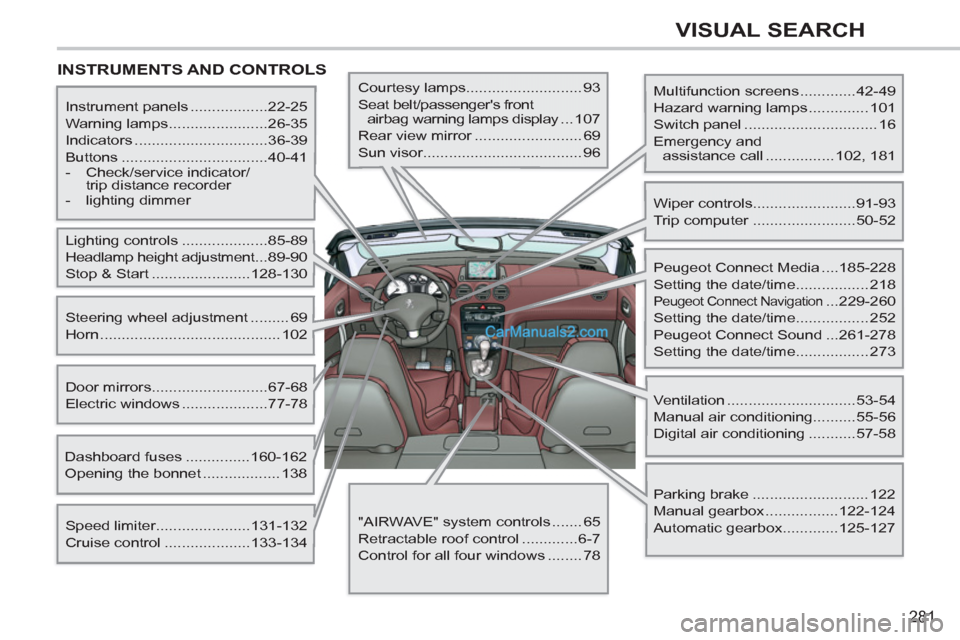
INSTRUMENTS AND CONTROLS
Multifunction screens .............42-49
Hazard warning lamps .............. 101
Switch panel ............................... 16
Emergency and
assistance call ................ 102, 181
Instrument panels ..................22-25
Warning lamps .......................26-35
Indicators ...............................36-39
Buttons ..................................40-41
- Check/service indicator/
trip distance recorder
- lighting dimmer
Lighting controls ....................85-89
Headlamp height adjustment ...89-90
Stop & Start .......................128-130
Speed limiter......................131-132
Cruise control ....................133-134
Door mirrors ...........................67-68
Electric windows ....................77-78
Dashboard fuses ...............160-162
Opening the bonnet .................. 138
Steering wheel adjustment ......... 69
Horn .......................................... 102
Courtesy lamps........................... 93
Seat belt/passenger's front
airbag warning lamps display ...107
Rear view mirror ......................... 69
Sun visor..................................... 96
Wiper controls........................91-93
Trip computer ........................50-52
Peugeot Connect Media ....185-228
Setting the date/time................. 218
Peugeot Connect Navigation ...229-260
Setting the date/time................. 252
Peugeot Connect Sound ...261-278
Setting the date/time................. 273
Ventilation ..............................53-54
Manual air conditioning..........55-56
Digital air conditioning ...........57-58
Parking brake ........................... 122
Manual gearbox .................122-124
Automatic gearbox.............125-127
"AIRWAVE" system controls ....... 65
Retractable roof control .............6-7
Control for all four windows ........ 78
Page 288 of 292
286
ALPHABETICAL INDEX
Reduction of electrical load ............ 168
Refitting a wheel ............................. 154
Reinitialising partial opening
of the windows ............................. 78
Reinitialising the electric windows .... 78
Reinitialising the remote control ....... 73
Remote control ............................ 70-74
Removable screen
(snow shield) .............................. 172
Removing a wheel .......................... 153
Removing the mat ............................ 98
Repair kit, puncture ................ 100, 146
Replacing bulbs ....................... 155-159
Replacing fuses ....................... 160-165
Replacing the air filter .................... 144
Replacing the oil filter ..................... 144
Replacing the particle
emission filter ............................. 144
Replacing the passenger
compartment filter ...................... 144
Replacing wiper blades ............ 93, 169
Resetting the service indicator ......... 39
Resetting the trip recorder ................ 40
Retractable colour screen .... 45, 47, 49
Retractable roof .......................... 6, 100
Rev counter ................................. 22-24
Reversing lamps ............................. 158
Roll-over bars ........................... 66, 106
Routine checks ....................... 144, 145
Routine maintenance ....................... 20
Running out of fuel (Diesel)............ 139 Radio .............................. 207, 245, 265
Rear armrest .................................... 66
Rear foglamps .......................... 86, 158
Rear head restraints ......................... 66
Rear lamps ..................................... 158
Rear parking sensors ..................... 135
Rear screen (demisting) ................... 56
Rear seats ................................ 66, 106
Rear view mirror ............................... 69
Recharging the battery ................... 167Satellite navigation system ..... 196, 235
Screen,
colour 16/9 .........191, 219, 232, 253
Screen, monochrome C ................... 50
Screen, multifunction (with audio
equipment) .................42, 45, 47, 49
Screen-wash reservoir ................... 143
Screen menu map .......... 219, 253, 274
Screenwash fluid level.............. 92, 143
Seat adjustment ......................... 62, 63
Seat belts ............................... 107, 109
Serial number, vehicle .................... 179
Service indicator ............................... 38
Servicing ........................................... 20
Setting the clock ............. 218, 252, 273
Short-cut menus ............. 192, 233, 234
Sidelamps ...................85, 87, 155, 158
Side repeater .................................. 157
Side spotlamps ......................... 89, 157
SIM card ......................................... 216
Snow chains ................................... 179
Spare wheel ................................... 151
Speed limiter .................................. 131
Speedometer ............................... 22-24
Stability control (ESP) .................... 105
Starting the vehicle ................... 72, 125
Steering mounted
controls ....................... 190, 231, 263
Stopping the vehicle ................. 72, 125
Stop Start ....................52, 57, 83, 128,
138, 144, 166 Passenger compartment filter ........ 144
Petrol engine ............................ 84, 140
PEUGEOT call button ............ 182, 183
PEUGEOT CONNECT
ASSISTANCE ..................... 182, 183
Peugeot Connect Media ...... 25, 47, 49,
50, 185-228
Peugeot Connect Navigation..... 45, 49,
229-260
PEUGEOT CONNECT SOS .......... 182
Peugeot Connect Sound ................. 42,
261-278
PEUGEOT services ........................ 183
PIN code ......................................... 216
Player, CD MP3 .............. 208, 246, 267
Priming the fuel system .................. 139
Protecting children ... 109, 111, 114-121
Puncture ......................................... 146
R
S