warning Peugeot 308 CC 2011 Repair Manual
[x] Cancel search | Manufacturer: PEUGEOT, Model Year: 2011, Model line: 308 CC, Model: Peugeot 308 CC 2011Pages: 292, PDF Size: 40.04 MB
Page 174 of 292
10
i
!
172
PRACTICAL INFORMATION
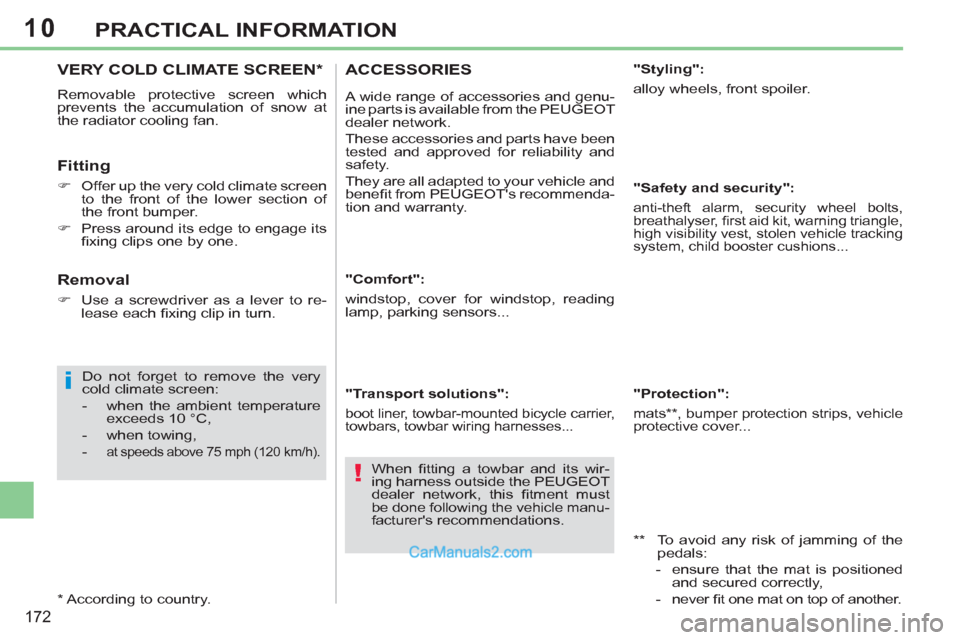
VERY COLD CLIMATE SCREEN *
Removable protective screen which
prevents the accumulation of snow at
the radiator cooling fan.
Fitting
)
Offer up the very cold climate screen
to the front of the lower section of
the front bumper.
)
Press around its edge to engage its
fi xing clips one by one.
Do not forget to remove the very
cold climate screen:
- when the ambient temperature
exceeds 10 °C,
- when towing,
-
at speeds above 75 mph (120 km/h).
* According to country.
Removal
)
Use a screwdriver as a lever to re-
lease each fi xing clip in turn.
"Comfort":
windstop, cover for windstop, reading
lamp, parking sensors...
"Transport solutions":
boot liner, towbar-mounted bicycle carrier,
towbars, towbar wiring harnesses...
ACCESSORIES
A wide range of accessories and genu-
ine parts is available from the PEUGEOT
dealer network.
These accessories and parts have been
tested and approved for reliability and
safety.
They are all adapted to your vehicle and
benefi t from PEUGEOT's recommenda-
tion and warranty.
"Styling":
alloy wheels, front spoiler.
"Safety and security":
anti-theft alarm, security wheel bolts,
breathalyser, fi rst aid kit, warning triangle,
high visibility vest, stolen vehicle tracking
system, child booster cushions...
** To avoid any risk of jamming of the
pedals:
- ensure that the mat is positioned
and secured correctly,
- never fi t one mat on top of another.
"Protection":
mats ** , bumper protection strips, vehicle
protective cover...
When fi tting a towbar and its wir-
ing harness outside the PEUGEOT
dealer network, this fi tment must
be done following the vehicle manu-
facturer's recommendations.
Page 175 of 292
10
!
i
i
173
PRACTICAL INFORMATION
The fi tting of electrical equipment
or accessories which are not rec-
ommended by PEUGEOT may
result in a failure of your vehicle's
electronic system and excessive
electrical consumption.
Please note this precaution. You
are advised to contact a PEUGEOT
representative to be shown the
range of recommended equipment
and accessories.
Depending on the legislation in
force in the country, it may be com-
pulsory to have a high visibility
safety vest, warning triangle and
spare bulbs and fuses available in
the vehicle.
By visiting a PEUGEOT dealer, you can
also obtain products for maintenance
and cleaning (interior and exterior), in-
cluding products in the "TECHNATURE"
range, products for topping up (screen-
wash...), touch-up pens and paint aero-
sols in the exact colour of your vehicle,
and refi lls (sealant cartridge for the tem-
porary puncture repair kit), ...
Installation of radio
communication transmitters
Before installing any after-market ra-
dio communication transmitter, you
can contact a PEUGEOT dealer for
the specifi cation of transmitters which can be fi tted (frequency, maximum
power, aerial position, specifi c instal-
lation requirements), in line with the
Vehicle Electromagnetic Compatibility Directive (2004/104/EC).
"Multimedia":
portable satellite navigation systems,
Bluetooth hands-free kit, DVD player,
USB Box...
Page 177 of 292
12
175
TECHNICAL DATA
*
The weight of the braked trailer can be increased, within the GTW limit, on condition that the GVW of the towing vehicle is reduced
by the same amount; warning: towing with a lightly loaded towing vehicle may have an adverse effect on its road holding.
The GTW and towed load values indicated apply up to a maximum altitude of 1 000 metres; the towed load mentioned must
be reduced by 10 % for every additional 1 000 metres.
The speed of a towing vehicle must not exceed 60 mph (100 km/h) (comply with the legislation in force in your country).
High ambient temperatures may result in a reduction in the performance of the vehicle to protect the engine; when the ambi-
ent temperature is higher than 37 °C, limit the towed weight.
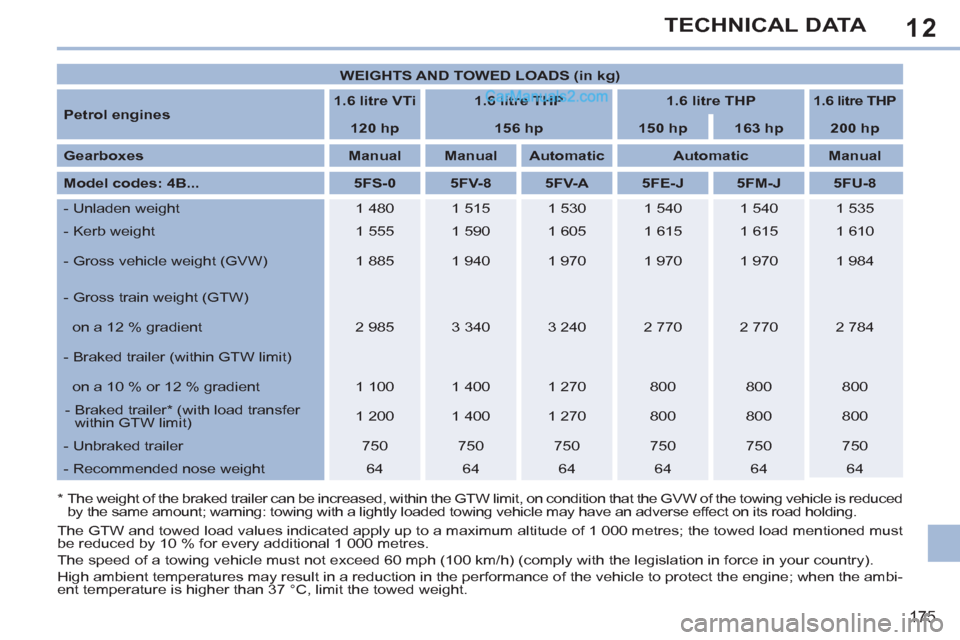
WEIGHTS AND TOWED LOADS (in kg)
Petrol engines
1.6 litre VTi
1.6 litre THP
1.6 litre THP
1.6 litre THP
120 hp
156 hp
150 hp
163 hp
200 hp
Gearboxes
Manual
Manual
Automatic
Automatic
Manual
Model codes: 4B...
5FS-0
5FV-8
5FV-A
5FE-J
5FM-J
5FU-8
- Unladen weight
1 480
1 515
1 530
1 540
1 540
1 535
- Kerb weight
1 555
1 590
1 605
1 615
1 615
1 610
- Gross vehicle weight (GVW)
1 885
1 940
1 970
1 970
1 970
1 984
- Gross train weight (GTW)
on a 12 % gradient
2 985
3 340
3 240
2 770
2 770
2 784
- Braked trailer (within GTW limit)
on a 10 % or 12 % gradient
1 100
1 400
1 270
800
800
800
- Braked trailer * (with load transfer
within GTW limit)
1 200
1 400
1 270
800
800
800
- Unbraked trailer
750
750
750
750
750
750
- Recommended nose weight
64
64
64
64
64
64
Page 179 of 292
12
177
TECHNICAL DATA
*
The weight of the braked trailer can be increased, within the GTW limit, on condition that the GVW of the towing vehicle is reduced by
the same amount; warning: towing with a lightly loaded towing vehicle may have an adverse effect on its road holding.
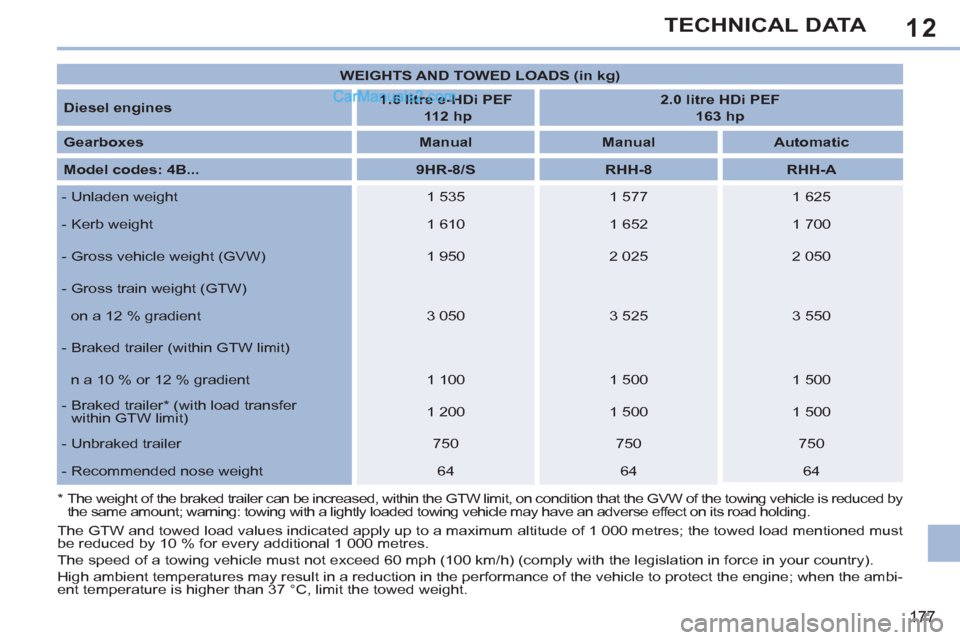
WEIGHTS AND TOWED LOADS (in kg)
Diesel engines
1.6 litre e-HDi PEF
112 hp
2.0 litre HDi PEF
163 hp
Gearboxes
Manual
Manual
Automatic
Model codes: 4B...
9HR-8/S
RHH-8
RHH-A
- Unladen weight
1 535
1 577
1 625
- Kerb weight
1 610
1 652
1 700
- Gross vehicle weight (GVW)
1 950
2 025
2 050
- Gross train weight (GTW)
on a 12 % gradient
3 050
3 525
3 550
- Braked trailer (within GTW limit)
n a 10 % or 12 % gradient
1 100
1 500
1 500
- Braked trailer * (with load transfer
within GTW limit)
1 200
1 500
1 500
- Unbraked trailer
750
750
750
- Recommended nose weight
64
64
64
The GTW and towed load values indicated apply up to a maximum altitude of 1 000 metres; the towed load mentioned must
be reduced by 10 % for every additional 1 000 metres.
The speed of a towing vehicle must not exceed 60 mph (100 km/h) (comply with the legislation in force in your country).
High ambient temperatures may result in a reduction in the performance of the vehicle to protect the engine; when the ambi-
ent temperature is higher than 37 °C, limit the towed weight.
Page 185 of 292
183
2ABC3DEF5JKL4GHI6MNO8TUV7PQRS9WXYZ0*#
1RADIO MEDIANAV ESC TRAFFIC
SETUPADDR
BOOK
2ABC3DEF5JKL4GHI6MNO8TUV7PQRS9WXYZ0*#
1RADIO MEDIANAV ESC TRAFFIC
SETUPADDR
BOOK
EMERGENCY OR ASSISTANCE CALL USING PEUGEOT
CONNECT MEDIA
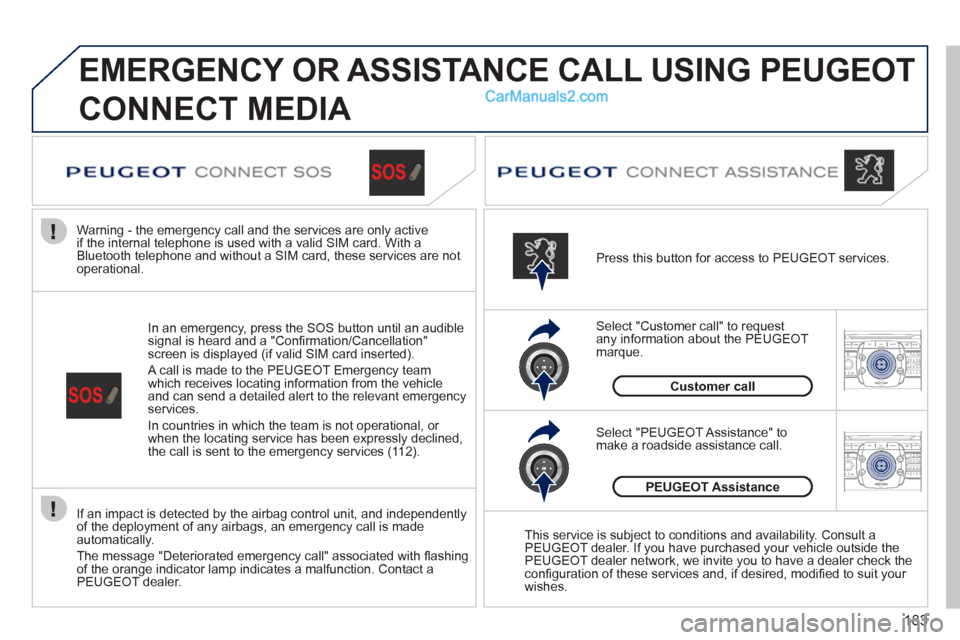
If an impact is detected by the airbag control unit, and independently
of the deployment of any airbags, an emergency call is made
automatically.
The message "Deteriorated emergency call" associated with fl ashing
of the orange indicator lamp indicates a malfunction. Contact a
PEUGEOT dealer.
In an emergency, press the SOS button until an audible
signal is heard and a "Confi rmation/Cancellation"
screen is displayed (if valid SIM card inserted).
A call is made to the PEUGEOT Emergency team
which receives locating information from the vehicle
and can send a detailed alert to the relevant emergency
services.
In countries in which the team is not operational, or
when the locating service has been expressly declined,
the call is sent to the emergency services (112).
Warning - the emergency call and the services are only active
if the internal telephone is used with a valid SIM card. With a
Bluetooth telephone and without a SIM card, these services are not
operational.
Press this button for access to PEUGEOT services.
Customer call
Select "Customer call" to request
any information about the PEUGEOT
marque.
Select "PEUGEOT Assistance" to
make a roadside assistance call.
PEUGEOT Assistance
This service is subject to conditions and availability. Consult a
PEUGEOT dealer. If you have purchased your vehicle outside the
PEUGEOT dealer network, we invite you to have a dealer check the
confi guration of these services and, if desired, modifi ed to suit your
wishes.
Page 207 of 292
205
05
2ABC3DEF5JKL4GHI6MNO8TUV7PQRS9WXYZ0*#
1RADIO MEDIANAV ESCTRAFFIC
SETUPADDR
BOOK
2ABC3DEF5JKL4GHI6MNO8TUV7PQRS9WXYZ0*#
1RADIO MEDIANAV ESC TRAFFIC
SETUPADDR
BOOK
TRAFFIC
1
3
4
5
2ABC3DEF5JKL4GHI6MNO8TUV7PQRS9WXYZ0*#
1RADIO MEDIANAV ESC TRAFFIC
SETUPADDR
BOOK
2ABC3DEF5JKL4GHI6MNO8TUV7PQRS9WXYZ0*#
1RADIO MEDIANAV ESC TRAFFIC
SETUPADDR
BOOK
2ABC3DEF5JKL4GHI6MNO8TUV7PQRS9WXYZ0*#
1RADIO MEDIANAV ESC TRAFFIC
SETUPADDR
BOOK
2
TRAFFIC INFORMATION
CONFIGURE THE FILTERING AND
DISPLAYING OF THE TMC MESSAGES
When all of the messages on the route are selected, the addition
of a geographic fi lter is recommended (within a radius of 3 miles
(5 km) for example) to reduce the number of messages displayed
on the map. The geographic fi lter follows the movement of the
vehicle.
The fi lters are independent and their results are concealed.
We recommend:
- a fi lter over 6 miles (10 km) around the vehicle in heavy traffi c,
- a fi lter over 30 miles (50 km) around the vehicle or a fi lter on
the route on motorway journeys.
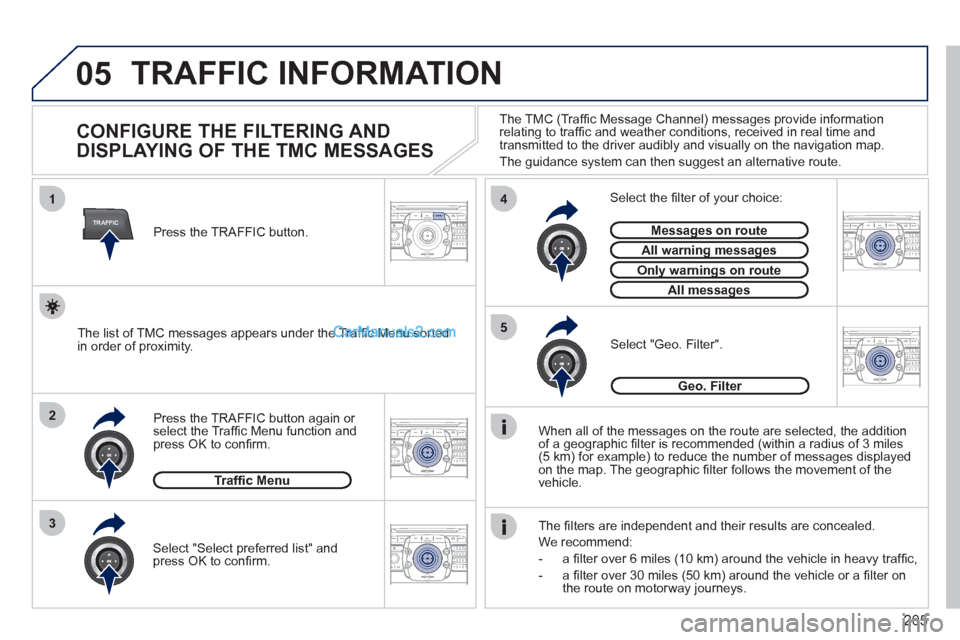
Press the TRAFFIC button again or
select the Traffi c Menu function and
press OK to confi rm.
Select "Geo. Filter".
The list of TMC messages appears under the Traffi c Menu sorted
in order of proximity.
Select the fi lter of your choice:
Messages on route
All warning messages
Only warnings on route
All messages
Traffi c Menu
Select "Select preferred list" and
press OK to confi rm.
The TMC (Traffi c Message Channel) messages provide information
relating to traffi c and weather conditions, received in real time and
transmitted to the driver audibly and visually on the navigation map.
The guidance system can then suggest an alternative route.
Press the TRAFFIC button.
Geo. Filter
Page 212 of 292
210
07
1
3
42ABC3DEF5JKL4GHI6MNO8TUV7PQRS9WXYZ0*#
1RADIO MEDIANAV ESC TRAFFIC
SETUPADDR
BOOK
2ABC3DEF5JKL4GHI6MNO8TUV7PQRS9WXYZ0*#
1RADIO MEDIANAV ESC TRAFFIC
SETUPADDR
BOOK
2ABC3DEF5JKL4GHI6MNO8TUV7PQRS9WXYZ0*#
1RADIO MEDIANAV ESC TRAFFIC
SETUPADDR
BOOK
2ABC3DEF5JKL4GHI6MNO8TUV7PQRS9WXYZ0*#
1RADIO MEDIANAV ESC TRAFFIC
SETUPADDR
BOOK2
2ABC3DEF5JKL4GHI6MNO8TUV7PQRS9WXYZ0*#
1RADIO MEDIANAV ESC TRAFFIC
SETUPADDR
BOOK
5
7
8
6
9
RADIONAV ESC TRAFFICMEDIAMEDIA
2ABC3DEF5JKL4GHI6MNO8TUV7PQRS9WXYZ0*#
1RADIO MEDIANAV ESC TRAFFIC
SETUPADDR
BOOKRADIONAV ESC TRAFFICMEDIA
2ABC3DEF5JKL4GHI6MNO8TUV7PQRS9WXYZ0*#
1RADIO MEDIANAV ESC TRAFFIC
SETUPADDR
BOOK
2ABC3DEF5JKL4GHI6MNO8TUV7PQRS9WXYZ0*#
1RADIO MEDIANAV ESC TRAFFIC
SETUPADDR
BOOK
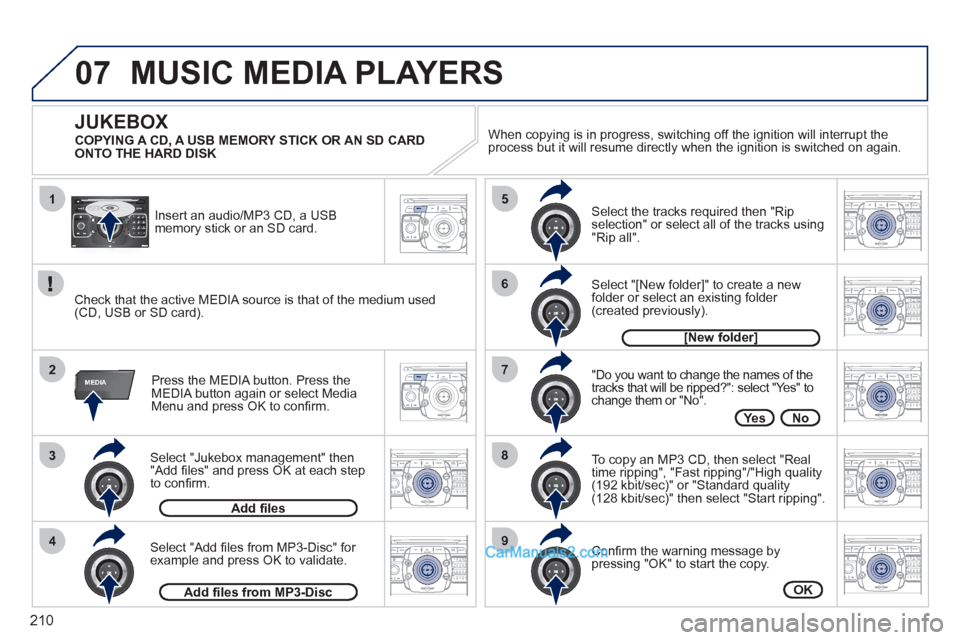
Select "Jukebox management" then
"Add fi les" and press OK at each step
to confi rm.
Press the MEDIA button. Press the
MEDIA button again or select Media
Menu and press OK to confi rm.
Insert an audio/MP3 CD, a USB
memory stick or an SD card.
JUKEBOX
Add fi les
Check that the active MEDIA source is that of the medium used
(CD, USB or SD card).
Select "Add fi les from MP3-Disc" for
example and press OK to validate.
Select the tracks required then "Rip
selection" or select all of the tracks using
"Rip all".
Select "[New folder]" to create a new
folder or select an existing folder
(created previously).
Add fi les from MP3-Disc
[New folder]
"Do you want to change the names of the
tracks that will be ripped?": select "Yes" to
change them or "No".
To copy an MP3 CD, then select "Real
time ripping", "Fast ripping"/"High quality
(192 kbit/sec)" or "Standard quality
(128 kbit/sec)" then select "Start ripping".
Confi rm the warning message by
pressing "OK" to start the copy.
OK
Yes No
When copying is in progress, switching off the ignition will interrupt the
process but it will resume directly when the ignition is switched on again.
MUSIC MEDIA PLAYERS
COPYING A CD, A USB MEMORY STICK OR AN SD CARD
ONTO THE HARD DISK
Page 221 of 292
219
10
MEDIA
TRAFFIC
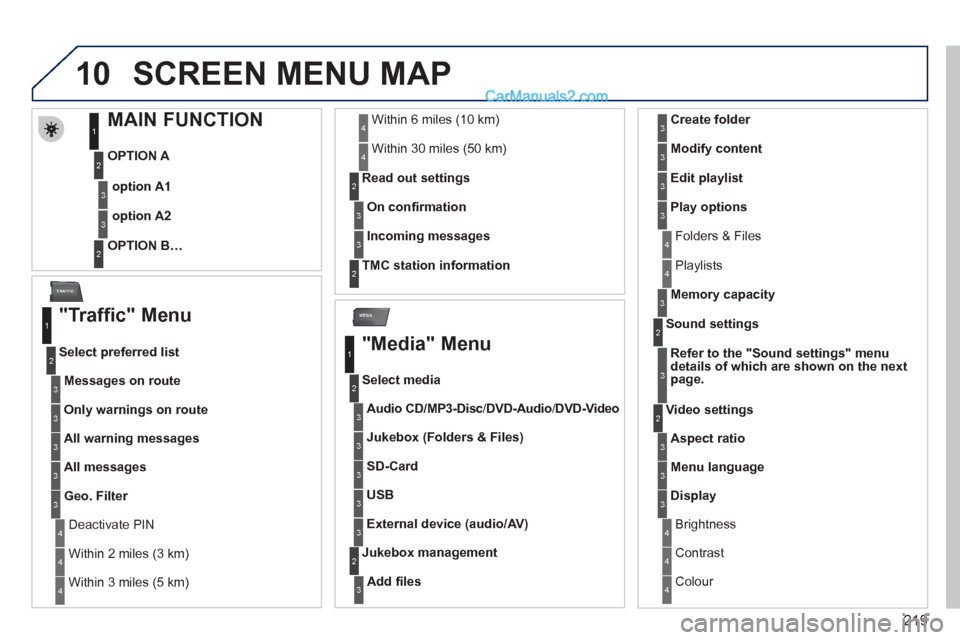
SCREEN MENU MAP
MAIN FUNCTION
OPTION A
OPTION B…
option A1
option A2
1
2
3
2
3
"Traffic" Menu
Messages on route
Select preferred list
1
2
3
Deactivate PIN 4
Only warnings on route
3
All warning messages
3
All messages
3
Geo. Filter
3
Within 2 miles (3 km) 4
Within 3 miles (5 km) 4
Within 6 miles (10 km) 4
Within 30 miles (50 km) 4
On confi rmation
Read out settings
2
3
Incoming messages
3
TMC station information
2
"Media" Menu
Audio CD/MP3-Disc
/
DVD-Audio
/ DVD-Video
Select media
1
2
3
Jukebox (Folders & Files)
3
SD-Card
3
USB
3
External device (audio/AV)
3
Add fi les
Jukebox management
2
3
Folders & Files 4
Create folder
3
Modify content
3
Edit playlist
3
Play options
3
Playlists 4
Memory capacity
3
Refer to the "
Sound settings
"
menu
details of which are shown on the next
page.
Sound settings
2
3
Aspect ratio
Video settings
2
3
Menu language 3
Display 3
Brightness 4
Contrast 4
Colour 4
Page 228 of 292
226
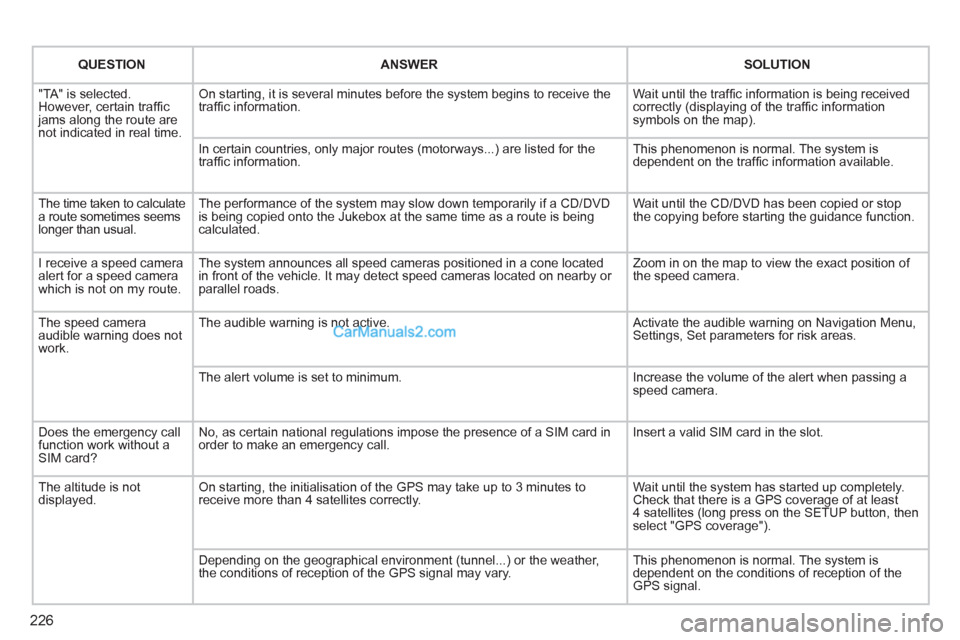
QUESTION
ANSWER
SOLUTION
"TA" is selected.
However, certain traffi c
jams along the route are
not indicated in real time. On starting, it is several minutes before the system begins to receive the
traffi c information. Wait until the traffi c information is being received
correctly (displaying of the traffi c information
symbols on the map).
In certain countries, only major routes (motorways...) are listed for the
traffi c information. This phenomenon is normal. The system is
dependent on the traffi c information available.
The time taken to calculate
a route sometimes seems
longer than usual. The performance of the system may slow down temporarily if a CD/DVD
is being copied onto the Jukebox at the same time as a route is being
calculated. Wait until the CD/DVD has been copied or stop
the copying before starting the guidance function.
I receive a speed camera
alert for a speed camera
which is not on my route. The system announces all speed cameras positioned in a cone located
in front of the vehicle. It may detect speed cameras located on nearby or
parallel roads. Zoom in on the map to view the exact position of
the speed camera.
The speed camera
audible warning does not
work. The audible warning is not active. Activate the audible warning on Navigation Menu,
Settings, Set parameters for risk areas.
The alert volume is set to minimum. Increase the volume of the alert when passing a
speed camera.
Does the emergency call
function work without a
SIM card? No, as certain national regulations impose the presence of a SIM card in
order to make an emergency call. Insert a valid SIM card in the slot.
The altitude is not
displayed. On starting, the initialisation of the GPS may take up to 3 minutes to
receive more than 4 satellites correctly. Wait until the system has started up completely.
Check that there is a GPS coverage of at least
4 satellites (long press on the SETUP button, then
select "GPS coverage").
Depending on the geographical environment (tunnel...) or the weather,
the conditions of reception of the GPS signal may vary. This phenomenon is normal. The system is
dependent on the conditions of reception of the
GPS signal.
Page 245 of 292
243
05
2 1
3
4
5
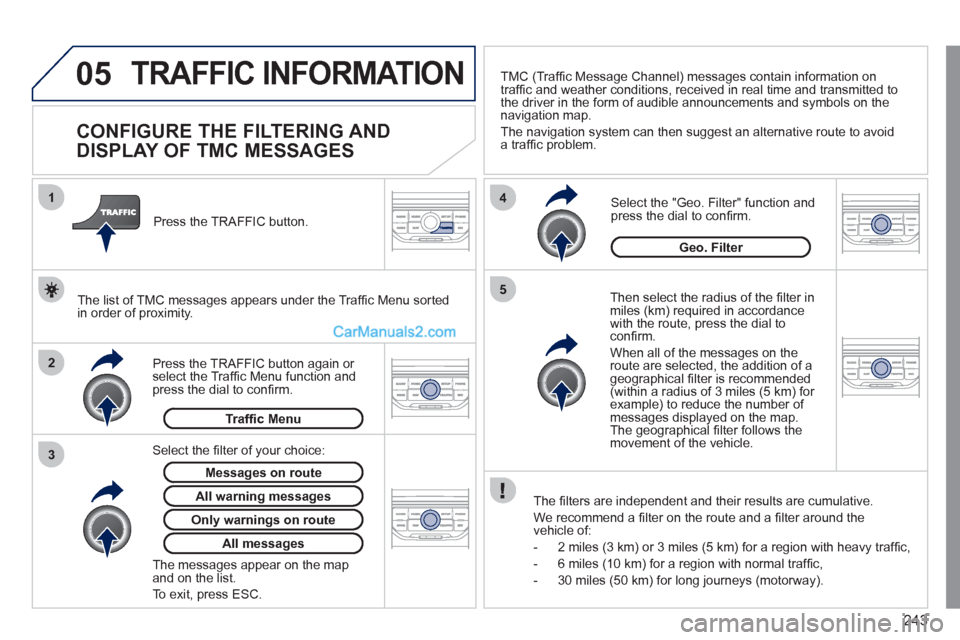
TRAFFIC INFORMATION
CONFIGURE THE FILTERING AND
DISPLAY OF TMC MESSAGES
Then select the radius of the fi lter in
miles (km) required in accordance
with the route, press the dial to
confi rm.
When all of the messages on the
route are selected, the addition of a
geographical fi lter is recommended
(within a radius of 3 miles (5 km) for
example) to reduce the number of
messages displayed on the map.
The geographical fi lter follows the
movement of the vehicle.
The fi lters are independent and their results are cumulative.
We recommend a fi lter on the route and a fi lter around the
vehicle of:
- 2 miles (3 km) or 3 miles (5 km) for a region with heavy traffi c,
- 6 miles (10 km) for a region with normal traffi c,
- 30 miles (50 km) for long journeys (motorway).
Press the TRAFFIC button again or
select the Traffi c Menu function and
press the dial to confi rm.
Press the TRAFFIC button.
TMC (Traffi c Message Channel) messages contain information on
traffi c and weather conditions, received in real time and transmitted to
the driver in the form of audible announcements and symbols on the
navigation map.
The navigation system can then suggest an alternative route to avoid
a traffi c problem.
Select the "Geo. Filter" function and
press the dial to confi rm.
Messages on route
The list of TMC messages appears under the Traffi c Menu sorted
in order of proximity.
All warning messages
Traffi c Menu
Select the fi lter of your choice:
Only warnings on route
All messages
The messages appear on the map
and on the list.
To exit, press ESC.
Geo. Filter