tow PEUGEOT 308 CC 2013 Owner's Guide
[x] Cancel search | Manufacturer: PEUGEOT, Model Year: 2013, Model line: 308 CC, Model: PEUGEOT 308 CC 2013Pages: 268, PDF Size: 15.28 MB
Page 170 of 268
10
i
!
168
PRACTICAL INFORMATION
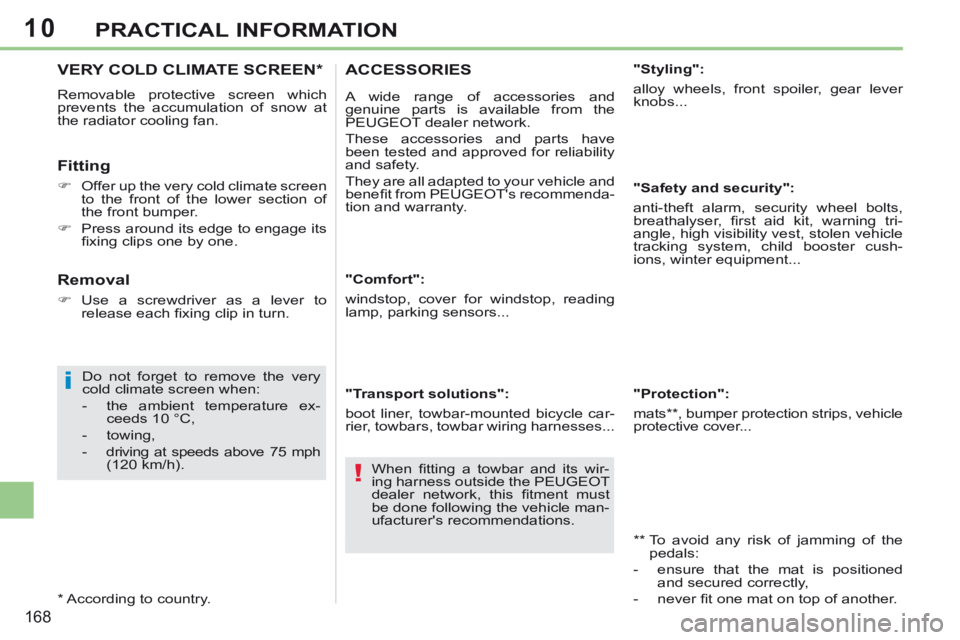
VERY COLD CLIMATE SCREEN *
Removable protective screen which
prevents the accumulation of snow at
the radiator cooling fan.
Fitting
Offer up the very cold climate screen to the front of the lower section of
the front bumper.
Press around its edge to engage its fi xing clips one by one.
Do not forget to remove the very
cold climate screen when:
- the ambient temperature ex- ceeds 10 °C,
- towing,
- driving at speeds above 75 mph (120 km/h).
* According to country.
Removal
Use a screwdriver as a lever to release each fi xing clip in turn. "Comfort":
windstop, cover for windstop, reading
lamp, parking sensors...
"Transport solutions":
boot liner, towbar-mounted bicycle car-
rier, towbars, towbar wiring harnesses...
ACCESSORIES
A wide range of accessories and
genuine parts is available from the
PEUGEOT dealer network.
These accessories and parts have
been tested and approved for reliability
and safety.
They are all adapted to your vehicle and
benefi t from PEUGEOT's recommenda-
tion and warranty. "Styling":
alloy wheels, front spoiler, gear lever
knobs...
"Safety and security":
anti-theft alarm, security wheel bolts,
breathalyser, fi rst aid kit, warning tri-
angle, high visibility vest, stolen vehicle
tracking system, child booster cush-
ions, winter equipment...
** To avoid any risk of jamming of the
pedals:
- ensure that the mat is positioned and secured correctly,
- never fi t one mat on top of another.
"Protection":
mats ** , bumper protection strips, vehicle
protective cover...
When fi tting a towbar and its wir-
ing harness outside the PEUGEOT
dealer network, this fi tment must
be done following the vehicle man-
ufacturer's recommendations.
Page 173 of 268
11
171
TECHNICAL DATA
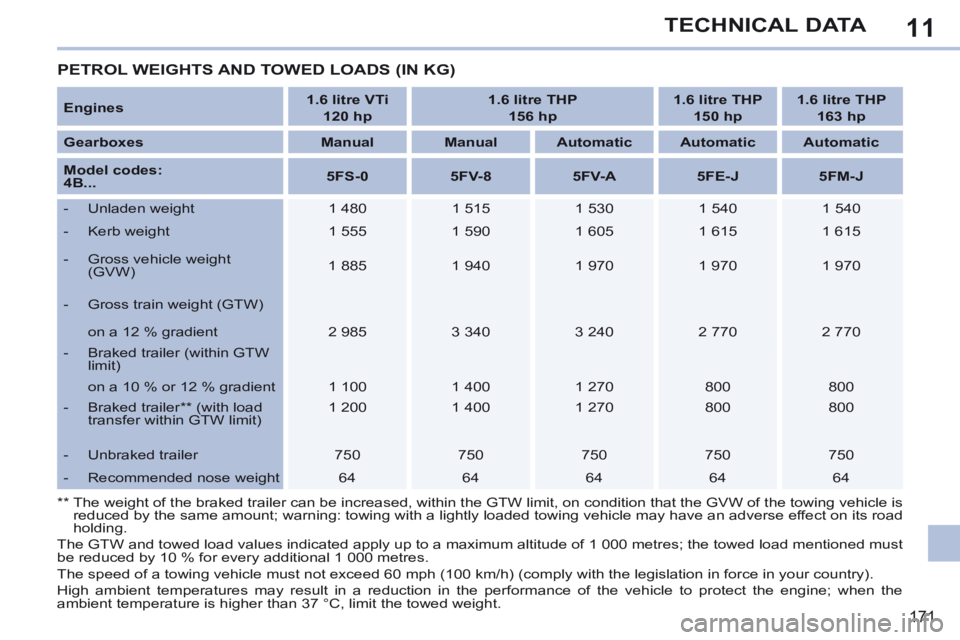
PETROL WEIGHTS AND TOWED LOADS (IN KG)
Engines 1.6 litre VTi
120 hp 1.6 litre THP
156 hp 1.6 litre THP
150 hp 1.6 litre THP
163 hp
Gearboxes Manual Manual Automatic Automatic Automatic
Model codes:
4B... 5FS-0
5FV-8 5FV-A 5FE-J 5FM-J
- Unladen weight 1 480 1 515 1 530 1 540 1 540
- Kerb weight 1 555 1 590 1 605 1 615 1 615
- Gross vehicle weight (GVW) 1 885
1 940 1 970 1 970 1 970
- Gross train weight (GTW)
on a 12 % gradient 2 985 3 340 3 240 2 770 2 770
- Braked trailer (within GTW limit)
on a 10 % or 12 % gradient 1 100 1 400 1 270 800 800
- Braked trailer ** (with load transfer within GTW limit) 1 200
1 400 1 270 800 800
- Unbraked trailer 750 750 750 750 750
- Recommended nose weight 64 64 64 64 64
** The weight of the braked trailer can be increased, within the GTW limit,\
on condition that the GVW of the towing vehicle is reduced by the same amount; warning: towing with a lightly loaded towing\
vehicle may have an adverse effect on its road
holding.
The GTW and towed load values indicated apply up to a maximum altitude o\
f 1 000 metres; the towed load mentioned must
be reduced by 10 % for every additional 1 000 metres.
The speed of a towing vehicle must not exceed 60 mph (100 km/h) (comp\
ly with the legislation in force in your country).
High ambient temperatures may result in a reduction in the performance of the vehicle to protect the engine; when the
a mbient temperature is higher than 37 °C, limit the towed weight.
Page 175 of 268
11
173
TECHNICAL DATA
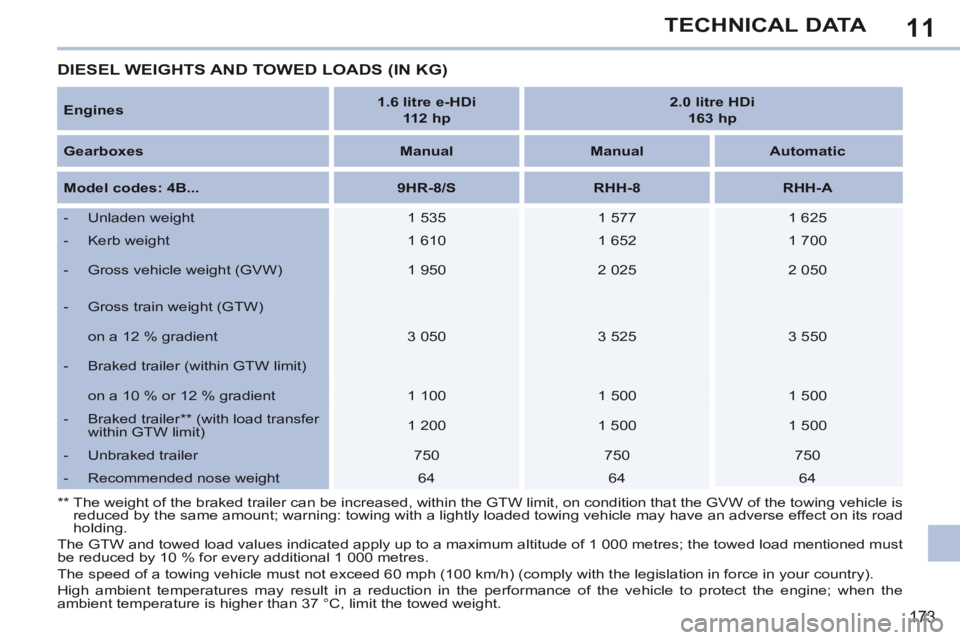
Engines 1.6 litre e-HDi
112 hp 2.0 litre HDi
163 hp
Gearboxes Manual Manual Automatic
Model codes: 4B... 9HR-8/S RHH-8 RHH-A
- Unladen weight 1 535 1 577 1 625
- Kerb weight 1 610 1 652 1 700
- Gross vehicle weight (GVW) 1 950 2 025 2 050
- Gross train weight (GTW)
on a 12 % gradient 3 050 3 525 3 550
- Braked trailer (within GTW limit)
on a 10 % or 12 % gradient 1 100 1 500 1 500
- Braked trailer ** (with load transfer within GTW limit) 1 200
1 500 1 500
- Unbraked trailer 750 750 750
- Recommended nose weight 64 64 64
The GTW and towed load values indicated apply up to a maximum altitude o\
f 1 000 metres; the towed load mentioned must
be reduced by 10 % for every additional 1 000 metres.
The speed of a towing vehicle must not exceed 60 mph (100 km/h) (comp\
ly with the legislation in force in your country).
High ambient temperatures may result in a reduction in the performance of the vehicle to protect the engine; when the
ambient temperature is higher than 37 °C, limit the towed weight.
DIESEL WEIGHTS AND TOWED LOADS (IN KG)
** The weight of the braked trailer can be increased, within the GTW limit,\
on condition that the GVW of the towing vehicle is reduced by the same amount; warning: towing with a lightly loaded towing\
vehicle may have an adverse effect on its road
holding.
Page 188 of 268
04
186
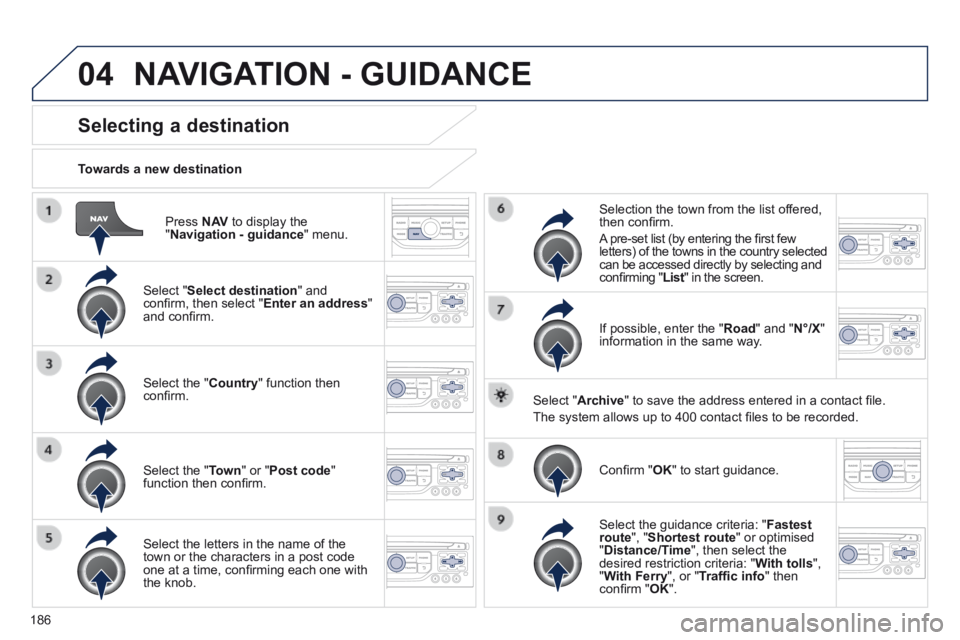
Press N AV to display the " Navigation - guidance " menu.
Towards a new destination
Selecting a destination
Select " Select destination " and confi rm, then select " Enter an address " and confi rm.
Select the " Country " function then confi rm.
Select the " Town " or " Post code " function then confi rm.
Select the letters in the name of the town or the characters in a post code one at a time, confi rming each one with the knob.
Selection the town from the list offered, then confi rm .
A pre-set list (by entering the fi rst few letters) of the towns in the country selected can be accessed directly by selecting and confi rming " List " in the screen. List " in the screen. List
If possible, enter the " Road " and " N°/X " information in the same way.
Select " Archive " to save the address entered in a contact fi le.
The system allows up to 400 contact fi les to be recorded.
Confi rm " OK " to start guidance.
Select the guidance criteria: " Fastest route ", " Shortest route " or optimised " Distance/Time ", then select the desired restriction criteria: " With tolls ", " With Ferry ", or " Traffi c info " then confi rm " OK ".
NAVIGATION - GUIDANCE
Page 189 of 268
04
187
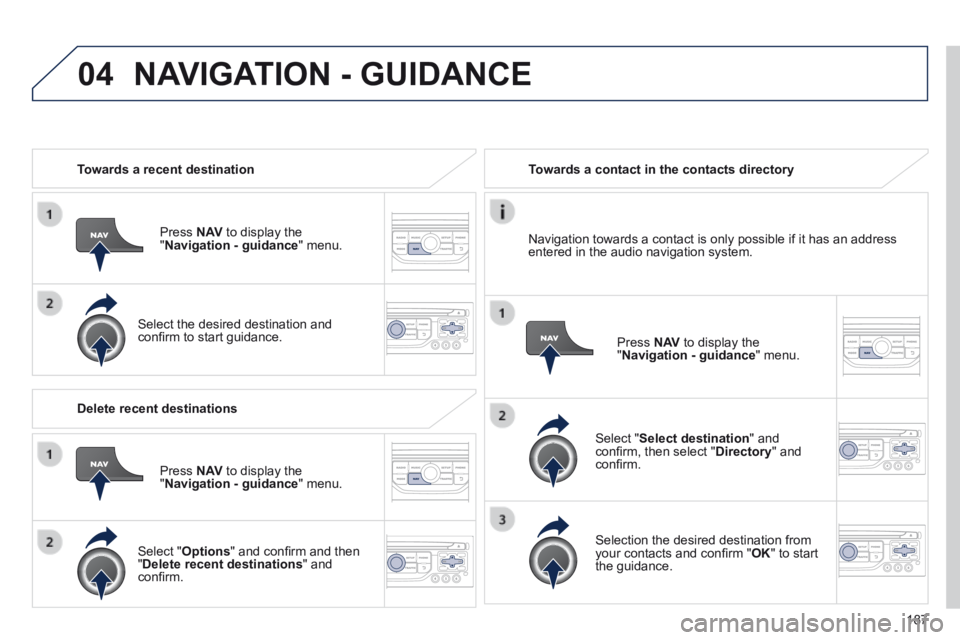
Towards a recent destination
Press N AV to display the " Navigation - guidance " menu.
Select the desired destination and confi rm to start guidance.
Towards a contact in the contacts directory
Select " Select destination " and confi rm, then select " Directory " and confi rm.
Selection the desired destination from your contacts and confi rm " OK " to start the guidance.
Press N AV to display the " Navigation - guidance " menu.
Navigation towards a contact is only possible if it has an address entered in the audio navigation system.
Delete recent destinations
Press N AV to display the " Navigation - guidance " menu.
Select " Options " and confi rm and then " Delete recent destinations " and confi rm.
NAVIGATION - GUIDANCE
Page 190 of 268
04
188
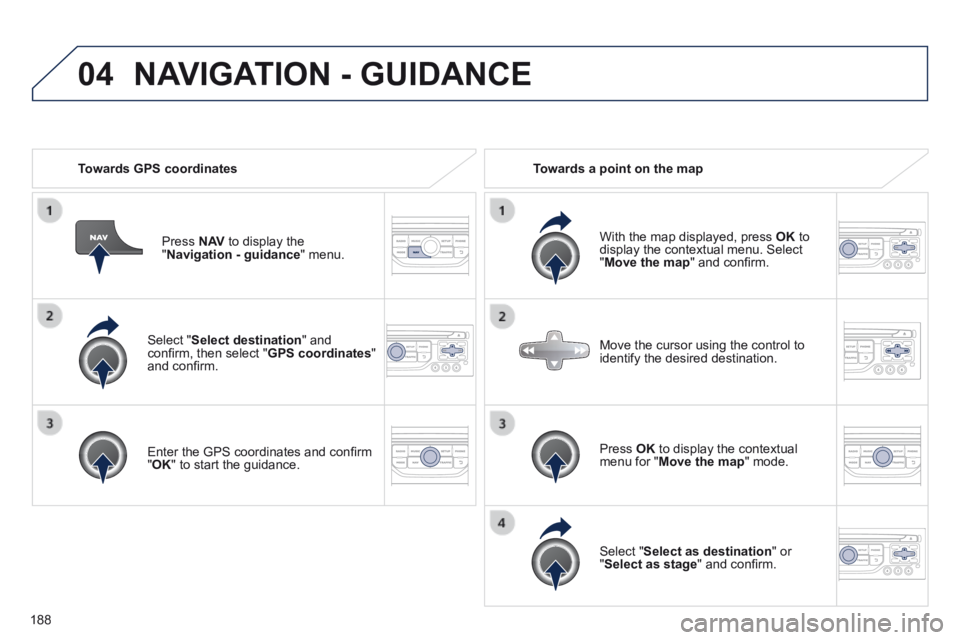
Select " Select destination " and confi rm, then select " GPS coordinates " and confi rm.
Enter the GPS coordinates and confi rm " OK " to start the guidance.
Press N AV to display the " Navigation - guidance " menu.
Towards GPS coordinates Towards a point on the map
With the map displayed, press OK to display the contextual menu. Select " Move the map " and confi rm.
Press OK to display the contextual menu for " Move the map " mode.
Select " Select as destination " or " Select as stage " and confi rm.
Move the cursor using the control to identify the desired destination.
NAVIGATION - GUIDANCE
Page 191 of 268
 The points of interest (POI) indicate all of the service locations in \
the vicinity (hotels, various businesses, airports…).
Select the \" Enter an")
04
189
Towards points of interest (POI) The points of interest (POI) indicate all of the service locations in \
the vicinity (hotels, various businesses, airports…).
Select the " Enter an address " function and confi rm, then select Select destination and confi rm.
To select a POI close to your current location, select " POI " and confi rm, then select " Around the current place " and confi rm.
To select a POI as a stage on the route, select " POI " and confi rm, then select " On the route " and confi rm.
To select a POI as a destination, fi rst enter the country and town (see "Towards a new destination"), select " POI " and confi rm, fi nally select " Near " and confi rm. Near " and confi rm. Near
Search for POIs in the categories suggested in the following pages.
Select " Search by Name " to search for POIs by name and not by proximity.
Select the POI and confi rm " OK " to start the guidance.
Press N AV to display the " Navigation - guidance " menu.
NAVIGATION - GUIDANCE
Page 192 of 268
04
190
NAVIGATION - GUIDANCE
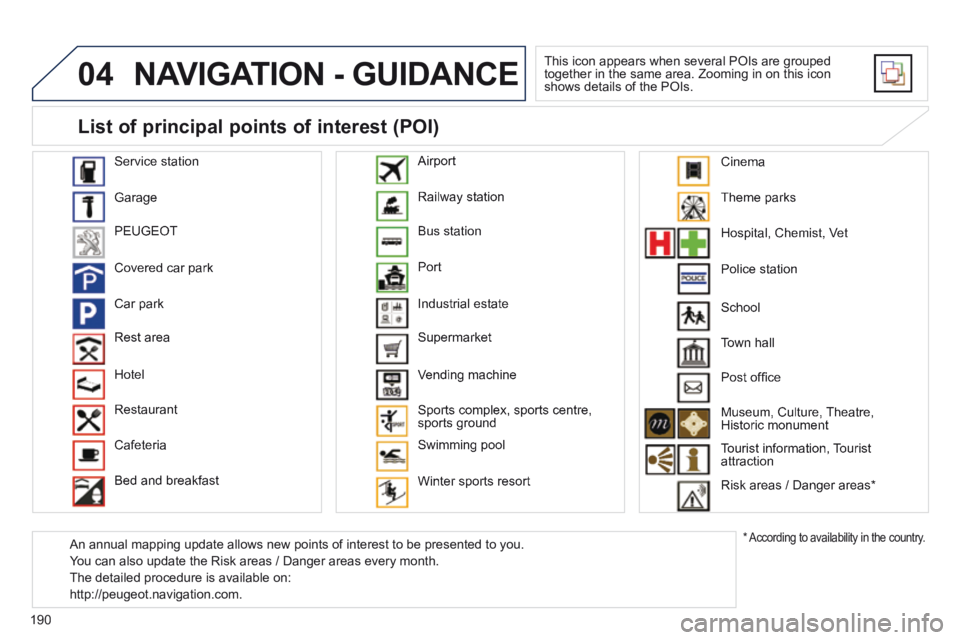
This icon appears when several POIs are grouped together in the same area. Zooming in on this icon shows details of the POIs.
Service station
Garage
PEUGEOT
Covered car park
Car park
Rest area
Hotel
Restaurant
Cafeteria
Bed and breakfast
Railway station
Bus station
Port
Industrial estate
Supermarket
Vending machine
Sports complex, sports centre, sports ground
Swimming pool
Winter sports resort
Airport
Theme parks
Hospital, Chemist, Vet
Police station
Town hall
Post offi ce
Museum, Culture, Theatre, Historic monument
Tourist information, Tourist attraction
Risk areas / Danger areas *
List of principal points of interest (POI)
* According to availability in the country.
School
An annual mapping update allows new points of interest to be presented t\
o you.
You can also update the Risk areas / Danger areas every month.
The detailed procedure is available on:
http://peugeot.navigation.com.
Cinema
Page 254 of 268
252
VISUAL SEARCH
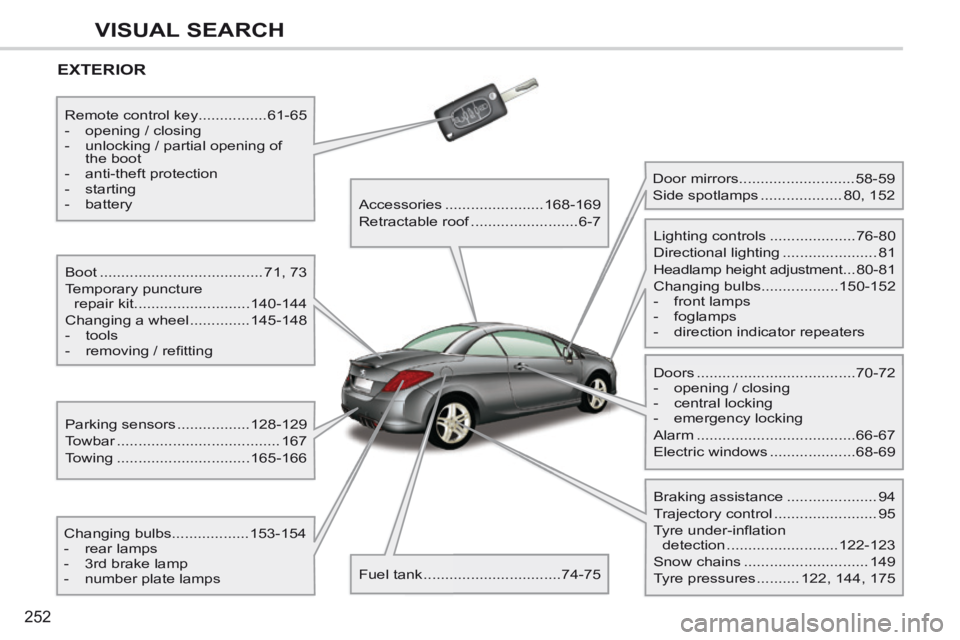
EXTERIOR
Boot ......................................71, 73
Temporary puncture repair kit ........................... 140-144
Changing a wheel .............. 145-148
- tools
- removing / refi tting
Changing bulbs ..................153-154
- rear lamps
- 3rd brake lamp
- number plate lamps Parking sensors .................
128-129
Towbar ...................................... 167
Towing ............................... 165-166
Remote control key
................61-65
- opening / closing
- unlocking / partial opening of the boot
- anti-theft protection
- starting
- battery Accessories .......................168-169
Retractable roof ......................... 6-7
Fuel tank ................................ 74-75 Door mirrors ...........................
58-59
Side spotlamps ................... 80, 152
Doors ..................................... 70-72
- opening / closing
- central locking
- emergency locking
Alarm ..................................... 66-67
Electric windows .................... 68-69
Lighting controls ....................
76-80
Directional lighting ...................... 81
Headlamp height adjustment ... 80-81
Changing bulbs ..................150-152
- front lamps
- foglamps
- direction indicator repeaters
Braking assistance ..................... 94
Trajectory control ........................ 95
Tyre under-inflation detection .......................... 122-123
Snow chains ............................. 149
Tyre pressures .......... 122, 144, 175
Page 255 of 268
253
VISUAL SEARCH
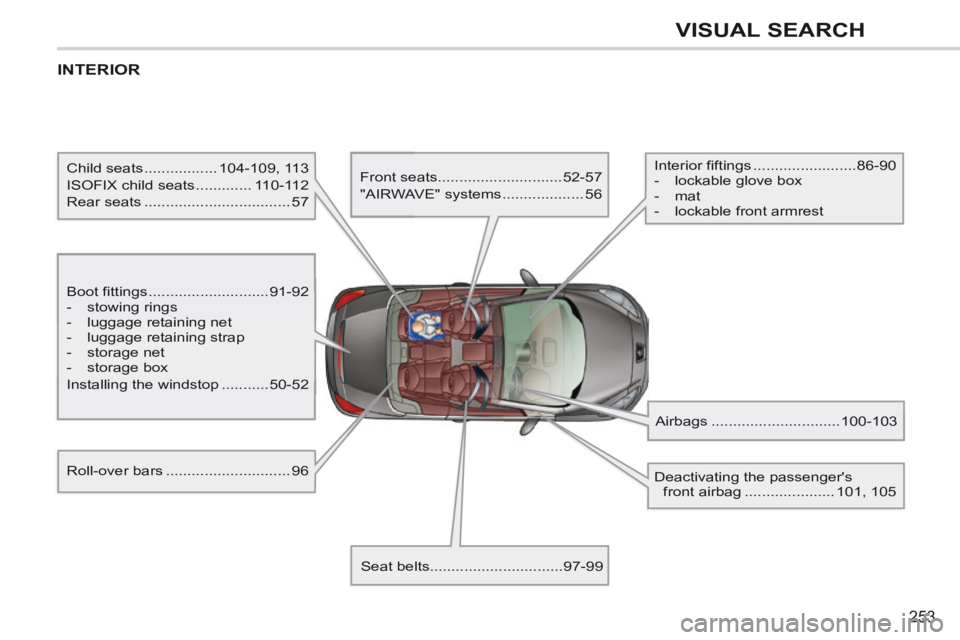
INTERIOR
Boot fittings ............................91-92
- stowing rings
- luggage retaining net
- luggage retaining strap
- storage net
- storage box
Installing the windstop ........... 50-52
Child seats .................
104-109, 113
ISOFIX child seats ............. 110-112
Rear seats .................................. 57 Front seats
............................. 52-57
"AIRWAVE" systems ................... 56
Seat belts ............................... 97-99 Airbags ..............................
100-103
Interior fiftings ........................
86-90
- lockable glove box
- mat
- lockable front armrest
Roll-over bars ............................. 96
Deactivating the passenger's
front airbag ..................... 101, 105