ESP Peugeot 308 CC 2014 Owner's Guide
[x] Cancel search | Manufacturer: PEUGEOT, Model Year: 2014, Model line: 308 CC, Model: Peugeot 308 CC 2014Pages: 268, PDF Size: 15.33 MB
Page 165 of 268
10
i
i
!
!
i
163
PRACTICAL INFORMATION
With Stop & Start, the battery does
not have to be disconnected for
charging.
Charging the battery using
a battery charger
When your vehicle's battery is dis-
charged or when the vehicle is to be
out of use for a prolonged period, you
can charge the battery using a battery
charger.
Contact a PEUGEOT dealer or a quali-
fi ed workshop for the specifi cation of
chargers compatible with your battery.
Before disconnecting
Go to the battery.
Close the retractable roof.
Check that the doors and boot are closed but not locked.
Switch off the ignition and wait for at least four minutes.
If the vehicle is to not going to be used for
more than a month, it is recommended
that the battery be disconnected.
Charging
Disconnect the (+) terminal.
Follow the instructions for use pro-vided by the manufacturer of the
charger.
Connect the charger's red cable to the (+) terminal of the battery, then
the black cable to the (-) terminal.
Once the battery is fully charged, disconnect the charger cables in re-
verse order.
Charging should be carried out in
a well-ventilated area and away
from naked fl ames and sources of
sparks, so as to avoid any risk of
explosion and fi re.
Do not try to charge a frozen bat-
tery; fi rst thaw it out so as to avoid
the risk of explosion.
If the battery had frozen, before
charging, have it checked by a
PEUGEOT dealer or qualifi ed
workshop who will ensure that
the internal components have not
been damaged and that the casing
is not cracked, which would cause
a leak of toxic and corrosive acid.
Some functions are not available
if the battery is not suffi ciently
charged. Reinitialisation after
reconnection
After any reconnection of the battery,
switch on the ignition and wait at least
one minute before starting, to allow time
for the initialisation of the electronic sys-
tems.
By referring to the corresponding sec-
tions, you should set or initialise the fol-
lowing systems yourself:
- remote control,
- electric windows and automatic par- tial opening of door glasses,
- time and date,
- audio and navigation system set- tings.
Check that no alert message or
warning lamp comes on after
switching on the ignition.
However, if minor problems persist
after carrying out these operations,
contact a PEUGEOT dealer or a
qualifi ed workshop.
Page 167 of 268
10
i
165
PRACTICAL INFORMATION
CHANGING A WIPER BLADE
Removing
Raise the corresponding wiper arm.
Unclip the wiper blade and remove it.
Fitting
Put the corresponding new wiper blade in place and clip it.
Fold down the wiper arm carefully.
Before removing a front wiper
blade
Within one minute after switching off the ignition, operate the wiper stalk
to position the wiper blades verti-
cally on the windscreen.
After fitting a front wiper blade
Switch on the ignition.
Operate the wiper stalk again to park the wiper blades.
TOWING THE VEHICLE
Procedure for having your vehicle
towed or for towing another vehicle us-
ing a removable towing eye.
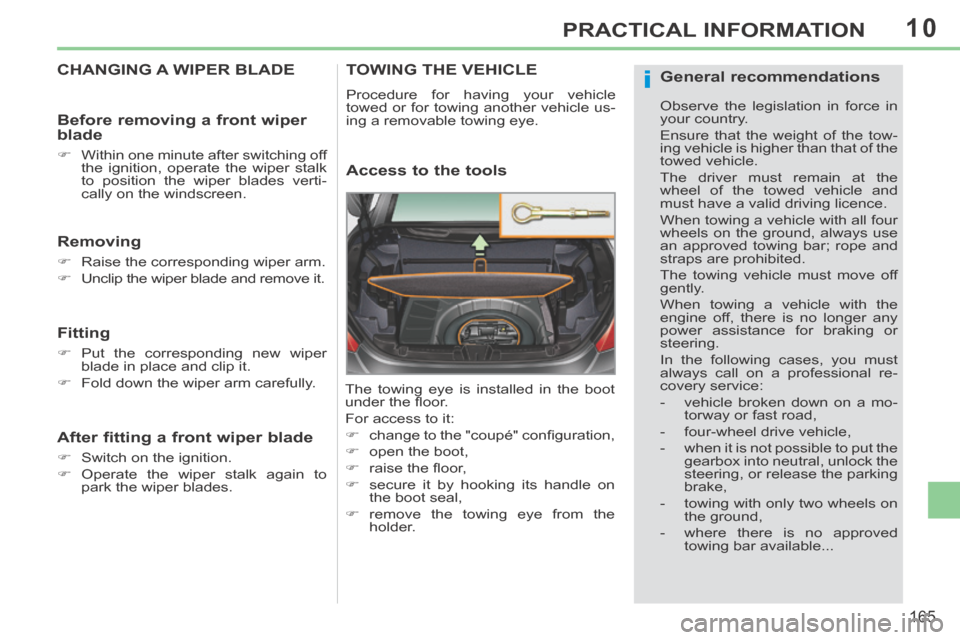
Access to the tools
The towing eye is installed in the boot
under the fl oor.
For access to it:
change to the "coupé" confi guration,
open the boot,
raise the fl oor,
secure it by hooking its handle on the boot seal,
remove the towing eye from the holder.
General recommendations
Observe the legislation in force in
your country.
Ensure that the weight of the tow-
ing vehicle is higher than that of the
towed vehicle.
The driver must remain at the
wheel of the towed vehicle and
must have a valid driving licence.
When towing a vehicle with all four
wheels on the ground, always use
an approved towing bar; rope and
straps are prohibited.
The towing vehicle must move off
gently.
When towing a vehicle with the
engine off, there is no longer any
power assistance for braking or
steering.
In the following cases, you must
a lways call on a professional re-
covery service:
- vehicle broken down on a mo-torway or fast road,
- four-wheel drive vehicle,
- when it is not possible to put the gearbox into neutral, unlock the
steering, or release the parking
brake,
- towing with only two wheels on the ground,
- where there is no approved towing bar available...
Page 172 of 268
11
170
TECHNICAL DATA
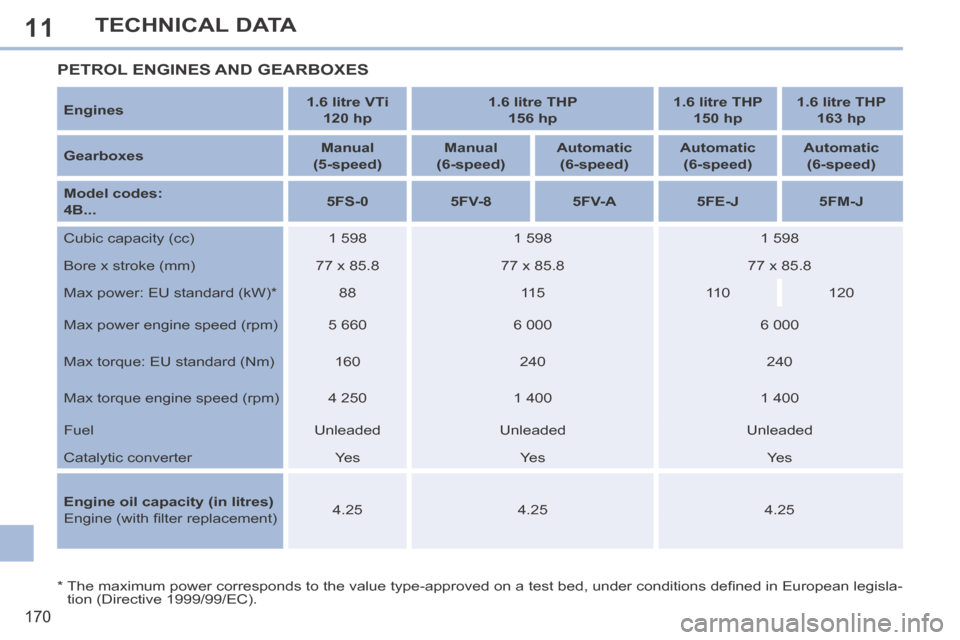
* The maximum power corresponds to the value type-approved on a test bed, under conditions defi ned in European legisla-tion (Directive 1999/99/EC).
PETROL ENGINES AND GEARBOXES
Engines 1.6 litre VTi
120 hp 1.6 litre THP
156 hp 1.6 litre THP
150 hp 1.6 litre THP
163 hp
Gearboxes Manual
(5-speed) Manual
(6-speed) Automatic
(6-speed) Automatic
(6-speed) Automatic
(6-speed)
Model codes:
4B... 5FS-0
5FV-8 5FV-A 5FE-J 5FM-J
Cubic capacity (cc) 1 598 1 598 1 598
Bore x stroke (mm) 77 x 85.8 77 x 85.8 77 x 85.8
Max power: EU standard (kW) * 88 115 110 120
Max power engine speed (rpm) 5 660 6 000 6 000
Max torque: EU standard (Nm) 160 240 240
Max torque engine speed (rpm) 4 250 1 400 1 400
Fuel Unleaded Unleaded Unleaded
Catalytic converter Yes Yes Yes
Engine oil capacity (in litres)
Engine (with fi lter replacement) 4.25
4.25 4.25
Page 174 of 268
11
172
TECHNICAL DATA
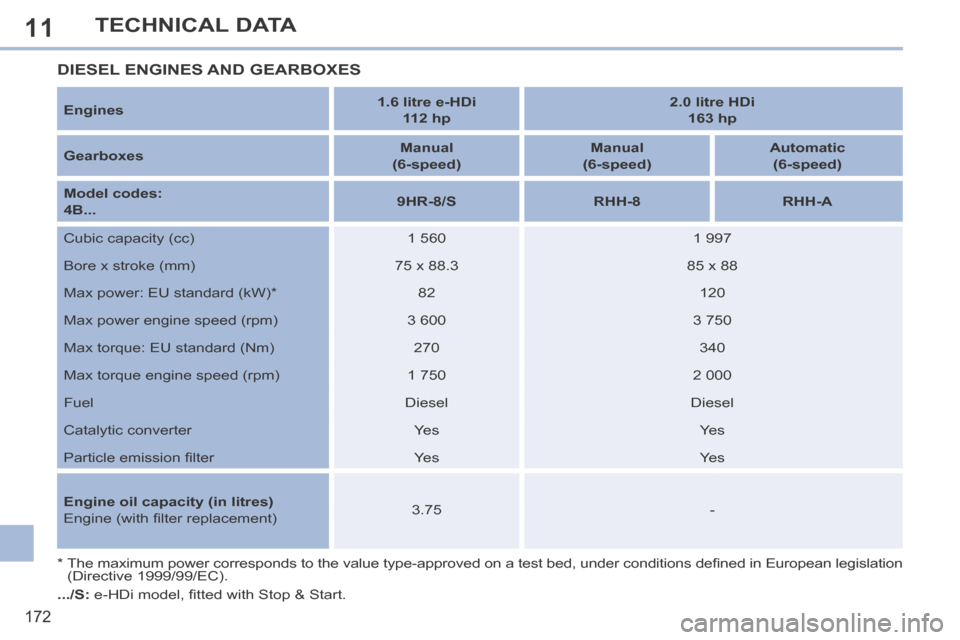
Engines 1.6 litre e-HDi
112 hp 2.0 litre HDi
163 hp
Gearboxes Manual
(6-speed) Manual
(6-speed) Automatic
(6-speed)
Model codes:
4B... 9HR-8/S
RHH-8 RHH-A
Cubic capacity (cc) 1 560 1 997
Bore x stroke (mm) 75 x 88.3 85 x 88
Max power: EU standard (kW) * 82 120
Max power engine speed (rpm) 3 600 3 750
Max torque: EU standard (Nm) 270 340
Max torque engine speed (rpm) 1 750 2 000
Fuel Diesel Diesel
Catalytic converter Yes Yes
Particle emission fi lter Yes Yes
Engine oil capacity (in litres)
Engine (with fi lter replacement) 3.75
-
* The maximum power corresponds to the value type-approved on a test bed, under conditions defi ned in European legislation (Directive 1999/99/EC).
DIESEL ENGINES AND GEARBOXES
.../S: e-HDi model, fi tted with Stop & Start.
Page 220 of 268
08
218
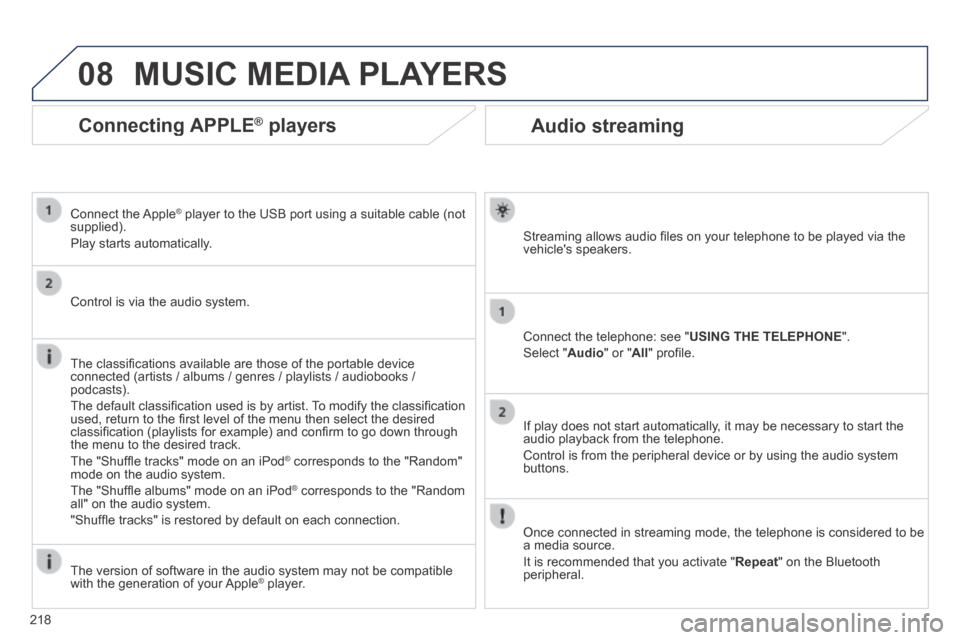
Audio streaming
Streaming allows audio fi les on your telephone to be played via the vehicle's speakers.
Connect the telephone: see " USING THE TELEPHONE ".
Select " Audio " or " All " profi le.
If play does not start automatically, it may be necessary to start the audio playback from the telephone.
Control is from the peripheral device or by using the audio system buttons.
Once connected in streaming mode, the telephone is considered to be a media source.
It is recommended that you activate " Repeat " on the Bluetooth peripheral.
MUSIC MEDIA PLAYERS
Connecting APPLE ® Connecting APPLE ® Connecting APPLE players ® players ®
Connect the Apple ® player to the USB port using a suitable cable (not ® player to the USB port using a suitable cable (not ®
supplied).
Play starts automatically.
Control is via the audio system.
The classifi cations available are those of the portable device connected (artists / albums / genres / playlists / audiobooks / podcasts).
The default classifi cation used is by artist. To modify the classifi cation used, return to the fi rst level of the menu then select the desired classifi cation (playlists for example) and confi rm to go down through the menu to the desired track.
The "Shuffl e tracks" mode on an iPod ® corresponds to the "Random" ® corresponds to the "Random" ®
mode on the audio system.
The "Shuffl e albums" mode on an iPod ® corresponds to the "Random ® corresponds to the "Random ®
all" on the audio system.
"Shuffl e tracks" is restored by default on each connection.
The version of software in the audio system may not be compatible with the generation of your Apple ® player. ® player. ®
Page 227 of 268
11
225
2
3
3
1
4
2
2
1
4
4
2
2
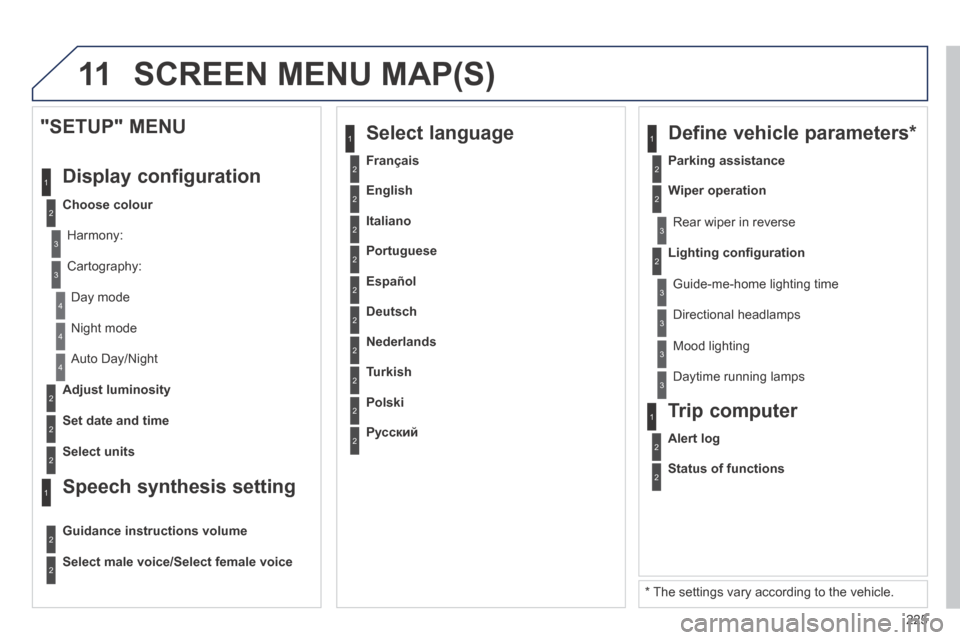
Night mode
Auto Day/Night
Adjust luminosity
Set date and time
"SETUP" MENU
Display configuration
Choose colour
Harmony:
Cartography:
Day mode
Speech synthesis setting
Guidance instructions volume
Select male voice/Select female voice
2Select units
2
3
3
2Lighting confi guration
Parking assistance
Rear wiper in reverse
Guide-me-home lighting time
1 Define vehicle parameters *
2Wiper operation
3 Directional headlamps
3 Mood lighting
3 Daytime running lamps
* The settings vary according to the vehicle.
2Alert log
1 Trip computer
2Status of functions
2Français
1 Select language
2English
2Italiano
2Portuguese
2Español
2Deutsch
2Nederlands
2Turkish
2Polski
2Русский
SCREEN MENU MAP(S)