ignition Peugeot 308 CC 2014 Repair Manual
[x] Cancel search | Manufacturer: PEUGEOT, Model Year: 2014, Model line: 308 CC, Model: Peugeot 308 CC 2014Pages: 268, PDF Size: 15.33 MB
Page 164 of 268
10
i
!
162
PRACTICAL INFORMATION
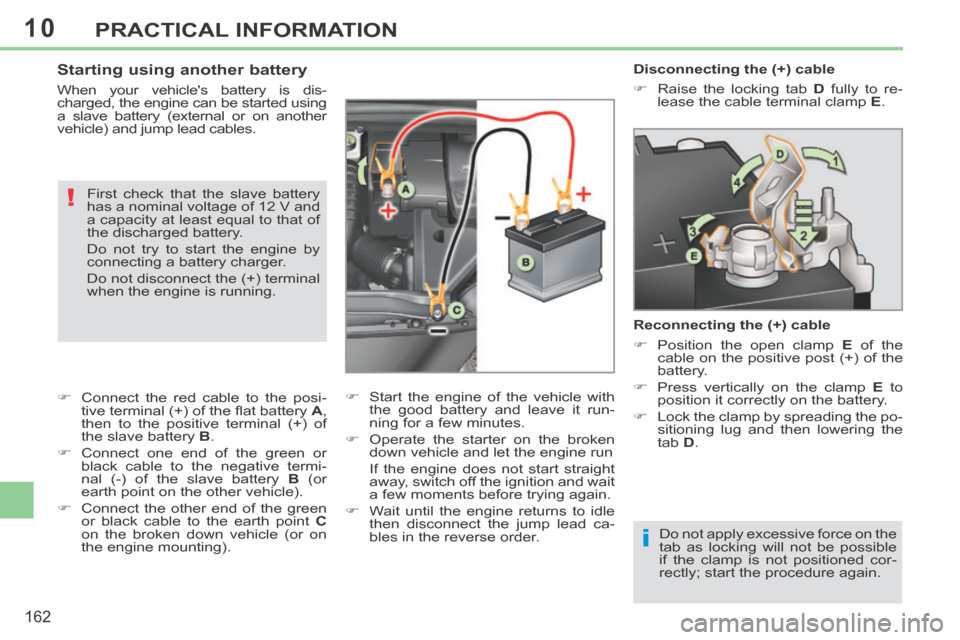
Disconnecting the (+) cable
Raise the locking tab D fully to re-
lease the cable terminal clamp E .
Reconnecting the (+) cable
Position the open clamp E of the
cable on the positive post (+) of the
battery.
Press vertically on the clamp E to
position it correctly on the battery.
Lock the clamp by spreading the po- sitioning lug and then lowering the
tab D .
Do not apply excessive force on the
tab as locking will not be possible
if the clamp is not positioned cor-
rectly; start the procedure again. Starting using another battery
When your vehicle's battery is dis-
charged, the engine can be started using
a slave battery (external or on another
v ehicle) and jump lead cables. First check that the slave battery
has a nominal voltage of 12 V and
a capacity at least equal to that of
the discharged battery.
Do not try to start the engine by
connecting a battery charger.
Do not disconnect the (+) terminal
when the engine is running.
Connect the red cable to the posi- tive terminal (+) of the fl at battery A ,
then to the positive terminal (+) of
the slave battery B .
Connect one end of the green or black cable to the negative termi-
nal (-) of the slave battery B (or
earth point on the other vehicle).
Connect the other end of the green or black cable to the earth point C
on the broken down vehicle (or on
the engine mounting). Start the engine of the vehicle with
the good battery and leave it run-
ning for a few minutes.
Operate the starter on the broken down vehicle and let the engine run
If the engine does not start straight away, switch off the ignition and wait
a few moments before trying again.
Wait until the engine returns to idle then disconnect the jump lead ca-
bles in the reverse order.
Page 165 of 268
10
i
i
!
!
i
163
PRACTICAL INFORMATION
With Stop & Start, the battery does
not have to be disconnected for
charging.
Charging the battery using
a battery charger
When your vehicle's battery is dis-
charged or when the vehicle is to be
out of use for a prolonged period, you
can charge the battery using a battery
charger.
Contact a PEUGEOT dealer or a quali-
fi ed workshop for the specifi cation of
chargers compatible with your battery.
Before disconnecting
Go to the battery.
Close the retractable roof.
Check that the doors and boot are closed but not locked.
Switch off the ignition and wait for at least four minutes.
If the vehicle is to not going to be used for
more than a month, it is recommended
that the battery be disconnected.
Charging
Disconnect the (+) terminal.
Follow the instructions for use pro-vided by the manufacturer of the
charger.
Connect the charger's red cable to the (+) terminal of the battery, then
the black cable to the (-) terminal.
Once the battery is fully charged, disconnect the charger cables in re-
verse order.
Charging should be carried out in
a well-ventilated area and away
from naked fl ames and sources of
sparks, so as to avoid any risk of
explosion and fi re.
Do not try to charge a frozen bat-
tery; fi rst thaw it out so as to avoid
the risk of explosion.
If the battery had frozen, before
charging, have it checked by a
PEUGEOT dealer or qualifi ed
workshop who will ensure that
the internal components have not
been damaged and that the casing
is not cracked, which would cause
a leak of toxic and corrosive acid.
Some functions are not available
if the battery is not suffi ciently
charged. Reinitialisation after
reconnection
After any reconnection of the battery,
switch on the ignition and wait at least
one minute before starting, to allow time
for the initialisation of the electronic sys-
tems.
By referring to the corresponding sec-
tions, you should set or initialise the fol-
lowing systems yourself:
- remote control,
- electric windows and automatic par- tial opening of door glasses,
- time and date,
- audio and navigation system set- tings.
Check that no alert message or
warning lamp comes on after
switching on the ignition.
However, if minor problems persist
after carrying out these operations,
contact a PEUGEOT dealer or a
qualifi ed workshop.
Page 167 of 268
10
i
165
PRACTICAL INFORMATION
CHANGING A WIPER BLADE
Removing
Raise the corresponding wiper arm.
Unclip the wiper blade and remove it.
Fitting
Put the corresponding new wiper blade in place and clip it.
Fold down the wiper arm carefully.
Before removing a front wiper
blade
Within one minute after switching off the ignition, operate the wiper stalk
to position the wiper blades verti-
cally on the windscreen.
After fitting a front wiper blade
Switch on the ignition.
Operate the wiper stalk again to park the wiper blades.
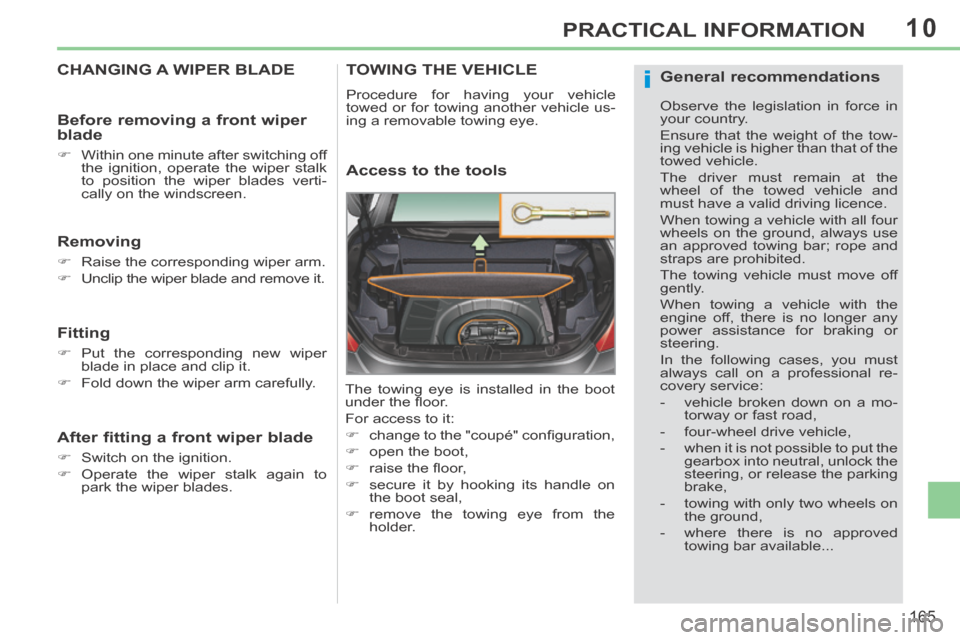
TOWING THE VEHICLE
Procedure for having your vehicle
towed or for towing another vehicle us-
ing a removable towing eye.
Access to the tools
The towing eye is installed in the boot
under the fl oor.
For access to it:
change to the "coupé" confi guration,
open the boot,
raise the fl oor,
secure it by hooking its handle on the boot seal,
remove the towing eye from the holder.
General recommendations
Observe the legislation in force in
your country.
Ensure that the weight of the tow-
ing vehicle is higher than that of the
towed vehicle.
The driver must remain at the
wheel of the towed vehicle and
must have a valid driving licence.
When towing a vehicle with all four
wheels on the ground, always use
an approved towing bar; rope and
straps are prohibited.
The towing vehicle must move off
gently.
When towing a vehicle with the
engine off, there is no longer any
power assistance for braking or
steering.
In the following cases, you must
a lways call on a professional re-
covery service:
- vehicle broken down on a mo-torway or fast road,
- four-wheel drive vehicle,
- when it is not possible to put the gearbox into neutral, unlock the
steering, or release the parking
brake,
- towing with only two wheels on the ground,
- where there is no approved towing bar available...
Page 168 of 268
10
i
166
PRACTICAL INFORMATION
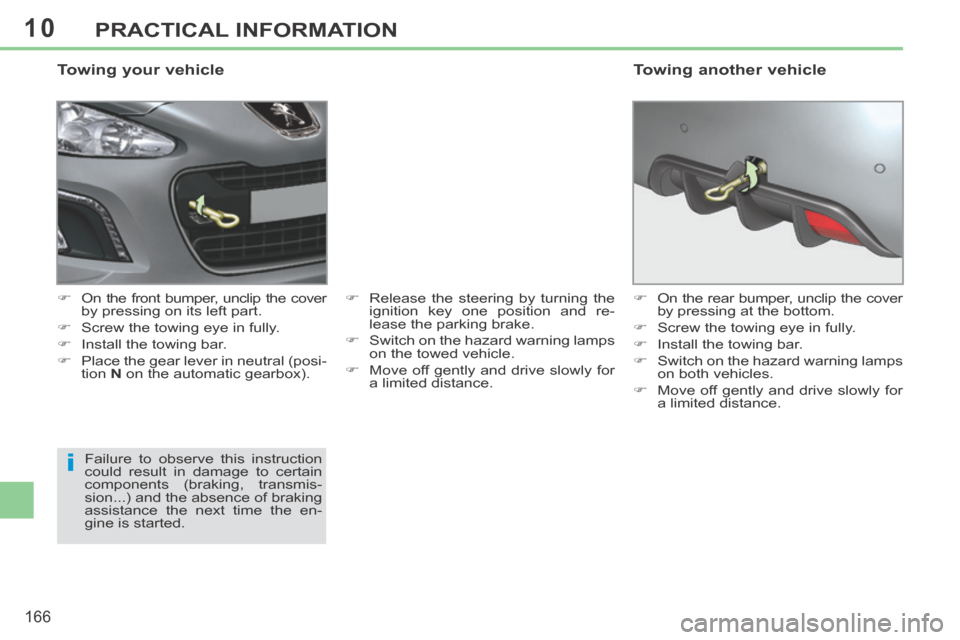
Towing your vehicle
On the front bumper, unclip the cover by pressing on its left part.
Screw the towing eye in fully.
Install the towing bar.
Place the gear lever in neutral (posi- tion N on the automatic gearbox). Release the steering by turning the
ignition key one position and re-
lease the parking brake.
Switch on the hazard warning lamps on the towed vehicle.
Move off gently and drive slowly for a limited distance.
Failure to observe this instruction
could result in damage to certain
components (braking, transmis-
sion...) and the absence of braking
assistance the next time the en-
gine is started. On the rear bumper, unclip the cover
by pressing at the bottom.
Screw the towing eye in fully.
Install the towing bar.
Switch on the hazard warning lamps on both vehicles.
Move off gently and drive slowly for a limited distance.
Towing another vehicle
Page 180 of 268
178
EMERGENCY OR ASSISTANCE CALL
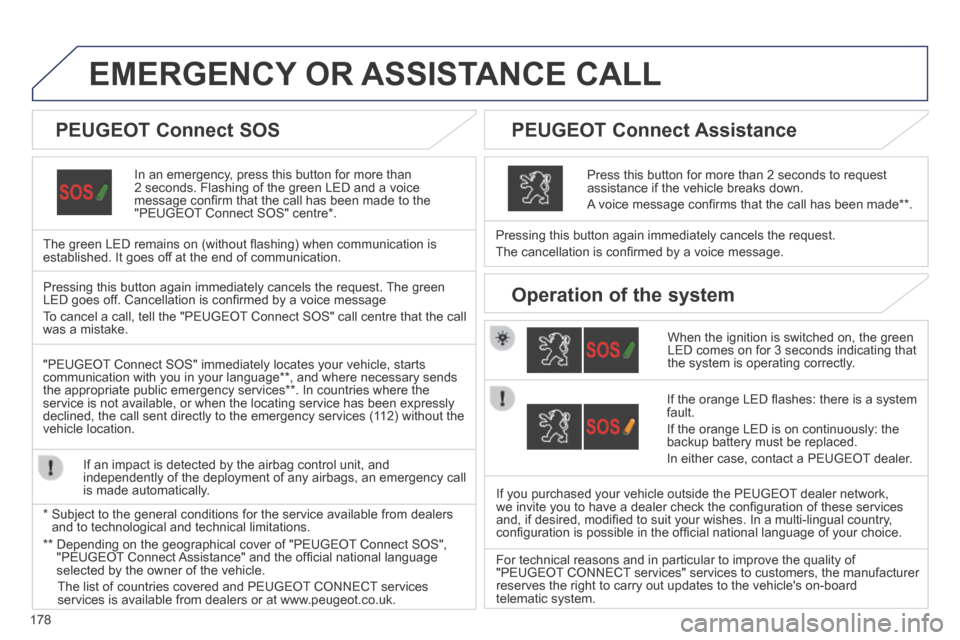
In an emergency, press this button for more than 2 seconds. Flashing of the green LED and a voice message confi rm that the call has been made to the "PEUGEOT Connect SOS" centre * .
The green LED remains on (without fl ashing) when communication is established. It goes off at the end of communication.
When the ignition is switched on, the green LED comes on for 3 seconds indicating that the system is operating correctly.
Pressing this button again immediately cancels the request.
The cancellation is confi rmed by a voice message.
Press this button for more than 2 seconds to request assistance if the vehicle breaks down.
A voice message confi rms that the call has been made ** .
Pressing this button again immediately cancels the request. The green LED goes off. Cancellation is confi rmed by a voice message
To cancel a call, tell the "PEUGEOT Connect SOS" call centre that the call was a mistake.
"PEUGEOT Connect SOS" immediately locates your vehicle, starts communication with you in your language ** , and where necessary sends the appropriate public emergency services ** . In countries where the service is not available, or when the locating service has been expressl\
y declined, the call sent directly to the emergency services (112) without the vehicle location.
If an impact is detected by the airbag control unit, and independently of the deployment of any airbags, an emergency call is made automatically.
* Subject to the general conditions for the service available from dealers\
and to technological and technical limitations.
If the orange LED fl ashes: there is a system fault.
If the orange LED is on continuously: the backup battery must be replaced.
In either case, contact a PEUGEOT dealer.
If you purchased your vehicle outside the PEUGEOT dealer network, we invite you to have a dealer check the confi guration of these services and, if desired, modifi ed to suit your wishes. In a multi-lingual country, confi guration is possible in the offi cial national language of your choice.
For technical reasons and in particular to improve the quality of "PEUGEOT CONNECT services" services to customers, the manufacturer reserves the right to carry out updates to the vehicle's on-board telematic system.
PEUGEOT Connect SOS PEUGEOT Connect Assistance
Operation of the system
** Depending on the geographical cover of "PEUGEOT Connect SOS", "PEUGEOT Connect Assistance" and the offi cial national language selected by the owner of the vehicle.
The list of countries covered and PEUGEOT CONNECT services services is available from dealers or at www.peugeot.co.uk.
Page 205 of 268
06
203
USING THE TELEPHONE
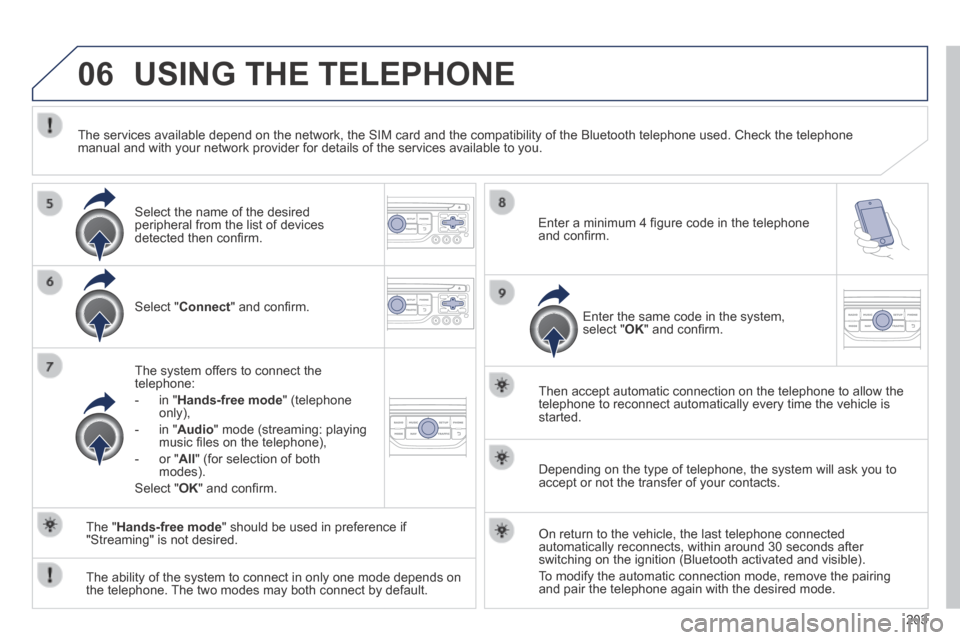
Select " Connect " and confi rm.
The system offers to connect the telephone:
- in " Hands-free mode " (telephone only),
- in " Audio " mode (streaming: playing music fi les on the telephone),
- or " All " (for selection of both modes).
Select " OK " and confi rm.
Then accept automatic connection on the telephone to allow the telephone to reconnect automatically every time the vehicle is started.
The ability of the system to connect in only one mode depends on the telephone. The two modes may both connect by default.
The " Hands-free mode " should be used in preference if "Streaming" is not desired.
The services available depend on the network, the SIM card and the compa\
tibility of the Bluetooth telephone used. Check the telephone manual and with your network provider for details of the services availa\
ble to you.
Depending on the type of telephone, the system will ask you to accept or not the transfer of your contacts.
On return to the vehicle, the last telephone connected automatically reconnects, within around 30 seconds after switching on the ignition (Bluetooth activated and visible).
To modify the automatic connection mode, remove the pairing and pair the telephone again with the desired mode.
Enter a minimum 4 fi gure code in the telephone and confi rm.
Enter the same code in the system, select " OK " and confi rm.
Select the name of the desired peripheral from the list of devices detected then confi rm .
Page 218 of 268
08
216
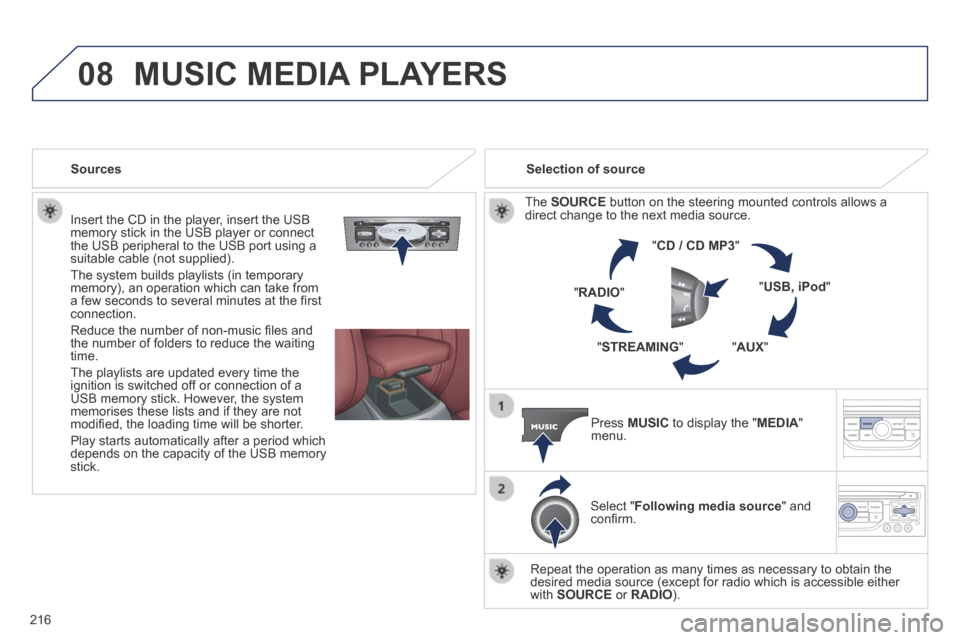
Insert the CD in the player, insert the USB memory stick in the USB player or connect the USB peripheral to the USB port using a suitable cable (not supplied) .
The system builds playlists (in temporary memory), an operation which can take from a few seconds to several minutes at the fi rst connection.
Reduce the number of non-music fi les and the number of folders to reduce the waiting time.
The playlists are updated every time the ignition is switched off or connection of a USB memory stick. However, the system memorises these lists and if they are not modifi ed, the loading time will be shorter.
Play starts automatically after a period which depends on the capacity of the USB memory stick.
Selection of source
The SOURCE button on the steering mounted controls allows a direct change to the next media source.
" CD / CD MP3 "
" USB, iPod "
" AUX " " STREAMING "
" RADIO "
Press MUSIC to display the " MEDIA " menu.
Select " Following media source " and confi rm.
Repeat the operation as many times as necessary to obtain the desired media source (except for radio which is accessible either with SOURCE or RADIO ).
Sources
MUSIC MEDIA PLAYERS
Page 243 of 268
05
241
PEUGEOT CONNECT USB
The system puts together playlists (temporary memory) created over a period which depends on the capacity of the USB device.
The other sources are available during this time.
The playlists are updated each time the ignition is switched off or each time a USB memory stick is connected.
When connecting for the fi rst time, the classifi cation suggested is by folder. When you reconnect, the classifi cation selected previously is retained.
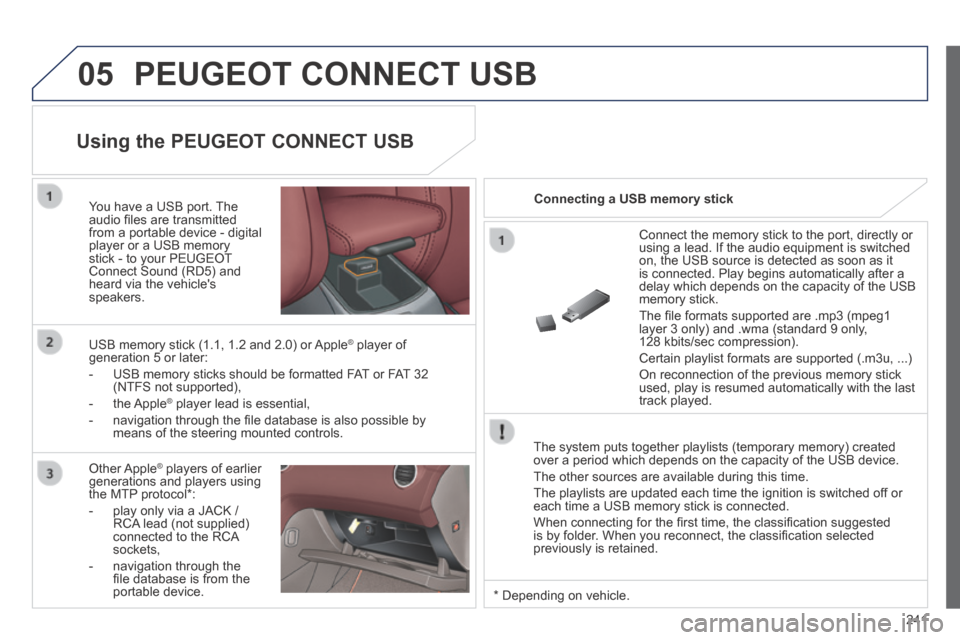
Connect the memory stick to the port, directly or using a lead. If the audio equipment is switched on, the USB source is detected as soon as it is connected. Play begins automatically after a delay which depends on the capacity of the USB memory stick.
The fi le formats supported are .mp3 (mpeg1 layer 3 only) and .wma (standard 9 only, 128 kbits/sec compression).
Certain playlist formats are supported (.m3u, ...)
On reconnection of the previous memory stick used, play is resumed automatically with the last track played.
You have a USB port. The audio fi les are transmitted from a portable device - digital player or a USB memory stick - to your PEUGEOT Connect Sound (RD5) and heard via the vehicle's speakers.
USB memory stick (1.1, 1.2 and 2.0) or Apple ® player of ® player of ®
generation 5 or later:
- USB memory sticks should be formatted FAT or FAT 32 (NTFS not supported),
- the Apple ® player lead is essential, ® player lead is essential, ®
- navigation through the fi le database is also possible by means of the steering mounted controls.
Using the PEUGEOT CONNECT USB
Connecting a USB memory stick
Other Apple ® players of earlier ® players of earlier ®
generations and players using the MTP protocol * :
- play only via a JACK / RCA lead (not supplied) connected to the RCA sockets,
- navigation through the fi le database is from the portable device. * Depending on vehicle.
Page 245 of 268
06
243
BLUETOOTH
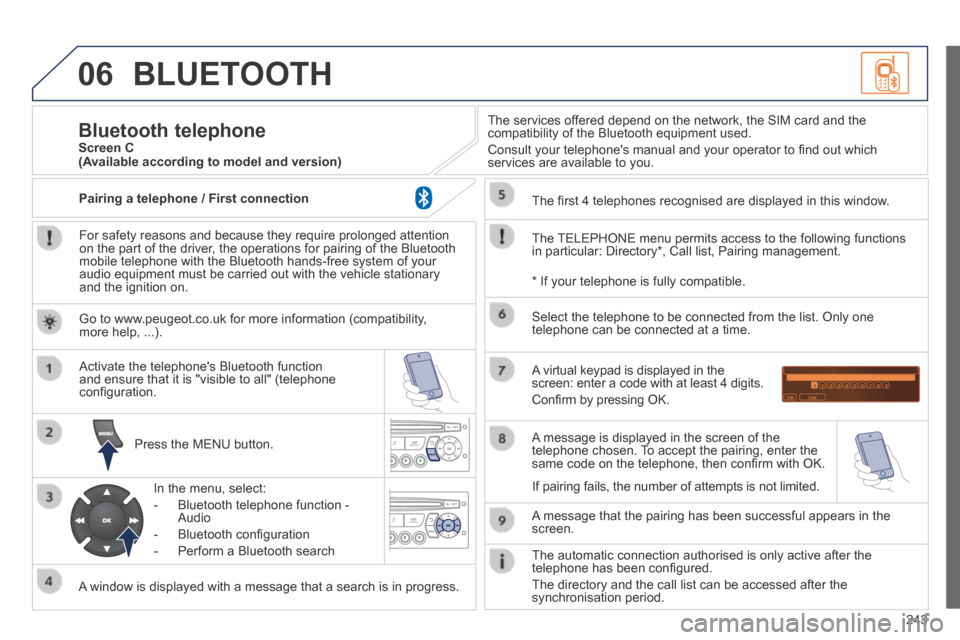
For safety reasons and because they require prolonged attention on the part of the driver, the operations for pairing of the Bluetooth mobile telephone with the Bluetooth hands-free system of your audio equipment must be carried out with the vehicle stationary and the ignition on.
Press the MENU button.
A window is displayed with a message that a search is in progress.
Activate the telephone's Bluetooth function and ensure that it is "visible to all" (telephone confi guration.
In the menu, select:
- Bluetooth telephone function - Audio
- Bluetooth confi guration
- Perform a Bluetooth search
The services offered depend on the network, the SIM card and the compatibility of the Bluetooth equipment used.
Consult your telephone's manual and your operator to fi nd out which services are available to you.
Bluetooth telephone Screen C
The TELEPHONE menu permits access to the following functions in particular: Directory * , Call list, Pairing management.
The fi rst 4 telephones recognised are displayed in this window.
A virtual keypad is displayed in the screen: enter a code with at least 4 digits.
Confi rm by pressing OK.
A message that the pairing has been successful appears in the screen.
Select the telephone to be connected from the list. Only one telephone can be connected at a time.
A message is displayed in the screen of the telephone chosen. To accept the pairing, enter the same code on the telephone, then confi rm with OK.
The automatic connection authorised is only active after the telephone has been confi gured.
The directory and the call list can be accessed after the synchronisation period.
(Available according to model and version)
* If your telephone is fully compatible.
If pairing fails, the number of attempts is not limited.
Go to www.peugeot.co.uk for more information (compatibility, more help, ...).
Pairing a telephone / First connection
Page 247 of 268
06
245
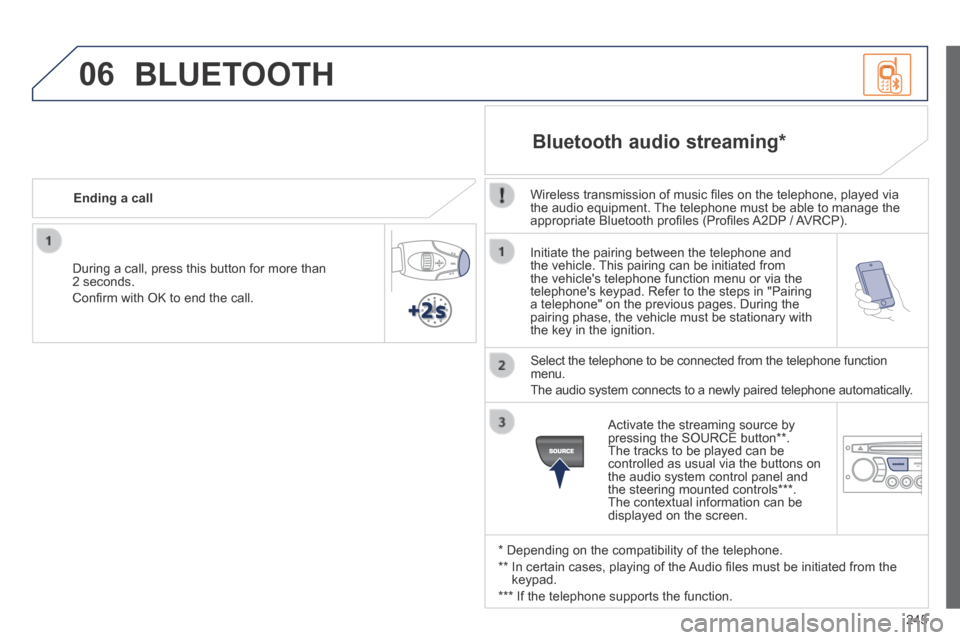
Initiate the pairing between the telephone and the vehicle. This pairing can be initiated from the vehicle's telephone function menu or via the telephone's keypad. Refer to the steps in "Pairing a telephone" on the previous pages. During the pairing phase, the vehicle must be stationary with the key in the ignition.
Select the telephone to be connected from the telephone function menu.
The audio system connects to a newly paired telephone automatically.
Bluetooth audio streaming *
Wireless transmission of music fi les on the telephone, played via the audio equipment. The telephone must be able to manage the appropriate Bluetooth profi les (Profi les A2DP / AVRCP).
* Depending on the compatibility of the telephone.
** In certain cases, playing of the Audio fi les must be initiated from the keypad.
*** If the telephone supports the function.
Activate the streaming source by pressing the SOURCE button ** . The tracks to be played can be controlled as usual via the buttons on the audio system control panel and the steering mounted controls *** . The contextual information can be displayed on the screen.
During a call, press this button for more than 2 seconds.
Confi rm with OK to end the call.
Ending a call
BLUETOOTH