boot PEUGEOT 308 CC DAG 2010 User Guide
[x] Cancel search | Manufacturer: PEUGEOT, Model Year: 2010, Model line: 308 CC DAG, Model: PEUGEOT 308 CC DAG 2010Pages: 280, PDF Size: 19.14 MB
Page 48 of 280
3
i
i
51
COMFORT
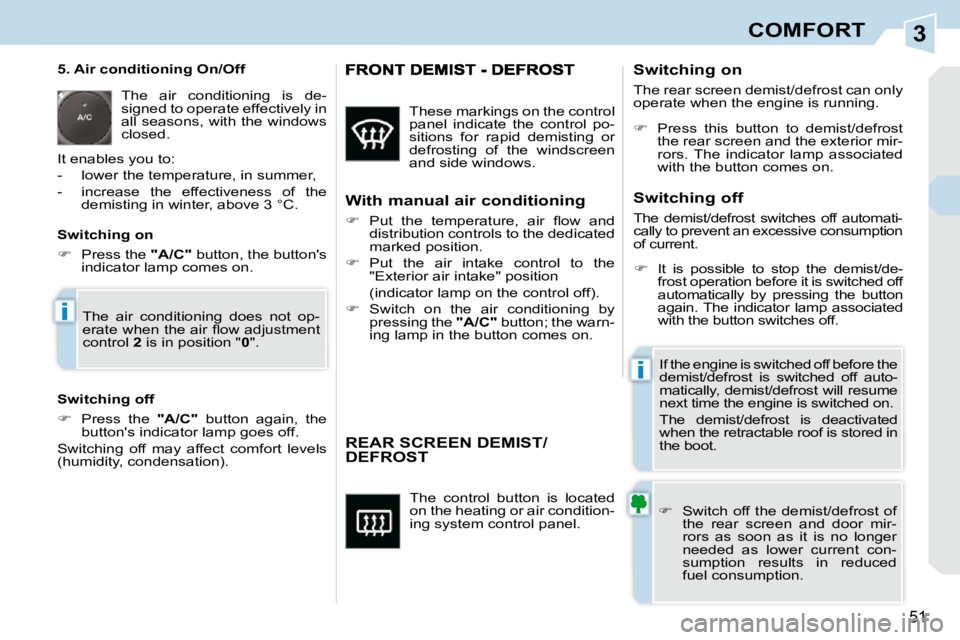
The control button is located
on the heating or air condition-
ing system control panel.
REAR SCREEN DEMIST/DEFROST
Switch off the demist/defrost of
the rear screen and door mir-
rors as soon as it is no longer
needed as lower current con-
sumption results in reduced
fuel consumption.
If the engine is switched off before the
demist/defrost is switched off auto-
matically, demist/defrost will resume
next time the engine is switched on.
The demist/defrost is deactivated
when the retractable roof is stored in
the boot.
Switching on
The rear screen demist/defrost can only
operate when the engine is running.
Switching off
The demist/defrost switches off automati-
cally to prevent an excessive consumption
of current.
5. Air conditioning On/Off
The air conditioning is de-
signed to operate effectively in
all seasons, with the windows
closed.
It enables you to:
- lower the temperature, in summer,
- increase the effectiveness of the demisting in winter, above 3 °C.
Switching off
Press the "A/C" button again, the
button's indicator lamp goes off.
Switching off may affect comfort levels
(humidity, condensation).
Press this button to demist/defrost
the rear screen and the exterior mir-
rors. The indicator lamp associated
with the button comes on.
It is possible to stop the demist/de-
frost operation before it is switched off
automatically by pressing the button
again. The indicator lamp associated
with the button switches off.
Switching on
Press the "A/C" button, the button's
indicator lamp comes on.
These markings on the control
panel indicate the control po-
sitions for rapid demisting or
defrosting of the windscreen
and side windows.
With manual air conditioning
Put the temperature, air fl ow and
distribution controls to the dedicated
marked position.
Put the air intake control to the
"Exterior air intake" position
(indicator lamp on the control off).
Switch on the air conditioning by
pressing the "A/C" button; the warn-
ing lamp in the button comes on.
The air conditioning does not op-
erate when the air fl ow adjustment
control
2 is in position " 0 ".
Page 49 of 280
3
i
i
51
COMFORT
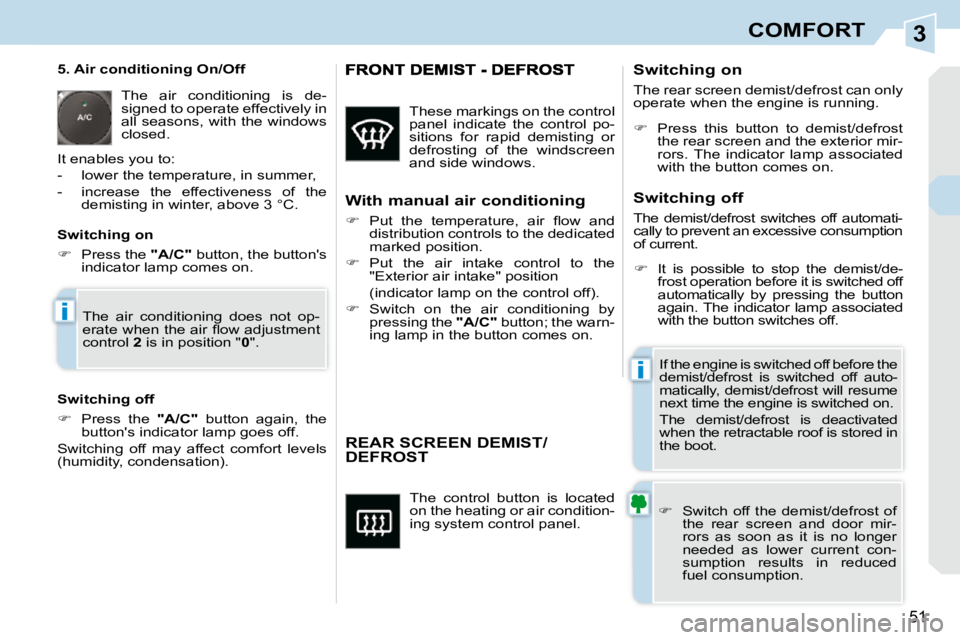
The control button is located
on the heating or air condition-
ing system control panel.
REAR SCREEN DEMIST/DEFROST
Switch off the demist/defrost of
the rear screen and door mir-
rors as soon as it is no longer
needed as lower current con-
sumption results in reduced
fuel consumption.
If the engine is switched off before the
demist/defrost is switched off auto-
matically, demist/defrost will resume
next time the engine is switched on.
The demist/defrost is deactivated
when the retractable roof is stored in
the boot.
Switching on
The rear screen demist/defrost can only
operate when the engine is running.
Switching off
The demist/defrost switches off automati-
cally to prevent an excessive consumption
of current.
5. Air conditioning On/Off
The air conditioning is de-
signed to operate effectively in
all seasons, with the windows
closed.
It enables you to:
- lower the temperature, in summer,
- increase the effectiveness of the demisting in winter, above 3 °C.
Switching off
Press the "A/C" button again, the
button's indicator lamp goes off.
Switching off may affect comfort levels
(humidity, condensation).
Press this button to demist/defrost
the rear screen and the exterior mir-
rors. The indicator lamp associated
with the button comes on.
It is possible to stop the demist/de-
frost operation before it is switched off
automatically by pressing the button
again. The indicator lamp associated
with the button switches off.
Switching on
Press the "A/C" button, the button's
indicator lamp comes on.
These markings on the control
panel indicate the control po-
sitions for rapid demisting or
defrosting of the windscreen
and side windows.
With manual air conditioning
Put the temperature, air fl ow and
distribution controls to the dedicated
marked position.
Put the air intake control to the
"Exterior air intake" position
(indicator lamp on the control off).
Switch on the air conditioning by
pressing the "A/C" button; the warn-
ing lamp in the button comes on.
The air conditioning does not op-
erate when the air fl ow adjustment
control
2 is in position " 0 ".
Page 54 of 280
3COMFORT
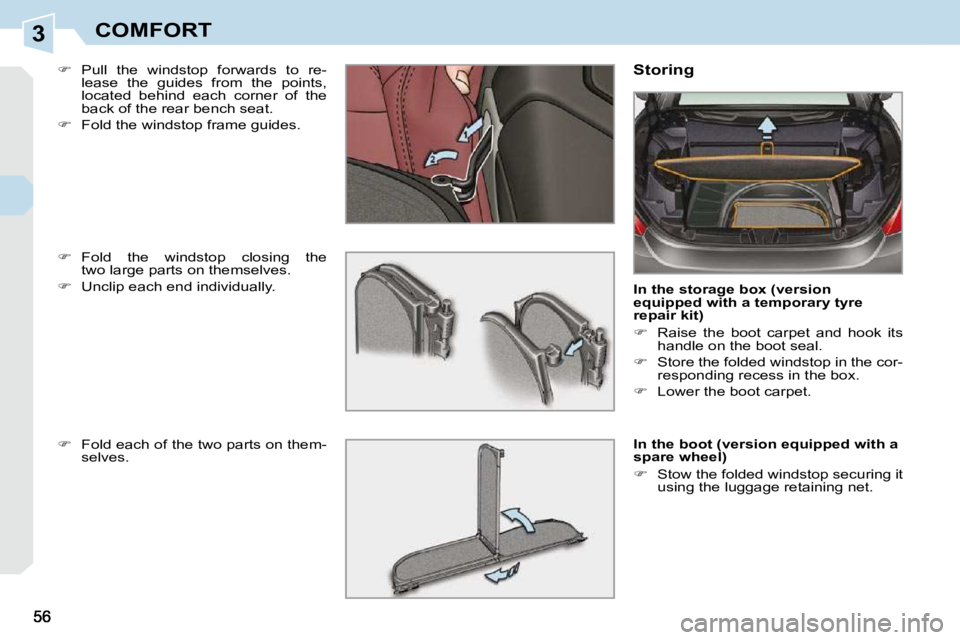
Pull the windstop forwards to re-
lease the guides from the points,
located behind each corner of the
back of the rear bench seat.
Fold the windstop frame guides. Storing
In the storage box (version
equipped with a temporary tyre
repair kit)
Raise the boot carpet and hook its
handle on the boot seal.
Store the folded windstop in the cor-
responding recess in the box.
Lower the boot carpet.
In the boot (version equipped with a
spare wheel)
Stow the folded windstop securing it
using the luggage retaining net.
Fold the windstop closing the
two large parts on themselves.
Unclip each end individually.
Fold each of the two parts on them-
selves.
Page 66 of 280
4
65
ACCESS
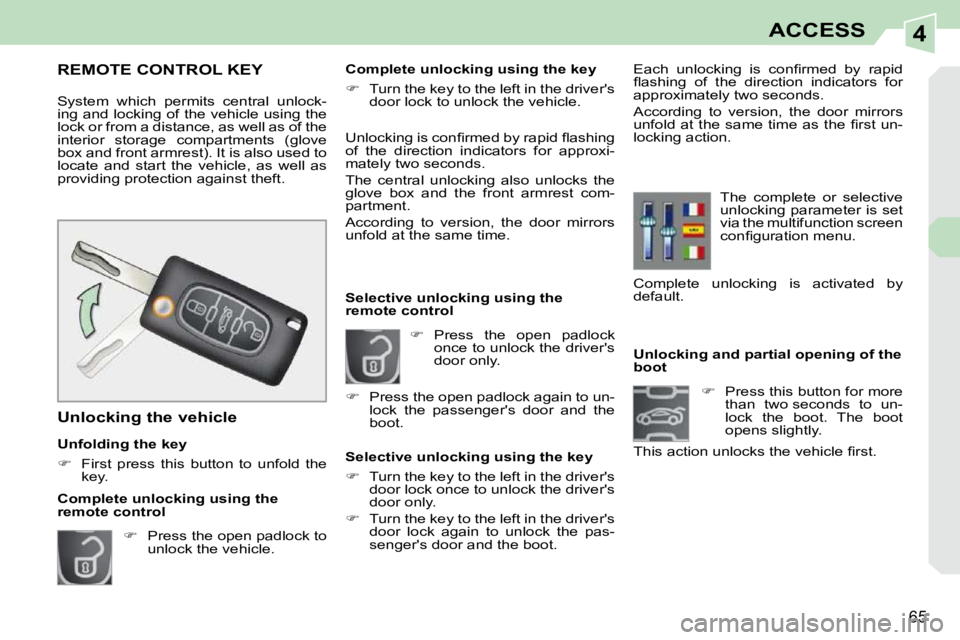
Unlocking and partial opening of the
boot
Press this button for more
than two seconds to un-
lock the boot. The boot
opens slightly.
This action unlocks the vehicle fi rst.
Press the open padlock
once to unlock the driver's
door only.
Selective unlocking using the
remote control Each unlocking is confi rmed by rapid
fl ashing of the direction indicators for
approximately two seconds.
According to version, the door mirrors
unfold at the same time as the fi rst un-
locking action.
Selective unlocking using the key
Turn the key to the left in the driver's
door lock once to unlock the driver's
door only.
Turn the key to the left in the driver's
door lock again to unlock the pas-
senger's door and the boot. The complete or selective
unlocking parameter is set
via the multifunction screen
confi guration menu.
REMOTE CONTROL KEY
System which permits central unlock-
ing and locking of the vehicle using the
lock or from a distance, as well as of the
interior storage compartments (glove
box and front armrest). It is also used to
locate and start the vehicle, as well as
providing protection against theft.
Unfolding the key
First press this button to unfold the
key.
Unlocking the vehicle Unlocking is confi rmed by rapid fl ashing
of the direction indicators for approxi-
mately two seconds.
The central unlocking also unlocks the
glove box and the front armrest com-
partment.
According to version, the door mirrors
unfold at the same time.
Press the open padlock to
unlock the vehicle. Complete unlocking using the key
Turn the key to the left in the driver's
door lock to unlock the vehicle.
Complete unlocking using the
remote control
Press the open padlock again to un-
lock the passenger's door and the
boot. Complete unlocking is activated by
default.
Page 67 of 280
4
!
i
i
66
ACCESS
Deadlocking renders the exterior and
interior door controls inoperative.
It also deactivates the manual cen-
tral control button.
Therefore, never leave anyone inside
the vehicle when it is deadlocked.
If one of the doors or the boot is still
open, the central locking does not
take place.
After unlocking the vehicle, if none
of the openings - door or boot - are
opened within thirty seconds, the
vehicle will lock itself again auto-
matically.
Deadlocking using the remote
control Deadlocking using the key
The folding and unfolding of the
door mirrors using the remote
control can be deactivated by a
PEUGEOT dealer.
Press the closed padlock
to lock the vehicle com-
pletely.
Press the closed padlock
again within fi ve seconds
to deadlock the vehicle.
Locking the vehicle
Press the closed padlock
to lock the vehicle com-
pletely.
Normal locking using the key
Turn the key to the right in the driv-
er's door lock to lock the vehicle
completely.
Normal locking using the remote
control
Deadlocking is confi rmed by fi xed
lighting of the direction indicators for
approximately two seconds.
According to version, the door mirrors
fold at the same time.
Locking is confi rmed by fi xed lighting of
the direction indicators for approximately
two seconds.
The central locking also locks the glove
box and the front armrest compartment.
According to version, the door mirrors
fold at the same time.
Turn the key to the right in the driver's
door lock to lock the vehicle com-
pletely.
Turn the key to the right again within
fi ve seconds to deadlock the vehicle.
Page 74 of 280
4
!
i
70
ACCESS
ALARM
System which protects and provides a
deterrent against theft and break-ins.
It provides the following types of moni-
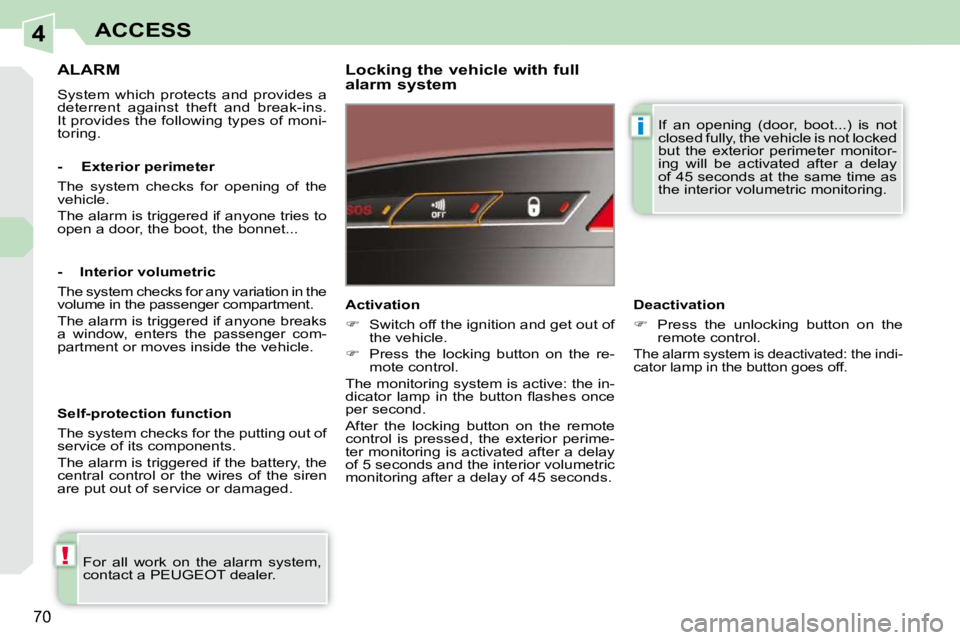
toring. Locking the vehicle with full
alarm system
For all work on the alarm system,
contact a PEUGEOT dealer. Activation
Switch off the ignition and get out of
the vehicle.
Press the locking button on the re-
mote control.
The monitoring system is active: the in-
dicator lamp in the button fl ashes once
per second.
After the locking button on the remote
control is pressed, the exterior perime-
ter monitoring is activated after a delay
of 5 seconds and the interior volumetric
monitoring after a delay of 45 seconds.
- Exterior perimeter
The system checks for opening of the
vehicle.
The alarm is triggered if anyone tries to
open a door, the boot, the bonnet...
- Interior volumetric
The system checks for any variation in the
volume in the passenger compartment.
The alarm is triggered if anyone breaks
a window, enters the passenger com-
partment or moves inside the vehicle.
Self-protection function
The system checks for the putting out of
service of its components.
The alarm is triggered if the battery, the
central control or the wires of the siren
are put out of service or damaged.
Deactivation
Press the unlocking button on the
remote control.
The alarm system is deactivated: the indi-
cator lamp in the button goes off.
If an opening (door, boot...) is not
closed fully, the vehicle is not locked
but the exterior perimeter monitor-
ing will be activated after a delay
of 45 seconds at the same time as
the interior volumetric monitoring.
Page 75 of 280
4
!
i
71
ACCESS
Triggering of the alarm The monitoring functions remain
active until the alarm has been trig-
gered eleven times in succession.
When the vehicle is unlocked using
the remote control, rapid fl ashing
of the indicator lamp in the button
informs you that the alarm was trig-
gered during your absence. When
the ignition is switched on, this
fl ashing stops immediately. Failure of the remote control
To deactivate the monitoring functions:
Locking the vehicle without
activating the alarm
Unlock the vehicle using the key in
the driver's door lock.
Open the door; the alarm is trig-
gered.
Switch on the ignition; the alarm
stops. The indicator lamp in the but-
ton goes off.
Lock or deadlock the vehicle using
the key in the driver's door lock.
To be effective, this deactivation
must be carried out each time the
ignition is switched off.
In "cabriolet" confi guration, interior
volumetric monitoring is deactivat-
ed automatically.
Deactivation of the interior
volumetric monitoring
Switch off the ignition.
Within ten seconds, press the but-
ton until the indicator lamp is on
continuously.
Get out of the vehicle.
Press the locking button on the re-
mote control immediately.
The exterior perimeter monitoring alone
is activated: the indicator lamp in the
button fl ashes once per second.
Locking the vehicle with exterior
perimeter monitoring only
Deactivate the interior volumetric moni-
toring to avoid unwanted triggering of
the alarm in certain cases such as:
- leaving a pet in the vehicle,
- leaving a window partially open,
- washing your vehicle,
Reactivation of the interior
volumetric monitoring
Press the unlocking button on the
remote control to deactivate the ex-
terior perimeter monitoring.
Press the locking button on the re-
mote control to activate all the moni-
toring functions.
The indicator lamp in the button again
fl ashes once per second.
This is indicated by sounding of the si-
ren and fl ashing of the direction indica-
tors for thirty seconds.
Operating fault
When the ignition is switched on, fi xed
illumination of the indicator lamp in the
button indicates a fault with the system.
Have it checked by a PEUGEOT dealer.
Automatic activation *
2 minutes after the last door or the boot
is closed, the system is activated auto-
matically.
To avoid triggering the alarm on en-
tering the vehicle, fi rst press the un-
locking button on the remote control.
* According to country.
Page 78 of 280
4
!
i
i
i
i
74
ACCESS
DOORS
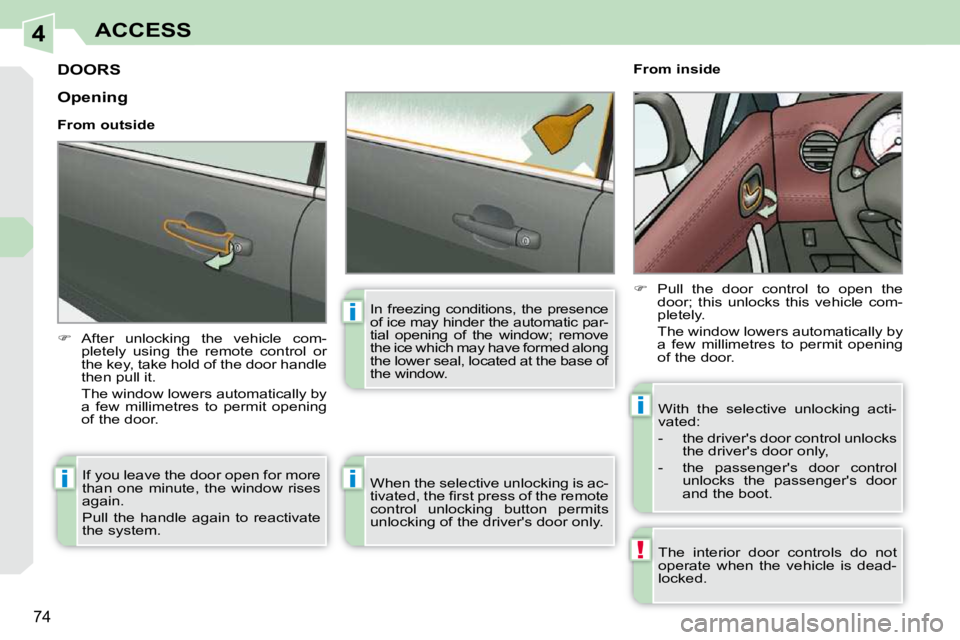
After unlocking the vehicle com-
pletely using the remote control or
the key, take hold of the door handle
then pull it.
The window lowers automatically by a few millimetres to permit opening
of the door. From inside
Pull the door control to open the
door; this unlocks this vehicle com-
pletely.
The window lowers automatically by a few millimetres to permit opening
of the door.
The interior door controls do not
operate when the vehicle is dead-
locked.
If you leave the door open for more
than one minute, the window rises
again.
Pull the handle again to reactivate
the system.
Opening
From outside
When the selective unlocking is ac-
tivated, the fi rst press of the remote
control unlocking button permits
unlocking of the driver's door only. With the selective unlocking acti-
vated:
- the driver's door control unlocks
the driver's door only,
- the passenger's door control unlocks the passenger's door
and the boot.
In freezing conditions, the presence
of ice may hinder the automatic par-
tial opening of the window; remove
the ice which may have formed along
the lower seal, located at the base of
the window.
Page 79 of 280
4
i
i
!
!
!
75
ACCESS
If the vehicle is locked or dead-
locked from the outside, the red in-
dicator lamp fl ashes and button A
is inactive.
In this case, use the remote
control or the key to unlock the
vehicle.
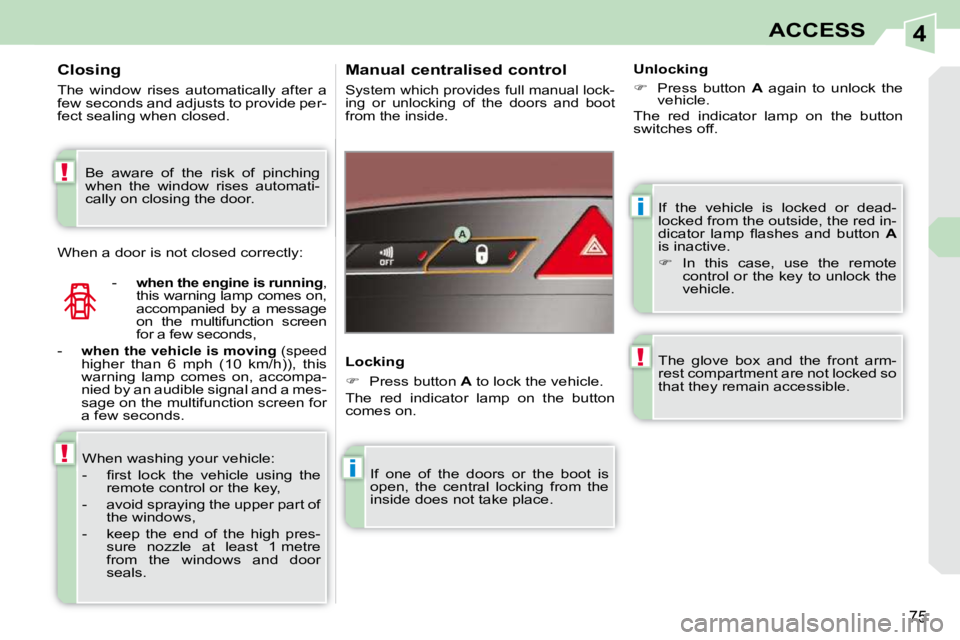
Manual centralised control
System which provides full manual lock-
ing or unlocking of the doors and boot
from the inside.
Locking
Press button A to lock the vehicle.
The red indicator lamp on the button
comes on.
If one of the doors or the boot is
open, the central locking from the
inside does not take place. Unlocking
Press button A again to unlock the
vehicle.
The red indicator lamp on the button
switches off.
The glove box and the front arm-
rest compartment are not locked so
that they remain accessible.
Closing
The window rises automatically after a
few seconds and adjusts to provide per-
fect sealing when closed.
-
when the engine is running ,
this warning lamp comes on,
accompanied by a message
on the multifunction screen
for a few seconds,
-
when the vehicle is moving (speed
higher than 6 mph (10 km/h)), this
warning lamp comes on, accompa-
nied by an audible signal and a mes-
sage on the multifunction screen for
a few seconds.
When washing your vehicle:
- fi rst lock the vehicle using the remote control or the key,
- avoid spraying the upper part of the windows,
- keep the end of the high pres- sure nozzle at least 1 metre
from the windows and door
seals.
When a door is not closed correctly:
Be aware of the risk of pinching
when the window rises automati-
cally on closing the door.
Page 80 of 280
4
!
76
ACCESS
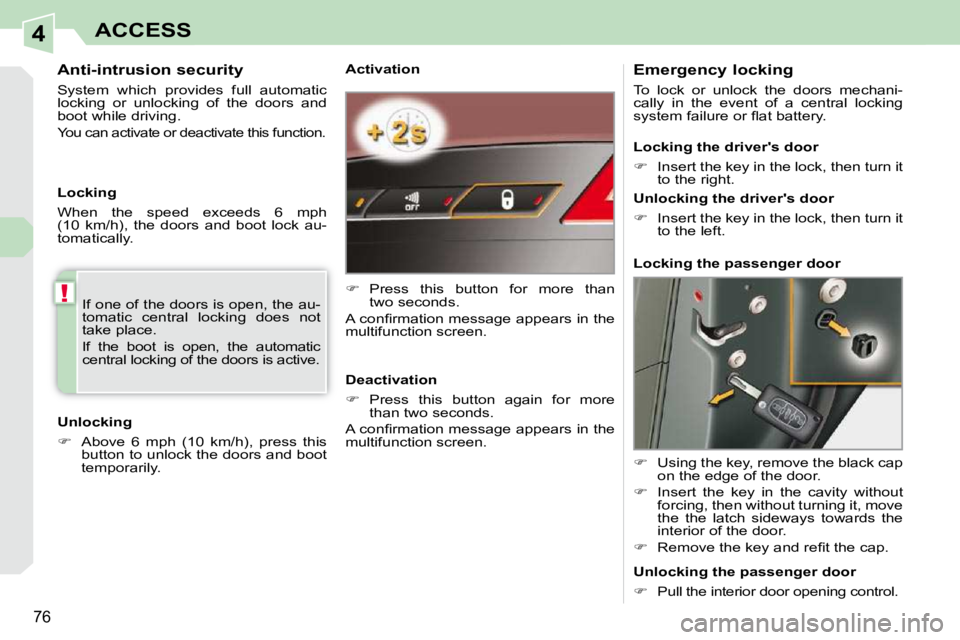
Activation
Press this button for more than
two seconds.
A confi rmation message appears in the
multifunction screen.
Deactivation
Press this button again for more
than two seconds.
A confi rmation message appears in the
multifunction screen. Emergency locking
To lock or unlock the doors mechani-
cally in the event of a central locking
system failure or fl at battery.
Using the key, remove the black cap
on the edge of the door.
Insert the key in the cavity without
forcing, then without turning it, move
the the latch sideways towards the
interior of the door.
Remove the key and refi t the cap.
Locking the driver's door
Insert the key in the lock, then turn it
to the right.
Unlocking the driver's door
Insert the key in the lock, then turn it
to the left.
Locking the passenger door
Unlocking the passenger door
Pull the interior door opening control.
If one of the doors is open, the au-
tomatic central locking does not
take place.
If the boot is open, the automatic
central locking of the doors is active.
Anti-intrusion security
System which provides full automatic
locking or unlocking of the doors and
boot while driving.
You can activate or deactivate this function.
Unlocking
Above 6 mph (10 km/h), press this
button to unlock the doors and boot
temporarily.
Locking
When the speed exceeds 6 mph
(10 km/h), the doors and boot lock au-
tomatically.