ignition PEUGEOT 308 SW BL 2010 Repair Manual
[x] Cancel search | Manufacturer: PEUGEOT, Model Year: 2010, Model line: 308 SW BL, Model: PEUGEOT 308 SW BL 2010Pages: 336, PDF Size: 21.2 MB
Page 292 of 336
290
1
2
3
2 1 4
07
*
The services available depend on the network, the SIM card and the compatibility of the Bluetooth telephone used. Check the telephone manual and with your network provider for details ofthe services available to you. A list of mobile telephones with the best level of compatibility is available from the dealer network.
BLUETOOTH TELEPHONE
CONNECTING A TELEPHONE
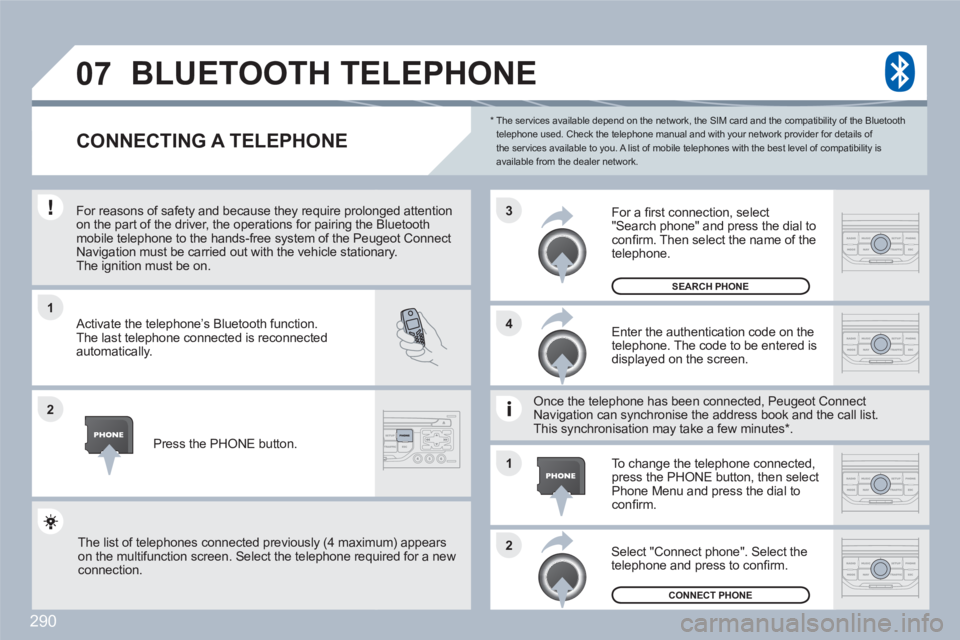
For reasons of safety and because they require prolonnged attention on the part of the driver, the operations for pairing the Bluetoothmobile telephone to the hands-free system of the Peuugeot ConnectNavigation must be carried out with the vehicle stationnary.The ignition must be on.
Activate the telephone’s Bluetooth function.
The last telephone connected is reconnected automatically.
Enter the authentication code on thetelephone. The code to be entered is displayed on the screen.
To change the telephone connected,press the PHONE button, then select Phone Menu and press the dial to confi rm.
Once the telephone has been connected, Peugeot CoonnectNavigation can synchronise the address book and thee call list.This synchronisation may take a few minutes * .
Select "Connect phone". Select the telephone and press to confi rm.
The list of telephones connected previously (4 maximum) appearson the multifunction screen. Select the telephone requuired for a new connection.
Press the PHONE button.
For a fi rst connection, select"Search phone" and press the dial to confi rm. Then select the name of the telephone.
SEARCH PHONE
CONNECT PHONE
Page 309 of 336
307
1
11
22
33
04PEUGEOT CONNECT USB
The system puts together playlists (temporary memory) created over a period which depends on the capacity of the USB equipment. The other sources are available during this time.
The playlists are updated each time the ignition is switched off or each time a USB memory stick is connected.
When connecting for the fi rst time, the classifi cation suggested is by folder. When you reconnect, the classifi cation selected previously is retained.
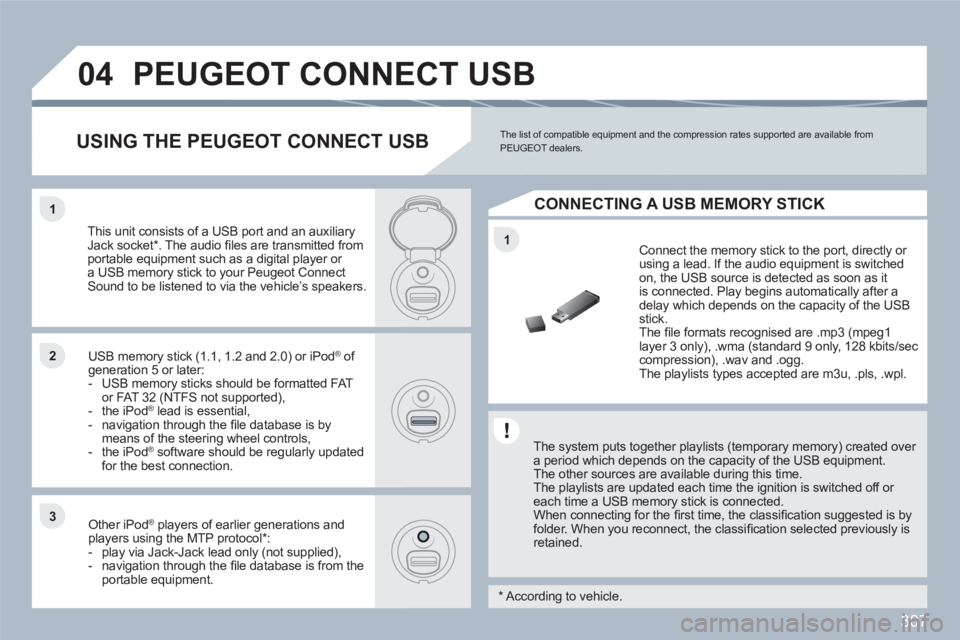
Connect the memory stick to the port, directly or using a lead. If the audio equipment is switched on, the USB source is detected as soon as itis connected. Play begins automatically after a delay which depends on the capacity of the USB stick.
The fi le formats recognised are .mp3 (mpeg1layer 3 only), .wma (standard 9 only, 128 kbits/seccompression), .wav and .ogg.
The playlists types accepted are m3u, .pls, .wpl.
This unit consists of a USB port and an auxiliaryJack socket * . The audio fi les are transmitted from portable equipment such as a digital player or a USB memory stick to your Peugeot Connect Sound to be listened to via the vehicle’s speakers.
USB memory stick (1.1, 1.2 and 2.0) or iPod®of ®
generation 5 or later: - USB memory sticks should be formatted FATor FAT 32 (NTFS not supported),- the iPod®lead is essential,®
- navigation through the fi le database is bymeans of the steering wheel controls,- the iPod®software should be regularly updated ®
for the best connection.
Other iPod ®players of earlier generations and®
players using the MTP protocol * :- play via Jack-Jack lead only (not supplied),- navigation through the fi le database is from theportable equipment.
The list of compatible equipment and the compression rates supported are available from PEUGEOT dealers. USING THE PEUGEOT CONNECT USB
CONNECTING A USB MEMORY STICK
*
According to vehicle.
Page 312 of 336
310
11
66
22
77
44
99
55
101
33
88
Saisir code authentification
01
OK Del23456789 _
05BLUETOOTH
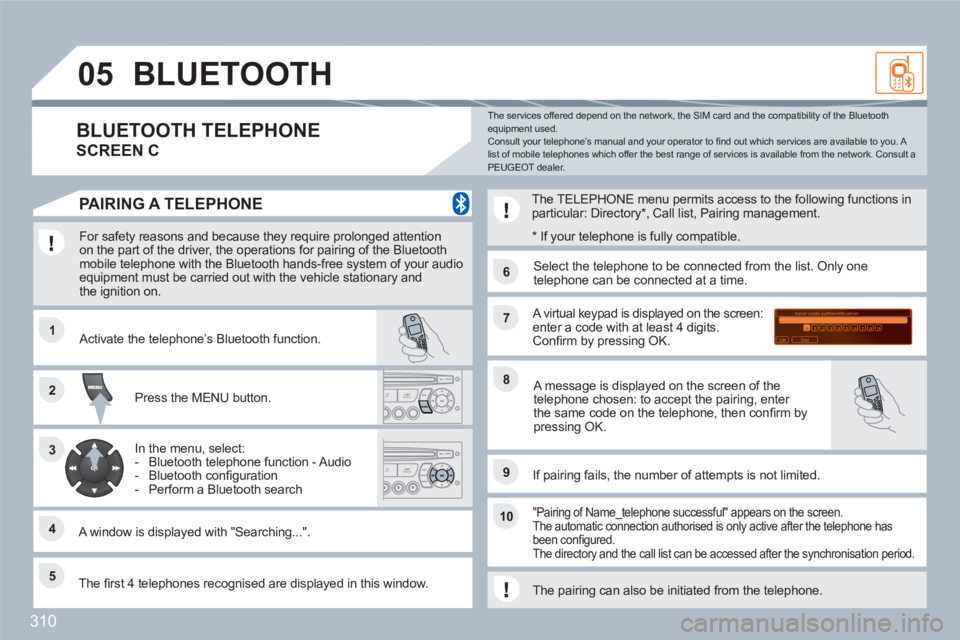
For safety reasons and because they require prolonged attention on the part of the driver, the operations for pairing of the Bluetooth mobile telephone with the Bluetooth hands-free system of your audioequipment must be carried out with the vehicle stationary andthe ignition on.
Press the MENU button.
A window is displayed with "Searching...".
Activate the telephone’s Bluetooth function.
In the menu, select:
- Bluetooth telephone function - Audio
- Bluetooth confi guration
- Perform a Bluetooth search
The services offered depend on the network, the SIM card and the compatibility of the Bluetooth equipment used. Consult your telephone’s manual and your operator to fi nd out which services are available to you. A list of mobile telephones which offer the best range of services is available from the network. Consult a PEUGEOT dealer.
BLUETOOTH TELEPHONE
SCREEN C
The TELEPHONE menu permits access to the following functions inparticular: Directory *
, Call list, Pairing management.
The fi rst 4 telephones recognised are displayed in this window.
A virtual keypad is displayed on the screen:enter a code with at least 4 digits. Confi rm by pressing OK.
If pairing fails, the number of attempts is not limited.
Select the telephone to be connected from the list. Only onetelephone can be connected at a time.
A message is displayed on the screen of thetelephone chosen: to accept the pairing, enter the same code on the telephone, then confi rm bypressing OK.
"Pairing of Name_telephone successful" appears on the screen.The automatic connection authorised is only active after the telephone has been confi gured. The directory and the call list can be accessed after the synchronisation period.
PAIRING A TELEPHONE
*
If your telephone is fully compatible.
The pairing can also be initiated from the telephone.
Page 313 of 336
311
05
11
22
11
22
33
22
11
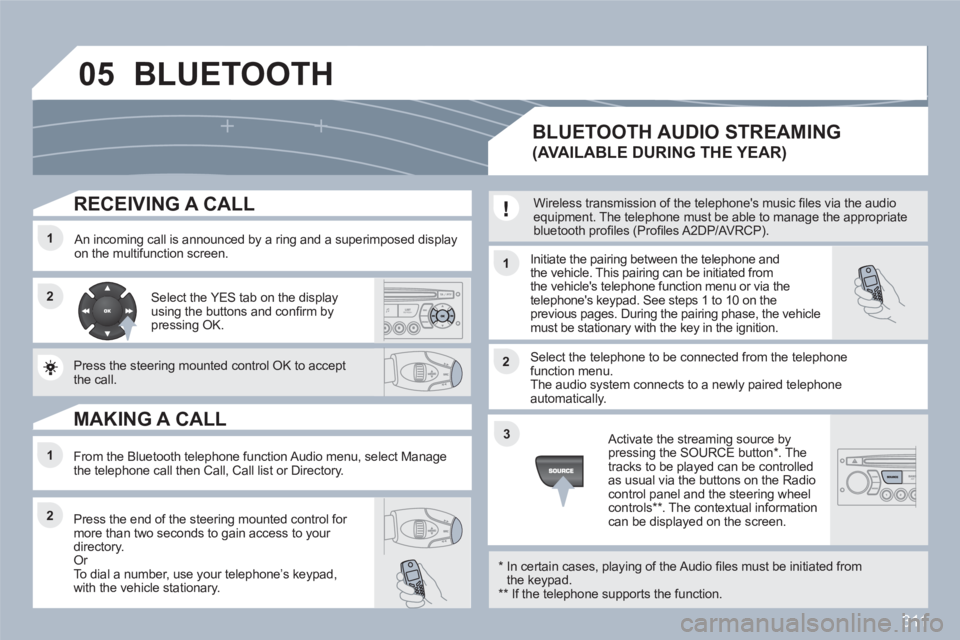
RECEIVING A CALL
An incoming call is announced by a ring and a superimposed display on the multifunction screen. Initiate the pairing between the telephone and the vehicle. This pairing can be initiated fromthe vehicle's telephone function menu or via the telephone's keypad. See steps 1 to 10 on theprevious pages. During the pairing phase, the vehiclemust be stationary with the key in the ignition.
Select the telephone to be connected from the telephone function menu. The audio system connects to a newly paired telephone automatically.
Select the YES tab on the display using the buttons and confi rm bypressing OK.
Press the steering mounted control OK to accept the call.
From the Bluetooth telephone function Audio menu, select Manage the telephone call then Call, Call list or Directory.
Press the end of the steering mounted control for more than two seconds to gain access to your directory. Or
To dial a number, use your telephoneís keypad, with the vehicle stationary.
MAKING A CALL
BLUETOOTH AUDIO STREAMING
(AVAILABLE DURING THE YEAR)
Wireless transmission of the telephone's music fi les via the audio equipment. The telephone must be able to manage the appropriatebluetooth profi les (Profi les A2DP/AVRCP).
*
In certain cases, playing of the Audio fi les must be initiated fromthe keypad. **
If the telephone supports the function.
Activate the streaming source bypressing the SOURCE button * . Thetracks to be played can be controlled as usual via the buttons on the Radio control panel and the steering wheel controls
** . The contextual information can be displayed on the screen.
BLUETOOTH
Page 329 of 336
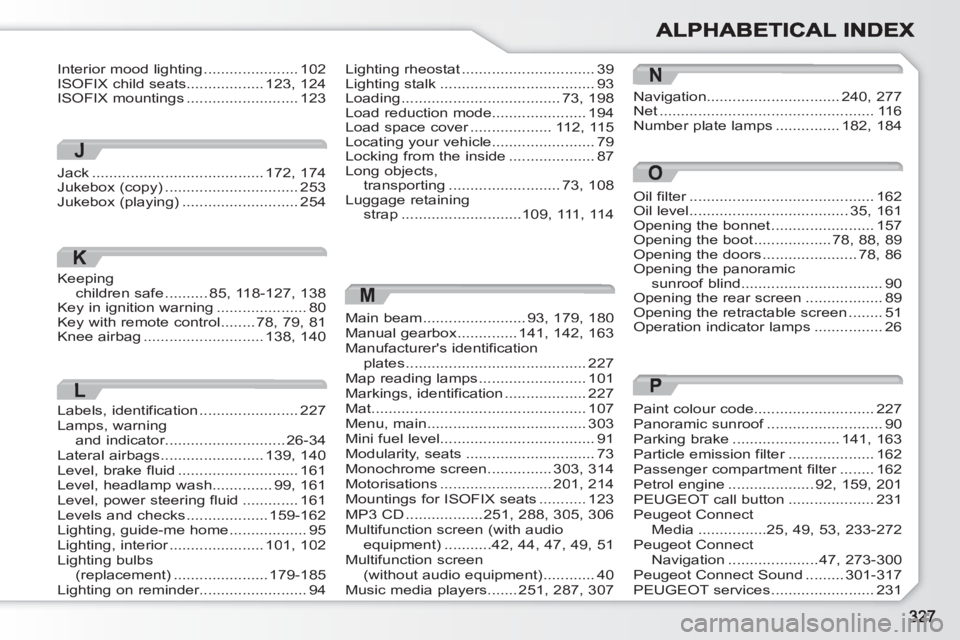
M
Main beam........................93,179, 180Manual gearbox..............141,142, 163Manufacturer's identification plates..........................................227Map reading lamps.........................101Markings, identification...................227Mat..................................................107Menu, main .....................................303Mini fuel level....................................91Modularity, seats ..............................73Monochrome screen ...............303, 314Motorisations..........................201, 214Mountings for ISOFIX seats...........123MP3 CD..................251,288,305, 306Multifunction screen (with audioequipment)...........42,44,47, 49, 51Multifunction screen(without audio equipment)............40Music media players.......251,287, 307
N
Navigation...............................240,277Net..................................................116Number plate lamps...............182,184
Oil filter...........................................r162Oil level .....................................35,161Opening the bonnet ........................157Opening the boot..................78,88,89Opening the doors......................78,86Opening the panoramic sunroof blind .................................90Opening the rear screen ..................89Opening the retractable screen........51Operation indicator lamps ................26
Lighting rheostat ...............................39Lighting stalk ....................................93Loading.....................................73, 198Load reduction mode......................194Load space cover...................r112, 115Locating your vehicle........................79Locking from the inside ....................87Long objects,transporting ..........................73,108Luggage retaining strap............................109, 111, 114
Interior mood lighting ......................102ISOFIX child seats..................123,124ISOFIX mountings ..........................123
J
Jack ........................................172,174Jukebox (copy) ...............................253Jukebox (playing)...........................254
K
Keeping children safe..........85, 118-127, 138Key in ignition warning.....................80Key with remote control........78,79,81Knee airbag............................138,140
L
Labels, identification .......................227Lamps, warningand indicator............................r26-34Lateral airbags........................139,140Level, brake fluid............................161Level, headlamp wash..............99,161Level, power steering fluid.............161Levels and checks...................159-162Lighting, guide-me home..................95Lighting, interior......................r101,102Lighting bulbs(replacement) ......................179-185Lighting on reminder.........................94
O
P
Paint colour code............................227Panoramic sunroof...........................f90Parking brake.........................141,163Particle emission filter....................r162Passenger compartment filter........r162Petrol engine....................92,159, 201PEUGEOT call button....................231Peugeot Connect Media................25, 49,53,233-272Peugeot Connect Navigation .....................47,273-300Peugeot Connect Sound.........301-317PEUGEOT services ........................231