ECO mode PEUGEOT 4007 2007.5 Owner's Guide
[x] Cancel search | Manufacturer: PEUGEOT, Model Year: 2007.5, Model line: 4007, Model: PEUGEOT 4007 2007.5Pages: 221, PDF Size: 13.99 MB
Page 200 of 221
11
AUDIO EQUIPMENT and TELEMATICS
Explanations Result
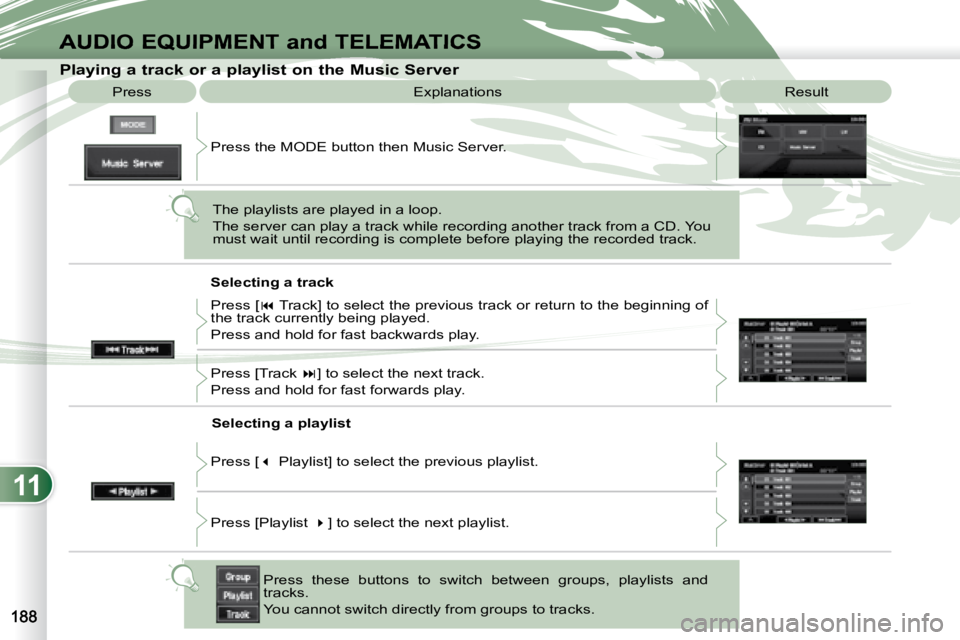
Playing a track or a playlist on the Mu
sic Server
Press
Press the MODE button then Music Server.
The playlists are played in a loop.
The server can play a track while recording another track from a CD. You
must wait until recording is complete before playing the recorde d track.
Selecting a track
Press these buttons to switch between groups, playlists and
tracks.
You cannot switch directly from groups to tracks.
Press [
Track] to select the previous track or return to the beginning of
the track currently being played.
Press and hold for fast backwards play.
Press [Track ] to select the next track.
Press and hold for fast forwards play.
Selecting a playlist
Press [ Playlist] to select the previous playlist.
Press [Playlist ] to select the next playlist.
Page 203 of 221
11
ABC
EF
G
IKL
M
N
D
H
J
AUDIO EQUIPMENT and TELEMATICSEQUIPMENT and TELEMA
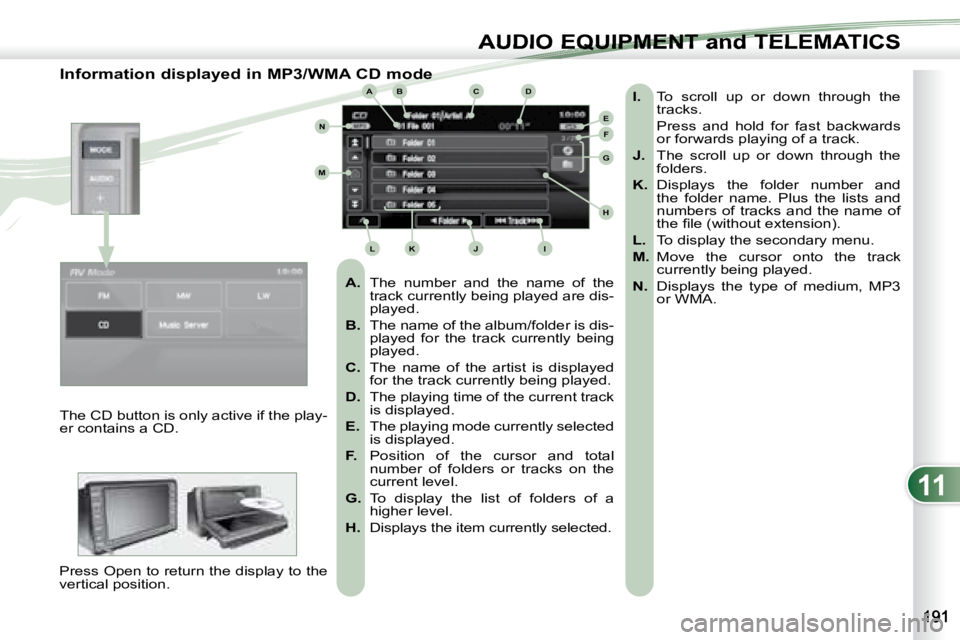
Information displayed in MP3/WMA CD mode
A. The number and the name of the
track currently being played are dis-
played.
B. The name of the album/folder is dis-
played for the track currently being
played.
C. The name of the artist is displayed
for the track currently being played.
D. The playing time of the current track
is displayed.
E. The playing mode currently selected
is displayed.
F. Position of the cursor and total
number of folders or tracks on the
current level.
G. To display the list of folders of a
higher level.
H. Displays the item currently selected.
I. To scroll up or down through the
tracks.
Press and hold for fast backwards or forwards playing of a track.
J. The scroll up or down through the
folders.
K. Displays the folder number and
the folder name. Plus the lists and
numbers of tracks and the name of
the fi le (without extension).
L. To display the secondary menu.
M. Move the cursor onto the track
currently being played.
N. Displays the type of medium, MP3
or WMA.
The CD button is only active if the play-
er contains a CD.
Press Open to return the display to the
vertical position.
Page 205 of 221
![PEUGEOT 4007 2007.5 Owners Guide 11
AUDIO EQUIPMENT and TELEMATICSEQUIPMENT and TELEMA
Changing the playing mode
Press [
Track] to select the previous track or return to the beginning of
the track currently being played](/img/29/76801/w960_76801-204.png "PEUGEOT 4007 2007.5 Owners Guide 11
AUDIO EQUIPMENT and TELEMATICSEQUIPMENT and TELEMA
Changing the playing mode
Press [
Track] to select the previous track or return to the beginning of
the track currently being played")
11
AUDIO EQUIPMENT and TELEMATICSEQUIPMENT and TELEMA
Changing the playing mode
Press [
Track] to select the previous track or return to the beginning of
the track currently being played.
Press and hold for fast backwards play.
Selecting a track
Press [Track
] to select the next track.
Press and hold for fast forwards play.
Press [Repeat] to play the track selected in a loop (repetitio n).
Press [Repeat] again to play all of the tracks in the selecte d folder in a
loop.
Press again to stop.
Press [Scan] to play the beginning of each track in each folde r for approxi-
mately 10 seconds (scanning).
Press [Scan] again the play the beginning of each track in th e selected
folder in a loop.
Press again to stop or press on the current track (during the 10 seco nds)
and play begins.
Press [Random] to play all of the tracks in the selected folde r in random
order.
Press [Random] again to play all of the tracks on the CD in random
order.
Press again to stop.
Press [^] to access the secondary menu.
Press
Explanations Result
Playing an MP3/WMA CD (2/2)
Page 214 of 221
11
AUDIO EQUIPMENT and TELEMATICS
HANDS-FREE TELEPHONE HANDS-FREE TELEPHONE
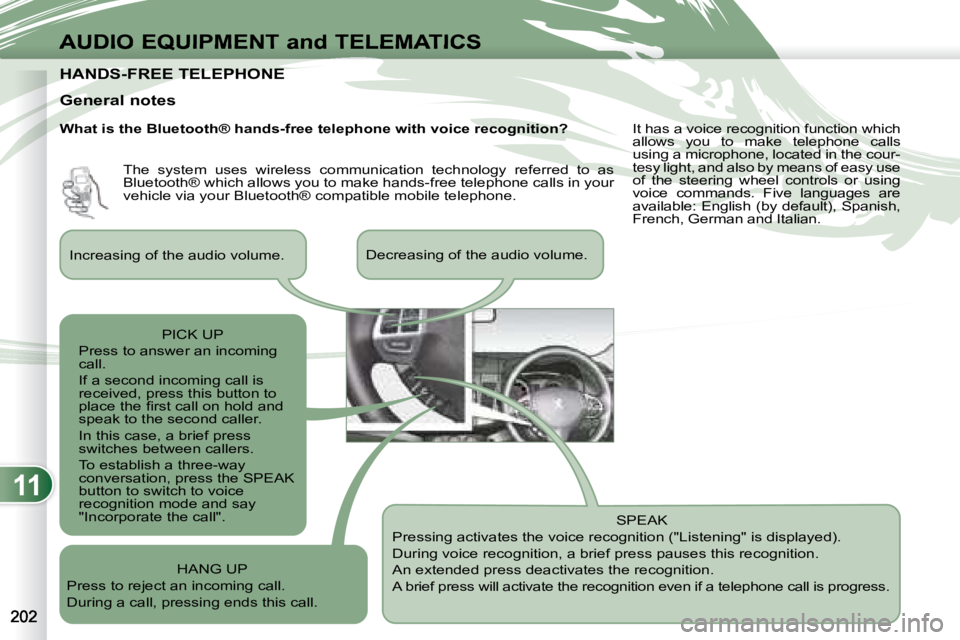
General notes SPEAK
Pressing activates the voice recognition ("Listening" is displayed).
During voice recognition, a brief press pauses this recognition.
An extended press deactivates the recognition.
A brief press will activate the recognition even i f a telephone call is progress.
Increasing of the audio volume.
Decreasing of the audio volume.
PICK UP
Press to answer an incoming
call.
If a second incoming call is
received, press this button to
place the fi rst call on hold and
speak to the second caller.
In this case, a brief press
switches between callers.
To establish a three-way
conversation, press the SPEAK
button to switch to voice
recognition mode and say
"Incorporate the call".
HANG UP
Press to reject an incoming call.
During a call, pressing ends this call. The system uses wireless communication technology referred to as
Bluetooth® which allows you to make hands-free telephone call
s in your
vehicle via your Bluetooth® compatible mobile telephone. It has a voice recognition function which
allows you to make telephone calls
using a microphone, located in the cour-
tesy light, and also by means of easy use
of the steering wheel controls or using
voice commands. Five languages are
available: English (by default), Spanish,
French, German and Italian.
What is the Bluetooth® hands-free telephone with voice re
cognition?
Page 215 of 221
11
i
AUDIO EQUIPMENT and TELEMATICSEQUIPMENT and TELEMA
Changing the language,
programming the voice
Changing the language of the voice
commands
By default, the recognition system is in
English. Programming the user’s voice
You can use the user’s voice program-
ming function to create a voice model
for one person per language.
The characteristics of your voice and
your pronunciation are recorded in this
model for improved voice recognition.
It is essential that the vehicle is parked
in a safe place, with the handbrake ap-
plied.
Switch off your telephone during the
process to avoid any interruption.
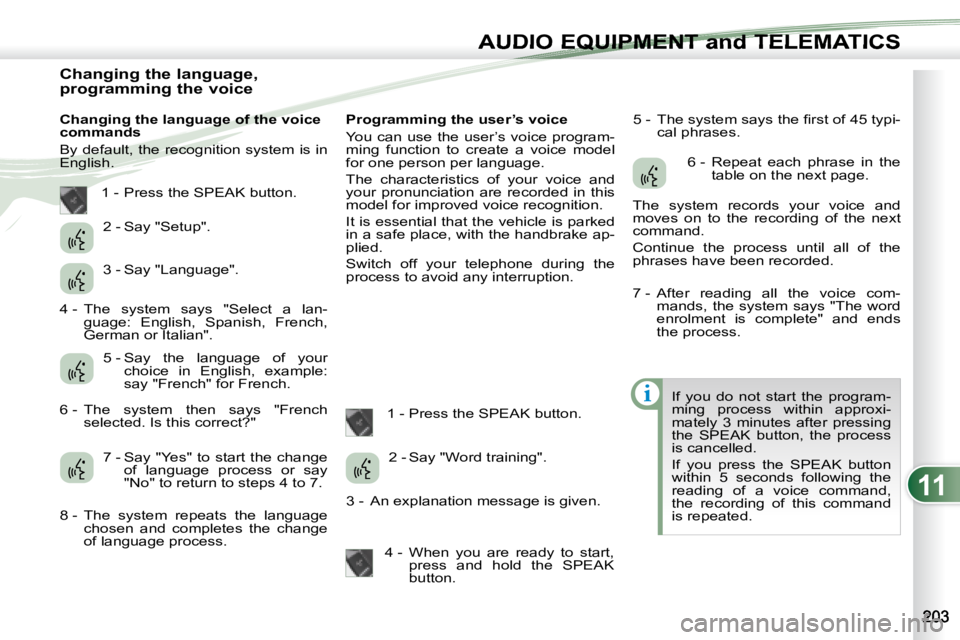
1 - Press the SPEAK button. 5 - The system says the fi rst of 45 typi-
cal phrases.
If you do not start the program-
ming process within approxi-
mately 3 minutes after pressing
the SPEAK button, the process
is cancelled.
If you press the SPEAK button
within 5 seconds following the
reading of a voice command,
the recording of this command
is repeated.
1 - Press the SPEAK button.
2 - Say "Setup".
3 - Say "Language".
4 - The system says "Select a lan- guage: English, Spanish, French,
German or Italian".
5 - Say the language of your choice in English, example:
say "French" for French.
6 - The system then says "French selected. Is this correct?"
7 - Say "Yes" to start the change of language process or say
"No" to return to steps 4 to 7.
8 - The system repeats the language chosen and completes the change
of language process. 2 - Say "Word training".
3 - An explanation message is given.
4 - When you are ready to start, press and hold the SPEAK
button. 6 - Repeat each phrase in the
table on the next page.
The system records your voice and
moves on to the recording of the next
command.
Continue the process until all of the
phrases have been recorded.
7 - After reading all the voice com- mands, the system says "The word
enrolment is complete" and ends
the process.