display PEUGEOT 4008 2014.5 Service Manual
[x] Cancel search | Manufacturer: PEUGEOT, Model Year: 2014.5, Model line: 4008, Model: PEUGEOT 4008 2014.5Pages: 389, PDF Size: 15.75 MB
Page 207 of 389
205
the fitting of electrical equipment
or accessories which are not
recommended by P
e
uge
Ot
may result
in a failure of your vehicle's electronic
system and excessive electrical
consumption.
Contact a P
e
uge
Ot
dealer
for information on the range of
recommended equipment and
accessories.
Installation of radio
communication
transmitters
Before installing any after-market radio
communication transmitter, you can
contact a P
e
uge
Ot
dealer for the
specification of transmitters which can
be fitted (frequency, maximum power,
aerial position, specific installation
requirements), in line with the Vehicle
el
ectromagnetic Compatibility
Directive (2004/104/
eC
). Depending on the legislation in force in
the country, certain safety equipment
may be compulsory: high visibility
safety vests, warning triangles,
breathalyzers, spare bulbs, spare fuses,
fire extinguisher, first aid kit, mud flaps
at the rear of the vehicle.
"Multimedia":
semi-integral satellite navigation systems,
portable satellite navigation systems, audio
systems, speakers, hands-free kit, DVD player,
mapping update DVD, driving assistant,
Wi-Fi on board, 230V socket, head-up display
system, iPhone charger, telephone carrier, rear
multimedia carrier...
7
Practical information
Page 217 of 389
215
Avoid prolonged contact of used oil or
fluids with the skin.
Most of these fluids are harmful to
health or indeed very corrosive.
Do not discard used oil or fluids into
sewers or onto the ground.
ta
ke used oil to a P
e
uge
Ot
dealer or
a qualified workshop (France) or to an
authorised waste disposal site.
Used products
To p p i n g u p
the reservoir must be topped up without delay
by a Pe ugeOt dealer or a qualified workshop.
Additive level
(1.6 HDi 110 Diesel versions
with particle filter)
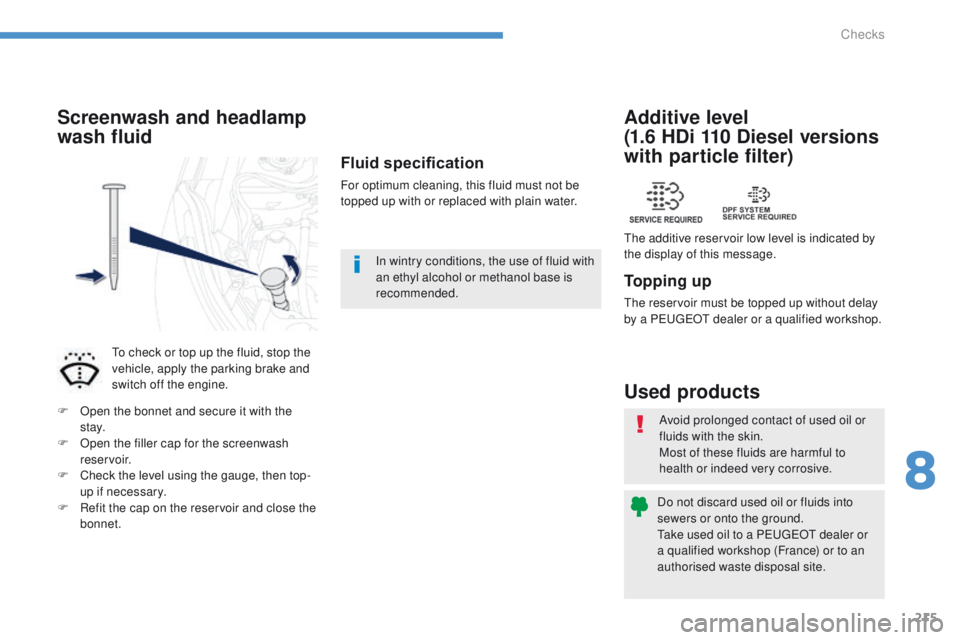
the additive reservoir low level is indicated by
the display of this message.
Fluid specification
For optimum cleaning, this fluid must not be
topped up with or replaced with plain water.
Screenwash and headlamp
wash fluid
to check or top up the fluid, stop the
vehicle, apply the parking brake and
switch off the engine.
F
O
pen the bonnet and secure it with the
st ay.
F
O
pen the filler cap for the screenwash
reservoir.
F
C
heck the level using the gauge, then top-
up if necessary.
F
R
efit the cap on the reservoir and close the
bonnet. In wintry conditions, the use of fluid with
an ethyl alcohol or methanol base is
recommended.
8
Checks
Page 239 of 389
237
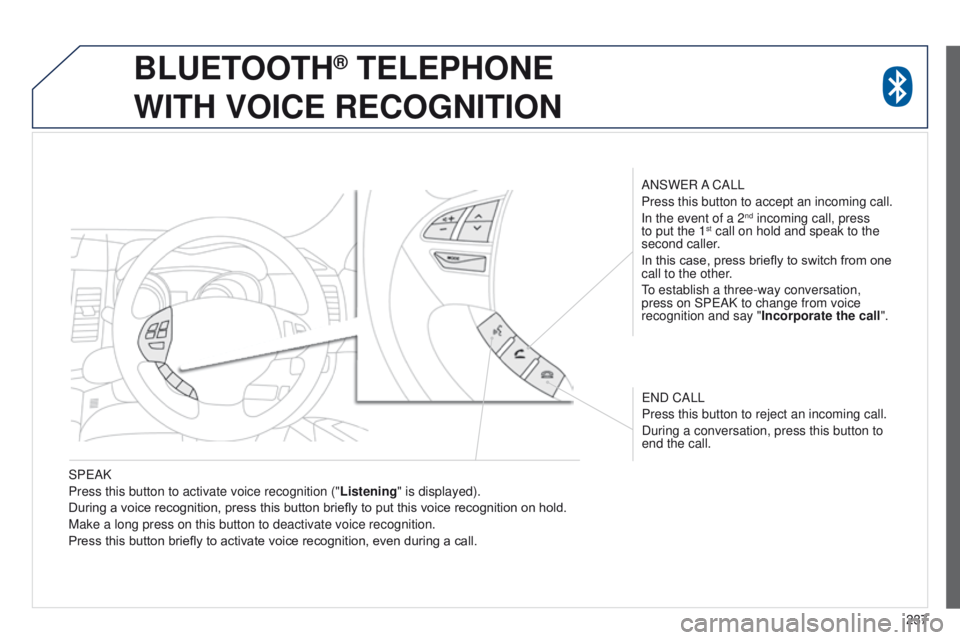
SP
e
AK
Press this button to activate voice recognition (" Listening" is displayed).
During a voice recognition, press this button briefly to put this voice recognition on hold.
Make a long press on this button to deactivate voice recognition.
Press this button briefly to activate voice recognition, even during a call. ANSW
e
R A CALL
Press this button to accept an incoming call.
In the event of a 2
nd incoming call, press
to put the 1st call on hold and speak to the
second caller.
In this case, press briefly to switch from one
call to the other.
to establish a three-way conversation,
press on SP
e AK to change from voice
recognition and say " Incorporate the call".
e
ND CALL
Press this button to reject an incoming call.
During a conversation, press this button to
end the call.
BLUETOOTH® TELEPHONE
WITH
VOICE
RECOGNITION
Page 255 of 389

03
253
Description of the controls - Menus
SETTINGS: used to manage the
different adjustments. DESTINATION: used to set
navigation options and select the
destination.
NAVI MENU: used for adjustments
to the navigation system.
MODE: used to select the audio
source.
INFO: used to check information.
AUDIO: display the screen for the
last audio source used.
MAP: used to display the current
position of your vehicle on the map.
GENERAL
OPERATION
Page 257 of 389
255
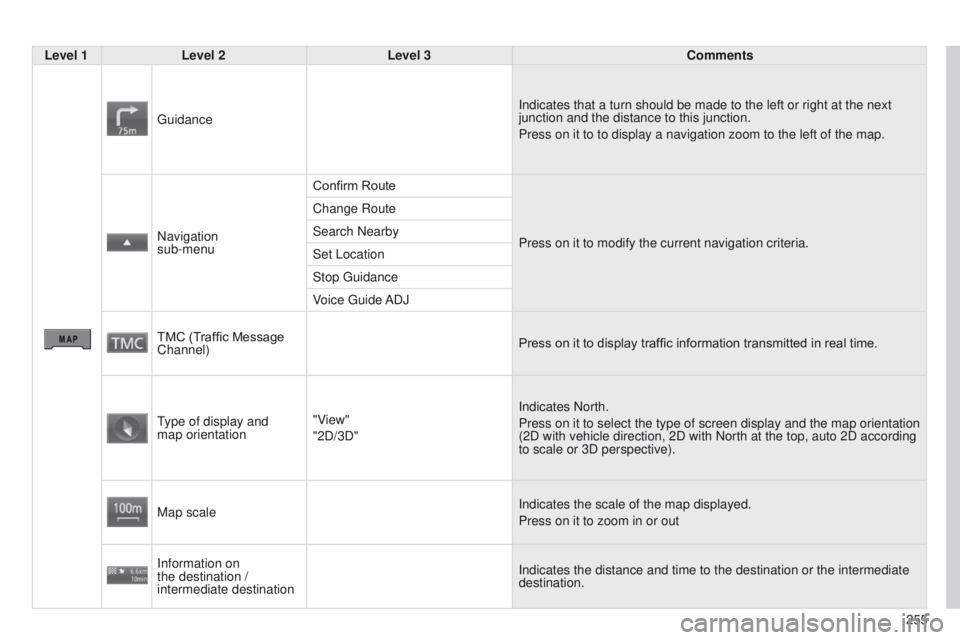
Level 1
Level 2 Level 3 Comments
g
uidance
Indicates that a turn should be made to the left or right at the next
junction and the distance to this junction.
Press on it to to display a navigation zoom to the left of the map.
Navigation
sub-menu Confirm Route
Press on it to modify the current navigation criteria.
Change Route
Search Nearby
Set Location
Stop
g
uidance
Voice
g
uide ADJ
TMC (Traffic Message
Channel) Press on it to display traffic information transmitted in real time.
type of display and
map orientation "V
iew"
"2D/3D" Indicates North.
Press on it to select the type of screen display and the map orientation\
(2D with vehicle direction, 2D with North at the top, auto 2D according\
to scale or 3D perspective).
Map scale Indicates the scale of the map displayed.
Press on it to zoom in or out
Information on
the destination /
intermediate destination Indicates the distance and time to the destination or the intermediate
destination.
Page 261 of 389
259
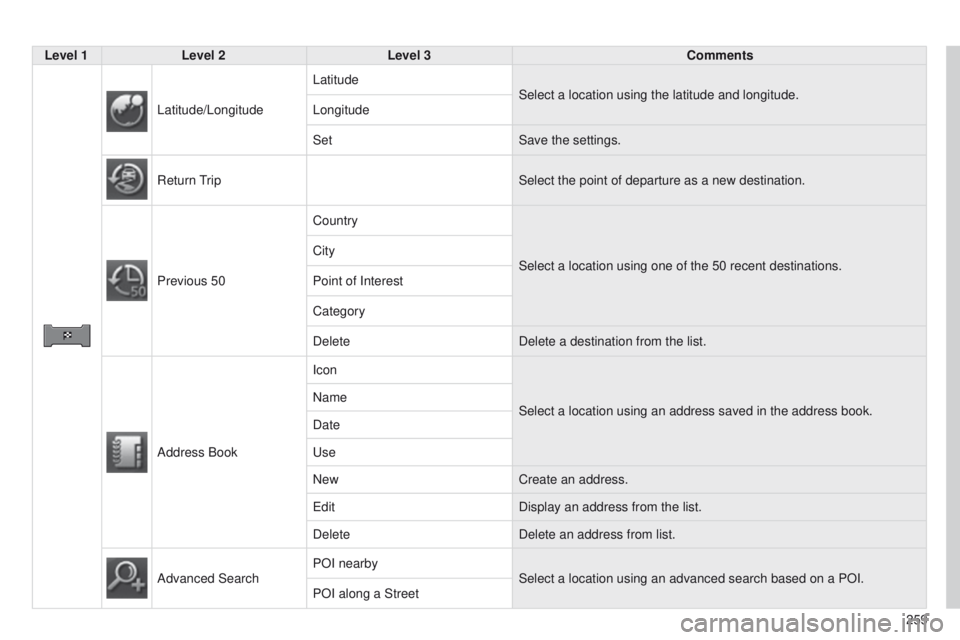
Level 1
Level 2 Level 3 Comments
Latitude/Longitude Latitude
Select a location using the latitude and longitude.
Longitude
Set Save the settings.
Return
t
rip
Select the point of departure as a new destination.
Previous 50 Country
Select a location using one of the 50 recent
destinations.
City
Point of Interest
Category
Delete
Delete a destination from the list.
Address Book Icon
Select a location using an address saved in the address book.
Name
Date
u
se
New Create an address.
e
dit
Display an address from the list.
Delete Delete an address from list.
Advanced Search POI nearby
Select a location using an advanced search based on a POI.
POI along a Street
Page 263 of 389
261
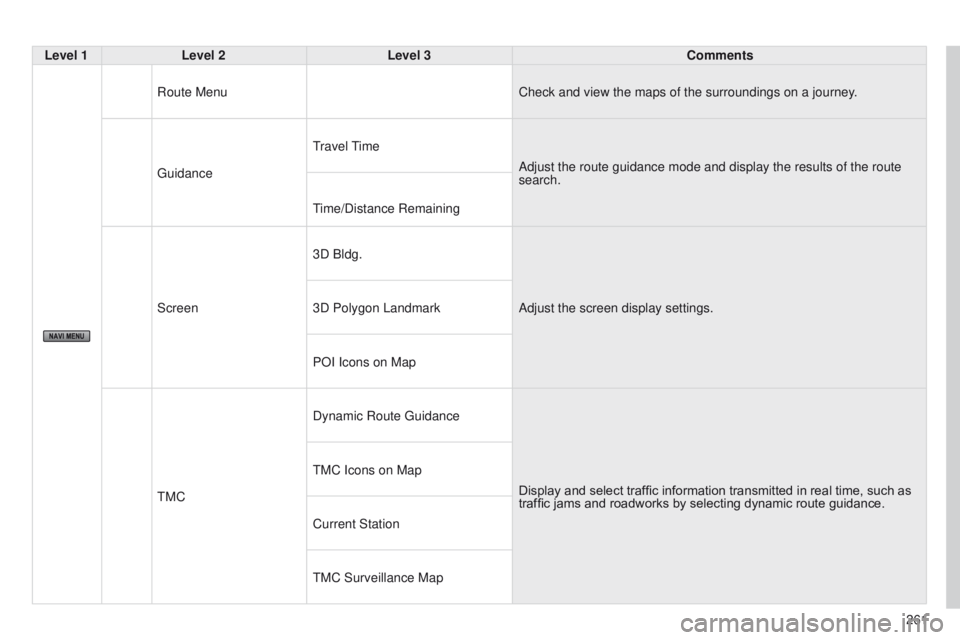
Level 1
Level 2 Level 3 Comments
Route Menu Check and view the maps of the surroundings on a journey.
g
uidance
travel
t
ime
Adjust the route guidance mode and display the results of the route
search.
time/Distance Remaining
Screen 3D Bldg.
Adjust the screen display settings.
3D Polygon Landmark
POI Icons on Map
t
MC
Dynamic Route
g
uidance
Display and select traffic information transmitted in real time, such as
traffic jams and roadworks by selecting dynamic route guidance.
t
MC Icons on Map
Current Station
t
MC Surveillance Map
Page 266 of 389
04
264
t
he satellite navigation system guides the driver to the destination
set in accordance with a chosen route.
Initially, it searches for the destination required by the user, then
it calculates the route and finally it provides the visual and vocal
guidance instructions.
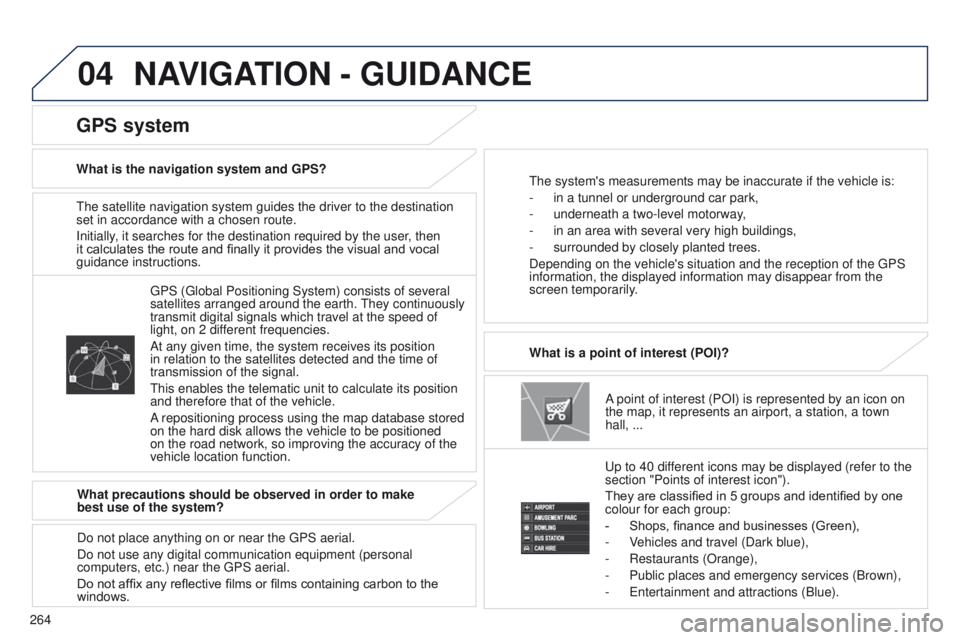
A point of interest (POI) is represented by an icon on
the map, it represents an airport, a station, a town
hall, ...
What is a point of interest (POI)?
u
p to 40 different icons may be displayed (refer to the
section "Points of interest icon").
They are classified in 5 groups and identified by one
colour for each group:
-
Shops, finance and businesses (Green),
-
V
ehicles and travel (Dark blue),
-
Restaurants (Orange),
-
Public places and emergency services (Brown),
-
e ntertainment and attractions (Blue).
g
PS ( g lobal Positioning System) consists of several
satellites arranged around the earth.
t
hey continuously
transmit digital signals which travel at the speed of
light, on 2 different frequencies.
At any given time, the system receives its position
in relation to the satellites detected and the time of
transmission of the signal.
t
his enables the telematic unit to calculate its position
and therefore that of the vehicle.
A repositioning process using the map database stored
on the hard disk allows the vehicle to be positioned
on the road network, so improving the accuracy of the
vehicle location function.
GPS system
What is the navigation system and GPS?t he system's measurements may be inaccurate if the vehicle is:
-
in a tunnel or underground car park,
-
underneath a two-level motorway
,
-
in an area with several very high buildings,
-
surrounded by closely planted trees.
Depending on the vehicle's situation and the reception of the
g PS
information, the displayed information may disappear from the
screen temporarily.
What precautions should be observed in order to make
best use of the system?
Do not place anything on or near the
g PS aerial.
Do not use any digital communication equipment (personal
computers, etc.) near the
g PS aerial.
Do not affix any reflective films or films containing carbon to the
windows.
NAVIGATION - GUIDANCE
Page 268 of 389
04
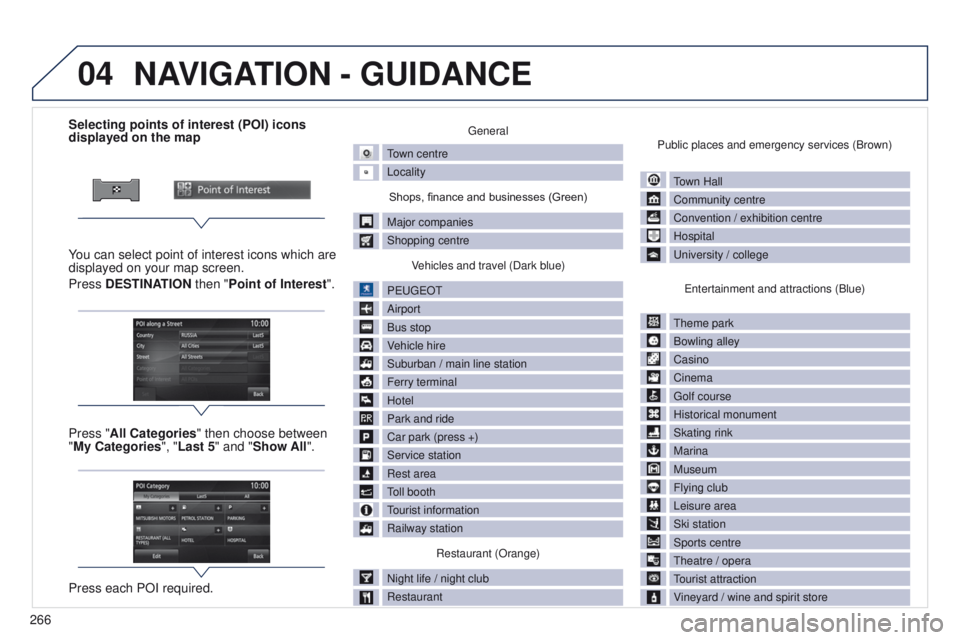
266Selecting points of interest (POI) icons
displayed on the map
You can select point of interest icons which are
displayed on your map screen.
Press DESTINATION then "Point of Interest ".
Press "All Categories" then choose between
"My Categories", "Last 5" and "Show All".
Press each POI required.
general
town centre
Locality
Shops, finance and businesses (Green)
Major companies
Shopping centre V
ehicles and travel (Dark blue)
P
euge
O
t
Airport
Bus stop
V
ehicle hire
Suburban / main line station
Ferry terminal
Hotel
Park and ride
Car park (press +)
Service station
Rest area
toll booth
tourist information
Railway station
Restaurant (Orange)
Night life / night club
Restaurant Public places and emergency services (Brown)
town Hall
Community centre
Convention / exhibition centre
Hospital
u
niversity / college
e
ntertainment and attractions (Blue)
t
heme park
Bowling alley
Casino
Cinema
g
olf course
Historical monument
Skating rink
Marina
Museum
Flying club
Leisure area
Ski station
Sports centre
t
heatre / opera
tourist attraction
V
ineyard / wine and spirit store
NAVIGATION - GUIDANCE
Page 269 of 389
04
267
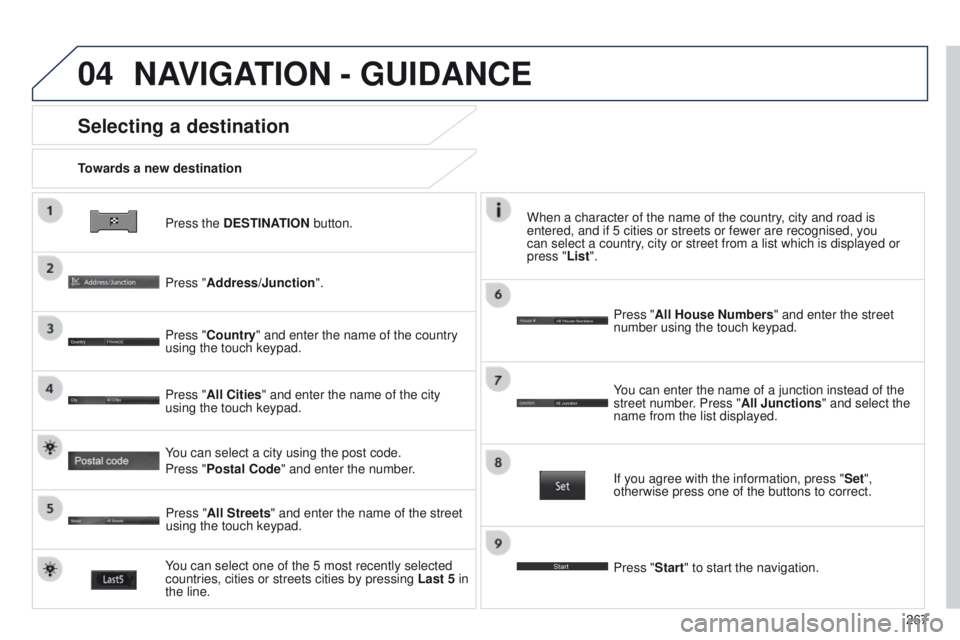
Press the DESTINATION button.
Towards a new destination
Selecting a destination
Press "Address/Junction".
Press "Country" and enter the name of the country
using the touch keypad.
You can select one of the 5 most recently selected
countries, cities or streets cities by pressing
Last 5 in
the line. Press "All Cities" and enter the name of the city
using the touch keypad.
Press "All Streets" and enter the name of the street
using the touch keypad. Press "All House Numbers" and enter the street
number using the touch keypad.
If you agree with the information, press "
Set",
otherwise press one of the buttons to correct.
Press "Start" to start the navigation. You can enter the name of a junction instead of the
street number. Press "All Junctions " and select the
name from the list displayed.
When a character of the name of the country, city and road is
entered, and if 5 cities or streets or fewer are recognised, you
can select a country, city or street from a list which is displayed or
press
"List".
You can select a city using the post code.
Press "Postal Code" and enter the number.
NAVIGATION - GUIDANCE