gearbox PEUGEOT 4008 2014.5 Owners Manual
[x] Cancel search | Manufacturer: PEUGEOT, Model Year: 2014.5, Model line: 4008, Model: PEUGEOT 4008 2014.5Pages: 389, PDF Size: 15.75 MB
Page 4 of 389
Instrument panel 12
Warning and indicator lamps
1
3
Instrument panel screen
1
9
tr
ip computer
3
2
Distance recorder
3
2
tr
ip distance recorder
3
2
Service indicator
3
3
Adjusting vehicle settings
3
7
Audio- CD system screen
4
4
Audio- CD system touch screen
4
6
Audio-
te
lematic system touch
screen
48
Lighting dimmer
5
1
MonitoringOver view
Remote control key 5
2
"Keyless e
n
try and Starting"
system
5
6
Doors
62
Boot
6
3
Alarm
65
el
ectric windows
6
8
Panoramic sunroof
7
0
Access
Front seats 7 1
Rear seats
7
5
Mirrors
77
Steering wheel adjustment
7
9
Ventilation
80
Manual heating / air conditioning
8
2
Automatic air conditioning
8
4
Rear screen demist - defrost
8
9
Interior fittings
9
0
Boot fittings
9
6
Comfort
Starting - stopping the engine with the key 98
Starting - stopping the engine with
the Keyless
e
n
try and Starting system
9
9
Parking brake
1
02
Manual gearbox
1
03
ge
ar shift indicator
1
04
CV
t
gearbox
1
05
Hill start assist
1
10
Stop & Start (Auto Stop &
g
o
) function
1
11
Under-inflation detection
1
14
Four wheel drive system
1
18
Cruise control
1
20
Parking sensors
1
23
Reversing camera
1
26
Driving
Lighting controls 1 27
Daytime running lamps
1
30
Automatic illumination of headlamps
1
30
Manual guide-me-home lighting
1
31
Welcome lighting
1
32
Headlamp adjustment
1
33
Wiper controls
1
34
Automatic rain sensitive wipers
1
36
Courtesy lamps
1
38
Boot lamp
1
40
Panoramic roof lighting
1
40
Visibility
e
co-driving
Contents
Page 8 of 389
6
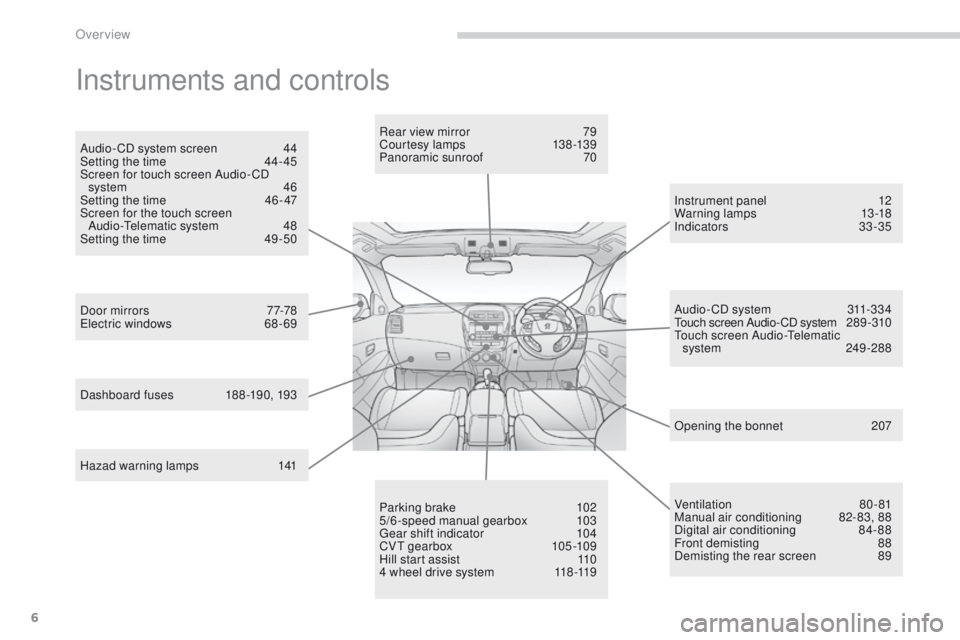
Instruments and controls
Hazad warning lamps 141
Door mirrors
7
7-78
el
ectric windows
6
8 - 69Rear view mirror
7
9
Courtesy lamps
1
38 -139
Panoramic sunroof
7
0
Dashboard fuses
1
88 -190, 193 Instrument panel
1
2
Warning lamps
1
3-18
Indicators
33-35
Audio- CD system screen
4
4
Setting the time
4
4- 45
Screen for touch screen Audio- CD system
4
6
Setting the time
4
6 - 47
Screen for the touch screen Audio-
te
lematic system
4
8
Setting the time
4
9 -50
Parking brake
1
02
5/6-speed manual gearbox
1
03
ge
ar shift indicator
1
04
CV
t g
earbox
10
5 -109
Hill start assist
1
10
4 wheel drive system
1
18 -119Audio- CD system
3
11-334
to
uch screen Audio- CD system
2
8 9 - 310
tou
ch screen Audio-
te
lematic
system
2
49 -288
Ventilation
8
0-81
Manual air conditioning
8
2-83, 88
Digital air conditioning
8
4-88
Front demisting
8
8
Demisting the rear screen
8
9
Opening the bonnet
2
07
Over view
Page 12 of 389
10
eco-drivingeco-driving is a range of everyday practices that allow the motorist to optimise their fuel consumption and CO2 emissions.
Optimise the use of your gearbox
With a manual gearbox, move off gently and change up without waiting.
During acceleration change up early.
With an automatic or electronic gearbox, give preference to automatic
mode and avoid pressing the accelerator pedal heavily or suddenly.
th
e gear shift indicator invites you to change up: as soon as the
indication to change up is displayed in the instrument panel, follow it
straight away.
With an electronic or automatic gearbox, this indicator appears only in
manual mode.
Drive smoothly
Maintain a safe distance between vehicles, use engine braking rather
than the brake pedal, and press the accelerator progressively. th ese
practices contribute towards a reduction in fuel consumption and CO
2
emissions and also helps reduce the background traffic noise.
Control the use of your electrical
equipment
Before moving off, if the passenger compartment is too warm, ventilate it
by opening the windows and air vents before using the air conditioning.
Above 30 mph (50 km/h), close the windows and leave the air vents
open.
Remember to make use of equipment that can help keep the
temperature in the passenger compartment down (sunroof and window
blinds...).
Switch off the air conditioning, unless it has automatic regulation, as
soon as the desired temperature is attained.
Switch off the demisting and defrosting controls, if not automatic.
Switch off the heated seat as soon as possible.
Switch off the headlamps and front foglamps when the level of light
does not require their use.
Avoid running the engine before moving off, particularly in winter; your
vehicle will warm up much faster while driving.
As a passenger, if you avoid connecting your multimedia devices
(film, music, video game...), you will contribute towards limiting the
consumption of electrical energy, and so of fuel.
Disconnect your portable devices before leaving the vehicle.
If your vehicle has cruise control, make use of the system at speeds
above 25 mph (40 km/h) when the traffic is flowing well.
eco-driving
Page 21 of 389
19
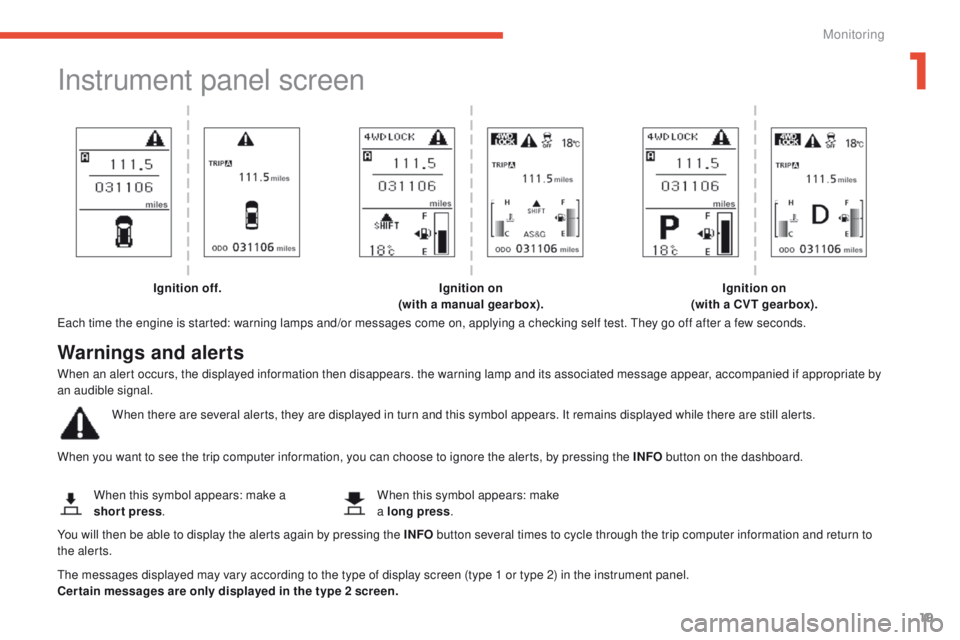
Instrument panel screen
each time the engine is started: warning lamps and/or messages come on, applying a checking self test. th ey go off after a few seconds.
When you want to see the trip computer information, you can choose to ignore the alerts, by pressing the INFO button on the dashboard.
th
e messages displayed may vary according to the type of display screen (type 1 or type 2) in the instrument panel.
Cer tain messages are only displayed in the type 2 screen. When this symbol appears: make a
short press
. When this symbol appears: make
a long press
.
Ignition off.
Ignition on
(with a manual gearbox). Ignition on
(with a CVT gearbox).
Warnings and alerts
When an alert occurs, the displayed information then disappears. the warning lamp and its associated message appear, accompanied if appropriate by
an audible signal.
When there are several alerts, they are displayed in turn and this symbol appears. It remains displayed while there are still alerts.
You will then be able to display the alerts again by pressing the INFO button several times to cycle through the trip computer information and return to
the alerts.
1
Monitoring
Page 30 of 389
28
Screen 1 Screen 2Cause Solution - ActionObservations
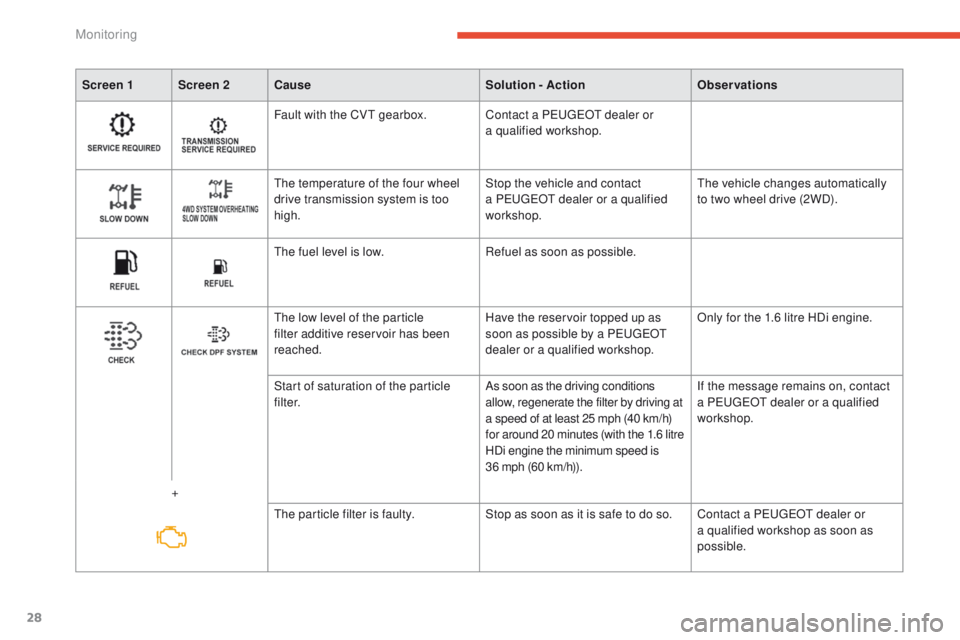
Fault with the CV
t
gearbox. Contact a P
e
uge
Ot
dealer or
a qualified workshop.
th
e temperature of the four wheel
drive transmission system is too
high. Stop the vehicle and contact
a P
e
uge
Ot
dealer or a qualified
workshop.
th
e vehicle changes automatically
to two wheel drive (2WD).
th
e fuel level is low.Refuel as soon as possible.
th
e low level of the particle
filter additive reservoir has been
reached. Have the reservoir topped up as
soon as possible by a P
e
uge
Ot
dealer or a qualified workshop. Only for the 1.6 litre HDi engine.
+ Start of saturation of the particle
f i l t e r.
As soon as the driving conditions
allow, regenerate the filter by driving at
a speed of at least 25 mph (40 km/h)
for around 20 minutes (with the 1.6 litre
HDi engine the minimum speed is
36 mph (60 km/h)). If the message remains on, contact
a P
e
uge
Ot
dealer or a qualified
workshop.
th
e particle filter is faulty.Stop as soon as it is safe to do so. Contact a P
e
uge
Ot
dealer or
a qualified workshop as soon as
possible.
Monitoring
Page 31 of 389
29
Screen 1 Screen 2Cause Solution - ActionObservations
* Depending on country of sale.
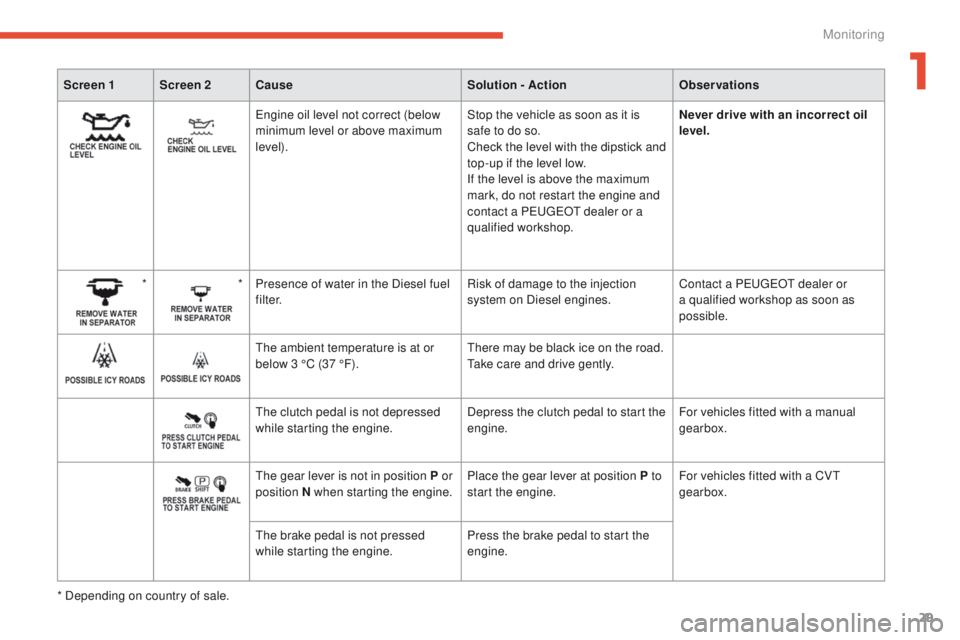
engine oil level not correct (below
minimum level or above maximum
level). Stop the vehicle as soon as it is
safe to do so.
Check the level with the dipstick and
top-up if the level low.
If the level is above the maximum
mark, do not restart the engine and
contact a P
e
uge
Ot
dealer or a
qualified workshop. Never drive with an incorrect oil
level.
* * Presence of water in the Diesel fuel
f i l t e r. Risk of damage to the injection
system on Diesel engines.Contact a P
e
uge
Ot
dealer or
a qualified workshop as soon as
possible.
th
e ambient temperature is at or
below 3 °C (37 °F).
th
ere may be black ice on the road.
ta
ke care and drive gently.
th
e clutch pedal is not depressed
while starting the engine. Depress the clutch pedal to start the
engine.For vehicles fitted with a manual
gearbox.
th
e gear lever is not in position P or
position N when starting the engine. Place the gear lever at position P to
start the engine.For vehicles fitted with a CV
t
gearbox.
th
e brake pedal is not pressed
while starting the engine. Press the brake pedal to start the
engine.
1
Monitoring
Page 100 of 389
98
Starting - stopping the engine with the key
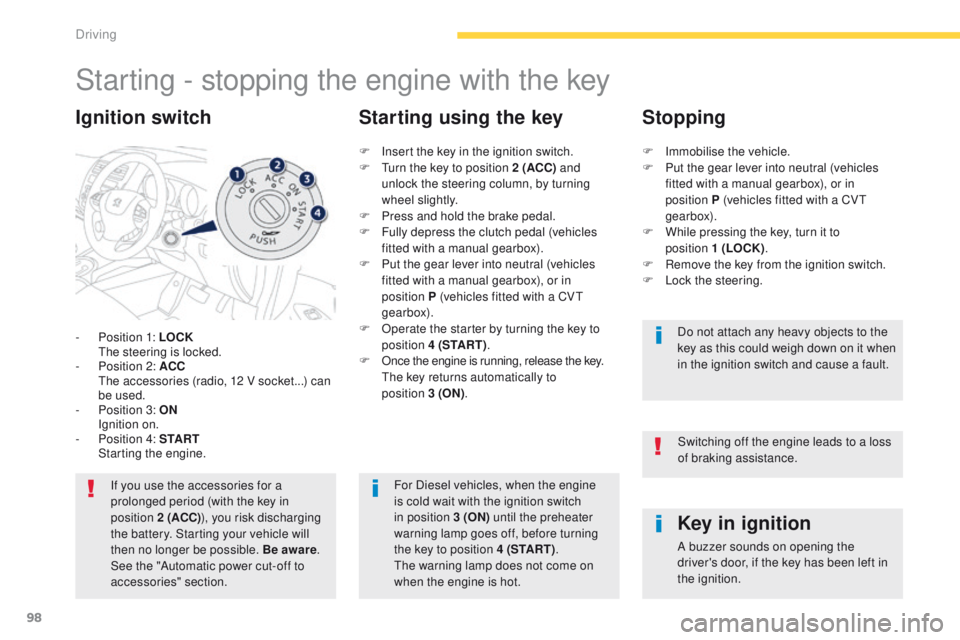
- Position 1: LOCK the steering is locked.
-
P
osition 2: ACC
t
h
e accessories (radio, 12 V socket...) can
be used.
-
P
osition 3: ON
I
gnition on.
-
P
osition 4: S TA R T
S
tarting the engine.
Ignition switch
If you use the accessories for a
prolonged period (with the key in
position 2 (ACC) ), you risk discharging
the battery. Starting your vehicle will
then no longer be possible. Be aware .
See the "Automatic power cut-off to
accessories" section.
Key in ignition
A buzzer sounds on opening the
driver's door, if the key has been left in
the ignition.
F
I
nsert the key in the ignition switch.
F
t
u
rn the key to position 2 (ACC)
and
unlock
the steering column, by turning
wheel slightly.
F
P
ress and hold the brake pedal.
F
F
ully depress the clutch pedal (vehicles
fitted with a manual gearbox).
F
P
ut the gear lever into neutral (vehicles
fitted with a manual gearbox), or in
position
P (vehicles fitted with a CV
t
gearbox).
F
O
perate the starter by turning the key to
position 4 (S TA R T ) .
F
O
nce the engine is running, release the key.
t
h
e key returns automatically to
position
3
(ON)
.
Starting using the key Stopping
F Immobilise the vehicle.
F
P ut the gear lever into neutral (vehicles
fitted with a manual gearbox), or in
position
P (vehicles fitted with a CV
t
gearbox).
F
W
hile pressing the key, turn it to
position
1 (LOCK).
F
R
emove the key from the ignition switch.
F
L
ock the steering.Do not attach any heavy objects to the
key as this could weigh down on it when
in the ignition switch and cause a fault.
For Diesel vehicles, when the engine
is cold wait with the ignition switch
in position 3 (ON) until the preheater
warning lamp goes off, before turning
the key to position 4 (S TA R T ) .
th
e warning lamp does not come on
when the engine is hot. Switching off the engine leads to a loss
of braking assistance.
Driving
Page 101 of 389
99
Changing the mode of
the vehicle
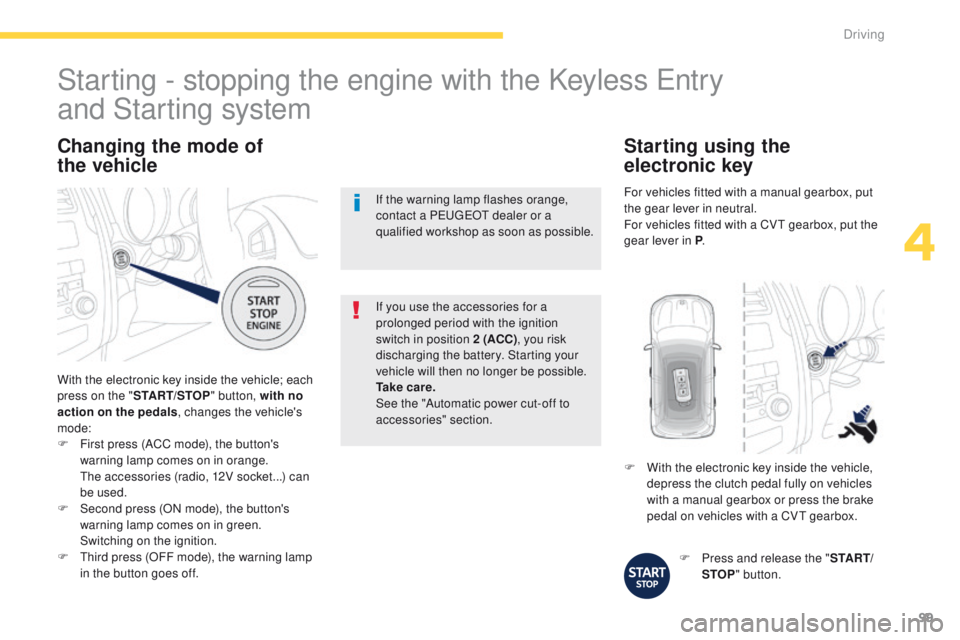
With the electronic key inside the vehicle; each
press on the " START/STOP " button, with no
action on the pedals , changes the vehicle's
mode:
F
F
irst press (ACC mode), the button's
warning lamp comes on in orange.
t
h
e accessories (radio, 12V socket...) can
be used.
F
S
econd press (ON mode), the button's
warning lamp comes on in green.
S
witching on the ignition.
F
t
h
ird press (OFF mode), the warning lamp
in the button goes off. If you use the accessories for a
prolonged period with the ignition
switch in position 2 (ACC)
, you risk
discharging the battery. Starting your
vehicle will then no longer be possible.
Ta k e c a r e .
See the "Automatic power cut-off to
accessories" section.
Starting - stopping the engine with the Keyless en try
and Starting system
If the warning lamp flashes orange,
contact a Pe
ugeOt dealer or a
qualified workshop as soon as possible.
F
P
ress and release the "S TA R T/
STOP " button.
F
W
ith the electronic key inside the vehicle,
depress the clutch pedal fully on vehicles
with a manual gearbox or press the brake
pedal on vehicles with a CV
t
gearbox.
Starting using the
electronic key
For vehicles fitted with a manual gearbox, put
the gear lever in neutral.
For vehicles fitted with a CV
t
gearbox, put the
gear lever in P .
4
Driving
Page 102 of 389
100
For Diesel vehicles, when
the engine is cold starting
does not take place until the
pre-heater warning lamp has
gone of f.
If one of the starting conditions is not
met, a reminder message appears in
the instrument panel screen. In some
circumstances, it is necessary to
turn the steering wheel slightly while
pressing the "
START/STOP " button
to assist unlocking of the steering;
a message warns you when this is
needed.
th
e presence of the electronic key
in the defined zone is essential. For
reasons of safety, do not leave this area
when the engine is running.
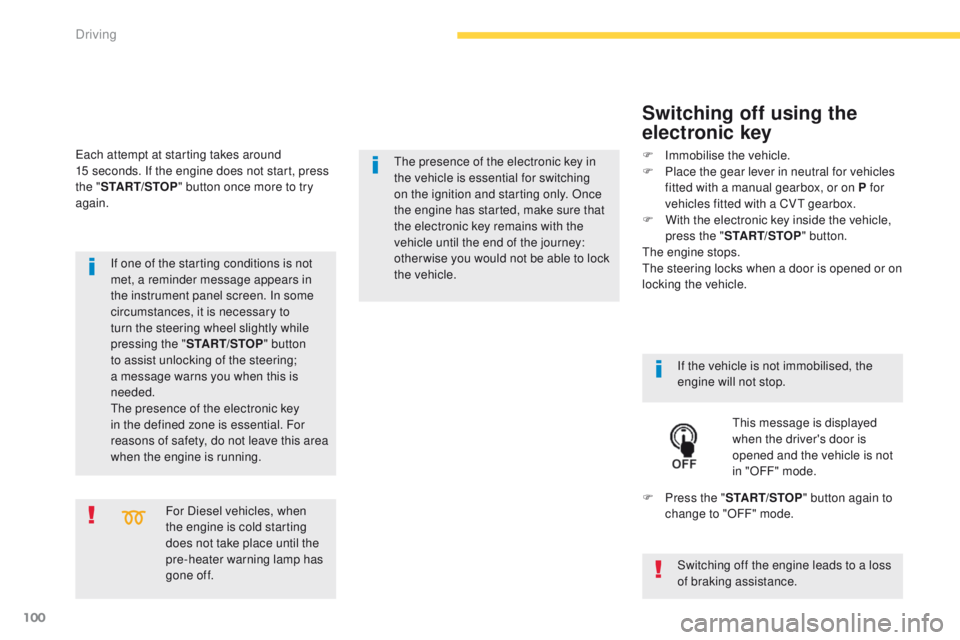
Switching off using the
electronic key
If the vehicle is not immobilised, the
engine will not stop.
th
is message is displayed
when the driver's door is
opened and the vehicle is not
in "OFF" mode.
F
P
ress the " START/STOP " button again to
change to "OFF" mode.
F
Imm
obilise the vehicle.
F
P
lace the gear lever in neutral for vehicles
fitted with a manual gearbox, or on P for
vehicles fitted with a CV
t
gearbox.
F
W
ith the electronic key inside the vehicle,
press the " START/STOP " button.
the
engine stops.
th
e steering locks when a door is opened or on
locking the vehicle.
ea
ch attempt at starting takes around
15 seconds. If the engine does not start, press
the " START/STOP " button once more to try
again.
the presence of the electronic key in
the vehicle is essential for switching
on the ignition and starting only. Once
the engine has started,
make sure that
the electronic key remains with the
vehicle until the end of the journey:
other wise you would not be able to lock
the
vehicle.
Switching off the engine leads to a loss
of braking assistance.
Driving
Page 103 of 389
101
Once the engine has started, you can
remove the electronic key from its
housing A and close the glove box.
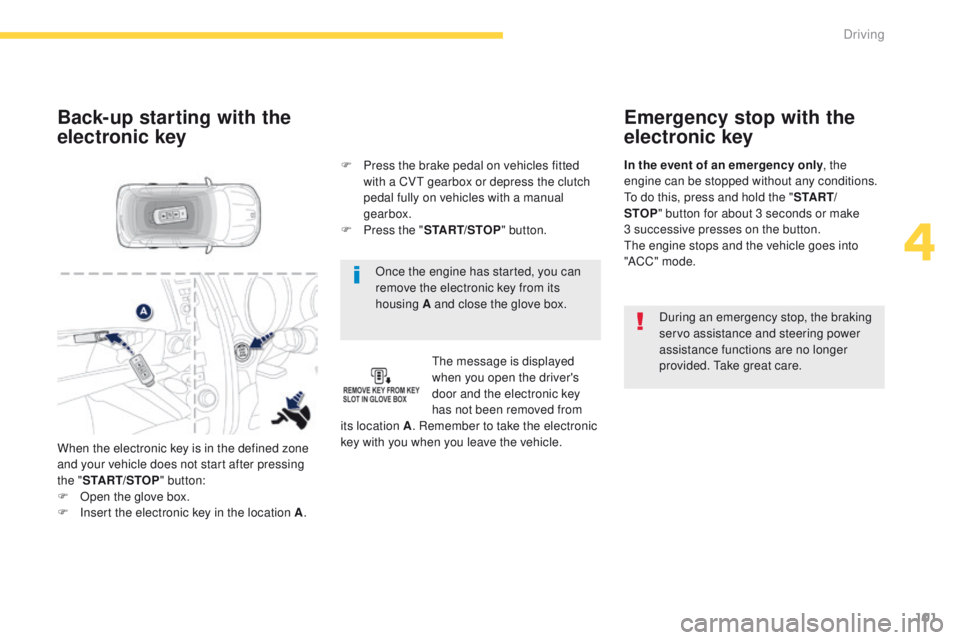
Back-up starting with the
electronic key
the message is displayed
when you open the driver's
door and the electronic key
has not been removed from
its location A . Remember to take the electronic
key with you when you leave the vehicle. F
P
ress the brake pedal on vehicles fitted
with a CV
t
gearbox or depress the clutch
pedal fully on vehicles with a manual
gearbox.
F
P
ress the "
START/STOP " button.
When the electronic key is in the defined zone
and your vehicle does not start after pressing
the " START/STOP " button:
F
O
pen the glove box.
F
I
nsert the electronic key in the location A .
Emergency stop with the
electronic key
During an emergency stop, the braking
servo assistance and steering power
assistance functions are no longer
provided.
t
a
ke great care.
In the event of an emergency only
, the
engine can be stopped without any conditions.
to d
o this, press and hold the "
S TA R T/
STOP " button for about 3 seconds or make
3
successive presses on the button.
th
e engine stops and the vehicle goes into
"ACC " mode.
4
Driving