ad blue PEUGEOT 4008 2014 Owner's Manual
[x] Cancel search | Manufacturer: PEUGEOT, Model Year: 2014, Model line: 4008, Model: PEUGEOT 4008 2014Pages: 368, PDF Size: 20.33 MB
Page 275 of 368
273
04
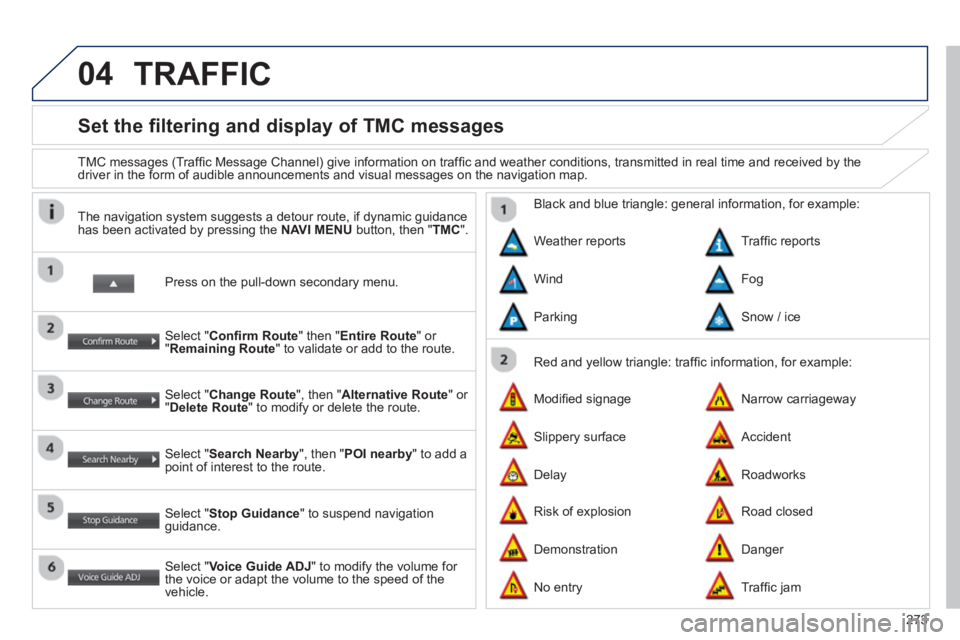
Set the filtering and display of TMC messages
TMC messages (Traffi c Message Channel) give information on traffi c and weather conditions, transmitted in real time and received by the
driver in the form of audible announcements and visual messages on the navigation map.
Press on the pull-down secondary menu.
The navigation system suggests a detour route, if dynamic guidance
has been activated by pressing the NAVI MENU
button, then " TMC
".
Select " Confi rm Route
" then " Entire Route
" or
" Remaining Route
" to validate or add to the route.
Select " Change Route
", then " Alternative Route
" or
" Delete Route
" to modify or delete the route.
Select " Search Nearby
", then " POI nearby
" to add a
point of interest to the route.
Select " Stop Guidance
" to suspend navigation
guidance.
Select " Voice Guide ADJ
" to modify the volume for
the voice or adapt the volume to the speed of the
vehicle.
Red and yellow triangle: traffi c information, for example:
Black and blue triangle: general information, for example:
Weather reports
Modifi ed signage
Risk of explosion Traffi c reports
Narrow carriageway
Road closed Wind
Slippery surface
Demonstration Fog
Accident
Danger Parking
Delay
No entry
Snow / ice
Roadworks
Traffi c jam
TRAFFIC
Page 279 of 368
277
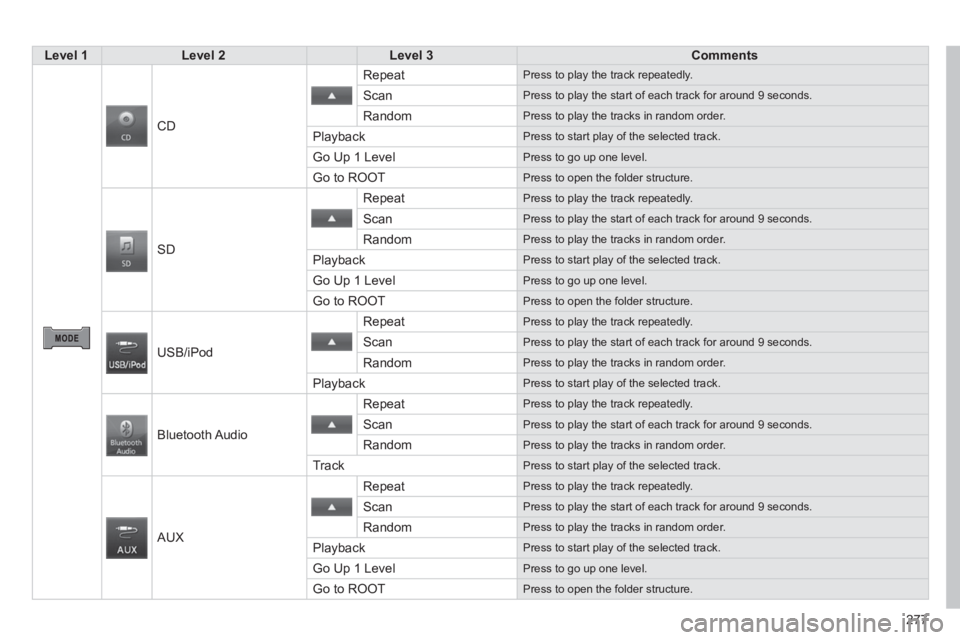
Level 1
Level 2
Level 3
Comments
CD Repeat
Press to play the track repeatedly.
Scan
Press to play the start of each track for around 9 seconds.
Random
Press to play the tracks in random order.
Playback
Press to start play of the selected track.
Go Up 1 Level
Press to go up one level.
Go to ROOT
Press to open the folder structure.
SD Repeat
Press to play the track repeatedly.
Scan
Press to play the start of each track for around 9 seconds.
Random
Press to play the tracks in random order.
Playback
Press to start play of the selected track.
Go Up 1 Level
Press to go up one level.
Go to ROOT
Press to open the folder structure.
USB/iPod Repeat
Press to play the track repeatedly.
Scan
Press to play the start of each track for around 9 seconds.
Random
Press to play the tracks in random order.
Playback
Press to start play of the selected track.
Bluetooth Audio Repeat
Press to play the track repeatedly.
Scan
Press to play the start of each track for around 9 seconds.
Random
Press to play the tracks in random order.
Track
Press to start play of the selected track.
AUX Repeat
Press to play the track repeatedly.
Scan
Press to play the start of each track for around 9 seconds.
Random
Press to play the tracks in random order.
Playback
Press to start play of the selected track.
Go Up 1 Level
Press to go up one level.
Go to ROOT
Press to open the folder structure.
Page 294 of 368
292
08
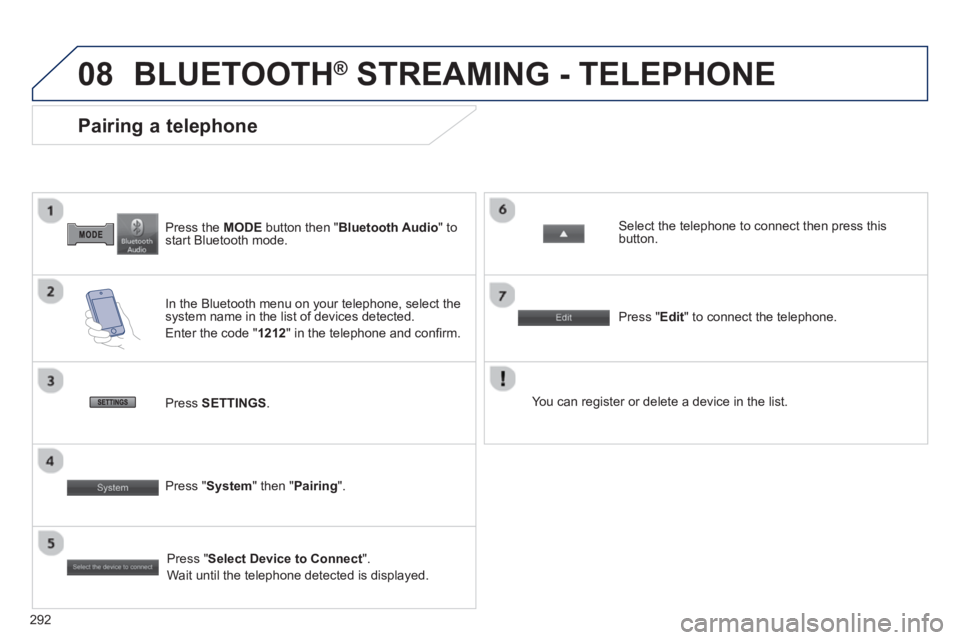
Press the MODE
button then " Bluetooth Audio
" to
start Bluetooth mode.
Pairing a telephone
In the Bluetooth menu on your telephone, select the
system name in the list of devices detected.
Enter the code " 1212
" in the telephone and confi rm.
Select the telephone to connect then press this
button.
Press " Select Device to Connect
".
Wait until the telephone detected is displayed.
Press SETTINGS
.
Press " Edit
" to connect the telephone.
Press " System
" then " Pairing
".
You can register or delete a device in the list.
BLUETOOTH ®
STREAMING - TELEPHONE
Page 295 of 368
293
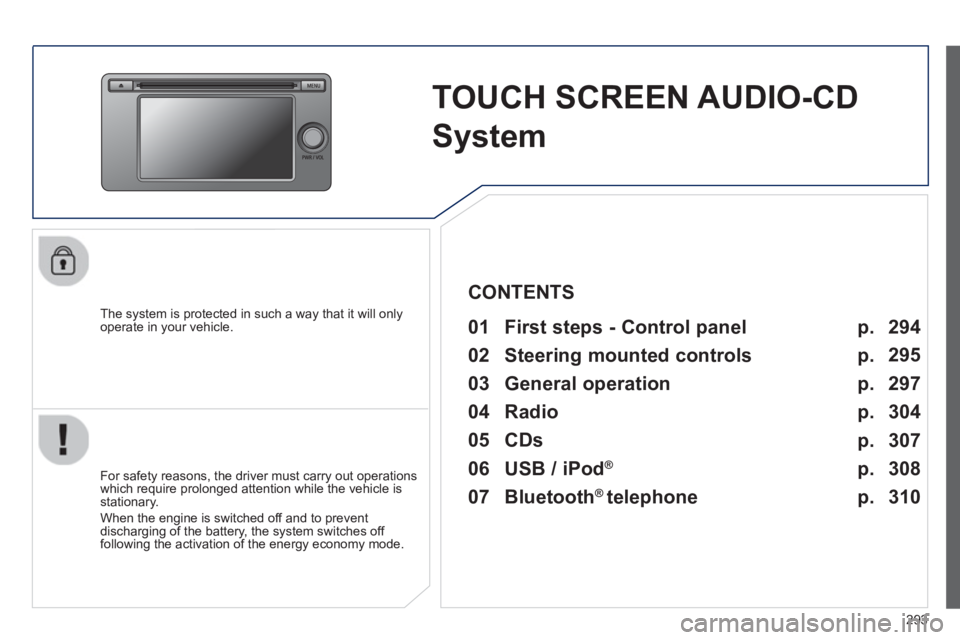
TOUCH SCREEN AUDIO-CD
System
The system is protected in such a way that it will only
operate in your vehicle.
01 First steps - Control panel
For safety reasons, the driver must carry out operations
which require prolonged attention while the vehicle is
stationary.
When the engine is switched off and to prevent
discharging of the battery, the system switches off
following the activation of the energy economy mode.
CONTENTS
03 General operation
02 Steering mounted controls
04 Radio
05 CDs
06 USB / iPod
®
07 Bluetooth
®
telephone p.
p. p.
p.
p.
p.
p. 294
295
297
304
307
308
310
Page 297 of 368
295
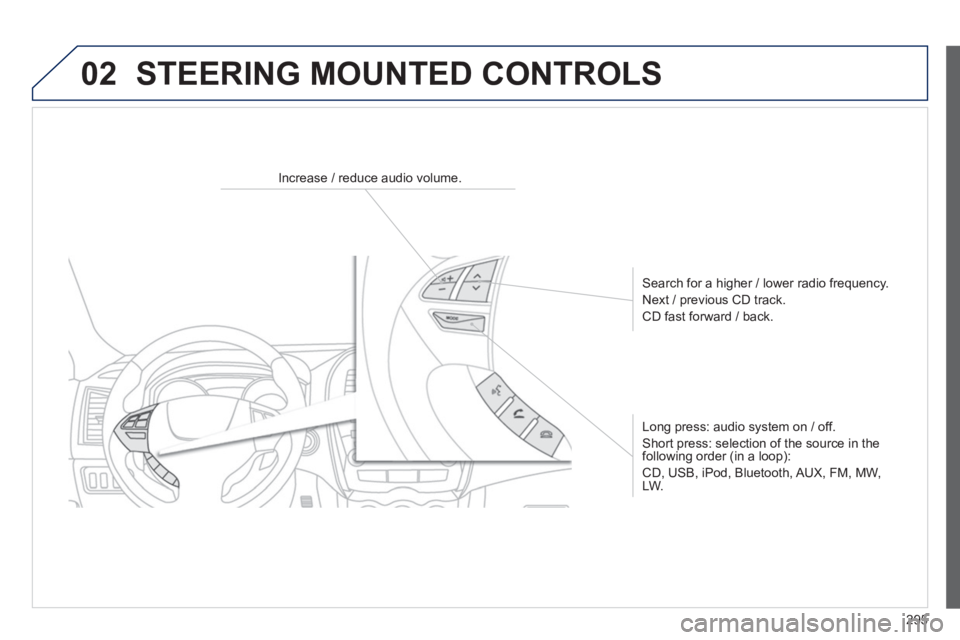
02 STEERING MOUNTED CONTROLS
Increase / reduce audio volume.
Search for a higher / lower radio frequency.
Next / previous CD track.
CD fast forward / back.
Long press: audio system on / off.
Short press: selection of the source in the
following order (in a loop):
CD, USB, iPod, Bluetooth, AUX, FM, MW,
LW.
Page 299 of 368
297
03 GENERAL OPERATION
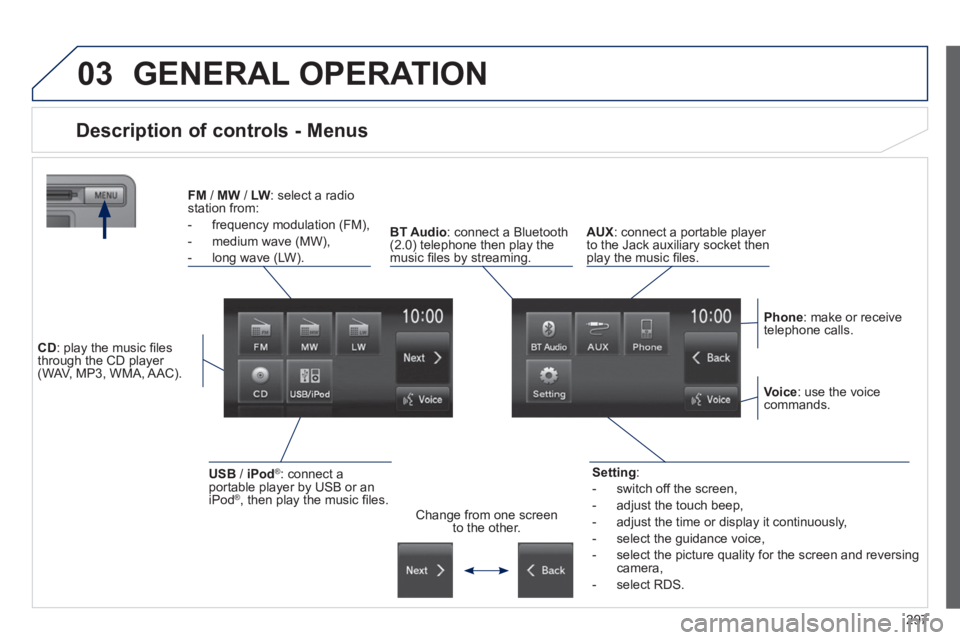
Description of controls - Menus
Setting
:
- switch off the screen,
- adjust the touch beep,
- adjust the time or display it continuously,
- select the guidance voice,
- select the picture quality for the screen and reversing
camera,
- select RDS.
FM
/ MW
/ LW
: select a radio
station from:
- frequency modulation (FM),
- medium wave (MW),
- long wave (LW).
BT Audio
: connect a Bluetooth
(2.0) telephone then play the
music fi les by streaming.
AUX
: connect a portable player
to the Jack auxiliary socket then
play the music fi les.
Phone
: make or receive
telephone calls.
Change from one screen
to the other.
Voice
: use the voice
commands.
USB
/ iPod
®
: connect a
portable player by USB or an
iPod
® , then play the music fi les.
CD
: play the music fi les
through the CD player
(WAV, MP3, WMA, AAC).
Page 312 of 368
310
07 BLUETOOTH ®
TELEPHONE
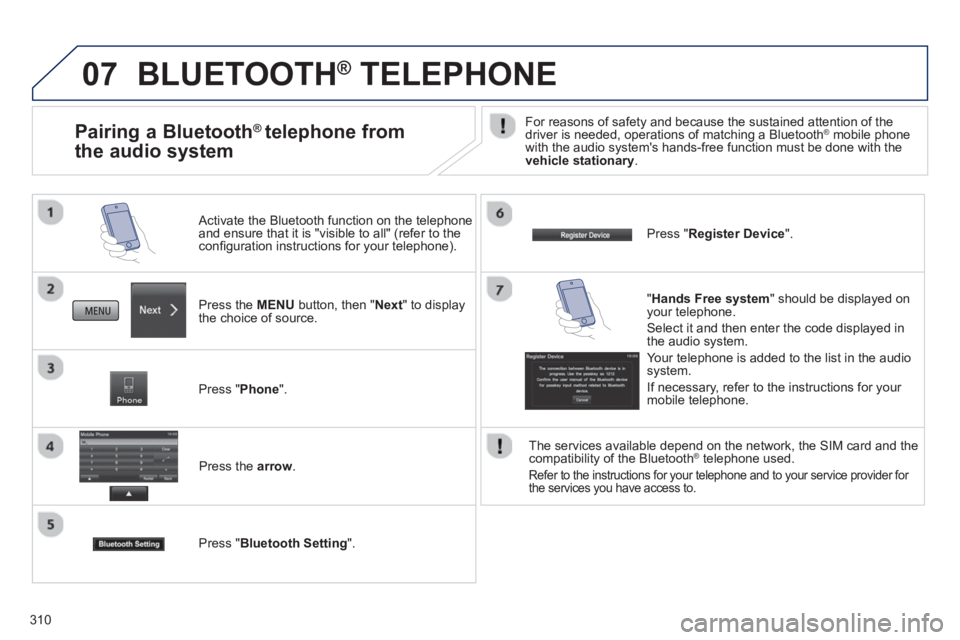
Press the MENU
button, then " Next
" to display
the choice of source.
Activate the Bluetooth function on the telephone
and ensure that it is "visible to all" (refer to the
confi guration instructions for your telephone).
Press " Phone
".
Press the arrow
.
Press " Bluetooth Setting
".
Press " Register Device
".
Pairing a Bluetooth ®
telephone from
the audio system
For reasons of safety and because the sustained attention of the
driver is needed, operations of matching a Bluetooth ® mobile phone
with the audio system's hands-free function must be done with the
vehicle stationary
.
" Hands Free system
" should be displayed on
your telephone.
Select it and then enter the code displayed in
the audio system.
Your telephone is added to the list in the audio
system.
If necessary, refer to the instructions for your
mobile telephone.
The services available depend on the network, the SIM card and the
compatibility of the Bluetooth
® telephone used.
Refer to the instructions for your telephone and to your service provider for
the services you have access to.
Page 313 of 368
311
07
Making a call
BLUETOOTH ®
TELEPHONE
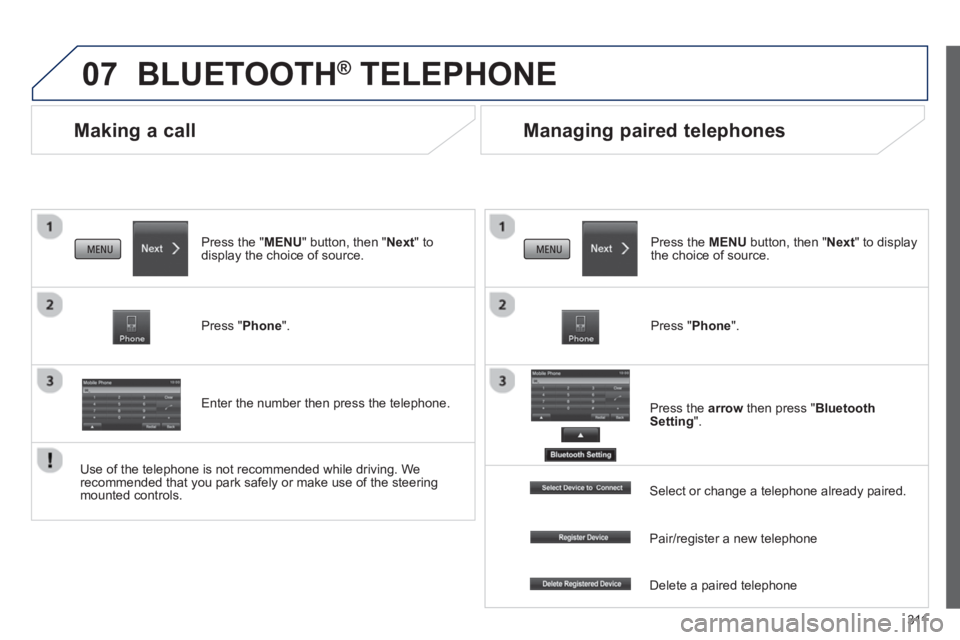
Press the " MENU
" button, then " Next
" to
display the choice of source.
Press " Phone
".
Enter the number then press the telephone.
Managing paired telephones
Press the MENU
button, then " Next
" to display
the choice of source.
Press " Phone
".
Press the arrow
then press " Bluetooth
Setting
".
Use of the telephone is not recommended while driving. We
recommended that you park safely or make use of the steering
mounted controls.
Select or change a telephone already paired.
Pair/register a new telephone
Delete a paired telephone
Page 315 of 368
313
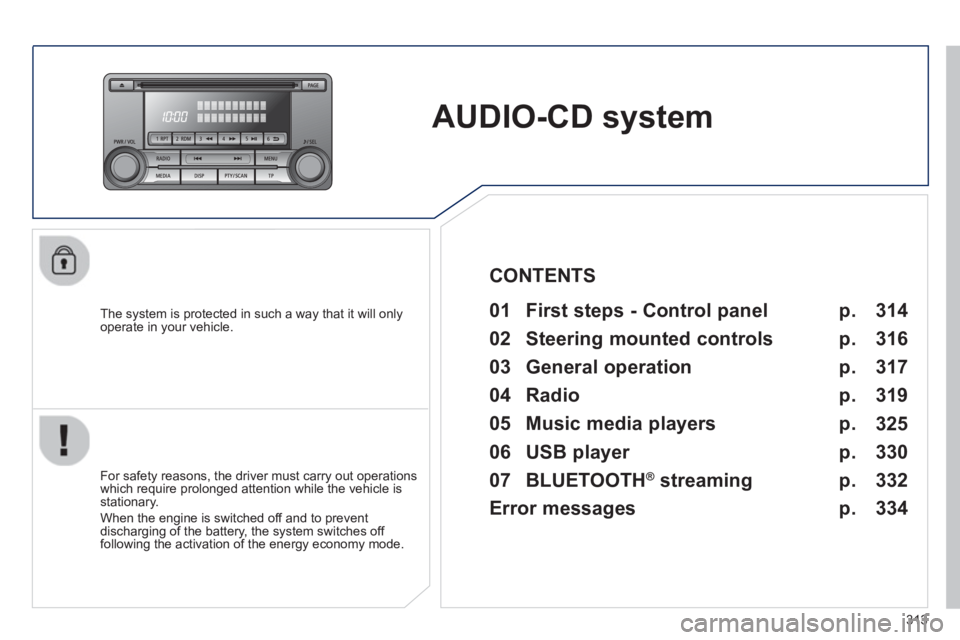
AUDIO-CD system
The system is protected in such a way that it will only
operate in your vehicle.
01 First steps - Control panel
For safety reasons, the driver must carry out operations
which require prolonged attention while the vehicle is
stationary.
When the engine is switched off and to prevent
discharging of the battery, the system switches off
following the activation of the energy economy mode.
CONTENTS
02 Steering mounted controls
03 General operation
04 Radio
05 Music media players
06 USB player
07 BLUETOOTH
®
streaming
Error messages p.
p.
p.
p.
p.
p.
p.
p. 314
316
317
319
325
330
332
334
Page 316 of 368
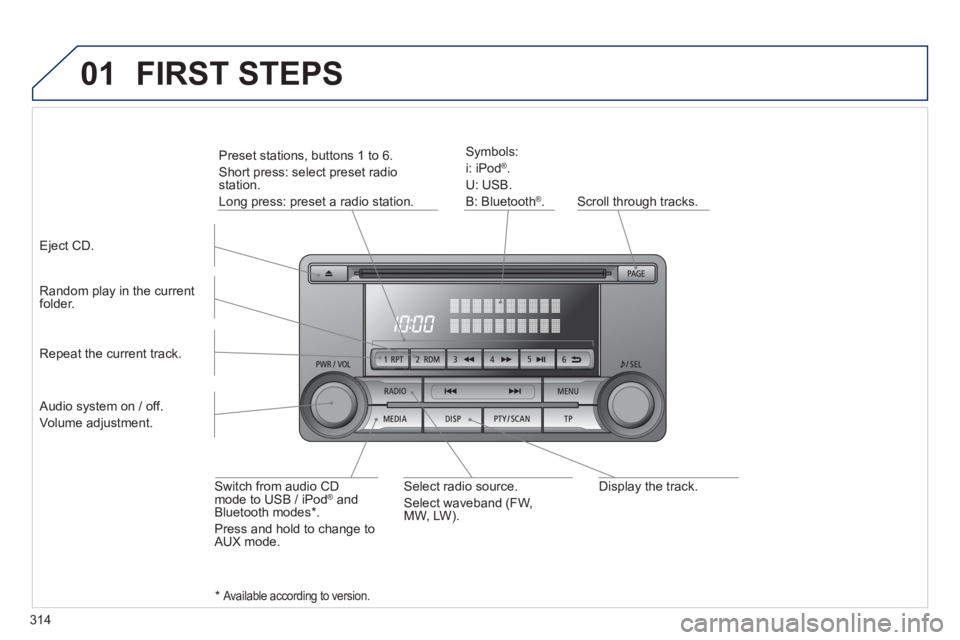
314
01
Display the track.
Scroll through tracks.
Symbols:
i: iPod
®
.
U: USB.
B: Bluetooth
®
.
Random play in the current
folder.
Switch from audio CD
mode to USB / iPod
® and
Bluetooth modes * .
Press and hold to change to
AUX mode.
Repeat the current track.
FIRST STEPS
Audio system on / off.
Volume adjustment.
Select radio source.
Select waveband (FW,
MW, LW).
*
Available according to version.
Eject CD.
Preset stations, buttons 1 to 6.
Short press: select preset radio
station.
Long press: preset a radio station.