audio PEUGEOT 4008 2015 User Guide
[x] Cancel search | Manufacturer: PEUGEOT, Model Year: 2015, Model line: 4008, Model: PEUGEOT 4008 2015Pages: 389, PDF Size: 15.89 MB
Page 191 of 389
189
4008_en_Chap07_info-pratiques_ed01-2014
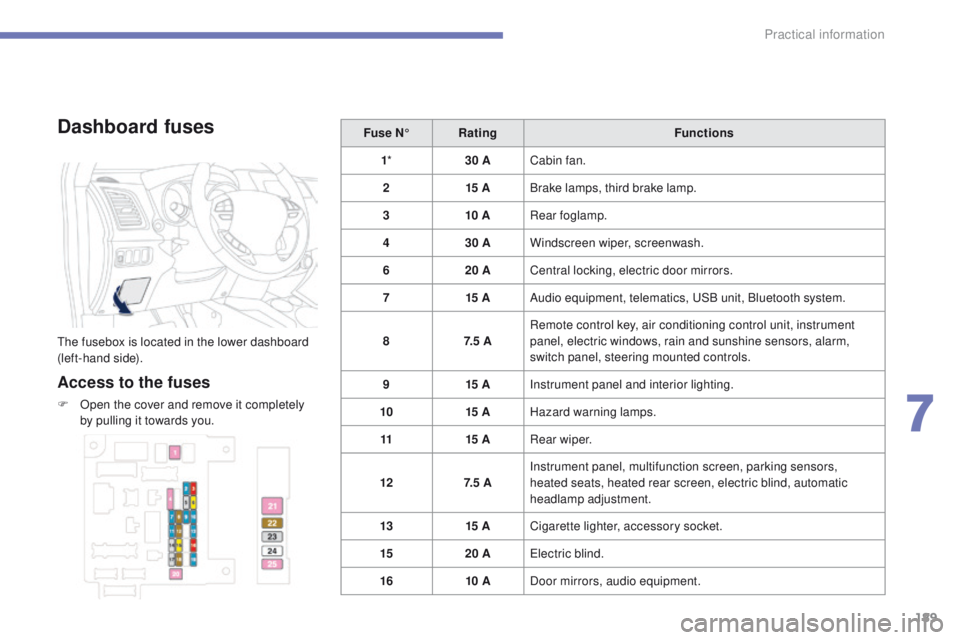
Dashboard fuses
the fusebox is located in the lower dashboard
(left-hand side).
Access to the fuses
F Open the cover and remove it completely by pulling it towards you. Fuse N°
Rating Functions
1 * 30 ACabin fan.
2 15 ABrake lamps, third brake lamp.
3 10 ARear foglamp.
4 30 AWindscreen wiper, screenwash.
6 20 ACentral locking, electric door mirrors.
7 15 AAudio equipment, telematics, u
S
B unit, Bluetooth system.
8 7. 5 ARemote control key, air conditioning control unit, instrument
panel, electric windows, rain and sunshine sensors, alarm,
switch panel, steering mounted controls.
9 15 AInstrument panel and interior lighting.
10 15 AHazard warning lamps.
11 15 ARear wiper.
12 7. 5 AInstrument panel, multifunction screen, parking sensors,
heated seats, heated rear screen, electric blind, automatic
headlamp adjustment.
13 15 ACigarette lighter, accessory socket.
15 20 A
ele
ctric blind.
16 10 ADoor mirrors, audio equipment.
7
Practical information
Page 194 of 389
192
4008_en_Chap07_info-pratiques_ed01-2014
Fuse N°Rating Functions
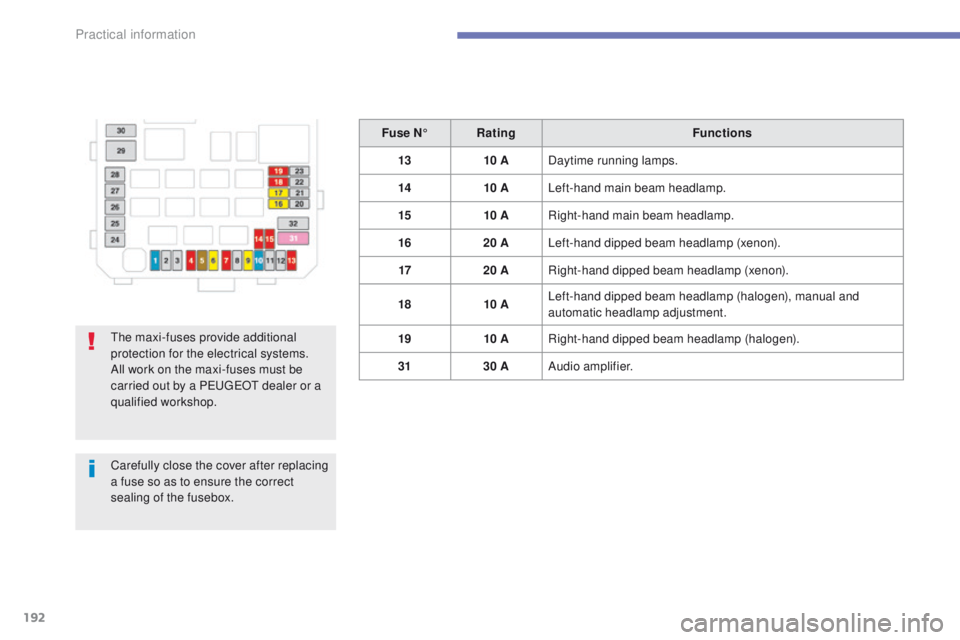
13 10 ADaytime running lamps.
14 10 ALeft-hand main beam headlamp.
15 10 ARight-hand main beam headlamp.
16 20 ALeft-hand dipped beam headlamp (xenon).
17 20 ARight-hand dipped beam headlamp (xenon).
18 10 ALeft-hand dipped beam headlamp (halogen), manual and
automatic headlamp adjustment.
19 10 ARight-hand dipped beam headlamp (halogen).
31 30 AAudio amplifier.
th
e maxi-fuses provide additional
protection for the electrical systems.
All work on the maxi-fuses must be
carried out by a P
e
uge
Ot
dealer or a
qualified workshop.
Carefully close the cover after replacing
a fuse so as to ensure the correct
sealing of the fusebox.
Practical information
Page 195 of 389
193
4008_en_Chap07_info-pratiques_ed01-2014
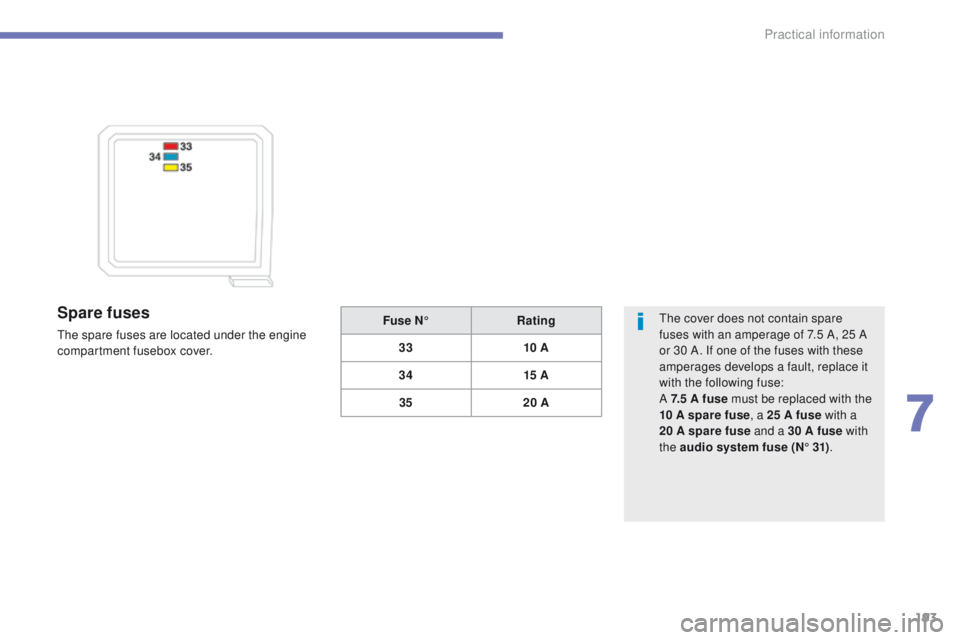
Spare fuses
the spare fuses are located under the engine
compartment fusebox cover.
th
e cover does not contain spare
fuses with an amperage of 7.5 A, 25 A
or 30 A. If one of the fuses with these
amperages develops a fault, replace it
with the following fuse:
A 7.5 A fuse must be replaced with the
10 A spare fuse , a 25 A fuse with a
20
A spare fuse and a 30 A fuse with
the audio system fuse (N° 31) .
Fuse N°
Rating
33 10 A
34 15 A
35 20 A
7
Practical information
Page 199 of 389
197
4008_en_Chap07_info-pratiques_ed01-2014
Removing a front or rear
wiper blade
F Raise the corresponding wiper arm.
F R emove the wiper blade, sliding it towards
the outside.
Changing a wiper
blade
Fitting a front or rear wiper
blade
F At the front, check the size of the wiper blade as the shorter blade is fitted on the
right-hand side of the vehicle.
F
P
ut the corresponding new wiper blade in
place and fix it.
F
F
old down the wiper arm carefully.
Automatic power cut-off to accessories
After the engine has stopped, when the
ignition switch is in the "ACC" position
(or the vehicle in "ACC" mode) you
can still use functions such as the audio
equipment, windscreen wipers, dipped beam
headlamps,
courtesy lamps, etc. for about
thirty
minutes.Cutting off
Once the thirty minutes have expired, the
power supply to the accessories will be
automatically cut off.
Restoring power
the power supply will be restored the next time
the ignition is switched on.
7
Practical information
Page 207 of 389
205
4008_en_Chap07_info-pratiques_ed01-2014
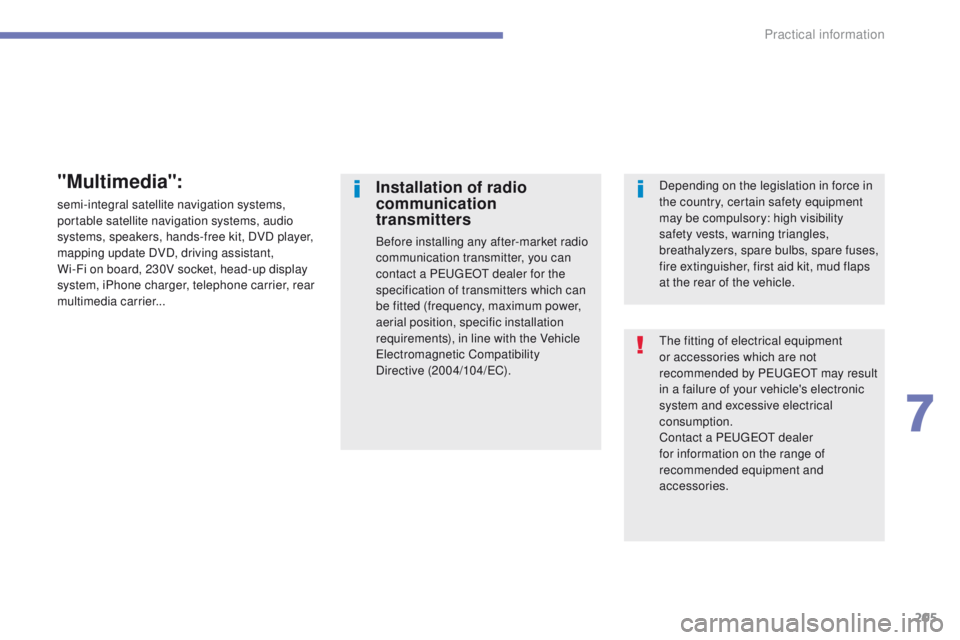
the fitting of electrical equipment
or accessories which are not
recommended by P
e
uge
Ot
may result
in a failure of your vehicle's electronic
system and excessive electrical
consumption.
Contact a P
e
uge
Ot
dealer
for information on the range of
recommended equipment and
accessories.
Installation of radio
communication
transmitters
Before installing any after-market radio
communication transmitter, you can
contact a P
e
uge
Ot
dealer for the
specification of transmitters which can
be fitted (frequency, maximum power,
aerial position, specific installation
requirements), in line with the Vehicle
el
ectromagnetic Compatibility
Directive (2004/104/
eC
). Depending on the legislation in force in
the country, certain safety equipment
may be compulsory: high visibility
safety vests, warning triangles,
breathalyzers, spare bulbs, spare fuses,
fire extinguisher, first aid kit, mud flaps
at the rear of the vehicle.
"Multimedia":
semi-integral satellite navigation systems,
portable satellite navigation systems, audio
systems, speakers, hands-free kit, DVD player,
mapping update DVD, driving assistant,
Wi-Fi on board, 230V socket, head-up display
system, iPhone charger, telephone carrier, rear
multimedia carrier...
7
Practical information
Page 243 of 389
241
BLUETOOTH® TELEPHONE
WITH
VOICE
RECOGNITION
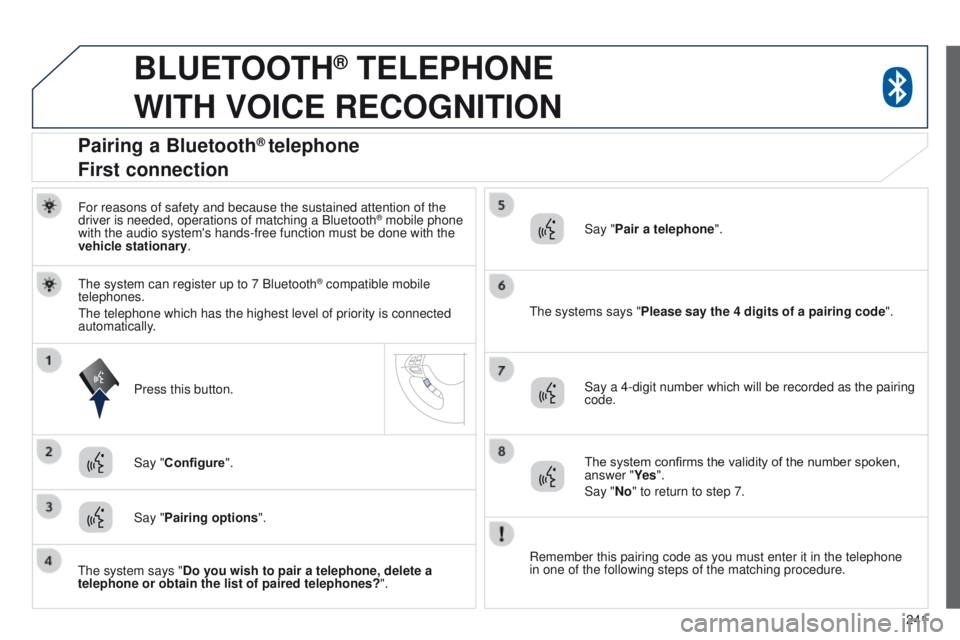
For reasons of safety and because the sustained attention of the
driver is needed, operations of matching a Bluetooth® mobile phone
with the audio system's hands-free function must be done with the
vehicle stationary.
t
he systems says "Please say the 4 digits of a pairing code".
Press this button. The system confirms the validity of the number spoken,
answer "Ye s".
Say "No" to return to step 7.
Say "Pairing options ".
Pairing a Bluetooth® telephone
First connection
Say "Pair a telephone".
Say "Configure".
t
he system can register up to 7 Bluetooth
® compatible mobile
telephones.
t
he telephone which has the highest level of priority is connected
automatically.
t
he system says "Do you wish to pair a telephone, delete a
telephone or obtain the list of paired telephones? ".Say a 4-digit number which will be recorded as the pairing
code.
Remember this pairing code as you must enter it in the telephone
in one of the following steps of the matching procedure.
Page 244 of 389
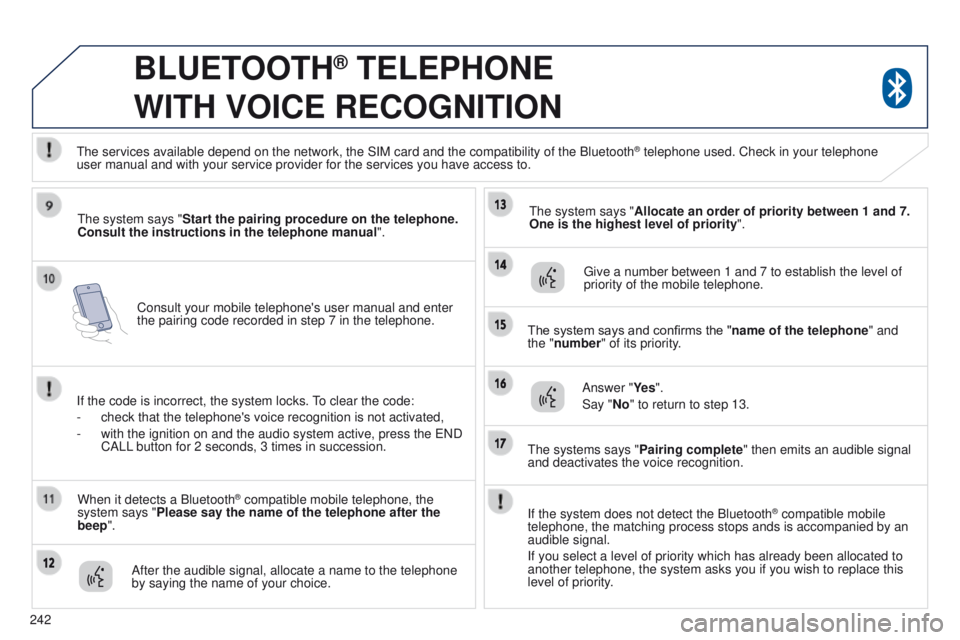
242Consult your mobile telephone's user manual and enter
the pairing code recorded in step 7 in the telephone.
BLUETOOTH® TELEPHONE
WITH
VOICE
RECOGNITION
the system says "Start the pairing procedure on the telephone.
Consult the instructions in the telephone manual ".
If the code is incorrect, the system locks.
to clear the code:
-
check that the telephone's voice recognition is not activated,
-
with the ignition on and the audio system active, press the
e ND
CALL button for 2 seconds, 3 times in succession.
When it detects a Bluetooth
® compatible mobile telephone, the
system says "Please say the name of the telephone after the
beep".
After the audible signal, allocate a name to the telephone
by saying the name of your choice.
t
he system says "Allocate an order of priority between 1 and 7.
One is the highest level of priority ".
g
ive a number between 1 and 7 to establish the level of
priority of the mobile telephone.
The system says and confirms the "name of the telephone " and
the "number" of its priority.
Answer "Ye s ".
Say "No" to return to step 13.
t
he systems says "Pairing complete" then emits an audible signal
and deactivates the voice recognition.
t
he services available depend on the network, the SIM card and the compat\
ibility of the Bluetooth
® telephone used. Check in your telephone
user
manual and with your service provider for the services you have access t\
o.
If the system does not detect the Bluetooth
® compatible mobile
telephone, the matching process stops ands is accompanied by an
audible signal.
If you select a level of priority which has already been allocated to
another telephone, the system asks you if you wish to replace this
level of priority.
Page 248 of 389
246
BLUETOOTH® TELEPHONE
WITH
VOICE
RECOGNITION
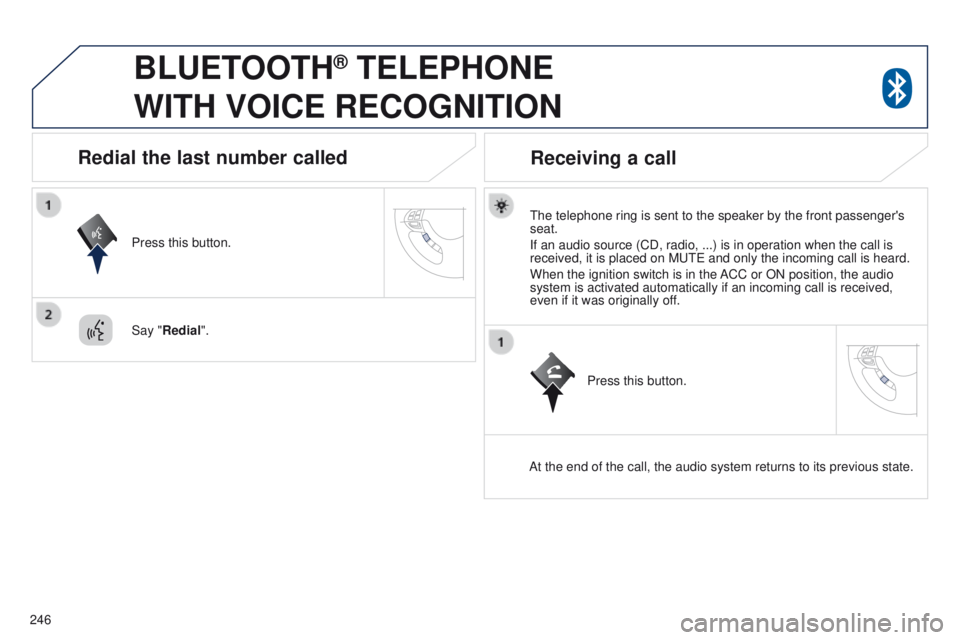
the telephone ring is sent to the speaker by the front passenger's
seat.
If an audio source (CD, radio, ...) is in operation when the call is
received, it is placed on M
ute and only the incoming call is heard.
When the ignition switch is in the ACC or ON position, the audio
system is activated automatically if an incoming call is received,
even if it was originally off.
At the end of the call, the audio system returns to its previous state.
Redial the last number called
Press this button.
Say "Redial".
Receiving a call
Press this button.
Page 251 of 389
249
4008_en_Chap10b_Mitsu6_ed01-2014
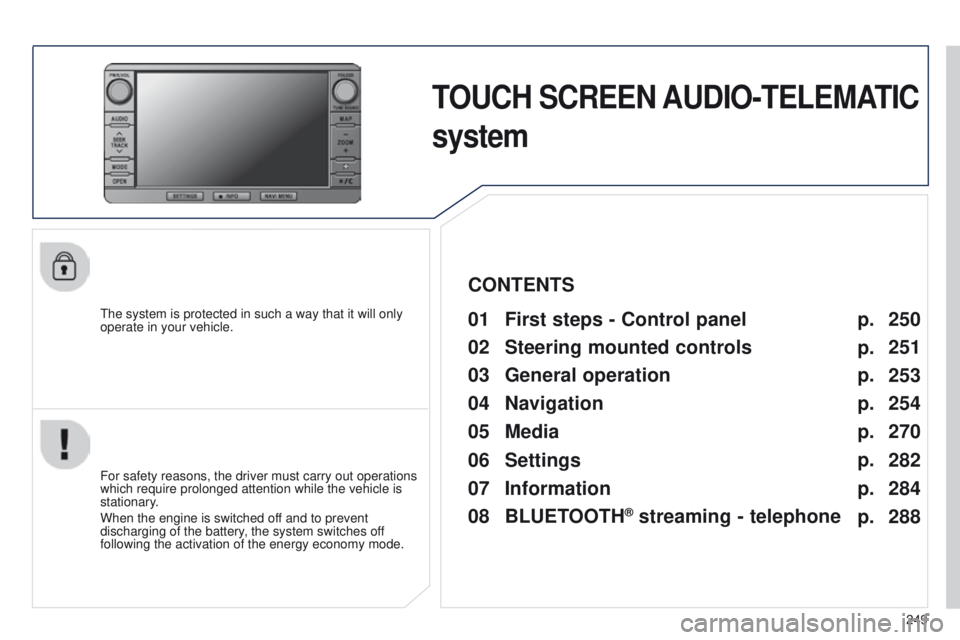
TOUCH SCREEN AUDIO-TELEMATIC
system
the system is protected in such a way that it will only
operate in your vehicle.01 First steps - Control panel
For safety reasons, the driver must carry out operations
which require prolonged attention while the vehicle is
stationary.
When the engine is switched off and to prevent
discharging of the battery, the system switches off
following the activation of the energy economy mode.
CONTENTS
03
General
operation
04
Navigation
05
Media
06
Settings
07
Information p.
p.
p.
p.
p.
p.
p. 250
251
253
254
270
282
284
02
Steering mounted
controls p.
288
08
BLUETOOTH
® streaming - telephone
Page 252 of 389
01
250
4008_en_Chap10b_Mitsu6_ed01-2014
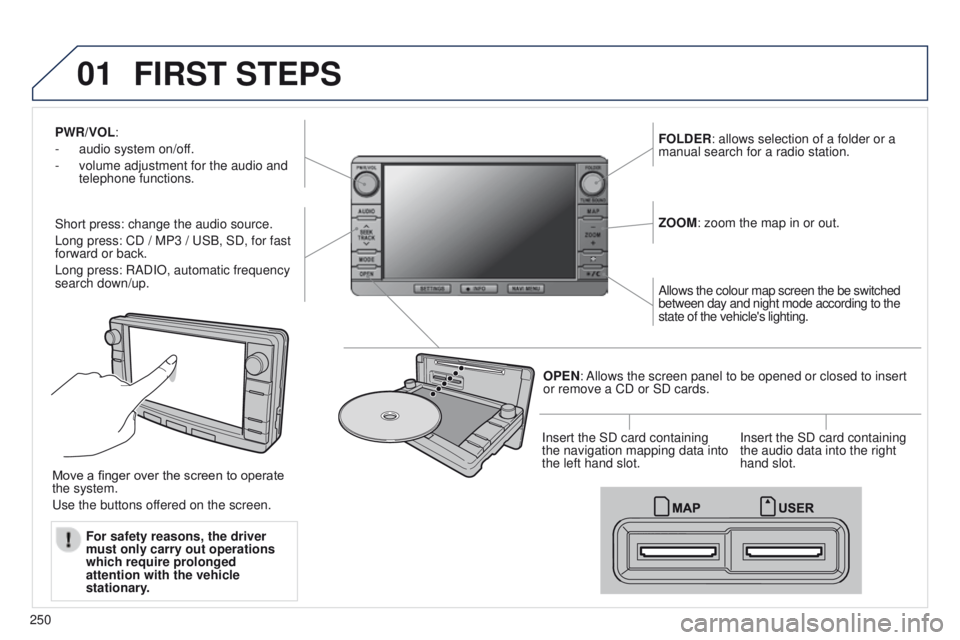
PWR/VOL:
-
audio system on/of
f.
-
volume adjustment for the audio and
telephone functions.
Short press: change the audio source.
Long press: CD / MP3 /
u SB, SD, for fast
forward or back.
Long press: RADIO, automatic frequency
search down/up. FOLDER: allows selection of a folder or a
manual search for a radio station.
OPEN: Allows the screen panel to be opened or closed to insert
or remove a CD or SD cards. ZOOM: zoom the map in or out.
Allows the colour map screen the be switched
between day and night mode according to the
state of the vehicle's lighting.
Move a finger over the screen to operate
the system.
u
se the buttons offered on the screen. For safety reasons, the driver
must only carry out operations
which require prolonged
attention with the vehicle
stationary. Insert the SD card containing
the navigation mapping data into
the left hand slot.
Insert the SD card containing
the audio data into the right
hand slot.
FIRST STEPS