audio PEUGEOT 4008 2015 Owner's Manual
[x] Cancel search | Manufacturer: PEUGEOT, Model Year: 2015, Model line: 4008, Model: PEUGEOT 4008 2015Pages: 389, PDF Size: 15.89 MB
Page 253 of 389
02
251
4008_en_Chap10b_Mitsu6_ed01-2014
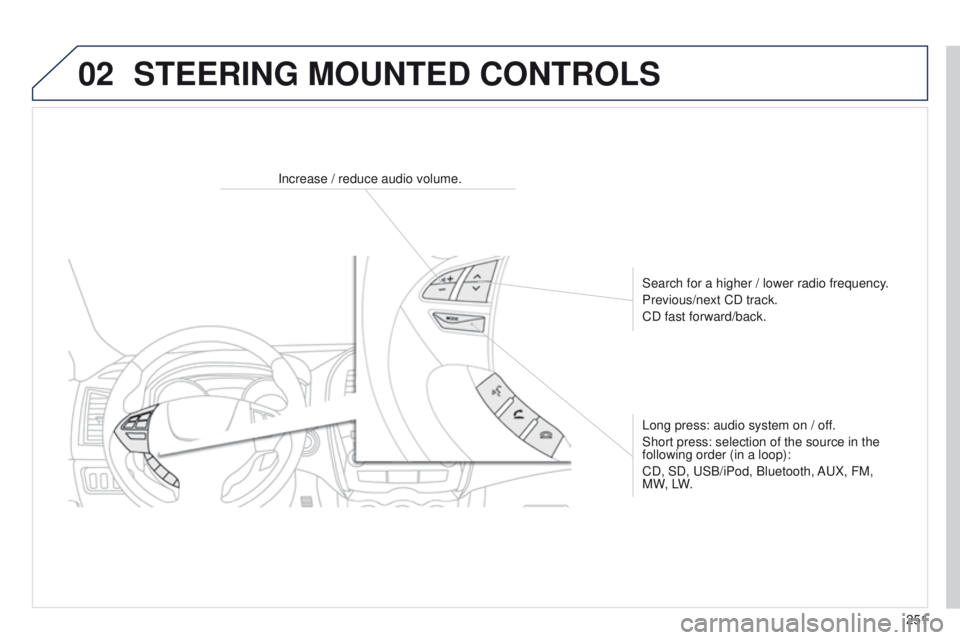
Increase / reduce audio volume.Search for a higher / lower radio frequency.
Previous/next CD track.
CD fast forward/back.
Long press: audio system on / off.
Short press: selection of the source in the
following order (in a loop):
CD, SD,
u SB/iPod, Bluetooth, A u X, FM,
M W, LW.
STEERING MOUNTED CONTROLS
Page 255 of 389
03
253
4008_en_Chap10b_Mitsu6_ed01-2014
Description of the controls - Menus
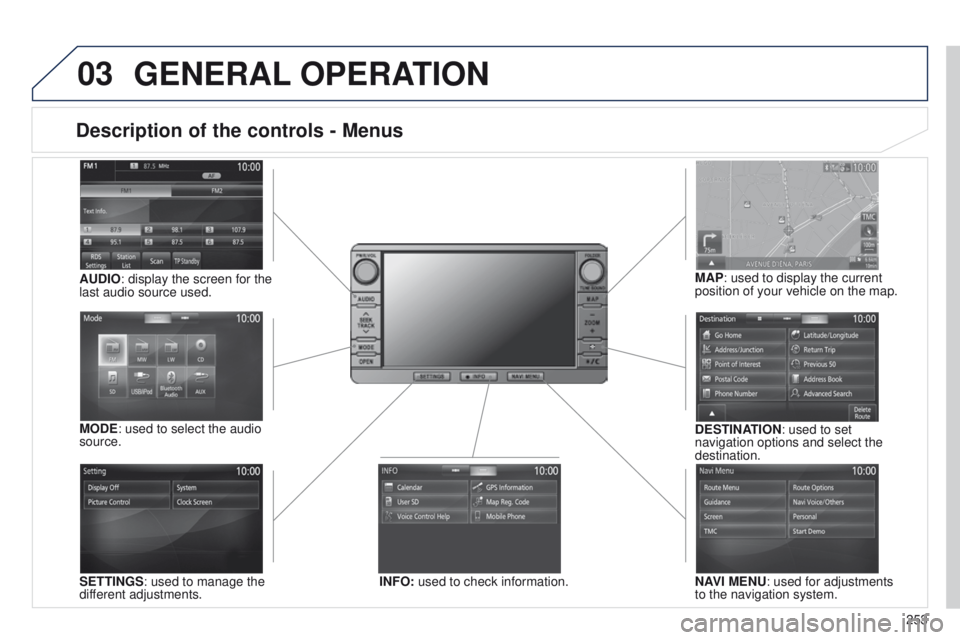
SETTINGS: used to manage the
different adjustments. DESTINATION: used to set
navigation options and select the
destination.
NAVI MENU: used for adjustments
to the navigation system.
MODE: used to select the audio
source.
INFO: used to check information.
AUDIO: display the screen for the
last audio source used.
MAP: used to display the current
position of your vehicle on the map.
GENERAL
OPERATION
Page 275 of 389
273
4008_en_Chap10b_Mitsu6_ed01-2014
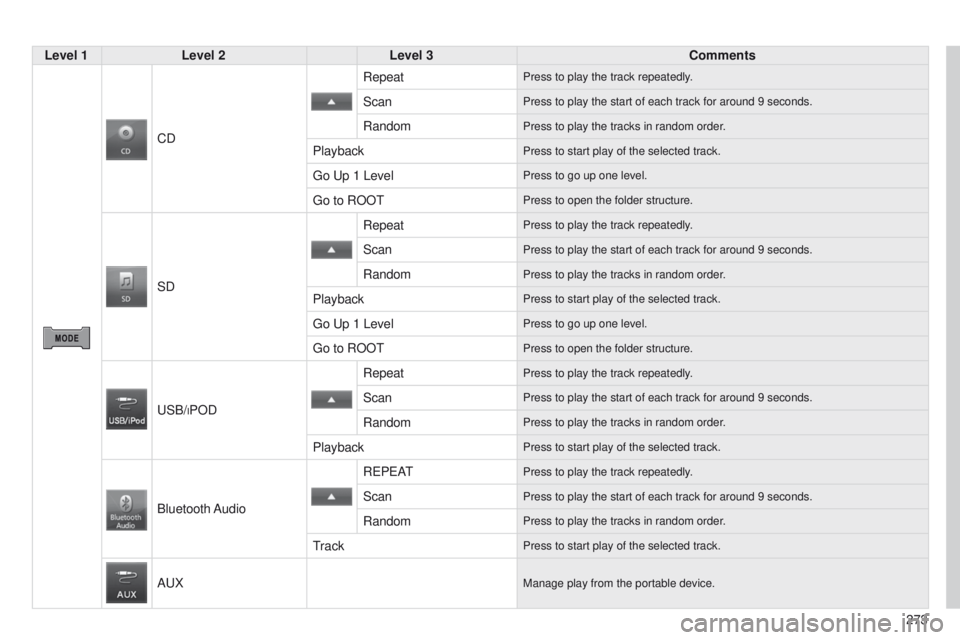
Level 1Level 2 Level 3 Comments
CD Repeat
Press to play the track repeatedly.
ScanPress to play the start of each track for around 9 seconds.
RandomPress to play the tracks in random order.
PlaybackPress to start play of the selected track.
go up 1 LevelPress to go up one level.
go to ROOtPress to open the folder structure.
SDRepeat
Press to play the track repeatedly.
ScanPress to play the start of each track for around 9 seconds.
RandomPress to play the tracks in random order.
PlaybackPress to start play of the selected track.
go up 1 LevelPress to go up one level.
go to ROOtPress to open the folder structure.
uSB/iPOD
RepeatPress to play the track repeatedly.
ScanPress to play the start of each track for around 9 seconds.
RandomPress to play the tracks in random order.
PlaybackPress to start play of the selected track.
Bluetooth Audio
Re P e A
tPress to play the track repeatedly.
ScanPress to play the start of each track for around 9 seconds.
RandomPress to play the tracks in random order.
trackPress to start play of the selected track.
AuXManage play from the portable device.
Page 277 of 389
05
275
4008_en_Chap10b_Mitsu6_ed01-2014
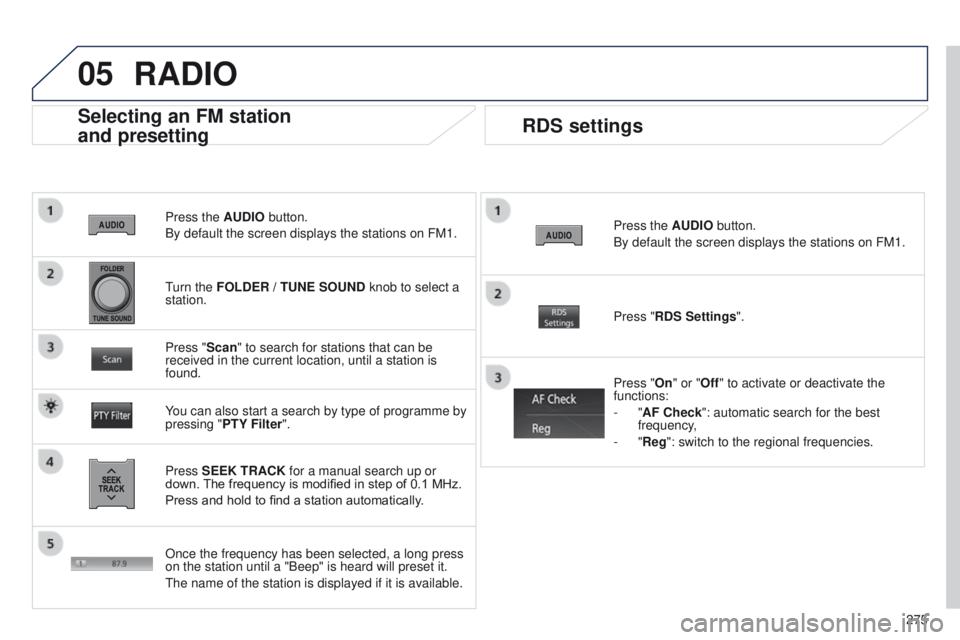
Press the AUDIO button.
By default the screen displays the stations on FM1.
Selecting an FM station
and presetting
Press SEEK TRACK for a manual search up or
down. The frequency is modified in step of 0.1 MHz.
Press and hold to find a station automatically. Press "Scan" to search for stations that can be
received in the current location, until a station is
found.
You can also start a search by type of programme by
pressing " PTY Filter". Press "RDS Settings".
Press "On" or "Off" to activate or deactivate the
functions:
-
"AF Check": automatic search for the best
frequency,
- "Reg": switch to the regional frequencies.
Once the frequency has been selected, a long press
on the station until a "Beep" is heard will preset it.
t
he name of the station is displayed if it is available.
RDS settings
Press the AUDIO button.
By default the screen displays the stations on FM1.
turn the
FOLDER / TUNE SOUND knob to select a
station.
RADIO
Page 278 of 389
05
276
4008_en_Chap10b_Mitsu6_ed01-2014
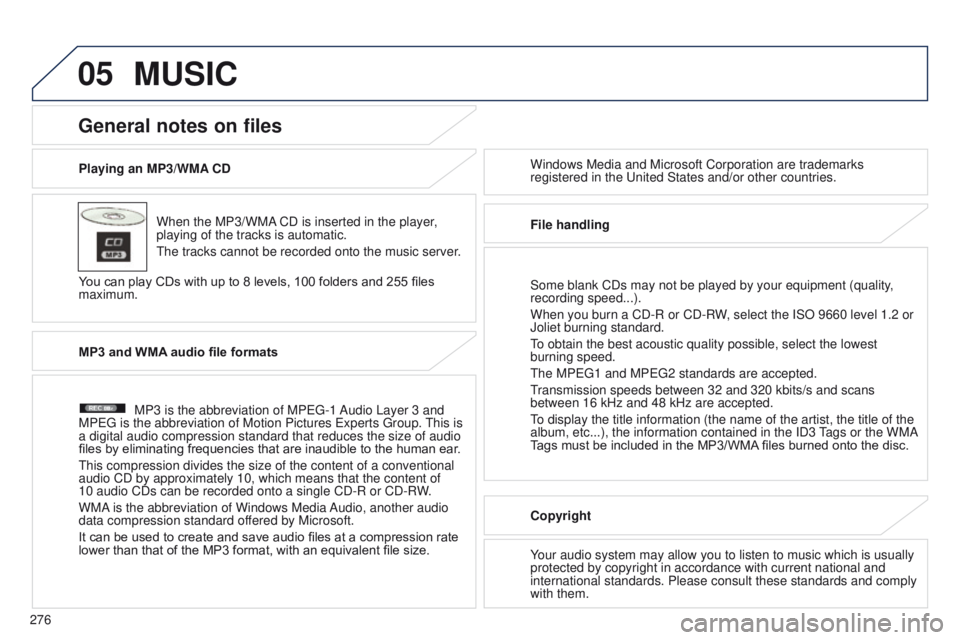
Playing an MP3/WMA CDWhen the MP3/WMA CD is inserted in the player,
playing of the tracks is automatic.
t
he tracks cannot be recorded onto the music server.
You can play CDs with up to 8 levels, 100 folders and 255 files
maximum. Windows Media and Microsoft Corporation are trademarks
registered in the
u nited States and/or other countries.
General notes on files
MP3 and WMA audio file formats
MP3 is the abbreviation of MP eg -1 Audio Layer 3 and
MP
eg is the abbreviation of Motion Pictures e xperts g roup.
t
his is
a digital audio compression standard that reduces the size of audio
files by eliminating frequencies that are inaudible to the human ear .
t
his compression divides the size of the content of a conventional
audio CD by approximately 10, which means that the content of
10 audio CDs can be recorded onto a single CD-R or CD-RW.
WMA is the abbreviation of Windows Media Audio, another audio
data compression standard offered by Microsoft.
It can be used to create and save audio files at a compression rate
lower than that of the MP3 format, with an equivalent file size.
File handling
Some blank CDs may not be played by your equipment (quality,
recording speed...).
When you burn a CD-R or CD-RW, select the ISO 9660 level 1.2 or
Joliet burning standard.to obtain the best acoustic quality possible, select the lowest
burning speed.
t
he MP eg 1 and MP eg 2 standards are accepted.
transmission speeds between 32 and 320 kbits/s and scans
between 16 kHz and 48 kHz are accepted.
to display the title information (the name of the artist, the title of t\
he
album, etc...), the information contained in the ID3 tags or the WMA
Tags must be included in the MP3/WMA files burned onto the disc.
Copyright
Your audio system may allow you to listen to music which is usually
protected by copyright in accordance with current national and
international standards. Please consult these standards and comply
with them.
MUSIC
Page 280 of 389
05
278
4008_en_Chap10b_Mitsu6_ed01-2014
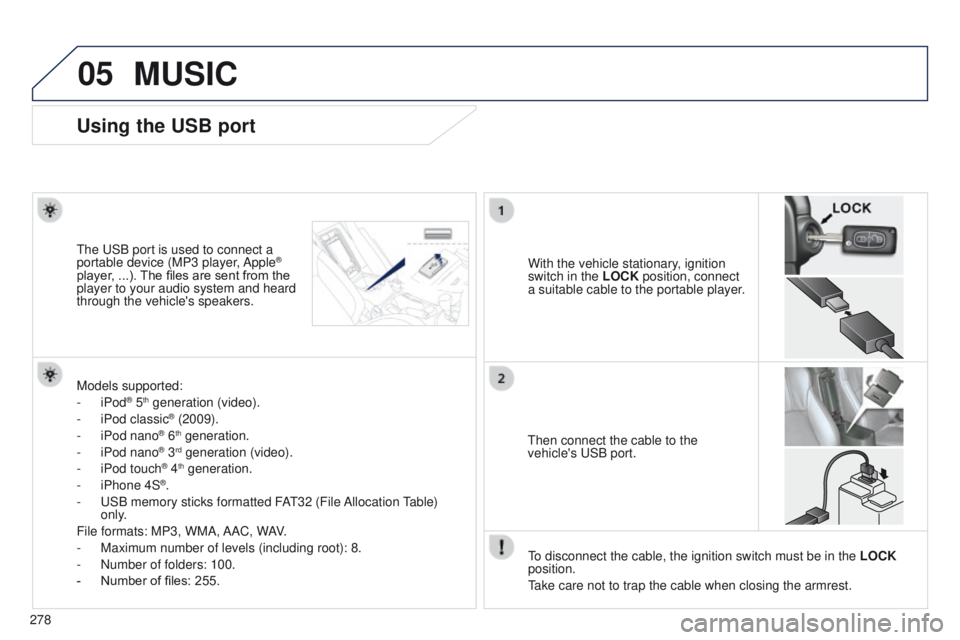
Using the USB port
With the vehicle stationary, ignition
switch in the LOCK position, connect
a suitable cable to the portable player.t
he
u
SB port is used to connect a
portable device (MP3 player, Apple®
player, ...). The files are sent from the
player to your audio system and heard
through the vehicle's speakers.
t
hen connect the cable to the
vehicle's
u SB port.
Models supported:
-
iPod
® 5th generation (video).
-
iPod classic® (2009).
-
iPod nano® 6th generation.
-
iPod nano® 3rd generation (video).
-
iPod touch® 4th generation.
-
iPhone 4S®.
-
u
SB memory sticks formatted FA
t
32 (File Allocation
table)
only
.
File formats: MP3, WMA, AAC, WAV.
-
Maximum number of levels (including root): 8.
-
Number of folders: 100.
-
Number of files: 255.
to disconnect the cable, the ignition switch must be in the LOCK
position.
take care not to trap the cable when closing the armrest.
MUSIC
Page 281 of 389
05
279
4008_en_Chap10b_Mitsu6_ed01-2014
Connecting APPLE® players
Connect the Apple® player to the uSB port using a suitable cable
(not
supplied).
Play starts automatically.
Control is via the audio system.
The classifications available are those of the portable device
connected (artists / albums / genres / playlists / audiobooks /
podcasts).
The default classification used is by artist. To modify the classification
used, return to the first level of the menu then select the desired
classification (playlists for example) and confirm to go down through
the menu to the desired track.
The "Shuffle tracks" mode on an iPod
® corresponds to the "Random"
mode on the audio system.
The "Shuffle albums" mode on an iPod
® corresponds to the "Random
all" on the audio system.
"Shuffle tracks" is restored by default on each connection.
t
he version of software in the audio system may not be compatible
with the generation of your Apple
® player.
MUSIC
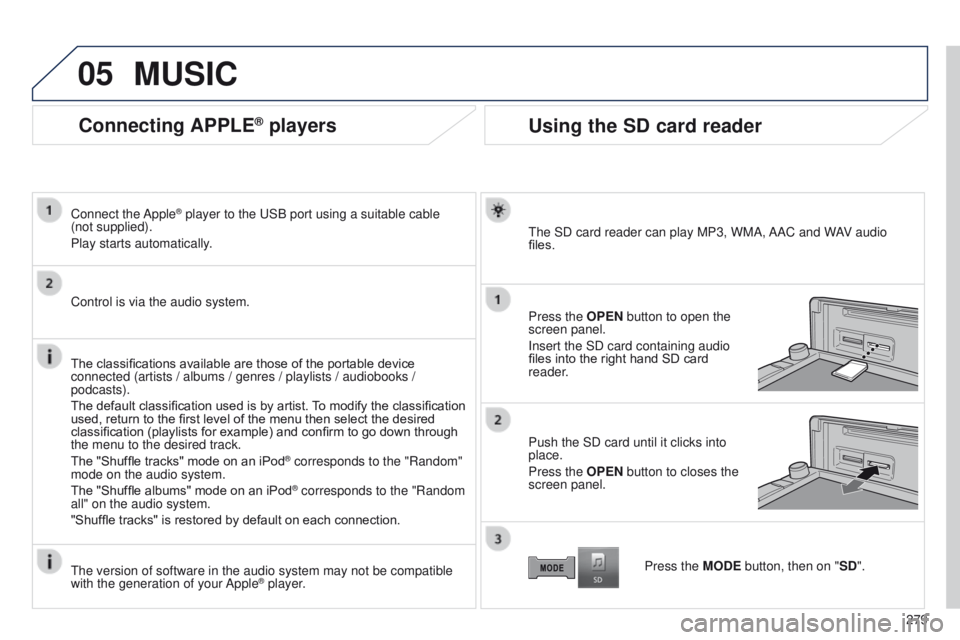
Using the SD card reader
the SD card reader can play MP3, WMA, AAC and WAV audio
files.
Press the
OPEN button to open the
screen panel.
Insert the SD card containing audio
files into the right hand SD card
reader.
Push the SD card until it clicks into
place.
Press the OPEN button to closes the
screen panel.
Press the MODE button, then on "SD".
Page 283 of 389
05
281
4008_en_Chap10b_Mitsu6_ed01-2014
MUSIC
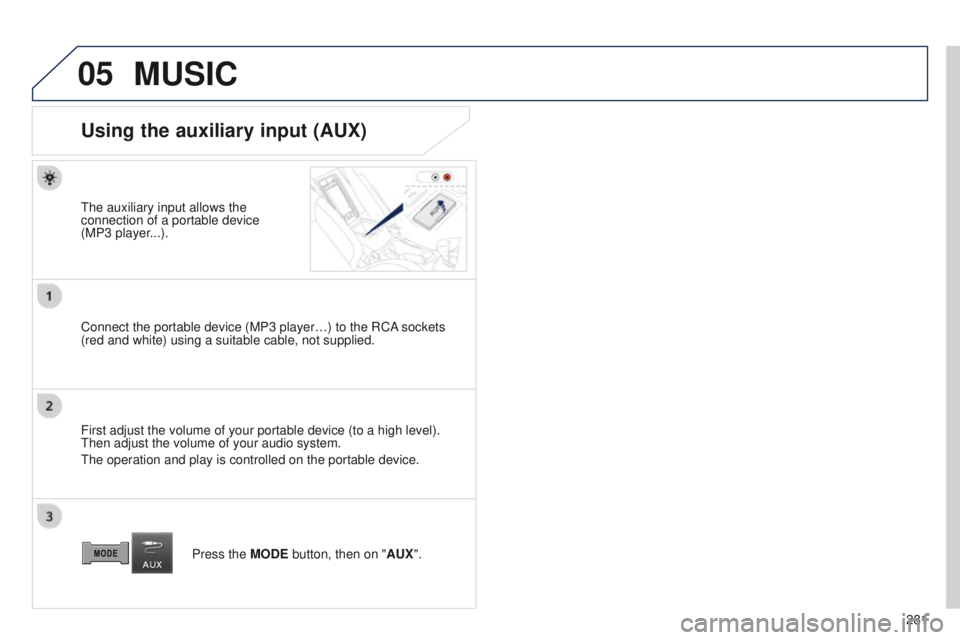
Using the auxiliary input (AUX)
the auxiliary input allows the
connection of a portable device
(MP3
player...).
Connect the portable device (MP3 player…) to the RCA sockets
(red and white) using a suitable cable, not supplied.
First adjust the volume of your portable device (to a high level).
t
hen adjust the volume of your audio system.
t
he operation and play is controlled on the portable device. Press the MODE button, then on "AUX".
Page 290 of 389
08
288
4008_en_Chap10b_Mitsu6_ed01-2014
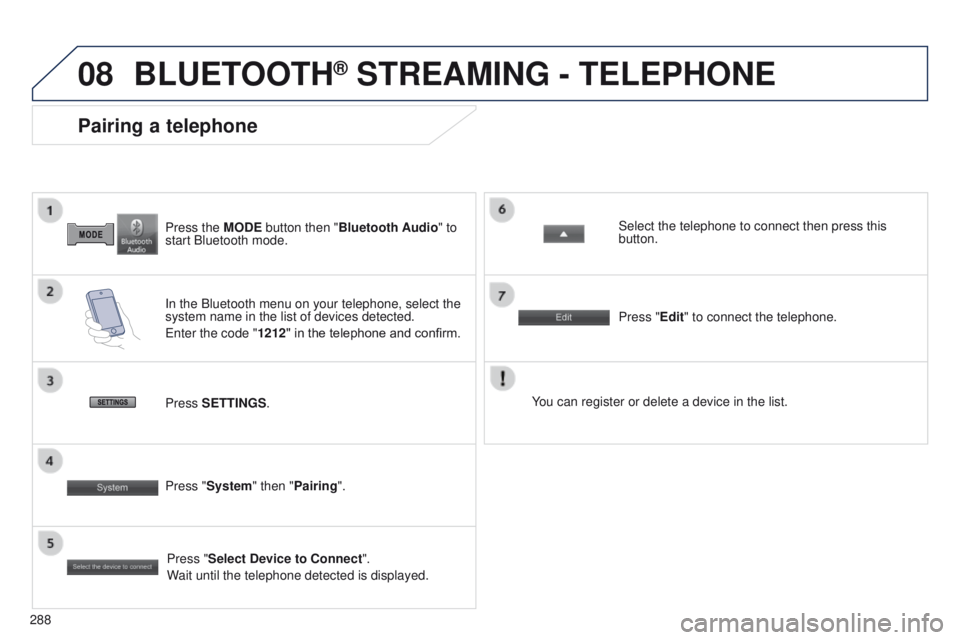
Press the MODE button then "Bluetooth Audio" to
start Bluetooth mode.
Pairing a telephone
In the Bluetooth menu on your telephone, select the
system name in the list of devices detected.
e
nter the code "1212 " in the telephone and confirm. Select the telephone to connect then press this
button.
Press "Select Device to Connect".
Wait until the telephone detected is displayed.
Press SETTINGS
. Press "Edit" to connect the telephone.
Press "System " then "Pairing". You can register or delete a device in the list.
BLUETOOTH® STREAMING - TELEPHONE
Page 291 of 389
289
4008_en_Chap10c_Mitsu5_ed01-2014
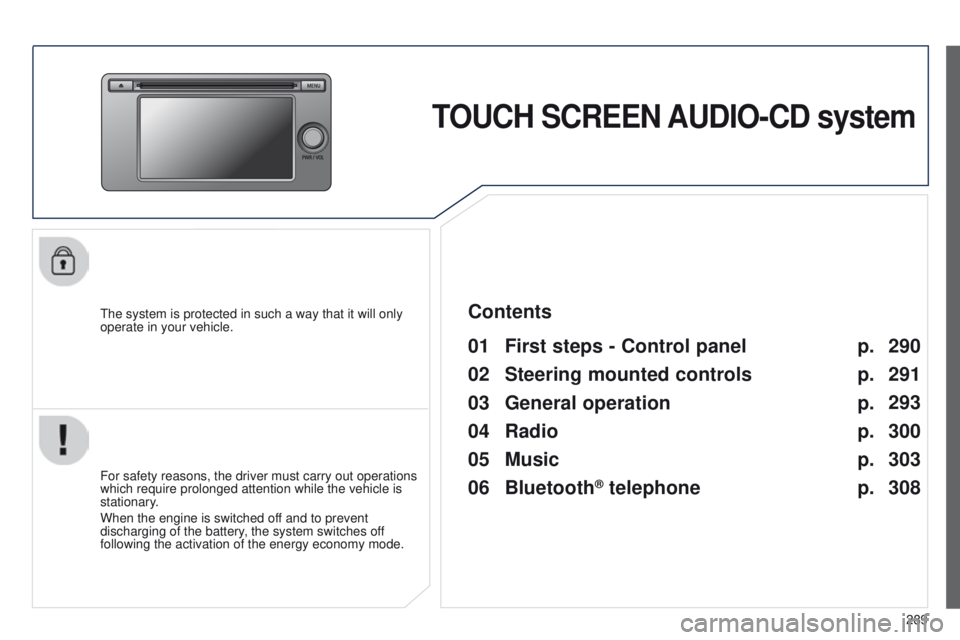
TOUCH SCREEN AUDIO-CD system
the system is protected in such a way that it will only
operate in your vehicle.
01 First steps - Control panel
For safety reasons, the driver must carry out operations
which require prolonged attention while the vehicle is
stationary.
When the engine is switched off and to prevent
discharging of the battery, the system switches off
following the activation of the energy economy mode.
Contents
03
General
operation
02
Steering mounted
controls
04
Radio
05
Music
06
Bluetooth
® telephone p.
p. p.
p.
p.
p. 290
291
293
300
303
308