audio PEUGEOT 4008 2015 Owner's Guide
[x] Cancel search | Manufacturer: PEUGEOT, Model Year: 2015, Model line: 4008, Model: PEUGEOT 4008 2015Pages: 389, PDF Size: 15.89 MB
Page 292 of 389
01
290
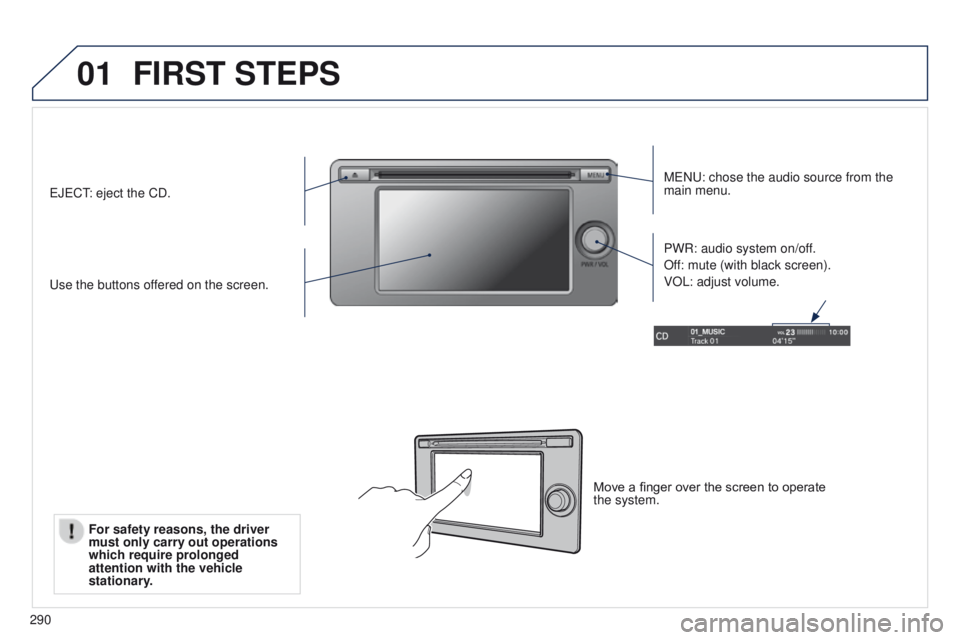
FIRST STEPS
MeNu: chose the audio source from the
main menu.
u
se the buttons offered on the screen. PWR: audio system on/off.
Off: mute (with black screen).
VOL: adjust volume.e
J
e
C
t: eject the CD.
Move a finger over the screen to operate
the system.
For safety reasons, the driver
must only carry out operations
which require prolonged
attention with the vehicle
stationary
.
Page 293 of 389
02
291
4008_en_Chap10c_Mitsu5_ed01-2014
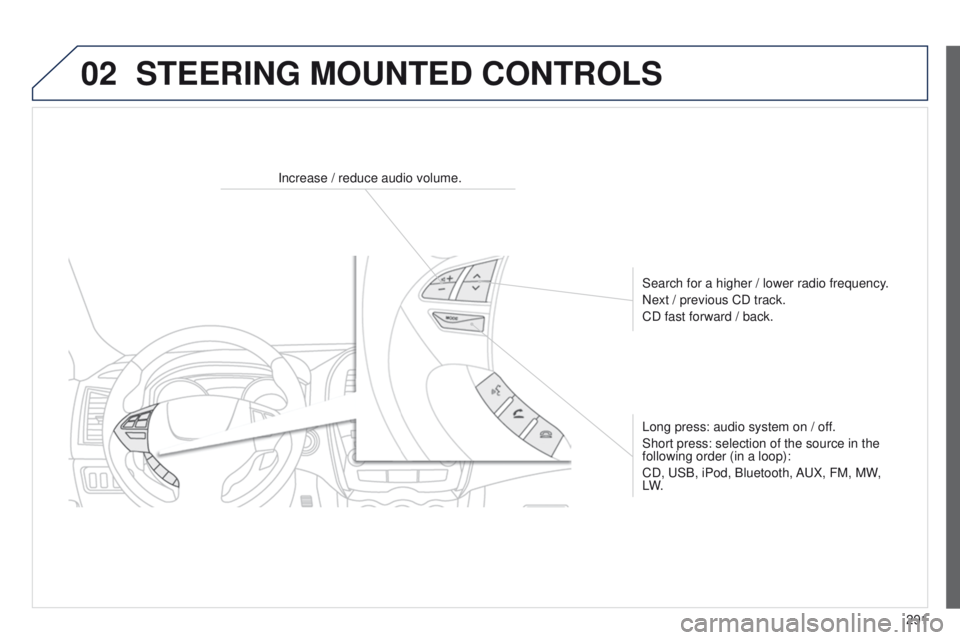
STEERING MOUNTED CONTROLS
Increase / reduce audio volume.Search for a higher / lower radio frequency.
Next / previous CD track.
CD fast forward / back.
Long press: audio system on / off.
Short press: selection of the source in the
following order (in a loop):
CD,
u SB, iPod, Bluetooth, A u X, FM, MW,
LW.
Page 295 of 389
03
293
4008_en_Chap10c_Mitsu5_ed01-2014
GENERAL OPERATION
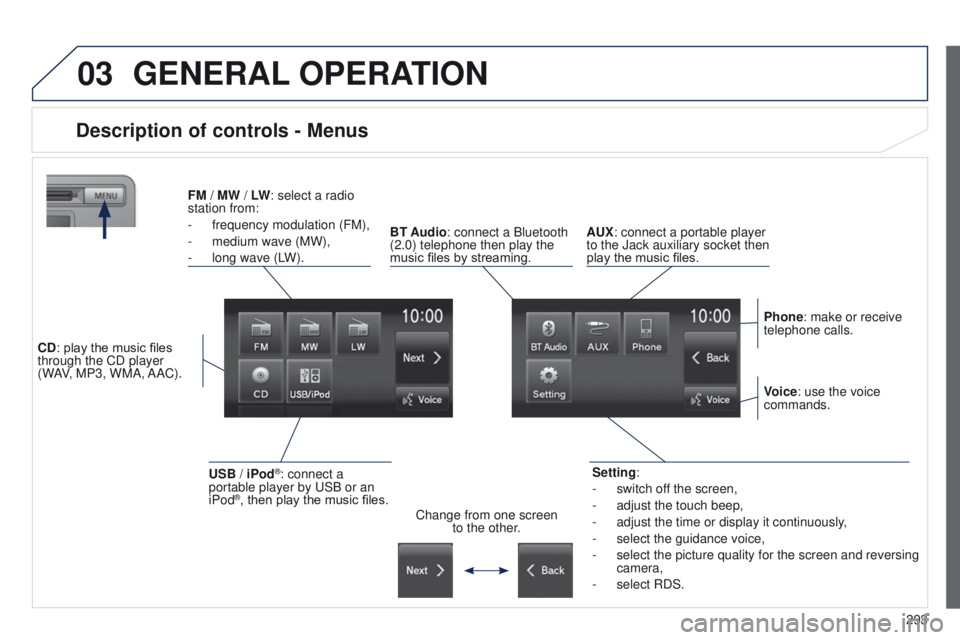
Description of controls - Menus
Setting:
-
switch of
f the screen,
-
adjust the touch beep,
-
adjust the time or display it continuously
,
-
select the guidance voice,
-
select the picture quality for the screen and reversing
camera,
-
select RDS.
FM
/
MW / LW: select a radio
station from:
-
frequency modulation (FM),
-
medium wave (MW),
-
long wave (L
W).
BT Audio: connect a Bluetooth
(2.0) telephone then play the
music files by streaming. AUX: connect a portable player
to the Jack auxiliary socket then
play the music files.
Phone: make or receive
telephone calls.
Change from one screen to the other. Voice: use the voice
commands.
USB / iPod®: connect a
portable player by u SB or an
iPod
®, then play the music files.
CD: play the music files
through the CD player
(WAV, MP3, WMA, AAC).
Page 297 of 389
295
4008_en_Chap10c_Mitsu5_ed01-2014
Level 1Level 2 Level 3 Comments
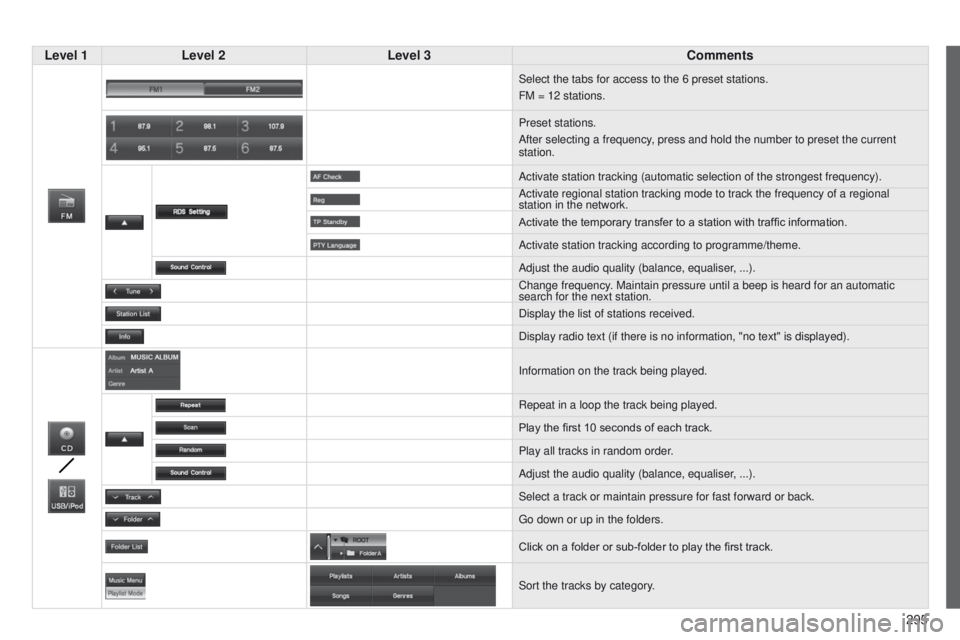
Select the tabs for access to the 6 preset stations.
FM = 12 stations.
Preset stations.
After selecting a frequency, press and hold the number to preset the current
station.
Activate station tracking (automatic selection of the strongest frequen\
cy).
Activate regional station tracking mode to track the frequency of a regi\
onal
station in the network.
Activate the temporary transfer to a station with traffic information.
Activate station tracking according to programme/theme.
Adjust the audio quality (balance, equaliser, ...).
Change frequency. Maintain pressure until a beep is heard for an automatic
search for the next station.
Display the list of stations received.
Display radio text (if there is no information, "no text" is displayed)\
.
Information on the track being played.
Repeat in a loop the track being played.
Play the first 10
seconds of each track.
Play all tracks in random order.
Adjust the audio quality (balance, equaliser, ...).
Select a track or maintain pressure for fast forward or back.
g
o down or up in the folders.
Click on a folder or sub-folder to play the first track.
Sort the tracks by category.
Page 299 of 389
297
4008_en_Chap10c_Mitsu5_ed01-2014
Level 1Level 2 Level 3 Comments
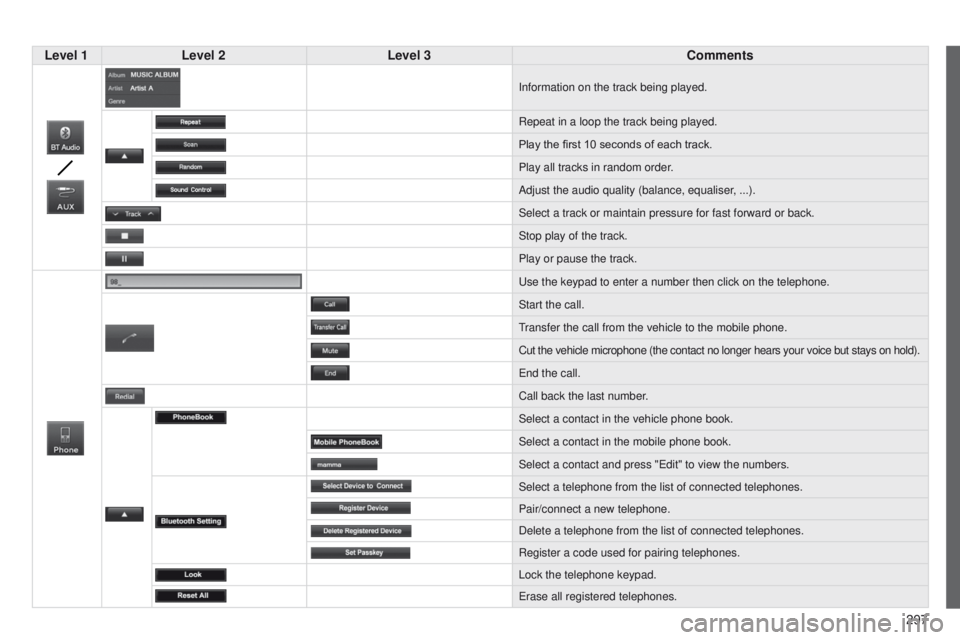
Information on the track being played.
Repeat in a loop the track being played.
Play the first 10
seconds of each track.
Play all tracks in random order.
Adjust the audio quality (balance, equaliser, ...).
Select a track or maintain pressure for fast forward or back.
Stop play of the track.
Play or pause the track.
u
se the keypad to enter a number then click on the telephone.
Start the call.
transfer the call from the vehicle to the mobile phone.
Cut the vehicle microphone (the contact no longer hears your voice but \
stays on hold).
e
nd the call.
Call back the last number.
Select a contact in the vehicle phone book.
Select a contact in the mobile phone book.
Select a contact and press "
e dit" to view the numbers.
Select a telephone from the list of connected telephones.
Pair/connect a new telephone.
Delete a telephone from the list of connected telephones.
Register a code used for pairing telephones.
Lock the telephone keypad.
e
rase all registered telephones.
Page 301 of 389
299
4008_en_Chap10c_Mitsu5_ed01-2014
Level 1Level 2 Level 3 Comments
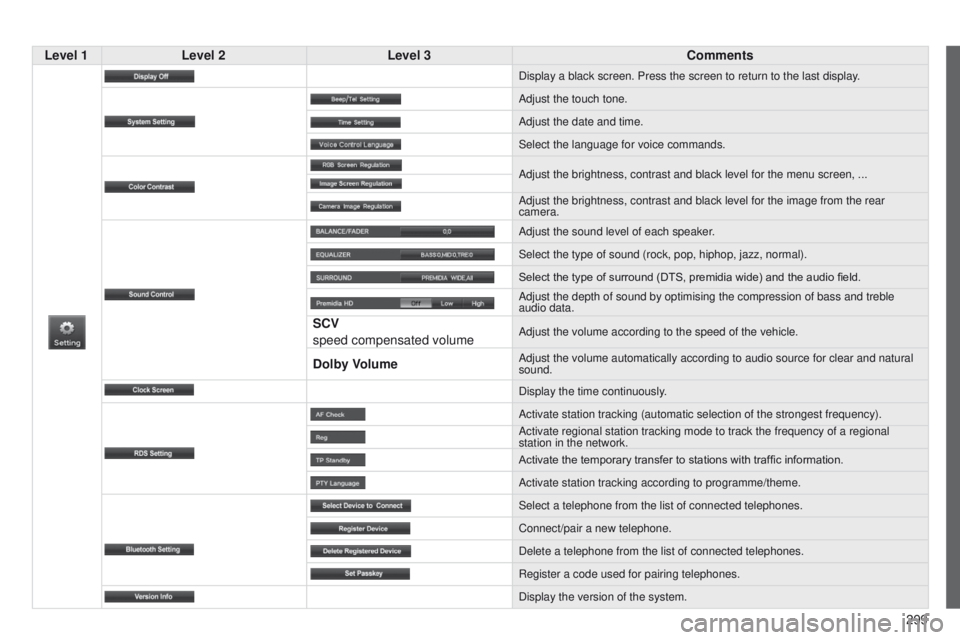
Display a black screen. Press the screen to return to the last display.
Adjust the touch tone.
Adjust the date and time.
Select the language for voice commands.
Adjust the brightness, contrast and black level for the menu screen, ...\
Adjust the brightness, contrast and black level for the image from the r\
ear
camera.
Adjust the sound level of each speaker.
Select the type of sound (rock, pop, hiphop, jazz, normal).
Select the type of surround (DTS, premidia wide) and the audio field.
Adjust the depth of sound by optimising the compression of bass and treb\
le
audio data.
SCV
speed compensated volumeAdjust the volume according to the speed of the vehicle.
Dolby VolumeAdjust the volume automatically according to audio source for clear and \
natural
sound.
Display the time continuously.
Activate station tracking (automatic selection of the strongest frequen\
cy).
Activate regional station tracking mode to track the frequency of a regi\
onal
station in the network.
Activate the temporary transfer to stations with traffic information.
Activate station tracking according to programme/theme.
Select a telephone from the list of connected telephones.
Connect/pair a new telephone.
Delete a telephone from the list of connected telephones.
Register a code used for pairing telephones.
Display the version of the system.
Page 302 of 389
 may prevent reception, even in RDS station tracking mode. this phenomenon is n")
04
300
Selecting an FM / MW / LW station
the exterior environment (hills, buildings, tunnel, car park, below grou\
nd...) may prevent reception, even in RDS station tracking mode. this phenomenon is normal in the propagation of radio waves and is in no \
way indicative of a fault with the audio system. Select "FM" or "MW" or "LW
".
Press MENU to display the choice of source.
Select a radio station in the list or press "
Tune"
to change the frequency.
Maintain pressure on " Tune" until a beep is
heard, for an automatic search for the next
station.
RADIO
Press the arrow to adjust the RDS or the audio
settings (balance, equaliser, ...). Press "Station list " to display the list of radio
stations received locally.
A long press on one of the numbered buttons
presets the current station.
Preset up to 12 stations between FM1 and
FM2.
Page 306 of 389
05
304
MUSIC
Using the USB port
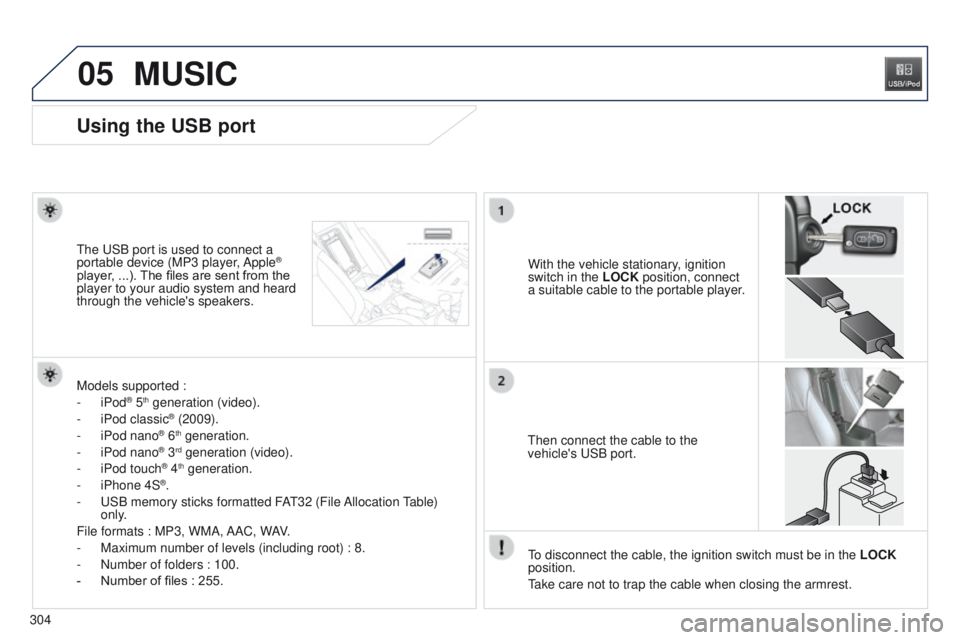
With the vehicle stationary, ignition
switch in the LOCK position, connect
a suitable cable to the portable player.t
he
u
SB port is used to connect a
portable device (MP3 player, Apple®
player, ...). The files are sent from the
player to your audio system and heard
through the vehicle's speakers.
t
hen connect the cable to the
vehicle's
u SB port.
Models supported :
-
iPod
® 5th generation (video).
-
iPod classic® (2009).
-
iPod nano® 6th generation.
-
iPod nano® 3rd generation (video).
-
iPod touch® 4th generation.
-
iPhone 4S®.
-
u
SB memory sticks formatted FA
t
32 (File Allocation
table)
only
.
File formats : MP3, WMA, AAC, WAV.
-
Maximum number of levels (including root) : 8.
-
Number of folders : 100.
-
Number of files : 255.
to disconnect the cable, the ignition switch must be in the LOCK
position.
take care not to trap the cable when closing the armrest.
Page 307 of 389
05
305
4008_en_Chap10c_Mitsu5_ed01-2014
MUSIC
Using the auxiliary input (AUX)
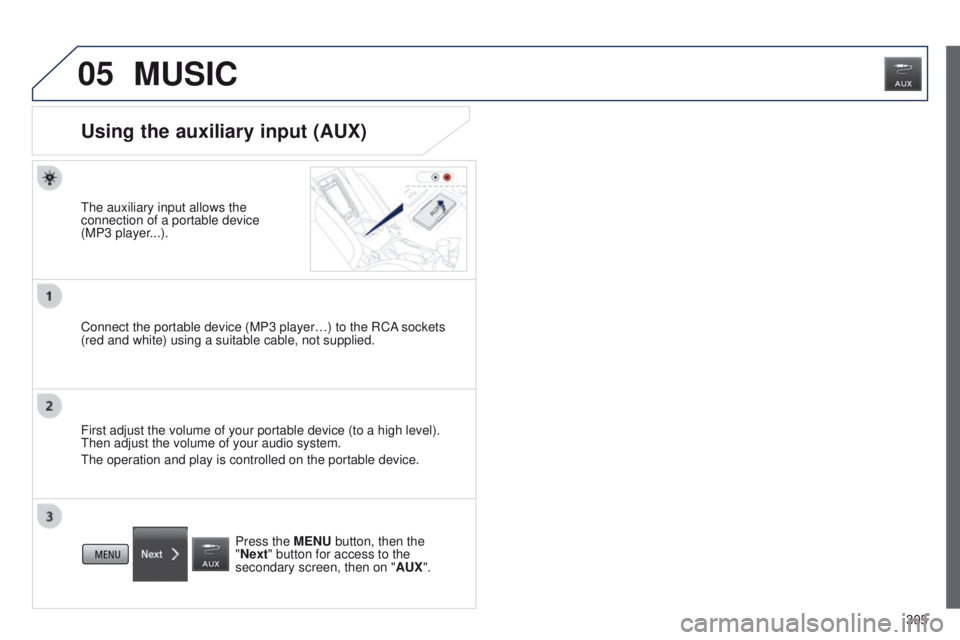
the auxiliary input allows the
connection of a portable device
(MP3 player
...).
Connect the portable device (MP3 player…) to the RCA sockets
(red and white) using a suitable cable, not supplied.
First adjust the volume of your portable device (to a high level).
t
hen adjust the volume of your audio system.
t
he operation and play is controlled on the portable device. Press the MENU button, then the
"Next" button for access to the
secondary screen, then on " AUX".
Page 308 of 389
05
306
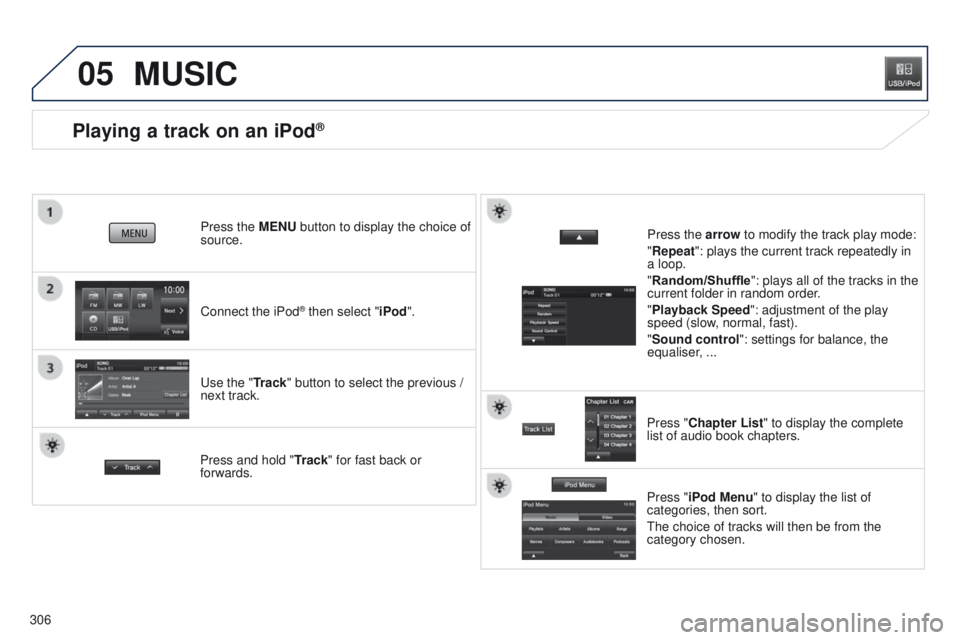
Playing a track on an iPod®
Connect the iPod® then select "iPod".
Press the MENU button to display the choice of
source.
u
se the "Track" button to select the previous /
next track.
MUSIC
Press and hold " Track" for fast back or
forwards. Press the arrow to modify the track play mode:
"Repeat": plays the current track repeatedly in
a loop.
"Random/Shuffle
": plays all of the tracks in the
current folder in random order.
"Playback Speed": adjustment of the play
speed (slow, normal, fast).
"Sound control ": settings for balance, the
equaliser, ...
Press "Chapter List" to display the complete
list of audio book chapters.
Press "iPod Menu " to display the list of
categories, then sort.
t
he choice of tracks will then be from the
category chosen.