radio PEUGEOT 4008 2017 User Guide
[x] Cancel search | Manufacturer: PEUGEOT, Model Year: 2017, Model line: 4008, Model: PEUGEOT 4008 2017Pages: 368, PDF Size: 12.22 MB
Page 291 of 368
289
4008_en_Chap10c_Mitsu5_ed01-2016
AUDIO-CD TOUCH SCREEN
S
ystem
the system is protected in such a way that it will only
operate in your vehicle.
01 First steps - Control panel
For safety reasons, the driver must carry out operations
which require prolonged attention while the vehicle is
stationary.
When the engine is switched off and to prevent
discharging of the battery, the system switches off
following the activation of the energy economy mode.
Contents
03
General
operation
02
Steering
mounted controls
04
Radio
05
Music
06
Bluetooth® telephone p.
p. p.
p.
p.
p. 290
291
293
300
305
310
Page 293 of 368
02
291
4008_en_Chap10c_Mitsu5_ed01-2016
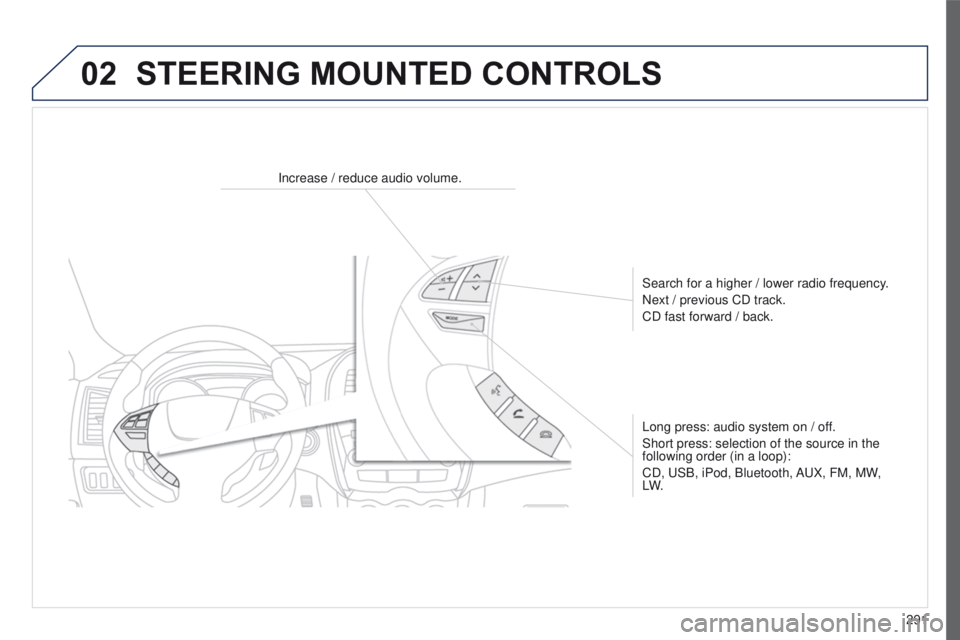
STEERING MOUNTED CONTROLS
Increase / reduce audio volume.Search for a higher / lower radio frequency.
Next / previous CD track.
CD fast forward / back.
Long press: audio system on / off.
Short press: selection of the source in the
following order (in a loop):
CD,
u SB, iPod, Bluetooth, A u X, FM, MW,
LW.
Page 295 of 368
03
293
4008_en_Chap10c_Mitsu5_ed01-2016
GENERAL OPERATION
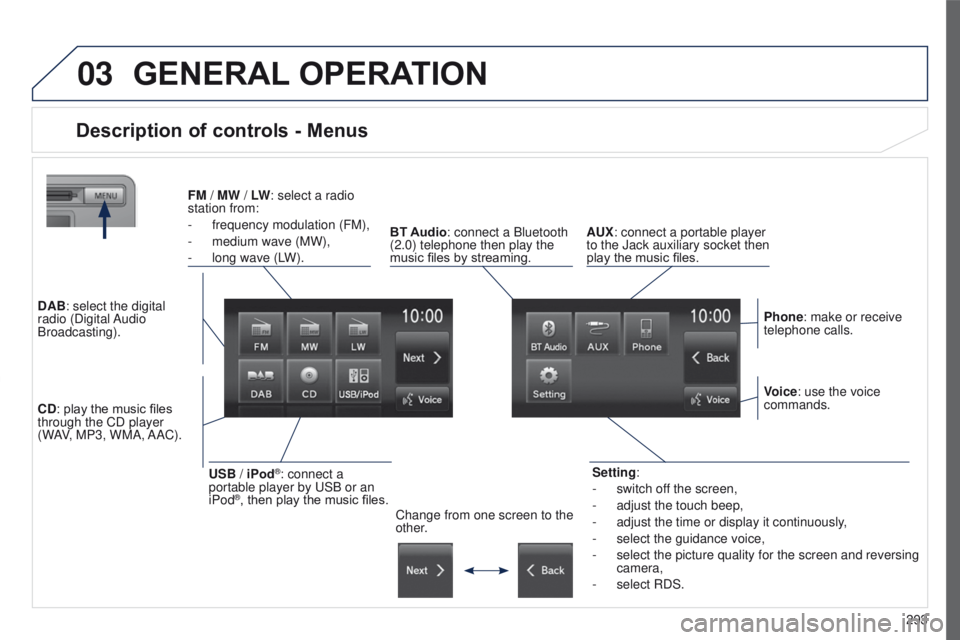
Description of controls - Menus
Setting:
-
switch of
f the screen,
-
adjust the touch beep,
-
adjust the time or display it continuously
,
-
select the guidance voice,
-
select the picture quality for the screen and reversing
camera,
-
select RDS.
FM
/
MW / LW: select a radio
station from:
-
frequency modulation (FM),
-
medium wave (MW),
-
long wave (L
W).
BT Audio: connect a Bluetooth
(2.0) telephone then play the
music files by streaming. AUX: connect a portable player
to the Jack auxiliary socket then
play the music files.
Phone: make or receive
telephone calls.
Change from one screen to the
other. Voice: use the voice
commands.
USB / iPod®: connect a
portable player by u SB or an
iPod
®, then play the music files.
CD: play the music files
through the CD player
(WAV, MP3, WMA, AAC). DAB: select the digital
radio (Digital Audio
Broadcasting).
Page 297 of 368
295
4008_en_Chap10c_Mitsu5_ed01-2016
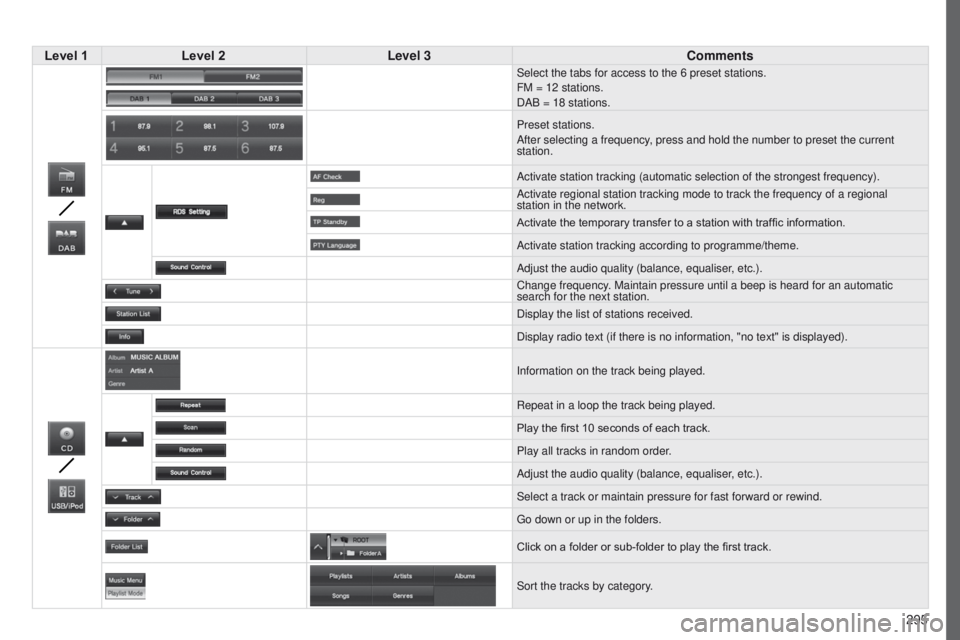
Level 1Level 2 Level 3 Comments
Select the tabs for access to the 6 preset stations.
FM = 12 stations.
DAB = 18 stations.
Preset stations.
After selecting a frequency, press and hold the number to preset the current
station.
Activate station tracking (automatic selection of the strongest frequen\
cy).
Activate regional station tracking mode to track the frequency of a regi\
onal
station in the network.
Activate the temporary transfer to a station with traffic information.
Activate station tracking according to programme/theme.
Adjust the audio quality (balance, equaliser, etc.).
Change frequency. Maintain pressure until a beep is heard for an automatic
search for the next station.
Display the list of stations received.
Display radio text (if there is no information, "no text" is displayed)\
.
Information on the track being played.
Repeat in a loop the track being played.
Play the first 10
seconds of each track.
Play all tracks in random order.
Adjust the audio quality (balance, equaliser, etc.).
Select a track or maintain pressure for fast forward or rewind.
g
o down or up in the folders.
Click on a folder or sub-folder to play the first track.
Sort the tracks by category.
Page 302 of 368
 may prevent reception, even in RDS station tracking mode. this phenomenon is n")
04
300
Selecting an FM / MW / LW station
the exterior environment (hills, buildings, tunnel, car park, below grou\
nd...) may prevent reception, even in RDS station tracking mode. this phenomenon is normal in the propagation of radio waves and is in no \
way indicative of a fault with the audio system. Select "FM" or "MW" or "LW
".
Press MENU to display the choice of source.
Select a radio station in the list (1 to 6) or
press "Tune" to change the frequency.
Maintain pressure on " Tune" until a beep is
heard, for an automatic search for the next
station.
RADIO
Press the arrow to adjust the RDS or the audio
settings (balance, equaliser, ...). Press "Station list " to display the list of radio
stations received locally.
A long press on one of the numbered buttons
presets the current station.
Preset up to 12 stations between FM1 and
FM2.
Page 303 of 368
04
301
4008_en_Chap10c_Mitsu5_ed01-2016
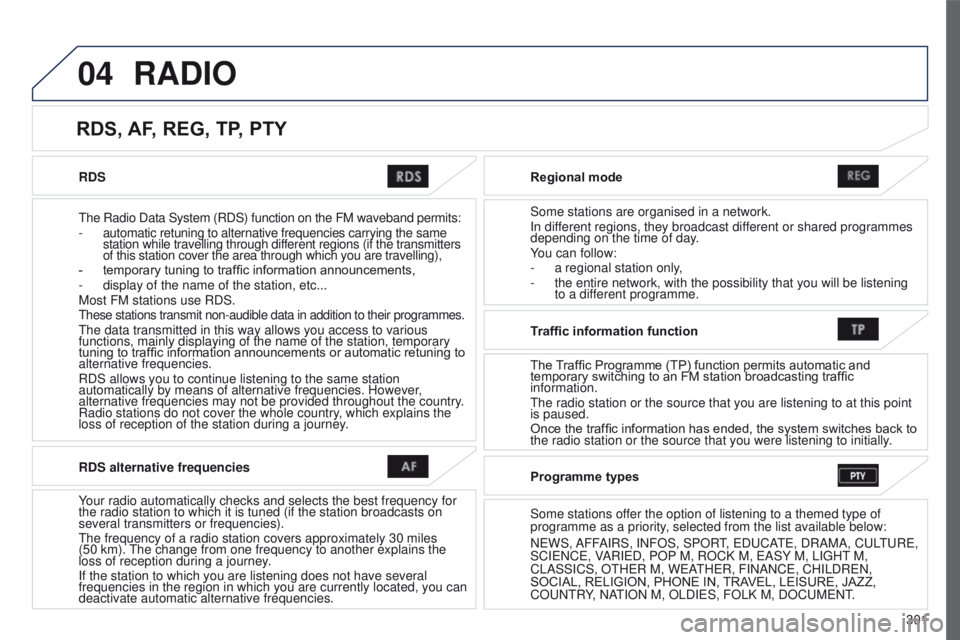
RDS
t
he Radio Data System (RDS) function on the FM waveband permits:
-
automatic retuning to alternative frequencies carrying the same
station while travelling through different regions (if the transmitters
of this station cover the area through which you are travelling),
-
temporary tuning to traffic information announcements,
-
display of the name of the station, etc...
Most FM stations use RDS.
these stations transmit non-audible data in addition to their programmes.\
the data transmitted in this way allows you access to various
functions, mainly displaying of the name of the station, temporary
tuning to traffic information announcements or automatic retuning to
alternative frequencies.
RDS allows you to continue listening to the same station
automatically by means of alternative frequencies. However
,
alternative frequencies may not be provided throughout the country.
Radio stations do not cover the whole country, which explains the
loss of reception of the station during a journey. Regional mode
Some stations are organised in a network.
In different regions, they broadcast different or shared programmes
depending on the time of day.
You can follow:
-
a regional station only
,
-
the entire network, with the possibility that you will be listening
to a dif
ferent programme.
RDS, AF, REG, TP, PTY
RADIO
RDS alternative frequencies
Your radio automatically checks and selects the best frequency for
the radio station to which it is tuned (if the station broadcasts on
several transmitters or frequencies).
t
he frequency of a radio station covers approximately 30 miles
(50
km).
t
he change from one frequency to another explains the
loss of reception during a journey.
If the station to which you are listening does not have several
frequencies in the region in which you are currently located, you can
deactivate automatic alternative frequencies. Traffic information function
The Traf
fi c Programme (TP) function permits automatic and
temporary switching to an FM station broadcasting traffic
information.
t
he radio station or the source that you are listening to at this point
is paused.
Once the traffic information has ended, the system switches back to
the radio station or the source that you were listening to initially.
Programme types
Some stations offer the option of listening to a themed type of
programme as a priority, selected from the list available below:
N
e WS, AFFAIRS, INFOS, SPOR
t,
e D u CA
te
, DRAMA, C u L
tu
R e ,
SCI
e NC e , VARI e D, POP M, ROCK M, e ASY M, LI g H t
M,
CLASSICS, O
t H e R M, W e A
t
H e R, FINANC e , CHILDR e N,
SOCIAL, RELIGION, PHONE IN, TRAVEL, LEISURE, JAZZ,
CO
u N t RY, NA
t
ION M, OLDI e S, FOLK M, DOC u M e N t
.
Page 304 of 368
04
302
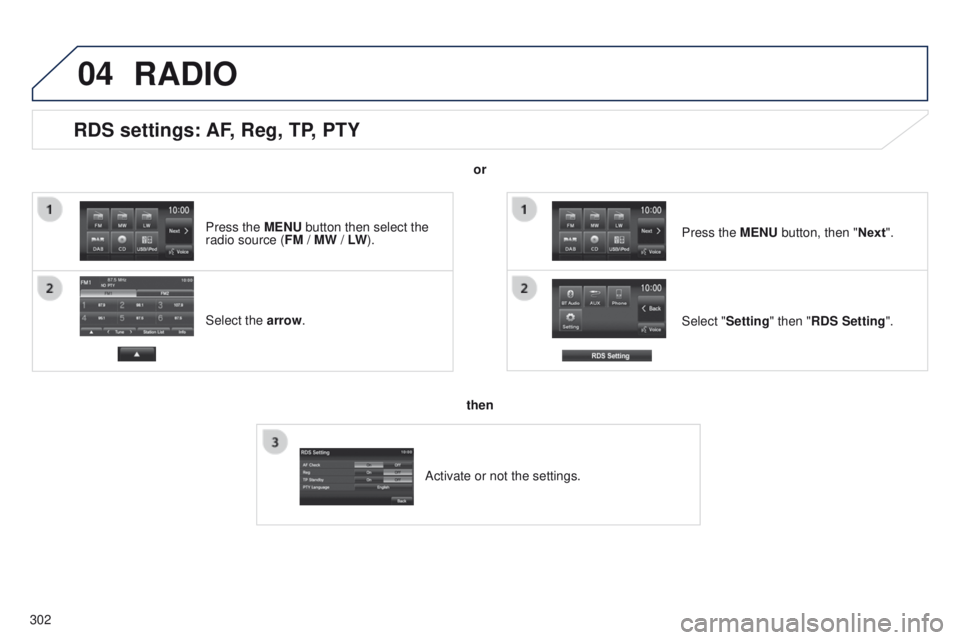
RDS settings: AF, Reg, TP, PTY
Select the arrow.Select "Setting" then "RDS Setting". Press the MENU button, then "Next".
RADIO
or
then
Activate or not the settings.
Press the MENU button then select the
radio source (
FM / MW / LW).
Page 305 of 368
 station - digital radio
the exterior environment (hills, buildings, tunnels, car parks, being un\
derground,")
04
303
4008_en_Chap10c_Mitsu5_ed01-2016
RADIO
Selecting a DAB (Digital Audio Broadcasting) station - digital radio
the exterior environment (hills, buildings, tunnels, car parks, being un\
derground, etc.) may prevent reception, even in RDS station tracking mo\
de. this phenomenon is normal in the propagation of radio waves and is in no \
way indicative of a fault with the audio system. Select "DAB". Press MENU to display the source selection.
Select a station from the list (1 to 6) or use
"Tune" to change the frequency.
Maintain the pressure on "
Tune" until a
beep is heard to search for the next station
automatically. Press the arrow to adjust the DAB or the sound
quality (balance, equaliser, etc.). Press "Station list
" to display the list of radio
stations received in your area.
Pressing and holding one of the numbers stores
the current station.
Digital radio provides a superior audio quality and also a display of gr\
aphic current information concerning the radio station selected.
t
he different channels offer a choice of radio stations in alphabetical order.
Store up to 18 stations between DAB1, DAB2
and DAB3.
Page 306 of 368
04
304
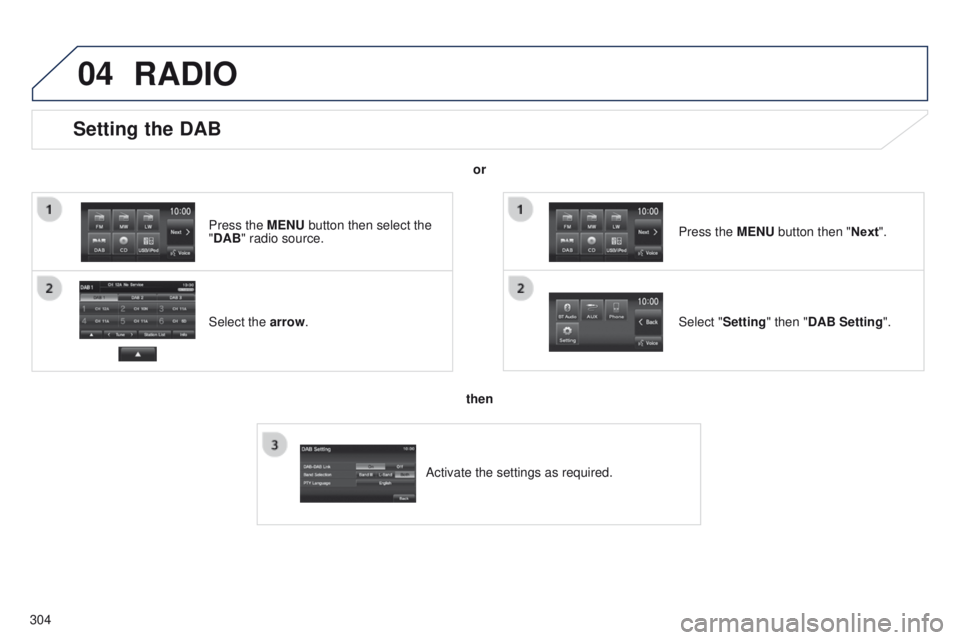
Setting the DAB
Select the arrow. Press the MENU button then select the
"DAB" radio source.Select "Setting" then "DAB Setting". Press the MENU button then "Next".
or
then
Activate the settings as required.
RADIO
Page 315 of 368
313
4008_en_Chap10d_Mitsu4_ed01-2016
AUDIO-CD system
the system is protected in such a way that it will only
operate in your vehicle.01 First steps - Control panel
For safety reasons, the driver must carry out operations
which require prolonged attention while the vehicle is
stationary.
When the engine is switched off and to prevent
discharging of the battery, the system switches off
following the activation of the energy economy mode.
CONTENTS
02
Steering
mounted controls
03
General
operation
04
Radio
05
Music
media players
06
USB
player
07
BLUETOOTH
® streaming
Error messages p.
p.
p.
p.
p.
p.
p.
p. 314
316
317
319
326
331
333
335