lock PEUGEOT 4008 2017 Owner's Manual
[x] Cancel search | Manufacturer: PEUGEOT, Model Year: 2017, Model line: 4008, Model: PEUGEOT 4008 2017Pages: 368, PDF Size: 12.22 MB
Page 60 of 368
58
4008_en_Chap02_ouvertures_ed01-2016
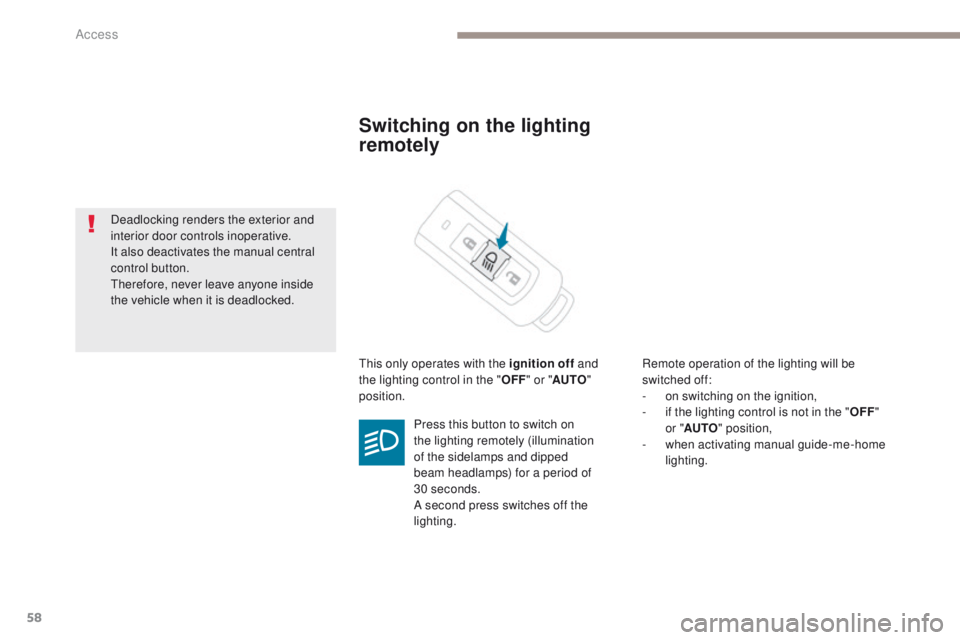
Switching on the lighting
remotely
this only operates with the ignition off and
the lighting control in the " OFF" or " AUTO "
position. Remote operation of the lighting will be
switched off:
-
o
n switching on the ignition,
-
i
f the lighting control is not in the "OFF"
or
"AUTO " position,
-
w
hen activating manual guide-me-home
lighting.
Press this button to switch on
the lighting remotely (illumination
of the sidelamps and dipped
beam headlamps) for a period of
30
seconds.
A second press switches off the
lighting.
Deadlocking renders the exterior and
interior door controls inoperative.
It also deactivates the manual central
control button.
th
erefore, never leave anyone inside
the vehicle when it is deadlocked.
Access
Page 61 of 368
59
4008_en_Chap02_ouvertures_ed01-2016
emergency procedure with the Keyless en try and
Star ting system
Unlocking
F turn the key towards the front in the
driver's door lock to unlock it.
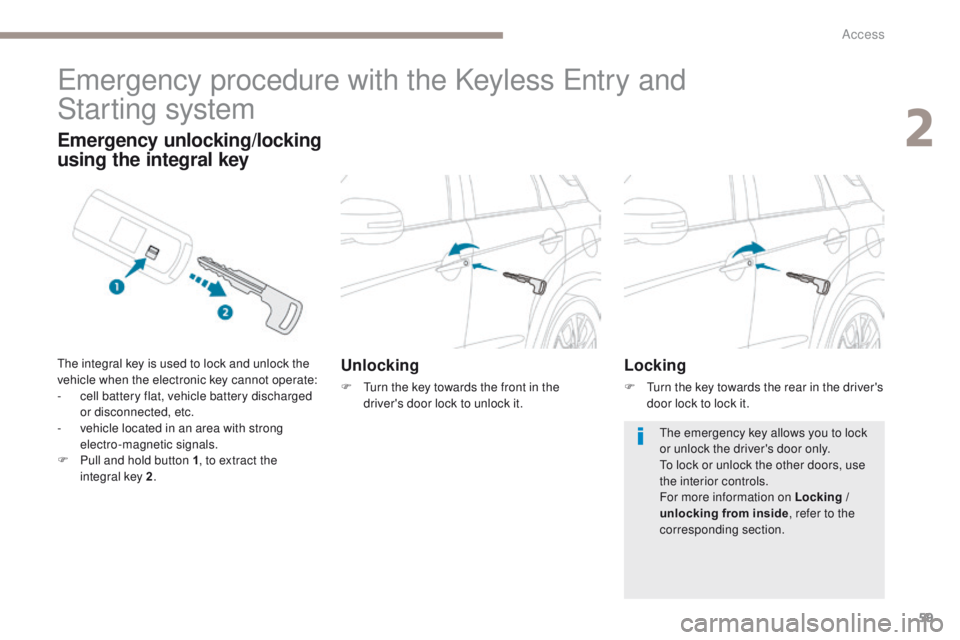
Emergency unlocking/locking
using the integral key
the integral key is used to lock and unlock the
vehicle when the electronic key cannot operate:
-
c
ell battery flat, vehicle battery discharged
or disconnected, etc.
-
v
ehicle located in an area with strong
electro-magnetic signals.
F
P
ull and hold button 1 , to extract the
integral key 2 .Locking
F turn the key towards the rear in the driver's
door lock to lock it.
th
e emergency key allows you to lock
or unlock the driver's door only.
to l
ock or unlock the other doors, use
the interior controls.
For more information on Locking /
unlocking from inside , refer to the
corresponding section.
2
Access
Page 63 of 368
61
4008_en_Chap02_ouvertures_ed01-2016
Lost electronic key
Visit a PeugeOt dealer with the vehicle's registration document and your personal identification documents and if possible the key code label.th
e Pe ugeOt dealer will be able to retrieve the key code and the transponder code required to order a new key.
Electronic key
the electronic key is a sensitive system; do not operate it while it is in your pocket as there is a possibility that it may unlock the vehicle, without
you being aware of it.
Do not repeatedly press the buttons of your electronic key out of range and out of sight of your vehicle. You run the risk of stopping it from
working and the remote control would have to be reinitialised.
th
e electronic key cannot operate as a remote control when it is in the reader or even when the ignition is switched on.
Locking the vehicle
Driving with the doors locked may make access to the passenger compartment by the emergency services more difficult in an emergency.
As a safety precaution, never leave children alone in the vehicle, even for a very short time.
In all cases, take the remote control or electronic key (if Keyless e
n
try and Starting) with you when leaving the vehicle.
Electrical interference
the Keyless en try and Starting electronic key may not operate if close to certain electronic devices: telephone, laptop computer, strong
magnetic fields, ...
Anti-theft protection
Do not make any modifications to the electronic engine immobiliser system; this could cause malfunctions.
Don't forget to turn the steering to engage the steering lock.
When purchasing a second-hand vehicle
Have all of the keys in your possession paired by a Pe ugeOt dealer, to ensure that only your keys allow your vehicle to be unlocked and
started.
2
Access
Page 64 of 368
62
4008_en_Chap02_ouvertures_ed01-2016
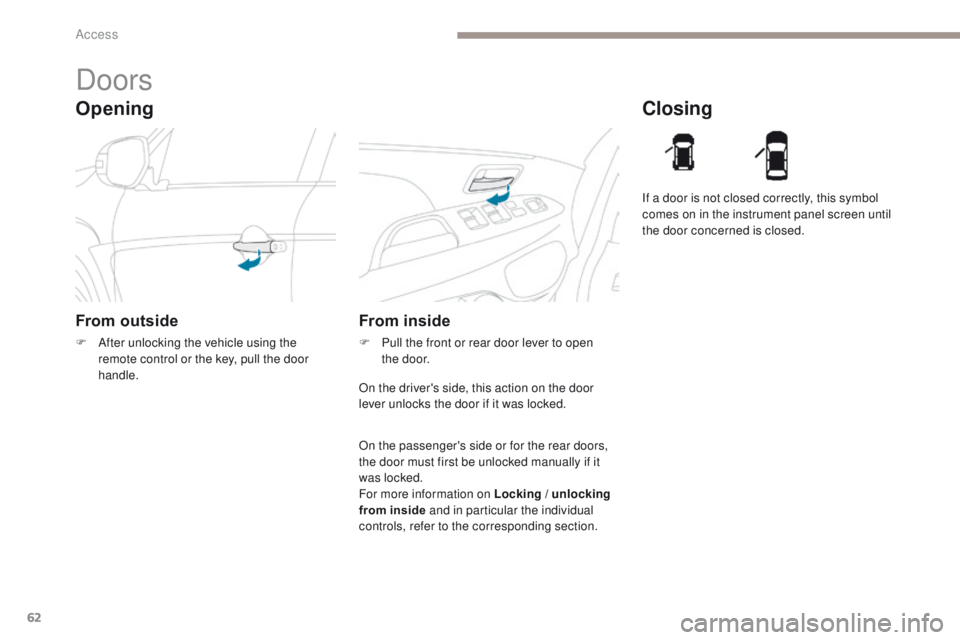
Opening
Doors
From outside
F After unlocking the vehicle using the remote control or the key, pull the door
handle.
Closing
From inside
F Pull the front or rear door lever to open the door. If a door is not closed correctly, this symbol
comes on in the instrument panel screen until
the door concerned is closed.
On the driver's side, this action on the door
lever unlocks the door if it was locked.
On the passenger's side or for the rear doors,
the door must first be unlocked manually if it
was locked.
For more information on Locking / unlocking
from inside and in particular the individual
controls, refer to the corresponding section.
Access
Page 65 of 368
63
4008_en_Chap02_ouvertures_ed01-2016
Boot
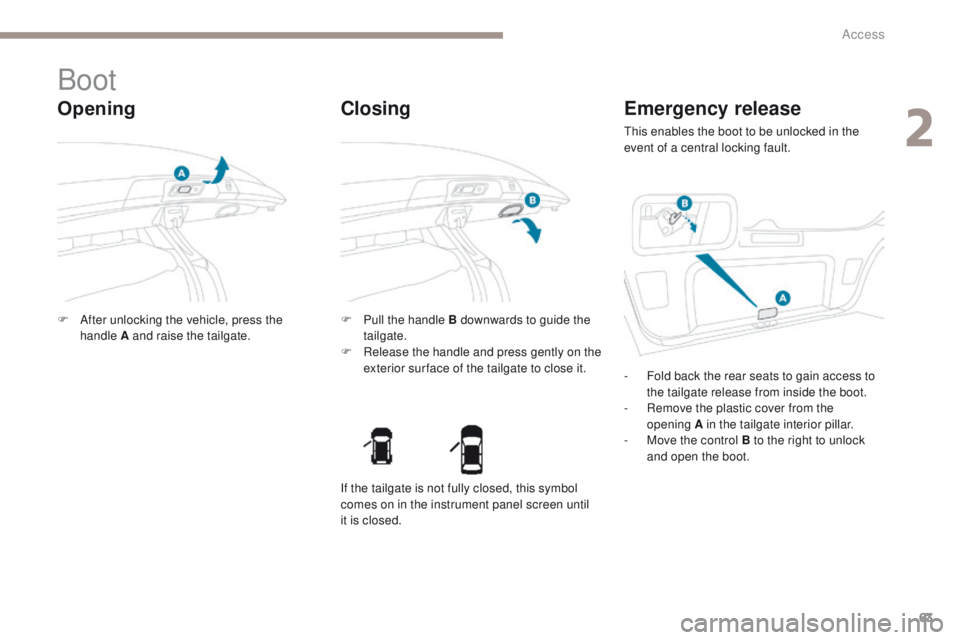
Opening
F After unlocking the vehicle, press the handle A and raise the tailgate. F
P ull the handle B downwards to guide the
tailgate.
F
R
elease the handle and press gently on the
exterior sur face of the tailgate to close it.
Closing Emergency release
this enables the boot to be unlocked in the
event of a central locking fault.
-
F
old back the rear seats to gain access to
the tailgate release from inside the boot.
-
R
emove the plastic cover from the
opening
A in the tailgate interior pillar.
-
M
ove the control B to the right to unlock
and open the boot.
If the tailgate is not fully closed, this symbol
comes on in the instrument panel screen until
it is closed.
2
Access
Page 66 of 368
64
4008_en_Chap02_ouvertures_ed01-2016
Locking / unlocking from inside
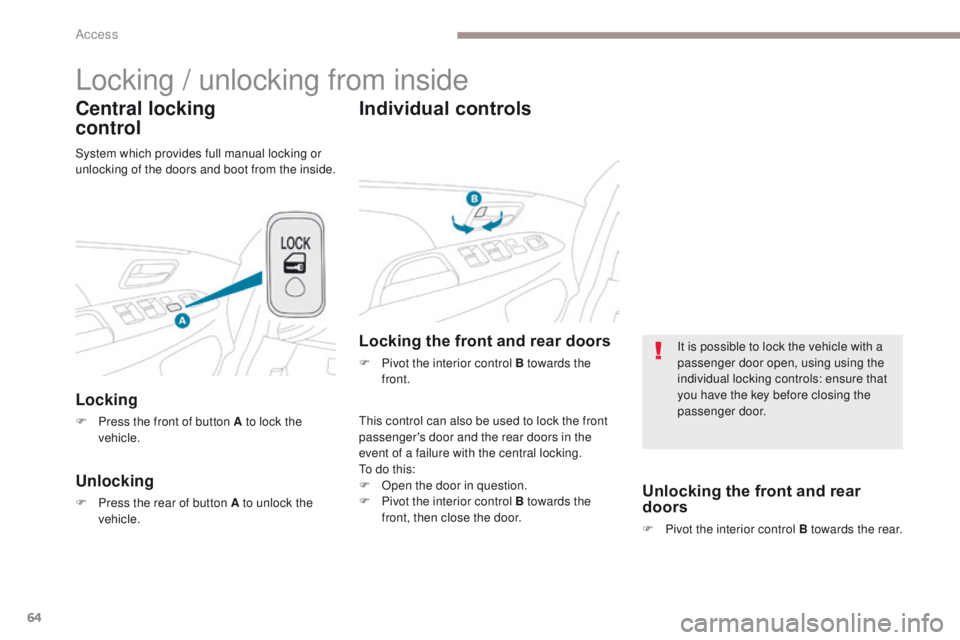
Central locking
control
Locking
F Press the front of button A to lock the vehicle.
Unlocking
F Press the rear of button A to unlock the vehicle.
Individual controls
this control can also be used to lock the front
passenger's door and the rear doors in the
event of a failure with the central locking.
to d
o this:
F
O
pen the door in question.
F
P
ivot the interior control B towards the
front, then close the door.
Locking the front and rear doors
F Pivot the interior control B towards the front.
System which provides full manual locking or
unlocking of the doors and boot from the inside.
Unlocking the front and rear
doors
F Pivot the interior control B towards the rear.
It is possible to lock the vehicle with a
passenger door open, using using the
individual locking controls: ensure that
you have the key before closing the
passenger door.
Access
Page 67 of 368
65
4008_en_Chap02_ouvertures_ed01-2016
For all work on the alarm system,
contact a PeugeOt dealer or a
qualified workshop.
Alarm*System which protects and provides a deterrent against theft and break-ins. It provides the following types of monitoring:
- perimeter
the system checks for any opening of the vehicle.th e alarm is triggered if anyone tries to open a
door, the boot, the bonnet, etc.
- volumetric
the system checks for any variation in the
volume of the passenger compartment.
th
e alarm is triggered if anyone breaks a
window, enters the passenger compartment or
moves inside the vehicle.
- tilt
the system checks for any change in the
position of the vehicle.
th
e alarm is triggered if the vehicle is lifted,
moved or knocked.
Self-protection function
the system checks for the putting out of
service of its components.
th
e alarm is triggered if the battery, the central
control or the siren wiring are put out of service
or damaged.
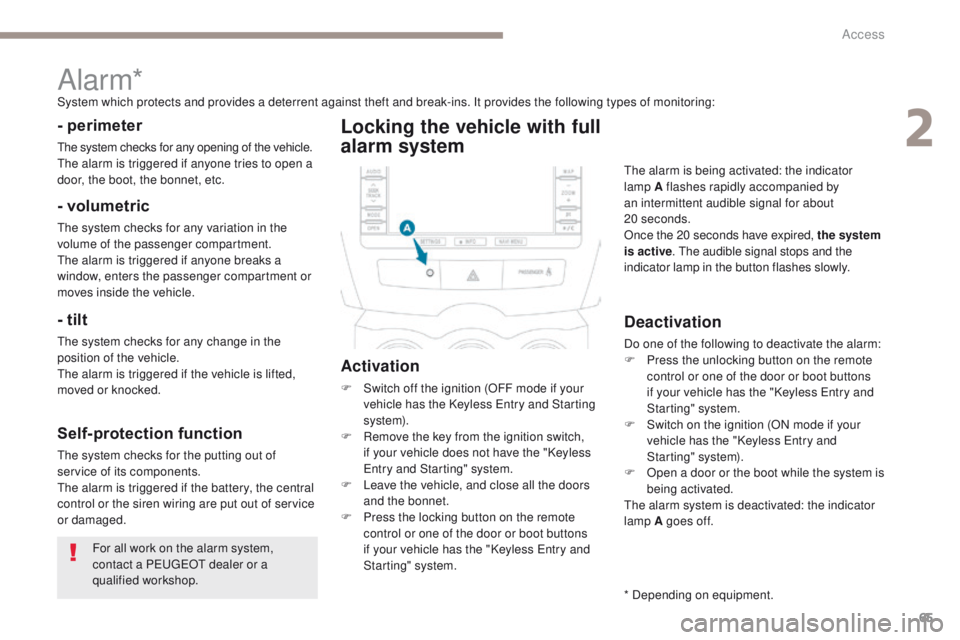
Locking the vehicle with full
alarm system
Activation
F Switch off the ignition (OFF mode if your vehicle has the Keyless en try and Starting
syste m).
F
R
emove the key from the ignition switch,
if your vehicle does not have the "Keyless
en
try and Starting" system.
F
L
eave the vehicle, and close all the doors
and the bonnet.
F
P
ress the locking button on the remote
control or one of the door or boot buttons
if your vehicle has the "Keyless
e
n
try and
Starting" system.
Deactivation
Do one of the following to deactivate the alarm:
F P ress the unlocking button on the remote
control or one of the door or boot buttons
if your vehicle has the "Keyless
e
n
try and
Starting" system.
F
S
witch on the ignition (ON mode if your
vehicle has the "Keyless
e
n
try and
Starting" system).
F
O
pen a door or the boot while the system is
being activated.
th
e alarm system is deactivated: the indicator
lamp A goes off.
th
e alarm is being activated: the indicator
lamp A flashes rapidly accompanied by
an intermittent audible signal for about
20
seconds.
Once the 20 seconds have expired, the system
is active . t
h
e audible signal stops and the
indicator lamp in the button flashes slowly.
* Depending on equipment.
2
Access
Page 68 of 368
66
4008_en_Chap02_ouvertures_ed01-2016
Locking the vehicle
with
p
erimeter monitoring
only
Deactivate the interior volumetric and tilt
monitoring to avoid unwanted triggering of the
alarm in certain cases, such as:
-
a
n animal left in the vehicle,
-
a w
indow left partly open,
-
w
ashing your vehicle.Deactivation of the interior
volumetric and tilt monitoring
Raise and hold the wiper control stalk in the
"MIST " position for about 3 seconds to activate
them again, the audible signal sounds twice .
F
S
witch off the ignition and remove the
key from the ignition switch (OFF mode if
your vehicle has the "Keyless
e
n
try and
Starting" system).
F
R
aise and hold the wiper control stalk in
the "MIST" position for about 3 seconds.
F
t
h
e audible signal sounds once and the
interior volumetric and tilt monitoring are
deactivated.
Access
Page 69 of 368
67
4008_en_Chap02_ouvertures_ed01-2016
Triggering of the alarm
this is indicated by sounding of the siren
and flashing of the direction indicators for
thirty
seconds.
A message then appears in the instrument
panel screen while the siren is operating.
When the ignition is next switched on
(ON
mode if your vehicle has the "Keyless
en
try and Starting" system), an audible signal
sounds four times to inform you that the alarm
was triggered during your absence.
Complete deactivation of
the alarm
F Switch off the ignition (OFF mode if your vehicle has the "Keyless en try and
Starting" system).
F
R
emove the key from the ignition switch,
if your vehicle does not have the "Keyless
en
try and Starting" system.
F
O
pen the driver's door.
F
P
lace the lighting control stalk in
the
"OFF "
position.
F
P
ull the wiper control stalk towards you and
hold.
A
fter about ten seconds there is an audible
signal.
F
W
hen the audible signal stops, continue to
hold the wiper stalk pulled towards you and
press the remote control locking button.
You can completely deactivate the alarm
system.
t
o d
o this, proceed as follows:
F th e state of the system is then signalled to
you by the number of beeps:
O
ne beep: the alarm system is completely
deactivated.
t
w
o beeps: the alarm system is activated.
e
a
ch new press of the remote control
locking button changes the state of the
system.
2
Access
Page 76 of 368
74
4008_en_Chap03_Ergonomie-et-confort_ed01-2016
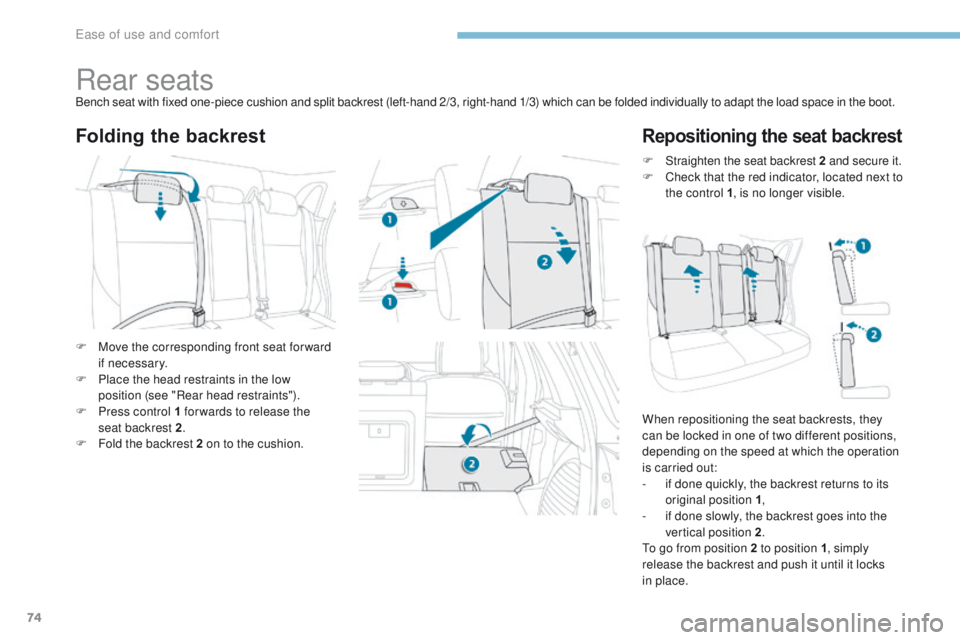
Rear seatsBench seat with fixed one-piece cushion and split backrest (left-hand 2/3, right-hand 1/3) which can be folded individually to adapt the load space in the boot.
Folding the backrestRepositioning the seat backrest
F Move the corresponding front seat for ward if necessary.
F
P
lace the head restraints in the low
position (see "Rear head restraints").
F
P
ress control 1 for wards to release the
seat backrest 2 .
F
F
old the backrest 2 on to the cushion. F
S
traighten the seat backrest 2
and secure it.
F
C
heck that the red indicator, located next to
the control 1 , is no longer visible.
When repositioning the seat backrests, they
can be locked in one of two different positions,
depending on the speed at which the operation
is carried out:
-
i
f done quickly, the backrest returns to its
original position 1 ,
-
i
f done slowly, the backrest goes into the
vertical position 2 .
to g
o from position 2 to position 1, simply
release the backrest and push it until it locks
in place.
ease of use and comfort