lock PEUGEOT 4008 2017 Workshop Manual
[x] Cancel search | Manufacturer: PEUGEOT, Model Year: 2017, Model line: 4008, Model: PEUGEOT 4008 2017Pages: 368, PDF Size: 12.22 MB
Page 207 of 368
205
4008_en_Chap08_en-cas-de panne_ed01-2016
Changing a fuse
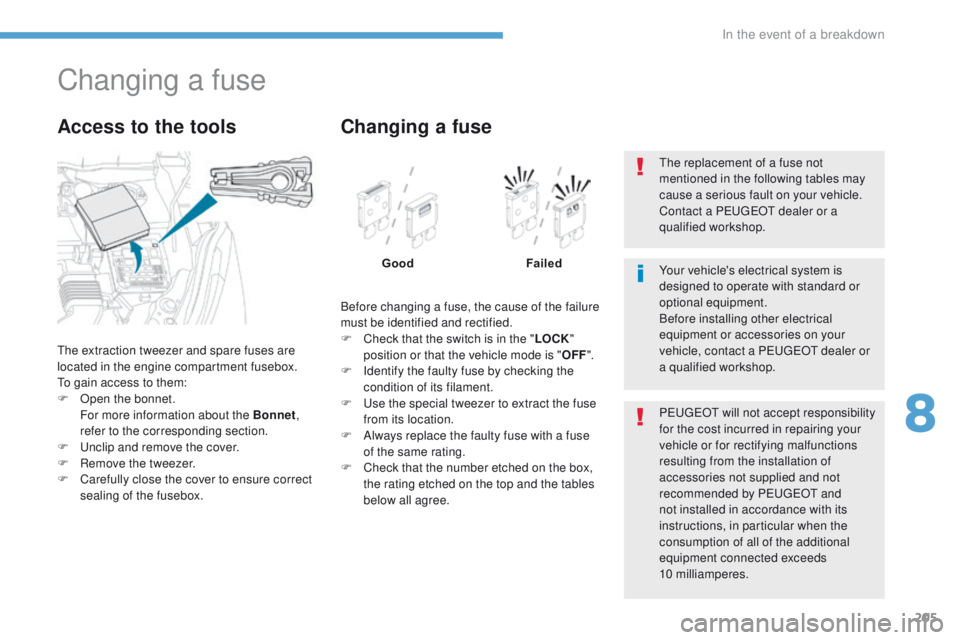
the extraction tweezer and spare fuses are
located in the engine compartment fusebox.
to g
ain access to them:
F
O
pen the bonnet.
F
or more information about the Bonnet ,
refer to the corresponding section.
F
u
n
clip and remove the cover.
F
R
emove the tweezer.
F
C
arefully close the cover to ensure correct
sealing of the fusebox.
Access to the tools
Before changing a fuse, the cause of the failure
must be identified and rectified.
F
C
heck that the switch is in the " LOCK"
position or that the vehicle mode is " OFF".
F
I
dentify the faulty fuse by checking the
condition of its filament.
F
u
s
e the special tweezer to extract the fuse
from its location.
F
A
lways replace the faulty fuse with a fuse
of the same rating.
F
C
heck that the number etched on the box,
the rating etched on the top and the tables
below all agree.
Changing a fuse
Good Failed
P
e
uge
Ot
will not accept responsibility
for the cost incurred in repairing your
vehicle or for rectifying malfunctions
resulting from the installation of
accessories not supplied and not
recommended by P
e
uge
Ot
and
not installed in accordance with its
instructions, in particular when the
consumption of all of the additional
equipment connected exceeds
10
milliamperes.
Your vehicle's electrical system is
designed to operate with standard or
optional equipment.
Before installing other electrical
equipment or accessories on your
vehicle, contact a P
e
uge
Ot
dealer or
a qualified workshop.
th
e replacement of a fuse not
mentioned in the following tables may
cause a serious fault on your vehicle.
Contact a P
e
uge
Ot
dealer or a
qualified workshop.
8
In the event of a breakdown
Page 208 of 368
206
4008_en_Chap08_en-cas-de panne_ed01-2016
Dashboard fuses
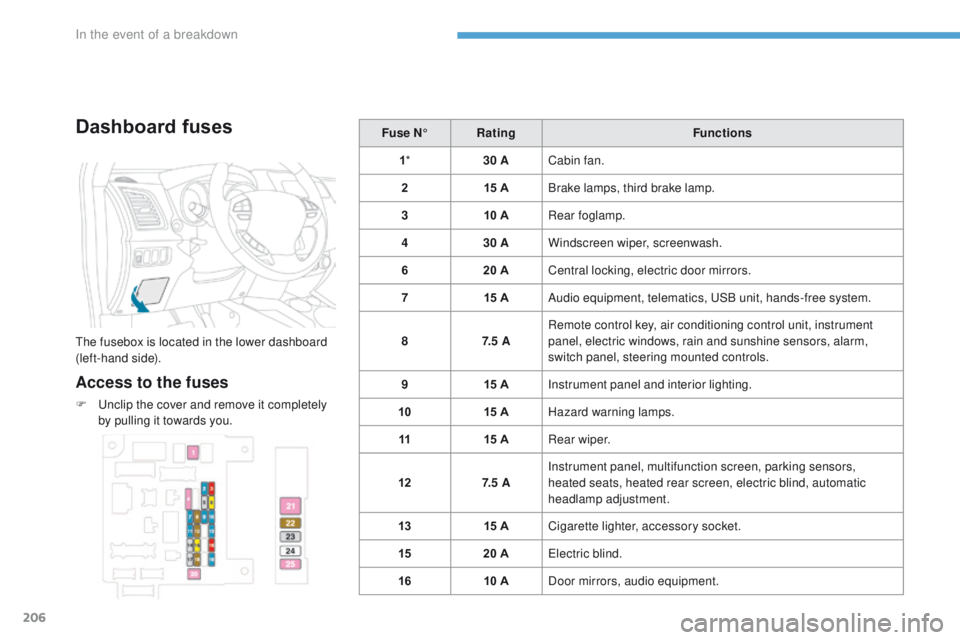
the fusebox is located in the lower dashboard
(left-hand side).
Access to the fuses
F unclip the cover and remove it completely
by pulling it towards you. Fuse N°
Rating Functions
1 * 30 ACabin fan.
2 15 ABrake lamps, third brake lamp.
3 10 ARear foglamp.
4 30 AWindscreen wiper, screenwash.
6 20 ACentral locking, electric door mirrors.
7 15 AAudio equipment, telematics, u
S
B unit, hands-free system.
8 7. 5 ARemote control key, air conditioning control unit, instrument
panel, electric windows, rain and sunshine sensors, alarm,
switch panel, steering mounted controls.
9 15 AInstrument panel and interior lighting.
10 15 AHazard warning lamps.
11 15 ARear wiper.
12 7. 5 AInstrument panel, multifunction screen, parking sensors,
heated seats, heated rear screen, electric blind, automatic
headlamp adjustment.
13 15 ACigarette lighter, accessory socket.
15 20 A
ele
ctric blind.
16 10 ADoor mirrors, audio equipment.
In the event of a breakdown
Page 217 of 368
215
4008_en_Chap08_en-cas-de panne_ed01-2016
towing the vehicle
Towing your vehicle
2 wheel drive (2WD) versions: towing
with the wheels on the ground
General recommendations
towing with the wheels on the ground
is only possible on 2 wheel drive (2WD)
versions.
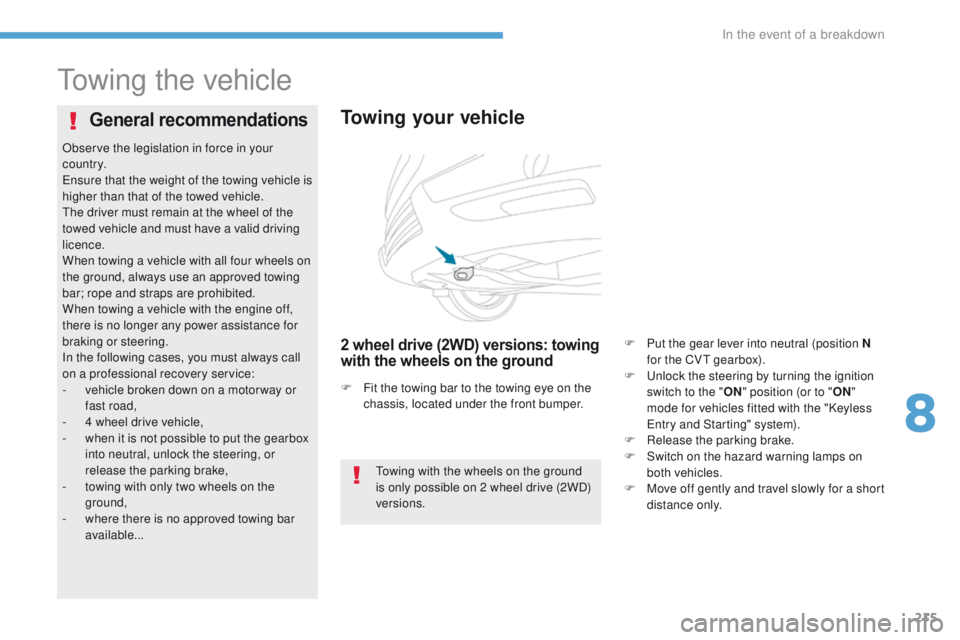
F
F
it the towing bar to the towing eye on the
chassis, located under the front bumper.
Observe the legislation in force in your
c o unt r y.
en
sure that the weight of the towing vehicle is
higher than that of the towed vehicle.
th
e driver must remain at the wheel of the
towed vehicle and must have a valid driving
licence.
When towing a vehicle with all four wheels on
the ground, always use an approved towing
bar; rope and straps are prohibited.
When towing a vehicle with the engine off,
there is no longer any power assistance for
braking or steering.
In the following cases, you must always call
on a professional recovery service:
-
v
ehicle broken down on a motor way or
fast road,
-
4 w
heel drive vehicle,
-
w
hen it is not possible to put the gearbox
into neutral, unlock the steering, or
release the parking brake,
-
t
owing with only two wheels on the
ground,
-
w
here there is no approved towing bar
available... F
P
ut the gear lever into neutral (position N
for the CV
t
gearbox).
F u
n
lock the steering by turning the ignition
switch to the " ON" position (or to " ON"
mode for vehicles fitted with the "Keyless
en
try and Starting" system).
F
R
elease the parking brake.
F S witch on the hazard warning lamps on
both vehicles.
F
M
ove off gently and travel slowly for a short
distance only.
8
In the event of a breakdown
Page 242 of 368
240
4008_en_Chap10a_Mitsu3_ed01-2016
Consult your mobile telephone's user manual and enter
the pairing code recorded in step 7 in the telephone.
BLUETOOTH® TELEPHONE
WITH
VOICE
RECOGNITION
the system says "Start the pairing procedure on the telephone.
Consult the instructions in the telephone manual ".
If the code is incorrect, the system locks.
to clear the code:
-
check that the telephone's voice recognition is not activated,
-
with the ignition on and the audio system active, press
the
e ND CALL button for 2 seconds, 3 times in succession.
When it detects a Bluetooth
® compatible mobile telephone, the
system says "Please say the name of the telephone after the
beep".
After the audible signal, allocate a name to the telephone
by saying the name of your choice.
t
he system says "Allocate an order of priority between 1 and 7.
One is the highest level of priority ".
g
ive a number between 1 and 7 to establish the level of
priority of the mobile telephone.
The system says and confirms the "name of the telephone " and
the "number" of its priority.
Answer "Ye s ".
Say "No" to return to step 13.
t
he systems says "Pairing complete" then emits an audible signal
and deactivates the voice recognition.
t
he services available depend on the network, the SIM card and the compat\
ibility of the Bluetooth
® telephone used. Check in your telephone
user
manual and with your service provider for the services you have access t\
o.
If the system does not detect the Bluetooth
® compatible mobile
telephone, the matching process stops ands is accompanied by an
audible signal.
If you select a level of priority which has already been allocated to
another telephone, the system asks you if you wish to replace this
level of priority.
Page 280 of 368
05
278
4008_EN_CHAP10B_MITSU6_ED01-2016
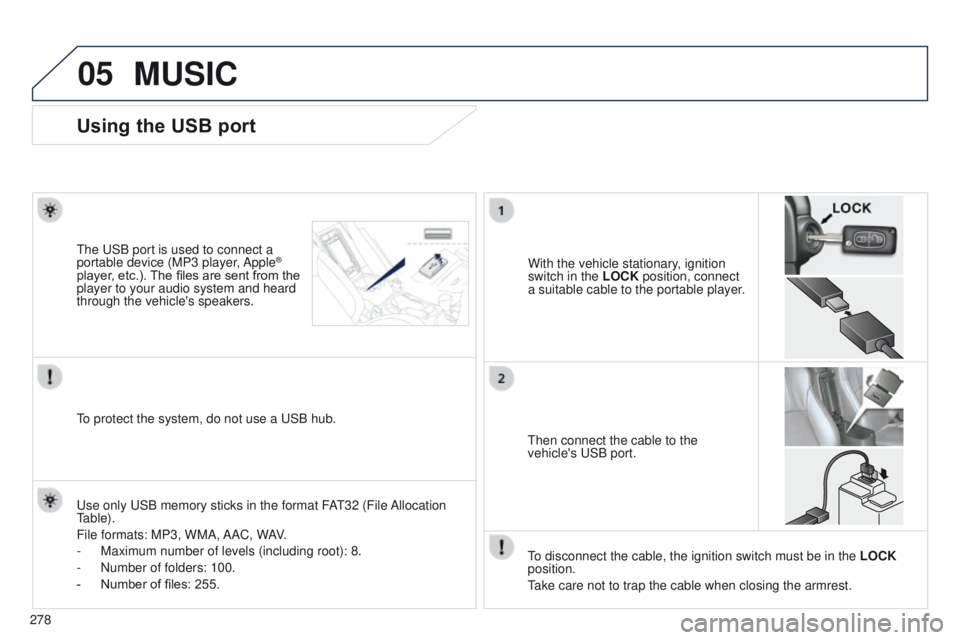
Using the USB port
With the vehicle stationary, ignition
switch in the LOCK position, connect
a suitable cable to the portable player.t
he
u
SB port is used to connect a
portable device (MP3 player, Apple®
player, etc.). The files are sent from the
player to your audio system and heard
through the vehicle's speakers.
t
hen connect the cable to the
vehicle's
u SB port.
u
se only
u
SB memory sticks in the format FA
t
32 (File Allocation
table).
File formats: MP3, WMA,
AAC, WAV.
-
Maximum number of levels (including root): 8.
-
Number of folders: 100.
-
Number of files: 255.
to protect the system, do not use a
u SB hub.
to disconnect the cable, the ignition switch must be in the LOCK
position.
take care not to trap the cable when closing the armrest.
MUSIC
Page 285 of 368
283
4008_EN_CHAP10B_MITSU6_ED01-2016
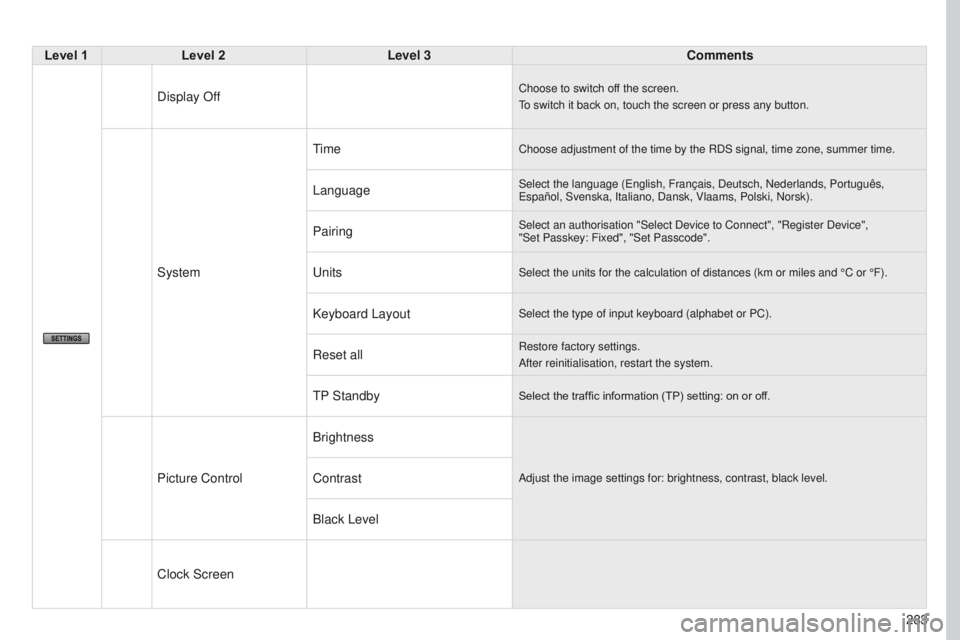
Level 1Level 2 Level 3 Comments
Display Off
Choose to switch off the screen.
to switch it back on, touch the screen or press any button.
System
timeChoose adjustment of the time by the RDS signal, time zone, summer time.\
LanguageSelect the language (english, Français, Deutsch, Nederlands, Português, e spañol, Svenska, Italiano, Dansk, Vlaams, Polski, Norsk).
PairingSelect an authorisation "Select Device to Connect", "Register Device",
"Set Passkey: Fixed", "Set Passcode".
unitsSelect the units for the calculation of distances (km or miles and °\
C or °F).
Keyboard LayoutSelect the type of input keyboard (alphabet or PC).
Reset allRestore factory settings.
After reinitialisation, restart the system.
tP StandbySelect the traffic information (TP) setting: on or off.
Picture Control BrightnessAdjust the image settings for: brightness, contrast, black level.Contrast
Black Level
Clock Screen
Page 299 of 368
297
4008_en_Chap10c_Mitsu5_ed01-2016
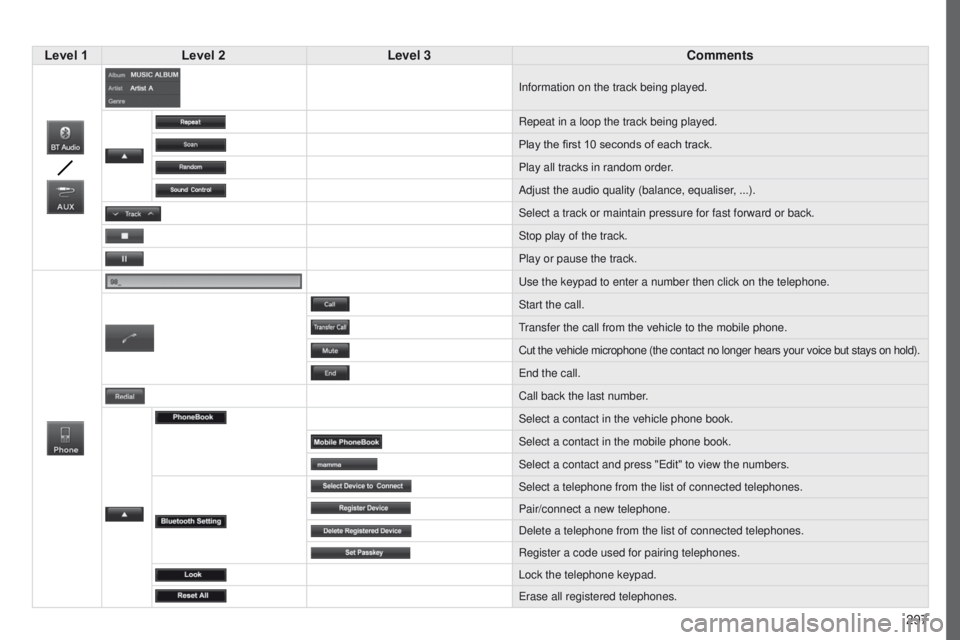
Level 1Level 2 Level 3 Comments
Information on the track being played.
Repeat in a loop the track being played.
Play the first 10
seconds of each track.
Play all tracks in random order.
Adjust the audio quality (balance, equaliser, ...).
Select a track or maintain pressure for fast forward or back.
Stop play of the track.
Play or pause the track.
u
se the keypad to enter a number then click on the telephone.
Start the call.
transfer the call from the vehicle to the mobile phone.
Cut the vehicle microphone (the contact no longer hears your voice but \
stays on hold).
e
nd the call.
Call back the last number.
Select a contact in the vehicle phone book.
Select a contact in the mobile phone book.
Select a contact and press "
e dit" to view the numbers.
Select a telephone from the list of connected telephones.
Pair/connect a new telephone.
Delete a telephone from the list of connected telephones.
Register a code used for pairing telephones.
Lock the telephone keypad.
e
rase all registered telephones.
Page 308 of 368
05
306
MUSIC
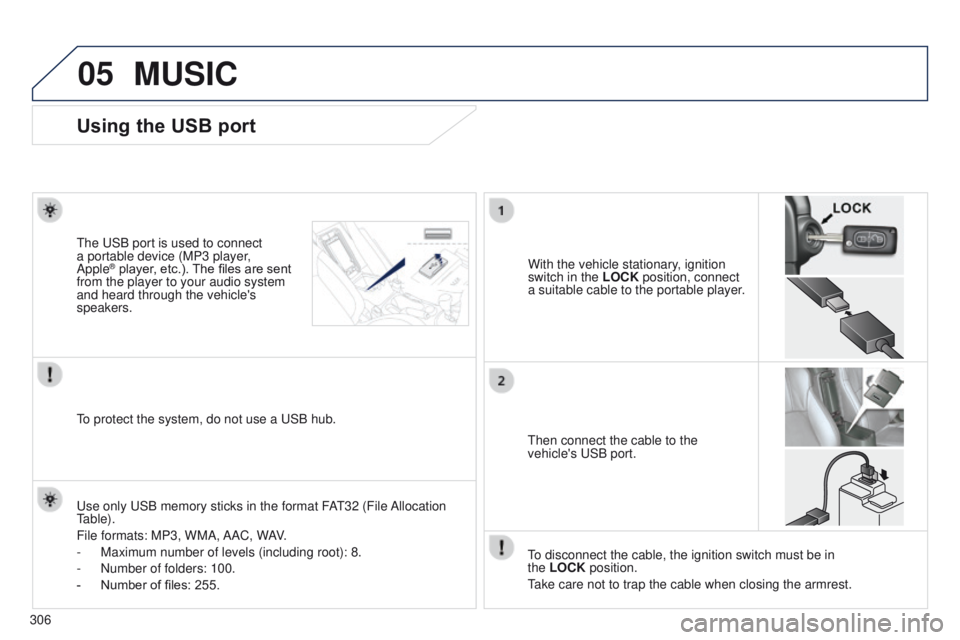
Using the USB port
With the vehicle stationary, ignition
switch in the LOCK position, connect
a suitable cable to the portable player.
t
he
u
SB port is used to connect
a portable device (MP3 player,
Apple® player, etc.). The files are sent
from the player to your audio system
and heard through the vehicle's
speakers.
t
hen connect the cable to the
vehicle's
u SB port.
u
se only u SB memory sticks in the format FA
t
32 (File Allocation
table).
File formats: MP3, WMA,
AAC, WAV.
-
Maximum number of levels (including root): 8.
-
Number of folders: 100.
-
Number of files: 255.
to protect the system, do not use a
u SB hub.
to disconnect the cable, the ignition switch must be in
the
LOCK position.
take care not to trap the cable when closing the armrest.
Page 333 of 368
06
331
4008_en_Chap10d_Mitsu4_ed01-2016
USB PLAYER
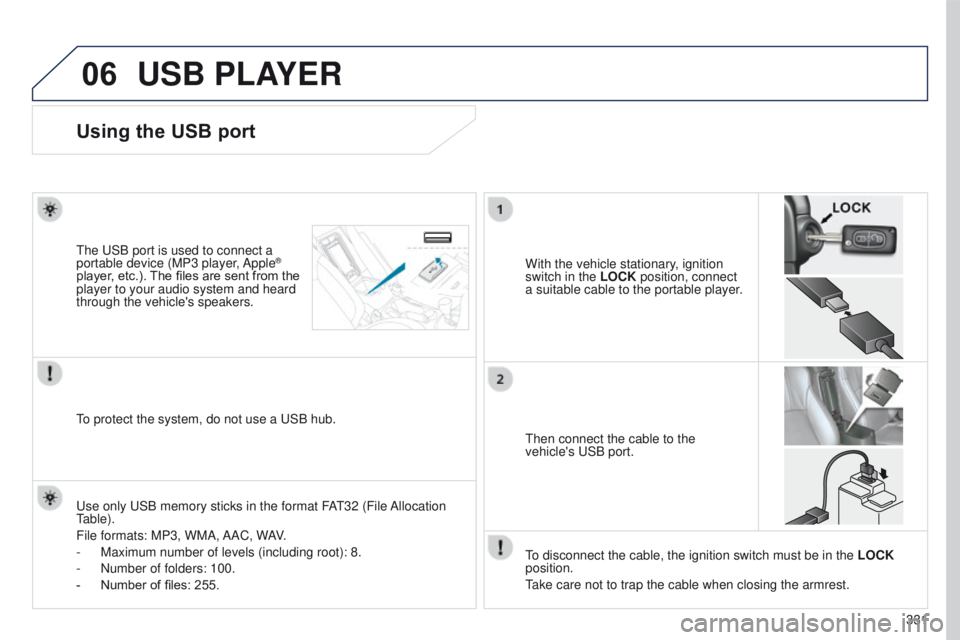
Using the USB port
With the vehicle stationary, ignition
switch in the LOCK position, connect
a suitable cable to the portable player.t
he
u
SB port is used to connect a
portable device (MP3 player, Apple®
player, etc.). The files are sent from the
player to your audio system and heard
through the vehicle's speakers.
t
hen connect the cable to the
vehicle's
u SB port.
u
se only
u
SB memory sticks in the format FA
t
32 (File Allocation
table).
File formats: MP3, WMA,
AAC, WAV.
-
Maximum number of levels (including root): 8.
-
Number of folders: 100.
-
Number of files: 255.
to protect the system, do not use a
u SB hub.
to disconnect the cable, the ignition switch must be in the LOCK
position.
take care not to trap the cable when closing the armrest.
Page 339 of 368
337
4008_en_Chap11_index-alpha_ed01-2016
ABS and eBFD systems ...............................143
Accessories .................................................. 141
Access to bulbs
............................................. 200
Active stability control (ASC)
........................145
Adjusting headlamps
.................................... 13 3
Adjusting head restraints
................................73
Adjusting the date
........................................... 46
Adjusting the height and reach of the steering wheel
....................................78
Adjusting the seat
..................................... 71, 72
Adjusting the seat belt height
.......................147
Adjusting the temperature
.............................. 83
A
djusting the time
.............................. 44, 46, 48
Advice on driving
............................................ 97
Airbag, knee
.......................................... 153, 155
Airbags
.......................................................... 151
Airbags, curtain
..................................... 15
4, 155
Airbags, front ......................................... 151, 155
Airbags, lateral
...................................... 153, 155
Air conditioning
............................................... 10
Air conditioning, automatic
.......................80, 83
Air conditioning, manual
...........................80, 81
Air filter
.......................................................... 18 6
Air intake
......................................................... 83
Air vents
.......................................................... 79
Alarm
............................................................... 65
Anti-lock braking system (ABS)
....................143
Anti-theft
....................................................... 102
Armrest, front
...................................... 73, 89, 92
Armrest, rear
................................................... 75
A
shtray, portable
....................................... 89, 91
Audio- CD system
.................................. 3
13 - 3 3 6
Audio streaming (Bluetooth)
................ 333
, 334
Audio- CD system, touch screen
............2 8 9 - 311
Audio-telematic system, touch screen
........................................ 247-2 8 8Battery
...........................................
186, 211, 214
Battery, charging ...................................211, 214
Battery, remote control
............................. 6
0, 61
Blind, panoramic roof
......................................70
Bluetooth (telephone)
............................2 3 5 - 2 41
Bluetooth telephone with voice recognition
.........................236 -246
Bonnet
...........................................................180
Bonnet stay
...................................................180
Boot
.................................................................63
Bottle holder
....................................................89
Brake discs
.................................................... 18
8
Brake lamps
...............................
...................203
Brake pads
....................................................188
Brakes
...........................................................188
Braking assistance system
...........................14
3
AB
Child lock .......................................................171
Children ............................... ..........................165
Child seats
..............................
....150, 15 6, 157,
161-163, 170
Child seats, ISOFIX
......................16
5, 167, 169
Cigar lighter
..................................................... 91
Closing the boot
........................................ 54, 63
Closing the doors
...................................... 54, 57
Control, emergency boot release
...................63
Controls for air conditioning
............................83
Control stalk, lighting
.................................... 12
7
Control stalk, wipers
.............................13 4, 13 6
Coolant level
................................................. 18 4
Courtesy lamp, front
..................................... 13 8
Courtesy lamp, rear
...................................... 13 8
Cruise control
................................................ 12
0
Cup holder
...............................
........................89
CV
t g
earbox
................................................. 187
Capacity, fuel tank
..............................
.......... 173
Card, SD
...................................... 263, 279, 280
CD changer
...............................
.................... 328
Central locking
.......................................... 54, 57
Changing a bulb
........................... 199, 203, 204
Changing a fuse
............................................ 205
Changing a wheel
................................. 193, 19 4
Changing a wiper blade
................................ 176
Changing the remote control battery
.............. 60
Checking levels
...................................... 18
3 -185
Checking the engine oil level
........................ 183
Checking tyre pressures (using the kit)
........ 189
Checks
...............
................... 181, 182, 18 6, 188 DAB (Digital Audio Broadcasting) -
Digital radio
........................ 275, 303, 304, 325
Date (setting)
...............................
....................46
Daytime running lamps
.........................13 0, 201
Deactivating ASC
.......................................... 145
Deactivating the passenger airbag
.......151, 15 8
Deactivating the passenger and rear window control switches
.......................68
Deadlocking
.............................................. 55, 57
Defrosting
.................................................. 87, 88
Defrosting, front
.............................................. 87
C
D
.
Alphabetical index