tow PEUGEOT 4008 2017 Workshop Manual
[x] Cancel search | Manufacturer: PEUGEOT, Model Year: 2017, Model line: 4008, Model: PEUGEOT 4008 2017Pages: 368, PDF Size: 12.22 MB
Page 228 of 368
226
4008_en_Chap09_caracteristiques-techniques_ed01-2016
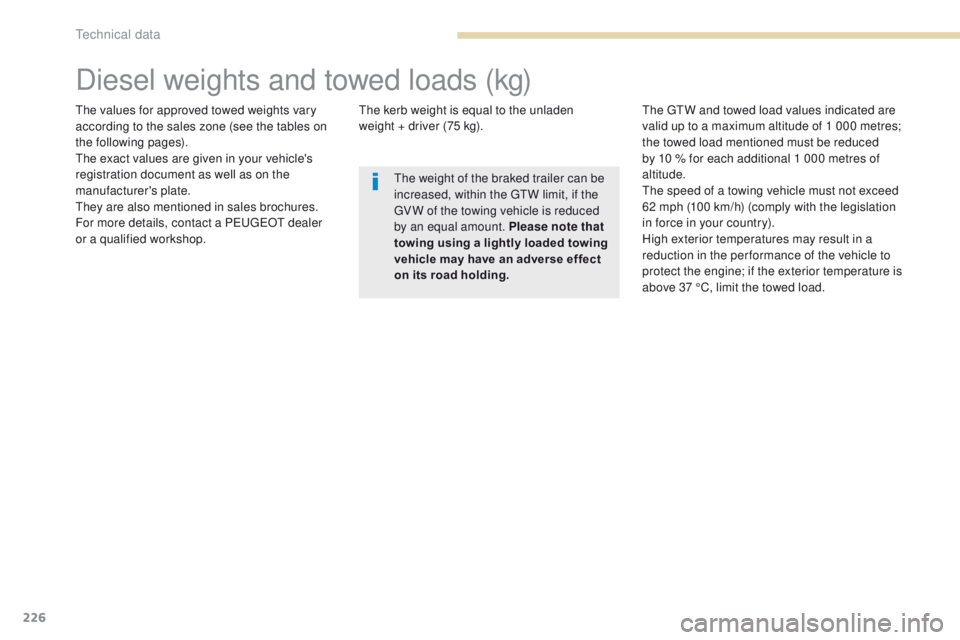
Diesel weights and towed loads (kg)
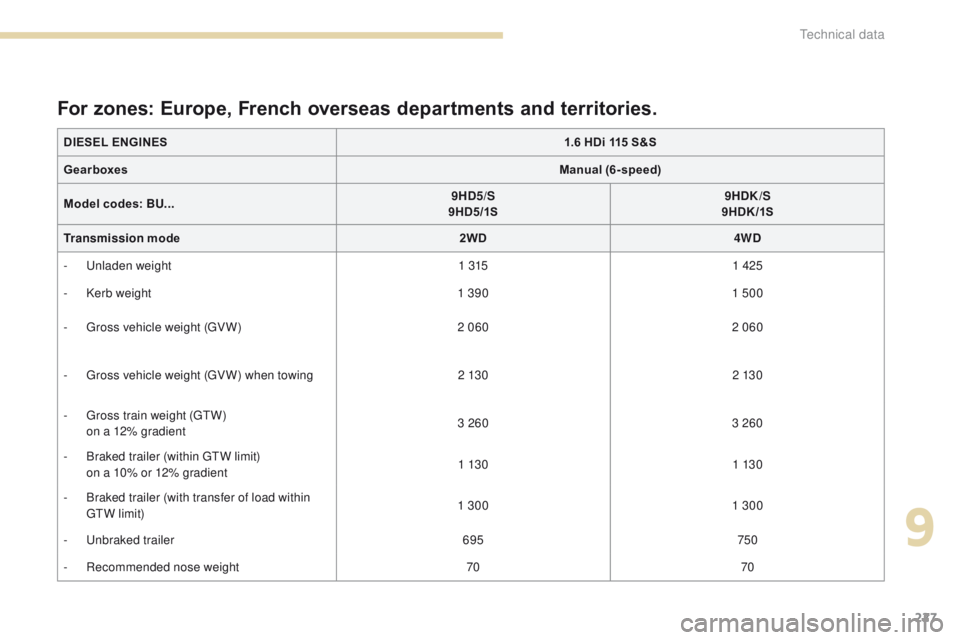
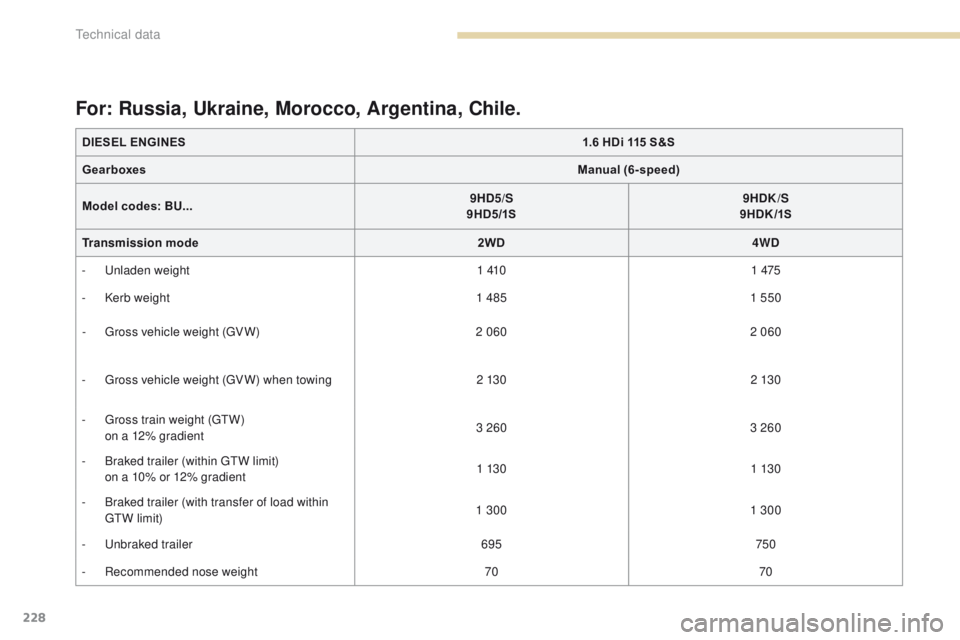
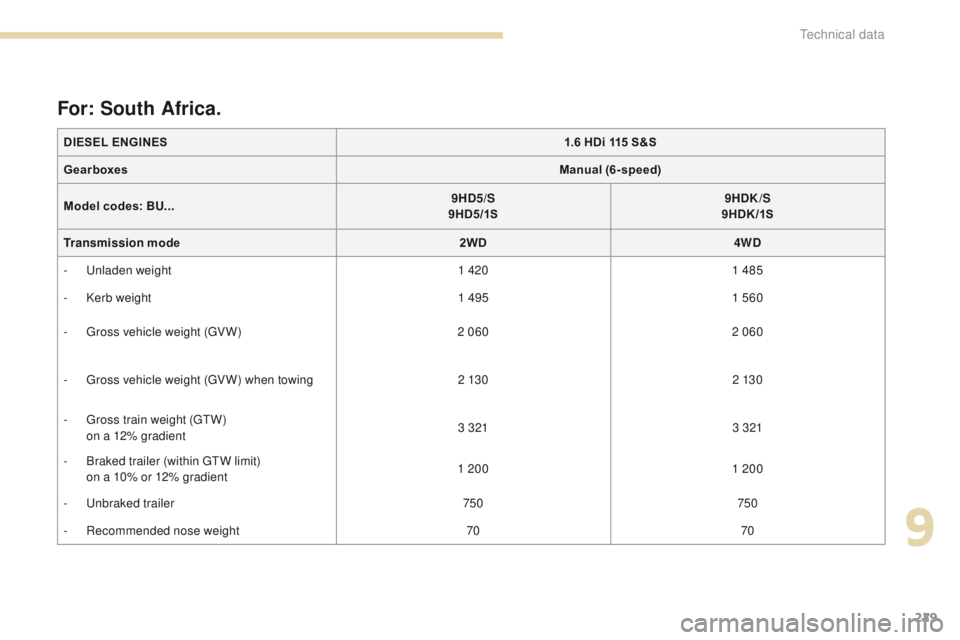
the values for approved towed weights vary
according to the sales zone (see the tables on
the following pages).
th
e exact values are given in your vehicle's
registration document as well as on the
manufacturer's plate.
th
ey are also mentioned in sales brochures.
For more details, contact a P
e
uge
Ot
dealer
or a qualified workshop.th e kerb weight is equal to the unladen
weight + driver (75 kg).th e gtW a nd towed load values indicated are
valid up to a maximum altitude of 1 000 metres;
the towed load mentioned must be reduced
by 10 % for each additional 1 000 metres of
altitude.
th
e speed of a towing vehicle must not exceed
62 mph (100 km/h) (comply with the legislation
in force in your country).
High exterior temperatures may result in a
reduction in the per formance of the vehicle to
protect the engine; if the exterior temperature is
above 37 °C, limit the towed load.
th
e weight of the braked trailer can be
increased, within the
gt
W l
imit, if the
gV
W of the towing vehicle is reduced
by an equal amount. Please note that
towing using a lightly loaded towing
vehicle may have an adverse effect
on its road holding.
technical data
Page 229 of 368
227
4008_en_Chap09_caracteristiques-techniques_ed01-2016
DIESEL ENGINES1.6 HDi 115 S&S
Gearboxes Manual (6-speed)
Model codes: BU... 9HD5/S
9HD5/1S 9HDK/S
9HDK /1S
Transmission mode 2WD4WD
-
u
n
laden weight 1 3151 425
-
K
erb weight 1 3901 500
-
g
r
oss vehicle weight (
gV
W) 2 060 2 060
-
g
r
oss vehicle weight (
gV
W) when towing 2 13 0 2 13 0
-
g
r
oss train weight (
g
t
W
)
o
n a 12% gradient 3 260
3 260
-
B
raked trailer (within gt
W l
imit)
o
n a 10% or 12% gradient 1 13 0
1 13 0
-
B
raked trailer (with transfer of load within
g
t
W
limit) 1 300
1 300
-
u
nb
raked trailer 695750
-
R
ecommended nose weight 7070
For zones: Europe, French overseas departments and territories.
9
technical data
Page 230 of 368
228
4008_en_Chap09_caracteristiques-techniques_ed01-2016
DIESEL ENGINES1.6 HDi 115 S&S
Gearboxes Manual (6-speed)
Model codes: BU... 9HD5/S
9HD5/1S 9HDK/S
9HDK /1S
Transmission mode 2WD4WD
-
u
n
laden weight 1 4101 475
-
K
erb weight 1 4851 550
-
g
r
oss vehicle weight (
gV
W) 2 060 2 060
-
g
r
oss vehicle weight (
gV
W) when towing 2 13 0 2 13 0
-
g
r
oss train weight (
g
t
W
)
o
n a 12% gradient 3 260
3 260
-
B
raked trailer (within gt
W l
imit)
o
n a 10% or 12% gradient 1 13 0
1 13 0
-
B
raked trailer (with transfer of load within
g
t
W
limit) 1 300
1 300
-
u
nb
raked trailer 695750
-
R
ecommended nose weight 7070
For: Russia, Ukraine, Morocco, Argentina, Chile.
technical data
Page 231 of 368
229
4008_en_Chap09_caracteristiques-techniques_ed01-2016
DIESEL ENGINES1.6 HDi 115 S&S
Gearboxes Manual (6-speed)
Model codes: BU... 9HD
5/S
9HD5/1S 9HDK/S
9HDK /1S
Transmission mode 2WD4WD
-
u
n
laden weight 1 4201 485
-
K
erb weight 1 4951 560
-
g
r
oss vehicle weight (
gV
W) 2 060 2 060
-
g
r
oss vehicle weight (
gV
W) when towing 2 13 0 2 13 0
-
g
r
oss train weight (
g
t
W
)
o
n a 12% gradient 3 321
3 321
-
B
raked trailer (within gt
W l
imit)
o
n a 10% or 12% gradient 1 200
1 200
-
u
nb
raked trailer 750750
-
R
ecommended nose weight 7070
For: South Africa.
9
technical data
Page 232 of 368
230
4008_en_Chap09_caracteristiques-techniques_ed01-2016
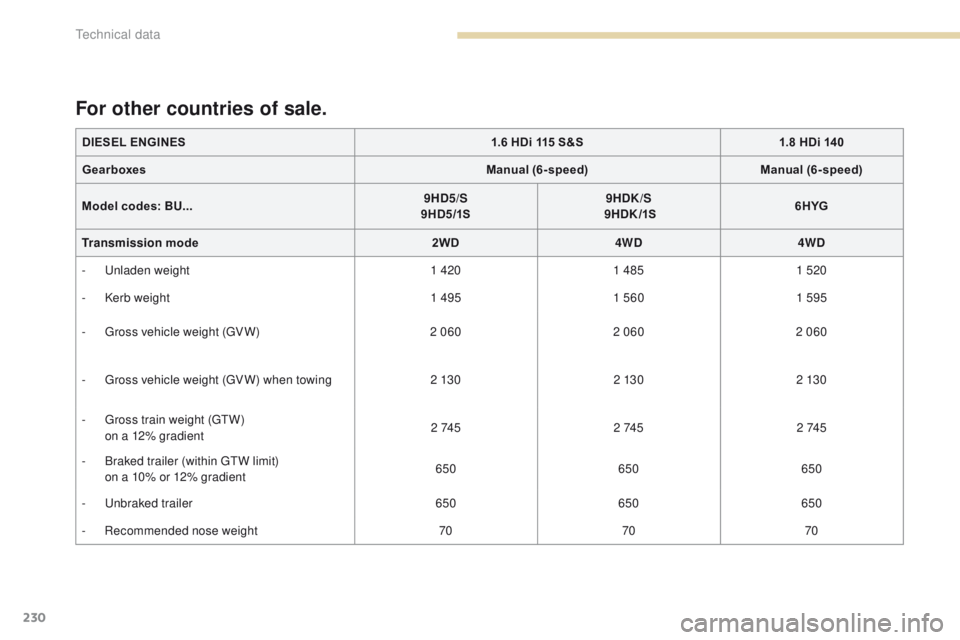
DIESEL ENGINES1.6 HDi 115 S&S1.8 HDi 140
Gearboxes Manual (6-speed)Manual (6-speed)
Model codes: BU... 9HD5/S
9HD5/1S 9HDK/S
9HDK /1S 6HYG
Transmission mode 2WD4WD4WD
-
u
n
laden weight 1 4201 485 1 520
-
K
erb weight 1 4951 560 1 595
-
g
r
oss vehicle weight (
gV
W) 2 0602 0602 060
-
g
r
oss vehicle weight (
gV
W) when towing 2 13 02 13 02 13 0
-
g
r
oss train weight (
g
t
W
)
o
n a 12% gradient 2 74 5
2 74 52 74 5
-
B
raked trailer (within gt
W l
imit)
o
n a 10% or 12% gradient 650
650650
-
u
nb
raked trailer 650650650
-
R
ecommended nose weight 707070
For other countries of sale.
technical data
Page 264 of 368
04
262
4008_EN_CHAP10B_MITSU6_ED01-2016
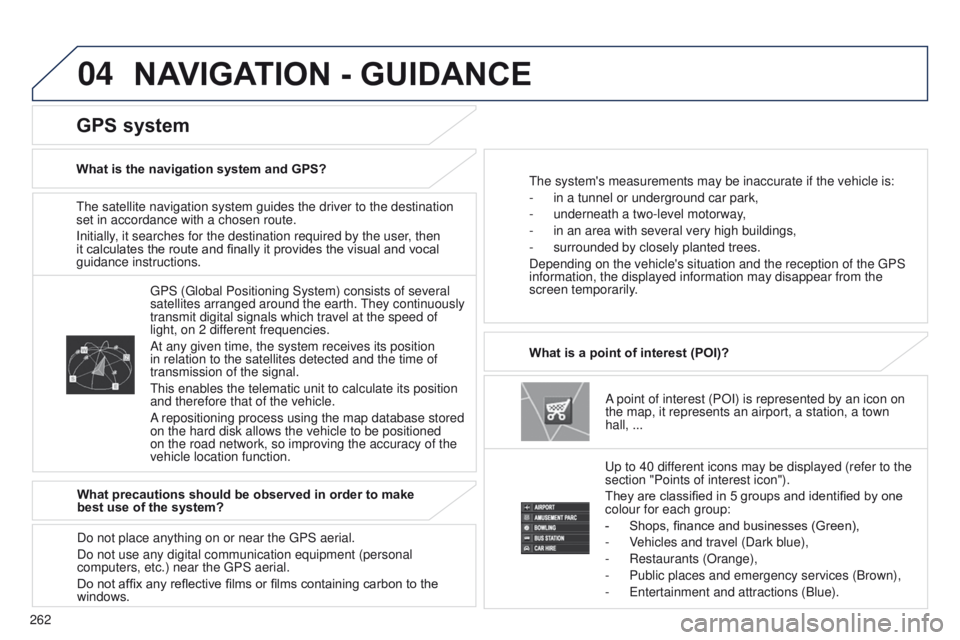
the satellite navigation system guides the driver to the destination
set in accordance with a chosen route.
Initially
, it searches for the destination required by the user, then
it calculates the route and finally it provides the visual and vocal
guidance instructions.
A point of interest (POI) is represented by an icon on
the map, it represents an airport, a station, a town
hall,
...
What is a point of interest (POI)?
u
p to 40 different icons may be displayed (refer to the
section "Points of interest icon").
They are classified in 5 groups and identified by one
colour for each group:
-
Shops, finance and businesses (Green),
-
V
ehicles and travel (Dark blue),
-
Restaurants (Orange),
-
Public places and emergency services (Brown),
-
e ntertainment and attractions (Blue).
g
PS ( g lobal Positioning System) consists of several
satellites arranged around the earth.
t
hey continuously
transmit digital signals which travel at the speed of
light, on 2 different frequencies.
At any given time, the system receives its position
in relation to the satellites detected and the time of
transmission of the signal.
t
his enables the telematic unit to calculate its position
and therefore that of the vehicle.
A repositioning process using the map database stored
on the hard disk allows the vehicle to be positioned
on the road network, so improving the accuracy of the
vehicle location function.
GPS system
What is the navigation system and GPS?t he system's measurements may be inaccurate if the vehicle is:
-
in a tunnel or underground car park,
-
underneath a two-level motorway
,
-
in an area with several very high buildings,
-
surrounded by closely planted trees.
Depending on the vehicle's situation and the reception of the
g PS
information, the displayed information may disappear from the
screen temporarily.
What precautions should be observed in order to make
best use of the system?
Do not place anything on or near the
g PS aerial.
Do not use any digital communication equipment (personal
computers, etc.) near the
g PS aerial.
Do not affix any reflective films or films containing carbon to the
windows.
NAVIGATION - GUIDANCE
Page 266 of 368
04
264
4008_EN_CHAP10B_MITSU6_ED01-2016
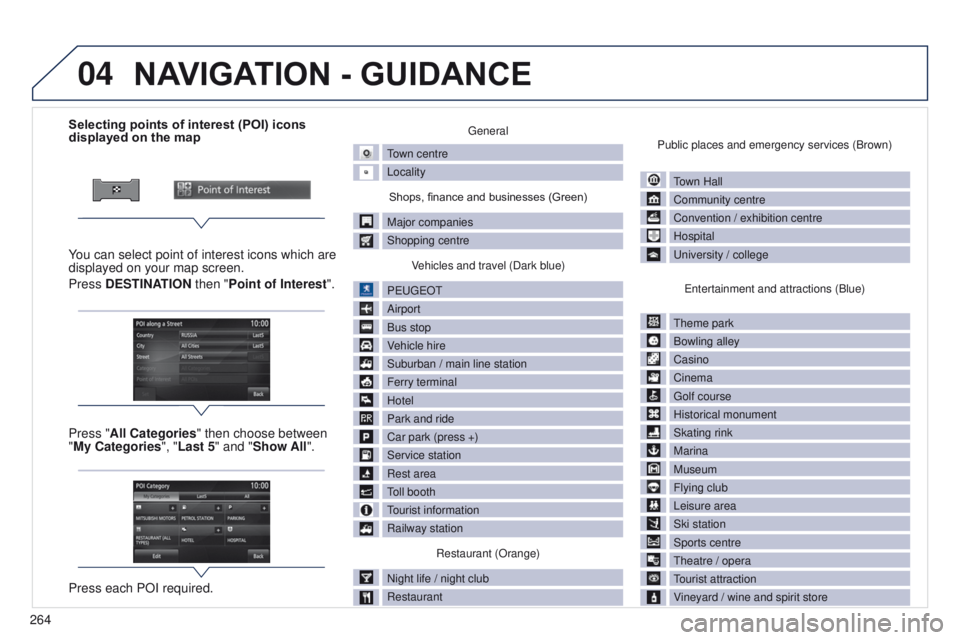
Selecting points of interest (POI) icons
displayed on the map
You can select point of interest icons which are
displayed on your map screen.
Press DESTINATION then "Point of Interest ".
Press "All Categories" then choose between
"My Categories", "Last 5" and "Show All".
Press each POI required.general
town centre
Locality
Shops, finance and businesses (Green)
Major companies
Shopping centre V
ehicles and travel (Dark blue)
P
euge
O
t
Airport
Bus stop
V
ehicle hire
Suburban / main line station
Ferry terminal
Hotel
Park and ride
Car park (press +)
Service station
Rest area
toll booth
tourist information
Railway station
Restaurant (Orange)
Night life / night club
Restaurant Public places and emergency services (Brown)
town Hall
Community centre
Convention / exhibition centre
Hospital
u
niversity / college
e
ntertainment and attractions (Blue)
t
heme park
Bowling alley
Casino
Cinema
g
olf course
Historical monument
Skating rink
Marina
Museum
Flying club
Leisure area
Ski station
Sports centre
t
heatre / opera
tourist attraction
V
ineyard / wine and spirit store
NAVIGATION - GUIDANCE
Page 267 of 368
04
265
4008_EN_CHAP10B_MITSU6_ED01-2016
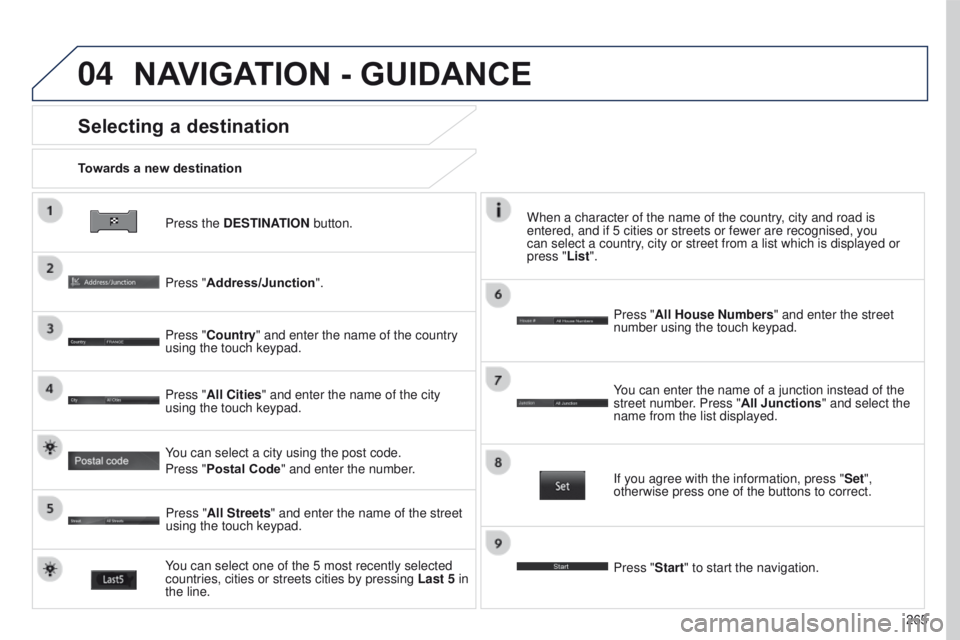
Press the DESTINATION button.
Towards a new destination
Selecting a destination
Press "Address/Junction".
Press "Country" and enter the name of the country
using the touch keypad.
You can select one of the 5 most recently selected
countries, cities or streets cities by pressing
Last 5 in
the line. Press "All Cities" and enter the name of the city
using the touch keypad.
Press "All Streets" and enter the name of the street
using the touch keypad. Press "All House Numbers" and enter the street
number using the touch keypad.
If you agree with the information, press "
Set",
otherwise press one of the buttons to correct.
Press "Start" to start the navigation. You can enter the name of a junction instead of the
street number. Press "All Junctions " and select the
name from the list displayed.
When a character of the name of the country, city and road is
entered, and if 5 cities or streets or fewer are recognised, you
can select a country, city or street from a list which is displayed or
press
"List".
You can select a city using the post code.
Press "Postal Code" and enter the number.
NAVIGATION - GUIDANCE
Page 342 of 368
340
4008_en_Chap11_index-alpha_ed01-2016
Regeneration of the particle emissions filter ............................................................. 187
Reminder, key in ignition
.................................98
Reminder, lighting on
.................................... 129
Remote control
........................ 5
2, 54, 56, 57, 61
Removing the mat
........................................... 90
Repair kit, puncture
....................................... 189
Replacing bulbs
........................... 199, 203, 204
Replacing fuses
..............................
..............205
Replacing the air filter
...................................18 6
Replacing the oil filter
................................... 18
6
Replacing the passenger compartment filter
............................................................. 18 6
Rev counter
..................................................... 12
Reversing camera
......................................... 126
Reversing lamps
.................................. 203, 204
Roof bars
....................................................... 17
9
Routine checks
..................................... 18 6, 188
Running out of fuel (Diesel)
..........................2
18Screenwash, front
.........................................
13 5
Screen-wash reservoir .................................185
Seat belts
.............................................. 14
9, 15 0
Seat, rear bench
.............................................74
Seats, electric
.................................................72
Seats, front
...............................
..................71-73
Seats, heated
..................................................73
Seats, rear
.......................................................74
Serial number, vehicle
.................................. 23
3
Service indicator
.............................................33
Servicing
...............................
....................10, 33
Sidelamps
.....................................199, 201, 203
Side repeater
..............................
..................202
Ski flap
..............................
..............................75
Snow chains
.................................................. 17
5
Socket, 12 V accessory
......................8
9, 91, 92
Sockets, audio
............93, 278, 281, 306, 307, 330, 331
Sockets, auxiliary
....................93, 281, 307, 330
Spare wheel
...............................
...........193, 19 4
Speedometer
..................................................12
Spotlamps, side
............................................202
Starting the engine
...................................98, 99
Station, radio
................................. 3
00, 302-304
Steering mounted controls, audio
...........................................249, 291, 316
Steering wheel, adjustment
............................78
Stop & Start system (Auto Stop &
g
o
).........................................111
Storage
................................................75, 90, 95
Stowing rings
............................................95, 96
Sun visor
.........................................................90
Switching off the engine
........................... 9
8, 99
System, ABS
.................................................143
Radio
............ 268, 272, 300, 301, 303, 319, 321
Range
........................................................ 32, 35
RDS
...................................................... 302, 304
Reader, SD card
.......................... 263, 279, 280
Rear foglamp ........................................ 203, 204
Rear screen, demisting
................................... 88
Recharging the battery
......................... 21
1, 214
Recirculation / exterior air intake
.......................................... 83
R
P
Pairing a telephone ...............................2 8 8, 310
Panoramic glass sunroof ................................70
Parcel shelf, rear
............................................. 96
P
arking brake
........................................ 102, 188
Parking sensors, front
...................................125
Parking sensors, rear ............................123, 124
Particle filter
.......................... 180, 18 4, 185, 187
Passenger compartment filter
......................18 6
Plates, identification ...................................... 233
Player, Apple
® .............................. ........280, 308
Player, MP3 CD ............................................. 305
Player,
u
S
B
.......... 278, 280, 306, 308, 309, 331
Pockets, seat back
.......................................... 94
Port,
u
S
B
............................... 9
3, 278, 306, 331
Pressures, tyres
.................................... 114 , 2 3 3
Pre-tensioning seat belts
.............................. 150
Priming the fuel system
................................ 218
Protecting children
................ 156, 157, 161, 163,
165, 167, 169 -171
Puncture
................................................ 189, 193
Safety, children
..................... 15
6 -15 8, 161, 163,
165, 167, 169, 170
Screen (audio system)
.......................4
4, 46, 48
Screen, colour
.......................248, 251, 290, 293
Screen, instrument panel
..........................19, 32
Screen menu
................................294, 296, 298
Screen menu map
........................294, 296, 298
Screenwash fluid level
..................................185
S
Alphabetical index