park assist PEUGEOT 408 2023 Owners Manual
[x] Cancel search | Manufacturer: PEUGEOT, Model Year: 2023, Model line: 408, Model: PEUGEOT 408 2023Pages: 244, PDF Size: 7.37 MB
Page 4 of 244
2
Contents
■
Overview
■
Eco-driving
1Dashboard instrumentsDriver information 10
Digital instrument panels 10
Warning and indicator lamps 11
Indicators 17
Manual test 19
Total distance recorder 19
Trip computer 19
10-inch touch screen 20
i-Toggles 22
Remotely operable additional functions
(Rechargeable hybrid)
22
2AccessElectronic key with remote control function and
built-in key 24
Proximity Keyless Entry and Start 26
Central locking 28
Back-up procedures 29
Doors 31
Boot 31
Motorised tailgate 31
Alarm 35
Electric windows 37
Sunroof 38
3Ease of use and comfortDriving position 40
Front seats 41
Steering wheel adjustment 45
Heated steering wheel 45
Mirrors 45
Rear bench seat 47
Heating and Ventilation 48
Dual-zone automatic air conditioning 49
Front demisting/defrosting 52
Rear screen demisting/defrosting 52
Heated windscreen 53
Temperature pre-conditioning
(Rechargeable hybrid)
53
Front fittings 54
Courtesy lamps 57
Interior ambient lighting 58
Rear fittings 58
Boot fittings 59
4Lighting and visibilityExterior lighting control stalk 61
Direction indicators 62
Headlamp beam height adjustment 62
Automatic illumination of headlamps 63
Guide-me-home and welcome lighting 63
Automatic lighting systems - General
recommendations
64
Automatic headlamp dipping 64
Peugeot Matrix LED Technology 2.0 65
Night Vision 67
Wiper control stalk 68
Intermittent wipers 70
Automatic wipers 70
Changing a wiper blade 71
5SafetyGeneral safety recommendations 72
Hazard warning lamps 72
Horn 73
Pedestrian horn (Rechargeable hybrid) 73
Emergency or assistance 73
Electronic stability control (ESC) 75
Seat belts 78
Airbags 80
Active bonnet 82
Child seats 83
Deactivating the front passenger airbag 84
ISOFIX child seats 85
i-Size child seats 87
Installing child seats 88
Child lock 90
6DrivingDriving recommendations 91
Starting/switching off the engine 92
Starting rechargeable hybrid vehicles 93
Electric parking brake 94
Automatic gearbox 96
Driving modes 99
Hill start assist 100
Gear shift indicator 101
Stop & Start 101
Tyre under-inflation detection 103
Driving and manoeuvring aids - General
recommendations
104
Steering wheel with hands-on detection 106
Shortcuts for driving aids 106
Road signs recognition 107
Speed limiter 111
Cruise control - Specific recommendations 11 2 CarM an uals 2 .c o m
Page 5 of 244
3
Contents
Cruise control 11 3
Drive Assist Plus 11 4
Drive Assist 2.0 11 5
Adaptive cruise control 11 5
Lane positioning assist 11 9
Semi-automatic lane changing 122
Active Safety Brake with Collision Risk Alert and
Intelligent emergency braking assistance
126
Distraction detection 130
Lane keeping assist 131
Long-distance blind spot monitoring 134
Parking sensors 135
Visiopark 1 136
Visiopark 3 138
Rear cross traffic alert 140
7Practical informationCompatibility of fuels 143
Refuelling 143
Rechargeable hybrid system 144
Charging the traction battery
(Rechargeable hybrid)
151
Towing device 153
Towing device with quickly detachable
towball
154
Roof bars 157
Very cold climate screen 158
Snow chains 159
Energy economy mode 159
Bonnet 160
Engine compartment 161
Checking levels 161
Checks 163
Free-wheeling 164
Advice on care and maintenance 165
8In the event of a breakdownWarning triangle 168
Tool kit 168
Temporary puncture repair kit 169
Spare wheel 172
Changing a bulb 175
Fuses 177
12
V battery/Accessory batteries 177
Towing the vehicle 182
9Technical dataEngine technical data and towed loads 185
Petrol engines 186
Rechargeable hybrid engines 187
Dimensions 188
Identification markings 188
10 PEUGEOT i-Connect Advanced -PEUGEOT i-Connect
First steps 189
Customisation 192
Steering mounted controls 193
Applications 194
Voice commands 194
Navigation 195
Connectivity 196
Mirror Screen 198
Media 199
Phone 201
Settings 202
Help 203
11Vehicle data recording and privacy
■
Alphabetical index
■
Appendix CarM an uals 2 .c o m
Page 6 of 244
4
Overview
Presentation
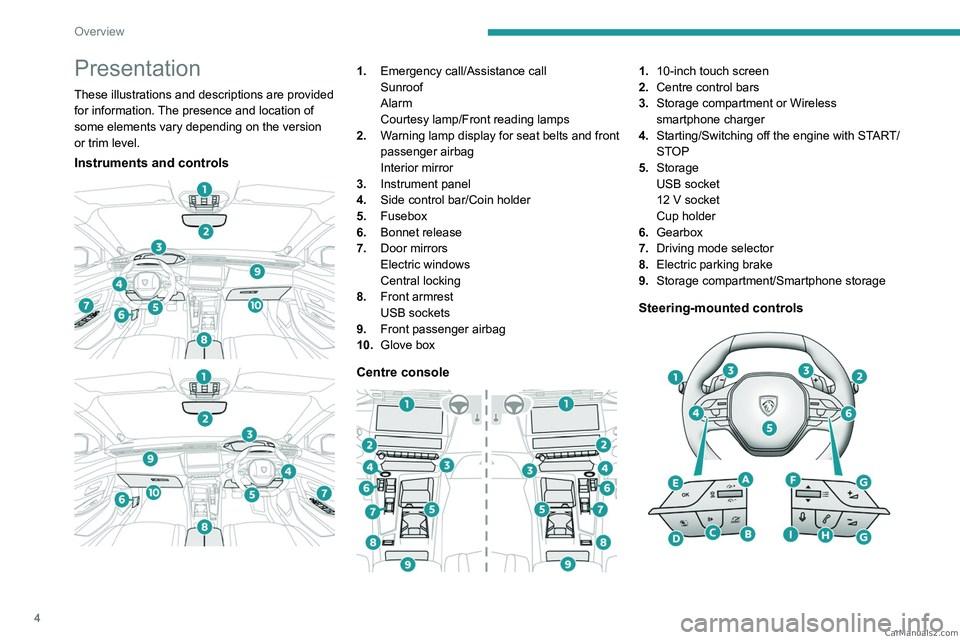
These illustrations and descriptions are provided
for information. The presence and location of
some elements vary depending on the version
or trim level.
Instruments and controls
1. Emergency call/Assistance call
Sunroof
Alarm
Courtesy lamp/Front reading lamps
2. Warning lamp display for seat belts and front
passenger airbag
Interior mirror
3. Instrument panel
4. Side control bar/Coin holder
5. Fusebox
6. Bonnet release
7. Door mirrors
Electric windows
Central locking
8. Front armrest
USB sockets
9. Front passenger airbag
10. Glove box
Centre console
1.10-inch touch screen
2. Centre control bars
3. Storage compartment or Wireless
smartphone charger
4. Starting/Switching off the engine with START/
STOP
5. Storage
USB socket
12
V socket
Cup holder
6. Gearbox
7. Driving mode selector
8. Electric parking brake
9. Storage compartment/Smartphone storage
Steering-mounted controls
CarM an uals 2 .c o m
Page 8 of 244
6
Overview
Rechargeable hybrid
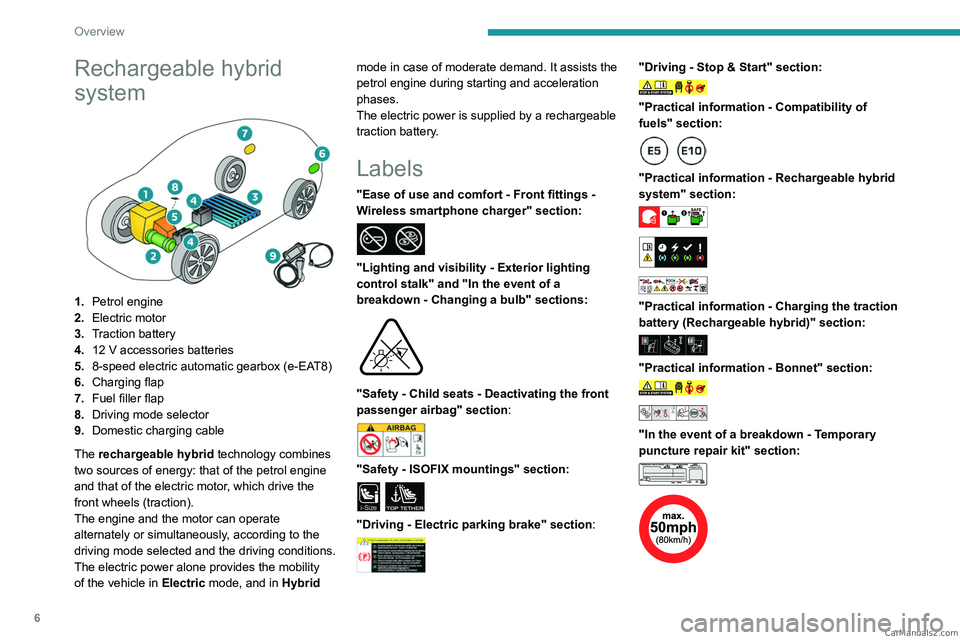
system
1.Petrol engine
2. Electric motor
3. Traction battery
4. 12 V accessories batteries
5. 8-speed electric automatic gearbox (e-EAT8)
6. Charging flap
7. Fuel filler flap
8. Driving mode selector
9. Domestic charging cable
The rechargeable hybrid technology combines
two sources of energy: that of the petrol engine
and that of the electric motor, which drive the
front wheels (traction).
The engine and the motor can operate
alternately or simultaneously, according to the
driving mode selected and the driving conditions.
The electric power alone provides the mobility
of the vehicle in Electric mode, and in Hybrid mode in case of moderate demand. It assists the
petrol engine during starting and acceleration
phases.
The electric power is supplied by a rechargeable
traction battery.
Labels
"Ease of use and comfort - Front fittings -
Wireless smartphone charger" section:
"Lighting and visibility - Exterior lighting
control stalk" and "In the event of a
breakdown - Changing a bulb" sections:
"Safety - Child seats - Deactivating the front
passenger airbag" section:
"Safety - ISOFIX mountings" section:
i-SizeTOP TETHER
"Driving - Electric parking brake" section:
"Driving - Stop & Start" section:
"Practical information - Compatibility of
fuels" section:
"Practical information - Rechargeable hybrid
system" section:
"Practical information - Charging the traction
battery (Rechargeable hybrid)" section:
"Practical information - Bonnet" section:
"In the event of a breakdown - Temporary
puncture repair kit" section:
CarM an uals 2 .c o m
Page 16 of 244
14
Dashboard instruments
The warning lamp should go off when the engine
is started.
Carry out (3) without delay.
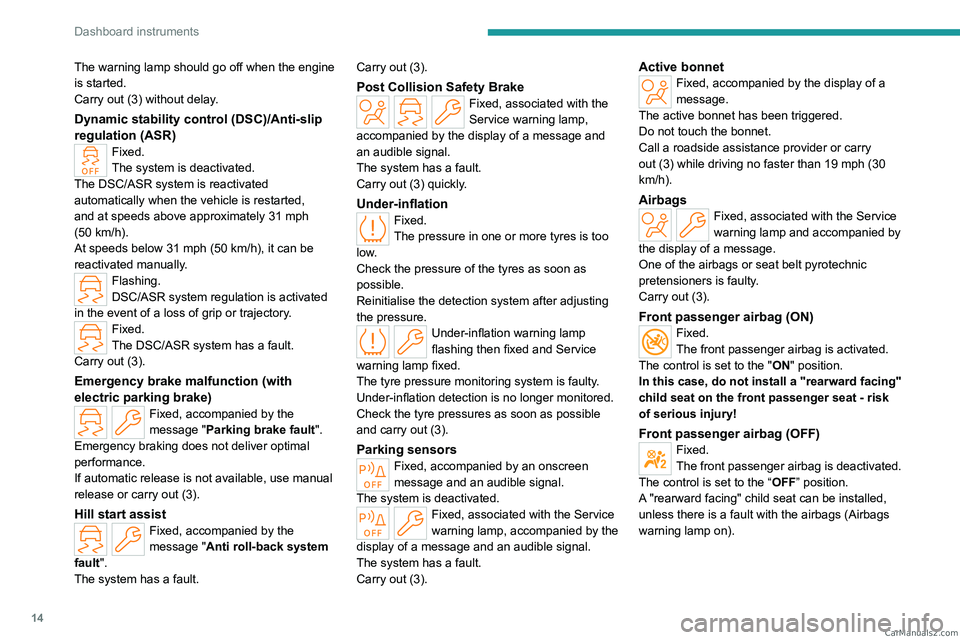
Dynamic stability control (DSC)/Anti-slip
regulation (ASR)
Fixed.
The system is deactivated.
The DSC/ASR system is reactivated
automatically when the vehicle is restarted,
and at speeds above approximately 31 mph
(50
km/h).
At speeds below 31
mph (50 km/h), it can be
reactivated manually.
Flashing.
DSC/ASR system regulation is activated
in the event of a loss of grip or trajectory.
Fixed.
The DSC/ASR system has a fault.
Carry out (3).
Emergency brake malfunction (with
electric parking brake)
Fixed, accompanied by the
message "Parking brake fault".
Emergency braking does not deliver optimal
performance.
If automatic release is not available, use manual
release or carry out (3).
Hill start assistFixed, accompanied by the
message "Anti roll-back system
fault".
The system has a fault. Carry out (3).
Post Collision Safety BrakeFixed, associated with the
Service warning lamp,
accompanied by the display of a message and
an audible signal.
The system has a fault.
Carry out (3) quickly.
Under-inflationFixed.
The pressure in one or more tyres is too
low.
Check the pressure of the tyres as soon as
possible.
Reinitialise the detection system after adjusting
the pressure.
Under-inflation warning lamp
flashing then fixed and Service
warning lamp fixed.
The tyre pressure monitoring system is faulty.
Under-inflation detection is no longer monitored.
Check the tyre pressures as soon as possible
and carry out (3).
Parking sensorsFixed, accompanied by an onscreen
message and an audible signal.
The system is deactivated.
Fixed, associated with the Service
warning lamp, accompanied by the
display of a message and an audible signal.
The system has a fault.
Carry out (3).
Active bonnetFixed, accompanied by the display of a
message.
The active bonnet has been triggered.
Do not touch the bonnet.
Call a roadside assistance provider or carry
out (3) while driving no faster than 19 mph (30
km/h).
AirbagsFixed, associated with the Service
warning lamp and accompanied by
the display of a message.
One of the airbags or seat belt pyrotechnic
pretensioners is faulty.
Carry out (3).
Front passenger airbag (ON)Fixed.
The front passenger airbag is activated.
The control is set to the "ON" position.
In this case, do not install a "rearward facing"
child seat on the front passenger seat - risk
of serious injury!
Front passenger airbag (OFF)Fixed.
The front passenger airbag is deactivated.
The control is set to the “OFF ” position.
A "rearward facing" child seat can be installed,
unless there is a fault with the airbags (Airbags
warning lamp on). CarM an uals 2 .c o m
Page 48 of 244

46
Ease of use and comfort
Adjustment
► Move control A to the right or to the left to
select the corresponding mirror.
►
Move control
B in any of the four directions
to adjust.
►
Return control A
to its central position.
Manual folding
The mirrors can be folded manually (parking
obstruction, narrow garage, etc.).
►
T
urn the mirror towards the vehicle.
Electric folding
Depending on equipment, the door mirrors can
be folded electrically.
► From the inside, with the
ignition on, place control A
in the
central position.
►
Pull control A
backwards.
►
Lock the vehicle from the outside.
If the mirrors are folded using control A,
they will not unfold when the vehicle is
unlocked.
Electric unfolding
► From outside: unlock the vehicle.
► From inside: with the ignition on, place
control
A in the central position and then pull it
rearwards.
The automatic folding/unfolding of the door mirrors is configured in the
Settings
> Vehicle touch screen application.
Before using an automatic car wash, fold the
mirrors.
Automatic tilting in reverse gear
Depending on version, this function allows you to
automatically tilt the mirrors downwards to assist
with parking manoeuvres in reverse gear.
With the engine running, on engaging reverse
gear, the mirror glasses tilt downwards.
They each return to their original positions:
–
A
few seconds after coming out of reverse
gear.
– Once the vehicle speed exceeds 6 mph
(10 km/h).
–
When the engine is switched off.
It can be activated/deactivated in the
Settings > Vehicle touch screen
application.
Electrochrome interior rear
view mirror
The electrochrome system uses a sensor that
detects the level of exterior brightness and that
coming from the rear of the vehicle, in order to
automatically and gradually switch between day
and night usage.
To ensure optimum visibility while manoeuvring, the mirror automatically
brightens when reverse gear is engaged.
The system is deactivated if the load in the
boot exceeds the height of the load space CarM an uals 2 .c o m
Page 95 of 244
93
Driving
6If there is still a problem, refer to the "Key
not detected - Back-up starting or Back-up
switch-off" section.
Starting
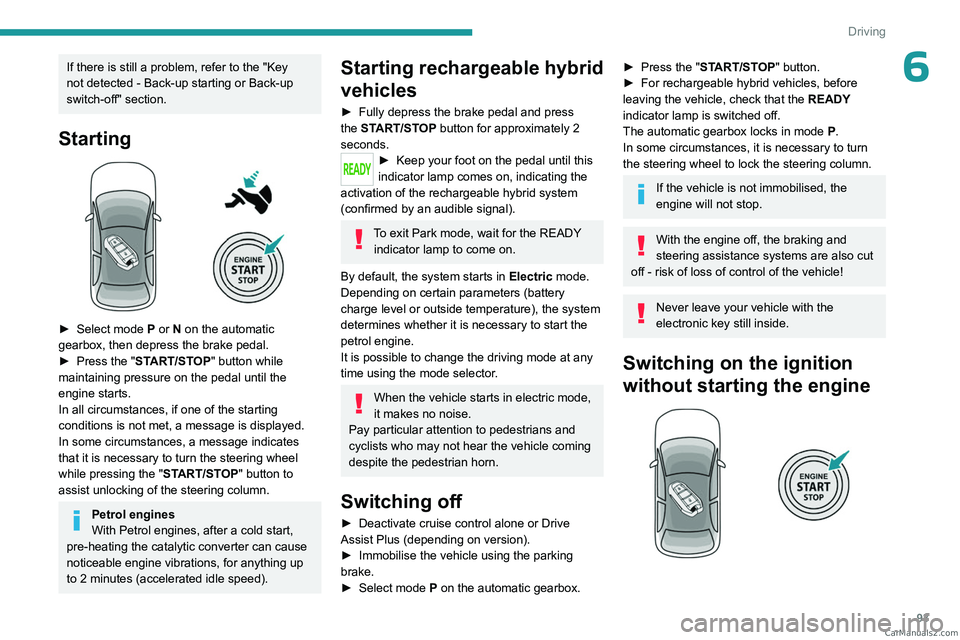
► Select mode P or N on the automatic
gearbox, then depress the brake pedal.
►
Press the "
START/STOP" button while
maintaining pressure on the pedal until the
engine starts.
In all circumstances, if one of the starting
conditions is not met, a message is displayed.
In some circumstances, a message indicates
that it is necessary to turn the steering wheel
while pressing the " START/STOP" button to
assist unlocking of the steering column.
Petrol engines
With Petrol engines, after a cold start,
pre-heating the catalytic converter can cause
noticeable engine vibrations, for anything up
to 2
minutes (accelerated idle speed).
Starting rechargeable hybrid
vehicles
► Fully depress the brake pedal and press
the START/STOP button for approximately 2
seconds.
► Keep you r foot on the pedal until this
indicator lamp comes on, indicating the
activation of the rechargeable hybrid system
(confirmed by an audible signal).
To exit Park mode, wait for the READY indicator lamp to come on.
By default, the system starts in Electric mode.
Depending on certain parameters (battery
charge level or outside temperature), the system
determines whether it is necessary to start the
petrol engine.
It is possible to change the driving mode at any
time using the mode selector.
When the vehicle starts in electric mode,
it makes no noise.
Pay particular attention to pedestrians and
cyclists who may not hear the vehicle coming
despite the pedestrian horn.
Switching off
► Deactivate cruise control alone or Drive
Assist Plus (depending on version).
►
Immobilise the vehicle using the parking
brake.
►
Select mode
P on the automatic gearbox.
► Press the "START/STOP" button.
► For rechargeable hybrid vehicles, before
leaving the vehicle, check that the READY
indicator lamp is switched off.
The automatic gearbox locks in mode P.
In some circumstances, it is necessary to turn
the steering wheel to lock the steering column.
If the vehicle is not immobilised, the
engine will not stop.
With the engine off, the braking and
steering assistance systems are also cut
off - risk of loss of control of the vehicle!
Never leave your vehicle with the
electronic key still inside.
Switching on the ignition
without starting the engine
CarM an uals 2 .c o m
Page 98 of 244
96
Driving
Special cases
Immobilising the vehicle with the
engine running
To immobilise the vehicle with the engine
running, briefly pull the control.
Parking the vehicle with the brake
released
In very cold conditions (ice), applying the
parking brake is not recommended.
To immobilise the vehicle, place the chock
against one of the wheels.
Mode P is automatically selected when
the ignition is switched off. The wheels
are blocked.
For more information on Free-wheeling, refer
to the corresponding section.
If you open the driver's door while mode
N is engaged, an audible signal will
sound and mode P will be engaged. The
audible signal stops when the driver's door is
closed.
Deactivating automatic
operation
In some situations, for example when it is
extremely cold or when towing (e.g. caravan, breakdown), it may be necessary to deactivate
automatic operation of the system.
►
Start the engine.
►
Use the control to apply the parking brake, if
it is released.
►
T
ake your foot fully off the brake pedal.
►
Keep the control pushed in the release
direction for 10 to a maximum of
15 seconds.
►
Release the control.
►
Depress and hold the brake pedal.
►
Pull the control in the application direction for
2
seconds.
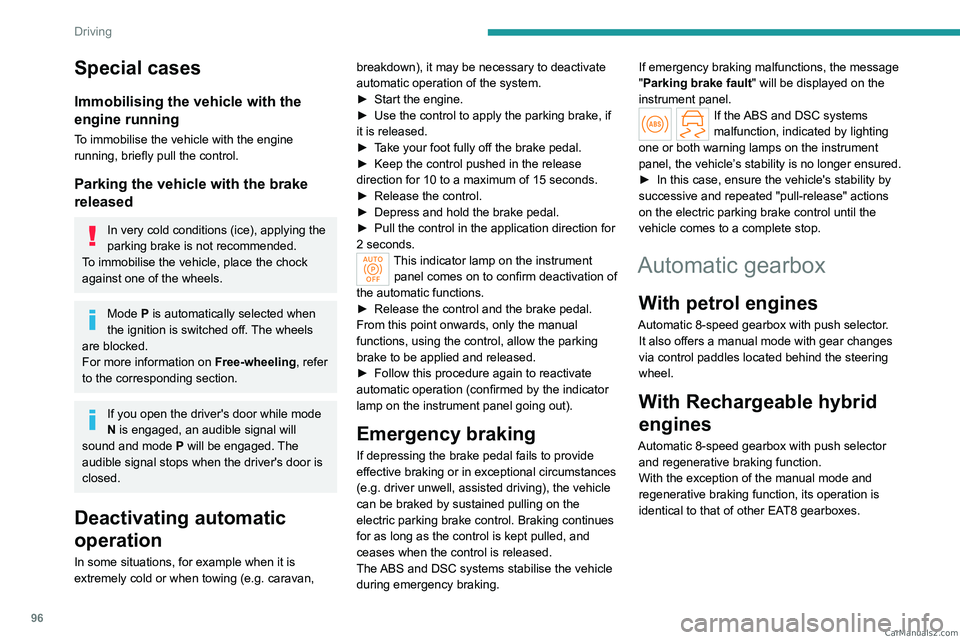
This indicator lamp on the instrument
panel comes on to confirm deactivation of
the automatic functions.
►
Release the control and the brake pedal.
From this point onwards, only the manual
functions, using the control, allow the parking
brake to be applied and released.
►
Follow this procedure again to reactivate
automatic operation (confirmed by the indicator
lamp on the instrument panel going out).
Emergency braking
If depressing the brake pedal fails to provide
effective braking or in exceptional circumstances
(e.g.
driver unwell, assisted driving), the vehicle
can be braked by sustained pulling on the
electric parking brake control. Braking continues
for as long as the control is kept pulled, and
ceases when the control is released.
The ABS and DSC systems stabilise the vehicle
during emergency braking. If emergency braking malfunctions, the message
"Parking brake fault" will be displayed on the
instrument panel.
If the ABS and DSC systems
malfunction, indicated by lighting
one or both warning lamps on the instrument
panel, the vehicle’s stability is no longer ensured.
►
In this case, ensure the vehicle's stability by
successive and repeated "pull-release" actions
on the electric parking brake control until the
vehicle comes to a complete stop.
Automatic gearbox
With petrol engines
Automatic 8-speed gearbox with push selector. It also offers a manual mode with gear changes
via control paddles located
behind the steering
wheel.
With Rechargeable hybrid
engines
Automatic 8-speed gearbox with push selector and regenerative braking function.
With the exception of the manual mode and
regenerative braking function, its operation is
identical to that of other EAT8 gearboxes. CarM an uals 2 .c o m
Page 103 of 244

101
Driving
6Do not leave the vehicle while it is being
held temporarily by hill start assist.
If someone needs to get out of the vehicle
with the engine running, apply the parking
brake manually. Then check that the parking
brake indicator lamp and the P indicator lamp
in the electric parking brake control are on
fixed.
The hill start assist function cannot be deactivated. However, using the parking
brake to immobilise the vehicle interrupts its
operation.
Operation
Facing uphill, with the vehicle stationary,
the vehicle is held for a short time when the
driver releases the brake pedal:
–
If mode
D or M is selected on an automatic
gearbox.
Facing downhill, with the vehicle stationary
and reverse gear engaged, the vehicle is held
for a short time when the driver releases the
brake pedal.
Malfunction
If the event of a malfunction, these
warning lamps light up on the
instrument panel, accompanied by the display of
a message.
Have it checked by a PEUGEOT dealer or a
qualified workshop.
Gear shift indicator
(Depending on engine)
This system is designed to reduce fuel
consumption by recommending the most suitable
gear.
Operation
Depending on the driving situation and
the vehicle's equipment, the system may
recommend skipping one or more gears.
Gear engagement recommendations are
not to be considered mandatory. Indeed, the
configuration of the road, the traffic density and
safety remain determining factors when choosing
the best gear. Therefore, the driver remains
responsible for deciding whether or not to follow
the system’s advice.
The system cannot be deactivated.
With an automatic gearbox, the system is
only active in manual operation.
The information appears on the instrument panel, in the form of an arrow
and the recommended gear.
The system adapts the gear change instructions according to the driving
conditions (e.g.
slope, load) and driving style
(e.g.
power demand, acceleration, braking).
The system never suggests:
–
engaging first gear
.
–
engaging reverse gear
.
Stop & Start
The Stop & Start function puts the engine temporarily into standby - STOP mode - during
phases when the vehicle is stationary (e.g.
red
lights, traffic jams). The engine automatically
restarts - START mode - as soon as the driver
indicates the intention of moving off again.
Primarily designed for urban use, the function
is intended to reduce fuel consumption and
exhaust emissions as well as the noise level
when stationary. CarM an uals 2 .c o m
Page 116 of 244
11 4
Driving
8.Speed suggested by the Road signs
recognition function (depending on version)
Switching on/pausing
► Press button 1 to select the cruise control
mode; the function is paused (grey).
►
Press
3 upwards/downwards, or press 4-OK
to activate the cruise control and save a speed
setting as soon as the vehicle speed reaches the
desired level (green).
►
Pressing button 2-I I>
temporarily pauses the
function.
►
Pressing
2-I I>, 3 or 4-OK again will
reactivate cruise control (green).
Cruise control operation is also
temporarily interrupted (pause):
–
by pressing the brake pedal.
–
automatically
, if the electronic stability
control (ESC) system is triggered.
–
by shifting to neutral or engaging reverse
gear
.
–
by using the electric parking brake.
Modifying the speed setting
The cruise control must be active.
To change the speed setting using the vehicle’s
current speed:
►
For steps of +/- 1 mph (1 km/h),
make successive short presses upwards/
downwards
on 3 to increase/decrease.
► For steps of +/- 5 mph (5 km/h), press and
hold upwards/downwards on 3 to increase/
decrease.
Prolonged pressing and holding
upwards/downwards on 3 causes a very
rapid change in vehicle speed.
As a precaution, we recommend setting a cruise speed fairly close to the current
speed of your vehicle, to avoid any sudden
acceleration or deceleration of the vehicle.
When the function is activated, the speed
setting value can be changed using the speed
suggested by the Road signs recognition
function displayed on the instrument panel:
–
When passing the sign:
►
Press
4-OK to save the suggested speed.
This value is then immediately shown as the new
speed setting on the instrument panel.
–
After passing the sign:
►
Press
4-OK. The message "OK?" is
displayed to confirm the request to save.
►
Press
4-OK again to save the suggested
speed. The new speed setting value is displayed
on the instrument panel.
Off
► Press 1: the cruise control information display
disappears.
Malfunction
In the event of a malfunction, dashes are
displayed flashing and then fixed (orange)
instead of the speed setting.
Have it checked by a PEUGEOT dealer or a
qualified workshop.
Drive Assist Plus
This system automatically adjusts the speed and corrects the trajectory of the vehicle, using
Adaptive cruise control with Stop&Go function in
conjunction with Lane positioning assist.
These two functions must be activated and in
operation.
For more information on Adaptive cruise
control and Lane positioning assist , refer to
the corresponding sections.
The system assists the driver by acting on the steering, acceleration and braking
within the physical limits and capacities of the
vehicle. Certain road infrastructure elements
or vehicles in the surroundings may not be
properly seen or may be poorly interpreted by
the camera and radar, resulting in an
unexpected change in direction, a lack of
steering correction and/or inappropriate
management of acceleration or braking.
Primarily designed for driving on main
roads and motorways, this system only CarM an uals 2 .c o m