display PEUGEOT 5008 2010.5 Owners Manual
[x] Cancel search | Manufacturer: PEUGEOT, Model Year: 2010.5, Model line: 5008, Model: PEUGEOT 5008 2010.5Pages: 345, PDF Size: 22.77 MB
Page 292 of 345
259
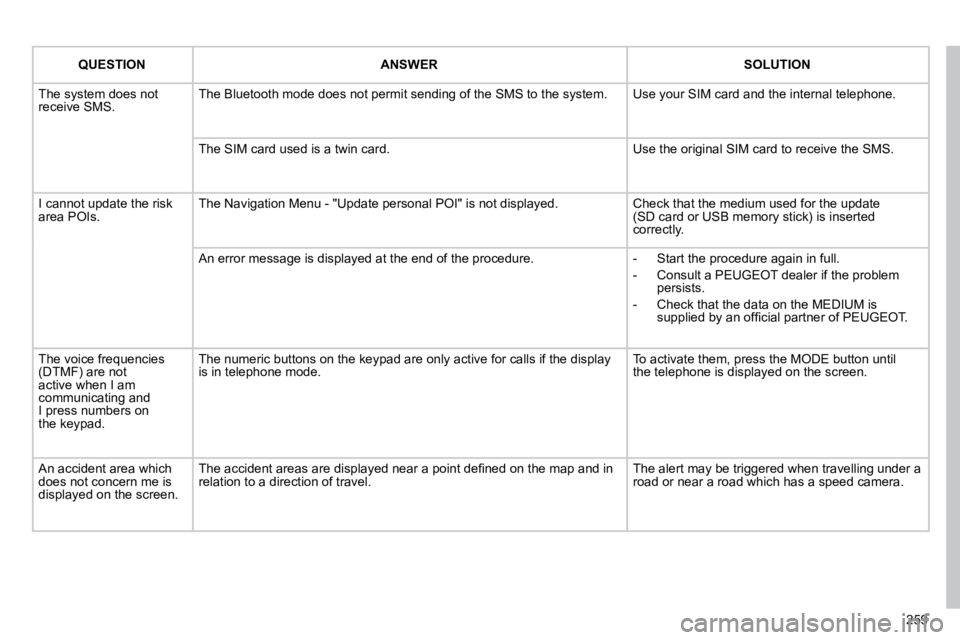
QUESTIONANSWERSOLUTION
The system does not receive SMS. The Bluetooth mode does not permit sending of the SMS to the system. Use your SIM card and the internal telephone.
The SIM card used is a twin card. Use the original SIM card to receive the SMS.
I cannot update the risk area POIs. The Navigation Menu - "Update personal POI" is not displayed. Check that the medium used for the update (SD card or USB memory stick) is inserted correctly.
An error message is displayed at the end of the procedure. - Start the procedure again in full.
- Consult a PEUGEOT dealer if the problem persists.
- Check that the data on the MEDIUM is supplied by an offi cial partner of PEUGEOT.
The voice frequencies (DTMF) are not active when I am communicating and I press numbers onthe keypad.
The numeric buttons on the keypad are only active for calls if the display is in telephone mode. To activate them, press the MODE button untilthe telephone is displayed on the screen.
An accident area which does not concern me is displayed on the screen.
The accident areas are displayed near a point defi ned on the map and in relation to a direction of travel. The alert may be triggered when travelling under a road or near a road which has a speed camera.
Page 294 of 345
01
11
55
1010
22
334466
1313
1111
99
14141515
778812121616
262
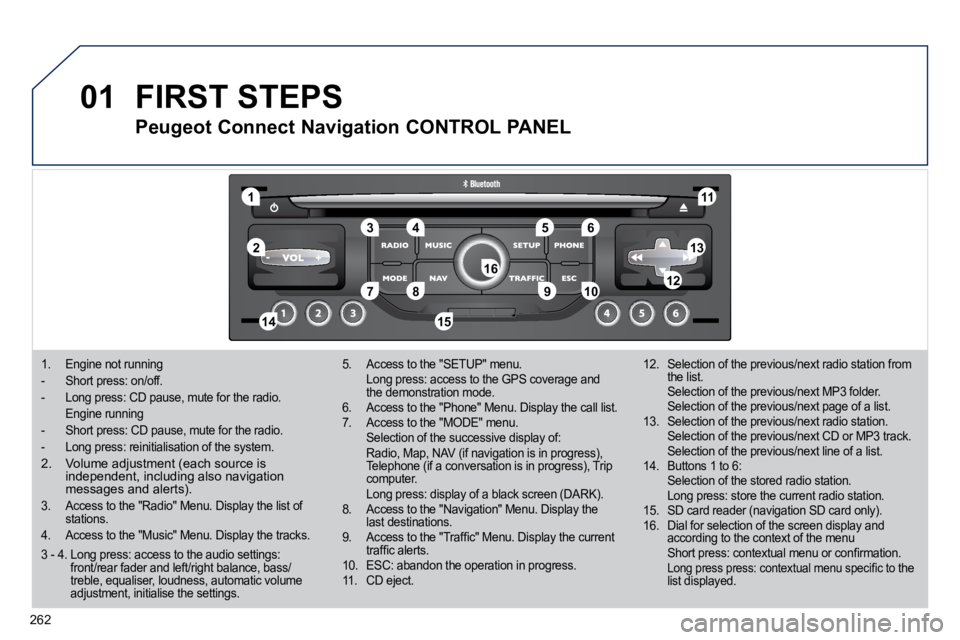
1. Engine not running
- Short press: on/off.
- Long press: CD pause, mute for the radio.
Engine running
- Short press: CD pause, mute for the radio.
- Long press: reinitialisation of the system.
2. Volume adjustment (each source is independent, including also navigation messages and alerts).
3. Access to the "Radio" Menu. Display the list of stations.
4. Access to the "Music" Menu. Display the track s.
5. Access to the "SETUP" menu. Long press: access to the GPS coverage and the demonstration mode. 6. Access to the "Phone" Menu. Display the call list. 7. Access to the "MODE" menu. Selection of the successive display of: Radio, Map, NAV (if navigation is in progress), Telephone (if a conversation is in progress), Trip computer. Long press: display of a black screen (DARK). 8. Access to the "Navigation" Menu. Display the last destinations. 9. Access to the "Traffi c" Menu. Display the current traffi c alerts. 10. ESC: abandon the operation in progress. 11. CD eject.
12. Selection of the previous/next radio station from the list. Selection of the previous/next MP3 folder. Selection of the previous/next page of a list. 13. Selection of the previous/next radio station. Selection of the previous/next CD or MP3 track. Selection of the previous/next line of a list. 14. Buttons 1 to 6: Selection of the stored radio station. Long press: store the current radio station. 15. SD card reader (navigation SD card only). 16. Dial for selection of the screen display and according to the context of the menu Short press: contextual menu or confi rmation. Long press press: contextual menu specifi c to the list displayed.
FIRST STEPS
Peugeot Connect Navigation CONTROL PANEL
3 - 4. Long press: access to the audio settings: front/rear fader and left/right balance, bass/treble, equaliser, loudness, automatic volume adjustment, initialise the settings.
Page 296 of 345
03
264
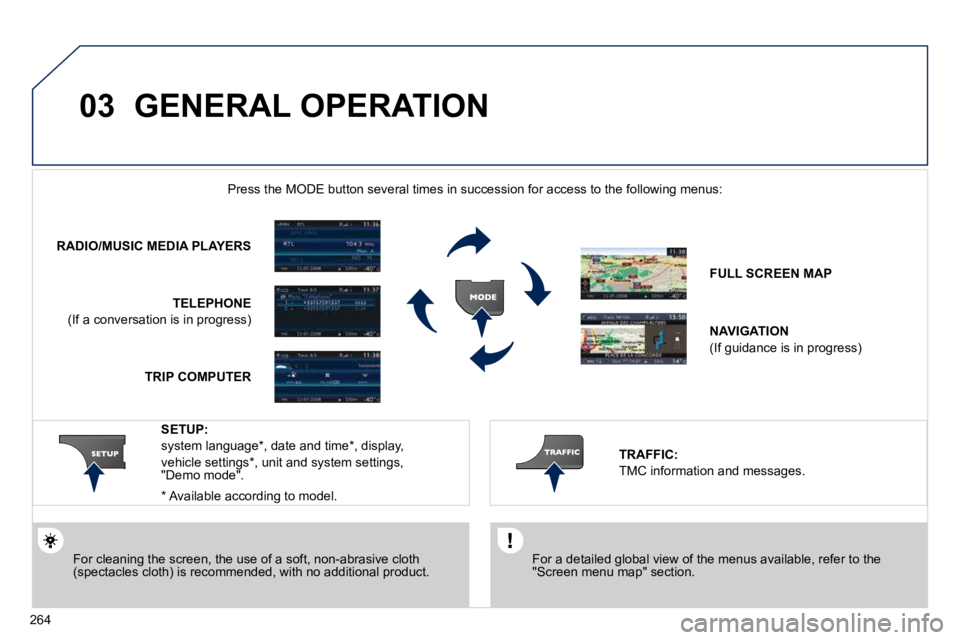
GENERAL OPERATION
For a detailed global view of the menus available, refer to the "Screen menu map" section.
Press the MODE button several times in succession for access to the foll owing menus:
For cleaning the screen, the use of a soft, non-abrasive cloth (spectacles cloth) is recommended, with no additional product.
RADIO/MUSIC MEDIA PLAYERS
TELEPHONE
(If a conversation is in progress)
FULL SCREEN MAP
NAVIGATION
(If guidance is in progress)
SETUP:
system language * , date and time * , display,
vehicle settings * , unit and system settings, "Demo mode".
TRAFFIC:
TMC information and messages.
* Available according to model.
TRIP COMPUTER
Page 297 of 345
03
265
GENERAL OPERATION
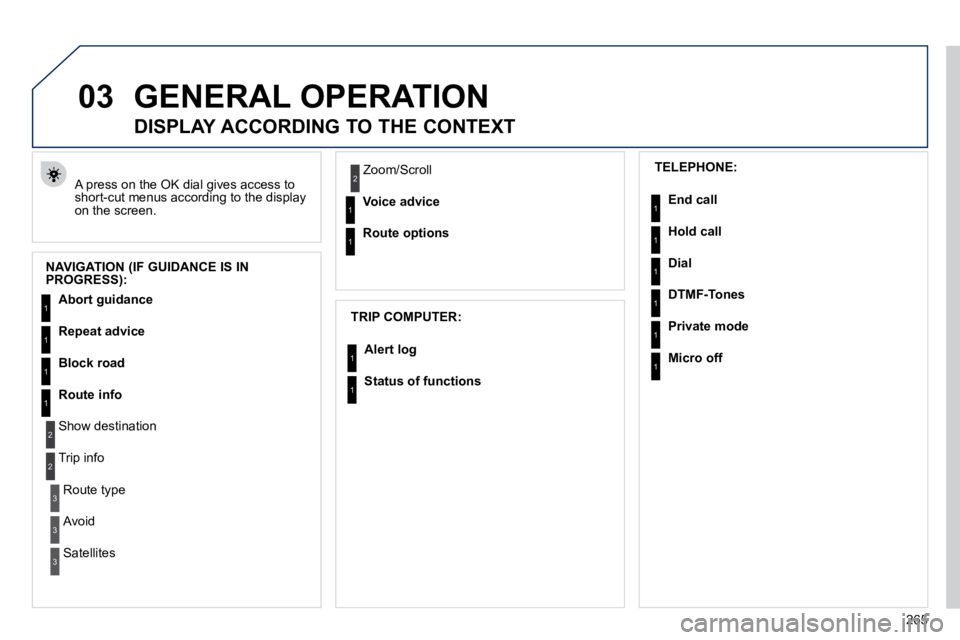
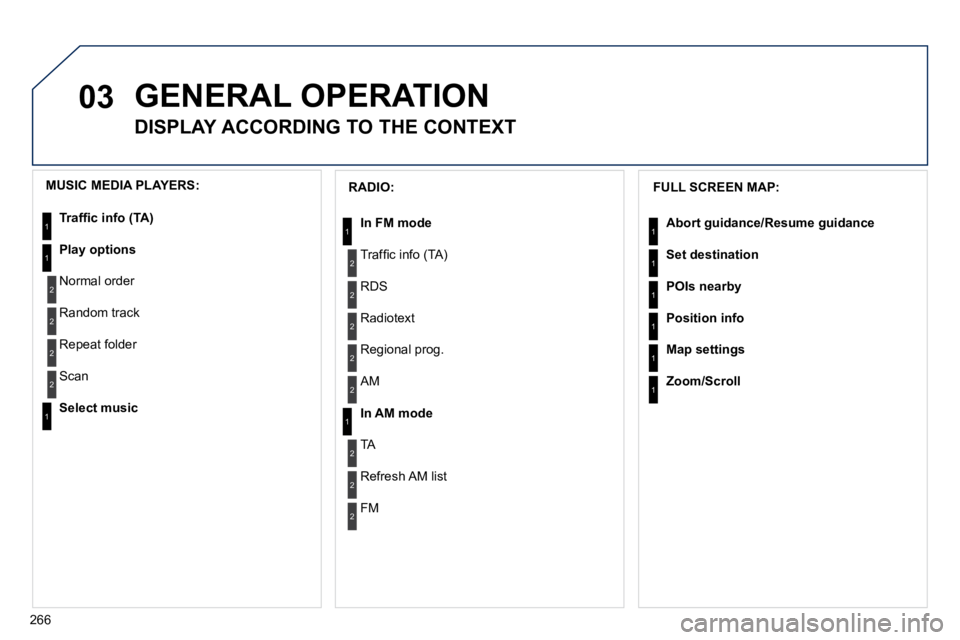
A press on the OK dial gives access to short-cut menus according to the display on the screen.
DISPLAY ACCORDING TO THE CONTEXT
NAVIGATION (IF GUIDANCE IS IN PROGRESS):
TRIP COMPUTER:
Abort guidance
Repeat advice
Block road
Route info
Show destination
Trip info
Route type
Avoid
Satellites
Zoom/Scroll
Voice advice
Route options
Alert log
Status of functions
1
2
3
3
2
1
1
1
3
1
1
1
1
2 TELEPHONE:
End call
Hold call
Dial
DTMF-Tones
Private mode
Micro off
1
1
1
1
1
1
Page 298 of 345
03
266
GENERAL OPERATION
DISPLAY ACCORDING TO THE CONTEXT
FULL SCREEN MAP:
Abort guidance/Resume guidance
Set destination
POIs nearby
Position info
Map settings
Zoom/Scroll
1
1
1
1
1
1
RADIO:
In FM mode
Traffi c info (TA)
RDS
Radiotext
Regional prog.
In AM mode
AM
TA
Refresh AM list
FM
1
2
1
2
2
2
2
2
2
2
MUSIC MEDIA PLAYERS:
Traffi c info (TA)
Play options
Normal order
Random track
Repeat folder
Select music
Scan
1
1
2
2
2
2
1
Page 300 of 345
04
7
8
9
268
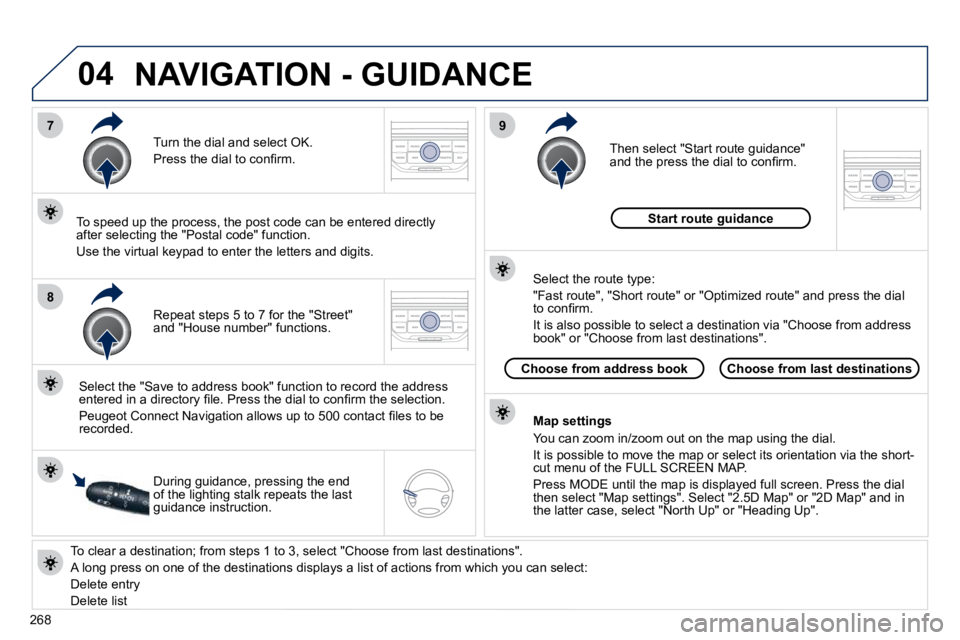
To clear a destination; from steps 1 to 3, select "Choose from last destinations".
A long press on one of the destinations displays a list of actions from which you can select:
Delete entry
Delete list
Repeat steps 5 to 7 for the "Street" and "House number" functions.
Turn the dial and select OK.
Press the dial to confi rm.
Select the "Save to address book" function to record the address entered in a directory fi le. Press the dial to confi rm the select ion.
Peugeot Connect Navigation allows up to 500 contact fi les to be recorded.
To speed up the process, the post code can be entered direct ly after selecting the "Postal code" function.
Use the virtual keypad to enter the letters and digits.
Then select "Start route guidance" and the press the dial to confi rm.
During guidance, pressing the end of the lighting stalk repeats the last guidance instruction.
Map settings
You can zoom in/zoom out on the map using the dial.
It is possible to move the map or select its orientation via the short-cut menu of the FULL SCREEN MAP.
Press MODE until the map is displayed full screen. Press the dial then select "Map settings". Select "2.5D Map" or "2D Map" and in the latter case, select "North Up" or "Heading Up".
Select the route type:
"Fast route", "Short route" or "Optimized route" and press the dial to confi rm.
It is also possible to select a destination via "Choose from a ddress book" or "Choose from last destinations".
Choose from last destinationsChoose from address book
Start route guidance
NAVIGATION - GUIDANCE
Page 301 of 345
04
1
2
3
5
4
269
NAVIGATION - GUIDANCE
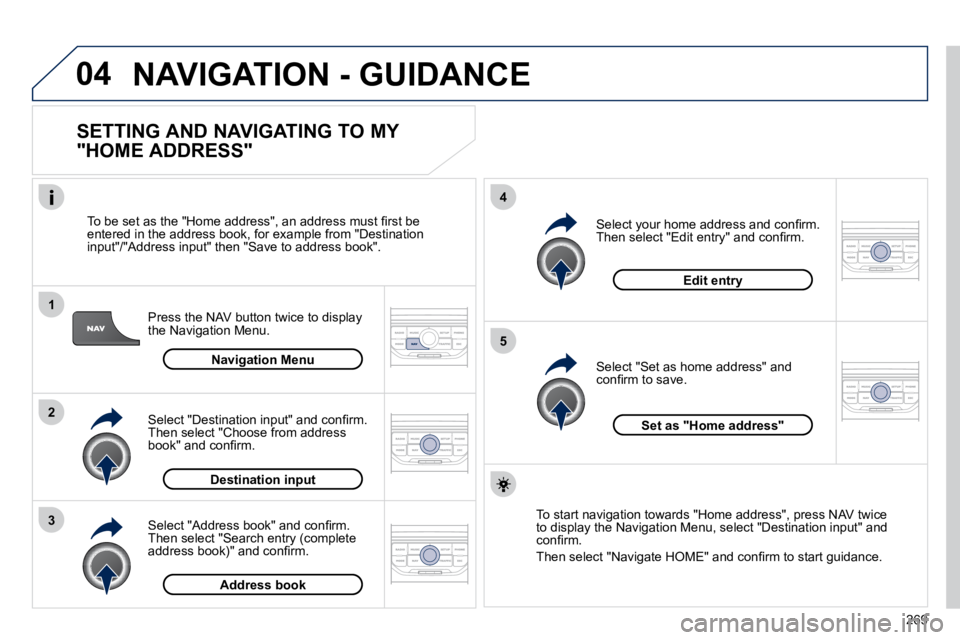
SETTING AND NAVIGATING TO MY
"HOME ADDRESS"
Press the NAV button twice to display the Navigation Menu.
To be set as the "Home address", an address must fi rst be entered in the address book, for example from "Destination input"/"Address input" then "Save to address book".
Select "Address book" and confi rm. Then select "Search entry (complete address book)" and confi rm.
Select "Destination input" and confi rm. Then select "Choose from address book" and confi rm.
Select "Set as home address" and confi rm to save.
Select your home address and confi rm. Then select "Edit entry" and confi rm.
To start navigation towards "Home address", press NAV twice to display the Navigation Menu, select "Destination input" and confi rm.
Then select "Navigate HOME" and confi rm to start guidance.
Navigation Menu
Destination input
Address book
Edit entry
Set as "Home address"
Page 306 of 345
04
5
6
3
2
1
4
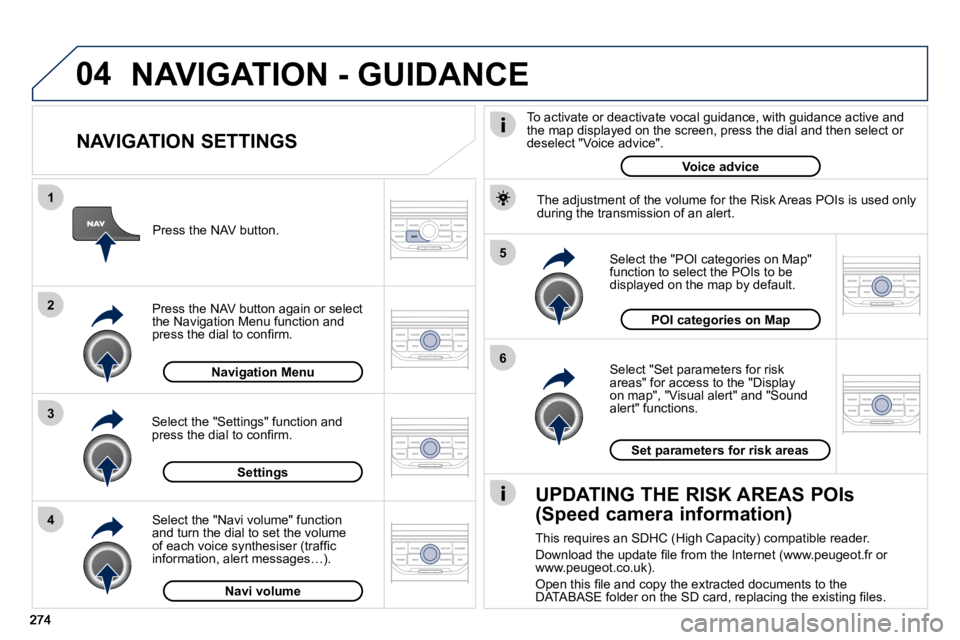
NAVIGATION SETTINGS
Select "Set parameters for risk areas" for access to the "Display on map", "Visual alert" and "Sound alert" functions.
Select the "POI categories on Map" function to select the POIs to be displayed on the map by default.
Press the NAV button.
Press the NAV button again or select the Navigation Menu function and press the dial to confi rm.
Select the "Settings" function and press the dial to confi rm.
POI categories on Map
Settings
Set parameters for risk areas
Navigation Menu
NAVIGATION - GUIDANCE
Select the "Navi volume" function and turn the dial to set the volume of each voice synthesiser (traffi c information, alert messages…).
Navi volume
The adjustment of the volume for the Risk Areas POIs is used on
ly during the transmission of an alert.
UPDATING THE RISK AREAS POIs
(Speed camera information)
This requires an SDHC (High Capacity) compatible reader.
Download the update fi le from the Internet (www.peugeot.fr or www.peugeot.co.uk).
Open this fi le and copy the extracted documents to the DATABASE folder on the SD card, replacing the existing fi les.
To activate or deactivate vocal guidance, with guidance act ive and the map displayed on the screen, press the dial and then sele ct or deselect "Voice advice".
Voice advice
Page 307 of 345
05
2
1
3
4
5
275
TRAFFIC INFORMATION
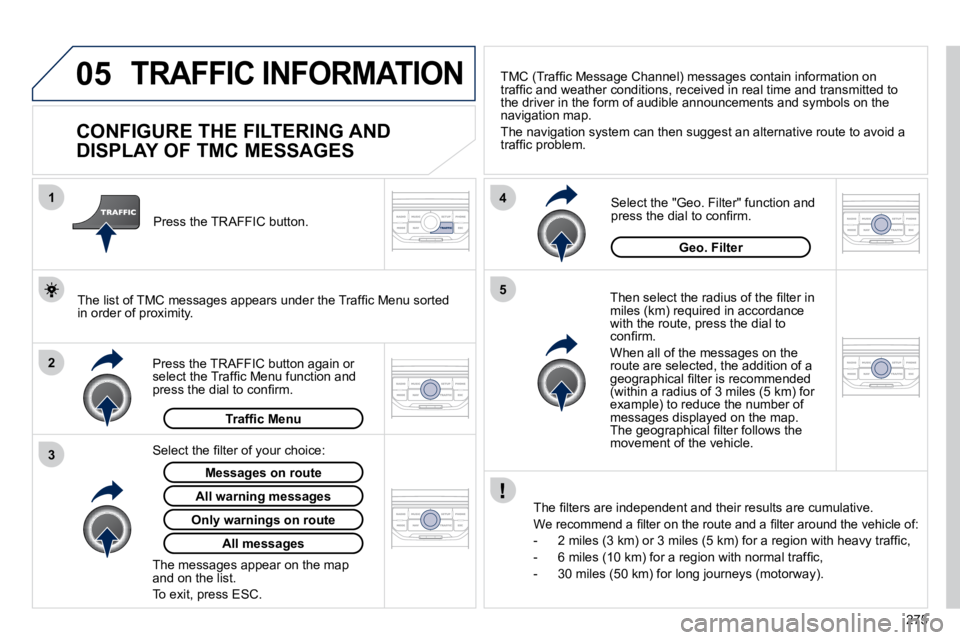
CONFIGURE THE FILTERING AND
DISPLAY OF TMC MESSAGES
Then select the radius of the fi lter in miles (km) required in accordance with the route, press the dial to confi rm.
When all of the messages on the route are selected, the addition of a geographical fi lter is recommended (within a radius of 3 miles (5 km) for example) to reduce the number of messages displayed on the map. The geographical fi lter follows the movement of the vehicle.
The fi lters are independent and their results are cumulative
.
We recommend a fi lter on the route and a fi lter around the vehicle of:
- 2 miles (3 km) or 3 miles (5 km) for a region with heavy traffi c,
- 6 miles (10 km) for a region with normal traffi c,
- 30 miles (50 km) for long journeys (motorway).
Press the TRAFFIC button again or select the Traffi c Menu function and press the dial to confi rm.
Press the TRAFFIC button.
TMC (Traffi c Message Channel) messages contain information on traffi c and weather conditions, received in real time and transmitted to the driver in the form of audible announcements and symbols on the navigation map.
The navigation system can then suggest an alternative route to avoid a traffi c problem.
Select the "Geo. Filter" function and press the dial to confi rm.
Messages on route
The list of TMC messages appears under the Traffi c Menu sorted in order of proximity.
All warning messages
Traffi c Menu
Select the fi lter of your choice:
Only warnings on route
All messages
The messages appear on the map and on the list.
To exit, press ESC.
Geo. Filter
Page 308 of 345
05
2
1
3
2
1
276
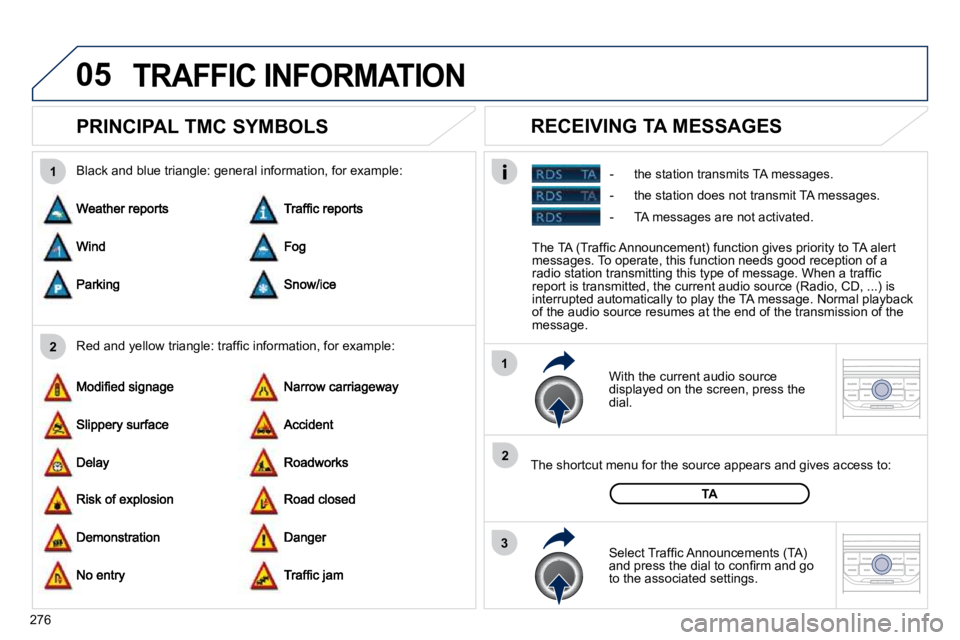
PRINCIPAL TMC SYMBOLS
With the current audio source displayed on the screen, press the dial.
The shortcut menu for the source appears and gives access to:
Select Traffi c Announcements (TA) and press the dial to confi rm and go to the associated settings.
TA
- the station transmits TA messages.
RECEIVING TA MESSAGES
Red and yellow triangle: traffi c information, for example:
Black and blue triangle: general information, for example:
TRAFFIC INFORMATION
The TA (Traffi c Announcement) function gives priority to TA al ert messages. To operate, this function needs good reception of a radio station transmitting this type of message. When a traffi c report is transmitted, the current audio source (Radio, CD, ...) is interrupted automatically to play the TA message. Normal playba ck of the audio source resumes at the end of the transmission of the message.
- the station does not transmit TA messages.
- TA messages are not activated.