display PEUGEOT 5008 2010.5 Owners Manual
[x] Cancel search | Manufacturer: PEUGEOT, Model Year: 2010.5, Model line: 5008, Model: PEUGEOT 5008 2010.5Pages: 345, PDF Size: 22.77 MB
Page 309 of 345
06
3
2
1
1
277
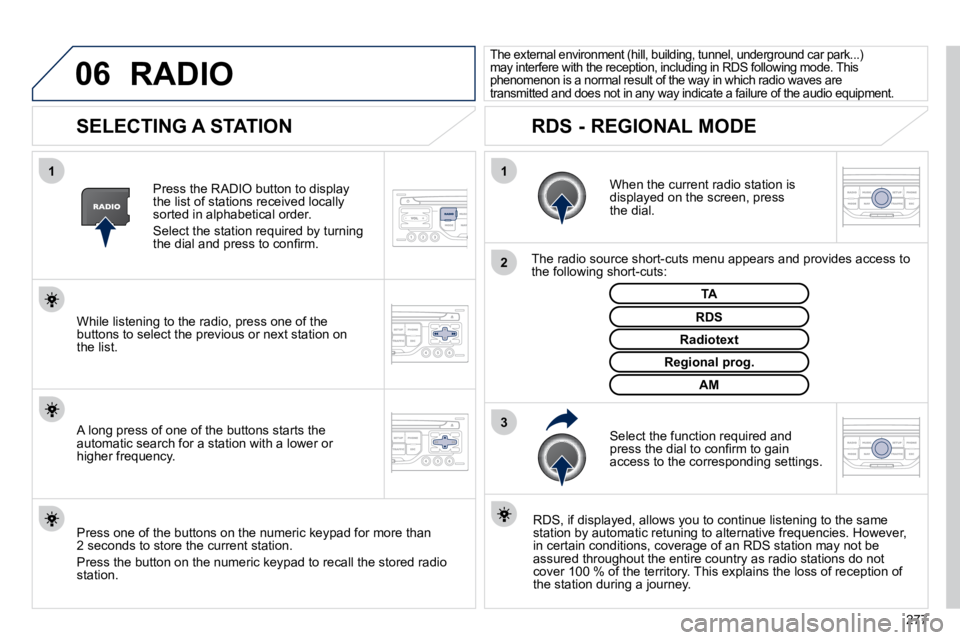
SELECTING A STATION
When the current radio station is displayed on the screen, press the dial.
The radio source short-cuts menu appears and provides access to the following short-cuts:
Select the function required and press the dial to confi rm to gain access to the corresponding settings.
TA
RDS, if displayed, allows you to continue listening to t he same station by automatic retuning to alternative frequencies. How ever, in certain conditions, coverage of an RDS station may not be assured throughout the entire country as radio stations do not cover 100 % of the territory. This explains the loss of receptio n of the station during a journey.
The external environment (hill, building, tunnel, underground car park...) may interfere with the reception, including in RDS following mode. This phenomenon is a normal result of the way in which r adio waves are transmitted and does not in any way indicate a failure of the audio equipment.
RDS - REGIONAL MODE
Press the RADIO button to display the list of stations received locally sorted in alphabetical order.
Select the station required by turning the dial and press to confi rm.
Regional prog.
Radiotext
RDS While listening to the radio, press one of the buttons to select the previous or next station on the list.
Press one of the buttons on the numeric keypad for more than 2 seconds to store the current station.
Press the button on the numeric keypad to recall the stored radi o station.
AM
A long press of one of the buttons starts the automatic search for a station with a lower or higher frequency.
RADIO
Page 310 of 345
07
278
MUSIC MEDIA PLAYERS
CD, MP3/WMA CD
INFORMATION AND ADVICE
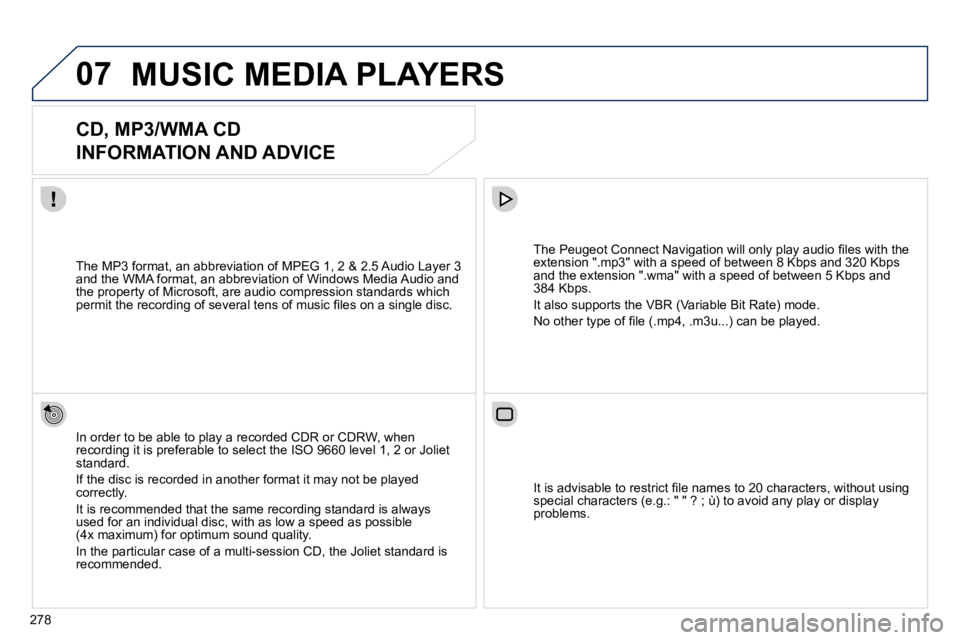
In order to be able to play a recorded CDR or CDRW, when recording it is preferable to select the ISO 9660 level 1, 2 or Joliet standard.
If the disc is recorded in another format it may not be played correctly.
It is recommended that the same recording standard is always used for an individual disc, with as low a speed as possible (4x maximum) for optimum sound quality.
In the particular case of a multi-session CD, the Joliet standard is recommended.
The Peugeot Connect Navigation will only play audio fi les with the extension ".mp3" with a speed of between 8 Kbps and 320 Kbps and the extension ".wma" with a speed of between 5 Kbps and 384 Kbps.
It also supports the VBR (Variable Bit Rate) mode.
No other type of fi le (.mp4, .m3u...) can be played.
The MP3 format, an abbreviation of MPEG 1, 2 & 2.5 Audio Laye r 3 and the WMA format, an abbreviation of Windows Media Audio and the property of Microsoft, are audio compression standards which permit the recording of several tens of music fi les on a single disc.
It is advisable to restrict fi le names to 20 characters, without using special characters (e.g.: " " ? ; ù) to avoid any play or display problems.
Page 311 of 345
07
3
2
1
6
4
5
279
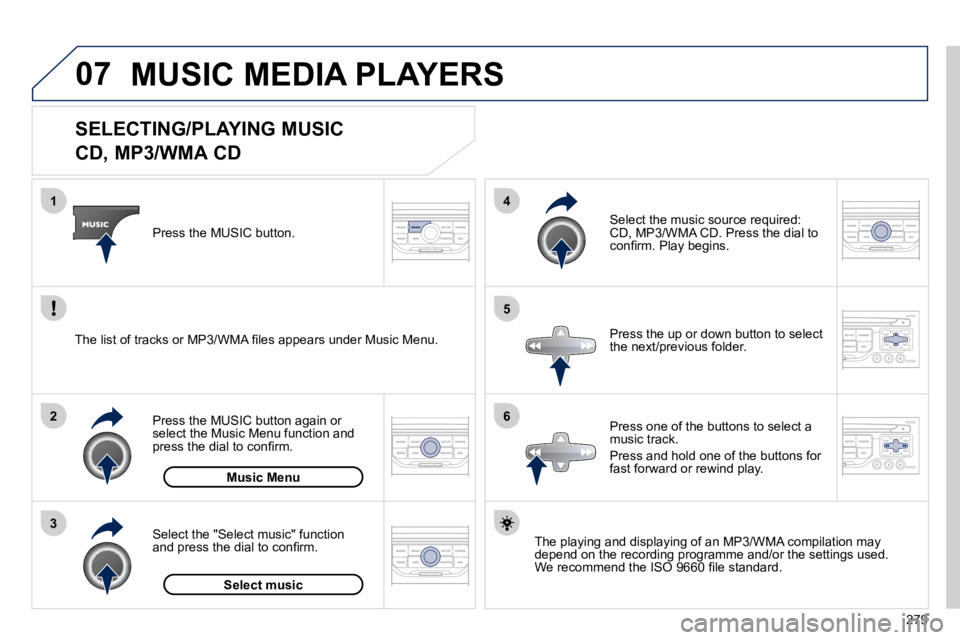
SELECTING/PLAYING MUSIC
CD, MP3/WMA CD
The playing and displaying of an MP3/WMA compilation may depend on the recording programme and/or the settings used. We recommend the ISO 9660 fi le standard.
Press the MUSIC button.
Select the "Select music" function and press the dial to confi rm.
Press the up or down button to select the next/previous folder.
Select the music source required: CD, MP3/WMA CD. Press the dial to confi rm. Play begins.
Select music
Press the MUSIC button again or select the Music Menu function and press the dial to confi rm.
Press one of the buttons to select a music track.
Press and hold one of the buttons for fast forward or rewind play. Music Menu
The list of tracks or MP3/WMA fi les appears under Music Menu.
MUSIC MEDIA PLAYERS
Page 312 of 345
07
43
1
2
280
MUSIC MEDIA PLAYERS
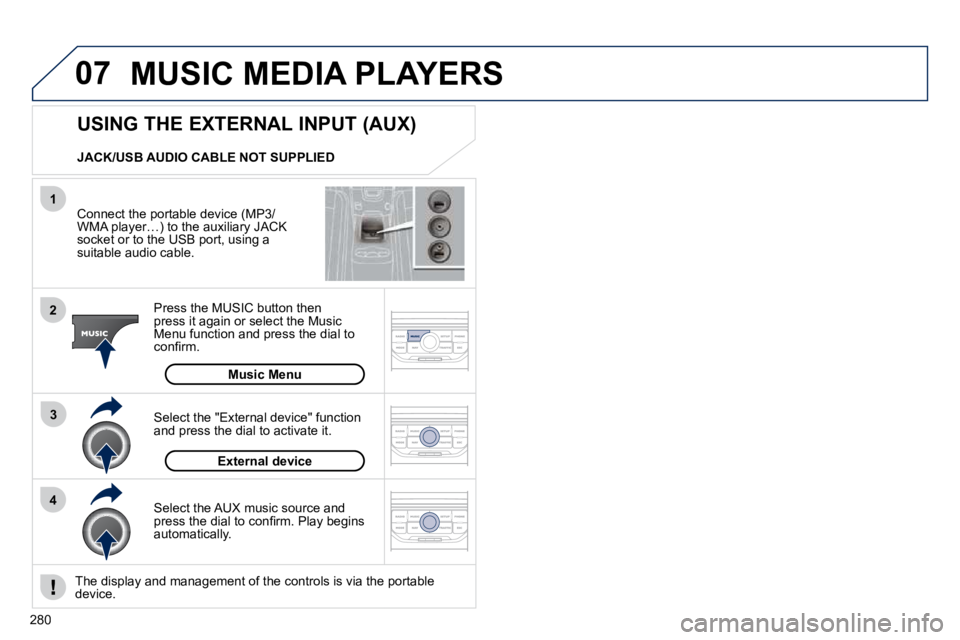
Connect the portable device (MP3/WMA player…) to the auxiliary JACK socket or to the USB port, using a suitable audio cable.
Press the MUSIC button then press it again or select the Music Menu function and press the dial to confi rm.
Select the AUX music source and press the dial to confi rm. Play begins automatically.
Select the "External device" function and press the dial to activate it.
External device
The display and management of the controls is via the porta
ble device.
USING THE EXTERNAL INPUT (AUX)
Music Menu
JACK/USB AUDIO CABLE NOT SUPPLIED
Page 313 of 345
08
1
2
3
2
1
4
281
* The services available depend on the network, the SIM
card and the compatibility of the Bluetooth telephone used. Check the t elephone manual and with your network provider for details of the services available to you. A list of mobile telephones with the best level of compatibility is available from the dealer network.
BLUETOOTH TELEPHONE
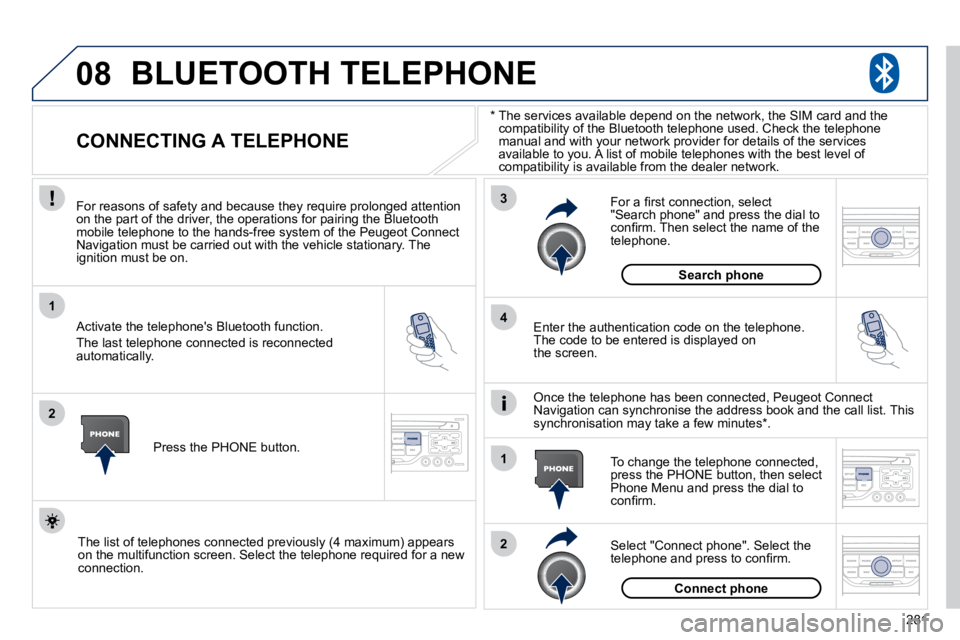
CONNECTING A TELEPHONE
For reasons of safety and because they require prolonged atte ntion on the part of the driver, the operations for pairing the Bluetooth mobile telephone to the hands-free system of the Peugeot Con nect Navigation must be carried out with the vehicle stationary. The ignition must be on.
Activate the telephone's Bluetooth function.
The last telephone connected is reconnected automatically.
Enter the authentication code on the telephone. The code to be entered is displayed on the screen.
To change the telephone connected, press the PHONE button, then select Phone Menu and press the dial to confi rm.
Once the telephone has been connected, Peugeot Connect Navigation can synchronise the address book and the call list. T his synchronisation may take a few minutes * .
Select "Connect phone". Select the telephone and press to confi rm.
The list of telephones connected previously (4 maximum) appears on the multifunction screen. Select the telephone required for a new connection.
Press the PHONE button.
For a fi rst connection, select "Search phone" and press the dial to confi rm. Then select the name of the telephone.
Search phone
Connect phone
Page 314 of 345
08
1
3
2
2
1
282
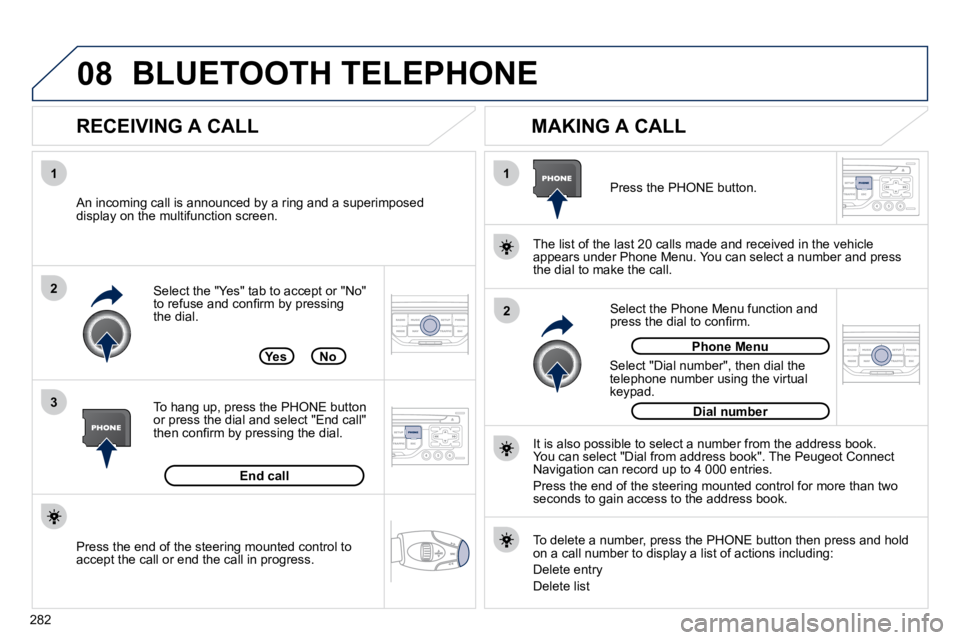
Select the "Yes" tab to accept or "No" to refuse and confi rm by pressing the dial.
RECEIVING A CALL MAKING A CALL
An incoming call is announced by a ring and a superimposed display on the multifunction screen.
Yes
To hang up, press the PHONE button or press the dial and select "End call" then confi rm by pressing the dial.
End call
Press the PHONE button.
Select "Dial number", then dial the telephone number using the virtual keypad.
Select the Phone Menu function and press the dial to confi rm.
The list of the last 20 calls made and received in the veh
icle appears under Phone Menu. You can select a number and press the dial to make the call.
No
It is also possible to select a number from the address book. You can select "Dial from address book". The Peugeot Connect Navigation can record up to 4 000 entries.
Press the end of the steering mounted control for more than tw o seconds to gain access to the address book.
Phone Menu
Dial number
To delete a number, press the PHONE button then press and hold on a call number to display a list of actions including:
Delete entry
Delete list
BLUETOOTH TELEPHONE
Press the end of the steering mounted control to accept the call or end the call in progress.
Page 315 of 345
09
4
3
2
1
6 5
283
CONFIGURATION
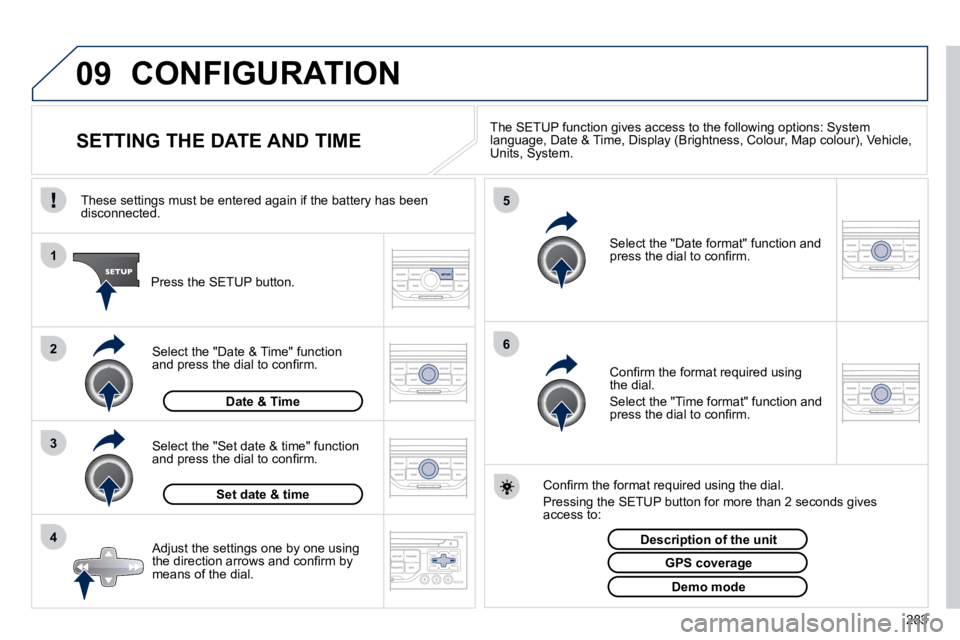
SETTING THE DATE AND TIME The SETUP function gives access to the following options: Syst
em language, Date & Time, Display (Brightness, Colour, Map colour), Vehicle, Units, System.
Adjust the settings one by one using the direction arrows and confi rm by means of the dial.
Select the "Date format" function and press the dial to confi rm.
Select the "Set date & time" function and press the dial to confi rm.
Confi rm the format required using the dial.
Pressing the SETUP button for more than 2 seconds gives access to:
These settings must be entered again if the battery has been disconnected.
Press the SETUP button.
Confi rm the format required using the dial.
Select the "Time format" function and press the dial to confi rm.
Set date & time
Select the "Date & Time" function and press the dial to confi rm.
Demo mode
GPS coverage
Description of the unit
Date & Time
Page 316 of 345
10
1
284
TRIP COMPUTER
TRIP COMPUTER
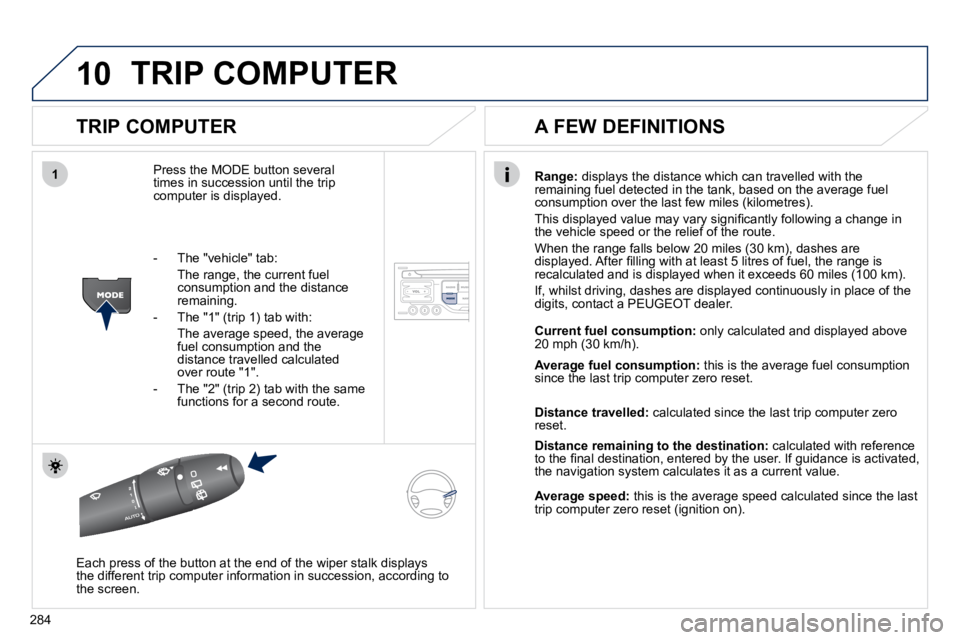
Press the MODE button several times in succession until the trip computer is displayed.
Range: displays the distance which can travelled with the remaining fuel detected in the tank, based on the average fuel consumption over the last few miles (kilometres).
This displayed value may vary signifi cantly following a change in the vehicle speed or the relief of the route.
When the range falls below 20 miles (30 km), dashes are displayed. After fi lling with at least 5 litres of fuel, the range is recalculated and is displayed when it exceeds 60 miles (100 km).
If, whilst driving, dashes are displayed continuously in place of the digits, contact a PEUGEOT dealer.
Each press of the button at the end of the wiper stalk displays the different trip computer information in succession, according t o the screen.
A FEW DEFINITIONS
- The "vehicle" tab:
The range, the current fuel consumption and the distance remaining.
- The "1" (trip 1) tab with:
The average speed, the average fuel consumption and the distance travelled calculated over route "1".
- The "2" (trip 2) tab with the same functions for a second route.
Current fuel consumption: only calculated and displayed above 20 mph (30 km/h).
Average fuel consumption: this is the average fuel consumption since the last trip computer zero reset.
Distance travelled: calculated since the last trip computer zero reset.
Distance remaining to the destination: calculated with reference to the fi nal destination, entered by the user. If guidance is activated, the navigation system calculates it as a current value.
Average speed: this is the average speed calculated since the last trip computer zero reset (ignition on).
Page 319 of 345
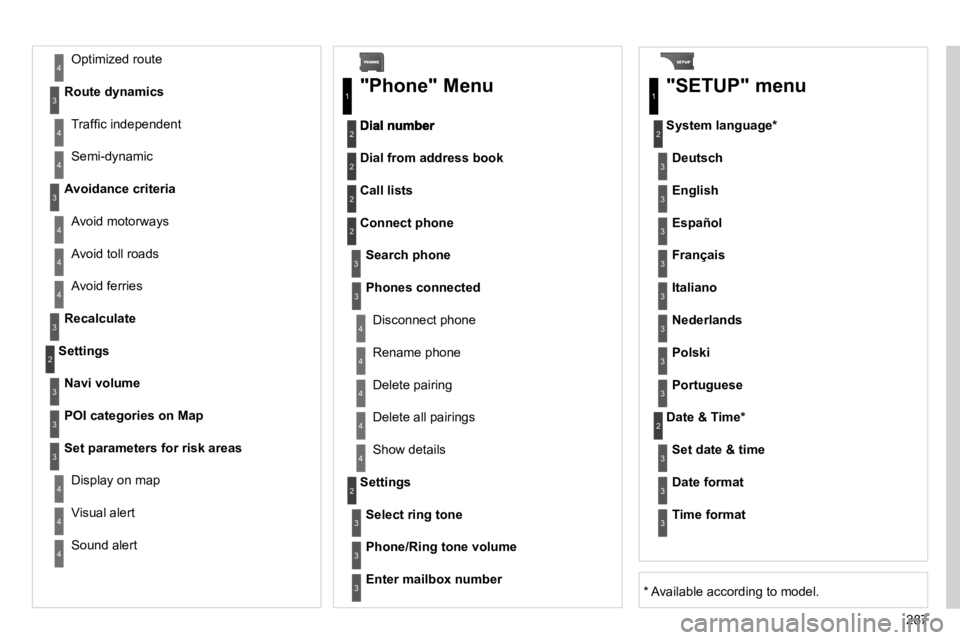
287
Avoid ferries
Recalculate
Settings
Navi volume
POI categories on Map
Set parameters for risk areas
Display on map
Visual alert
Sound alert
3
2
4
3
3
3
4
4
4
Dial from address book
"Phone" Menu
Search phone
Call lists
Connect phone
Select ring tone
Phone/Ring tone volume
Phones connected
Enter mailbox number
Settings
Disconnect phone
Rename phone
Delete pairing
Delete all pairings
Show details
"SETUP" menu
System language *
English
Español
Deutsch
Italiano
Français
Nederlands
Polski
Portuguese
Date & Time *
Set date & time
Date format
Time format
1
2
2
2
2
3
3
4
4
4
4
4
2
3
3
3
1
2
3
3
3
3
3
3
3
3
3
3
3
2
Avoid motorways
Route dynamics
Traffi c independent
Semi-dynamic
Avoidance criteria
Avoid toll roads
Optimized route
3
3
4
4
4
4
4
* Available according to model.
Page 320 of 345
288
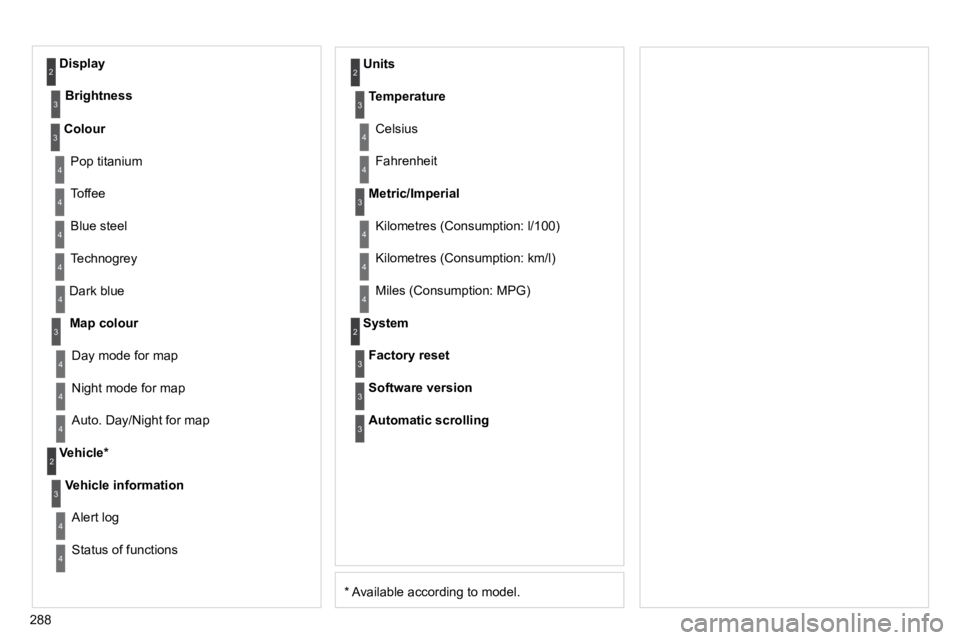
* Available according to model.
Dark blue
Map colour
Night mode for map
Units
Day mode for map
Vehicle *
Vehicle information
Alert log
Status of functions
Temperature
Celsius
Fahrenheit
Metric/Imperial
Kilometres (Consumption: l/100)
Kilometres (Consumption: km/l)
Miles (Consumption: MPG)
System
Auto. Day/Night for map
Factory reset
Software version
Automatic scrolling
3
4
4
2
4
3
4
4
2
3
4
4
3
4
4
4
2
4
3
3
3
Colour
Pop titanium
Toffee
Blue steel
Technogrey
3
4
4
4
4
Display
Brightness
2
3