display PEUGEOT 5008 2010.5 Manual PDF
[x] Cancel search | Manufacturer: PEUGEOT, Model Year: 2010.5, Model line: 5008, Model: PEUGEOT 5008 2010.5Pages: 345, PDF Size: 22.77 MB
Page 256 of 345
223
03
SETUP
TRAFFIC
MEDIA
GENERAL OPERATION
For a detailed global view of the menus available, refer tothe "Screen menu map" section of this handbook.
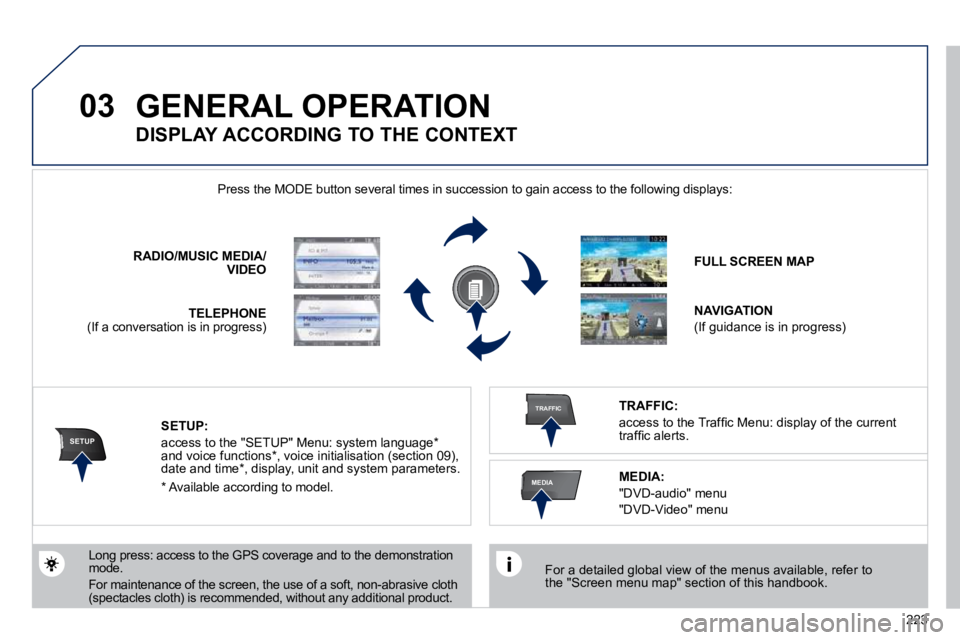
Press the MODE button several times in succession to gain access to the following displays:
Long press: access to the GPS coverage and to the demonstration mode.
For maintenance of the screen, the use of a soft, non-abrasive cloth (spectacles cloth) is recommended, without any addi tional product.
RADIO / MUSIC MEDIA/VIDEO
TELEPHONE (If a conversation is in progress)
FULL SCREEN MAP
NAVIGATION
(If guidance is in progress)
SETUP:
access to the "SETUP" Menu: system language * and voice functions * , voice initialisation (section 09), date and time * , display, unit and system parameters.
TRAFFIC:
access to the Traffi c Menu: display of the current traffi c alerts.
DISPLAY ACCORDING TO THE CONTEXT
MEDIA:
"DVD-audio" menu
"DVD-Video" menu
* Available according to model.
Page 257 of 345
224
03 GENERAL OPERATION
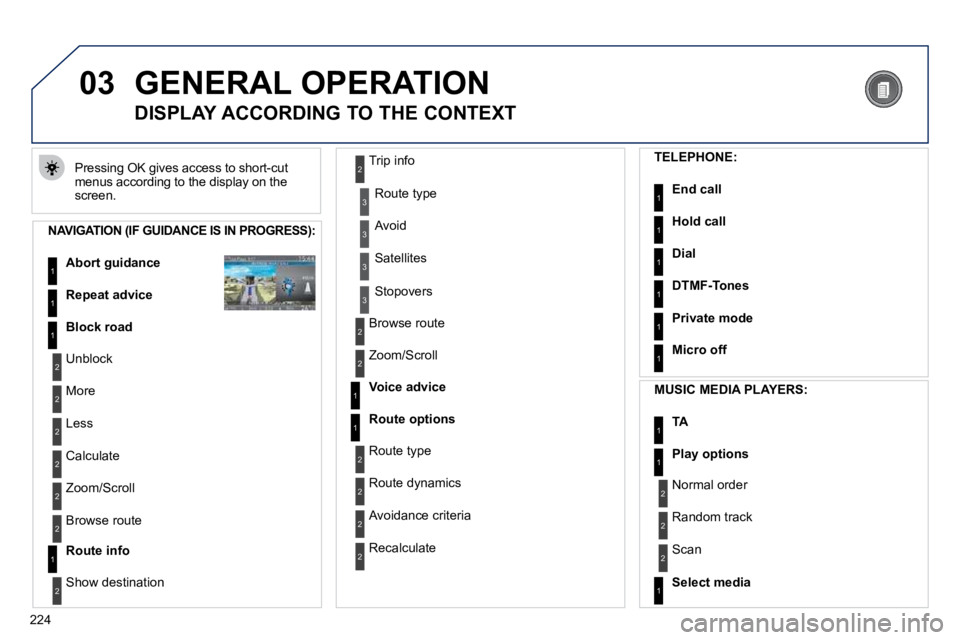
Pressing OK gives access to short-cut menus according to the display on the screen.
DISPLAY ACCORDING TO THE CONTEXT
NAVIGATION (IF GUIDANCE IS IN PROGRESS):
Abort guidance1
1
1
Repeat advice
Block road
2
2
Unblock
More
2 Less
3
3
Route type
Avoid
3 Satellites
2
2
Calculate
Zoom/Scroll
2Browse route
1Route info
2
2
Show destination
Trip info
3 Stopovers
2
2
Browse route
Zoom/Scroll
1
1
Voice advice
Route options
2
2
Route type
Route dynamics
2 Avoidance criteria
2 Recalculate
TELEPHONE:
End call1
1
1
1
Hold call
Dial
DTMF-Tones
1Private mode
1Micro off
MUSIC MEDIA PLAYERS:
TA1
1Play options
1Select media
2
2
Normal order
Random track
2 Scan
Page 258 of 345
225
03 GENERAL OPERATION
DISPLAY ACCORDING TO THE CONTEXT
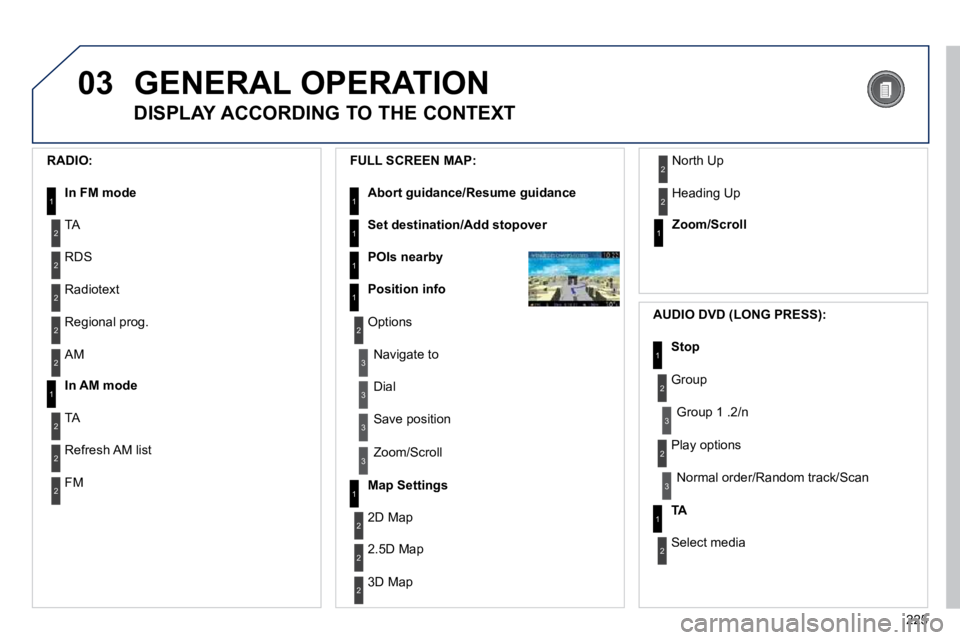
RADIO:
In FM mode 1
1 In AM mode
2
2
TA
RDS
2 Radiotext
2 Regional prog.
2 AM
2
2
TA
Refresh AM list
2 FM
FULL SCREEN MAP:
Abort guidance/Resume guidance1
1
1
1
Set destination/Add stopover
POIs nearby
Position info
2Options
3
3
Navigate to
Dial
3 Save position
3 Zoom/Scroll
Map Settings1
1Zoom/Scroll
2
2
2D Map
2.5D Map
2 3D Map
2 North Up
2 Heading Up
AUDIO DVD (LONG PRESS):
1Stop
2Group
3 Group 1 .2/n
TA1
2Select media
2 Play options
3 Normal order/Random track/Scan
Page 259 of 345
226
03
3
3
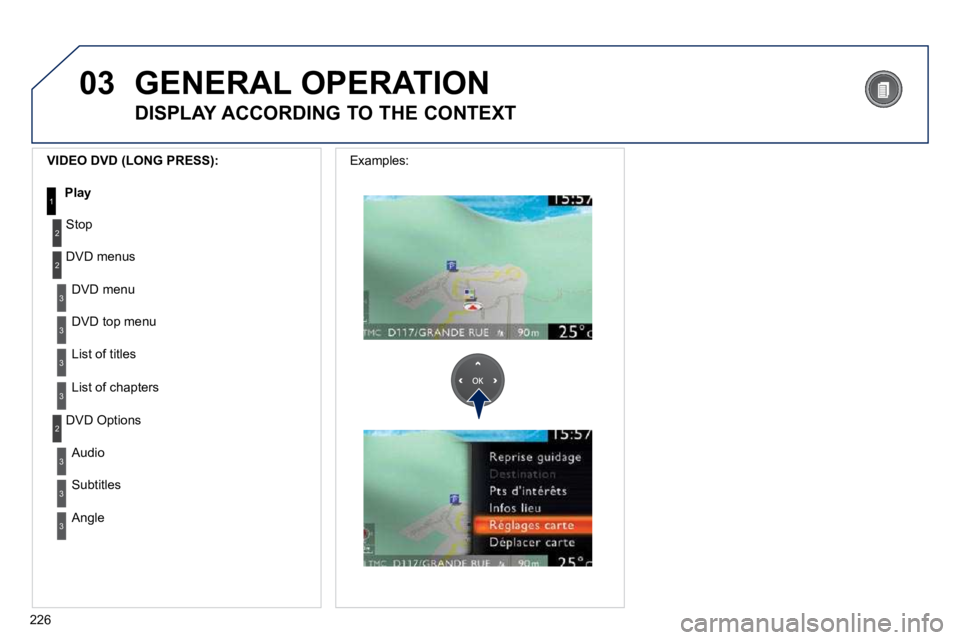
DVD menu
DVD top menu
3 List of titles
3 List of chapters
VIDEO DVD (LONG PRESS):
Play1
GENERAL OPERATION
DISPLAY ACCORDING TO THE CONTEXT
2
2
Stop
DVD menus
3
3
Audio
Subtitles
3 Angle
2DVD Options
Examples:
Page 262 of 345
229
04
2
ABC 3
DEF
5
JKL
4
GHI 6
MNO8
TUV
7
PQRS 9
WXYZ0
* #
1
RADIO MEDIA
NAV ESC TRAFFIC
SETUP
ADDR
BOOK
7
8
9
10
11
2
ABC 3
DEF
5
JKL
4
GHI 6
MNO8
TUV
7
PQRS 9
WXYZ0
* #
1
RADIO MEDIA
NAV ESC TRAFFIC
SETUP
ADDR
BOOK
2
ABC 3
DEF
5
JKL
4
GHI 6
MNO8
TUV
7
PQRS 9
WXYZ0
* #
1
RADIO MEDIA
NAV ESC TRAFFIC
SETUP
ADDR
BOOK
2
ABC 3
DEF
5
JKL
4
GHI 6
MNO8
TUV
7
PQRS 9
WXYZ0
* #
1
RADIO MEDIA
NAV ESC TRAFFIC
SETUP
ADDR
BOOK
2
ABC 3
DEF
5
JKL
4
GHI 6
MNO8
TUV
7
PQRS 9
WXYZ0
* #
1
RADIO MEDIA
NAV ESC TRAFFIC
SETUP
ADDR
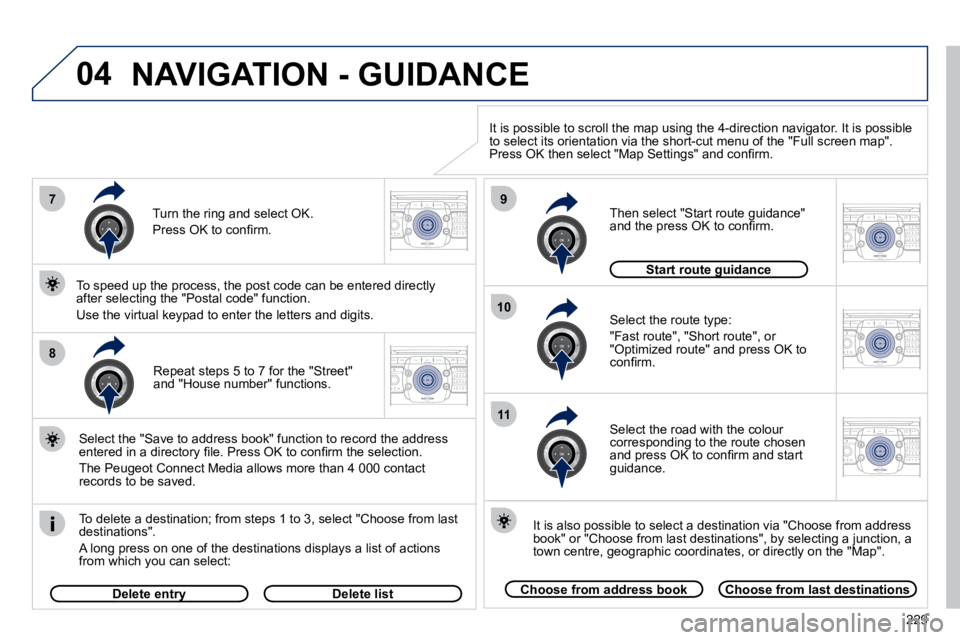
BOOK Repeat steps 5 to 7 for the "Street" and "House number" functions.
To delete a destination; from steps 1 to 3, select "Choose
from last destinations".
A long press on one of the destinations displays a list of actions from which you can select:
Select the "Save to address book" function to record the address entered in a directory fi le. Press OK to confi rm the selection.
The Peugeot Connect Media allows more than 4 000 contact records to be saved.
To speed up the process, the post code can be entered direct ly after selecting the "Postal code" function.
Use the virtual keypad to enter the letters and digits. Select the route type:
"Fast route", "Short route", or "Optimized route" and press OK to confi rm.
Then select "Start route guidance" and the press OK to confi rm.
It is also possible to select a destination via "Choose from address book" or "Choose from last destinations", by selecting a junction, a town centre, geographic coordinates, or directly on the "Map".
Choose from address bookChoose from last destinations
Start route guidanceStart route guidance
It is possible to scroll the map using the 4-direction navigator. It is possible to select its orientation via the short-cut menu of the "Full screen map". Press OK then select "Map Settings" and confi rm.
Select the road with the colour corresponding to the route chosen and press OK to confi rm and start guidance.
Turn the ring and select OK.
Press OK to confi rm.
Delete entryDelete entryDelete list
NAVIGATION - GUIDANCE
Page 263 of 345
230
04
2
ABC 3
DEF
5
JKL
4
GHI 6
MNO8
TUV
7
PQRS 9
WXYZ0
* #
1
RADIO MEDIA
NAV ESC TRAFFIC
SETUP
ADDR
BOOK
1
2
3
4
2
ABC 3
DEF
5
JKL
4
GHI 6
MNO8
TUV
7
PQRS 9
WXYZ0
* #
1
RADIO MEDIA
NAV ESC TRAFFIC
SETUP
ADDR
BOOK
2
ABC 3
DEF
5
JKL
4
GHI 6
MNO8
TUV
7
PQRS 9
WXYZ0
* #
1
RADIO MEDIA
NAV ESC TRAFFIC
SETUP
ADDR
BOOK
2
ABC 3
DEF
5
JKL
4
GHI 6
MNO8
TUV
7
PQRS 9
WXYZ0
* #
1
RADIO MEDIA
NAVESC TRAFFIC
SETUP
ADDR
BOOKNAV
NAVIGATION - GUIDANCE
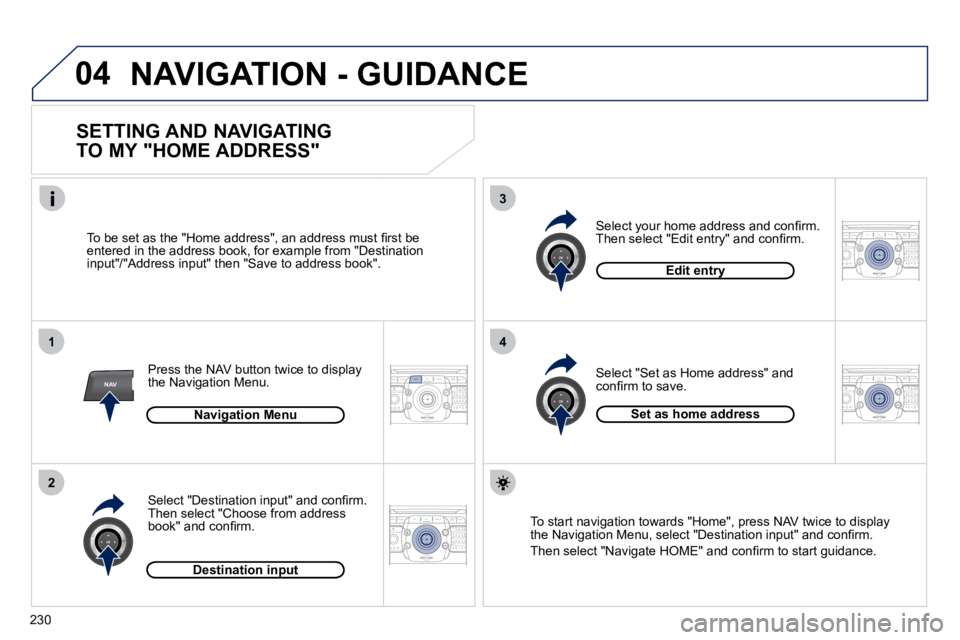
SETTING AND NAVIGATING
TO MY "HOME ADDRESS"
Press the NAV button twice to display the Navigation Menu.
To be set as the "Home address", an address must fi rst be entered in the address book, for example from "Destination input"/"Address input" then "Save to address book".
Select "Destination input" and confi rm. Then select "Choose from address book" and confi rm.
Select "Set as Home address" and confi rm to save.
Select your home address and confi rm. Then select "Edit entry" and confi rm.
To start navigation towards "Home", press NAV twice to displaythe Navigation Menu, select "Destination input" and confi rm.
Then select "Navigate HOME" and confi rm to start guidance.
Navigation Menu
Destination input
Edit entry
Set as home address
Page 264 of 345
231
04
2
ABC 3
DEF
5
JKL
4
GHI 6
MNO8
TUV
7
PQRS 9
WXYZ0
* #
1
RADIO MEDIA
NAVESC TRAFFIC
SETUP
ADDR
BOOK
2
ABC 3
DEF
5
JKL
4
GHI 6
MNO8
TUV
7
PQRS 9
WXYZ0
* #
1
RADIO MEDIA
NAV ESC TRAFFIC
SETUP
ADDR
BOOK
NAV
1
3
4
5
6
7
2
ABC 3
DEF
5
JKL
4
GHI 6
MNO8
TUV
7
PQRS 9
WXYZ0
* #
1
RADIO MEDIA
NAV ESC TRAFFIC
SETUP
ADDR
BOOK
2
ABC 3
DEF
5
JKL
4
GHI 6
MNO8
TUV
7
PQRS 9
WXYZ0
* #
1
RADIO MEDIA
NAV ESC TRAFFIC
SETUP
ADDR
BOOK
2
ABC 3
DEF
5
JKL
4
GHI 6
MNO8
TUV
7
PQRS 9
WXYZ0
* #
1
RADIO MEDIA
NAV ESC TRAFFIC
SETUP
ADDR
BOOK
2
ABC 3
DEF
5
JKL
4
GHI 6
MNO8
TUV
7
PQRS 9
WXYZ0
* #
1
RADIO MEDIA
NAV ESC TRAFFIC
SETUP
ADDR
BOOK
2
2
ABC 3
DEF
5
JKL
4
GHI 6
MNO8
TUV
7
PQRS 9
WXYZ0
* #
1
RADIO MEDIA
NAV ESC TRAFFIC
SETUP
ADDR
BOOK
NAVIGATION - GUIDANCE
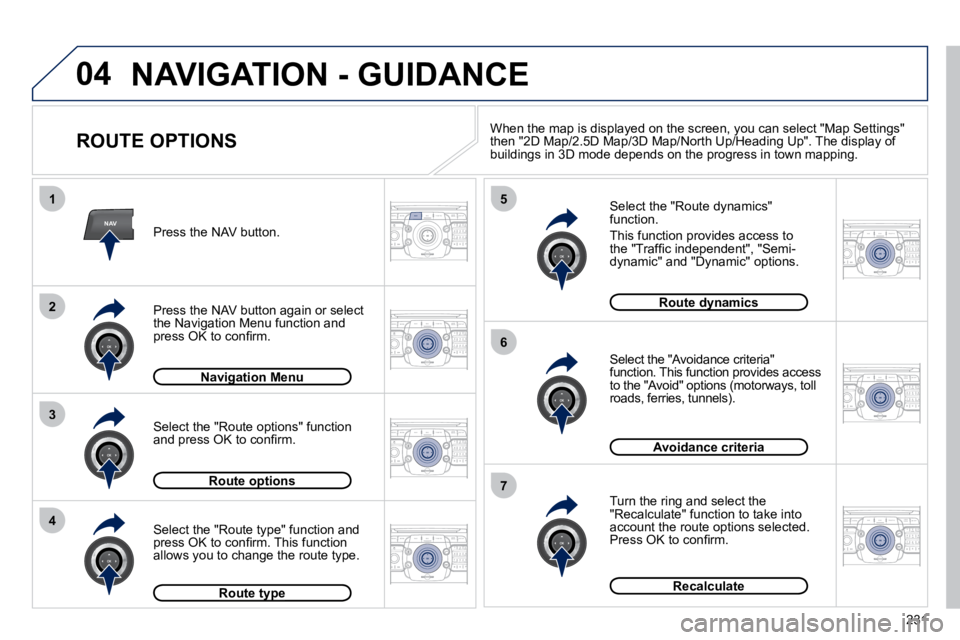
ROUTE OPTIONS
Select the "Route dynamics" function.
This function provides access to the "Traffi c independent", "Semi-dynamic" and "Dynamic" options.
Select the "Avoidance criteria" function. This function provides access to the "Avoid" options (motorways, toll roads, ferries, tunnels).
Turn the ring and select the "Recalculate" function to take into account the route options selected. Press OK to confi rm.
Press the NAV button.
Press the NAV button again or select the Navigation Menu function and press OK to confi rm.
Select the "Route type" function and press OK to confi rm. This function allows you to change the route type.
Select the "Route options" function and press OK to confi rm.
Navigation MenuNavigation Menu
Route optionsRoute options
Route typeRoute type
Route dynamicsRoute dynamics
Avoidance criteria
Recalculate
When the map is displayed on the screen, you can select "Map Se
ttings" then "2D Map/2.5D Map/3D Map/North Up/Heading Up". The display of buildings in 3D mode depends on the progress in town mapping.
Page 269 of 345
236
2
ABC 3
DEF
5
JKL
4
GHI 6
MNO8
TUV
7
PQRS 9
WXYZ0
* #
1
RADIO MEDIA
NAVESC TRAFFIC
SETUP
ADDR
BOOKNAV
13
4
5
2
ABC 3
DEF
5
JKL
4
GHI 6
MNO8
TUV
7
PQRS 9
WXYZ0
* #
1
RADIO MEDIA
NAV ESC TRAFFIC
SETUP
ADDR
BOOK
2
ABC 3
DEF
5
JKL
4
GHI 6
MNO8
TUV
7
PQRS 9
WXYZ0
* #
1
RADIO MEDIA
NAV ESC TRAFFIC
SETUP
ADDR
BOOK
2
ABC 3
DEF
5
JKL
4
GHI 6
MNO8
TUV
7
PQRS 9
WXYZ0
* #
1
RADIO MEDIA
NAV ESC TRAFFIC
SETUP
ADDR
BOOK2
ABC 3
DEF
5
JKL
4
GHI 6
MNO8
TUV
7
PQRS 9
WXYZ0
* #
1
RADIO MEDIA
NAV ESC TRAFFIC
SETUP
ADDR
BOOK
2
ABC 3
DEF
5
JKL
4
GHI 6
MNO8
TUV
7
PQRS 9
WXYZ0
* #
1
RADIO MEDIA
NAV ESC TRAFFIC
SETUP
ADDR
BOOK
1
2
04
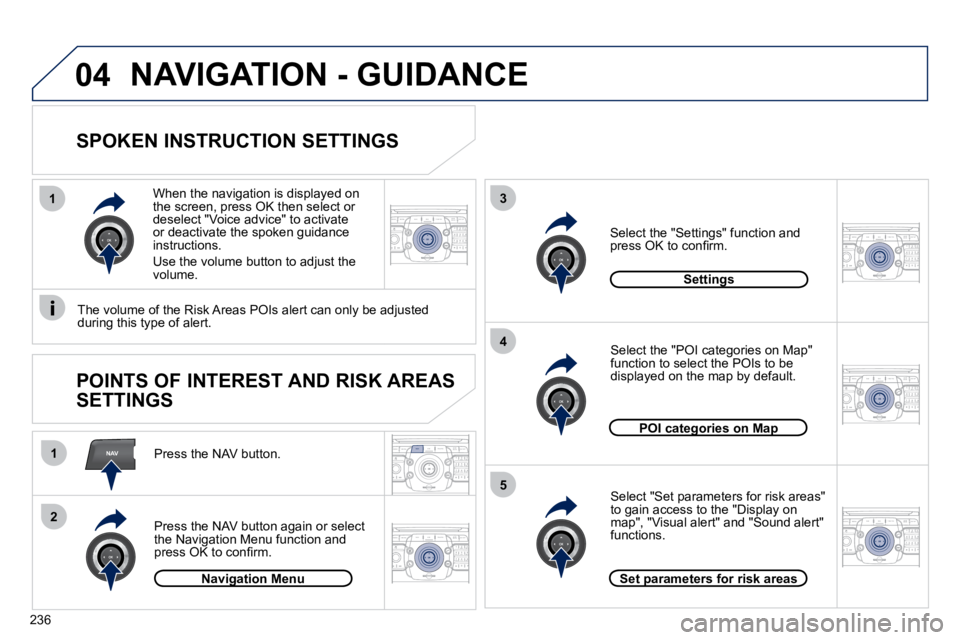
SPOKEN INSTRUCTION SETTINGS
Press the NAV button.
Press the NAV button again or select the Navigation Menu function and press OK to confi rm.
Select the "Settings" function and press OK to confi rm.
Navigation MenuNavigation Menu
Settings
When the navigation is displayed on the screen, press OK then select or deselect "Voice advice" to activate or deactivate the spoken guidance instructions.
Use the volume button to adjust the volume.
POINTS OF INTEREST AND RISK AREAS
SETTINGS
The volume of the Risk Areas POIs alert can only be adjusted during this type of alert.
NAVIGATION - GUIDANCE
POI categories on MapPOI categories on Map
Set parameters for risk areasSet parameters for risk areas
Select "Set parameters for risk areas" to gain access to the "Display on map", "Visual alert" and "Sound alert" functions.
Select the "POI categories on Map" function to select the POIs to be displayed on the map by default.
Page 270 of 345
237
05
2
ABC 3
DEF
5
JKL
4
GHI 6
MNO8
TUV
7
PQRS 9
WXYZ0
* #
1
RADIO MEDIA
NAV ESC
TRAFFICSETUP
ADDR
BOOK
2
ABC 3
DEF
5
JKL
4
GHI 6
MNO8
TUV
7
PQRS 9
WXYZ0
* #
1
RADIO MEDIA
NAV ESC TRAFFIC
SETUP
ADDR
BOOK
TRAFFIC
1
3
4
5
2
ABC 3
DEF
5
JKL
4
GHI 6
MNO8
TUV
7
PQRS 9
WXYZ0
* #
1
RADIO MEDIA
NAV ESC TRAFFIC
SETUP
ADDR
BOOK
2
ABC 3
DEF
5
JKL
4
GHI 6
MNO8
TUV
7
PQRS 9
WXYZ0
* #
1
RADIO MEDIA
NAV ESC TRAFFIC
SETUP
ADDR
BOOK
2
ABC 3
DEF
5
JKL
4
GHI 6
MNO8
TUV
7
PQRS 9
WXYZ0
* #
1
RADIO MEDIA
NAV ESC TRAFFIC
SETUP
ADDR
BOOK
2
TRAFFIC INFORMATION
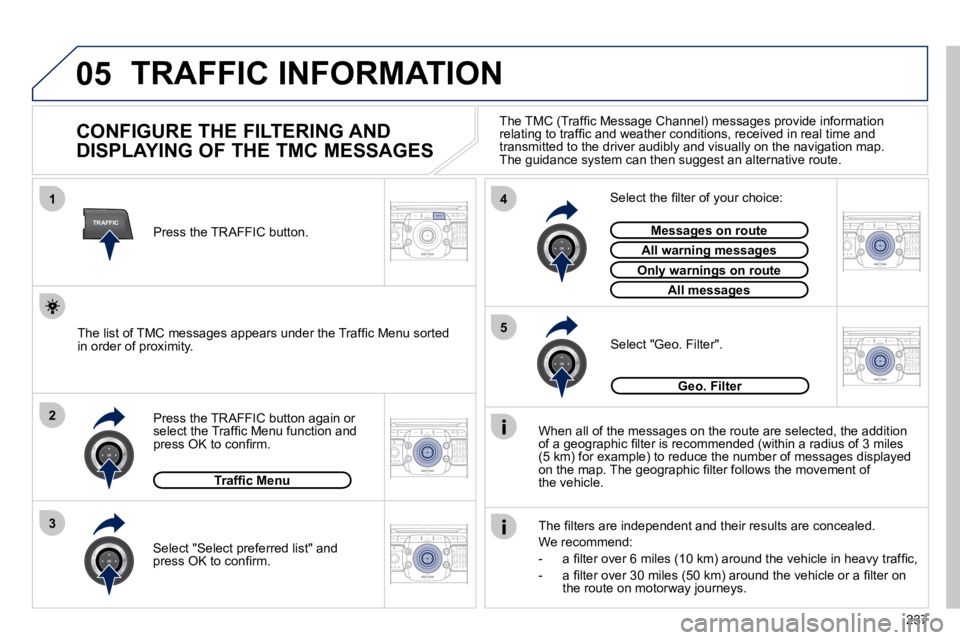
CONFIGURE THE FILTERING AND
DISPLAYING OF THE TMC MESSAGES
When all of the messages on the route are selected, the a
ddition of a geographic fi lter is recommended (within a radius of 3 mil es(5 km) for example) to reduce the number of messages displayed on the map. The geographic fi lter follows the movement ofthe vehicle.
The fi lters are independent and their results are concealed.
We recommend:
- a fi lter over 6 miles (10 km) around the vehicle in heavy tra ffi c,
- a fi lter over 30 miles (50 km) around the vehicle or a fi lter on the route on motorway journeys.
Press the TRAFFIC button again or select the Traffi c Menu function and press OK to confi rm.
Select "Geo. Filter". The list of TMC messages appears under the Traffi c Menu sorted in order of proximity.
Select the fi lter of your choice:
Messages on routeMessages on route
All warning messagesAll warning messages
Only warnings on routeOnly warnings on route
All messagesAll messages
Traffi c Menu
Select "Select preferred list" and press OK to confi rm.
The TMC (Traffi c Message Channel) messages provide information relating to traffi c and weather conditions, received in real time and transmitted to the driver audibly and visually on the navigati on map. The guidance system can then suggest an alternative route.
Press the TRAFFIC button.
Geo. Filter
Page 271 of 345
238
05
1
21
2
3
2
ABC 3
DEF
5
JKL
4
GHI 6
MNO8
TUV
7
PQRS 9
WXYZ0
* #
1
RADIO MEDIA
NAV ESC TRAFFIC
SETUP
ADDR
BOOK
2
ABC 3
DEF
5
JKL
4
GHI 6
MNO8
TUV
7
PQRS 9
WXYZ0
* #
1
RADIO MEDIA
NAV ESC TRAFFIC
SETUP
ADDR
BOOK
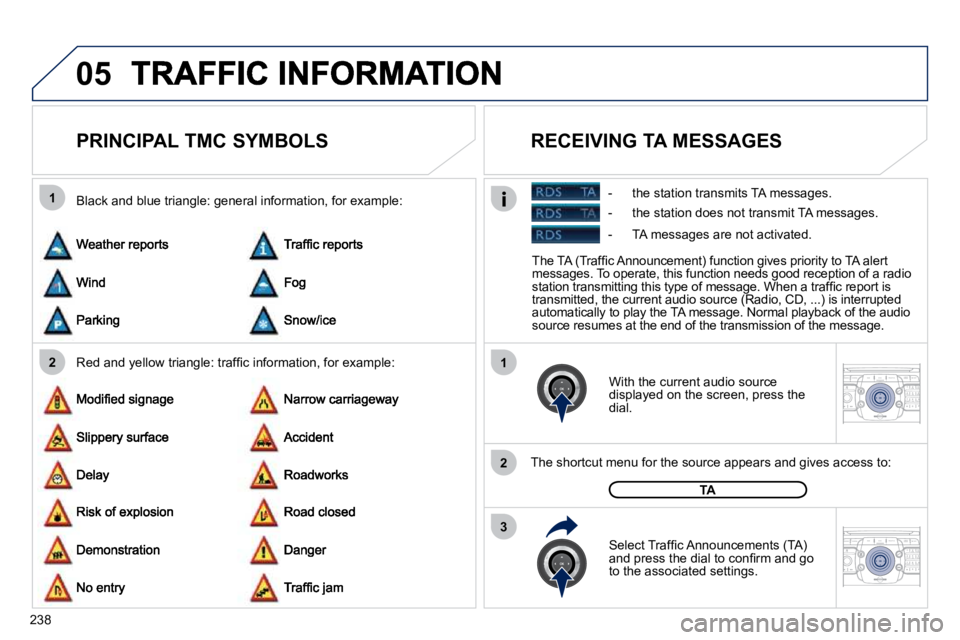
PRINCIPAL TMC SYMBOLS
Red and yellow triangle: traffi c information, for example:
Black and blue triangle: general information, for example:
With the current audio source displayed on the screen, press the dial.
The shortcut menu for the source appears and gives access to:
Select Traffi c Announcements (TA) and press the dial to confi rm and go to the associated settings.
TA
The TA (Traffi c Announcement) function gives priority to TA alert messages. To operate, this function needs good rece ption of a radio station transmitting this type of message. When a traffi c report is transmitted, the current audio source (Radio, CD, ...) is interrupted automatically to play the TA message. Normal playba ck of the audio source resumes at the end of the transmission of the message.
RECEIVING TA MESSAGES
- the station transmits TA messages.
- the station does not transmit TA messages.
- TA messages are not activated.