height adjustment PEUGEOT 5008 2013 User Guide
[x] Cancel search | Manufacturer: PEUGEOT, Model Year: 2013, Model line: 5008, Model: PEUGEOT 5008 2013Pages: 364, PDF Size: 16.24 MB
Page 151 of 364
D
R
149
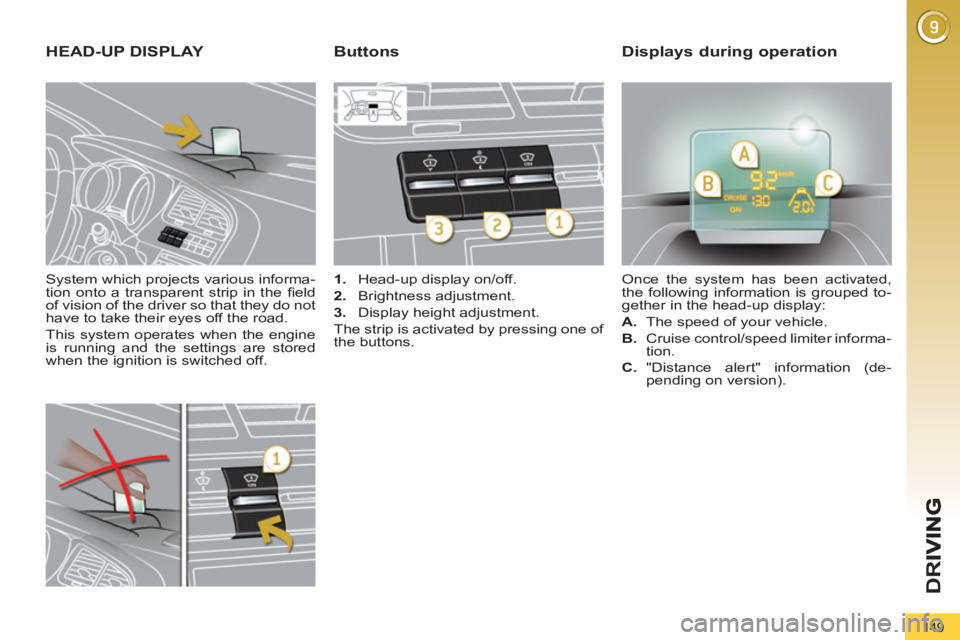
System which projects various informa-
tion onto a transparent strip in the fi eld
of vision of the driver so that they do not
have to take their eyes off the road.
This system operates when the engine
is running and the settings are stored
when the ignition is switched off.
HEAD-UP DISPLAY
1.
Head-up display on/off.
2.
Brightness adjustment.
3.
Display height adjustment.
The strip is activated by pressing one of
the buttons. Once the system has been activated,
the following information is grouped to-
gether in the head-up display:
A.
The speed of your vehicle.
B.
Cruise control/speed limiter informa-
tion.
ButtonsDisplays during operation
C.
"Distance alert" information (de-
pending on version).
Page 152 of 364
D
R
I
150
In certain extreme weather
conditions (rain and/or snow,
bright sunshine, ...) the head-
up display may not be legible or may
suffer temporary interference.
Certain glasses (sunglasses, spec-
tacles or polarised lenses) may ham-
per reading of the information.
To clean the transparent strip, which
is made of organic glass, use a clean,
soft cloth (such as a spectacles cloth
or microfi bre cloth). Do not use a dry
or abrasive cloth or detergent or sol-
vent products as these could scratch
the strip or damage the anti-refl ec-
tion coating.
We recommend that adjust-
ments are only made using
these buttons when the vehi-
cle is stationary.
When stationary or while driving, no
objects should be placed around the
transparent strip (or on its cover) to
avoid blocking the strip output and
preventing its correct operation.
)
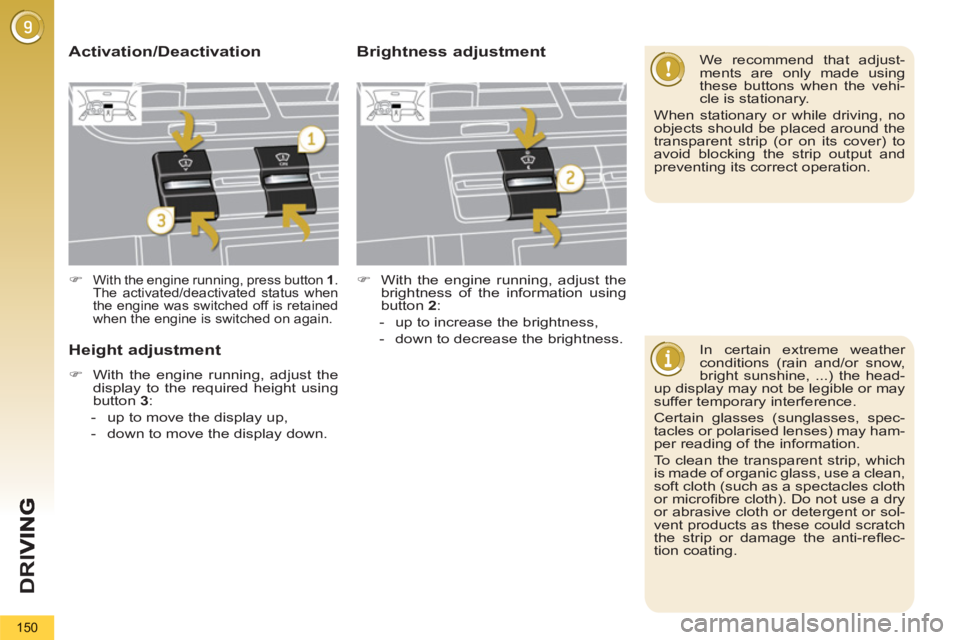
With the engine running, press button 1
.
The activated/deactivated status when
the engine was switched off is retained
when the engine is switched on again.
Height adjustment
)
With the engine running, adjust the
display to the required height using
button 3
:
- up to move the display up,
- down to move the display down.
Activation/DeactivationBrightness adjustment
)
With the engine running, adjust the
brightness of the information using
button 2
:
- up to increase the brightness,
- down to decrease the brightness.
Page 207 of 364
PRACTICAL INFORMATION
205
Engine compartment fuses
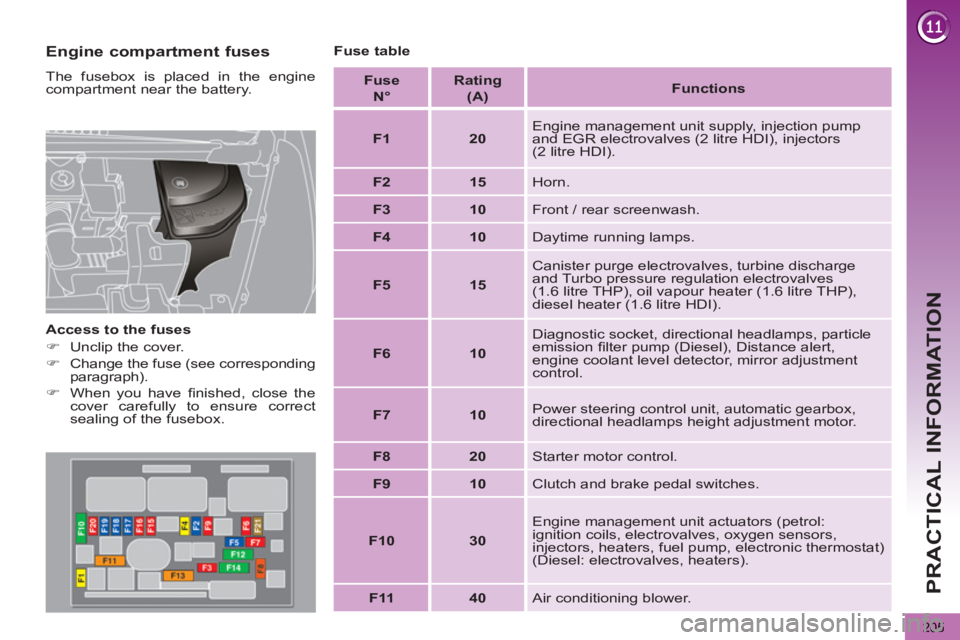
The fusebox is placed in the engine
compartment near the battery.
Access to the fuses
)
Unclip the cover.
)
Change the fuse (see corresponding
paragraph).
)
When you have fi nished, close the
cover carefully to ensure correct
sealing of the fusebox.
Fuse table
Fuse
N°
Rating
(A)
Functions
F1
20
Engine management unit supply, injection pump
and EGR electrovalves (2 litre HDI), injectors
(2 litre HDI).
F2
15
Horn.
F3
10
Front / rear screenwash.
F4
10
Daytime running lamps.
F5
15
Canister purge electrovalves, turbine discharge
and Turbo pressure regulation electrovalves
(1.6 litre THP), oil vapour heater (1.6 litre THP),
diesel heater (1.6 litre HDI).
F6
10
Diagnostic socket, directional headlamps, particle
emission fi lter pump (Diesel), Distance alert,
engine coolant level detector, mirror adjustment
control.
F7
10
Power steering control unit, automatic gearbox,
directional headlamps height adjustment motor.
F8
20
Starter motor control.
F9
10
Clutch and brake pedal switches.
F10
30
Engine management unit actuators (petrol:
ignition coils, electrovalves, oxygen sensors,
injectors, heaters, fuel pump, electronic thermostat)
(Diesel: electrovalves, heaters).
F11
40
Air conditioning blower.
Page 352 of 364
ALPHABETICAL INDEX
350
Jack ...............................190, 192JACK socket ...103, 315, 336, 338
Jukebox (copy) ......................256
Jukebox (playing) ..................257
Keeping children safe ... 115, 116,
125, 126, 137
Key with remote
control ....................... 74-76, 78
I
J
Eco-driving ..............................25
Eco-driving (advice) .................25
Economical driving .................25
Economy mode...................... 211
Electric window controls ..........81
Electronic engine
immobiliser ......................76, 78
Electronic stability control
(ESC) ..................................131
Emergency boot release..........86
Emergency call ..............228, 229
Emergency warning lamps ....129
Energy economy mode.......... 211
Engine, Diesel ........88, 174, 176,
219, 220, 223
Engine, petrol ...88, 175, 217, 218
Engine compartment .....175, 176
Engine compartment
fusebox ...............................201
Engine oil level indicator ....40, 177
Engines..........................217, 219
Environment ......................25, 78
ESC/ASR ...............................131Height and reach adjustment,
steering wheel .......................73
High load retaining net........... 111
Hill start assist .......................146
Hooks ............................ 109, 113
Horn .......................................129 Fuel consumption ....................25
Fuel fi ller cap ...........................87
Fuel fi ller fl ap .....................87, 88
Fuel gauge...............................87
Fuel tank ............................87, 88
Fusebox, dashboard ..............201
Fuses .....................................201 Dynamic emergency braking ... 144
Dynamic stability control
(DSC) ......................32, 35, 132
E
G
F
Filling with fuel ...................87, 88
Fitting a wheel .......................194
Fitting roof bars......................214
Fittings, boot ..................108, 109
Flashing indicators.................129
Foglamps, rear ........................90
Folding the rear seats ...67, 69, 70
Front foglamps.........90, 196, 198
Front seats...................63, 64, 66
Fuel..............................25, 87, 88G.P.S. ............................242, 284
Gearbox,
automatic ............162, 180, 210
Gearbox, electronic
gear control ...158, 165, 180, 210
Gearbox, manual ...157, 165, 180
Gear lever ................................25
Gear lever, automatic
gearbox ...............................162
Gear lever, electronic gear
control gearbox ...................158
Gear lever, manual gearbox ....157
Gear shift indicator ................157
Glove box ......................101, 102
Grab handles .........................101
Guidance ...............242, 282, 289
Guide-me-home.......................92Identifi cation plates ................225
Indicator lamps, status.......30, 31
Indicators, direction ...............129
Infl ating accessories
(using the kit) ......................181
Infl ating tyres ...........................25
Inputs for audio system ...258, 315,
336, 338
Instrument panel lighting .........41
Instrument panels ..............27, 28
Instrument panel screen ....27, 157
Intelligent Traction Control .....131
Interior fi ttings ........................101
Interior mood lighting ...............99
ISOFIX ...................................125
ISOFIX child seats ......... 124-126
ISOFIX mountings .................124
Halogen headlamps...............196
Hands-free kit ................298, 339
Hazard warning lamps ...........129
Head-up display.....149, 153, 155
Headlamp adjustment..............93
Headlamps, directional ....94, 196
Headlamp wash .......................96
Headlamp wash reservoir ......178
Head restraints, front ...............65
Head restraints, rear ................67
Heated seats ...........................65
Heating ........................25, 57, 58
H
K
Page 356 of 364
VISUAL SEARCH
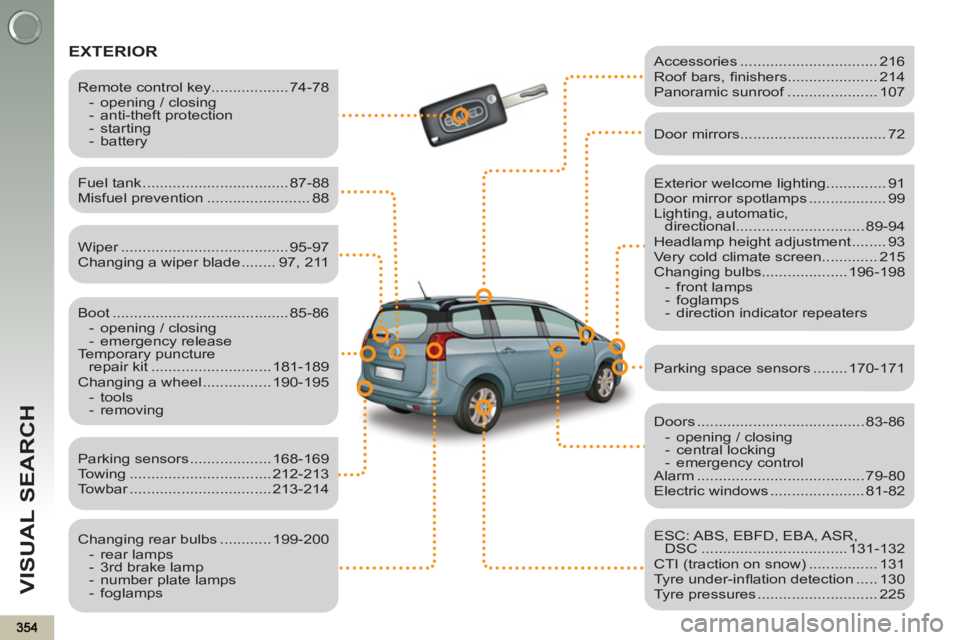
EXTERIOR
Exterior welcome lighting.............. 91
Door mirror spotlamps .................. 99
Lighting, automatic,
directional .............................. 89-94
Headlamp height adjustment ........ 93
Very cold climate screen............. 215
Changing bulbs.................... 196-198
- front lamps
- foglamps
- direction indicator repeaters
Fuel tank .................................. 87-88
Misfuel prevention ........................ 88
Boot ......................................... 85-86
- opening / closing
- emergency release
Temporary puncture
repair kit ............................ 181-189
Changing a wheel ................ 190-195
- tools
- removing
Remote control key.................. 74-78
- opening / closing
- anti-theft protection
- starting
- battery
Parking sensors ................... 168-169
Towing ................................. 212-213
Towbar ................................. 213-214
Changing rear bulbs ............ 199-200
- rear lamps
- 3rd brake lamp
- number plate lamps
- foglamps
Accessories ................................ 216
Roof bars, fi nishers..................... 214
Panoramic sunroof ..................... 107
Door mirrors .................................. 72
Doors ....................................... 83-86
- opening / closing
- central locking
- emergency control
Alarm ....................................... 79-80
Electric windows ...................... 81-82
ESC: ABS, EBFD, EBA, ASR,
DSC .................................. 131-132
CTI (traction on snow) ................ 131
Tyre under-infl ation detection ..... 130
Tyre pressures ............................ 225
Parking space sensors ........ 170-171
Wiper ....................................... 95-97
Changing a wiper blade ........ 97, 211
Page 359 of 364
VISUAL SEARCH
357
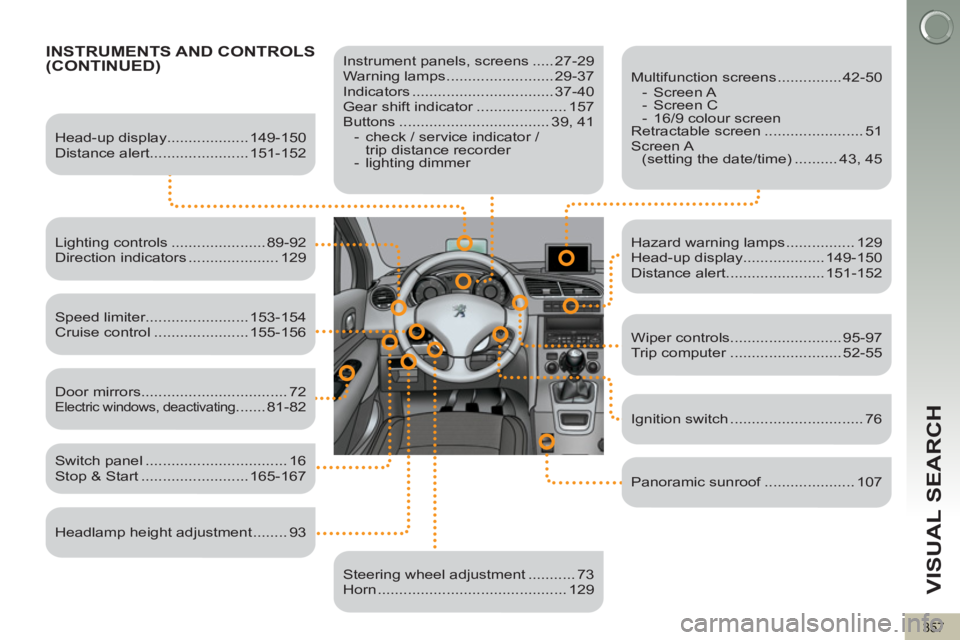
INSTRUMENTS AND CONTROLS(CONTINUED)
Instrument panels, screens ..... 27-29
Warning lamps ......................... 29-37
Indicators ................................. 37-40
Gear shift indicator ..................... 157
Buttons ................................... 39, 41
- check / service indicator /
trip distance recorder
- lighting dimmer
Head-up display................... 149-150
Distance alert....................... 151-152
Lighting controls ...................... 89-92
Direction indicators ..................... 129
Speed limiter........................ 153-154
Cruise control ...................... 155-156
Switch panel ................................. 16
Stop & Start ......................... 165-167
Door mirrors .................................. 72
Electric windows, deactivating ....... 81-82
Headlamp height adjustment ........ 93
Steering wheel adjustment ........... 73
Horn ............................................ 129
Multifunction screens ............... 42-50
- Screen A
- Screen C
- 16/9 colour screen
Retractable screen ....................... 51
Screen A
(setting the date/time) .......... 43, 45
Hazard warning lamps ................ 129
Head-up display................... 149-150
Distance alert....................... 151-152
Wiper controls.......................... 95-97
Trip computer .......................... 52-55
Ignition switch ............................... 76
Panoramic sunroof ..................... 107