language PEUGEOT 5008 2014 User Guide
[x] Cancel search | Manufacturer: PEUGEOT, Model Year: 2014, Model line: 5008, Model: PEUGEOT 5008 2014Pages: 404, PDF Size: 23.34 MB
Page 136 of 404
Child safety
134
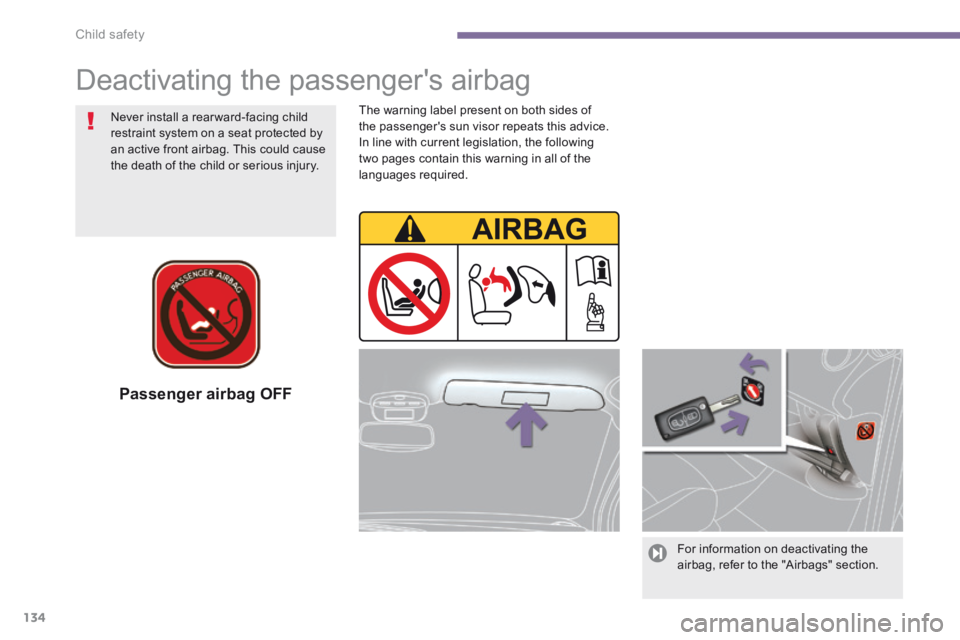
Passenger airbag OFF
For information on deactivating the airbag, refer to the "Airbags" section.
Deactivating the passenger's airbag
Never install a rear ward-facing child restraint system on a seat protected by an active front airbag. This could cause the death of the child or serious injury.
The warning label present on both sides of the passenger's sun visor repeats this advice. In line with current legislation, the following two pages contain this warning in all of the languages required.
Page 268 of 404
266
EMERGENCY OR ASSISTANCE CALL
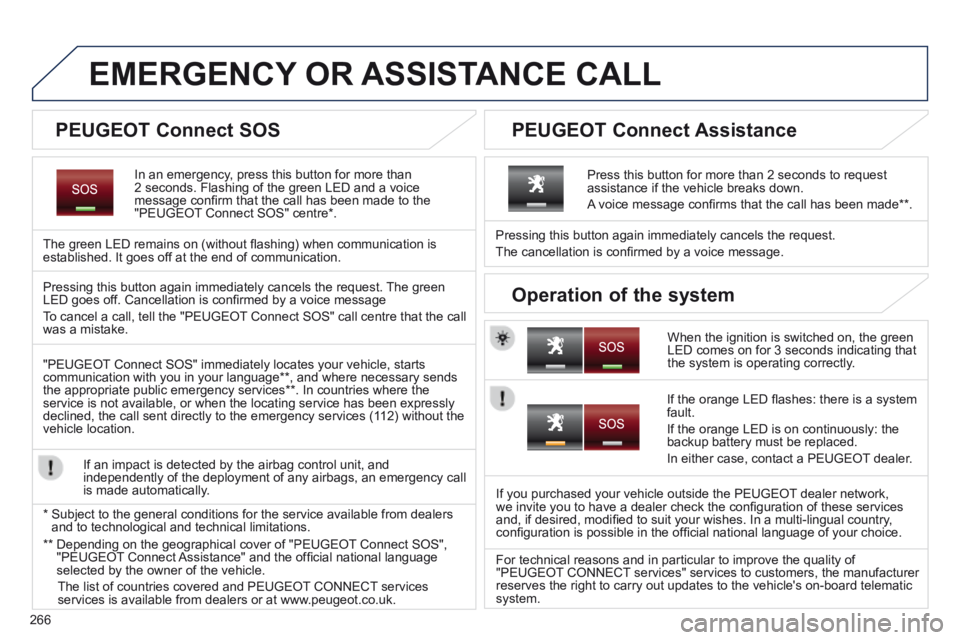
In an emergency, press this button for more than 2 seconds. Flashing of the green LED and a voice message confi rm that the call has been made to the "PEUGEOT Connect SOS" centre * .
The green LED remains on (without fl ashing) when communication is established. It goes off at the end of communication.
When the ignition is switched on, the green LED comes on for 3 seconds indicating that the system is operating correctly.
Pressing this button again immediately cancels the request.
The cancellation is confi rmed by a voice message.
Press this button for more than 2 seconds to request assistance if the vehicle breaks down.
A voice message confi rms that the call has been made ** .
Pressing this button again immediately cancels the request. The green LED goes off. Cancellation is confi rmed by a voice message
To cancel a call, tell the "PEUGEOT Connect SOS" call centre that the call was a mistake.
"PEUGEOT Connect SOS" immediately locates your vehicle, starts communication with you in your language ** , and where necessary sends the appropriate public emergency services ** . In countries where the service is not available, or when the locating service has been expressl\
y declined, the call sent directly to the emergency services (112) without the vehicle location.
If an impact is detected by the airbag control unit, and independently of the deployment of any airbags, an emergency call is made automatically.
* Subject to the general conditions for the service available from dealers\
and to technological and technical limitations.
If the orange LED fl ashes: there is a system fault.
If the orange LED is on continuously: the backup battery must be replaced.
In either case, contact a PEUGEOT dealer.
If you purchased your vehicle outside the PEUGEOT dealer network, we invite you to have a dealer check the confi guration of these services and, if desired, modifi ed to suit your wishes. In a multi-lingual country, confi guration is possible in the offi cial national language of your choice.
For technical reasons and in particular to improve the quality of "PEUGEOT CONNECT services" services to customers, the manufacturer reserves the right to carry out updates to the vehicle's on-board telema\
tic system.
PEUGEOT Connect SOS PEUGEOT Connect Assistance
Operation of the system
** Depending on the geographical cover of "PEUGEOT Connect SOS", "PEUGEOT Connect Assistance" and the offi cial national language selected by the owner of the vehicle.
The list of countries covered and PEUGEOT CONNECT services services is available from dealers or at www.peugeot.co.uk.
Page 274 of 404
272
02
SETUP2ABC3DEF5JKL4GHI6MNO8TUV7PQR S9WXYZ0*#
1NAV TRAFFICADDR
BOOKSETUP
Before using the system for the fi rst time, you are advised to listen to, say and practice the tutorial.
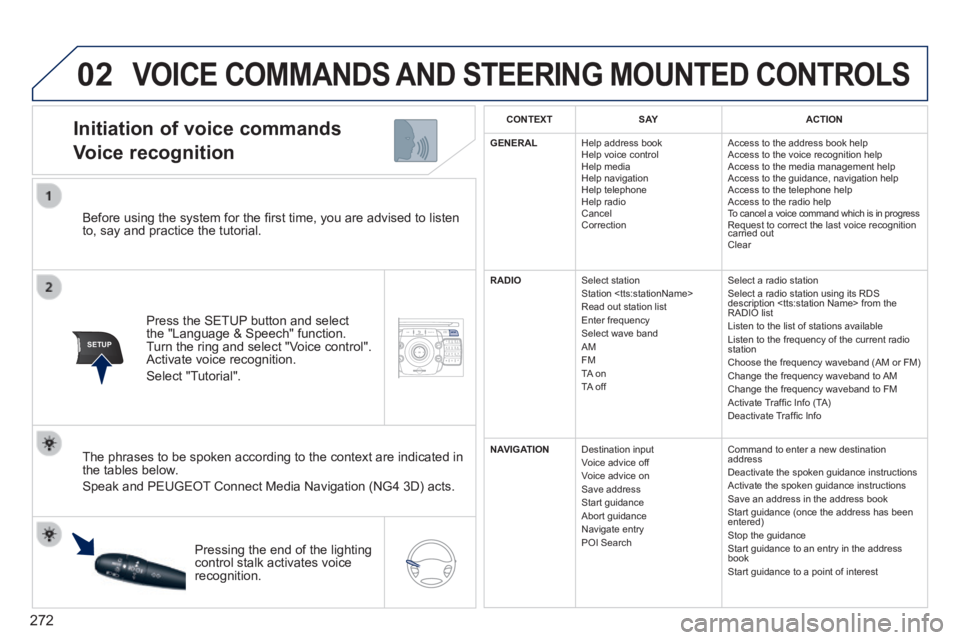
Press the SETUP button and select the "Language & Speech" function. Turn the ring and select "Voice control". Activate voice recognition.
Select "Tutorial".
Initiation of voice commands
Voice recognition
The phrases to be spoken according to the context are indicated in the tables below.
Speak and PEUGEOT Connect Media Navigation (NG4 3D) acts.
Pressing the end of the lighting control stalk activates voice recognition.
CONTEXTS AYACTION
GENERAL Help address book Help voice control Help media Help navigation Help telephone Help radio Cancel Correction
Access to the address book help Access to the voice recognition help Access to the media management help Access to the guidance, navigation help Access to the telephone help Access to the radio help To cancel a voice command which is in progress Request to correct the last voice recognition carried out Request to correct the last voice recognition carried out Request to correct the last voice recognition
Clear
RADIO Select station Station
Select a radio station Select a radio station using its RDS description
NAVIGATION Destination input Voice advice off Voice advice on Save address Start guidance Abort guidance Navigate entry POI Search
Command to enter a new destination address Deactivate the spoken guidance instructions Activate the spoken guidance instructions Save an address in the address book Start guidance (once the address has been entered) Stop the guidance Start guidance to an entry in the address book Start guidance to a point of interest
VOICE COMMANDS AND STEERING MOUNTED CONTROLS
Page 277 of 404
275
03
SETUP
TRAFFIC
MEDIA
GENERAL OPERATION
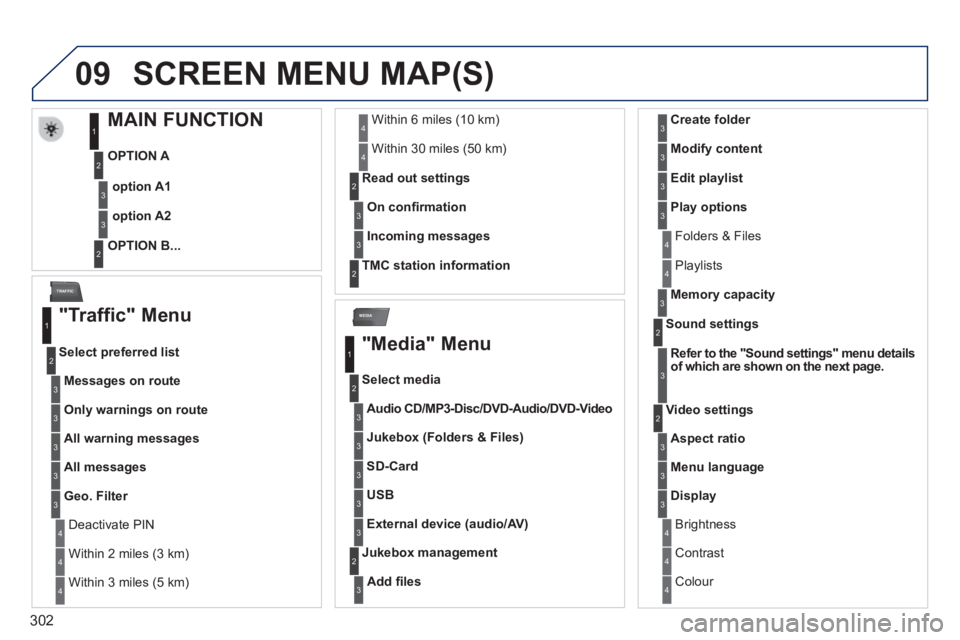
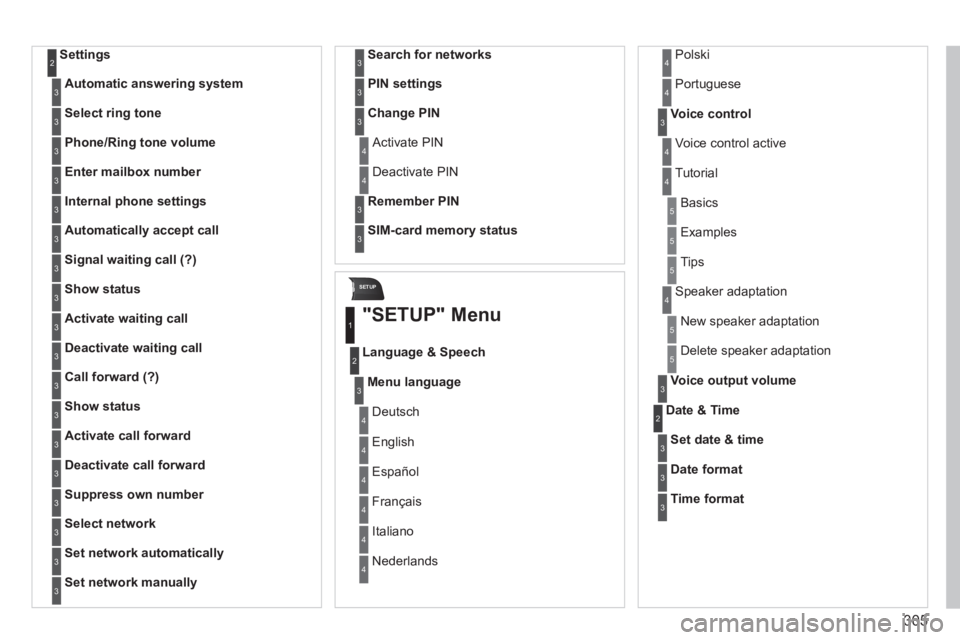
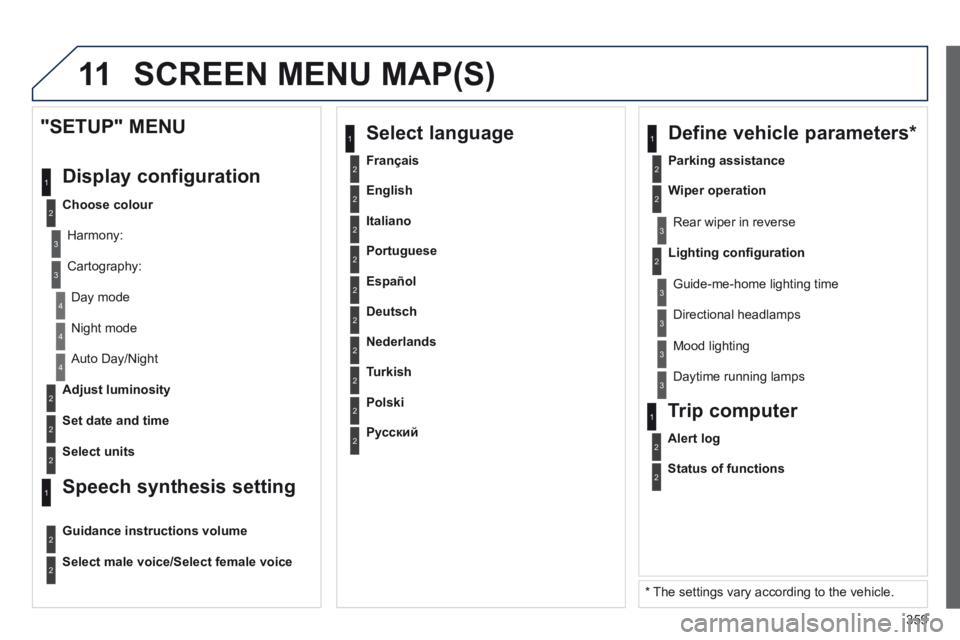
For a detailed global view of the menus available, refer to the "Screen menu map" section of this handbook.
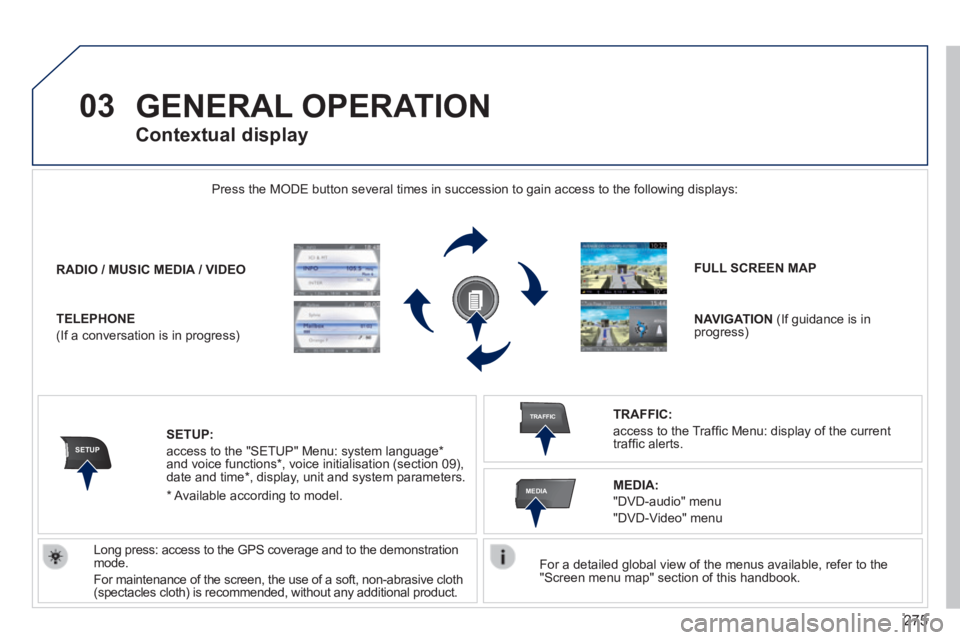
Press the MODE button several times in succession to gain access to the \
following displays:
Long press: access to the GPS coverage and to the demonstration mode.
For maintenance of the screen, the use of a soft, non-abrasive cloth (spectacles cloth) is recommended, without any additional product.
RADIO / / / /MUSIC MEDIA / VIDEO
TELEPHONE
(If a conversation is in progress)
FULL SCREEN MAP
NAVIGATION (If guidance is in progress)
SETUP:
access to the "SETUP" Menu: system language * and voice functions * , voice initialisation (section 09), date and time * , display, unit and system parameters.
TRAFFIC:
access to the Traffi c Menu: display of the current traffi c alerts.
Contextual display
MEDIA:
"DVD-audio" menu
"DVD-Video" menu
* Available according to model.
Page 304 of 404
302
09
MEDIA
TRAFFIC
SCREEN MENU MAP(S)
MAIN FUNCTION
OPTION A
OPTION B...
option A1
option A2
1
2
3
2
3
"Traffic" Menu
Messages on route
Select preferred list
1
2
3
Deactivate PIN 4
Only warnings on route3
All warning messages3
All messages3
Geo. Filter3
Within 2 miles (3 km) 4
Within 3 miles (5 km) 4
Within 6 miles (10 km) 4
Within 30 miles (50 km) 4
On confi rmation
Read out settings 2
3
Incoming messages3
TMC station information 2
"Media" Menu
Audio CD/MP3-Disc / Audio CD/MP3-Disc / Audio CD/MP3-DiscDVD-Audio / DVD-Audio / DVD-AudioDVD-Video
Select media
1
2
3
Jukebox (Folders & Files)3
SD-Card3
USB3
External device (audio/AV)3
Add fi les
Jukebox management 2
3
Folders & Files 4
Create folder3
Modify content3
Edit playlist3
Play options3
Playlists 4
Memory capacity3
Refer to the "Sound settings" menu details of which are shown on the next page.
Sound settings 2
3
Aspect ratio
Video settings 2
3
Menu language3
Display3
Brightness 4
Contrast 4
Colour 4
Page 307 of 404
305
SETUP
Settings 2
Automatic answering system3
Select ring tone3
Phone/Ring tone volume3
Enter mailbox number3
Internal phone settings3
Automatically accept call3
Signal waiting call (?)3
Show status3
Activate waiting call3
Deactivate waiting call3
Call forward (?)3
Show status3
Activate call forward3
Deactivate call forward3
Suppress own number3
Select network3
Set network automatically3
Set network manually3
Search for networks3
PIN settings3
Change PIN3
Activate PIN 4
Deactivate PIN 4
Remember PIN3
SIM-card memory status3
"SETUP" Menu
Menu language
Language & Speech
1
2
3
Deutsch 4
English 4
Español 4
Français 4
Italiano 4
Nederlands 4
Polski 4
Voice control3
Voice control active 4
Tutorial 4
Portuguese 4
Basics 5
Examples 5
Tips 5
Speaker adaptation 4
New speaker adaptation 5
Delete speaker adaptation 5
Voice output volume3
Date & Time 2
Set date & time3
Date format3
Time format3
Page 361 of 404
359
11
2
3
3
1
4
2
2
1
4
4
2
2
Night mode
Auto Day/Night
Adjust luminosity
Set date and time
"SETUP" MENU
Display configuration
Choose colour
Harmony:
Cartography:
Day mode
Speech synthesis setting
Guidance instructions volume
Select male voice/Select female voice
2Select units
2
3
3
2Lighting confi guration
Parking assistance
Rear wiper in reverse
Guide-me-home lighting time
1 Define vehicle parameters *
2Wiper operation
3 Directional headlamps
3 Mood lighting
3 Daytime running lamps
* The settings vary according to the vehicle.
2Alert log
1 Trip computer
2Status of functions
2Français
1 Select language
2English
2Italiano
2Portuguese
2Español
2Deutsch
2Nederlands
2Turkish
2Polski
2Русский
SCREEN MENU MAP(S)
Page 372 of 404

370
03 MAIN MENU
AUDIO FUNCTIONS : radio, CD, USB, options.
Screen C
For a detailed global view of the menus available, refer to the "Screen menu map" in this section.
TELEPHONE : Bluetooth hands-free, pairing, management of a call.
PERSONALISATION-CONFIGURATION : vehicle parameters, display, languages.
TRIP COMPUTER : entering of distances, alerts, status of functions.
Screen A
Page 383 of 404

381
07
Units
Temperature: °Celsius / °Fahrenheit
Fuel consumption: KM/L - L/100 - MPG
1
2
2
SCREEN MENU MAP(S)
Display adjust
Month
Day
Hour
Minutes
Year
12 H/24 H mode
Language
Italiano
Nederlands
Portuguès
Portuguès-Brazil
Français
Deutsch
English
Español
1
2
2
2
2
2
2
1
2
2
2
2
2
2
2
2
Page 386 of 404

384
07 SCREEN MENU MAP(S)
Bluetooth telephone
Connect/Disconnect an equipment
Consult the paired equipment
Bluetooth confi guration
Telephone function
Audio Streaming function
Delete a paired equipment
Perform a Bluetooth search
Calls list
Call
Directory
Terminate the current call
Manage the telephone call
Activate secret mode
1
2
3
3
3
4
4
4
2
3
4
2
3
3
Video-brightness adjustment
Display confi guration
Defi ne vehicle settings *
Personalisation-Configuration
normal video
inverse video
brightness (- +) adjustment
Setting the date and time
setting day/month/year
hour/minute adjustment
choice of 12 h / 24 h mode
Choice of units
l/100 km - mpg - km/l
°Celsius / °Fahrenheit
Choice of language
1
2
4
3
2
4
4
3
4
4
2
3
4
4
4
* The settings vary according to vehicle.