ad blue PEUGEOT 5008 2017 User Guide
[x] Cancel search | Manufacturer: PEUGEOT, Model Year: 2017, Model line: 5008, Model: PEUGEOT 5008 2017Pages: 404, PDF Size: 15.31 MB
Page 35 of 404
33
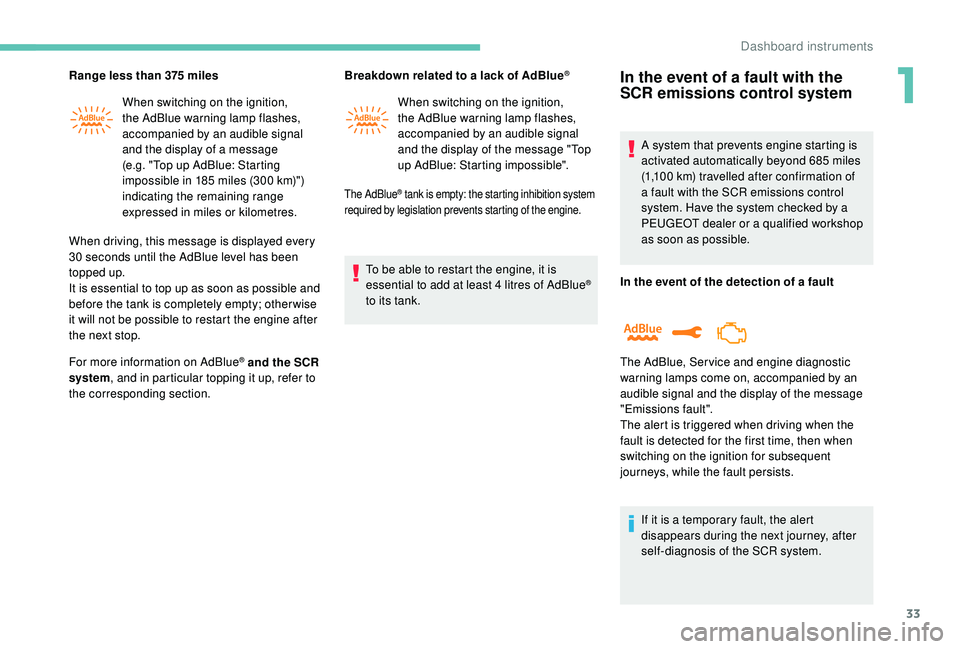
Range less than 375 miles
W hen switching on the ignition,
the AdBlue warning lamp flashes,
accompanied by an audible signal
and the display of a message
(e.g. "Top up AdBlue: Starting
impossible in 185
miles (300 km)")
indicating the remaining range
expressed in miles or kilometres.
When driving, this message is displayed every
30
seconds until the AdBlue level has been
topped up.
It is essential to top up as soon as possible and
before the tank is completely empty; other wise
it will not be possible to restart the engine after
the next stop.
For more information on AdBlue
® and the SCR
system, and in particular topping it up, refer to
the corresponding section. Breakdown related to a lack of AdBlue
®
When switching on the ignition,
the AdBlue warning lamp flashes,
accompanied by an audible signal
and the display of the message "Top
up AdBlue: Starting impossible".
The AdBlue® tank is empty: the starting inhibition system
required by legislation prevents starting of the engine.
To be able to restart the engine, it is
essential to add at least 4 litres of AdBlue®
to its tank.
In the event of a fault with the
SCR emissions control system
A system that prevents engine starting is
activated automatically beyond 685 miles
(1,100
km) travelled after confirmation of
a fault with the SCR emissions control
system. Have the system checked by a
PEUGEOT dealer or a qualified workshop
as soon as possible.
In the event of the detection of a fault
The AdBlue, Ser vice and engine diagnostic
warning lamps come on, accompanied by an
audible signal and the display of the message
"Emissions fault".
The alert is triggered when driving when the
fault is detected for the first time, then when
switching on the ignition for subsequent
journeys, while the fault persists.
If it is a temporary fault, the alert
disappears during the next journey, after
self-diagnosis of the SCR system.
1
Dashboard instruments
Page 36 of 404
34
During the permitted driving phase
(between 685 and 0 miles) [1,100 km and 0 km)Starting prevented
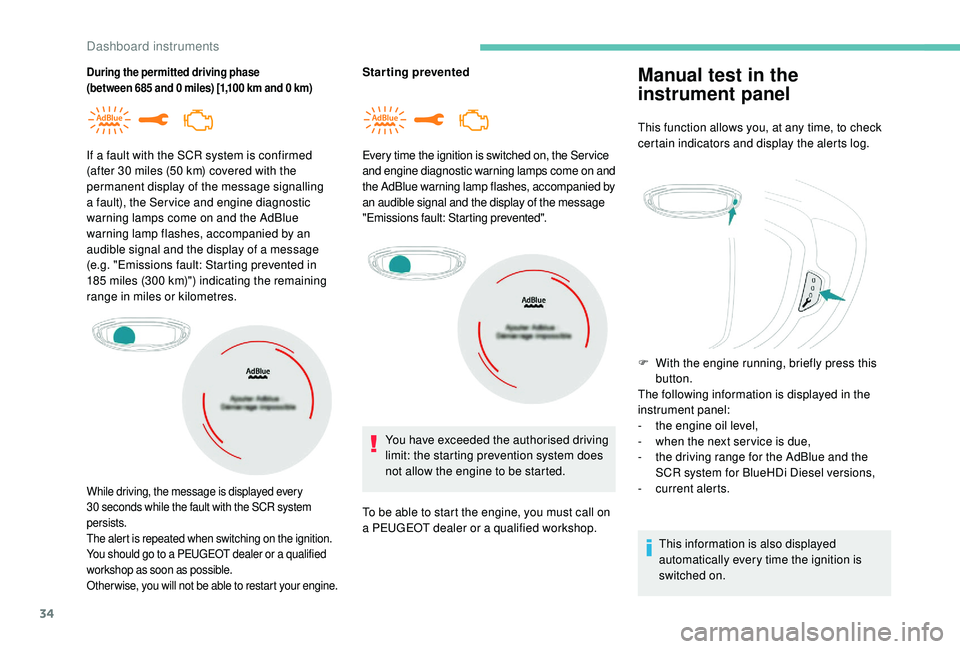
If a fault with the SCR system is confirmed
(after 30
miles (50
km) covered with the
permanent display of the message signalling
a fault), the Ser vice and engine diagnostic
warning lamps come on and the AdBlue
warning lamp flashes, accompanied by an
audible signal and the display of a message
(e.g. "Emissions fault: Starting prevented in
185
miles (300
km)") indicating the remaining
range in miles or kilometres.
While driving, the message is displayed every
30 seconds while the fault with the SCR system
persists.
The alert is repeated when switching on the ignition.
You should go to a PEUGEOT dealer or a qualified
workshop as soon as possible.
Other wise, you will not be able to restart your engine.
Every time the ignition is switched on, the Ser vice
and engine diagnostic warning lamps come on and
the AdBlue warning lamp flashes, accompanied by
an audible signal and the display of the message
"Emissions fault: Starting prevented".
You have exceeded the authorised driving
limit: the starting prevention system does
not allow the engine to be started.
To be able to start the engine, you must call on
a PEUGEOT dealer or a qualified workshop.
Manual test in the
instrument panel
This function allows you, at any time, to check
certain indicators and display the alerts log.
F
W
ith the engine running, briefly press this
button.
The following information is displayed in the
instrument panel:
-
t
he engine oil level,
-
w
hen the next ser vice is due,
-
t
he driving range for the AdBlue and the
SCR system for BlueHDi Diesel versions,
-
c
urrent alerts.
This information is also displayed
automatically every time the ignition is
switched on.
Dashboard instruments
Page 41 of 404
39
"Connections" menu
With the audio system on, this
menu allows a Bluetooth device
(telephone, media player) to be
paired and the connection mode
to be defined (hands-free, playing
audio files).
For more information on the "Connections"
application, refer to the "Audio equipment and
telematics" section.
"Personalisation-
configuration" menu
This menu gives access to the
following functions:
-
"
Define the vehicle parameters",
-
"
Choice of language",
-
"
Display configuration".
Define the vehicle parameters
This menu allows the activation or deactivation
of the following equipment, depending on
version:
-
"
Access to the vehicle" :
•
"
Plip action".
For more information on the Remote control
and driver door selective unlocking in
particular, refer to the "Access" section. -
"
Comfort"
:
•
"
Rear wipe in reverse gear".
For more information on the Wipers , refer
to the "Lighting and visibility" section.
•
"
Parking assistance".
For more information on Parking
assistance , refer to the "Driving" section.
•
"
Fatigue Detection System".
For more information on the Fatigue
detection system , refer to the "Driving"
section.
-
"
Driving assistance"
:
•
"
Auto. emergency braking".
For more information on the Active Safety
Brake , refer to the "Driving" section.
•
"
Speed recommendation".
For more information on Speed limit
recognition , refer to the "Driving" section.
•
"
Tyre inflation".
For more information on Under-inflation
detection and reinitialisation in particular,
refer to the "Driving" section.
Choice of language
This menu allows selection of the language
used by the screen and the instrument panel.
Display configuration
This menu gives access to the following
settings:
-
"
Choice of units",
-
"
Date and time adjustment",
-
"
Display parameters",
-
"Brightness".
Adjusting the date and time
F
P
ress the " 7" or " 8" button to display the
"Display configuration" menu, then press
OK.
F
P
ress the " 5" or " 6" button to select the
"Date and time adjustment" button, then
press OK.
F
P
ress the " 7" or " 8" button to select the
setting to modify. Confirm by pressing OK,
then modify the setting and confirm again to
save the modification.
F
A
djust the settings one by one, confirming
with the OK button.
F
P
ress the " 5" or " 6" button, then the OK
button to select the OK box and confirm or
the Back button to cancel.
As a safety measure, the driver must only
carry out operations that require sustained
attention when stationary.
1
Dashboard instruments
Page 42 of 404
40
Touch screen
This system gives access to:
- t he permanent display of the time and
the exterior temperature (a blue symbol
appears when there is a risk of ice),
-
t
he heating/air conditioning controls,
-
m
enus for adjusting settings for vehicle
functions and systems,
-
a
udio system and telephone controls and
the display of associated information,
-
t
he display of visual parking aids (visual
parking sensor information, Park
A s s i s t ,e t c .),
-
I
nternet ser vices and the display of
associated information.
and, depending on equipment, allows:
-
a
ccess to the navigation system controls
and the display of associated information.
As a safety measure, the driver should
only carry out operations that require
close attention with the vehicle
stationary.
Some functions are not accessible when
driving.
General operation
Recommendations
This screen is of the capacitive type.
Use is possible in all temperatures.
Do not use pointed objects on the touch
screen.
Do not touch the touch screen with wet hands.
Uses a soft clean cloth to clean the touch
screen.
Use the buttons below the touch screen for
access to the menus, then press the virtual
buttons in the touch screen.
Some menus may display across two pages:
press the " OPTIONS" button to access the
second page.
MenusPrinciples
After a few moments with no action
on the second page, the first page is
displayed automatically.
To deactivate or activate a function, select
" OFF " or " ON". Use this button to adjust the settings
for a function.
Use this button for access to
additional information on the
function.
Use this button to confirm.
Use this button to return to the
previous page.
i-Cockpit Amplify function.
Allows a driving ambience to be
personalised.
For more information on the i-Cockpit Amplify
function , refer to the corresponding section.
Dashboard instruments
Page 43 of 404
41
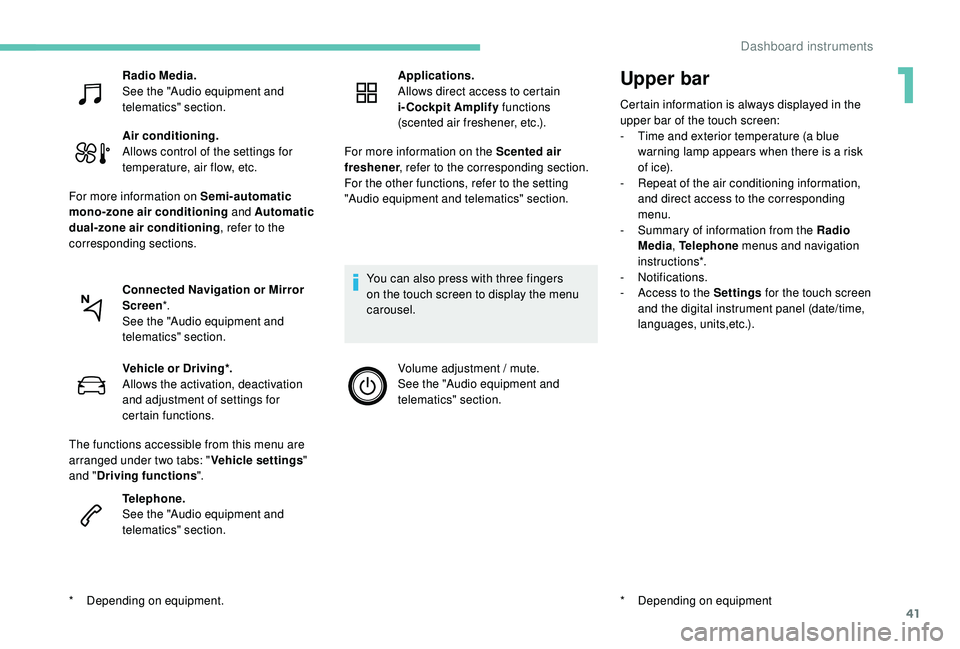
Upper bar
Certain information is always displayed in the
upper bar of the touch screen:
-
T
ime and exterior temperature (a blue
warning lamp appears when there is a risk
of i c e).
-
R
epeat of the air conditioning information,
and direct access to the corresponding
menu.
-
S
ummary of information from the Radio
Media , Telephone menus and navigation
instructions*.
-
Notifications.
-
A
ccess to the Settings for the touch screen
and the digital instrument panel (date/time,
languages, units,etc.).
*
D
epending on equipment
Radio Media.
See the "Audio equipment and
telematics" section.
Air conditioning.
Allows control of the settings for
temperature, air flow, etc.
For more information on Semi-automatic
mono-zone air conditioning and Automatic
dual-zone air conditioning , refer to the
corresponding sections.
Connected Navigation or Mirror
Screen *.
See the "Audio equipment and
telematics" section.
*
D
epending on equipment. Vehicle or Driving*.
Allows the activation, deactivation
and adjustment of settings for
certain functions.
The functions accessible from this menu are
arranged under two tabs: " Vehicle settings"
and " Driving functions ".
Telephone.
See the "Audio equipment and
telematics" section. Applications.
Allows direct access to certain
i-Cockpit Amplify
functions
(scented air freshener, etc.).
For more information on the Scented air
freshener , refer to the corresponding section.
For the other functions, refer to the setting
"Audio equipment and telematics" section.
You can also press with three fingers
on the touch screen to display the menu
carousel. Volume adjustment / mute.
See the "Audio equipment and
telematics" section.
1
Dashboard instruments
Page 98 of 404
96
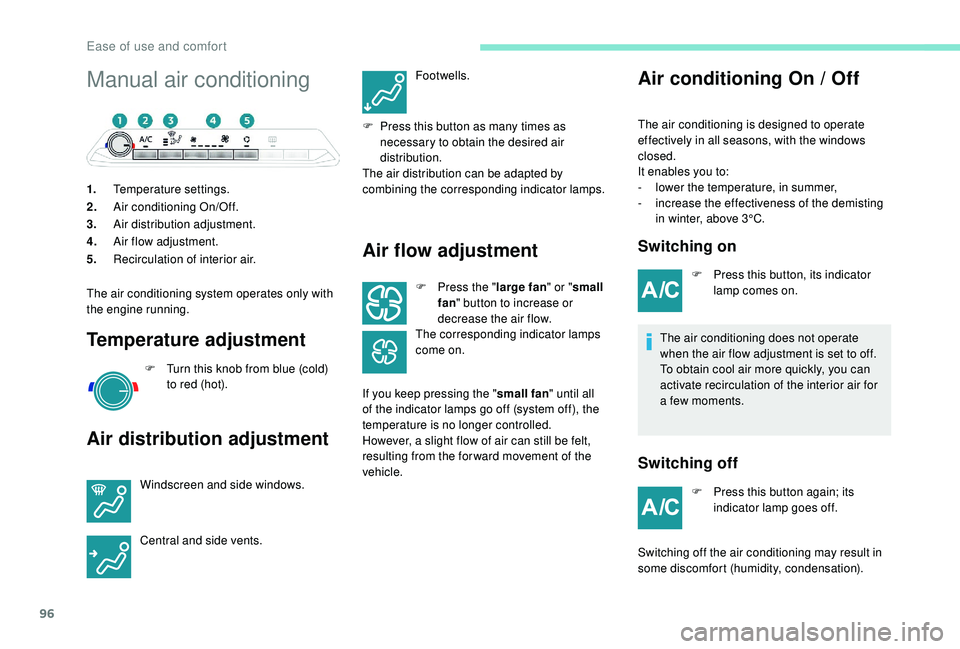
Manual air conditioning
1.Temperature settings.
2. Air conditioning On/Off.
3. Air distribution adjustment.
4. Air flow adjustment.
5. Recirculation of interior air.
The air conditioning system operates only with
the engine running.
Temperature adjustment
F Turn this knob from blue (cold) to red (hot).
Air distribution adjustment
Windscreen and side windows.
Central and side vents. Footwells.
F
P
ress this button as many times as
necessary to obtain the desired air
distribution.
The air distribution can be adapted by
combining the corresponding indicator lamps.
Air flow adjustment
F Press the " large fan" or "small
fan " button to increase or
decrease the air flow.
The corresponding indicator lamps
come on.
If you keep pressing the " small fan" until all
of the indicator lamps go off (system off), the
temperature is no longer controlled.
However, a slight flow of air can still be felt,
resulting from the for ward movement of the
vehicle.
Air conditioning On / Off
The air conditioning is designed to operate
effectively in all seasons, with the windows
closed.
It enables you to:
-
l
ower the temperature, in summer,
-
i
ncrease the effectiveness of the demisting
in winter, above 3°C.
Switching on
F Press this button, its indicator lamp comes on.
The air conditioning does not operate
when the air flow adjustment is set to off.
To obtain cool air more quickly, you can
activate recirculation of the interior air for
a few moments.
Switching off
F Press this button again; its indicator lamp goes off.
Switching off the air conditioning may result in
some discomfort (humidity, condensation).
Ease of use and comfort
Page 99 of 404
97
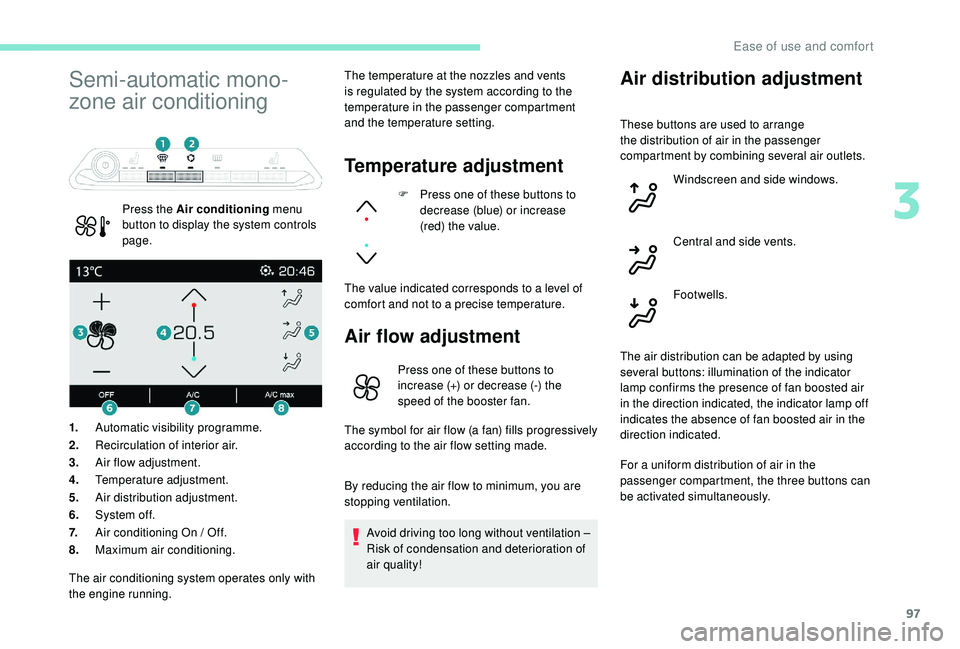
Semi-automatic mono-
zone air conditioning
Press the Air conditioning menu
button to display the system controls
page. The temperature at the nozzles and vents
is regulated by the system according to the
temperature in the passenger compartment
and the temperature setting.
Temperature adjustment
F Press one of these buttons to
decrease (blue) or increase
(red) the value.
The value indicated corresponds to a level of
comfort and not to a precise temperature.
Air flow adjustment
1. Automatic visibility programme.
2. Recirculation of interior air.
3. Air flow adjustment.
4. Temperature adjustment.
5. Air distribution adjustment.
6. System of f.
7. Air conditioning On / Off.
8. Maximum air conditioning.
Air distribution adjustment
Press one of these buttons to
increase (+) or decrease (-) the
speed of the booster fan.
The symbol for air flow (a fan) fills progressively
according to the air flow setting made.
By reducing the air flow to minimum, you are
stopping ventilation.
Avoid driving too long without ventilation –
Risk of condensation and deterioration of
air quality!
The air conditioning system operates only with
the engine running. These buttons are used to arrange
the distribution of air in the passenger
compartment by combining several air outlets.
Windscreen and side windows.
Central and side vents.
Footwells.
The air distribution can be adapted by using
several buttons: illumination of the indicator
lamp confirms the presence of fan boosted air
in the direction indicated, the indicator lamp off
indicates the absence of fan boosted air in the
direction indicated.
For a uniform distribution of air in the
passenger compartment, the three buttons can
be activated simultaneously.
3
Ease of use and comfort
Page 189 of 404
187
SPORT
SPORT
"Sport" button
With the engine running, when the programme
associated with the button is active, the
gearbox delays changing up for a more
dynamic driving style.
The programme is automatically deactivated
when the ignition is switched off.
Activating the Sport programme or the
Dynamic pack is not recommended in the
following situations:
-
o
ne of the special modes (other than
standard mode) of Advanced Grip Control is
on,
-
l
ow fuel level reached,
-
l
ow AdBlue level reached.Pressing this button has no effect when a
trailer is connected.
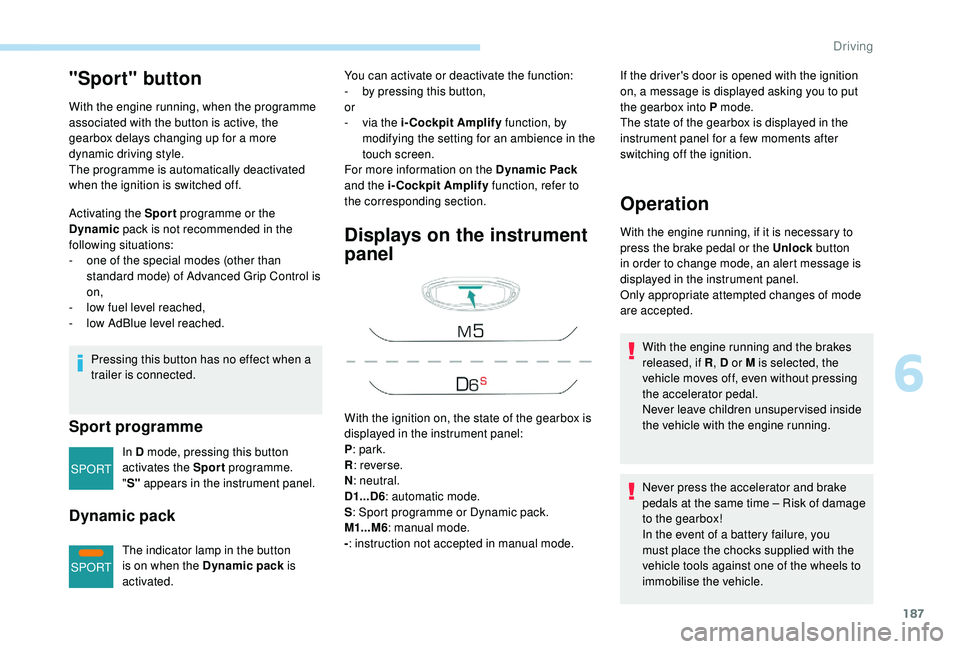
Sport programme
In D mode, pressing this button
activates the Sport programme.
" S" appears in the instrument panel.
Dynamic pack
The indicator lamp in the button
is on when the Dynamic pack is
activated.
Displays on the instrument
panel
If the driver's door is opened with the ignition
on, a message is displayed asking you to put
the gearbox into P mode.
The state of the gearbox is displayed in the
instrument panel for a few moments after
switching off the ignition.
Operation
You can activate or deactivate the function:
- b y pressing this button,
or
-
v
ia the i-Cockpit Amplify function, by
modifying the setting for an ambience in the
touch screen.
For more information on the Dynamic Pack
and the i-Cockpit Amplify function, refer to
the corresponding section.
With the ignition on, the state of the gearbox is
displayed in the instrument panel:
P : park.
R : reverse.
N : neutral.
D1...D6 : automatic mode.
S : Sport programme or Dynamic pack.
M1...M6 : manual mode.
- : instruction not accepted in manual mode. With the engine running, if it is necessary to
press the brake pedal or the Unlock
button
in order to change mode, an alert message is
displayed in the instrument panel.
Only appropriate attempted changes of mode
are accepted.
Never press the accelerator and brake
pedals at the same time – Risk of damage
to the gearbox!
In the event of a battery failure, you
must place the chocks supplied with the
vehicle tools against one of the wheels to
immobilise the vehicle. With the engine running and the brakes
released, if R , D or M is selected, the
vehicle moves off, even without pressing
the accelerator pedal.
Never leave children unsuper vised inside
the vehicle with the engine running.
6
Driving
Page 194 of 404
192
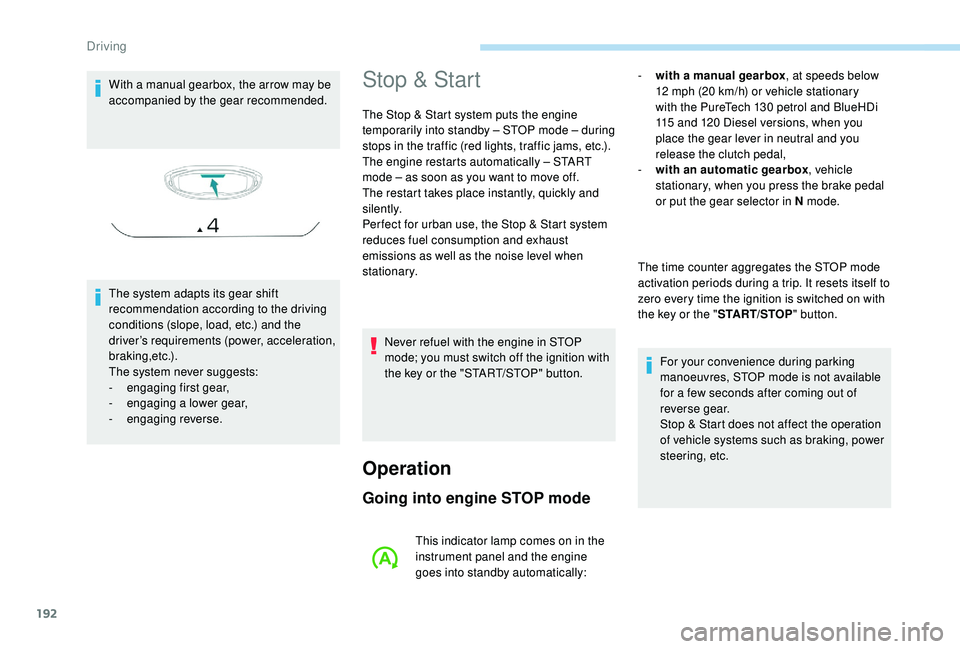
With a manual gearbox, the arrow may be
accompanied by the gear recommended.
The system adapts its gear shift
recommendation according to the driving
conditions (slope, load, etc.) and the
driver’s requirements (power, acceleration,
b r a k i n g ,e t c .) .
The system never suggests:
-
e
ngaging first gear,
-
enga
ging a lower gear,
-
enga
ging reverse.Stop & Start
The Stop & Start system puts the engine
temporarily into standby – STOP mode – during
stops in the traffic (red lights, traffic jams, etc.).
The engine restarts automatically – START
mode – as soon as you want to move off.
The restart takes place instantly, quickly and
silently.
Per fect for urban use, the Stop & Start system
reduces fuel consumption and exhaust
emissions as well as the noise level when
stationary.
Operation
Going into engine STOP mode
- with a manual gearbox , at speeds below
12 mph (20 km/h) or vehicle stationary
with the PureTech 130
petrol and BlueHDi
115
and 120 Diesel versions, when you
place the gear lever in neutral and you
release the clutch pedal,
-
w
ith an automatic gearbox , vehicle
stationary, when you press the brake pedal
or put the gear selector in N mode.
The time counter aggregates the STOP mode
activation periods during a trip. It resets itself to
zero every time the ignition is switched on with
the key or the " START/STOP" button.
For your convenience during parking
manoeuvres, STOP mode is not available
for a few seconds after coming out of
reverse gear.
Stop & Start does not affect the operation
of vehicle systems such as braking, power
steering, etc.
Never refuel with the engine in STOP
mode; you must switch off the ignition with
the key or the "START/STOP" button.
This indicator lamp comes on in the
instrument panel and the engine
goes into standby automatically:
Driving
Page 195 of 404
193
Special cases: STOP mode not
available
STOP mode is not invoked when:
- t he vehicle is on a steep slope (rising or
falling),
-
t
he driver's door is open,
-
t
he driver's seat belt is not fastened,
-
t
he vehicle has not exceeded 6 mph
(10
km/h) since the last engine start (with
the key or the "START/STOP" button),
-
t
he electric parking brake is applied or being
applied,
-
t
he engine is needed to maintain a
comfortable temperature in the passenger
compartment,
-
d
emisting is active,
-
s
ome temporary conditions (battery charge,
engine temperature, braking assistance,
exterior temperature, etc.) make this
necessary to ensure control of a system.
Going into engine START mode
In this case, this indicator lamp
flashes for a few seconds then goes
of f.
This operation is perfectly normal. -
w
ith a manual gearbox
, when you fully
depress the clutch pedal,
-
W
ith an automatic gearbox:
•
g
ear selector in D or M mode, when you
release the brake pedal,
•
o
r gear selector in N mode and brake
pedal released, when you place the gear
selector in D or M mode,
•
o
r when you engage reverse.This indicator lamp goes off and the
engine starts automatically:
Special cases: START mode
invoked automatically
As a safety measure or to maintain comfort
levels in the vehicle, START mode is invoked
automatically when:
-
y
ou open the driver's door,
-
y
ou unfasten the driver's seat belt,
-
t
he speed of the vehicle exceeds 16 mph
(25
km/h) with a manual gearbox (2 mph
(3
km/h) with PureTech 130 petrol and
BlueHDi 115
and 120 Diesel versions), or
2
mph (3 km/h) with an automatic gearbox.
-
t
he electric parking brake is being applied,
-
s
ome temporary conditions (battery charge,
engine temperature, braking assistance,
adjustment of the air conditioning, etc.)
make this necessary to ensure control of a
system or of the vehicle.
In this case, this indicator lamp
flashes for a few seconds then goes
of f.
This operation is perfectly normal.
6
Driving